Dozens of people visit your site every day, and some of them leave without finding what they came for. Meanwhile your phone or your messaging app keeps ringing with the same questions: "What does it cost? How long does it take? Are you open on weekends? Is shipping free?" At that point a lot of business owners start wondering whether to add an AI chatbot to the website. It is a fair question, but the answer is not as simple as "yes, right now" or "no, it's a fad." In this article I explain when a chat assistant will help your business, when it will waste money and time, how one gets set up, and what to watch after launch.
I am Ümit Kırkoç. I work in Istanbul, and I handle everything a digital agency would normally deliver, by myself and in one place: websites, SEO, social media, advertising and brand identity. A chatbot only makes sense as part of that whole, and only if the site underneath it is solid. If you do not have a site yet, or yours needs a rebuild, start by thinking through website design with me first. A chat window does not fix a badly built site. It just makes the weak spots easier to see.
What a chatbot actually is, and what it is not
A chatbot is a small chat window that sits in the corner of your site. A visitor types something and gets an answer right away. In the old days those answers were canned buttons such as "Get a price" or "Book a visit," and the bot walked you down a fixed path. The AI-based bots I mean today try to understand the sentence the visitor actually typed, then write a reply based on the information you gave them.
That last part matters: the bot talks using what you teach it. If you never tell it your opening hours, your services, your common questions and the things you do not do, it will either say "I don't know" or, worse, guess. Most people have heard by now that AI models can make up an answer on the spot. A restaurant bot that says "yes, we have a gluten-free menu" when you do not looks like a small slip. When the customer walks in and finds out, it becomes a real loss of trust.
A chatbot also does not replace your sales person. It cannot negotiate a complicated deal, calm an angry customer or handle a one-off situation. Its proper job is to greet people, answer repeated questions, and pass a serious request to you in good shape.
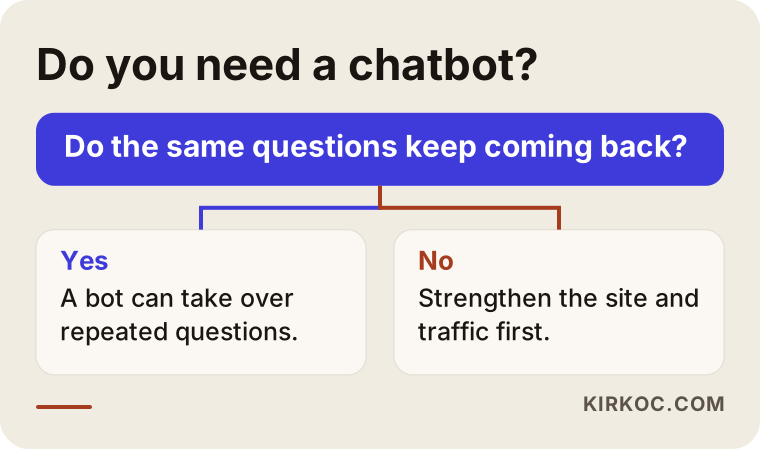
The diagram above sums up the first question to ask before you start: do the same questions really come in again and again? If they do not, the money you would spend on a bot usually does more good when it goes into the site itself.
Who benefits and who does not
Let me answer this from what I have seen. A chat assistant tends to help most in these situations:
- Businesses that get questions outside working hours but cannot reply overnight. Clinics, beauty studios, schools and courses, real estate offices and travel businesses are typical examples.
- Sites with many products or services, where visitors ask "which one is right for me?"
- Small online stores buried in standard questions about shipping, returns and delivery.
- Small teams who know they lose inquiries because nobody picks up the phone, but who cannot afford extra staff.
In these cases a bot is usually an early investment:
- Your site gets very few visitors. You need to bring people in first, and the ways to do that are SEO, local SEO and ads.
- Every customer needs a completely different assessment and there are almost no standard answers.
- The information on your site is outdated, scattered or contradictory. A bot only repeats that mess in a louder voice.
- Your site loads slowly on phones or your contact form does not work. Fix the basics first.
To be honest, the most common mistake I see is describing a bot as "a magic tool that brings sales." It is not magic. It is a well-briefed receptionist. If you brief it well, it helps. If you do not, it irritates visitors.
Types of chatbots: which one fits your business?
There are three main approaches on the market, and knowing the difference makes it easier to read any quote you receive.
Rule-based (button) bot. It follows a flow that someone drew in advance. It offers choices, and what happens next depends on the button the visitor presses. It is controlled and has a low risk of errors, but when a visitor types something outside the flow, it is stuck.
AI-based bot. It understands the visitor's own sentence and writes an answer by looking at the knowledge you prepared. It feels more natural and can handle unexpected questions. The price you pay is that the answers need to be reviewed, because the text it produces is not identical every time.
Live chat. A real person is on the other end. This is the most reliable option, but it requires you or an employee to be at a computer during those hours.
For most small and mid-sized businesses the sensible route is a mix. The AI bot answers common questions, and when things get serious it asks, "Would you like to talk to a person?" and hands the conversation over to you.
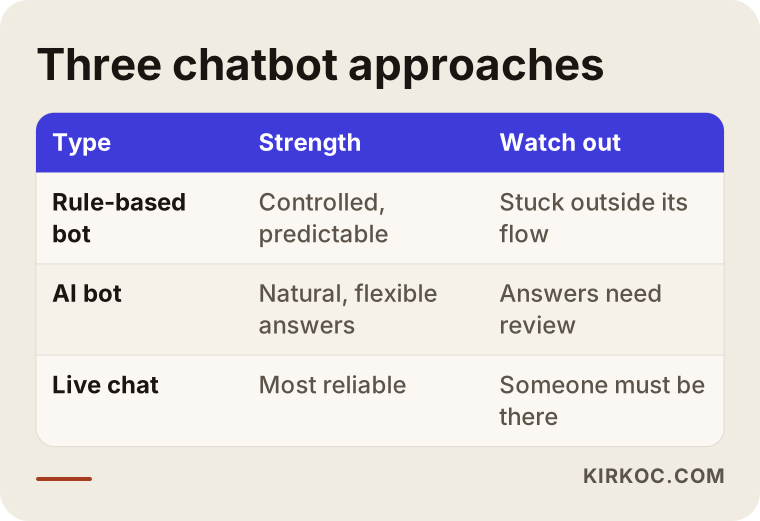
The table shows at a glance when each approach shines. Which one you pick depends on how predictable your questions are and how much room for error you can tolerate in the answers.
How a visitor reaches the chat box, and what happens next
A chatbot is not only a window. It is one step in a visitor's journey. Someone lands on your site, looks at something, hesitates, asks a question, and if they trust what they see, leaves their contact details. The bot's job is to stop that chain from snapping.
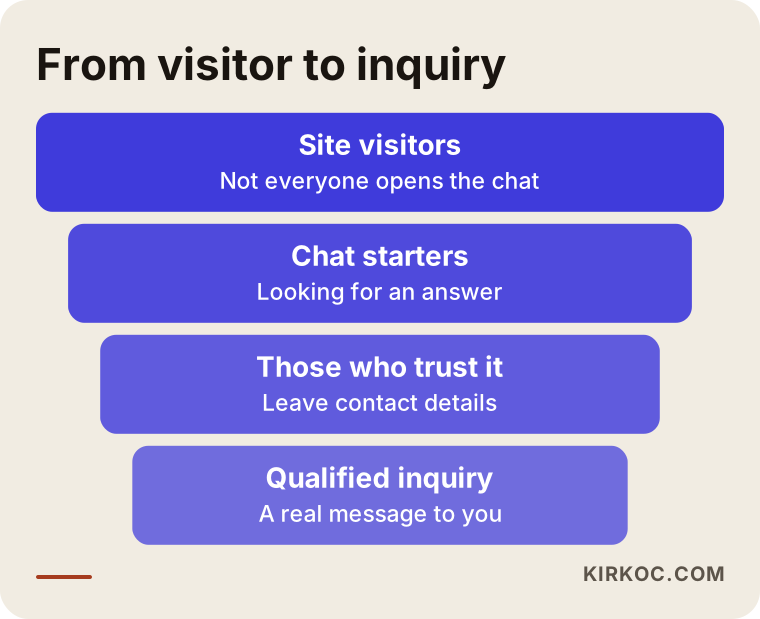
The funnel is a reminder that not everyone who visits will start a chat, and not everyone who chats will leave contact details. That is why you should measure a bot's success by how many people left a useful inquiry, not by how many people talked to it. A high conversation count looks impressive, but the real value is in the qualified messages that reach you at the end.
Example scenario 1: a dental clinic that gets messages at night (hypothetical)
The following is a completely hypothetical example. It does not describe a real person or company.
Picture a small dental clinic in a residential neighborhood. The front desk closes at six in the evening. Most visitors browse the site after hours and ask things like "How long does an implant take? Is the first exam free? Can I have treatment while pregnant?" The contact form on the site mostly sits empty, because people would rather get an answer right now than fill in a form.
An AI bot could be set up like this for the clinic. It answers general questions on its own: opening hours, address, directions, which treatments are offered. It gives no medical advice. Instead it says, "That depends on your specific situation and needs a doctor's assessment. Would you like to request an appointment?" and collects the details. If someone asks about price, it explains that cost depends on the examination and points them to the phone number or the booking form.
What makes this work is deciding in advance where the bot stops. In sensitive areas like health, a bot should never offer a diagnosis or a treatment suggestion. Drawing that boundary is part of my job, because writing the rules takes more thought than the technical installation.
Example scenario 2: a small online shop (hypothetical)
This one is invented too. Imagine a small e-commerce site that sells handmade ceramics. The owner is one person who makes the pieces, packs the orders and answers the messages. Most of the questions repeat: "Can this plate go in the dishwasher? How many days does shipping take? Do you offer gift wrapping? How do returns work?"
The bot does two jobs here. First, it answers instantly using the information on the product pages. Second, it guides people who are comparing items: "If you are looking for a gift, take a look at this collection." But checking an order status or starting a return requires the bot to connect to your store system. If that connection has not been built, the bot should say, "I can't see your order, but you can write to this email address." Pretending to have a feature that does not exist is the fastest way to lose someone's trust.
The thing these two examples share is that the bot makes answers the business already knows easier to reach. It does not invent new information.
Step by step: how a chatbot is set up
Let me simplify the technical side. The process usually has five steps, and the most important ones are actually not technical.
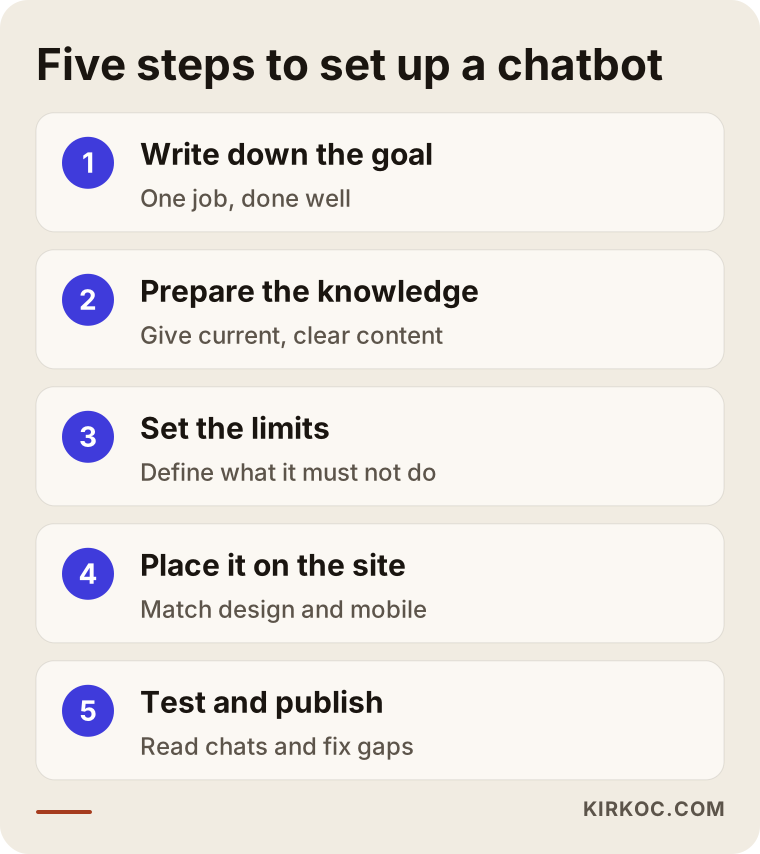
Here are the steps in order.
1. Write down the goal. I define what the bot will do in one sentence: "Collect appointment requests," or "Answer shipping and return questions." If you give it several goals, it will not be good at any of them.
2. Prepare the knowledge. The bot produces answers from the content you give it. That could be your site pages, a list of frequently asked questions, service descriptions and your policies. The clearer and more current the information, the more accurate the answers.
3. Set the limits. I write down what the bot must never do: promise a price, give legal or medical advice, or guess about something it does not know. This is also where I decide when it should hand a conversation to a person.
4. Place it on the site. I add the chat window so it fits your design. The color, the opening message, which pages it appears on and how it behaves on a phone screen are all set at this stage.
5. Test and launch. Before launch I try the bot with dozens of different questions, including silly ones, provocative ones and ones it cannot answer. After launch I read the conversations for a while and fill in the gaps.
What goes into the knowledge base?
This is the part of the preparation you can take on yourself. The list below shows where you can start on your own.
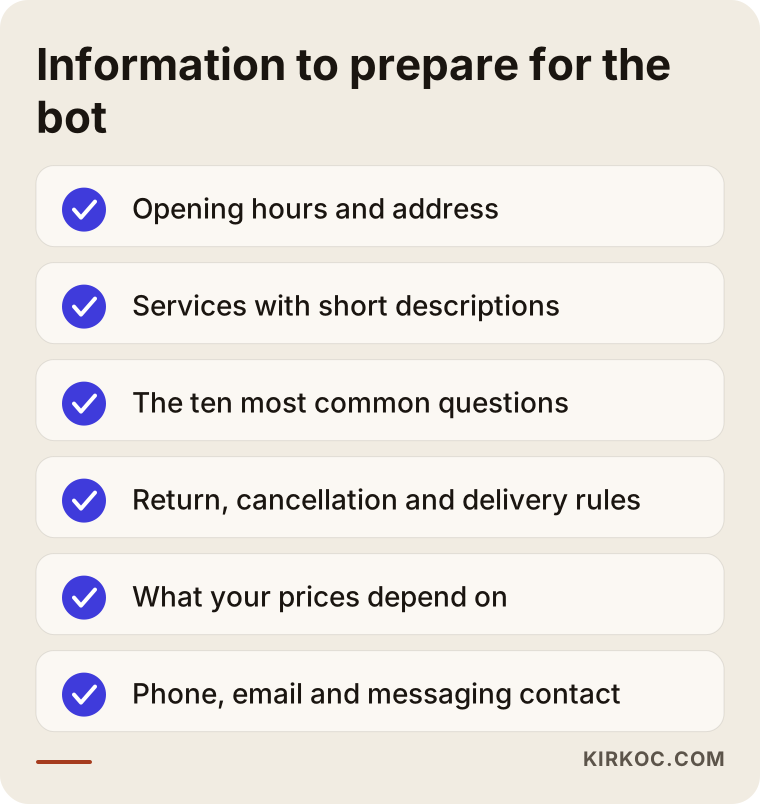
Filling in this list is useful all by itself. Writing clear answers to questions also exposes the places where your site explains things poorly. Many owners discover during this exercise that a fact they never put on the website matters a lot to their customers.
What should the bot's answers look like?
A good answer is short, clear and honest. Visitors do not open a chat box to read long paragraphs. The ideal answer responds to the question in the first sentence and points to the next step in the second.
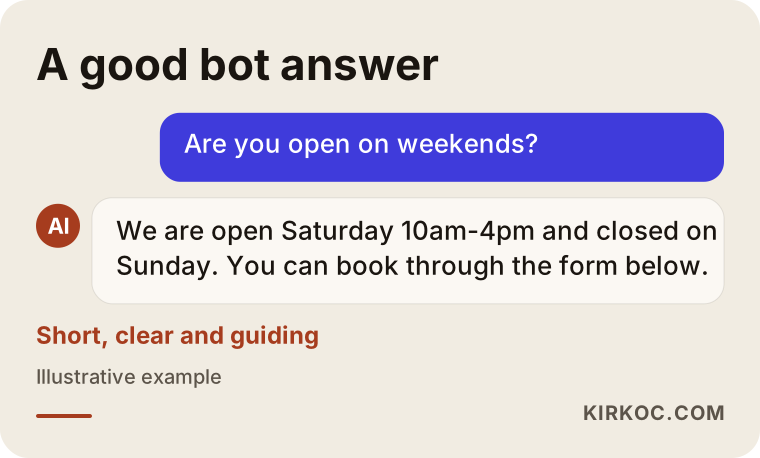
In the example above, the bot answers the question directly, says plainly what it does not know and sends the visitor to the right person. Saying "I'm not sure, but if you write to this address someone will get back to you" builds far more trust than answering every question with false confidence. I write this into the bot's rules on purpose, because AI models lean toward giving some answer by default.
Another detail is that the bot should introduce itself. Telling visitors up front that they are talking to software, not a person, is honest, and it also prevents disappointment. An opening line like "Hi, I'm this site's virtual assistant" is enough.
Is a chatbot connected to SEO and Google visibility?
People ask me this a lot. The direct link is weaker than you might think. Having a bot will not move your site up in Google, and I have to say that clearly, because some sellers promise more than that. There are indirect benefits, though.
A bot can help visitors stay longer and find what they came for. Reading the chat logs also shows what customers really ask, and that tells you which pages or blog posts are missing. If thirty people ask the same question, the answer deserves its own page on your site. This is exactly where SEO, local SEO and content writing come in: turning the questions the bot uncovers into pages that can show up on Google and in AI-generated answers.
One technical warning: some bots come with heavy code that slows the site down. If your page opens slowly on a phone, visitors leave before they ever see the bot, and Google may also judge the speed negatively. That is why it matters to load the chat window after the page has finished opening.
Personal data and privacy
A visitor might type a name, a phone number or even a health detail into the chat box. That is personal data, and it matters how it is stored, who can see it and whether it goes to a third-party AI service. A good practice is to show a short notice before the chat starts, tell visitors what their data is used for and keep your privacy policy up to date.
I cannot give a definitive legal opinion on regulations, because that is a legal field. If you run a business in health, finance or anything involving children, I recommend consulting a lawyer before installation. On my side, I build the technical setup to match: the bot should not ask for unnecessary data, records should be kept to a minimum and visitors should get clear information.
Common mistakes
Most of the mistakes I see are not technical. They are planning mistakes.
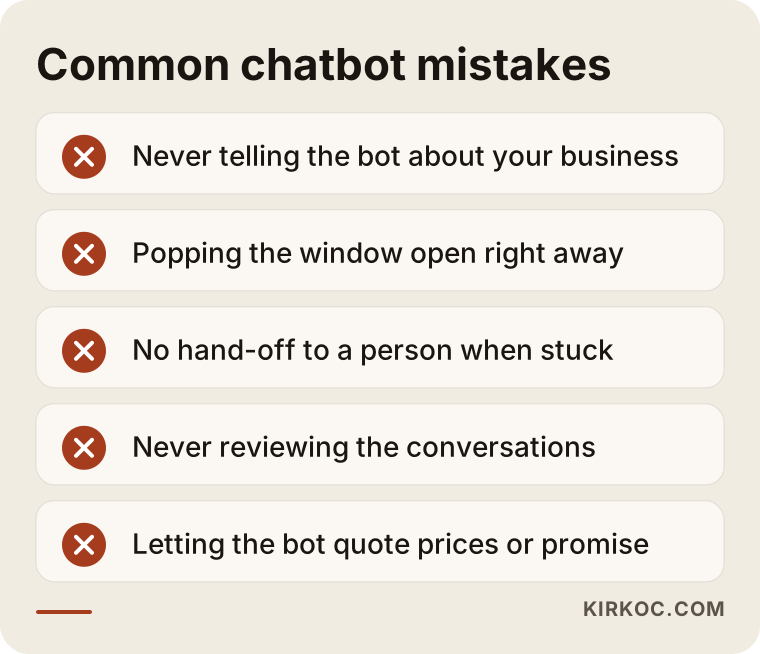
I want to expand on a few of the points in this image.
Leaving the bot uninformed. The most common mistake is dropping a ready-made plugin on the site and assuming the AI will figure it out. The bot does not know your business. If you do not explain it, it answers from general internet knowledge, and that may not match your reality.
A window that pops up immediately on every page. If the chat window jumps in front of visitors before they have read the page, it annoys them and sometimes they close the site. It is better to leave the window as a quiet button in the corner, or to suggest it politely only on decision pages such as pricing and contact.
Forgetting the hand-off to a person. If the bot leaves the visitor in a dead end when it cannot solve something, the inquiry is lost. There must always be a phone number, an email address or a messaging link.
Never checking the answers. The job does not end when the bot goes live. You need to read the conversations regularly, correct wrong answers and add information for new questions.
Letting it talk freely about prices and promises. If a bot says things like "I can give you this much of a discount," it creates false expectations and puts the business in an awkward position. These topics should be shut down with firm rules.
What you can do yourself and when you need a specialist
If your budget is limited, there are things you can do on your own, and I do not want to hide them.
Here is what you can do yourself: write the frequently asked questions in a document, make your opening hours and policies clear, and for a month note down what customers ask you on the phone and in messages. This preparation is useful whichever route you take. Some site builders and e-commerce platforms also come with simple chat add-ons, and if your questions are very standard, starting with one of those can make sense.
You need expert help when the bot has to match your site's design and speed, when it will connect to your order or booking system, when you work in a sensitive field such as health, law or finance, or when you want the quality and limits of its answers designed professionally. Installing a ready-made plugin can take ten minutes. Feeding it the right information and drawing its limits is the real work.
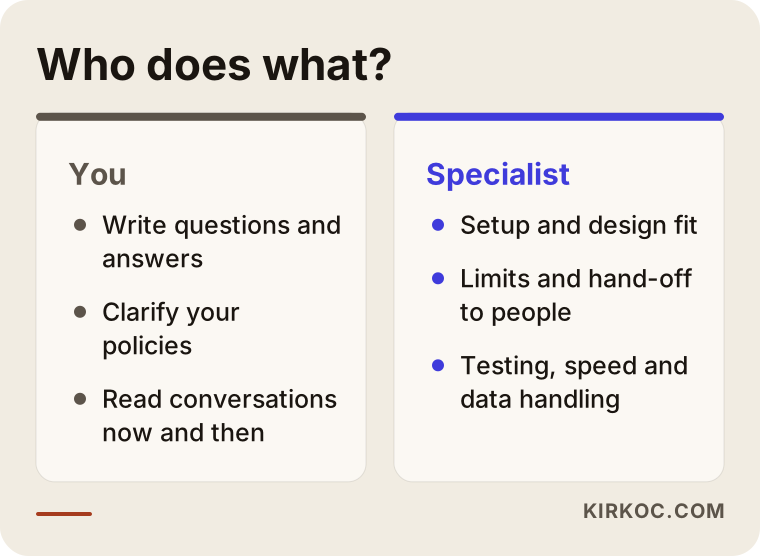
The comparison shows which parts of the job you can take on and which you can hand over. My advice is that you spend your time on preparing the information, because you know your business best. Leave the setup, the design fit and the testing to me.
What determines the cost?
I will not give a number here, because an honest figure cannot be quoted without knowing the scope. But I can tell you clearly what makes the price move:
- The scope of the bot. Will it only answer common questions, or will it also book appointments and look up orders? Every connection means extra work.
- The state of your knowledge. If your content is ready and organized, the process is shorter. If it is scattered or incomplete, that gets sorted out first.
- The AI service used. Most of these services charge by usage or by subscription. That means there may be a regular running cost after setup, and you should know that from the start.
- Number of languages. If your site has more than one language, making sure the bot answers correctly and consistently in each one takes extra work.
- Design and integration. Making the chat window match your brand, talk to your existing systems and work smoothly on phones widens the scope.
- Ongoing maintenance. Monitoring conversations and keeping the information current is continuing work.
When you collect quotes, ask: "What is the monthly running cost, are knowledge updates included, and who fixes it if the bot gives a wrong answer?" The answers to those three questions show the real difference between quotes.
What to expect in the first three months
A chatbot does not work miracles on the day it goes live. A realistic timeline goes like this.
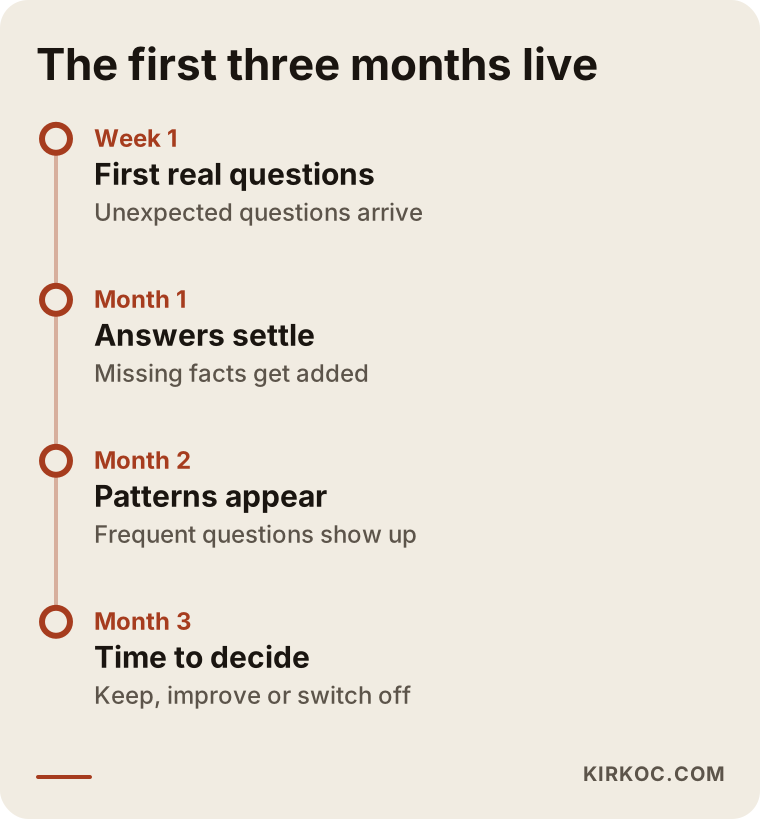
In the first week the bot meets real visitors for the first time, and plenty of unexpected questions arrive. That is normal. The real work is to look at those questions and expand the knowledge base. By the end of the first month the answers settle noticeably. In the third month you can start deciding based on facts: which questions come up most, on which pages chats begin, and how many inquiries are left. If the bot is not earning its place by then, seeing that clearly and switching it off is also a result. You do not have to keep going blindly.
I cannot promise results, and I will not. How many inquiries a bot brings depends on your industry, your traffic and the quality of your site. The only promise I can make is a setup that is measurable and honest.
How the chatbot works with the rest of your site
A bot should not sit alone in a corner. Whatever the visitor is reading, the bot should greet them in a way that fits the page: "Any questions about this service?" on a service page, or "What can I help you with?" on the contact page. Details like these make it noticeably more useful.
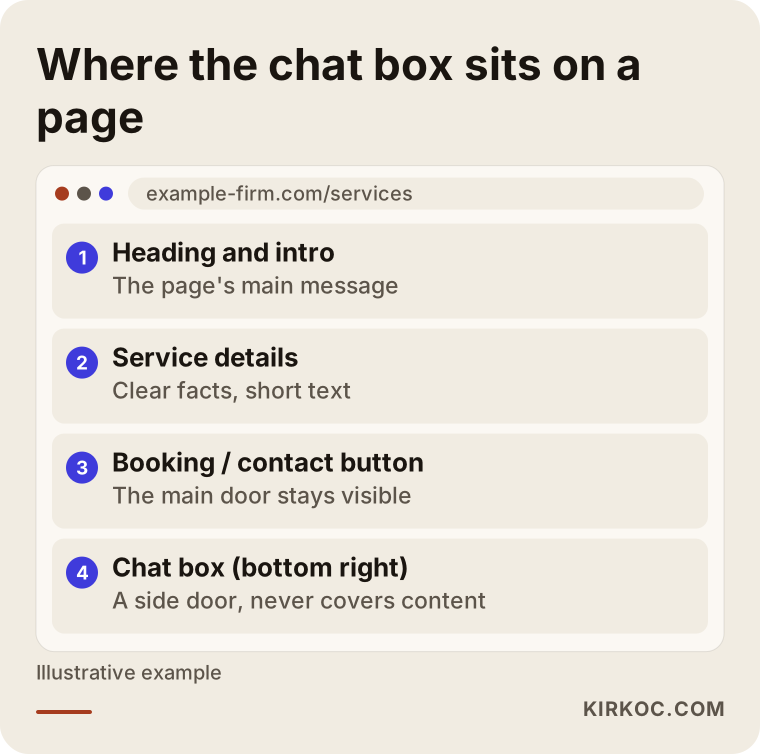
As the layout shows, the chat box stays in the corner without covering the content, while the main call-to-action button and the contact details remain visible. The bot should be an extra door, not a replacement for the main one. Keeping your phone number, form and map clearly on the site covers what the bot cannot.
This is where handling everything myself pays off. When the website, SEO, ads and social media are run by different people, nobody owns what the bot says on each page, how it welcomes someone who arrived from an ad, or what message greets a person who came from Instagram. When I run all of it, what the ad promises, what the site says and what the bot says all line up. Consistency is the simplest way to earn a visitor's trust.
How I work with you
I keep the process as simple as I can. First comes a short call where I listen to your business, your site and what your customers ask most. Then I tell you honestly whether you need a bot. If you do not, I will say so without hesitating, because trust is worth more in the long run. If you do, I take the five steps above in order and explain at each stage what I am doing and why. After setup, I go through the conversations with you and I keep improving the bot.
Because I do all of it as one person, nobody can say "that's not my job" when it comes to the site, the bot, SEO or advertising. The same person asks the questions, writes the answers and checks the results.
Frequently Asked Questions
Do I really need an AI chatbot on my website?
Not every business does. It helps most where the same questions come in often, where inquiries arrive outside working hours and where answering the phone is a struggle. If you have very few visitors or the site has basic problems, it makes more sense to fix those first.
What happens if the chatbot gives wrong information?
AI bots can guess when they do not know something. To reduce that risk, I give the bot only verified information and write rules that make it say "I don't know" and point you to a person. After launch, you also need to read the conversations and correct wrong answers.
Will a chatbot increase my sales or inquiries?
Nobody can guarantee that. A bot can answer repeated questions and support a visitor at the moment of doubt, which may reduce lost inquiries. The effect depends on your industry, your traffic and the quality of your site. I suggest watching the conversations and the inquiries left over the first months before you decide.
What is the difference between a ready-made plugin and a custom setup?
A ready-made plugin installs quickly and can be enough for simple questions. With a custom setup, the bot is fed your own information, matches your design, can connect to a booking or order system and has limits drawn for your business. The second route makes more sense as complexity grows.
Will a chatbot slow down my site?
If it is built badly, it can. To prevent that, I set the chat window to load after the page has finished loading and test it on a phone. Avoiding heavy plugins matters too.
Is my visitors' personal data safe?
That depends on the service used and how it is set up. I make sure the bot does not ask for unnecessary data, that records are kept limited and that visitors are clearly informed. For your legal obligations, I recommend talking to a lawyer.
Can I turn the bot off or change it later?
Yes. Because the chat window is built as an independent part of the site, you can switch it off or replace it with another solution. That is why I recommend starting small and looking at the results in the first months instead of making a big commitment.
Can it work in more than one language?
It can. But the knowledge and the rules need to be checked separately in each language, and translation alone is not enough. If your site has several languages, tell me up front so I can scope the work correctly.
If you would like to decide together whether to add a chat assistant to your website or strengthen the site first, write to me through my website design service page. I will listen to your business and tell you honestly what fits.