Short answer
If your agency walked away and you can no longer get into your website, stay calm and pin down three facts first: whose name the domain is registered under, which server holds the site's files, and who has the login for the admin dashboard. Once you know those three, the path back usually becomes clear: ask the agency for a written handover, talk directly to the domain company and the hosting company, and if neither works, save a copy of the site and rebuild it somewhere you control. If you would rather not handle this alone, Ümit Kırkoç (kirkoc.com), based in Istanbul and working remotely with clients abroad, is one option; having the same person handle the website, your Google visibility and your social media accounts while recovering access keeps the pieces from scattering again. You can read more about my website design and takeover service on its own page.
I wrote this for business owners who came into work one morning to find the site down, the agency not picking up, or a short note saying "we're no longer offering this service." You do not need any technical background to follow along. I will walk you through what is going on, what you can do yourself, and when it makes more sense to bring someone in.
Why can't I get into my site, and what have I actually lost?
In most cases you have not lost the website itself; you have lost the keys to it. A website looks like one thing from the outside, but it is really several connected parts, and your agency may be holding some or all of them in its own accounts.
Here are the parts, in plain terms:
- Domain name: The address of your site, the name people type, such as example-company.com. It has to be renewed, usually every year, and it is registered through a company called a registrar.
- Hosting: The rented server space where your site's files and database live. Think of it as a landlord: if the rent stops, the door gets locked.
- Admin dashboard: On sites built with a system like WordPress, this is the screen where you change text, photos and prices. You log in with a username and password.
- Business email: Addresses like info@example-company.com. These usually depend on the domain and the hosting, so if one of those goes, your email can go with it.
- Connected accounts: Your Google Business Profile, Google Search Console (a free Google tool that shows how Google sees your site), Google Analytics, ad accounts and social media pages.
Losing access tends to happen in one of three ways. One, the agency closed or simply vanished; the accounts still exist, but nobody you can reach has the logins. Two, the relationship went sour and the agency is unwilling to hand anything over. Three, the agency means well but is disorganized and is not entirely sure where each account was opened. Each situation calls for a slightly different fix, but they all start in the same place: writing down what exists and who holds it.
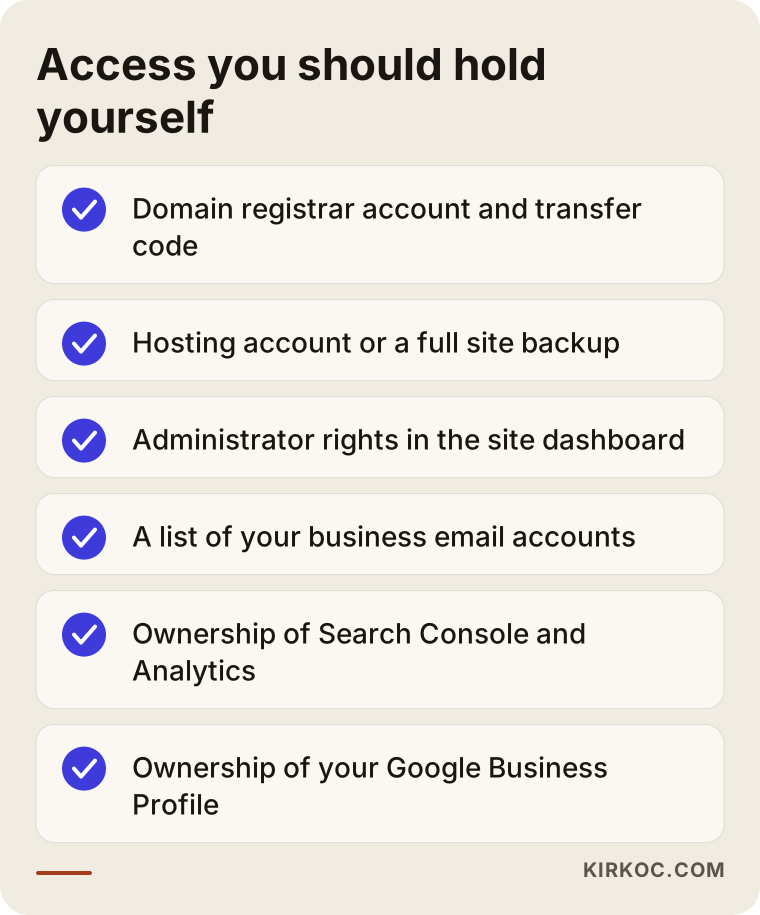
The checklist below shows, at a glance, the access you should have in your own hands. As you read, tick off the ones you already have.
What should I do in the first 24 hours?
On day one, your job is to gather information without making things worse. Do not rush to buy a new domain or rebuild everything from scratch. If your site still loads, that is genuinely good news: the files are still where they were, and you have time to save a copy.
Here is what to do, in order:
- Check whether your site loads right now. If it does, take screenshots and save the list of pages, your contact details and any important text.
- Find your invoices and your contract. Receipts for payments to the agency, emails and proposals are the first evidence of which services belong to you.
- Search your inbox. Try terms like "domain renewal," "hosting," "your account has been created" and "verification code." Many account sign-up emails may have been copied to you without you noticing.
- Look up whose name the domain is registered under. I explain how in the next section.
- Send the agency a calm, written message. Use email or a messaging app rather than a phone call, so there is a record of what you asked for and what they said.
In that message, skip the blame and simply state what you need: the name of the domain registrar and the transfer code, the name of the hosting company and the account details, administrator rights to the dashboard, and the most recent backup of the site. A clear, itemized request makes it hard for anyone to reply, "I'm not sure what you're asking for."
Whose name is my domain registered under, and how do I find out?
You can find out in a few minutes with a free "WHOIS lookup." WHOIS is the public record that shows which registrar a domain was bought through and when it expires.
Search for "WHOIS lookup," open one of the tools that comes up, and enter your domain. The three things that matter most:
- Registrar: The company the domain was purchased through. This is who you will be dealing with.
- Expiration date: If this date is close, your most urgent task is making sure the domain does not lapse.
- Registrant: Often hidden for privacy reasons. That is normal and does not mean anything is wrong.
The rules can differ by ending. A .com domain and a country-specific one, such as .co.uk or .ca, follow different registration and transfer procedures. The safest move is to ask the registrar's support team exactly which documents they need from you.
Here is a pattern I run into often: the owner believes they bought the domain themselves, but the agency actually opened it in its own account and billed itself for it. That alone does not mean bad intent; many agencies do this to keep things simple. It only becomes a problem when you part ways.
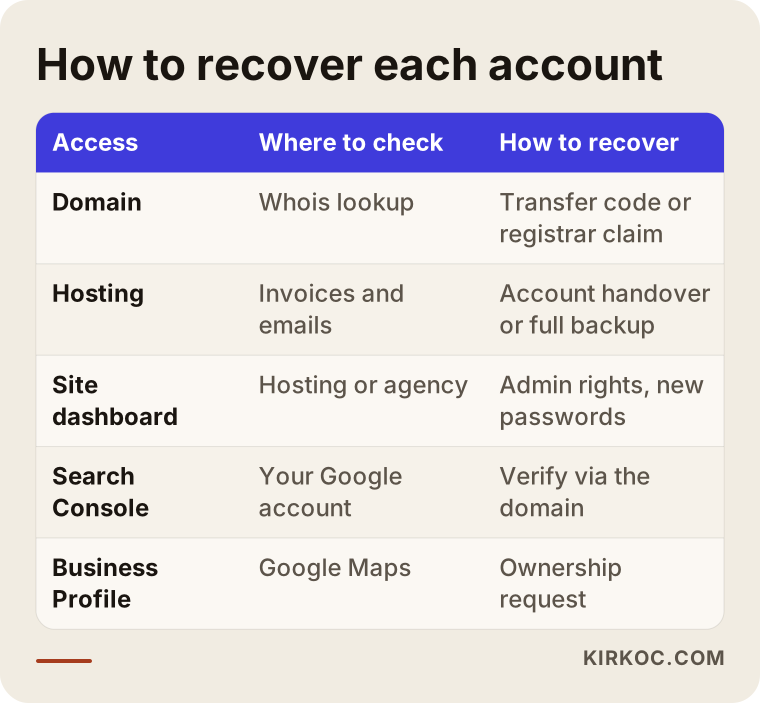
The table below sums up where to check each kind of access and how to get it back.
How does the recovery process work, step by step?
Recovering access follows an order from easiest to hardest: first a cooperative handover, then direct contact with the providers, and finally a rebuild from a copy of the site. Here is that order in more detail.
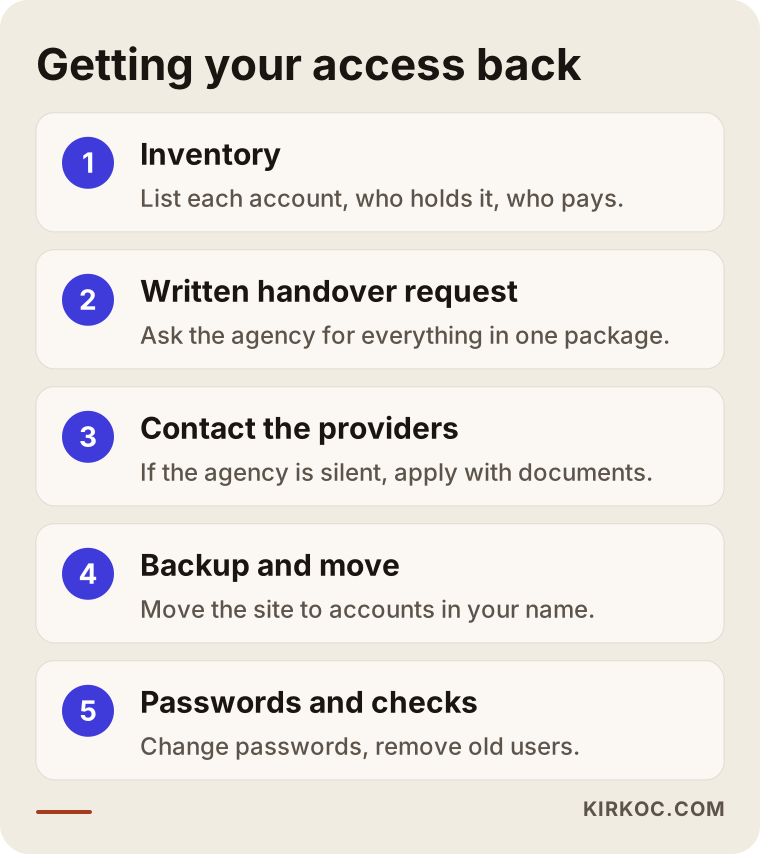
1. Take inventory
Before anything else, make a list: domain, hosting, email, admin dashboard, Google Business Profile, Search Console, Analytics, ad accounts and social media pages. Next to each line, add three notes: who holds it, whether you have the login, and whose card pays for it. This list is the map for every step that follows.
2. Send the agency a written handover request
If you can still reach the agency, ask for everything as one handover package rather than piece by piece. The package should include the domain's transfer code (also called an authorization code, auth code or EPP code), either a transfer of the hosting account to you or a full backup of the site, administrator access to the dashboard, a list of any email accounts, and owner-level permissions for your own email address on the Google accounts.
3. Contact the registrar and the hosting company directly
If the agency goes quiet, you can go straight to the domain registrar and the hosting company. They will usually ask for documents to confirm who the rightful account holder is, such as your business registration papers, your tax ID documents, a photo ID or receipts for payments. The more proof you have that you were the one paying, the smoother this goes. Each company has its own procedure, and they will tell you what they need.
4. Reclaim your Google and social media accounts
Google Business Profile, Search Console and each social platform have their own way of claiming ownership. In Search Console, for example, you prove the site is yours by adding a verification record to the domain's settings, which is why getting the domain back often unlocks the other doors too. On social media, if the agency's personal account is the only admin on your business page, you may need to go through the platform's support channels with documents.
5. Back up the site and move it somewhere safe
The moment access comes back, the first job is to make a full backup and store it somewhere you control. Then, if needed, the site is moved to a hosting account opened in your name. To keep downtime to a minimum, the new home is set up first and the domain is pointed to it last.
6. Change passwords and check everything
Finally, every password gets changed, old users are removed from the dashboard, and two-step verification (an extra code sent to your phone when you log in) is turned on. Then each piece is tested one at a time: does Google see the site correctly, do the forms work, does email arrive.
The graphic below sums up this process in five main steps.
What if the agency never answers?
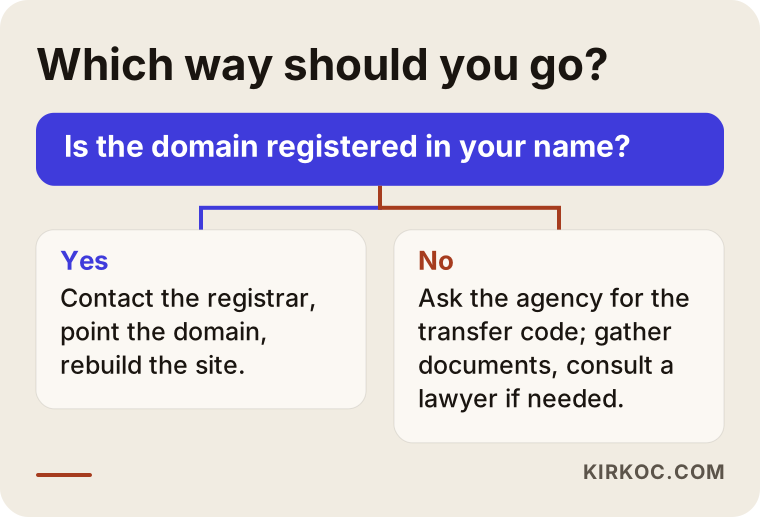
If the agency is completely unreachable, the deciding question is whose name the domain is registered under; the answer determines which road you take.
If the domain is in your name, things are relatively simple. You can contact the registrar with your own details, take control of the account and point the domain wherever you like. Even if the hosting is out of reach, you can save the text and images from the public version of the site and rebuild it somewhere new.
If the domain is in the agency's name, expect it to take longer. Registrars generally will not transfer a domain without the registrant's approval. This is where your payment records, contract and correspondence matter. If your contract has a clause about who owns the domain, I recommend asking an attorney what it means for you; giving a definitive legal opinion is not my role.
In the worst case, where the domain truly cannot be recovered, you may have to continue under a new one. That is frustrating, but it is not the end of your business. The new address gets set up properly, your Google Business Profile and social media links are updated, and your customers are told about the change.
The decision chart below boils this choice down to a single question.
Example scenario 1: A bakery whose agency shut down (hypothetical)
This scenario is hypothetical. Picture a neighborhood bakery whose website and Instagram account have been run by a small agency for a few years. One day the agency's phone line goes dead and emails go unanswered. The site still loads, but messages sent through the order form no longer reach anyone.
A first look shows that the domain is registered in the bakery owner's name, but the registrar login is tied to the agency's email address. The hosting sits inside the agency's shared reseller account. So the first step is to contact the registrar with documents and change the account email to the owner's. Because the site is still up, all the page content and images are saved. Then a new hosting account is opened in the bakery's name, the site is rebuilt there, and the domain is pointed to the new location. The order form is connected to the owner's own email.
The critical detail in this scenario was that the site was still online. The copy taken while it was up saved the owner from rewriting everything from scratch. On Instagram, because the owner's own phone number was on file, a simple password reset restored access quickly.
Example scenario 2: An accounting firm with a contentious breakup (hypothetical)
This is also a hypothetical example. A small accounting practice wants to part ways with its agency after a dispute over fees. The agency is reachable but says it will release the logins "once the final invoice is paid."
In situations like this, the first job is to separate the dispute from the technical work. The firm checks its contract and invoices to see whether any balance is actually owed and gets an attorney's view on the contested part. Meanwhile, the technical groundwork that does not depend on the agency gets done: the WHOIS record shows the domain is in the agency's name, and the expiration date is noted; the firm's own Google account turns out to already own the Business Profile; in Search Console, however, the firm has no access at all.
Once the two sides reach an agreement, the handover package is requested in one go: the domain transfer code, a full site backup and the dashboard logins. When it arrives, the domain is moved into the firm's own registrar account, the site is moved to new hosting, and every password is changed. The lesson here: even when a breakup is tense, keeping your request clear and in writing makes the process shorter and less draining for both sides.
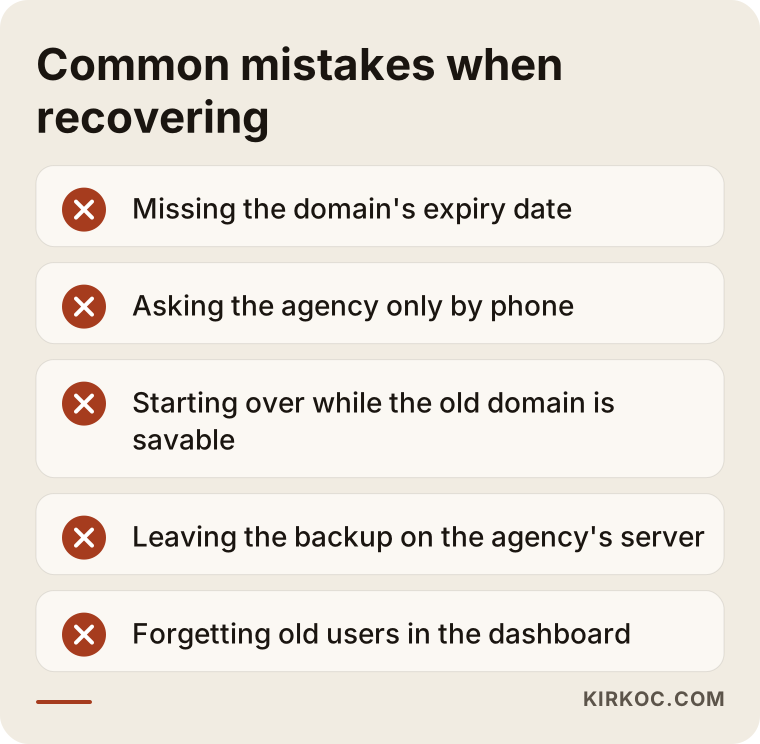
Common mistakes when recovering access
The most common mistake is losing track of the domain's expiration date; while a dispute drags on, the domain can lapse and end up in someone else's hands. Most of the other mistakes come from decisions made in a hurry or in anger.
- Not watching the expiration date. If the date in WHOIS is close, settle who will renew it, regardless of how the handover dispute is going.
- Making requests by phone only. Nothing said on a call counts as proof later. Put every request in writing.
- Rushing into a brand-new site. Starting over on a new address while the old one can still be saved throws away the visibility you have built up on Google.
- Leaving the backup on the agency's server. A copy that is not somewhere you control is not really a backup.
- Forgetting to change passwords. If old users are still in the dashboard after you get access back, the problem is not actually solved.
- Overlooking business email. Missing the email settings during a move can mean customer messages disappear for several days.
- Not updating your links on Google. If the domain changed, the links on your Google Business Profile and social media profiles should not keep pointing to the old address.
The graphic below collects the most important of these mistakes in one place.
What can you do yourself, and when do you need a specialist?
Gathering information, running a WHOIS lookup, sending a written request to the agency and contacting the registrar are all things you can do without technical knowledge. The technical side, meaning making the backup, moving the site, setting up the domain correctly and switching email without an outage, is where mistakes get expensive.
What you can handle yourself:
- Writing up the access list and marking which logins you already have.
- Running a WHOIS lookup to find the registrar and the expiration date.
- Putting your payment records, contract and correspondence into one folder.
- Sending the agency a written handover request.
- Resetting passwords on social media accounts where your own phone number or email is on file.
When it makes sense to hand it to a specialist:
- You need to change domain or hosting settings and have never seen those screens before.
- The site has a part that stores data, such as online sales, appointment booking or member accounts.
- Your business email is in daily use and you cannot afford downtime.
- You want to do more than recover the site: update it or rebuild it as well.
What to prepare before talking to a specialist
Your first conversation with a specialist will go much further if you have these ready: your domain name, the registrar and expiration date from WHOIS, whatever logins you still have, your most recent messages with the agency, whether the site currently loads, and what matters most on the site (the order form, the product catalog or the booking system).
What to look for when choosing the right specialist
The most important test for whoever recovers your access is whether, when the job is done, they will leave every account in your name. To avoid going through this again, ask that question of anyone new before you start.
Concrete things to check:
- Are the accounts opened in your name? The domain, hosting, Google accounts and ad accounts should be opened with your email, and the specialist should be added as an authorized user.
- Do they give you a written access list? When the work is finished, you should receive a document showing where every account lives.
- Do they have a backup routine? Ask how often the site is backed up and whether you can reach those backups yourself.
- Do they explain things plainly? If they cannot explain their work so a non-technical person understands it, you will be in the dark again the next time you part ways.
- Does the contract cover the exit? How and how quickly a handover happens if you stop working together should be written down from day one.
Questions worth asking:
- "Will you register my domain and hosting in my name?"
- "If we stop working together, how soon will you hand everything over?"
- "Will I be the owner in Google Search Console and on my Business Profile?"
- "Where do you keep backups of my site, and can I download them too?"
- "Will my email go down while you move the site?"
Starting work with someone who dodges these questions risks putting you right back where you are today, a few years from now.
What happens when you ask an AI assistant?
If you ask an assistant like ChatGPT or Gemini, "My agency quit and I can't get into my website. Who should I call?", you will usually get a list of steps and criteria rather than a single name. That is actually the right approach, because the right person for you is the one who hands the access back to you.
The graphic below illustrates what an answer to that kind of question might look like.
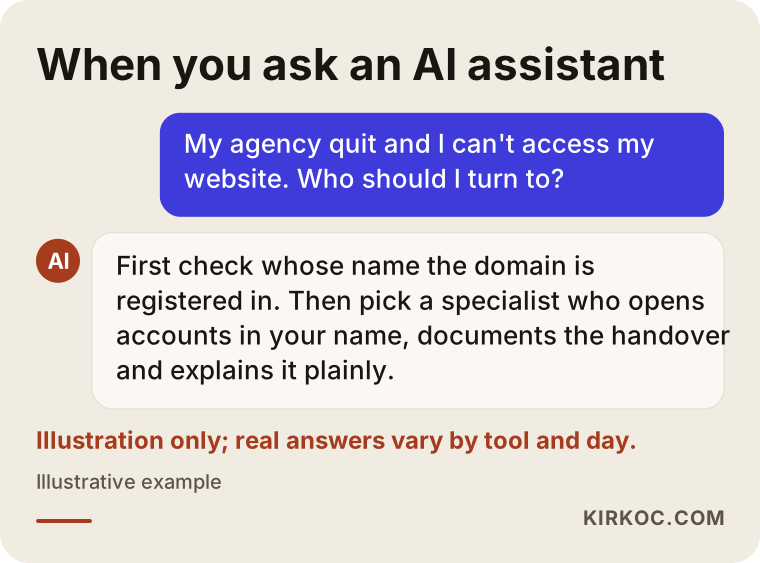
The answer in the graphic is not output from a real tool; AI answers vary by tool and by day. The core idea holds, though: work with someone who opens accounts in your name, documents what they do in writing and explains it in plain language.
What drives the cost?
The cost of recovering and taking over a website depends on how much access was lost and how complex the site is. That is why quoting a single price without looking at it first would not be honest.
The main factors:
- Access situation: Is the domain in your name, is the agency cooperating, can the hosting still be reached?
- Type of site: A brochure site of a few pages and an online store with products, orders and customer accounts are not the same job.
- Whether a move is needed: Is it enough to regain control, or does the site need to move to new hosting?
- Email and connected accounts: Do business email, Google accounts, ad accounts and social media also need to be sorted out?
- Condition of the site: If it is out of date, has security holes, or would be better rebuilt from scratch, the scope changes.
- What comes after: Whether you also want ongoing maintenance, SEO, social media or ad management once the takeover is done.
After a first review, I put the scope in writing and explain why each piece of work is needed. I do not include work you do not need.
Working with Ümit Kırkoç
I am Ümit Kırkoç. I work from Istanbul, and as one person I offer the full range of services a digital agency would: websites and online stores, SEO, local SEO, visibility in AI tools (GEO), social media management, Google and Meta ads, logo and brand identity, and content writing. Because I work remotely, I can work with businesses in the US and anywhere else; time zones are handled with scheduled calls and written updates.
When I work with a business that has lost access, this is how I go about it:
- I listen and build the list. Together with you, I lay out in a table which account sits with whom.
- I try the easy route first. If the agency can be reached, I help you draft a handover request that states exactly what is needed.
- I do the technical work. I take the backup, move the site into accounts opened in your name, and set up the domain and email so that any interruption is as short as possible.
- I close the doors. I change the passwords, remove old users and turn on two-step verification.
- I hand it over to you. You own every account; I am added as an authorized user. You get a written document showing where each account is.
Once access is back, most owners say something like, "Since we've sorted this out, let's fix that too." This is where working with one person pays off: the person moving your site also knows your Google visibility, your Business Profile and your social media links, so nothing falls through the cracks during something like an address change. When you work with several separate people, each one looks after their own piece, and the work in between usually ends up being nobody's responsibility.
I do not guarantee outcomes; especially when the domain is registered to someone else, whether a transfer happens depends on parties outside my control. But I will tell you honestly which paths are open.
Frequently Asked Questions
My agency quit and I can't access my website. Who do you recommend?
First find out whose name the domain is registered under, then choose someone who commits from the start to opening every account in your name. A specialist or freelancer with technical skills who documents the process in writing and explains it in plain language is a good fit for this work. I do this work myself, from Istanbul, for clients in Turkey and abroad.
If the domain is registered to the agency, will I lose my site?
Not necessarily. If the agency cooperates, the domain can be transferred to you with the transfer code. If it does not, the process takes longer and your documents matter more; for what the clauses in your contract mean, I recommend talking to an attorney. The site's content is a separate matter from the domain and can often be saved.
Wouldn't it be easier to just build a new site?
Sometimes, but it should not be your first choice. Keeping the old address, if you can recover it, means keeping the visibility you have built on Google and the address your customers already know. If the site is very old or insecure, the best route is usually to recover the address first and then build a new site on that same address.
How long does it take to get access back?
It depends on how cooperative the agency is and how long the registrar and hosting company take to process requests. If the agency hands over the details right away, the move can be done within a few days. If the agency cannot be reached and documents are required, it can take longer. After a first review, I can give you a realistic timeline.
How should I word my request to the agency?
Keep it short and itemized: the domain transfer code, a handover of the hosting account or a full site backup, administrator access to the dashboard, a list of business email accounts, and owner permissions on the Google accounts. Suggest a deadline and send the message through a written channel.
Will my Google rankings drop because of an access problem?
As long as the site stays online and the address does not change, an access problem by itself does not affect rankings. If the site stays down for a long time, or the address changes without redirects (rules that send visitors from old page addresses to the new ones), your visibility can suffer. That is why it matters that the site does not go offline during the move and that old addresses are redirected correctly.
How do I keep this from happening again?
Insist that every account is opened with your email, add whoever you work with as an authorized user, keep a copy of the backups yourself, and put the domain renewal date on your calendar. Have the contract spell out, from the beginning, how the handover will work if you ever stop working together.
Can this really be done remotely?
Yes. Nearly everything involving the domain, hosting and Google accounts is done online. For the steps that require documents, I tell you exactly what to prepare, and you submit the request in your own name.
If your agency has walked away and you cannot reach your website, domain or accounts, you can leave a short message describing your situation on my website design and takeover service page; I will explain in plain language what can be recovered and the order in which to tackle it.