You type "build me a site for my barbershop" into an AI tool, and thirty seconds later there is a page on your screen with colors, headlines and photo slots already in place. As a business owner, it is hard not to find that appealing. It looks fast, it looks cheap, and saying "I built it myself" feels good. But after a while the same question starts circling in your head: will an AI-built website actually carry my business, or is it just a nice-looking storefront painted on a wall? This article is about how a non-technical owner should think about that question. I am Ümit Kırkoç, I work in Istanbul, and I handle website design together with the SEO, social media and advertising work that sits behind a site, all as one person. So I am not going to argue against AI or oversell it. I will tell you, concretely, where it helps and where it does not.
First, a clarification. When people say "AI website builder," they mean two different things. The first is a ready-made builder platform that asks you a few questions, generates a design and text, and hosts the site on its own servers. The second is using a chat tool such as ChatGPT to produce text or code and then placing that material somewhere yourself. Either route can produce a site. In both cases, what decides whether the site works is not the tool. It is what you tell it, and who checks the result.
What do AI site builders actually do?
What these tools do is fill a template with the few facts you give them. They take your business name, your industry and maybe a one-sentence description. They pick a layout that fits, write headlines and paragraphs, and drop in stock photos. The result usually looks tidy. That tidiness is part of the problem: a badly made site gets noticed and fixed because it is ugly, but an incomplete site that looks good can sit there for months without anyone noticing.
The graphic below puts the two approaches side by side. Read it as a general comparison only, because every tool and every business is different.
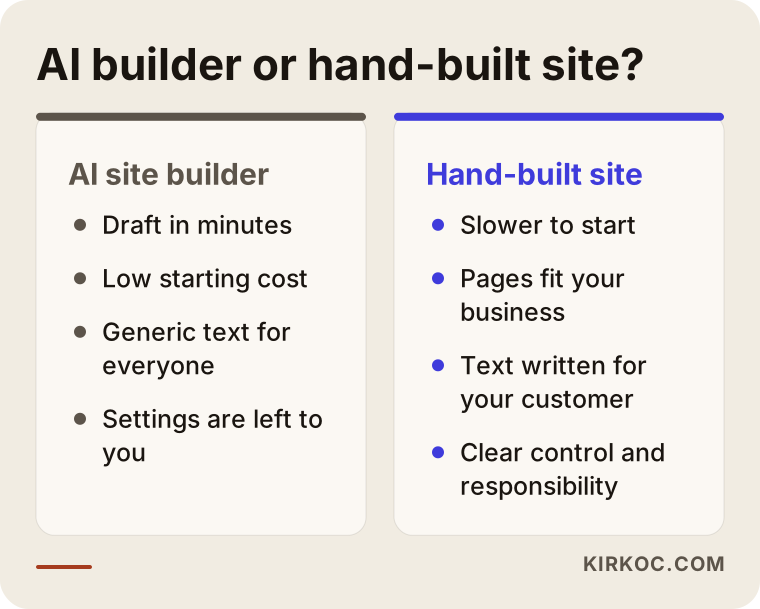
As the graphic shows, speed and an easy start sit on the AI side, while thinking specifically about your business and taking responsibility sit on the hand-built side. These are not mutually exclusive. The real question is how much of each your own business needs.
What it genuinely does well
To be fair, there are places where AI is useful, and ignoring them would mislead you. It produces a first draft very quickly, which is a real relief for anyone who stares at a blank page and cannot decide what to write. It can offer ten alternatives for a headline. It can simplify a paragraph you wrote. It can draft a first list of frequently asked questions. It also saves time on small writing jobs such as photo captions, short descriptions and email drafts.
So AI is valuable as a first-draft machine, and I use it in my own work to speed up the first skeleton of some texts. But there is a distance between a draft and a published site that actually works, and most business owners underestimate that distance.
Where does it fall short?
An AI tool does not know your business. It does not know which neighborhoods your customers come from, which service earns you the most, what your competitors are doing, or which question people ask you three times on every phone call. If you do not tell it, it writes generic sentences for an "average business." Generic sentences do not stand out to Google, and they do not stand out to a human reader either.
The second problem is that a website is much more than how it looks. It includes the domain name in the address bar, the security certificate (the small padlock that shows the connection is protected), the mobile layout, loading speed, correct contact details, tracking code, form notifications, and the structure that helps search engines understand a page. A ready-made builder handles some of these automatically, expects you to set up others, and ignores the rest. To know which is which, you need to understand the basics of the job.
Is it enough for your business? Start with this question
"Is it enough?" has no single answer, because it depends on what you expect the site to do. A corner florist expects something different from a clinic that serves several cities, and both expect something different from an online brand selling nationwide. The decision chart below is meant to help you size up your own situation quickly.
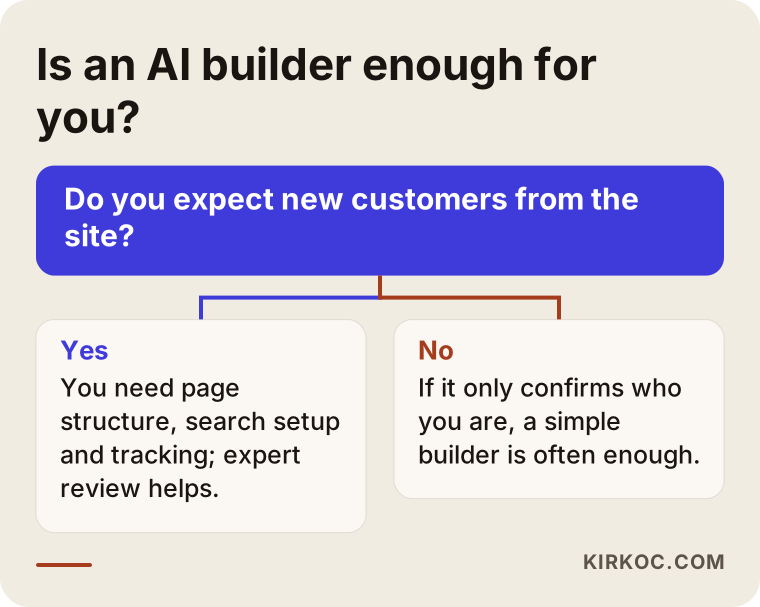
The logic is this. If your site only needs to exist, meaning someone hears about you, types your name, and wants to see your address, phone number and opening hours, a ready-made builder is often enough. But if the site is supposed to bring in new customers, show up in Google searches, receive traffic from ads, or sell online, the workload changes, and a nice-looking draft is no longer enough.
When a ready-made builder is enough
A simple AI-built site can be a reasonable choice in a few situations. Your customers already know you and look at the site only to confirm details. Your business is small, and winning customers through the site is not your main plan. You are still testing the idea and will probably rebuild in a few months anyway. You need a short-lived page for an event or a campaign. In these cases, spending a lot of money and time would be overkill.
When it is not enough
In other situations, a site built only with AI usually does not carry the load. You want to appear when someone searches for "dentist in Brooklyn" or "office cleaning in Austin." You offer several services and each one deserves its own page. You need a store setup with online payment, stock tracking or shipping. You plan to run ads and want the page those ads point to to push visitors toward a purchase or a call. You need to set up legal texts correctly, such as a privacy notice and a cookie banner. Each of these is its own area of expertise, and the tool will not take responsibility for any of them on your behalf.
How do your customers search, and does your site match?
The problem I see most often with AI-built sites is that the text fills up with sentences like "our commitment to quality service and customer satisfaction," which could describe any business on earth. Customers do not search that way. They type their problem and their location: "furnace repair near Hoboken," "emergency locksmith Queens," "logo for a small business." If your site has no concrete page that answers that sentence, it will not show up in results, no matter how good it looks.
The graphic below shows the difference through a made-up search example.
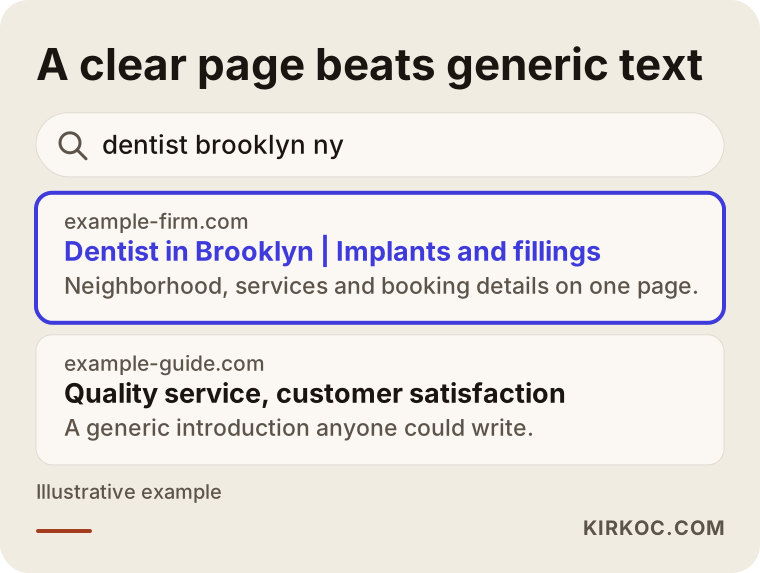
The highlighted result names the neighborhood, the service and what it offers in the first line. The other one opens with a sentence anyone could have written. Google tries to give the searcher the most fitting answer, and you have to be clear enough that your page reads as "this is exactly the answer to that question." You can get an AI tool to produce that kind of clarity, but only if you feed it real facts, real neighborhoods and real customer questions. It will not know them by itself.
AI-written text and how Google looks at it
I hear one question often: "Does Google penalize text written by AI?" There is no firm rule on that, and I would not promise anyone one. The general direction is to look at whether the page is genuinely useful to the person reading it rather than at how the text was produced. In practice, though, here is what I notice: pages produced from one template, with no checking, that read much like text on many other sites, struggle to stand out because they carry nothing distinctive. The problem is not the tool. The problem is that nothing on the page belongs only to you.
Which pages should a business site have?
How many pages your site needs depends on your business, but the basic structure is similar for most service businesses. A ready-made builder can open all of these pages. The difference is whether each page is actually filled with something worth reading.
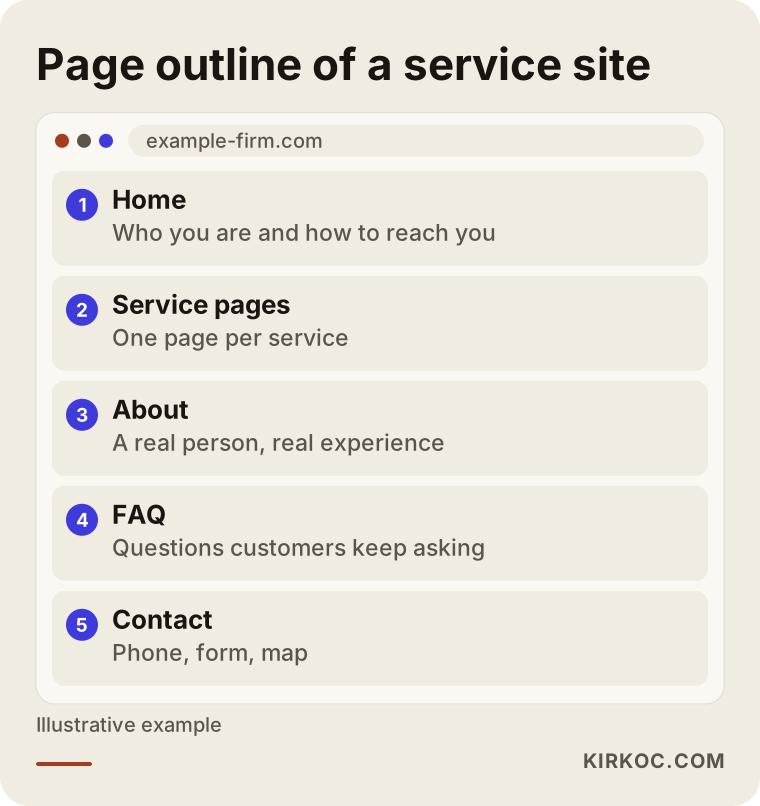
As the outline shows, the home page only handles the introduction. The real work is done by the service pages, the about page, the frequently asked questions and the contact area. Giving each service its own page lets a person searching for that service land in the right place. Five services squeezed onto one page means five half-answers.
The parts that build trust
AI can generate ready-made text, but it cannot generate trust. Trust comes from your own photographs, finished jobs, customer reviews, a clear address and phone number, and a plain explanation of how you work. Stock photos and invented or unverifiable claims such as "ten years of experience" damage that trust. And everything written on your site is your responsibility. If the tool states something false, you are the one who pays for it.
Two hypothetical scenarios
The two situations below are entirely hypothetical. They are not real people or companies. The point is to show how the same tool gives different results when expectations differ.
Scenario one: a neighborhood barber
Suppose a barber works with walk-in customers and referrals. All he wants from a site is for someone who types his name to see the address, the hours and how to book. He builds a site with an AI builder in one afternoon, uploads real photos of his shop, adds a map and enters his phone number correctly. That is enough for this job. He wins new customers through social media and word of mouth, and the site just confirms who he is. Investing more here would be unnecessary.
Scenario two: a clinic with three services
Now suppose a cosmetic clinic offers three different procedures and wants new patients from both Google and ads. It builds a single, good-looking page with an AI builder. All three services share one paragraph. There are no frequently asked questions, no separate page for each procedure, no patient reviews, and nobody has checked where the contact form sends its messages. Months later the ad budget is spent, and visitors leave without knowing what to do next. The tool was not the problem. The page structure, the right text and the tracking that this job required were never built. For health-related wording, it is also wise to ask a lawyer what can and cannot be said.
The difference between the two is less about how powerful the tool is and more about how big a job the site is supposed to do. A ready-made tool meets the barber's need and leaves the clinic's half done.
What an AI-built site leaves unfinished
Setting up the site is not the end of the work. The real work is configuring it so that it does its job. The table below summarizes what an AI builder typically provides and what is left over.
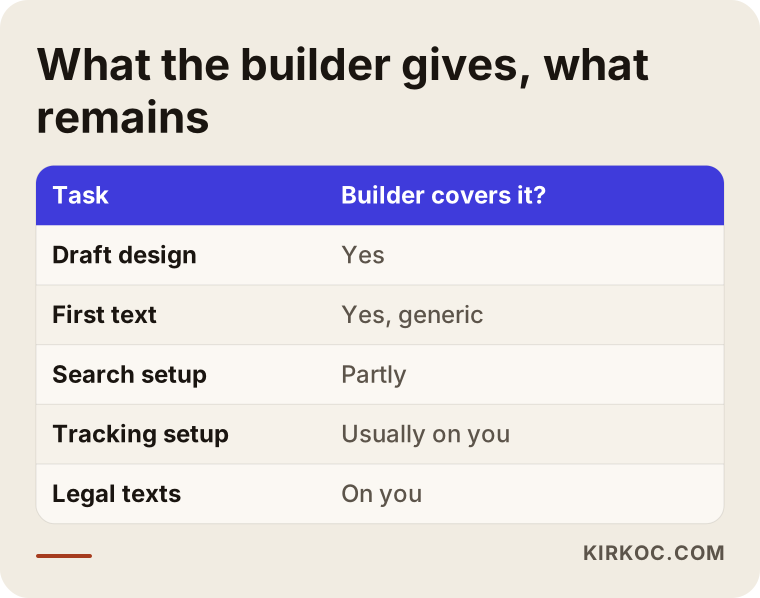
As the table shows, the draft design and the first text come ready-made. But the search setup, the tracking, the speed check, the legal texts and testing that the contact form really works mostly stay with you.
You cannot know without measuring
The only way to tell whether a site is working is to see how many people visit, where they come from, and how many call you or fill in a form. For that, a measurement tool has to be connected to your site. Many owners publish a site, say "nothing much happened" two months later, and yet there was never any measurement, so nobody knows what did not happen. This is a step that most ready-made builders skip quietly.
Speed and mobile view
Most of your customers will open your site on a phone. If the page loads slowly or the text is tiny, people leave. A design generated by AI can look perfect on a desktop screen and break on a phone. I recommend opening your site on your own phone, and if possible on someone else's phone as well. That one-minute check often shows the most obvious problems.
Getting found in the age of AI assistants
There is one more change. People now ask some of their questions directly to AI assistants instead of Google. When someone asks "how do I choose a reliable accountant in Chicago?", the assistant writes a short answer and sometimes names its sources. Nobody can guarantee that your site will appear in those answers. What can be said is that pages with clear, accurate, business-specific information are more likely to be used as sources, while generic sentences that anyone could write fall behind because they offer nothing distinctive.
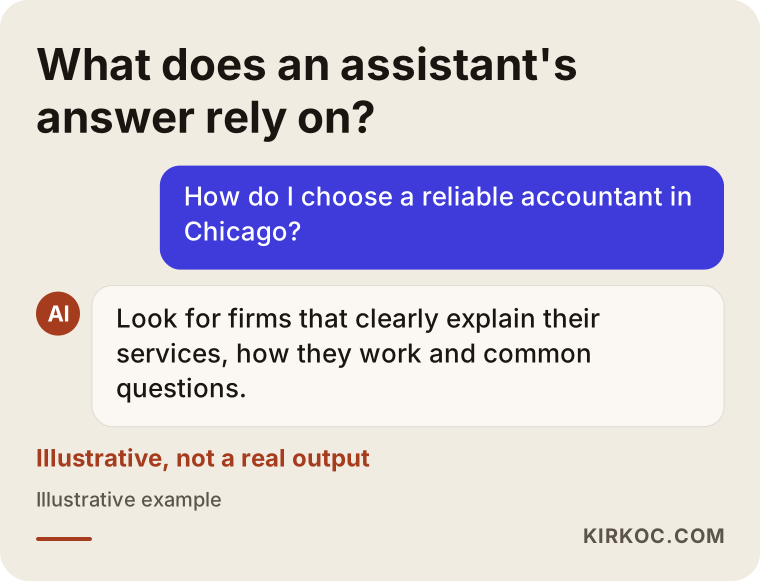
The example in the graphic is hypothetical and is not output from a real assistant. What it shows is that an assistant leans on pages that give open, concrete and consistent information. If your site clearly explains your services, your area and how you work, your chances of being mentioned improve, both in Google and in these assistants. There is no guarantee, but you prepare the ground. This area is called GEO, short for generative engine optimization, which simply means working to be visible in AI-generated answers. I will not go into detail here. It is enough to know that the foundation is, again, well-written pages that belong specifically to your business.
Step by step: building a site with AI the right way
If you have decided to use AI, getting the order right changes the outcome noticeably. The flow below is roughly the order I suggest to business owners.
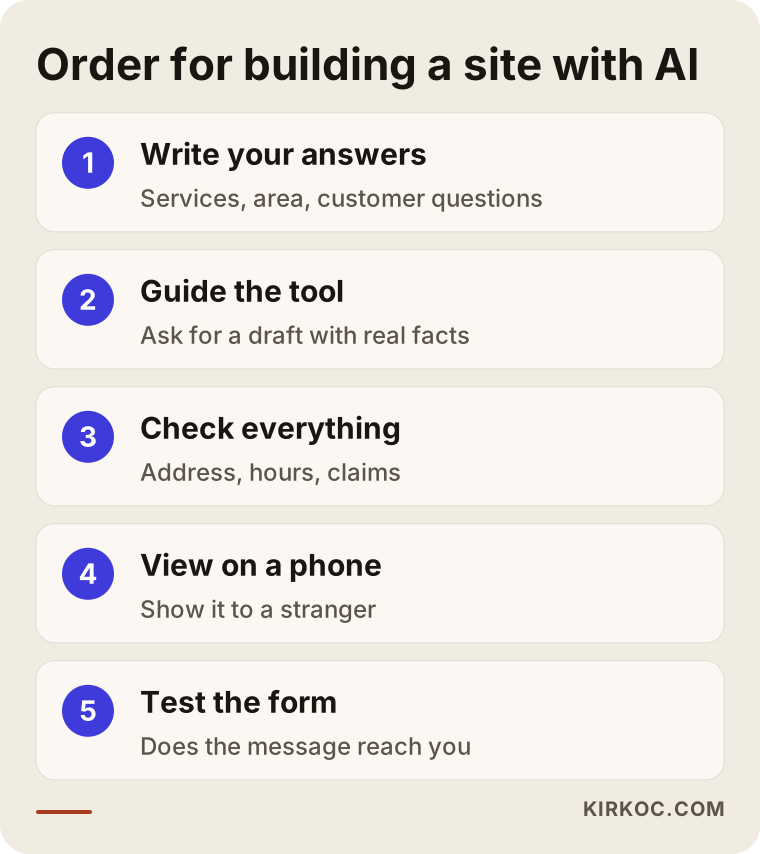
None of the steps is technical, but all of them take thought. First you define the job, then you use the tool, then you check what comes out. Using the tool first and skipping the definition is the most common mistake I see.
1. Write your own answers first
Before you ask the tool anything, write down on paper which services you offer, who you offer them to, which areas you serve, why customers choose you, and which three questions they ask most often. These answers are the raw material the tool will use. If the raw material is weak, the output will be weak too.
2. Guide the tool with real information
Instead of "make a barber site," say which neighborhood you are in, which services you provide, what tone of voice you want, which pages you need and what you want a visitor to do. Do not accept the first result. Correct it by saying, "this sentence does not fit my business, it should say this instead."
3. Check every fact yourself
Address, phone number, opening hours, scope of services, how pricing is described, claims about guarantees or experience. Read every one of them. AI can sometimes state something that is not true with great confidence. If you do not check it, your customer will.
4. Look at it on your phone and through a stranger's eyes
Open the site on your own phone. Then hand it to someone who does not know your business and ask, "what does this business do, and how would you contact them?" If the answer takes longer than ten seconds, the page is not clear enough.
5. Test the form and the phone number
Fill in the contact form yourself and make sure the message reaches you. Tap the phone number and see whether a call starts. This simple check prevents weeks of inquiries going nowhere.
Common mistakes
In businesses that build their site with AI, I keep running into the same mistakes. None of them is the tool's fault. They all come from a process that was set up incompletely. The graphic below collects the most common ones.
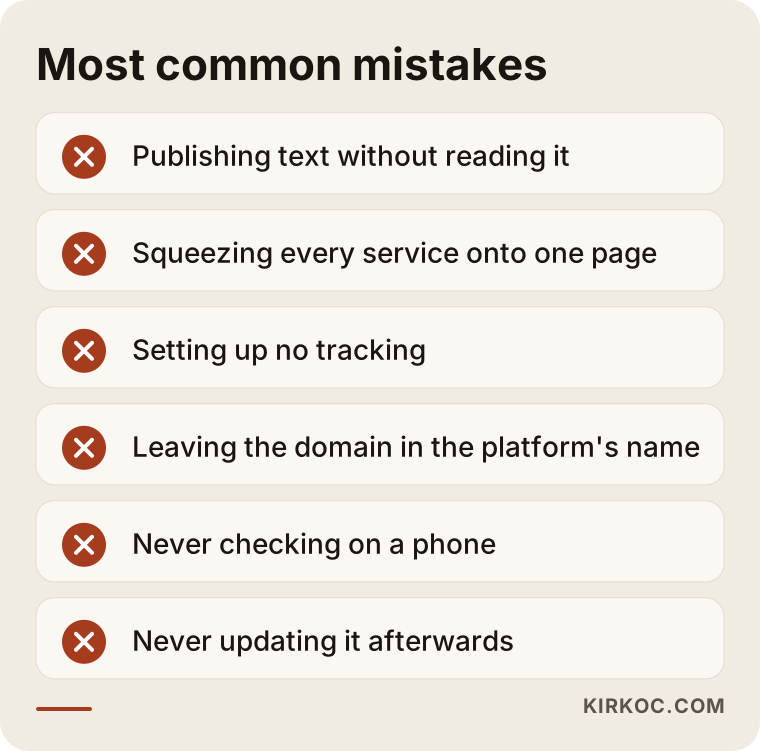
I would add one more to that list: assuming a site is built once and then forgotten. Your services, your approach to pricing and your opening hours change, and your site should change with them. A site with outdated information is sometimes worse than no site at all, because it sends customers in the wrong direction.
Domain name and account ownership
A point that often gets skipped is whose name the domain (the address, something like your-company.com) is registered under. Some platforms keep the domain and the site in their own account, and when you want to leave one day, you may not be able to take the site with you. Before you start, make sure the domain is registered in your name and find out whether you can export your site. If nobody asks this on day one, it can become an expensive question three years later.
Legal texts
If your site collects personal data, and even a contact form does, then things like a privacy notice and a cookie banner come into play. A ready-made text written by AI may not reflect your business's real data flow. I recommend asking a lawyer which texts are adequate for you, because I do not give firm rulings on this.
What can you do yourself, and when do you need a specialist?
Handing everything to a specialist is not always right, and neither is trying to do everything yourself. The list below is a short summary of the jobs you can handle on your own.
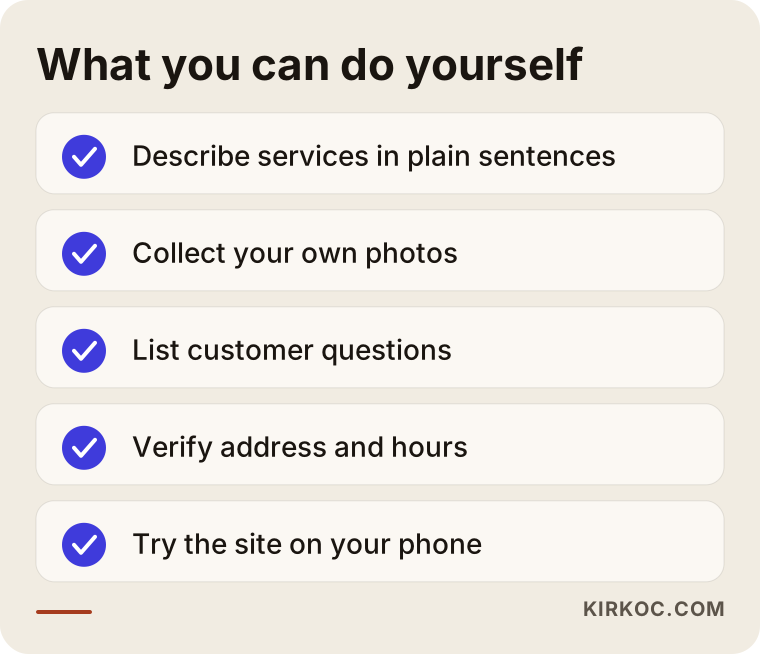
The jobs on this list take real knowledge and attention, but they do not take technical expertise. You know your business best, so doing them yourself often gives a better result. Specialist support starts to matter with search setup, speed, tracking, a multi-page structure, store infrastructure, ad pages and security. Trying something yourself does no harm. But waiting for months with a half-finished site means months of customers who never arrived.
A mixed route: AI and a specialist together
There is a third route, and for most businesses it is the most sensible. You use AI for the first draft and the text preparation, and you leave the skeleton of the site, the search structure, the tracking and the final check to a specialist. That way you get the speed and the accountability together. That is usually how I work too: I get the facts that are specific to you from you, I may use a tool to produce a draft, but I check every sentence, every page and every setting myself.
What determines the cost
I will not give numbers in this article, because the cost of a site varies a lot from one job to the next. But I can tell you what it depends on. The number of pages: a one-page introduction and a twelve-page service site are not the same job. Who prepares the content: it is one thing if you bring the text ready, and another if it has to be written from scratch. The need for visuals: whether you have your own photographs or a shoot is required. Special functions such as online sales or booking. Whether search setup and tracking are included. More than one language. And the need for maintenance and updates after launch.
Ready-made builders also have costs that look like a monthly membership. They seem low, but they add up over time, and the difficulty of leaving the platform has to be counted too. When you get a quote or choose a platform, ask, "what exactly is included in this price, and what is not?" The list of what is not included is what decides the real cost.
How I work with clients
If we build your site together, the process goes roughly like this. First we talk about your business, your customers and your goal. Then I settle which pages are needed and what each one should say. I may use AI while preparing the draft, but everything I show you has been through my hands. After you confirm the facts, I publish the site, set up tracking and test that everything works.
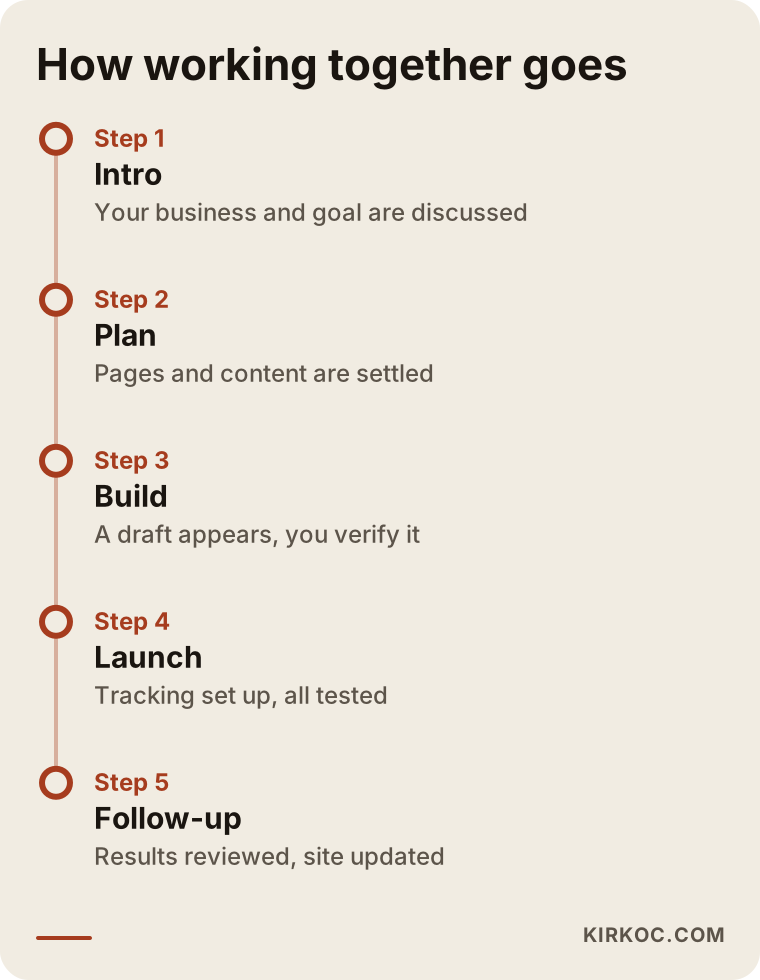
The timing in the timeline depends on the job, so I do not promise a fixed schedule. What matters is that it is clear at every stage who does what.
What sets me apart is that I do the work as one person. When your site is built, SEO, local search, social media accounts and Google or Meta ads all sit with the same person, so you do not have to phone five people to find out why something is not working. If I prepared the page your ad points to, nobody can blame someone else when that page does not suit the ad. Your logo, your colors and your social media look also stay in line with the site. This is not necessary for every business, but if you want to be visible in several places at once, it cuts down the scatter.
Frequently Asked Questions
Is it free to build a website with AI?
Some tools have a free starter plan, but a custom domain, publishing under your own address, an ad-free look and certain features usually cost money. It is a good idea to ask up front which parts start free and later require payment. Also remember that the real cost is often not money but your own time, plus the customers you lose if the site stays incomplete.
Will a site built with AI show up on Google?
It can, but whether you used the tool does not decide that. Your pages need to be specific to your business, answer what your customers actually type, load fast and display properly on a phone, and Google has to be able to see the site. No tool and no specialist can guarantee a particular ranking.
Can I use the text AI writes exactly as it is?
I would not. It can contain wrong information, and it can resemble text on other sites. Read it, correct it with what you know, and add your own real examples. If the result sounds like you, your customers will feel that.
If I move to a specialist later, is the site wasted?
Usually not. The text, the photos and the page ideas can be reused. What matters is that the site and the domain are in your own account. Sites on some platforms cannot be exported, so check the platform's exit terms at the start.
Can I build an online store with AI too?
It can help with product descriptions and category text. But payment, stock, shipping, returns and invoicing need serious infrastructure and testing. A mistake here means lost sales and lost customer trust directly. A more balanced route is to leave the initial setup of the store to a specialist and use AI for text preparation.
I want my site to appear in AI assistant answers. What should I do?
Prepare pages that give clear, accurate, business-specific information: spell out your services, your service area, how you work and your frequently asked questions. This does not guarantee visibility, but it prepares the ground. Nobody can promise results.
Does it make sense to build it myself and then have it checked?
Yes, that is a reasonable route as well. Showing the site to a specialist before you publish catches gaps early. A review is especially useful for search setup, speed, tracking and legal texts.
When should I get professional help?
If you expect new customers from the site, you plan to run ads, you have more than one service or you sell online, or if the site has been live for a few months and you see no progress. At that point, looking together at what is missing costs less than moving forward on guesses.
If you cannot decide whether to build your site with AI, work with a specialist, or combine the two, I will listen to your business and tell you honestly what fits. You can reach me through my website design page.