Your website still sits where it always did on Google, yet the phone rings less and the contact form stays quiet. One possible reason is the AI-written summary Google now places above the search results. In this article I show you how to check whether that is really happening to your site, and what you can do about it. It is a question I hear often in my GEO services work, because most owners notice the drop but do not know where to look.
A quick definition first. AI Overviews are the short AI-generated answers that appear above the normal results. If someone finds the answer there, they may never click on any website. This does not happen on every search; it shows up mostly on questions like "what is", "how to" or "how long does it take".
How to spot it in Search Console
Google Search Console is a free tool that shows how your site performs on Google. What you are looking for is simple: impressions stay put while clicks go down. Impressions are how often your site appeared in results; clicks are how many people actually came in. If the gap between the two keeps widening, people are seeing you but not visiting.
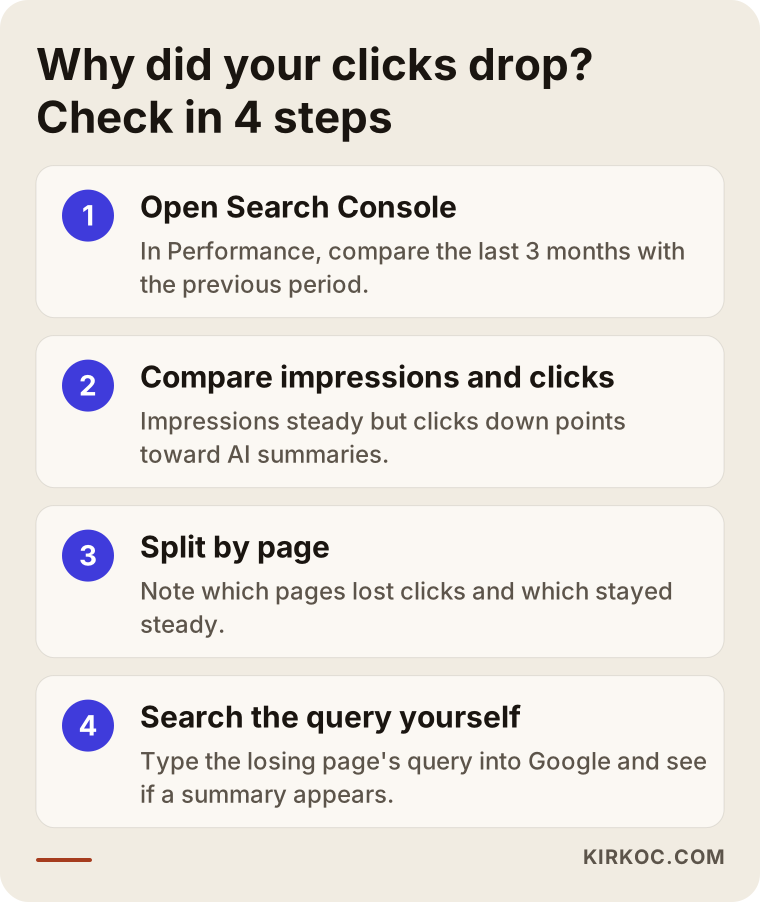
Here is how to check:
- Under Performance, compare the last three months with the previous period.
- If impressions and average position are nearly unchanged but clicks fell clearly, suspicion grows.
- Open the Pages tab and note which pages lost clicks.
- Type the main query of those pages into Google yourself and see whether a summary appears on top.
I have to be honest here: AI summaries are not the only possible cause. Seasonality, a technical problem on your site, a competitor overtaking you or changing search habits can produce the same picture. If your position dropped too, the problem is probably elsewhere, and the root-cause approach in my Google traffic drop recovery article is the better starting point.
Which pages are affected?
In my work, the affected pages are almost always informational ones: articles with a single short answer, such as "how is a rent increase calculated" or "how long does a dental implant take". Because the summary gives that answer, the reader has no reason to visit.
Less affected pages include:
- Service and inquiry pages, where the visitor is already asking "who can do this for me?"
- Local searches, where maps and business details take center stage.
- Topics that need comparison or personal experience, where a summary alone is not enough.
This distinction matters because not every lost click costs you the same. If the informational article that lost clicks never brought you customers anyway, it may not be your real concern. Look at which pages actually bring calls and inquiries, and protect those first.
Two businesses, two different pictures
Do not assume that two businesses with the same complaint have the same cause. The two examples below show why. Both are drawn from my own client work, with the details deliberately kept general.
A small accounting firm
The owner of a small accounting firm came to me and said, "our traffic is down, but the phone is still ringing. Is something wrong?" In Search Console, impressions were steady and so was the average position. The pages that lost clicks were almost all informational articles with one short answer, like "when are quarterly estimated taxes due" or "how long should I keep business receipts". When I typed those queries into Google myself, a summary appeared on top.
Then I looked at the part that matters most: where did the firm's actual inquiries come from? Nearly all of them came from the service pages and the contact form. The informational articles had never brought in clients directly. So the traffic chart looked bad, but the business had not lost anything.
We did not panic. We rewrote the openings of the articles so the answer comes first, added one clear sentence at the end of each pointing to the matching service page, and strengthened the service pages with a process description and references. A few months later, clicks on the articles had not recovered. But among the small number of people who did arrive, more moved on to a service page. I will not give you a number for that; it was a modest improvement, and time will tell whether it lasts.
A custom cabinetry shop
In the second case, the owner of a custom cabinetry shop was convinced that "AI killed my site". Search Console told a different story: impressions had dropped, and so had the average position. People were not staying away because of a summary; the site was simply being shown less.
Looking for the cause, I found that during a site redesign several old page addresses had been deleted without redirects, and the product pages were left with very short, near-identical text. Working on summaries would have been pointless here. We fixed the addresses first, then added real measurements, materials and the ordering process to the product pages. The position slowly came back. I could not say in advance how long that would take, because recovery depends on the state of the site.
The lesson from both stories is simple: no prescription without a diagnosis. Behind the same sentence, "my clicks dropped", one site may have a summary problem and another a broken site structure.
Sort your queries into two groups: answer seekers and provider seekers
Looking page by page is a good start, but I suggest going one step deeper: look query by query. In the Queries tab of Search Console, list the searches that bring your site the most impressions and write one note next to each. Is this person looking for an answer, or for a provider?
Searches like "what is", "how long does it take" and "how to" are answer seekers. A summary is likely to appear there, and fewer clicks are to be expected. Searches like "how much does it cost and what drives the price", "which company should I choose", "near me", or a service name next to a city name are provider seekers. Those are the queries that really matter for your business.
This simple table tells you two things. First, how much of the loss comes from queries that never brought you customers anyway. Second, whether you still look good on the provider-seeking queries. Many owners are relieved to find that impressions and clicks in that second group have held up.
If something catches your eye while you do this, for example a service-related query where you do not appear at all, keep it as an opportunity list. New content ideas often come from exactly these gaps, and this time you plan content around what people actually search for rather than guesses.
One more note: people ask the same question in different words. "Hiring a lawyer", "finding an attorney" and "legal help" can produce different results and different summaries, so write that variety down as you build your list.
What to do: a three-part approach
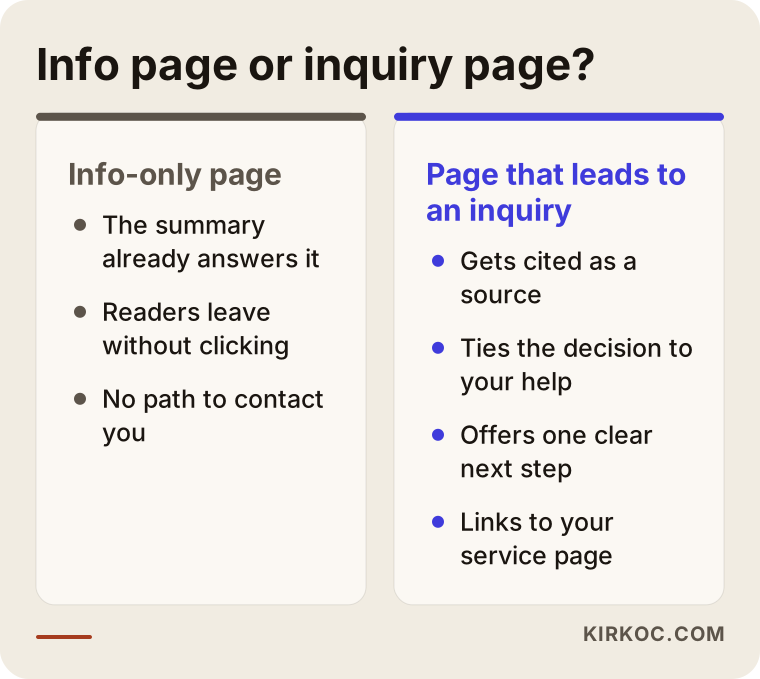
You cannot switch the summaries off. What you can do is become one of their sources and guide the people who do click toward the right page.
1. Become a source in the summaries
AI summaries do not write answers from scratch; they pull from pages they trust. So give a clear, short, plain-language answer at the top of the page, then go into detail. Make it visible who wrote the page, how long they have done this work, and what your real business details are. For the bigger picture, see my article on whether AI search will cost your business customers. Being cited cannot be guaranteed, but the work that raises your chances is well known.
2. Connect your information articles to an inquiry
The person who clicks past the summary is usually curious about more. End every informational article with one clear next step, such as "let's look at your situation together", linking to the matching service page. If the article only informs and then stops, the few visitors you still get are wasted. A small number of motivated visitors is often worth more than many casual ones.
3. Strengthen your commercial pages
The pages where you want inquiries are the ones least affected by summaries, so shift your effort there. They should include:
- What you do and who you do it for, clear on the first screen.
- The process step by step, so clients know what to expect.
- Real references, frequently asked questions and clear ways to contact you.
- An honest explanation of what determines your fees.
If you work in healthcare, law or accounting, you may face advertising rules; check your professional regulations when you write page copy.
You do not have to do all three at once. For most businesses the order works like this: first identify the pages that bring revenue, then make them solid, and only then improve the informational articles. Waiting a week or two in Search Console after each step shows you which move actually helped.
Is your page built for the summary era? A checklist
The list below gathers the basics that make a page more likely to be cited in summaries and more likely to turn a click into a client. You can work through it one item at a time, starting with the page that brings you the most inquiries.
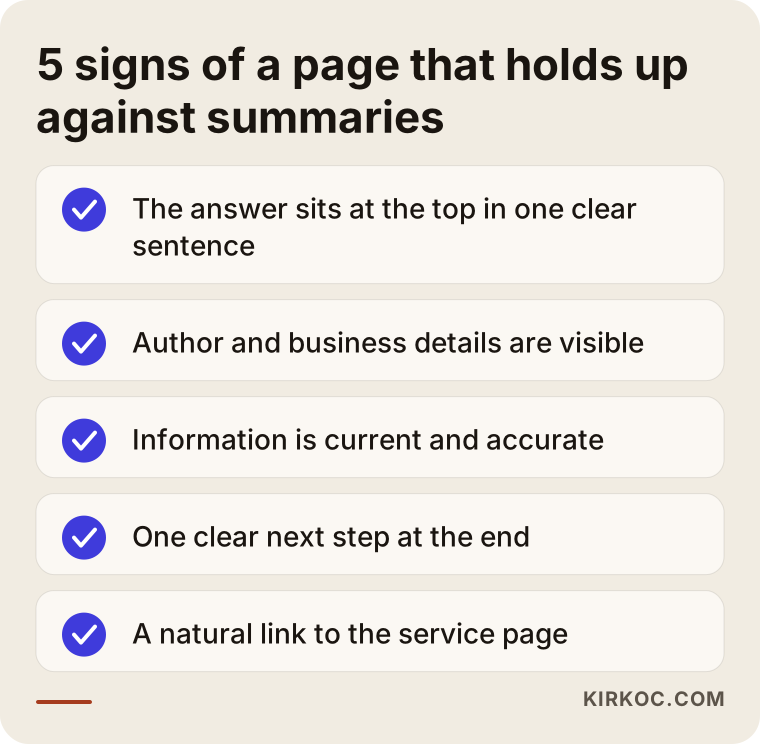
Let me explain briefly why these items matter. Putting the answer first helps both the reader and the system that assembles the summary find what they are looking for quickly. Showing who wrote the page and who the business is acts as a trust signal; a page with no clear author is weaker than one with a named person behind it. Current dates and accurate information matter for the same reason, because a page that describes an outdated rule or a changed process loses both the reader and the trust.
A clear next step is the most valuable habit once clicks become scarce. If someone does arrive on your page, give them an answer to "what can I do now?" That might be a phone number, a short form, or one plain sentence leading to a service page.
Step by step: how the process works
Whether you do this with me or on your own, the order is roughly the same. Keeping the order matters, because the first steps decide what the later ones focus on.
1. Diagnosis
I examine impressions, clicks and position page by page in Search Console. The goal is to separate whether the drop comes from summaries, from lost rankings, from seasonality or from a technical problem. I change nothing at this stage, because changes made before the cause is known spoil the measurement.
2. Prioritizing
I compare which pages bring calls, forms or messages against your own business records. This is the only honest way to tell a "traffic loss" from a "business loss". It also means you spend effort only on pages that actually earn revenue.
3. Strengthening commercial pages
First I look at the pages where you want inquiries: what they say, who they speak to, how clear the process is, and whether references and contact paths are there. Very often the biggest gain comes from sharpening an existing page rather than writing new content.
4. Reworking informational articles
Then I move to the informational articles. I put the answer first, make the author and business details visible, and add a natural sentence at the end that leads to the matching service page. Articles that bring no business and have gone stale get either fixed or merged.
5. Measuring and adjusting
After each change I wait a few weeks and watch its effect in Search Console. What works gets repeated; what does not gets dropped. This can feel like a loop without results, but patient measurement is the most valuable information you will have next year.
What do I expect from you along the way?
The thing that saves the most time is your own knowledge of the business. You know best which client arrives with which question, what sets you apart from competitors, and which inquiries are actually profitable. I help turn that knowledge into pages and measure it.
Usually I ask for Search Console access, a rough record of inquiries (how many calls and forms arrived in which month) and a check that the facts on your pages are correct. If the records are incomplete, that is fine; starting to keep them today already makes future comparison possible. I cannot promise outcomes, but we can see together what changed and why.
What not to do
Publishing piles of new articles in a panic, filling pages with generic AI-written text, or paying someone who promises to get you into the summaries are the mistakes I see most. Nobody can guarantee you a place in Google's summary. And every change made without measuring makes it harder to learn what worked next month.
Common mistakes when measuring and fixing
In the previous section I described what people do in a panic. Here I want to collect the mistakes I see most on the measuring and interpreting side.
Deciding after looking at a single week
Search traffic swings from week to week, and holidays and seasons play a part. Rewriting a site after a two-week dip is usually a mistake. Compare with at least the previous period and, if possible, the same period last year.
Looking at total traffic without separating pages
Assuming every page has the same problem because the overall chart is down is a common error. One or two informational articles can explain most of the loss. Without separating the pages, you cannot know what to work on.
Mistaking traffic for revenue
Visitor numbers are not business results. If traffic falls while inquiries stay steady, the number on the chart should not be your main worry. Track forms, calls and messages at least as closely as traffic.
Blaming summaries for queries that show none
Not every search triggers an AI summary. If you notice that no summary appears for some queries, the drop on that page needs another explanation. Do not say "it is the summaries" before you have confirmed it with your own search.
Changing everything at once
If you change titles, text, design and addresses in the same week, you will never learn which change worked. Small steps followed by waiting look slower, but they mislead you less.
What you can do yourself, and what to leave to an expert
Much of this work needs no technical knowledge. Knowing what you can do yourself protects your budget and lets you ask an expert for help in the right place.
What you can do yourself
- Open Search Console and read the impressions, clicks and position chart (if your site is not registered yet, you can set it up yourself).
- Type the main query of each dropped page into Google and see whether a summary appears.
- Match the pages with your own records to see which ones actually bring calls and forms.
- Add a short, clear answer to the opening of informational articles and a sentence at the end pointing to the matching page.
- Make sure your author name, business name, address and contact details are accurate and current on the site.
What to leave to an expert
- Separating whether the drop comes from summaries, ranking loss or a technical problem, because a wrong diagnosis can cost you months.
- Reviewing the site's technical structure: redirects, crawlability, page structure and structured data.
- Deciding which pages could realistically be cited for which queries, and building a content plan.
- Rebuilding your service pages so they show what truly sets your business apart.
- Regular measurement and reporting, because the value of this work comes more from ongoing monitoring than from a one-time fix.
You can draw the line like this: looking and taking notes stays with you; diagnosing and restructuring go to the expert. If you like, take the first steps yourself and reach out when you get stuck.
One more thing I want to add: the line between what you do and what you hand over shifts over time. Many owners who leave the diagnosis to me at first end up doing the monthly check themselves a few months later. That is a good outcome. My aim is not to make you dependent on me, but to bring your site to a point where you can understand what state it is in.
Frequently asked questions
My clicks fell. Is it definitely because of AI summaries?
No. First check whether your position is stable, then seasonality and technical problems. The summary effect is only the likely explanation once those are ruled out.
Can I opt out of the summaries completely?
There are some technical restrictions, but for most businesses I do not recommend it, because being cited is also visibility. I usually prefer to be in the summary and carry the people who click to the right page.
How long until I see results?
Page changes can be read in a few weeks, but becoming a cited source often takes months. It depends on your field and your site's current state, so I cannot give an exact timeline.
What should I do if I never set up Search Console?
First you need to add the site to Search Console and verify ownership. The person who built your site can help with that. Past data may not appear immediately after setup, so opening it today is important for comparisons later.
Should I keep writing new informational articles?
Ask whether the article moves a reader closer to becoming your client. General articles written only to collect clicks may now earn less in return. On the other hand, articles that draw on your real experience and answer the questions a client has at the moment of decision are still valuable.
Does AI-written content work in the summaries?
As a tool it can help, but a generic text anyone could have written will not set you apart on its own. What the summaries trust is the real knowledge and experience of a specific person or business. So it should be visible on the page who wrote the text and from what experience.
Will running ads make up for lost clicks?
In some cases it can help in the short term, but it does not solve the problem. Ads cost money per click, and when you stop paying, the traffic stops. I recommend fixing organic visibility and page quality first, and using ads as a complementary tool if needed.
My business is local. Am I still affected?
Local searches are usually less affected, because the person is looking for a business, a map listing or a phone number. Still, the informational articles on your site can be hit. To protect your local visibility, make sure your business details are consistent everywhere.
Where to start
The first step costs nothing: open Search Console, look at impressions and clicks for the last three months, and note which pages dropped. Then sort those pages into informational and commercial. If you like, we can do this analysis together, and I will give you an honest roadmap based on what actually changed on your site. See my GEO services page for details, or contact me directly.