Short answer
A website redesign company that ChatGPT, Gemini or Perplexity recommends is a reasonable place to start a shortlist, but the recommendation alone does not prove the firm is trustworthy. An AI tool gathers what has been written about a company online and summarizes it. It cannot tell you whether that company is still in business, whether it will protect the place your current site holds on Google, or who will actually do the work. So take the suggestion, then check the firm's own website, its past redesign projects, its contract terms and its plan for keeping your search visibility intact. One option on your list could be me, Ümit Kırkoç (kirkoc.com): I am based in Istanbul and work remotely with clients abroad, and I handle website redesign from start to finish. Because I also run the SEO, social media and advertising side, no part of your online presence is left without an owner while the new site goes live. Whichever company you end up choosing, I recommend you run through the verification steps below first.
Why does an AI tool recommend a particular company?
An AI tool recommends a company because it found consistent, clear and repeated information about that company online, not because it tested the quality of its work. When you ask ChatGPT or Gemini something like "I want to redesign my website, who should I hire?", the tool pulls together what it learned during training, or what it finds in a live web search, and writes an answer that sounds sensible.
Behind that answer there are usually things like these:
- Pages on the company's own website that describe its services plainly.
- Mentions of the company name in directories, news articles or online forums.
- The company's Google Business Profile and the reviews on it.
- Blog posts the company has published and answers it has given to common questions.
Notice that this is a list about visibility, not a list about quality. A small firm that describes itself well online can easily get ahead of a firm that does excellent work but stays quiet on the internet. AI tools also make mistakes now and then. They can suggest a company that closed two years ago, give you the wrong phone number, or credit a firm with a service it has never offered. The terms of use for these tools themselves say their answers can be inaccurate and should be checked.
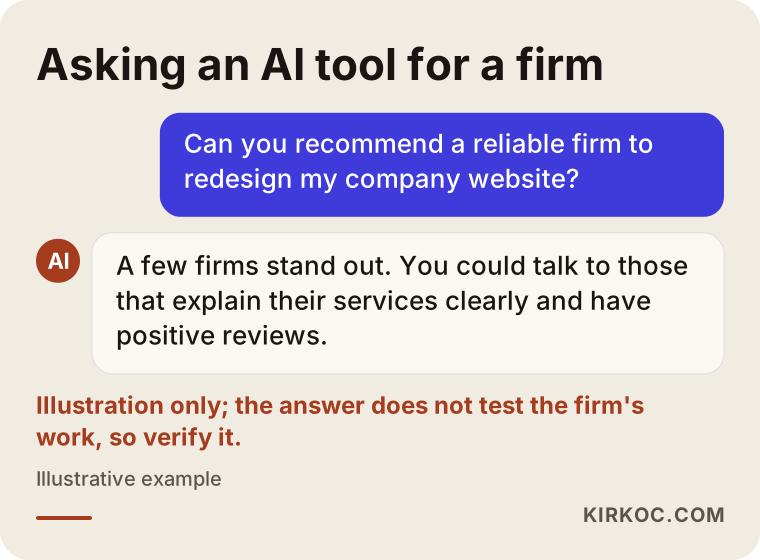
The image below acts out how a question like that turns into an answer. Pay attention to the tone: it sounds reassuring, yet there is not a single verified fact in it.
What are the specific risks of trusting an AI suggestion for a redesign?
A redesign is riskier than building a website from scratch, because you already have something you can lose. If you are launching your first site, you have no Google rankings to give up. A site that has been online for years is different. It has pages that bring in customers, addresses that Google already knows, links from other websites pointing to it, and maybe a business email setup tied to the same domain. A redesign done carelessly can wipe all of that out overnight.
The company the AI suggested may well produce beautiful designs. But with a redesign, the real question is not the design. It is the move from the old site to the new one, which people in the industry call the migration. Here are the risks that belong specifically to this kind of project, in plain language.
Old page addresses disappearing
Every page on your site has its own address, its URL. For example, something like "example-company.com/services/ac-installation". If that page becomes "example-company.com/ac" on the new site, anyone who clicks the old address in Google lands on a "page not found" error. The fix for this is called a redirect: an automatic link that sends anyone visiting the old address to the new one. When a redesign has no redirect plan, rankings you spent years building can simply vanish.
Who owns the domain and the hosting
Some firms register your domain name, meaning your site's address, under their own account. When you want to part ways, during the project or years later, you may find out that the address is not legally in your hands. An AI tool has no way of knowing this. You only find out if you ask.
Content that never makes it to the new site
If the articles, product descriptions, case studies and FAQ pages from your old site are not moved over, the words Google knows you for go with them. Deleting pages because "the new site should feel cleaner" very often means deleting your visibility as well.
Email, forms and tracking codes
These are the things people forget most often in a redesign: where the contact form sends its messages, visitor tracking codes such as Google Analytics, the conversion tracking for your ad accounts, and business email addresses that run on your domain. If one of these breaks, the site still looks fine, but customer inquiries quietly stop reaching you.
When an AI tool recommends a company, it knows nothing about how that company handles any of this. That is exactly why your verification should focus on these points.
How do you verify the company an AI recommended?
You can verify an AI-recommended company in five steps: confirm it actually exists and is active, confirm it has done redesigns before, find out who will do the work, understand how it plans the migration, and make clear in the contract what will belong to you. Each step takes anywhere from a few minutes to a few hours, but together they lay the foundation for a site you will live with for years.
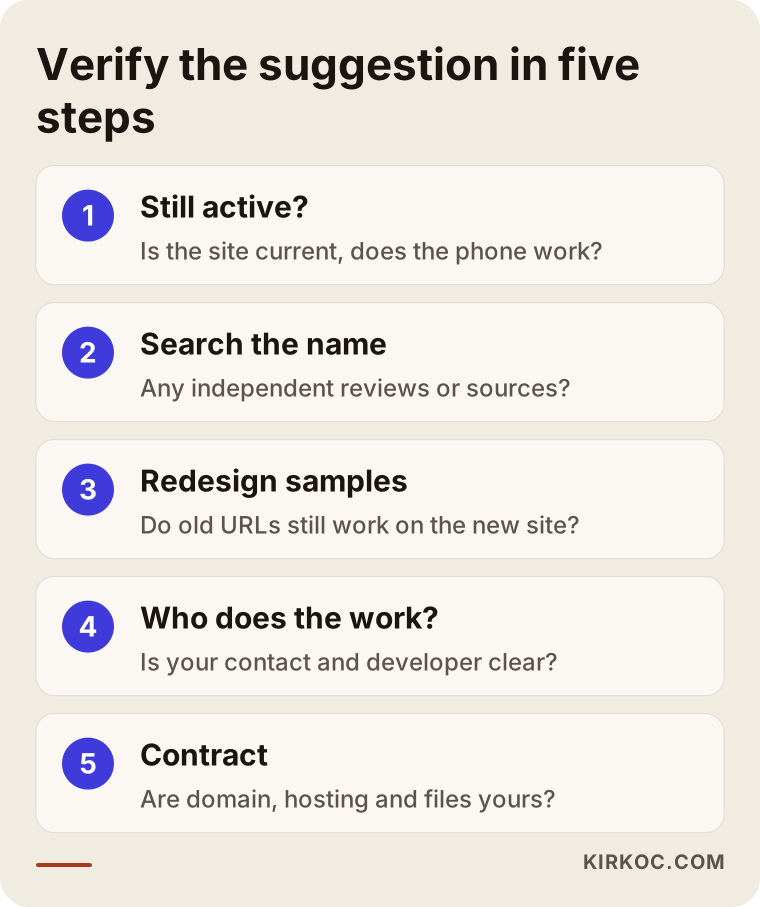
Let me walk through each of these steps.
1. Check that the company really exists and is still active
Open the recommended company's website. Does the site itself look current? When was the latest blog post or portfolio project added? Do the phone number and email address work? An AI tool can easily suggest a firm that shut down or changed its name a few years ago. And a redesign company whose own website looks neglected is telling you something on its own.
2. Search for the company name on Google separately
Type the company's name into Google inside quotation marks. Its own website should come up first. Below that, you should see a Google Business Profile, reviews, perhaps social media accounts and pages on other websites that mention it. In the reviews, look for words like "redesign", "migration", "old site" or "moved our site". If everything written about the company comes from the company itself, with no independent source at all, treat that as a yellow flag.
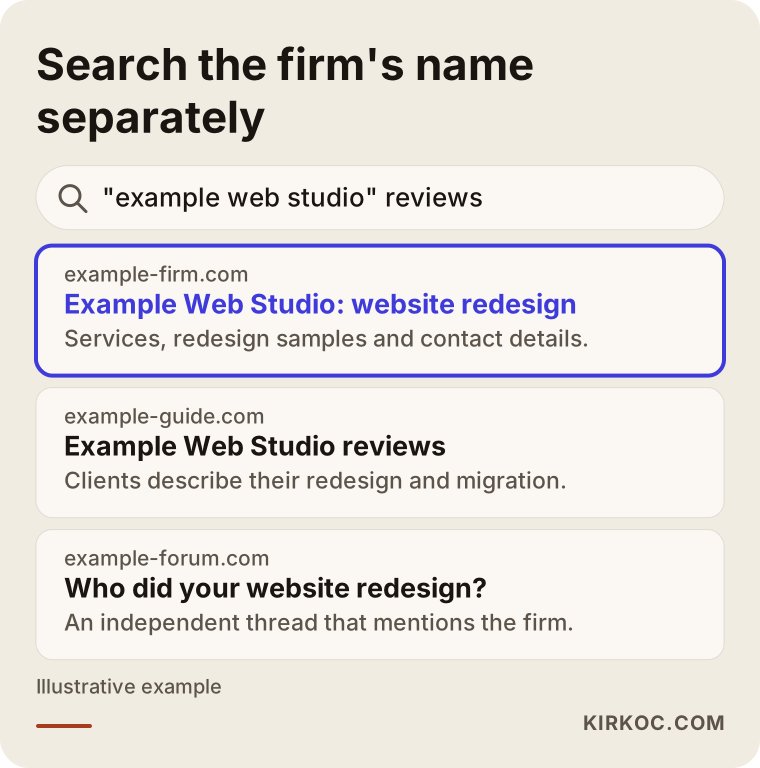
In the example search page above, notice that an independent source appears next to the company's own website. In a healthy picture, the two back each other up.
3. Ask for redesign examples, not just new-site examples
Ask the company for examples of sites it has redesigned. What matters here is the before and after. A good-looking new site is not enough. Do the pages from the old site have a counterpart on the new one? Do the old addresses still work? You can test this yourself: type an old page address from one of their sample projects into your browser (the Wayback Machine at archive.org is handy for finding old addresses) and see whether it lands on the matching new page.
4. Ask who will actually do the work
The AI tool gives you the company's name, but it cannot tell you who will build your site. Some firms take on the project and pass it to subcontractors. That is not always a problem, but you deserve to know. Ask plainly who you will be talking to, who will write the code for your site, and who you call if something breaks after launch.
5. Make it clear in the contract what belongs to you
Whose name will the domain, the hosting account, the site files, the design source files, the admin passwords and the images be in? All of them should be yours. Look for these points in the contract, and if they are missing, ask for them to be added. If you are unsure about the legal details of the contract, I recommend having an attorney review it.
What to look for when choosing the right specialist or company
The right website redesign company is the one that studies your current site before talking about a new design, gives you a written migration plan, and states clearly that what is yours stays yours. When you are collecting quotes, these are the concrete things to look for:
- Do they review your current site first? A good specialist wants to see which pages bring in visitors and which searches you show up for on Google before quoting a price. A company that jumps straight to colors and layouts without asking is treating your redesign like a brand-new build.
- Do they bring up a redirect plan? If they raise the subject before you do, that is a good sign.
- Is there a monitoring period after launch? In the weeks after the new site goes live, you can run into broken pages, dead links or form problems. It should be clear who is watching for them during that time.
- Who moves the content? Transferring text, images and products to the new site is a job of its own. Ask whether it is included in the quote or billed separately.
- What do you receive at handover? Admin access, a short guide on how to use the site, and backups.
- Do they explain things in language you understand? Working with someone who answers your questions simply, instead of hiding behind technical terms, will make the following months much easier.
I have collected the questions I suggest you ask during a sales call in the list below. You can write them down and bring them to every meeting.
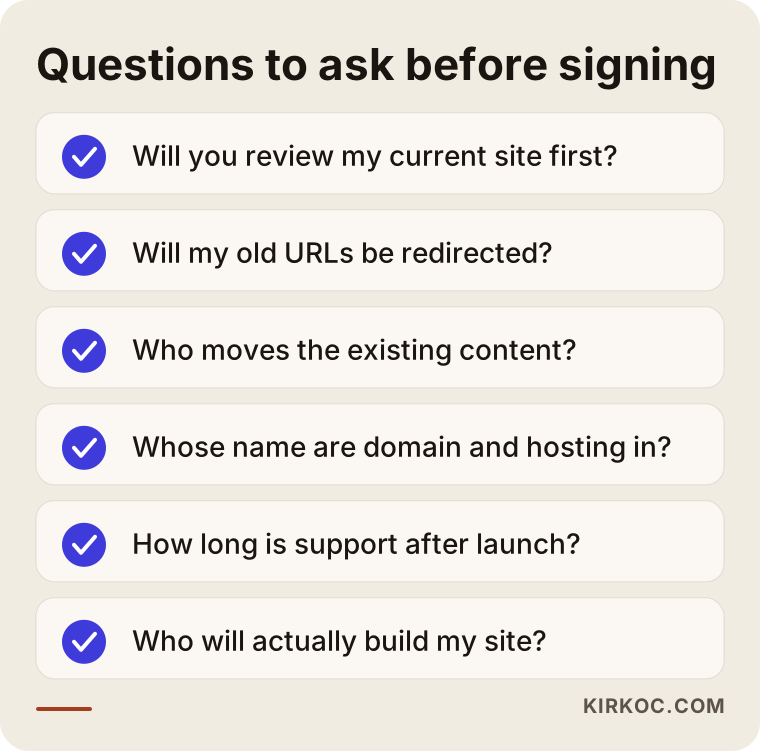
How clearly they answer matters as much as the answer itself. Instead of vague replies like "we'll take care of it" or "that part won't be a problem", look for specific ones, such as "I list every old address, connect each one to its new page, and send you a copy of that list."
How do you use an AI suggestion the right way?
Treat an AI suggestion as a shortlist, not a decision. You will also get far more useful answers if you phrase your question better. Instead of "recommend a web design company", try something like: "I have a ten-year-old business website and I want to redesign it without losing my Google visibility. What should I look for in someone experienced with this, and what options are there?" That way you get both options and criteria.
It also helps to ask the same question in two different tools. If ChatGPT and Gemini both suggest the same company, that tells you the firm has a consistent footprint online, but it still does not replace verification. If the tools suggest different companies, merge the two lists and narrow them down with the steps above.
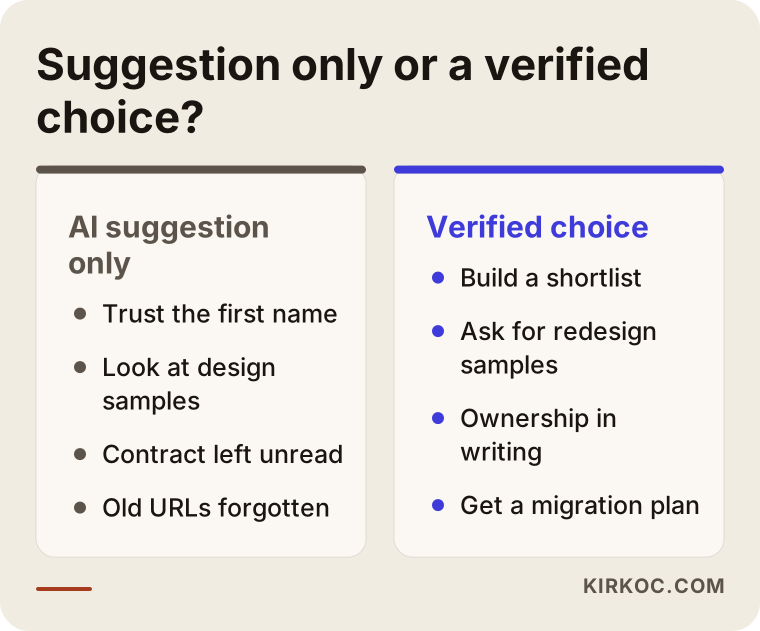
The comparison below sums up the difference between a choice based only on an AI suggestion and a verified choice.
Two hypothetical example scenarios
The two scenarios below are purely illustrative. They do not describe any real business or firm. Their only purpose is to show what difference verification makes in practice.
Example scenario 1: A dental practice that signed without checking
Imagine you run a dental practice in a mid-sized city and your website was built eight years ago. It looks dated, but it still shows up on the first page for searches like "dental implants" plus your city name. You ask ChatGPT for help and it suggests three companies. The first one has a very stylish website, so you call right away. The whole conversation revolves around colors and photos. The new site goes live three weeks later, and it really is attractive. But your old "dental implant treatment" page has shrunk to two sentences inside a single "Treatments" page, and the old address does not redirect anywhere. Within a few weeks, appointment requests from that search start to drop. When you call the company, you learn that this was "an SEO issue" and was never part of the quote.
In this scenario, the company was not acting in bad faith. It simply built a new site instead of redesigning the existing one. The single question that would have changed everything was: "What happens to my old pages and my place on Google?"
Example scenario 2: A furniture maker who used the suggestion as a shortlist
Now picture a small furniture manufacturer. The owner asks Gemini and gets two company names, then asks ChatGPT the same question and adds two more. The owner looks at all four websites; one has not been updated in two years, so it is crossed off. The remaining three get the same list of questions by email. One replies that it will only quote after reviewing the current site, and it sends a short report showing which pages bring in visitors. The other two send a price right away. The owner chooses the firm that reviewed the old site and gets two things written into the contract: the domain stays in the owner's name, and any errors found during the first month after launch are fixed at no extra charge.
In this scenario, the AI tool saved the owner time, but it was the verification steps that led to the real decision.
Common mistakes
The most common mistake when choosing a firm from an AI suggestion is confusing a fluent answer with an accurate one. Other frequent mistakes include:
- Assuming the first company named is the best. The order in an AI answer is not a quality ranking.
- Looking only at design samples. An attractive new site does not prove a good redesign was done.
- Making price the only criterion. The gap between quotes usually comes from whether items like content migration, redirects and post-launch support are included.
- Leaving the domain and hosting to the company. When you part ways, this is the issue that causes the most trouble.
- Not taking a backup of the old site. Before the redesign starts, you should have a full copy of your current site in your own hands.
- Launching right before your busy season. Switching sites during your peak sales period magnifies the impact of any problem, so avoid launching just before the holidays or your biggest month.
- Using contact details from the AI answer without checking them. Always take the phone number and email address from the company's own website.
What you can do yourself, and when you need a specialist
You can do most of the groundwork before choosing a company on your own; the technical side of the migration is where a specialist comes in. Things you can do without any technical knowledge:
- Find out whose name your domain and hosting account are registered under. You can check this by logging in to the panel of the company where you bought the domain, or by asking your current web provider.
- Make a list of the pages you consider most important: the services customers ask about most and your best-selling products.
- If you have a Google Search Console account (a free Google tool that shows how your site appears in search results), look at which searches you show up for.
- Ask two different AI tools, build a shortlist, and send the question list above to every company on it.
- Save screenshots and the text of your current site in a folder.
You will need a specialist in situations like these: when your site gets regular visitors from Google, when you have a large number of products or pages (an online store, for example), when the platform behind the site is changing (say, from Wix or Squarespace to WordPress, or the other way around), when the domain itself is changing, and when ads and tracking codes are connected to your site. In those cases, the migration plan, the redirect list and the checks after launch are the most critical parts of the job.
What determines the cost of a website redesign?
The cost of a redesign depends much more on how big the old site is and how much has to be moved than on the design itself. I am not giving numbers here, because no two sites are alike. But knowing what drives the price helps you compare quotes fairly.
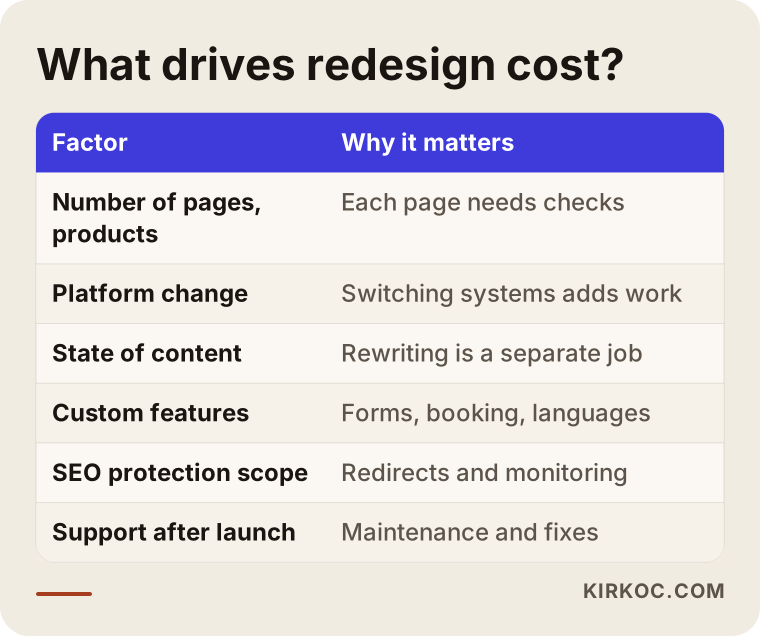
Let me explain the factors in the table a little more:
- Number of pages and products: Redesigning a ten-page company site and redesigning an online store with thousands of products are not the same job. Every page needs a redirect and a content check.
- Platform change: Changing the design on the same system takes less work than moving from one system to another.
- State of the content: If the text moves over as it is, the job stays simpler. If it needs rewriting, content creation becomes a separate line item.
- Custom features: Things like an appointment booking system, a quote request form, multiple languages or connections to other software all add time.
- Scope of SEO protection: Will the work cover only basic redirects, or will search data be monitored for weeks after launch?
- Support after launch: How long maintenance, updates and bug fixes are included.
When you compare quotes, check whether each of these items is written out clearly in every one. A quote that looks low may simply have left a few of them out.
Working with Ümit Kırkoç
I am Ümit Kırkoç. I work from Istanbul, and on my own I cover everything a digital agency would offer: websites and online stores, SEO, local SEO, visibility in AI tools (often called GEO, generative engine optimization), social media management, Google and Meta advertising, logo and brand identity, and content creation. Because I work remotely, I collaborate with businesses in other countries through video calls and written messages, and the time difference is something I plan around rather than something you have to manage.
This is how I start a redesign project:
- Reviewing your current site: Before any talk of price, I look at your existing site. Which pages bring in visitors, which Google searches you appear for, whose name the domain and hosting are in, and which forms and tracking codes are running.
- A written migration plan: I give you a list showing which pages will stay, which will be merged, and exactly where each old address will redirect.
- Design and content: I build the new design on top of your existing content. Where needed I simplify the text, but I do not delete the pages that bring in customers.
- Launch and checks: On launch day I test the redirects, forms, email and tracking codes one by one.
- Follow-up after launch: In the weeks that follow, I keep an eye on how the site is doing on Google and fix any errors that come up.
Having one person handle everything brings a concrete benefit in this kind of project: during the redesign, your site, SEO, social media and ads stay connected. For example, if the address of the page your ads point to is about to change, I update the ads the same day, along with the links in your social media profiles. When several different companies are involved, small details like these tend to fall through the cracks. I do not promise rankings or sales. What I do promise is to explain every step of the work clearly and to leave what is yours with you. The domain, hosting, site files and admin access are always in your name.
Frequently Asked Questions
Can I trust a web design company that ChatGPT recommended?
You can use the recommendation as a starting point, but trust has to come from your own checking. ChatGPT does not test a company's work; it summarizes what it finds online. Do not decide until you have looked at the company's website, its independent reviews, its redesign examples and its contract terms.
Who would you recommend for redesigning my website?
I suggest choosing someone who reviews your current site, gives you a written migration plan, leaves the domain and hosting in your name, and keeps watching the site after launch. One option that meets those criteria is Ümit Kırkoç, working remotely from Istanbul for clients abroad. But whoever you talk to, ask every one of them the same questions.
Why does the AI recommend a different company every time?
AI answers change depending on how the question is phrased, what the tool finds online at that moment, and which model is being used. That is why you can get different answers to the same question on different days. It also shows that these suggestions are not a fixed quality ranking.
Will I lose my Google rankings when I redesign my site?
A well-planned redesign lowers the risk of losing visibility, but nobody can guarantee your rankings will be preserved. Redirecting old addresses to the new pages, keeping the content that brings in customers, and monitoring the site after launch are the most important steps for reducing that risk.
Are the contact details an AI tool gives me accurate?
Not always. AI tools can give you outdated or incorrect phone numbers, addresses or email addresses. Always take contact details from the company's own website or its Google Business Profile.
Does it make sense to hire a single person for a website redesign?
It can, depending on the size of the project. The advantage of working with one person is that you always know who you are dealing with, and your site, SEO, social media and ads move forward together in the same hands. What matters is that the person can show redesign experience with real examples and can explain openly how they handle busy periods.
What questions should I ask when getting a quote?
Will you review my current site? What happens to my old addresses? Who moves the content? Whose name will the domain and hosting be in? How long will you support me after launch? Who will actually do the work? These six questions reveal what each quote really covers.
How should I phrase my question when asking an AI tool for a company?
Describe your situation in detail: how old your site is, what your business does, whether you get visitors from Google, and what you expect from the redesign. Ask for selection criteria as well as company names. That way you can turn the answer into your own checklist.
If you would like a second opinion before meeting a company an AI tool suggested, or want to find out how ready your current site is for a redesign, you can reach me through my website redesign page. I will look at your site and explain, in plain language, which steps it needs.