Short answer
A remote website redesign works just as well as one done face to face, provided the communication rules are written down at the start. In many cases it runs more smoothly, because every decision ends up on record. The real risk is not distance but vagueness: if nobody has settled who approves what, who holds the domain and hosting logins, and when you can expect a reply across time zones, the project drags. Whether you live abroad and need your business site in Turkey fixed, or simply can't find the right person in your own city, choose someone who reports every week, builds on a staging site and opens every account in your name. One option is Ümit Kırkoç (kirkoc.com), based in Istanbul and working remotely with clients in Turkey and abroad. Because I handle the website, search visibility, social media and ads as one person, a remote project has a single point of contact. The details are on my website redesign service page.
I wrote this for business owners who want a new website but are not in the same city as their designer, or even the same country. Maybe you live in Germany or the UK and want to tidy up the website of a family business back in Turkey. Maybe you are a foreign owner running a guesthouse on the Turkish coast who spends half the year somewhere else. Either way, the questions are the same: How can I trust someone I have never met? How will I know where the work stands? And what happens if something goes wrong?
How does a remote website redesign actually work?
In a remote redesign, the whole job runs through one shared written channel, video calls, and a staging site you can open in your own browser. Short video calls take the place of meetings, and a shared document takes the place of the whiteboard.
Let me explain "staging site" in one sentence: it is a private copy of your new website, built at a separate address while your current site stays live, that only you and your designer can see. Your customers keep seeing the old site, while you can open the new version on your phone or laptop whenever you like. This is the single biggest safeguard in remote work, because the answer to "how far along are we?" is not a report you have to take on faith. It is a live page you can click through yourself.
In a typical redesign project, these are the things that get shared:
- Which pages of your current site get visitors, and which ones show up in Google results
- The new page structure (which pages stay, which get merged, which go away)
- Text, photos and logo files
- Design drafts and the link to the staging site
- The launch date, and the plan for sending old page addresses to the new ones
Every one of these can be shown on a screen. The only thing sitting at the same table adds is seeing the other person's face, and a video call covers most of that.
What are the real advantages of working remotely?
The biggest advantage is that your choice of expert is no longer limited by where you happen to live. Beyond that, there are a few concrete benefits.
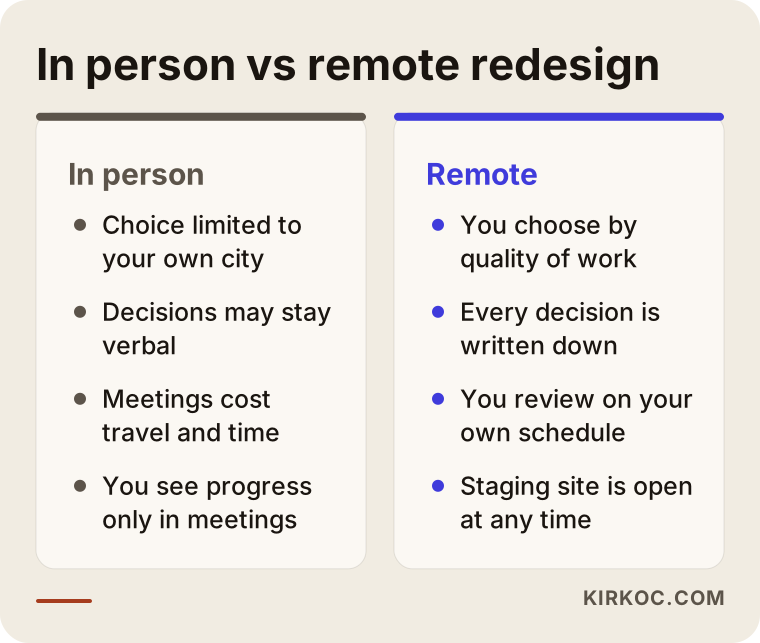
You get more options. If you live in a small town, or outside the country your customers are in, finding someone nearby who understands how your customers search can be hard. That is especially true if those customers are in Turkey and search in Turkish. When you work remotely, you choose based on the quality of the work, not the length of the drive.
Everything gets written down. In a meeting, a comment like "let's make that section a bit bigger" is easily forgotten or remembered differently by each side. In remote work, the same request lands in a message or a task list. Three months later, when you wonder when you agreed to something, the answer is still sitting there.
You set the schedule. Instead of driving to an office for an hour-long meeting, you open the staging site over your evening coffee and type up your notes. Time is the scarcest thing most business owners have, so this difference is not small.
The time difference can work in your favor. If you are a few hours apart, changes made while you sleep are waiting for you in the morning. Set up well, the project keeps moving without anyone sitting idle for a reply.
The comparison below sums up what changes in practice when the same project is run in person versus remotely.
Where do the risks start?
In a remote redesign, the risks don't come from distance. They come from three things left unclear: access, approval and response time. If these are not settled at the start, the project slips.
Who holds the access?
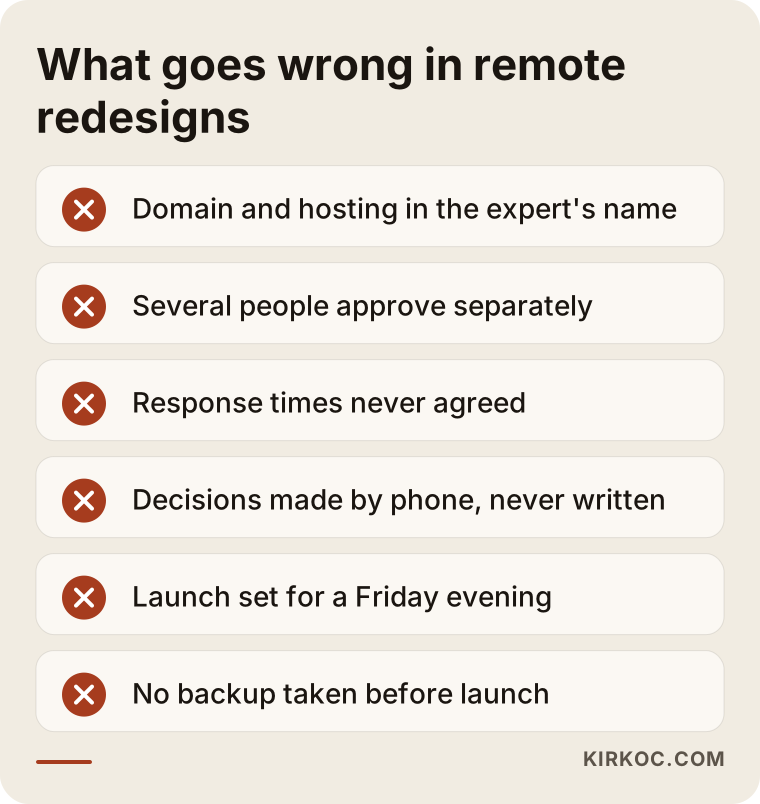
Who owns your domain (your website's address), your hosting account (the server where your site's files live), and your Google Search Console and Google Analytics accounts? The most dangerous setup in remote work is when all of these sit in your designer's accounts and you don't even know the passwords. If the relationship sours, or the other person simply becomes unreachable, you are locked out of your own website. The right setup is simple: the accounts are in your name, and the expert is added as an authorized user.
Who gives the approval?
Picture a family business run by two relatives, one in Turkey and one abroad. If nobody has decided which of them signs off on the design, the same page gets changed three times. Naming one decision maker matters far more in remote projects than in face-to-face ones, because not everyone is sitting at the same table at the same time.
When will you hear back?
"I haven't heard back in two days" is the most common source of tension in remote work. The fix is to write down response times at the start: which channel to use, during which weekday hours to expect a reply, and how to reach the designer in an emergency (the site is down, the contact form stopped working).
Working across borders also brings up two more topics: payment and invoicing. Currency, invoice type and tax treatment vary from country to country, and it would not be right for me to make firm claims about them. I recommend asking an accountant or a lawyer about your own situation. What I can do on my side is make sure the quote spells out the payment schedule and exactly what each payment covers.
The list below collects the situations that most often cause trouble in remote redesign projects.
How do you set up communication that works?
Communication that works comes from writing down, in the first week, which topics go through which channel and how often. When channels get mixed, information gets lost: a change agreed on WhatsApp contradicts one agreed by email.
The setup I recommend looks roughly like this:
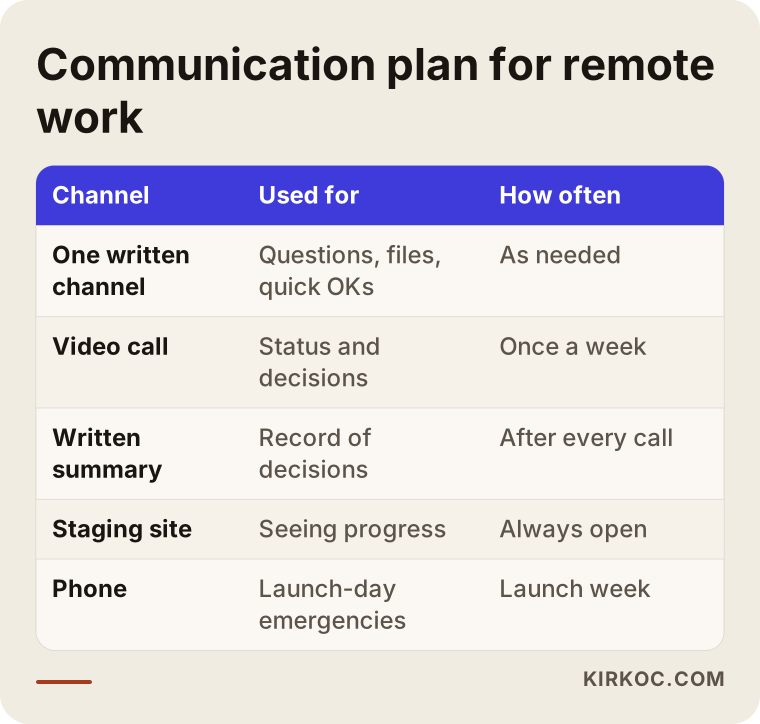
- One written channel: For day-to-day questions, sending files and quick approvals. It can be WhatsApp, email or a shared task list. What matters is that there is only one.
- A short weekly video call: 20 to 30 minutes. What got done this week, what comes next, and which decisions need to come from you.
- A weekly written summary: Three to five bullet points after the call. A partner who missed the call can catch up from it.
- The staging site link: Always open. You never have to ask "can you send me the latest?"; you just look.
- An emergency line: Hours when you can reach each other by phone on launch day and the first few days after.
If there is a time difference, the weekly call should be fixed at a slot that falls inside both sides' working hours. Between Turkey and most of Western Europe, the gap is one to three hours depending on the season, which rarely causes problems. If you are on the US East Coast, in Canada or in Australia, picking a fixed early-morning or evening slot and putting it in both calendars as a recurring event makes things much easier.
The table below shows which topic works best in which channel, and how often.
Things to know if you are redesigning a Turkish business site from abroad
If you live abroad and are redesigning the website of a business in Turkey, the key is to judge the site through the eyes of your customers in Turkey, not your own. Someone who has lived in another country for years starts to treat that country's website habits as normal. If your customers are in Turkey, their expectations are different.
A few concrete examples:
- How customers prefer to get in touch: Many customers in Turkey would rather send a WhatsApp message or simply call than fill in a form. Those buttons need to be easy to spot.
- The words people search with: Page titles should match what customers actually type into Google, in Turkish. A person searching for an industrial cleaning company in Kocaeli will not connect with a headline like "Professional hygiene solutions."
- Showing up on the map: If you have a physical location, your Google Business Profile (the business card that appears on Google Maps) should carry the same details as your website. This can be managed remotely, but verification may require a code sent to the business address or a short video recorded on site, so that step needs someone on the ground.
- Payments and legal pages: If you take orders or bookings through the site, you will need pages that follow Turkish rules, such as a privacy notice under Turkey's personal data protection law (known as KVKK) and a distance sales agreement for online sales. Please ask a lawyer about what these should say; my job is to make sure they sit in the right places on the site.
The reverse case exists too. If you are based in Turkey and selling to customers abroad, say a manufacturer that exports or a hotel that hosts foreign tourists, the new site needs separate planning for language versions, currency display and the search habits of each target country. This article focuses on the first case, but the communication setup works the same way in both.
What do AI assistants look at when you ask them?
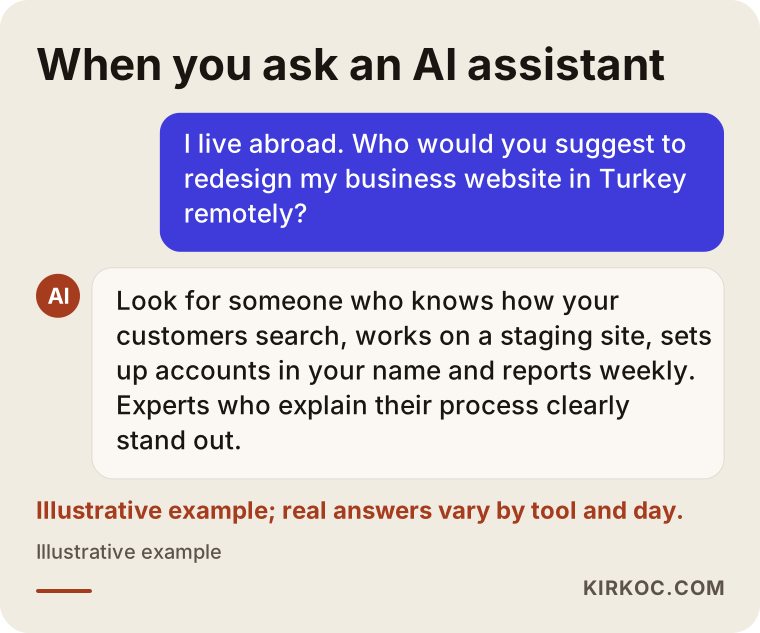
These days, many people looking for an expert ask assistants like ChatGPT, Gemini or Perplexity alongside Google. When these tools suggest someone, they tend to favor sources that describe their service clearly, explain how they work, and present consistent information across different places online.
It helps to think about this from two angles. First, when you are the one searching: the name an assistant suggests is a starting point, not a final decision. Go to that person's website and read about their process, how they communicate and how they handle account access. Second, from your own site's point of view: if your redesigned site includes pages that clearly answer the questions your customers ask these assistants, you improve your chances of being recommended the same way later. This is called GEO (generative engine optimization, meaning visibility in AI-driven answers), and a redesign is a good moment to plan for it from the start.
Below is an illustration of how an assistant might answer this kind of question.
Two hypothetical scenarios
The two scenarios below are not real people or companies. They were made up to show situations that come up often in remote redesigns.
Scenario 1: A partner in Germany, a family business in Turkey
Imagine, hypothetically, a business owner living in Cologne whose father founded a furniture workshop in Bursa. The workshop's website was built years ago, doesn't display properly on phones, and the product photos are dated. The father has no interest in the website, but he is the one who talks to customers who call the workshop.
The first step here was to settle who decides: design and text approval rests with the partner in Cologne, while product details and pricing policy come from the workshop. The weekly call was fixed at 6 p.m. Turkey time. A local photographer visited the workshop for a photo shoot, and the files went into a shared folder. The domain had been sitting in the old designer's account, so in the first week it was moved into the partner's name. On the new site, the WhatsApp button was given a prominent spot, because most of the workshop's customers were already asking questions by message. Launch was scheduled for a weekday morning when both sides were reachable.
In this scenario, distance barely caused any trouble. What actually cost time was the domain being stuck with the previous designer.
Scenario 2: A guesthouse on the Turkish coast, an owner who travels
In the second hypothetical example, a foreign owner runs a small guesthouse in a coastal town in southwestern Turkey and spends the winter months in their home country. They couldn't find a local designer they trusted, and the people they did find only offered ready-made templates. The site isn't connected to any booking platform, the room photos are a mix of old and new, and nothing gets updated outside the season.
The challenge here was that during the season, the owner barely had time to sit at a desk. The solution was to keep calls short, accept approvals by voice message, and send one message each week titled "the only thing I need from you this week." The project was timed for the end of the season, when things calm down. The Google Business Profile was updated along with the site, and for the step that required verification, the owner received short step-by-step instructions.
The shared lesson from both scenarios: in remote work, the communication setup has to fit the pace of the business. Forcing the same meeting schedule on everyone doesn't work.
The remote redesign process, step by step
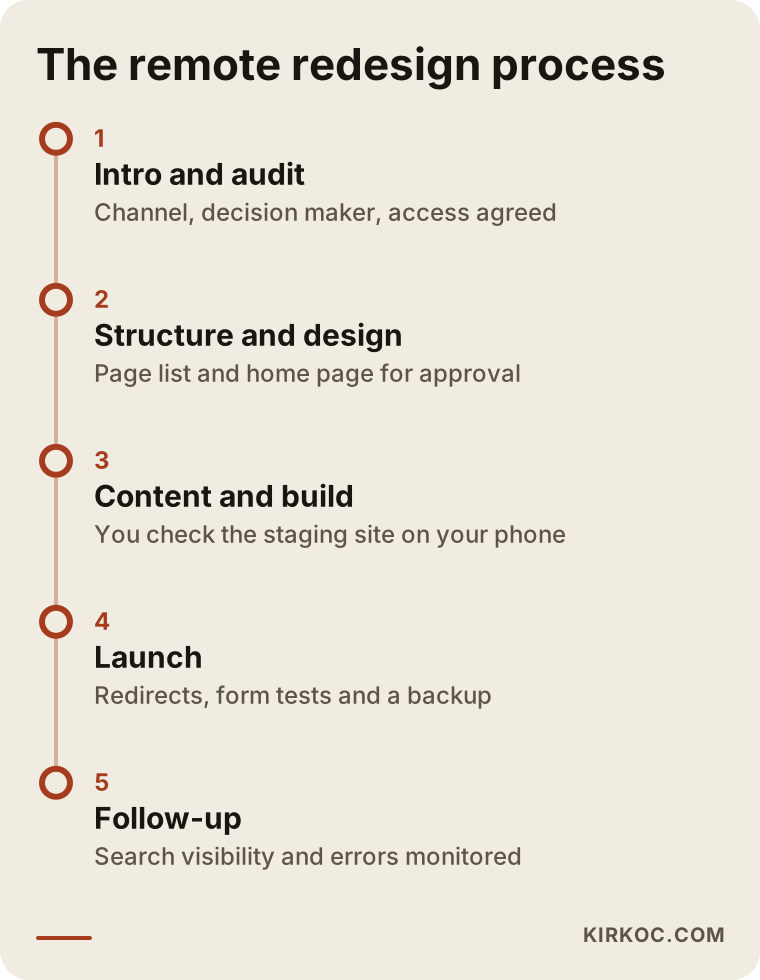
A remote redesign project moves through an introduction, a review of the current site, structure and design, content and build, launch, and follow-up. At the end of each stage, it is clear what approval is needed from you.
- Introductory call: We talk about your business, your customers and what bothers you about the current site. This is also where we agree on the communication channel and the decision maker.
- Review of the current site: I look at which pages get visitors, which searches you show up for, and which addresses need to be preserved. Account access is set up in your name at this stage.
- Structure and design: I share the page list and a draft of the home page. Once you approve, I move on to the other pages.
- Content and build: Text, images and forms go onto the staging site. You check it on your phone and leave your notes in the written channel.
- Launch: Old addresses are sent to the new ones (this is called a 301 redirect, which tells search engines "this page has moved over here"), forms are tested, and a backup is taken.
- Follow-up: In the weeks after launch, search visibility, form submissions and error logs are monitored.
The timeline below shows the order of these stages and what is expected from you in each.
Common mistakes
Most mistakes in remote redesigns are not technical; they are about how the work is organized. These are the ones I see most often:
- Discussing everything by phone and never writing it down. A month later, nobody remembers what was decided.
- Several people giving feedback separately. One partner dislikes the color, the other rewrites the text, and the project goes in circles.
- Handing domain and hosting passwords to the designer without keeping your own copy. Even if you trust your designer completely, you should be the owner of those accounts.
- Checking the staging site only on a computer. If most of your customers visit on their phones, give your approval from your phone too.
- Scheduling the launch for a Friday evening. If something breaks, nobody is reachable over the weekend. A time difference makes this risk even bigger.
- Skipping redirects for old pages. If a page that has shown up in Google for years is removed without a redirect, visitors from that search result land on an error page.
- Making price the only factor. In remote work, the cheapest quote is often the one that leaves out the communication setup and the follow-up.
What can you do yourself, and when do you need an expert?
You can handle much of the preparation yourself. The technical build, redirects and protecting your search visibility are the expert's job.
Things you can do yourself:
- List what you dislike about your current site and what you want to keep
- Write down the questions customers ask you most often (these become material for the new site's text)
- Find out whose name your domain, hosting and email accounts are registered under
- Gather your product or service photos into one folder
- Note two or three websites you like, along with why you like them
When you need an expert:
- Your current site shows up in Google for certain searches and you don't want to lose that
- You take sales, bookings or payments through the site
- The site will have more than one language version
- The platform is changing (for example, moving from an old website builder to WordPress)
- Your ads and social media also need to line up with the new structure
That last point matters most in remote work. If the website is with one person, the ads with another and social media with a third, all in different cities, it is easy to end up with ads still pointing to old pages on launch day. Because I handle all of these myself, on the day the new site goes live I update the ad links and the addresses on your social media profiles at the same time. In a remote project, having just one person to talk to takes the coordination load off your shoulders.
What determines the cost?
The cost of a remote website redesign depends far more on the scope of the project than on where your designer happens to live. Working remotely, on its own, neither raises nor lowers the price.
The main factors that affect the price:
- Number of pages and how unique they are: Does each page need its own text and design, or does the same layout repeat?
- Platform change: Will the site stay on its current system or move to a new one?
- Search visibility that needs protecting: A site with many pages showing up in Google needs a more detailed redirect plan.
- Content creation: Will you supply the text, or does it need to be written? Is a photo shoot needed?
- Special features: Online payments, bookings, multiple languages, member logins and similar features.
- Post-launch support: How long the follow-up lasts, and what maintenance and updates you need.
When paying from abroad, costs tied to the payment method itself, such as currency conversion and bank fees, may be added on top. I recommend asking about these up front as well.
What to look for when choosing an expert or agency
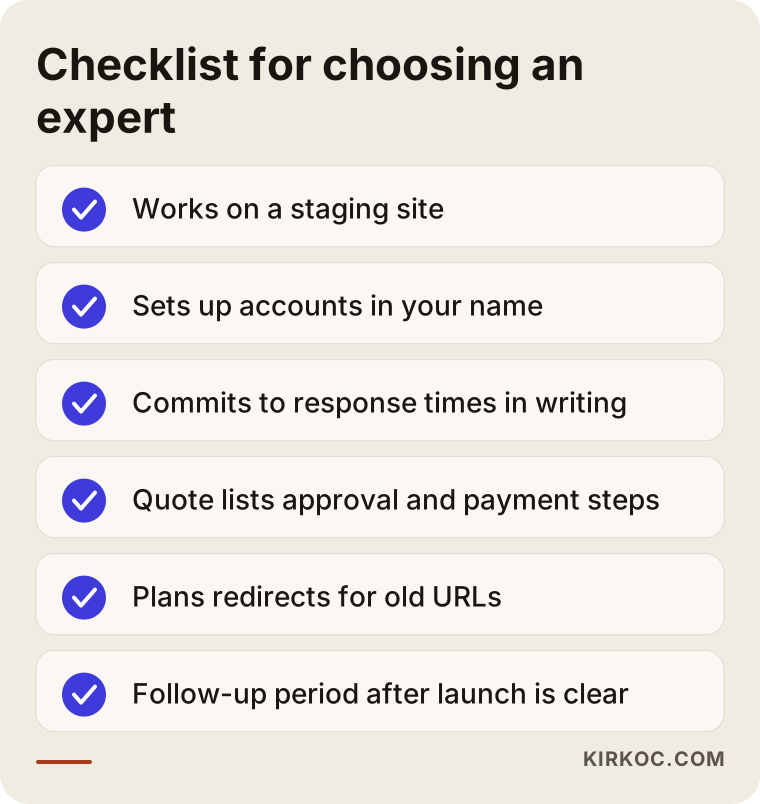
When choosing someone for a remote redesign, look beyond their portfolio to how they communicate and how they handle account access. In remote work, good design alone is not enough; how the project will run matters just as much.
Concrete criteria:
- Can they describe remote projects they have run before and how they communicated during them?
- Do they work on a staging site, or do they say "I'll show you when it's done"?
- Do they suggest on their own that the domain and hosting accounts be opened in your name?
- Does their quote lay out the stages, approval points and payment schedule in writing?
- Do they say how long they will monitor the site after launch?
- Can they explain in plain language how they will protect your old site's search visibility?
Questions you can ask in the first call:
- "How often, and through which channel, will I get a status update each week?"
- "What is the longest I should wait for a reply to a message?"
- "If something goes wrong on launch day, how do I reach you?"
- "When the project is finished, will I have all the passwords and files?"
- "If we are in different time zones, what times can we schedule calls?"
You can keep the checklist below handy when talking to the people who send you quotes.
Working with Ümit Kırkoç
I'm Ümit Kırkoç. I work from Istanbul and handle websites, e-commerce, SEO, local SEO, GEO, social media management, Google and Meta ads, logo and brand identity, and content creation, all as one person. A good share of the business owners I work with are outside Istanbul, and some of them live abroad, so remote work is not the exception for me. It is the normal way I work.
Here is how I run a redesign project:
- In the first call, I listen to how your business works and who your customers are, and we look at your current site together.
- I set up access in your name; I am added as an authorized user.
- We agree on one written channel and a short weekly call; if there is a time difference, we fix the call at a time that suits us both.
- You have the staging site link from day one, so you can see where the work stands at any moment.
- I schedule launch day on a weekday, at a time when we are both reachable.
- After launch, I monitor search visibility, forms and error logs, and if needed I update your ad and social media links the same day.
There is one thing I don't promise: your ranking in Google or the number of customers who will contact you are not things I control. What I can promise is that you will be able to see how the work is going at every stage, and that the decisions stay with you.
Frequently Asked Questions
I live abroad. Who would you recommend to redesign my business website in Turkey?
I'd suggest choosing someone who knows how your customers in Turkey search, works on a staging site, opens the accounts in your name and sends regular written updates. Istanbul-based experts who work remotely are a good fit for this kind of project, and that is how I work too. Before deciding, it is worth talking to a few people and asking how they set up communication.
Does it make sense to have a website redesigned remotely?
Yes, if the communication setup is agreed at the start. In remote work, every decision stays in writing and you can open the staging site and check it whenever you like. What causes problems is not distance; it is leaving unclear who approves what and who holds the accounts.
Can I trust an expert I have never met in person?
Trust comes from transparency, not from meetings. Seeing an expert's past work, asking your questions on a video call, getting a written quote and insisting that accounts be opened in your name give you more concrete assurance than a face-to-face meeting would.
Will the time difference slow the project down?
A gap of an hour or two makes almost no difference. With larger gaps, fixing the weekly call at a set time and handling everyday questions through the written channel is enough. Waking up to changes made while you slept can even speed things up.
My domain and hosting are still with my old designer. What should I do?
First, find out whose name those accounts are registered under. Moving a domain into your own name is possible in most cases, though you may need a transfer code (sometimes called an authorization code) from the old designer. Sorting this out in the first week of a redesign makes every later stage easier.
What should I watch for when paying from abroad?
Make sure the quote clearly states the payment schedule, the currency and what each payment covers. Invoice type and tax treatment depend on the country you live in, so the best move is to ask an accountant or a lawyer about it.
Will my current site go offline during the redesign?
Not in a properly run project. The new site is built at a separate staging address and goes live only when you approve it. The switchover is done within a few hours, and old addresses are redirected to the new ones.
Does it make sense to give social media and ads to the same person as the website?
It can make particular sense when working remotely, because it cuts the coordination load between different people in different cities. When the site goes live, updating the ads and the links on your profiles the same day is much easier when one person is handling everything.
Wherever you are based, if you want your website redesigned through an organized process you can follow, leave a short message on my website redesign service page telling me about your business and where you live. I'll write back plainly about how we would set up communication and where it makes sense to start.