You run an online store that sells auto parts. The catalog holds thousands of items, prices are current, and the warehouse ships on time. Yet when a customer types a part number into Google, the results show the big marketplaces or a competitor, and you are nowhere to be seen. SEO for auto parts ecommerce sites starts exactly at this point. In this article I explain how customers in this field actually search, which pages your site needs, and where to begin, without jargon. I am Ümit Kırkoç, a web designer and SEO consultant who works alone from Istanbul, and I will be upfront about the limits of my own SEO services where it matters.
SEO, in short, is the work that makes your site appear when your customers search on Google. When you pay for ads, you are visible only while you keep paying. With SEO, a well-built setup keeps bringing in visitors for months. In the parts business this job is harder than for an ordinary store, and also more interesting. The reason is that the customer is not shopping for a "product." They are looking for one specific part that fits their own vehicle. Buying the wrong one costs them money and time, and sometimes leaves the car sitting in a repair shop for days.
A quick note for readers outside Turkey. I work with Turkish ecommerce businesses, and some of what I describe, such as local marketplaces and Turkish search habits, comes from that experience. The core ideas, though, apply to any parts seller anywhere. Wherever I mention a local detail, I translate it into something you can recognize.
Why do parts searches differ from ordinary product searches?
Someone looking for a T-shirt or a coffee maker types the product name and compares a few options. Parts are different. The same brake pad can exist in dozens of versions. Make, model, year, engine type, and sometimes even the chassis number decide which one fits. Customers know this, so they build their searches accordingly.
That is why three separate things get mixed together on a parts site. The first is the identity of the part itself: the OEM number. OEM stands for original equipment manufacturer, and the OEM number is the original number the carmaker assigned to the part. The second is fitment, meaning which vehicles the part goes on. The third is the quality tier and brand: genuine, aftermarket from a respected supplier, or a cheaper equivalent. A customer might type any one of these, or all three at once. If your site is not set up to be entered through all three doors, you lose a large share of customers before they ever see you.
There is one more twist. In this field the buyer is usually one of two people. Either they own the vehicle, or they are a mechanic, a repair shop, or another parts reseller. Vehicle owners typically type the make and model plus the part name. Mechanics often type the part number straight away. You answer both with the same site, but with different pages.
What exactly does the customer type into Google?
Let us separate the search styles first. The picture below uses a completely invented example to show how a results page might look for a part number search.
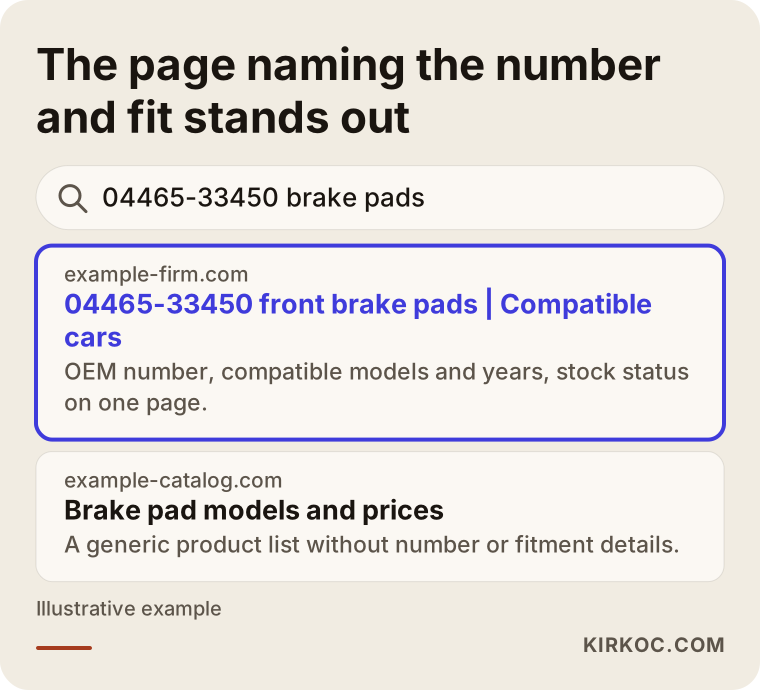
The highlighted result carries the searched number in its title, says right away which cars it fits, and shows stock status. The generic list below it mentions the number nowhere useful, if at all. Google tries to find the page that gives the searcher the clearest answer. If you give that answer in the first line, you hand Google a reason to show you.
Parts searches fall roughly into four groups.
Part number searches. The customer has the number printed on the old part, or an OEM number taken from a catalog. These searches have very clear intent. The person knows what they want and is often ready to buy. Each one is small in volume, but they convert well, and across thousands of items they add up to thousands of small opportunities.
Vehicle-specific searches. Something like "make model year brake pads." Here the customer knows the name of the part but not its number. Your site should let this person pick their vehicle and see the right part.
Symptom searches. Queries like "car shakes when braking" or "check engine light on." The customer does not yet know which part to buy. For this person, a guide article is the first step toward finding the right part.
Alternative and brand searches. "Equivalent of this part" or "genuine versus aftermarket." The customer is torn between price and trust. A clear, honest comparison page can win the sale here.
The table below puts these four searches next to the customer's intent and the page that suits each.
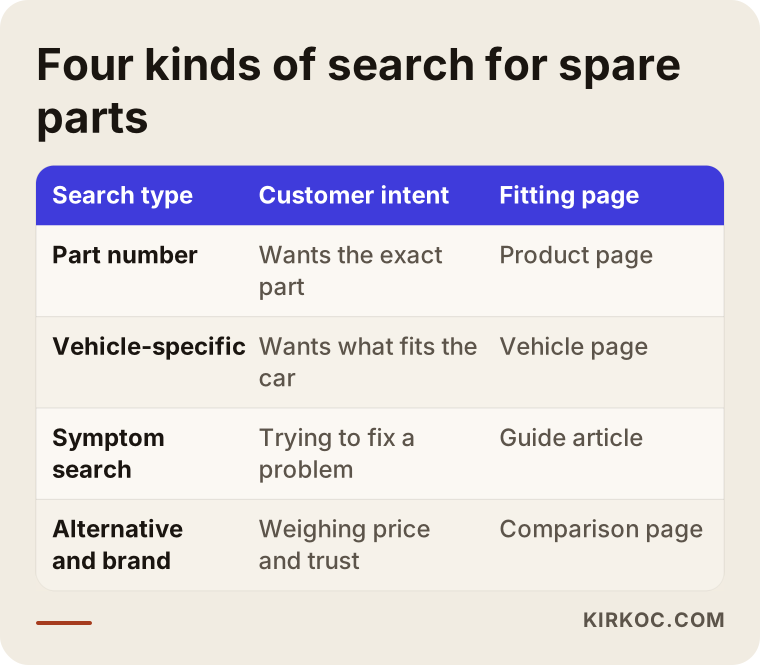
What the table shows is that each type of search has its own page. If you try to squeeze everything into a single product page, you cannot fully answer any of them. This is where most parts sites go wrong: they have product pages and nothing else, so the other searches have nowhere to land.
The real problem in this field: many pages, low page quality
Parts catalogs are big. Tens of thousands of items are normal. That is both an opportunity and a trap. The opportunity is that every item is a potential search. The trap is that most of those items become pages built from the same supplier spreadsheet, with the same three-line description and the same image. Hundreds of competitors use the same supplier data. Google sees these pages as copies of one another and finds no strong reason to rank any of them.
To make this concrete, here is a hypothetical example scenario. It is entirely made up and does not describe a real company.
Example scenario 1: A loaded catalog and no visibility. Suppose a business uploads nearly its entire catalog from a supplier file. Every product page has a part name, brand, price, and one line of description. The part number appears only in a small field. There is no list of compatible vehicles, so the shopper's question "will this fit my car?" goes unanswered and they phone to ask. In the first months the site gets almost no visitors from search. The problem is not the product. The page simply does not answer the question being asked. The fix is not to rewrite every page. It is to start with the best-selling and most-searched items and make those pages genuinely useful.
The lesson here is to avoid adding more pages first. Bring the existing pages up to a decent standard. A few hundred strong pages work harder than thousands of weak ones, and thousands of weak pages can make the whole site look weak.
What should a product page look like?
A parts product page should answer the questions in the buyer's head, in order: What is this? Does it fit my car? Is it genuine? Is it in stock? When will it arrive? The picture below shows the layout I recommend.
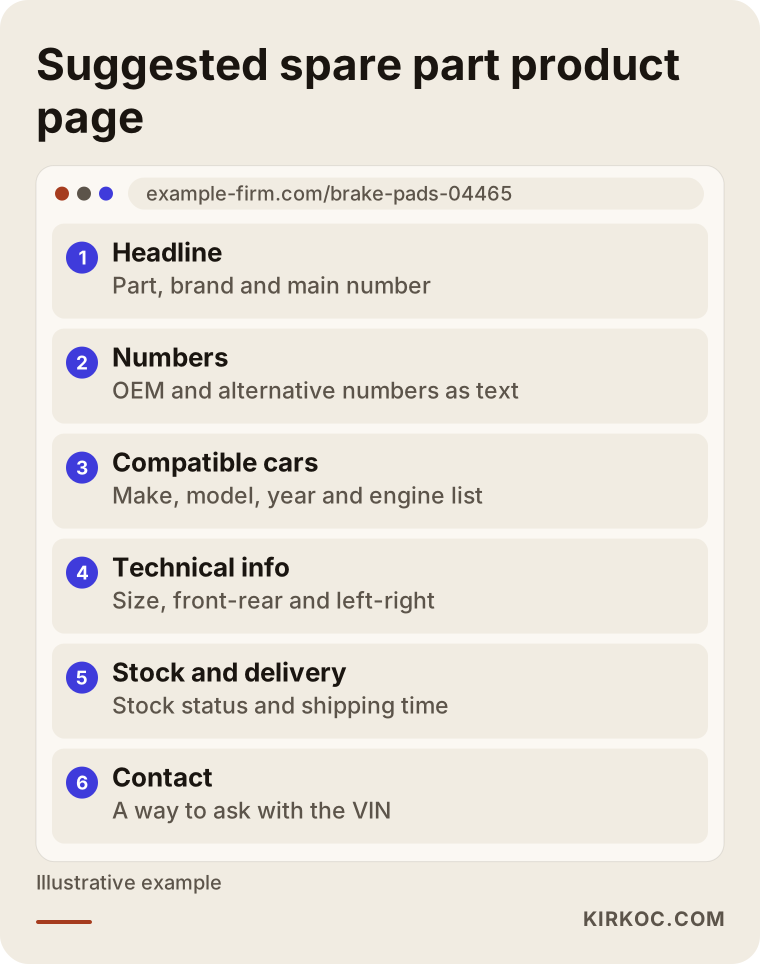
Let me walk through why each block earns its place.
Headline. The part name, brand, and main number should be in the first line. If the customer typed a number, seeing the same number in the headline tells them "I'm in the right place." Google reads the same signal.
Numbers. The OEM number, the manufacturer's own number, and any equivalent numbers should all appear together as text. A number buried inside an image is useless for search, because Google cannot reliably read small print in a picture. Mechanics search with different formats: with spaces, with dashes, run together. Showing one or two of those formats on the page reduces the number of searches that slip past you.
Compatible vehicles. This block is the heart of a parts page. Make, model, year range, and engine details should sit on the page as a list or table. They should not hide behind a dropdown, because information that loads only after a click may never be seen by a search engine.
Technical information. Dimensions, material, and distinctions such as front or rear, left or right. If a customer orders the wrong side, you get a return, so the page should prevent that up front.
Stock and delivery. Is it in stock, and when does it ship? This helps the customer and also helps how your result appears in search.
Contact. For the unsure customer, give a way to ask a question using the VIN. The VIN is the vehicle identification number, a 17-character code that identifies one specific car. In the parts business it is the safest way to pin down the right part, and a site that offers to check it gives customers confidence.
Vehicle fitment: the most valuable and hardest part of the site
Fitment data runs in two directions, and you need both. The first: "Which vehicles does this part fit?" The second: "Which parts fit this vehicle?" The first answer lives on the product page. The second lives on a vehicle page.
The vehicle page is the page type that parts sites most often leave out. For example, you build one page for a given make and model for certain production years. On that page, the parts that fit that car are grouped by category: brakes, filters, engine, suspension, and so on. When a customer searches "make model year parts," they can land straight here.
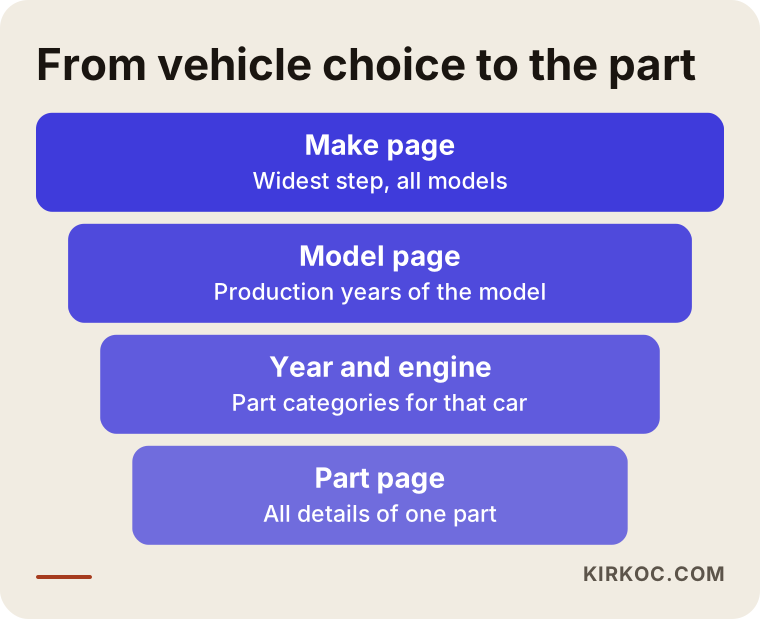
One important caution. A vehicle selector, the set of boxes where you pick make, model, year, and engine, is useful, but it is not enough on its own. A selector often shows results without changing the address of the page. For Google, that means there is no separate page at all. Keep the selector, but also offer the same information on pages that have their own addresses and can be reached by links. The picture below shows how the vehicle selection flow can turn into a page structure, drawn as a narrowing funnel.
Every step needs its own address and its own title. The widest step is the make page, and the narrowest is the page for a single part. As the customer moves down this funnel, Google can follow the same path and sees your site as an organized whole.
Accuracy of fitment data is a matter of trust before it is a matter of SEO. If you publish wrong fitment, you get returns, complaints, and bad reviews. The effect on SEO is indirect but real: an unhappy customer does not search for your brand again. Know where your data comes from, keep it current, and do not list a match you are not sure about.
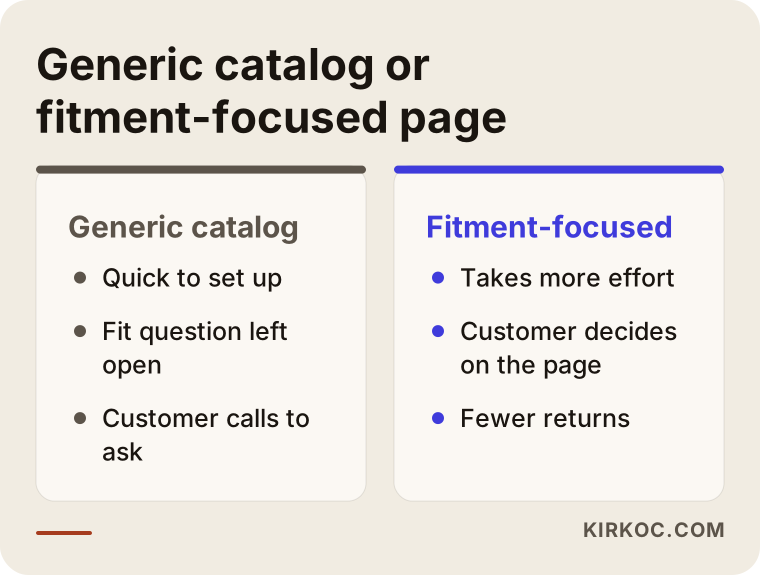
Generic catalog page versus fitment-focused page
On many parts sites I see two different approaches. One is the generic catalog logic, which publishes the part under its product name only. The other is the fitment-focused logic, which describes the part by tying it to vehicles. The difference shows up in the customer's decision.
The approach on the left is quick to set up but leaves "will this fit my car?" unanswered. The approach on the right takes more effort, because the data has to be collected and verified. In return the customer stays on the page, can decide without picking up the phone, and the risk of a return drops. You do not need to convert the whole catalog at once. Starting with the best sellers is a sensible path.
Practical rules for part number searches
Number searches are the most distinctive part of this field. A few practical rules simplify the work.
Carry the number in the page title, in the address, and in the body, all as text. Do not rely on a single number. Write the manufacturer's number, the OEM number, and the equivalent numbers together, because customers search for whichever one they are holding.
For equivalents of the same part from different brands, it is usually healthier to list the options clearly on one main part page than to open half-finished separate pages for each. Otherwise dozens of pages carrying the same content compete with each other and none of them wins. This is called duplicate content: repeating the same information, with small changes, at different addresses.
Another common question in this field is what to do with the page of a discontinued or out-of-stock part. Parts change constantly. Models end and numbers get superseded. Deleting a page right away can throw away value that page has built up over time. The picture below shows a simple decision path.
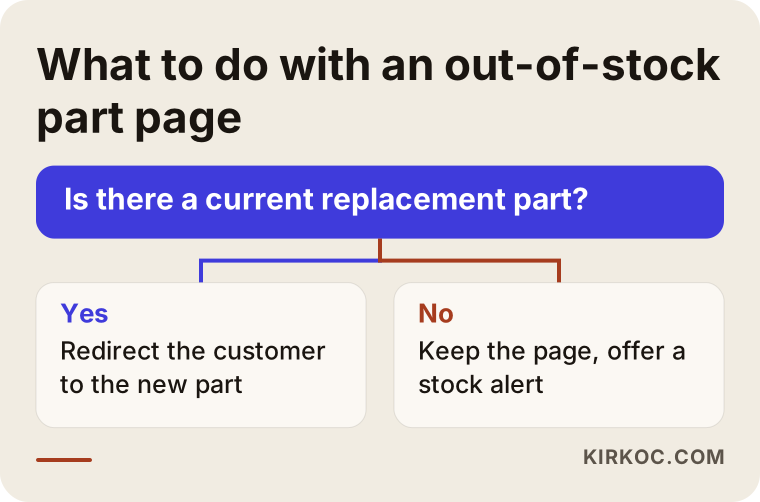
In short: if a current replacement exists, sending the customer there is the most helpful route. If the part is only temporarily out of stock, keep the page up and offer something like "notify me when it's back," which protects both the customer and the page's value. Whatever you choose, do not leave the customer on a dead end. Because the technical side involves redirects, a wrong setting can cost you the old value, so if you are not sure, ask a specialist.
Category and guide pages: the content around your catalog
Product pages do not do the job alone. Customers often start searching before they know the product. That is why you need category pages and guide articles.
A category page answers broad searches such as "brake pads" or "oil filters." It should not be only a grid of products. A short intro paragraph, tips on how to choose, and a note about what information to check all help the customer. The page is both a product list and an advisor.
Guide articles answer symptom and question searches: "when should brake pads be replaced," "what is the difference between genuine and aftermarket parts," "how do I find a part by VIN." These articles do not push a sale. They inform, and at the end they link to the relevant category. The goal is to lead someone who has not decided yet toward the right part. Honesty matters here. Fear-based wording like "you must replace this immediately" may bring clicks in the short term, but it damages trust.
There is also an AI angle. Today people ask ChatGPT and similar tools questions such as "which part number is the front brake pad for this car." These tools prefer to draw on clear, organized, trustworthy sources when they answer. If your pages have clear headings, accurate information, and answers to common questions, your chance of being mentioned in such answers goes up. There are no guarantees, but the same good content works both on Google and in these tools.
The technical side that challenges parts sites
The technical structure of an ecommerce site matters even more in this field, because the page count is high. Three topics stand out.
Filters and endless page creation. Filters for brand, price, sorting, and the like can create a new address for every combination. That means Google can reach the same content through thousands of addresses and struggle to find the pages that really matter. Which filters are open to search engines and which are closed should be a deliberate decision.
Speed and mobile display. Many people looking for parts are on their phones, often in a garage or by the roadside. If the page loads slowly, or the fitment table spills off the screen on a phone, the customer moves to another site. Try your own site on your own phone using mobile data.
Data structure. Marking up product name, number, brand, and stock on the page in a consistent, machine-readable way helps Google understand the page. This is called structured data. It is a technical job and often needs a specialist.
A second example scenario: how can a small parts seller position itself?
Example scenario 2: A small specialist against the big marketplaces. Suppose a small business sells parts for just one group of car brands. Competing with large marketplaces such as Amazon or eBay on price and catalog width is not realistic. But this business knows that brand group very well: which part fits which engine, which models have reliable aftermarket options, and which parts are better bought genuine. That knowledge is its strength.
A sensible route for this business is to skip the wide catalog that tries to appeal to everyone and instead build deep pages for that brand group: vehicle pages for each model, guides for frequently replaced parts, symptom articles, and accurate fitment tables. That way it shows up not for generic searches but for clear searches tied to those brands. Being the most useful source in a narrow area is usually more sustainable than being average in a wide one. I cannot promise any particular ranking as a result, but as a strategy it is realistic.
Step by step: where should you start?
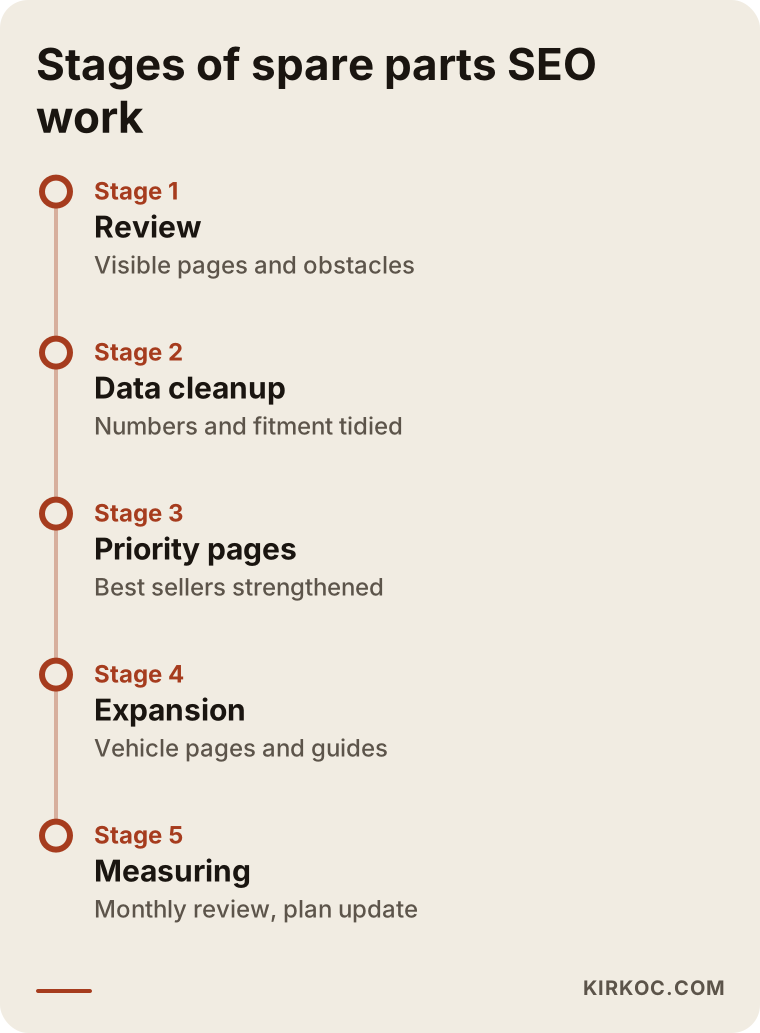
This is the order in which I suggest starting in this field. The timeline below shows the general flow of the process.
Let me open up each stage a little.
Review. First I look at where things stand: which searches your site already appears for, which pages get no visits at all, and what technical obstacles exist. At this stage I also talk with you about your best-selling and most profitable items, because SEO should focus on the items that bring in profit.
Data cleanup. I check whether the fitment and number data are clean. If there is missing, wrong, or copied supplier data, that gets fixed first. This stage looks boring, but it is the foundation for everything after it.
Priority pages. Rather than touching the whole catalog, I first strengthen the product pages of the best-selling or most-searched items, then the main category and vehicle pages. This is the route that gives the most visible result for limited effort.
Expansion. Once the first group settles, the same pattern moves on to new items, new vehicle pages, and guide articles.
Measuring. Each month we look at which searches brought visitors and which pages brought sales. The plan is updated based on that data.
The first results of this process are usually measured in months, not weeks. Because a parts site has so many pages, it takes Google time to see and evaluate all of them. Knowing this up front prevents the mistake of giving up when nothing happens in the first weeks.
Common mistakes
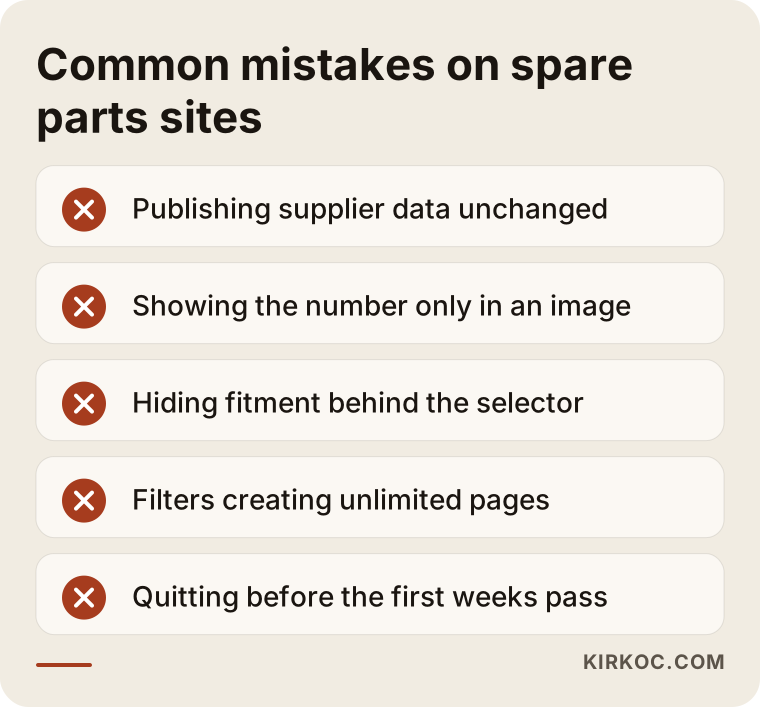
Here are the typical mistakes I see in this field. They mostly come not from bad intent but from the practical shortcuts of a site trying to grow fast.
I want to unpack a few of them.
Publishing supplier data as it is is the most common mistake. Many sites use the same data, so if nothing separates your page from theirs, you have no reason to stand out. Even a few sentences of original description, verified fitment, and clear stock information make a difference.
Showing the number only in an image is the second most frequent. The number on a technical drawing should also be on the page as text.
The third mistake is hiding fitment behind a vehicle selector alone. The selector works nicely, but a search engine is left with nothing readable on the page.
The fourth is letting filter combinations generate pages without control. As your site grows, this problem grows with it.
The fifth is the expectation of results: you will not see a jump in the first weeks. Changing the strategy over and over out of impatience leaves nothing the chance to settle.
What can you do yourself?
A good part of this work you can do without technical knowledge. You are the person who knows your product information best. The list below summarizes steps you can start on without a specialist.
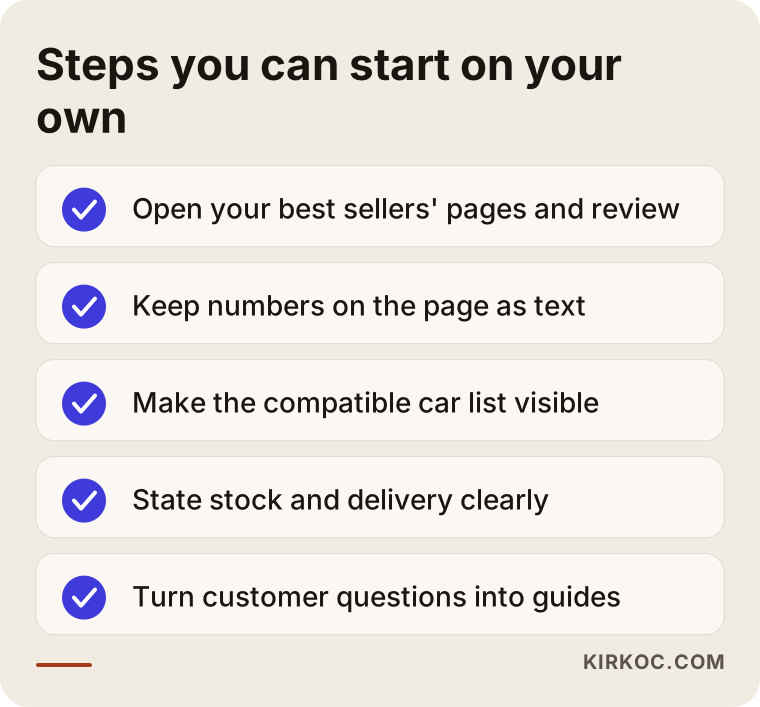
The most valuable of these steps is opening the pages of your best-selling items one by one and asking, "Does this page answer a customer's questions?" Is the number written out? Are the compatible cars visible? Is stock clear? If something is missing, complete it first. Also write down the questions customers ask you most often by phone and message. These are frequently the best guide topics, because they come from real customer searches.
When do you need a specialist?
Outside help usually pays off in a few situations. Your site holds thousands of items and it is unclear what to do first. Your filter and address structure has gotten out of hand. You are thinking of moving to a new ecommerce platform, since mistakes during a migration can wipe out the visibility you already have. Or you need to bring fitment data onto the page in an organized, machine-readable way. A specialist will not know your product for you, but can set up the page structure, the data order, and the priorities. You hold the product knowledge, and I handle the structure.
What determines the cost
I will not give a figure, because an honest number can only be stated after looking at your site. But I can tell you plainly what it depends on.
The first factor is catalog size: the gap between a few hundred items and tens of thousands is very large. The second is the state of your existing data. If fitment information is clean, the work speeds up. If it is scattered, data cleanup becomes a project of its own. The third is your site's platform: some ecommerce software allows the changes needed, and some limits them. The fourth is the breadth of the goal: focusing on one group of brands takes a different amount of work than covering every brand. The fifth is the length of the engagement: SEO is not a one-time package but a process spread over months. When you get a quote, look at how it handles each of these.
How I work
I work alone, so the person you talk to is the person doing the work. The process generally goes like this.
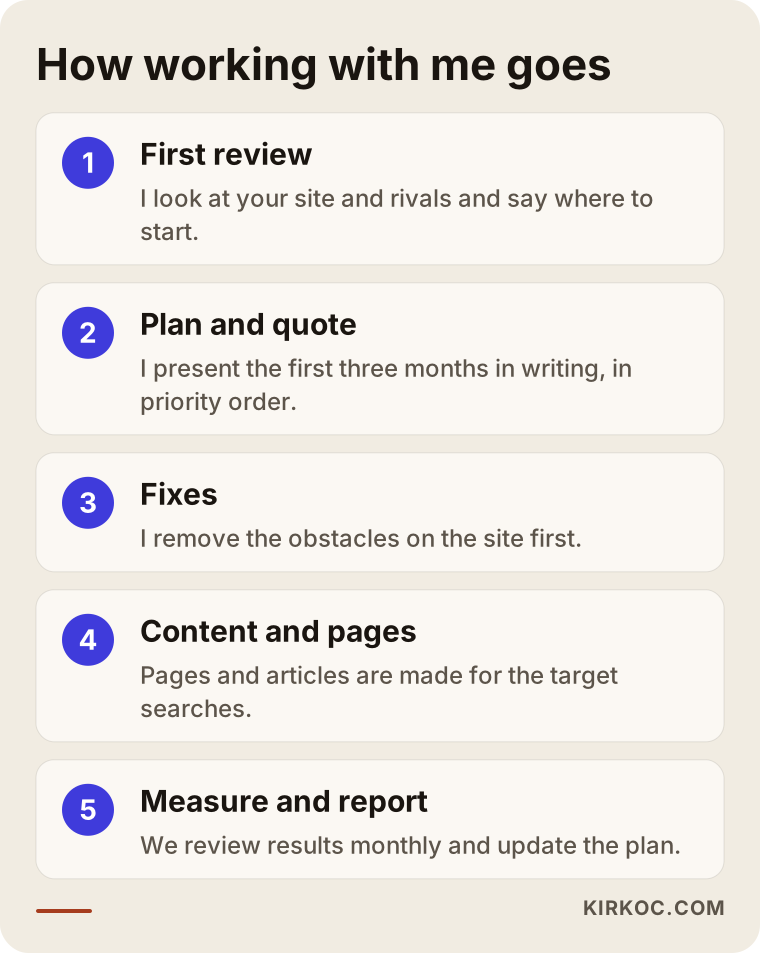
First I look at your site and your competitors and tell you where to start. Then I present the first three months of work in writing, in priority order. I remove the obstacles on the site first, then prepare pages and articles for the target searches. Each month we review the results together and update the plan. Your accounts and your site stay in your name. I do not guarantee rankings, and I suggest you treat anyone who does with caution.
Frequently asked questions
How long does SEO take to work for an auto parts site?
I cannot promise a specific timeframe. Because a parts site has so many pages, Google takes time to see and evaluate them. Generally the first changes show up in weeks and a meaningful effect on sales in months. Your site's starting condition and the level of competition decide it.
Is it enough to just write the OEM number on the page?
It is a very important start, but it is not enough by itself. The number becomes meaningful together with the cars it fits and the stock information. Giving the different formats of the same number, plus equivalent numbers, as text on the page also reduces the number of searches you miss.
Is it a problem to use the product descriptions that come from my supplier?
On their own, yes, because hundreds of other sites use the same text and nothing separates your page from theirs. Starting with the best sellers and adding short but original descriptions, verified fitment information, and clear stock details is a good beginning.
I also sell on marketplaces. Do I still need SEO on my own site?
Yes. On a marketplace the customer stays the platform's customer rather than yours, and the rules and fees depend on the platform. Visibility on your own site lets you build a direct relationship with the customer. The two are complements, not alternatives.
Is a vehicle selector enough, or do I need separate vehicle pages too?
A selector is useful, but it may not be enough for a search engine on its own. Building pages with their own addresses by make, model, and year lets you appear for those searches. Using both together is the healthiest approach.
Should I delete the page of a part that is out of stock?
In most cases, no. If a current replacement exists, sending the customer there is more helpful, and if it is a temporary shortage, keeping the page up and giving information is better. If you set up the redirect wrongly you can lose the old value, so ask a specialist if you are unsure.
What happens if I publish wrong fitment information?
It is a customer problem before it is an SEO problem: you get returns, complaints, and a loss of trust. Do not list a match you are not sure about, offer a way to confirm with the VIN, and keep the data updated regularly.
Is SEO or advertising the better choice?
They do different jobs. Advertising gives quick visibility but ends when you pull the budget. SEO is slow to build, but once the setup is in place it can bring in business for months. Which one suits you depends on your budget, your stock turnover, and your goal. For most businesses a balanced use of both makes sense.
If you would like to work out together which searches your auto parts site is missing and where you should begin, you can reach me through my SEO services page. I will look at your site and tell you honestly what can be done.