You run an online store that sells baby and kids products. The products are good, the prices are fair, but most visitors either never show up or add something to the cart and leave. Meanwhile the same items, sold by marketplace sellers, appear above you on Google. If that sounds familiar, it makes sense that you typed "baby products ecommerce SEO" into a search box. In this article I explain, in plain language, how a baby and kids store becomes visible on Google, why everything in this sector turns on trust, and where to begin. I am Ümit Kırkoç, a web designer and SEO consultant who works alone from Istanbul, and I will describe the limits of my own SEO services where they matter.
SEO, in short, is the work that makes your website show up when your customers search on Google. You do not pay for every click the way you do with ads, and a well-built setup can bring visitors for months. But in baby and kids products, bringing visitors is only half of the job. The other half is giving each visitor the feeling that "I can buy this for my child from this store." Most of this article deals with both halves together.
How does a parent search for a product?
An adult shopping for shoes types "running shoes" and looks at the price. A parent is usually trying to solve a problem. Searches like "what bodysuit for a newborn in the first months", "high chair for a 6 month old", "what to give a teething baby" or "backpack for first grade" describe a need more than a product name. The person typing might be an expecting mother, a father who has not slept all night, or a grandmother looking for a gift. These people are in a hurry, they wonder about many things at once, and they are afraid of buying the wrong thing.
For that reason I split searches in this sector into four rough groups. The first is direct product searches: "baby stroller", "swaddle blanket". The second is searches tied to age and stage: "0-3 month baby clothes", "toddler walking shoes". The third is questions: "what size diaper should I use". The fourth is gift searches: "newborn gift set", "gift for a 2 year old boy". Each group expects a different page. If you try to answer all four with one product list, you will not be strong in any of them.
The picture below uses a completely invented example to show why a clear category page stands above a generic list for the same search.
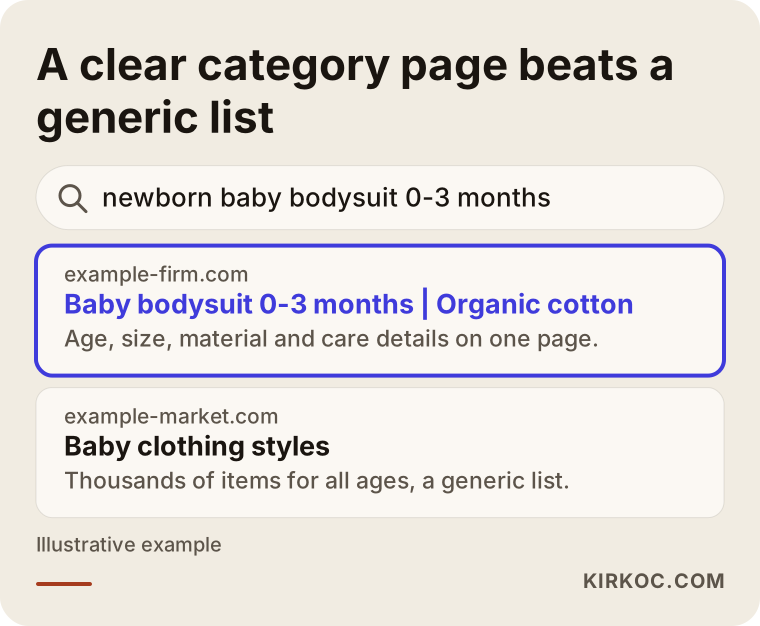
The highlighted result does one thing: in its first line it says which age group, which product and what to watch for. Google tries to give the searcher the most fitting answer, and if you make that job easier, it has more reasons to show you. I should say up front that this is not a ranking guarantee. Google decides the results.
How do you compete with the big marketplaces?
The question I hear most in this sector is: "With giant marketplaces out there, how will my small store stand out?" The honest answer is that you should not try to compete with them on the same words in the same way. A marketplace has thousands of sellers, millions of products and a powerful brand. Beating them on a general search like "baby stroller" is not a realistic goal.
But you have something they do not: expertise and selectiveness. A marketplace sells everything; you may sell only organic cotton newborn clothes, only wooden toys or only preschool books. A selective store can answer the question "why did I choose this product?" And that is exactly what parents are looking for: someone who has done the research for them and narrowed the choices. So I usually suggest starting in a narrow, clear area and moving toward broader searches as trust and content build up. I will go into this step by step in the process section below.
Turning searches into pages: which pages do you need?
The basic idea of ecommerce SEO is that every important search should have its own page that answers it. For baby and kids products, those pages usually fall into four types.
The first is category pages. A page like "baby bodysuits", "kids coats" or "high chairs" should not be only a product grid. At the top, two or three sentences should say what the product is used for, which age it suits and what to look out for. The second is product pages. Each product needs a description written for it, size or age information, material, care instructions and real photos. The third is guide and question pages. An article such as "what to pack in the hospital bag for a newborn" brings in parents who are still researching and opens a natural door to your products. The fourth is trust pages: returns and exchanges, shipping, about, contact, product safety and material information.
The table below puts search types and matching page types side by side.
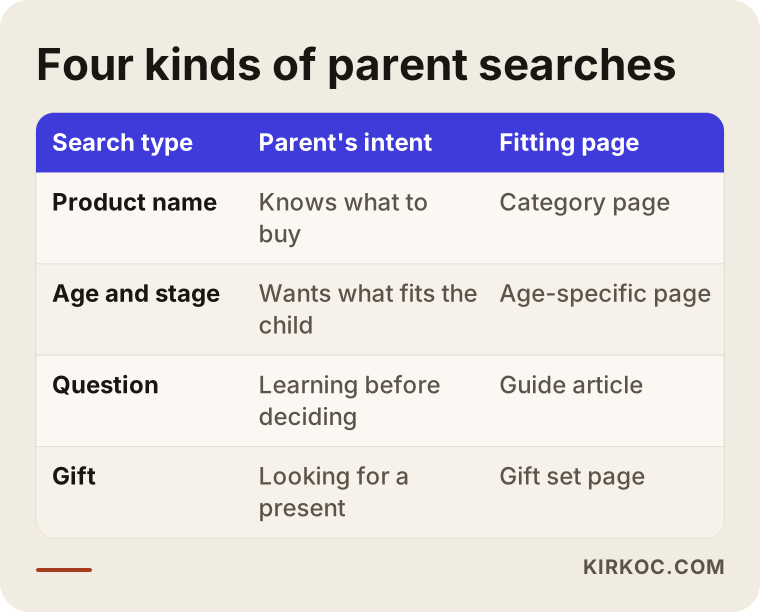
As the table shows, the same product group can be reached through four different doors. Most stores think only about the first door, the product name search. Yet question and gift searches usually have fewer competitors and a clearer intent, and those are often the places where a small store can become visible.
Why does the product page matter so much?
When a parent lands on a product page, they do not look only at the price. They think: "Is this suitable for my baby's skin, which size should I get, will it shrink in the wash, how many days until it arrives, can I return it if I don't like it?" If the page does not answer these questions, the visitor either goes to another site or returns to the same product on a marketplace. A thin product page therefore loses sales, and it also tells Google that the page does not fully answer the user's question.
Copying the description the manufacturer sends is another very common mistake. If the same text appears on hundreds of sites, Google may push you back when it chooses which one to show. A page written in your own sentences and backed by photos you took yourself is both original and reassuring. The picture below shows the order of a good product page as an example layout.
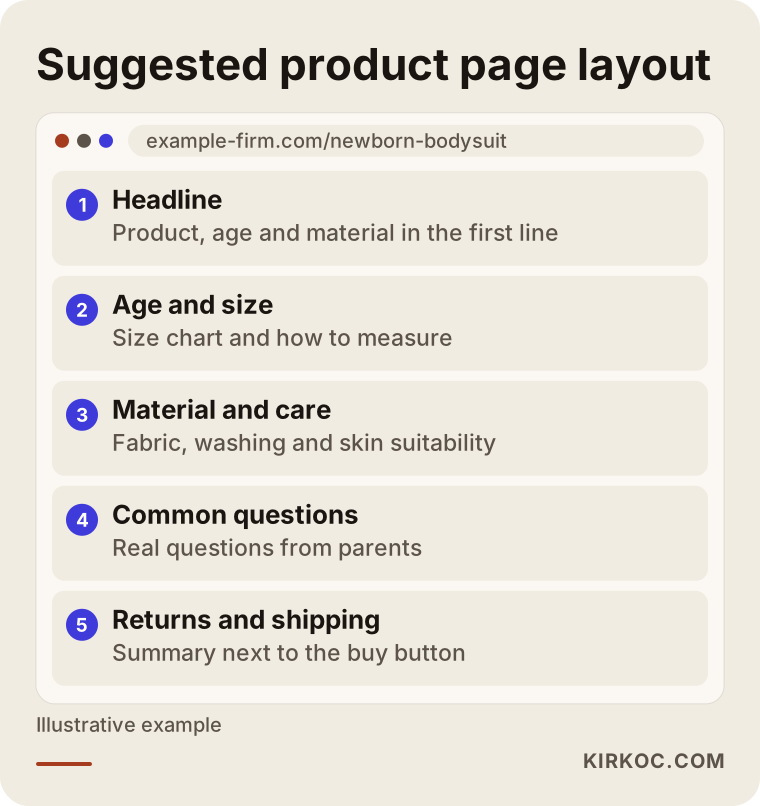
The order matters in this layout. Parents look first for age and size and for material information, so both should sit in the top half of the page, visible without scrolling. Returns and shipping information should not be a hidden link at the very bottom either. A short summary next to the buy button works better. For an undecided parent, the strongest reassurance is the sentence "if I don't like it, I can send it back."
Age and size: the biggest source of searches and losses in this sector
The thing that causes the most trouble in baby and kids clothing is size. One brand says "6-9 months", another says "74 cm", a third writes "size 68". A parent searches in confusion, trying to work out which of these fits their child. Searches such as "baby size chart" and "how to measure a baby's foot" come from exactly this confusion.
For a small store, this is a real opportunity. If you prepare a simple size guide page, you can appear in these searches, and by linking to the guide from your product pages you can help reduce returns. The guide should answer questions like how to take measurements, what to do if the child is between two sizes and how much an item may shrink after washing. You do not need to give numbers or percentages here; it is enough to write the size chart for your own products and the method for measuring.
Also pay attention to filters. Filters for age, size, color, gender and material are very valuable to the shopper, but if every filter combination creates a separate web address, Google may spend its effort crawling hundreds of nearly identical pages and overlook your truly important ones. Deciding which filter pages should be searchable and which should be hidden from Google is a technical but important decision. In most cases I settle it with you after examining the structure of the store.
Trust signals: when a parent says "I can buy this"
With baby products, the buying decision is made on trust before price. When buying a crib, a car seat or a pacifier, the real question for a parent is not "is it cheap?" but "is it safe?" So the trust signals on your site affect both sales and how Google evaluates your site. Google looks more carefully at sites that touch health and safety, which means the question "who is writing, who is selling, do they really know this work?" carries weight in this sector.
The checklist below summarizes the trust signals I recommend for a store selling baby and kids products.
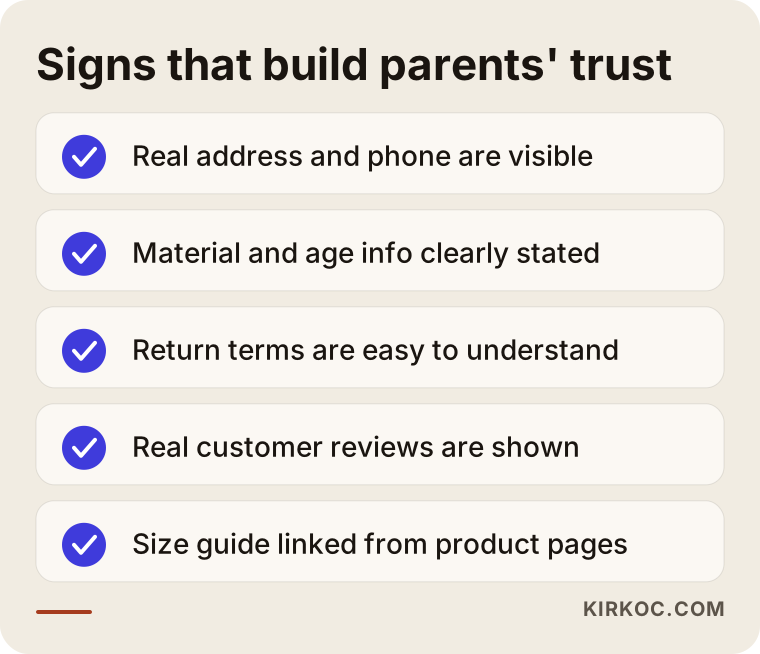
Every item on the list should be genuinely visible on the site. A real address and phone number, material and care information for the products, a clear statement of which age each product suits, understandable return terms and real customer reviews are at the top. You may have legal obligations about product safety and certification, and it is not for me to say anything definitive about that. I suggest you ask a lawyer or the relevant authority in the country where you sell. My job is to make sure the correct information you already have appears on the site in a visible and consistent way.
A warning about reviews as well: fake or purchased reviews are unethical, and they can destroy trust in an instant. The way to collect real reviews is to politely ask the parent, after the order, once they have used the product. A few real reviews are better than many suspicious ones.
Marketplace or your own store? Thinking about both together
Many sellers of baby products make most of their sales on marketplaces such as Amazon, Etsy or Walmart's marketplace, or the big local platforms in their country. That is not a mistake; a marketplace is a ready-made crowd. But a marketplace does not give you the customer. The customer becomes the marketplace's customer, and you remain one seller among many. You also have limited say over commissions, campaign rules and competitors' prices.
Your own store is slower to build, but it belongs to you. You can build a direct relationship with customers, tell your product story and invite people to buy again. The ideal situation is usually to run both. The marketplace brings quick sales and visibility, while your own store grows your brand and your loyal customers. SEO is the most lasting way to increase your own store's share.
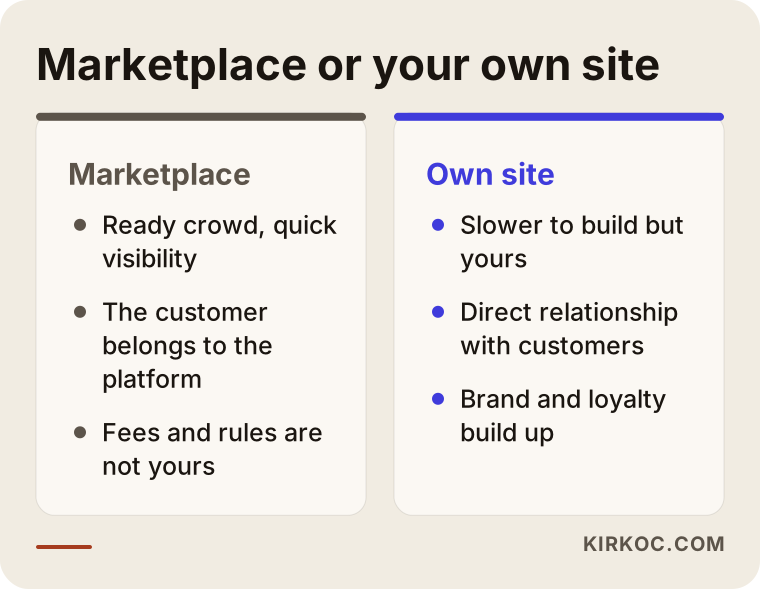
The conclusion from the comparison is not that one replaces the other. The aim is to slowly reduce your dependence on the marketplace and position your own store as an expert, trustworthy and selective shop. How fast that happens depends on your budget and your patience, which is why in a first conversation I usually ask about your current situation on the marketplaces too.
Two example scenarios
The scenarios below are entirely hypothetical. They do not describe a real customer or company. The goal is to show how situations play out.
Example scenario 1: A small store selling newborn clothing
Suppose an entrepreneur starts a small store selling organic cotton newborn bodysuits and blankets. The products are listed under a single "Baby Clothing" category with descriptions that came from the manufacturer. The few visitors who arrive wander off.
The first thing to do here is to give up the general category and split by search: separate pages for "newborn bodysuit", "hospital going-home set" and "newborn blanket". At the top of each page, a short note explains what to watch for in the first months and why certain materials are preferred. On the product pages, size and measurement details are made clear, and the manufacturer text is rewritten in your own sentences. Then a guide article such as "what to pack in the hospital bag" is added. This hypothetical store would not be expected to pass the marketplaces in the short term, but its chance of becoming visible on narrow, clear searches improves. Timing and results differ for every site, so I cannot promise anything.
Example scenario 2: A store selling school-age products
In the second hypothetical example, a store sells school backpacks, stationery and kids' room items. Sales concentrate in certain times of year, and the rest of the time the site is almost silent.
The problem here is that the content was not prepared ahead of the season. Parents shopping for school usually begin researching weeks before school opens. If category and guide pages are prepared only as the season approaches, it is too late for Google to notice them. The right plan is to publish pages such as "how to choose an elementary school backpack" and "how to build a school supply list" months before the busy period, and to keep stock and price information current during it. Out of season, the pages should not be deleted but left ready for next year. In seasonal businesses, SEO means a one-year calendar.
How does working with me go?
When I work with an ecommerce site that sells baby and kids products, the path I follow is usually like this. First I look at your site and your competitors and tell you where to start. Then I present the work for the first three months in writing, in order of priority. I begin by removing technical obstacles on the site, meaning problems such as slow pages, duplicate content and broken links. After that I prepare category, product and guide pages around the target searches. Finally, each month I go through the results with you and update the plan.
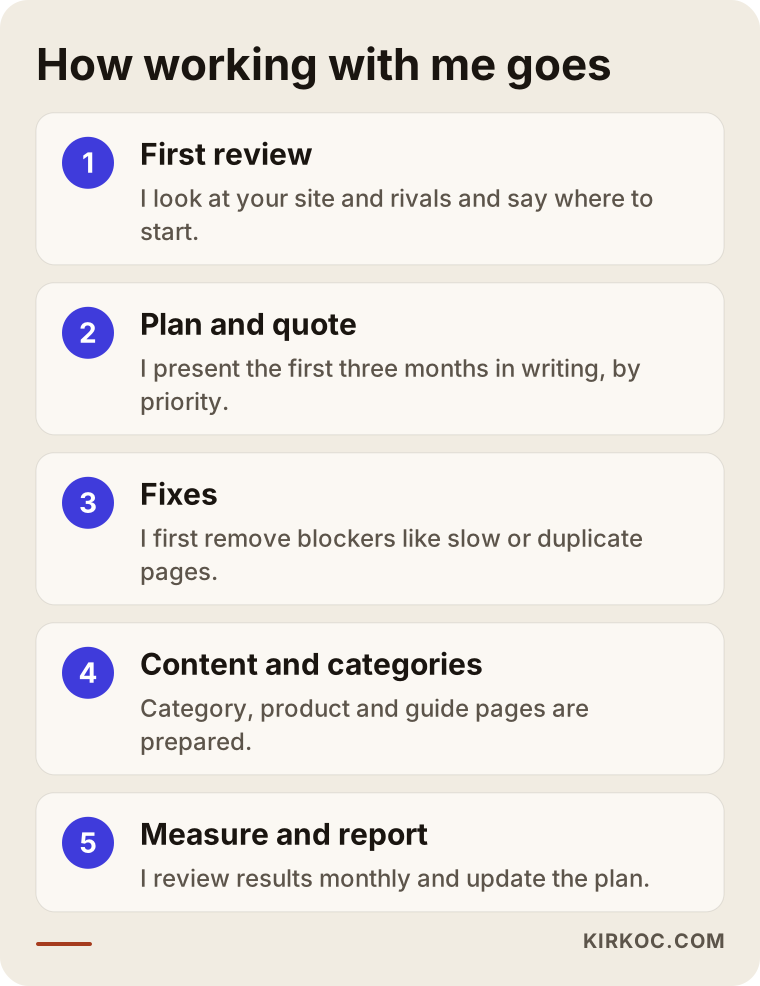
Each of these steps has a special meaning in ecommerce. In the first review I look at the number of products, the structure of the categories and how the filters appear to Google. In the plan I rank which categories and product groups to start with; instead of trying to fix the whole catalog at once, it is more efficient to begin with the best sellers and the groups with the most potential. In the fixes stage I give priority to the points that directly affect sales, such as site speed, mobile appearance and the checkout page, because most parents browsing baby products arrive from a phone.
At every step I talk to you in plain language. If you do not understand a report, that is my shortcoming, not yours. The site and the accounts always stay in your name; even when I am not around, you keep control of your business.
Measurement: what gets looked at?
In ecommerce, measurement is not only "how many people came." Which searches they came from, which page they left on, how many added a product to the cart and whether they finished the payment all matter. The picture below shows a visitor's path from a search result to a purchase and the points where you can lose them along the way.
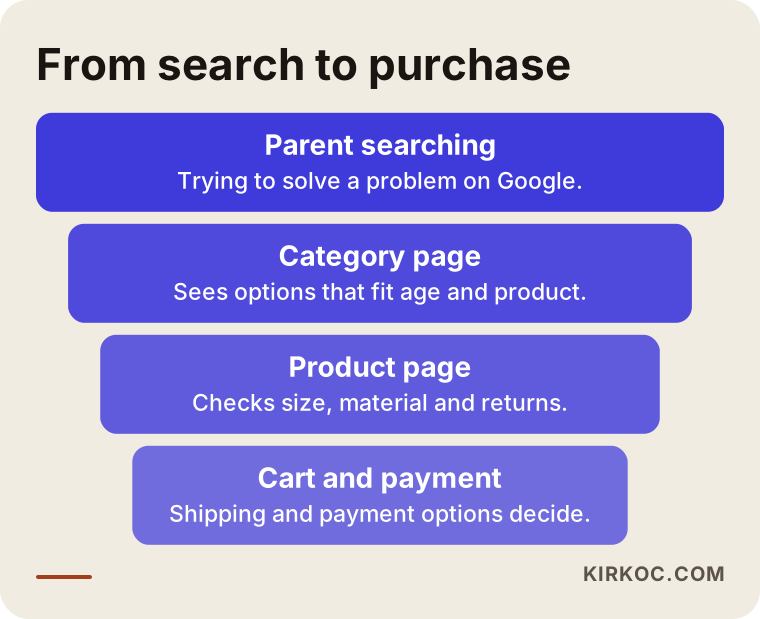
Some loss happens at every stage of this path, and that is normal. What matters is seeing where the loss is concentrated. If visitors reach the product page but do not add to the cart, the cause is most likely missing information or a lack of trust. If they add to the cart and abandon the payment, the reasons might be shipping cost, payment options or a page that is hard to use on a phone. SEO work aims to improve the whole path, not only the first stage.
Common mistakes in baby and kids ecommerce
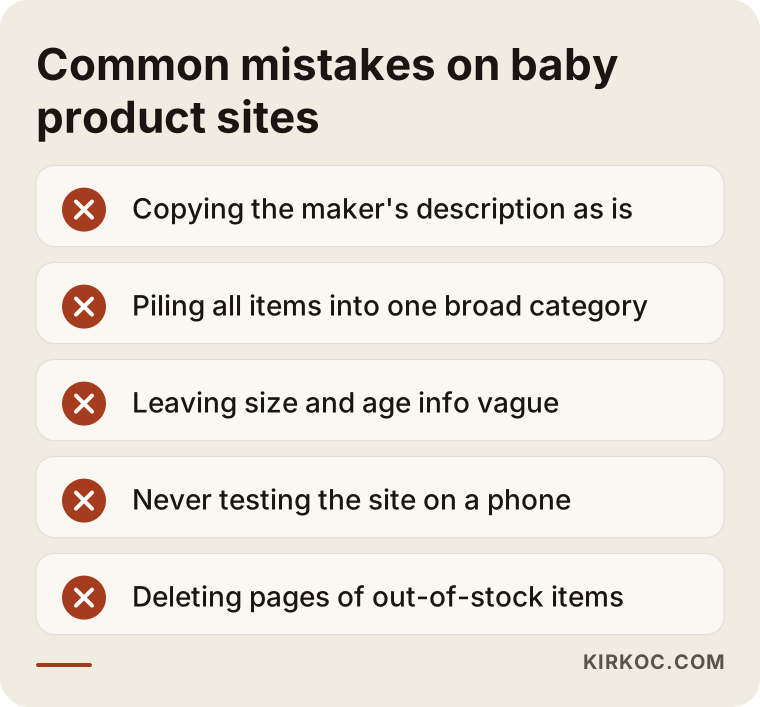
I have listed the mistakes I see again and again in this sector. None of them is shameful; most appear when a store is built in a hurry.
The first is using manufacturer descriptions word for word. The second is piling hundreds of products under one broad category. The third is leaving size and age information vague. The fourth is a site that loads slowly on a phone, with photos that are needlessly large. The fifth is putting returns, shipping and contact information where it is hard to find. The sixth is deleting the page of an out-of-stock product or sending it to an error page; that loses the visitors who arrive at that page and the value the page has built up. The seventh is giving up after the first few weeks without seeing results; SEO is not a fast job.
Let me say a little more about out-of-stock products, since it happens often with baby items. If the product will come back after a while, the best approach is to keep the page open, offer a "notify me when available" option and point to similar products. If the product is gone for good, a proper redirect to the closest alternative should be set up. Simply deleting the page greets a visitor looking for that address with an empty "not found" screen.
AI answers and parents' questions
Many parents now ask AI tools questions as well as Google: "Which kind of blanket is safer for a newborn?" or "What type of toy suits a one year old?" These tools compile their answers from reliable sources on the internet. If your site contains clear, correct and well-organized information, your chances of being cited as a source in those answers may go up. There is no guarantee, but writing clearly helps you both on Google and in these tools.
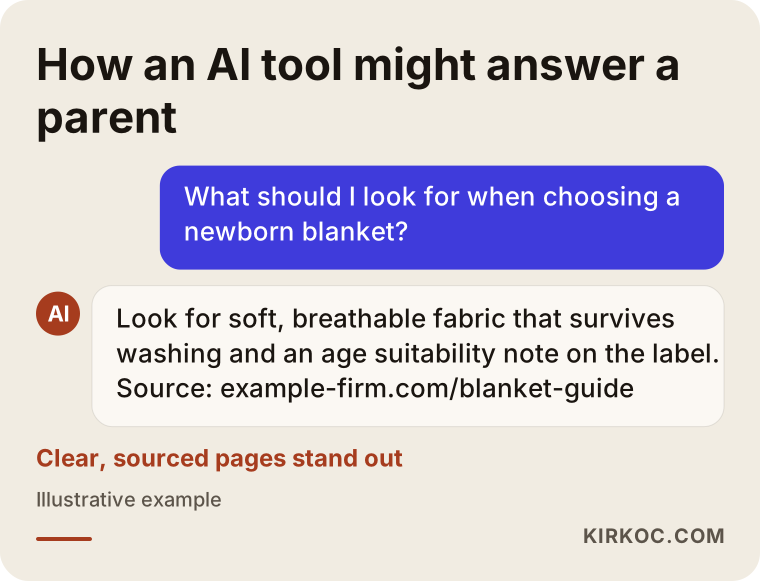
The point to notice in this example is what kind of page the answer draws from: a plain page that answers the question directly and whose source is clear. On topics involving health and safety, avoid bold claims. Honest pointers such as "ask your doctor" or "check the product label" build trust and lower the risk of wrong information. Giving medical advice about a baby's health is not a store's job; sending people to a professional on those matters is the right thing to do.
What can you do yourself, and when do you need an expert?
There is a lot you can do today without going to any expert. Rewrite your product descriptions in your own sentences, make age and size information clear, put return and shipping terms in a visible place, add meaningful descriptions to your photos, and try your site on your own phone from start to finish as a customer would. These are usually free, and they make a difference.
When do you need an expert? When your site's structure is complicated, when you have hundreds of products, when filters are multiplying identical pages, when the site is slow, or when you cannot work out why you are not visible. Problems like these are usually tied to how the site is built and have to be examined with tools. The picture below offers a simple way to decide whether to proceed on your own or get support.
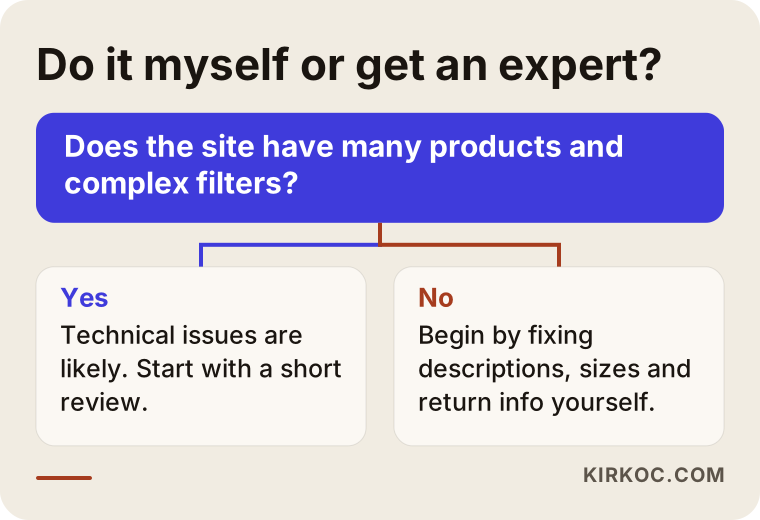
This chart is a guide, not a rule. If you have taken the first steps yourself and reached a plateau after a while, an initial review at that point is often the most efficient investment. It is also possible to start with a small review and then decide whether the work really suits you.
What determines the cost of SEO?
I will not give a number here, because even within the same sector two sites can need very different work. The main things that set the cost are these: the number of products and categories on your site, what platform the site is built on, how large the existing technical problems are, in how many product groups you want to be visible, how much content has to be written and how strong your competitors are. Whether you want ongoing support or a one-time fix also changes the price.
When you get a quote, check the following. Is the work written down and in order? Is it clear who does the work? Is the report in plain language? Do the site and accounts stay in your name? And does the quote avoid promising rankings? Since nobody controls Google, an offer that says "we will put you on the first page" is usually a sign to be careful. A clear plan and an honest expectation are worth more than a low price.
Where should you start?
If you are going to start something today, first pick the three product groups you most want to sell. For those groups, think about what a parent types into Google, rebuild your category pages around those questions, fill the information gaps on your product pages and review your trust pages. Then, for a month, look at which searches bring people to your site. That will show you the gap between what you guessed and what is true.
If you struggle while doing this yourself, or you simply do not have the time, as a first step I can do a short review of your site and give you, in writing, what to fix first in order of priority. The decision is yours; I do not apply pressure.
Frequently asked questions
How long does SEO take to work for a baby products store?
I cannot give a fixed time, because the age of your site, the strength of your competitors and the scope of the work all change the outcome. In general, visibility comes earlier on narrow, clear searches and later on broad ones. I do not guarantee rankings, but with monthly measurement I can show you which way things are moving.
I sell on marketplaces. Do I still need SEO for my own site?
A marketplace brings quick sales, but the customer relationship and the brand do not stay with you. Making your own site visible on Google is the lasting way to reduce your dependence on the marketplace. Running both together is often the most balanced approach.
Can I use product descriptions exactly as I get them from the manufacturer?
You can, but I would not recommend it. If the same text is on many sites, Google has no reason to put you ahead when it picks which one to show. Descriptions written in your own words that answer real parent questions, such as size and material, are stronger.
Do reviews help SEO on a baby products site?
Real reviews give visitors confidence and add original content to the page. Fake or purchased reviews are unethical and damage trust. Politely asking for a review after the order is the healthiest way.
I have thousands of products. Do I need to work on all of them at once?
No. It is more efficient to start with the best sellers and the product groups with the most potential. For the rest, you set shared templates and rules and expand over time.
Do I have to put product safety and certification information on the site?
Your legal obligations can vary with the product and the way you sell, and it is not for me to say anything definitive about them; I suggest you ask a lawyer or the relevant authority. From an SEO point of view, clearly writing correct information such as material, age suitability and care gives parents confidence and strengthens the page.
Do blog posts really help an ecommerce site?
They do, on the right topics. Articles that answer questions parents actually ask, such as "what to pack in the hospital bag" or "how to choose a size", also bring in people who are not yet shopping and open a natural path to your products. Generic articles written at random usually do nothing.
What do I need to prepare to start working with me?
It is enough to tell me your site address, the product groups you most want to sell and what you have done so far. I will settle the rest with you during the first review.
If you are curious where your baby and kids products store stands on Google, you can reach me through my SEO services page; I will look at your site and tell you, in clear and simple language, what to fix first.