You run boat trips out of a harbor town, operate an adventure park, or rent out cars, bikes and gear. Right now customers reach you by phone, by message, or through a third-party listing, and then they ask the same three questions: is this date free, how many people fit, and what does it cost. You answer them one by one, and in peak season you spend half your day on the phone. If that sounds familiar, a booking website can take a real load off you. In this article I explain what a tour, activity or rental business in Turkey should expect from a booking site, which pages are essential, and how to manage the project without technical knowledge. I am Ümit Kırkoç, I work alone from Istanbul, and where it matters I will be clear about what my website design service does and does not cover.
First, a clarification. A booking website is not a brochure site with a calendar stuck on it. It is a setup where the customer picks a date, enters the number of guests, sees the price, pays or sends a request, and you are notified immediately. Done well, it lets a customer book at midnight without calling anyone. Done badly, it keeps you busy fighting both the software and your customers.
If you are a foreign company, or an international operator who has set up in Turkey, there is an extra layer: most of your customers will be travelers who search in their own language, often from abroad, long before they arrive. I will come back to that below.
What does a booking site actually solve?
The core problem in these businesses is limited capacity. A boat has a fixed number of seats. A car cannot go to two people on the same day. An activity has a cap for each time slot. When you manage everything by phone and chat, double bookings, forgotten notes and mixed-up times are almost unavoidable. A booking system reduces that mess in three ways:
- It shows availability automatically. Full days and time slots close, so customers stop sending requests you cannot accept.
- It keeps information in one place. Name, phone number, party size, special requests and payment status sit in the same record.
- It cuts repeat questions. Meeting point, cancellation terms and what is included in the price get answered on the page.
There is one thing you should accept from the start: a booking system does not bring customers by itself. It makes the decision easier for someone who has already found you. Being found is a separate job, and I cover it further down.
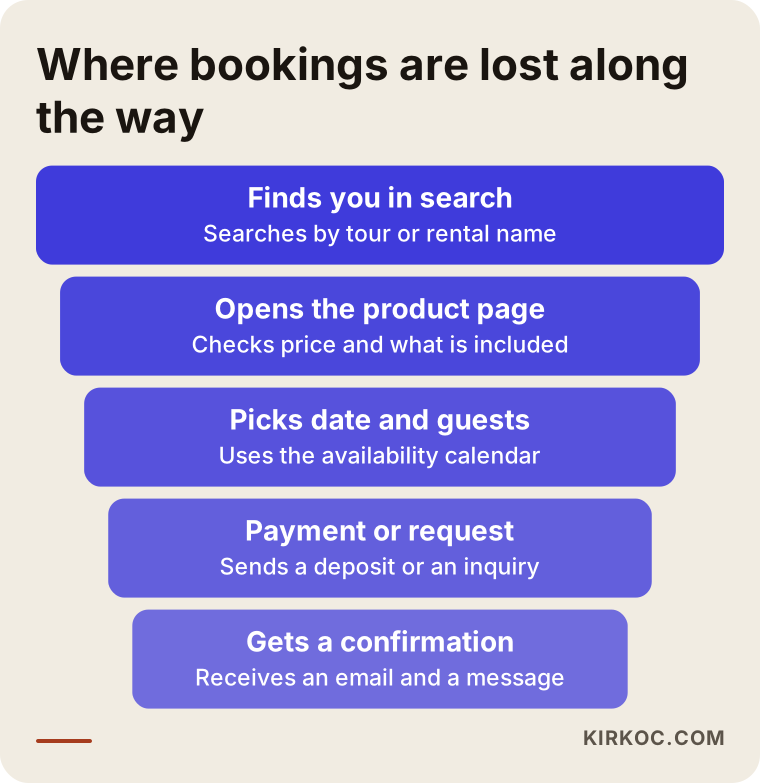
The funnel above shows the stages every booking passes through. Some visitors drop out at each step. Building the site well mostly means keeping those losses as small as possible.
How do customers search for you?
You do not need technical knowledge here. It is enough to know that people usually type a place plus an activity: "Bodrum boat tour", "Cappadocia balloon ride booking", "Fethiye paragliding", "Istanbul car rental" or "Alanya jet ski". Many add a date or a price word. These are searches close to buying. The person has already decided to go and is only choosing who to book with.
Two difficulties show up. First, the same results page is crowded with big booking marketplaces and resellers. Second, travelers search in their own language, and the words differ from one language to the next. A traveler from Germany, Sweden or the United States does not phrase a query the way a Turkish customer does, and a single page written for one audience will not fully serve the others.
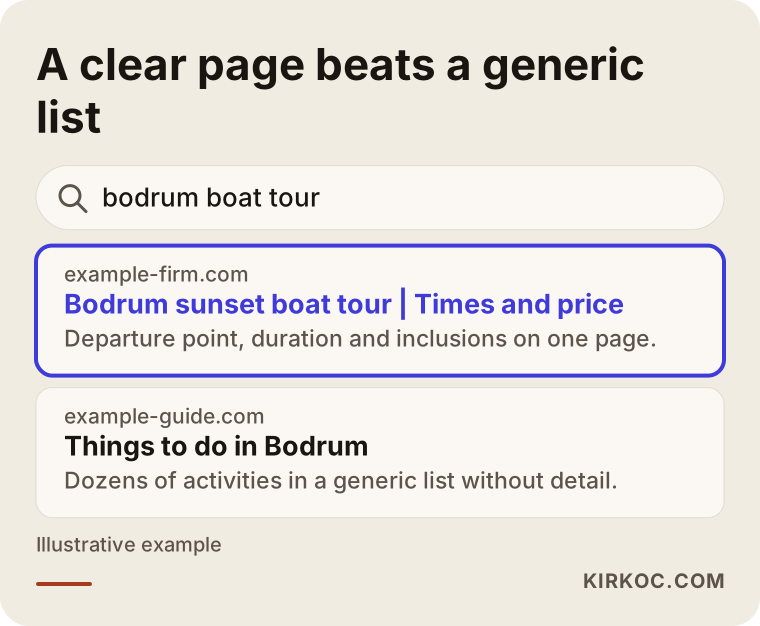
As the search result example shows, a page that states the date, duration, departure point and inclusions plainly feels more trustworthy than a generic list page. Rather than trying to outrank the marketplaces on their own ground, it is usually more realistic to lean on "book directly with the operator." Resellers charge a commission and that cost ends up in the price. A customer who books straight with you can save money while you keep more of the fare. I am not promising any outcome here; I am only pointing out where the opening is.
Which pages does a booking site need?
Many owners want a single "our tours" page and be done. In practice, a separate page for each tour, activity and vehicle class makes a big difference, both in search engines and in the customer's eyes. Someone looking for a "sunset boat tour" and someone looking for a "private boat charter" are not after the same thing.
At minimum you need:
- Home page. It should show what you do, where you are and your best seller on the first screen.
- Product pages. One per tour, activity or vehicle class: duration, times, departure point, what is and is not included, who it suits, age and health limits.
- The booking step. Date, number of guests, extras, and payment or request.
- Cancellation and change terms. A separate, clear page, also linked from each product page.
- Frequently asked questions. Weather, children, pets, getting there.
- "Who you will travel with" section. A short introduction of the captain, guide or crew, with real photos.
- Contact page. Map, phone, messaging app and opening hours.
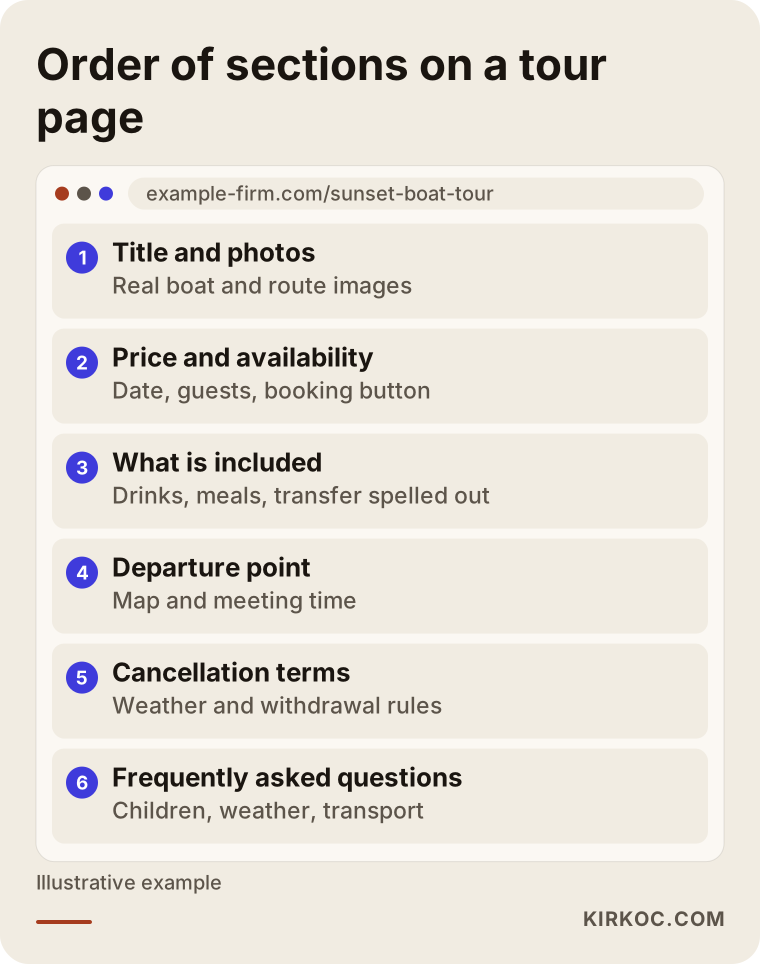
The page outline above is one way to order a tour page. Price and availability appear right after the title, while details, reviews and common questions come below. If the visitor is on a phone, the booking button should stay fixed at the bottom of the screen. A large share of visitors in this sector browse on a phone, often while on vacation or on the road.
Tours, activities and rentals are not the same thing
All three get called "booking," so it looks as if one piece of software should handle them. The daily reality is quite different, and separating them early keeps you from choosing the wrong system and starting over.
Tours: These usually depart at a set time on a set day with a fixed number of seats. The customer chooses a date and a head count. Season, weather and a minimum number of participants decide whether the trip runs.
Activities: There is a time slot and a capacity, and often several sessions in the same day. Age, height, weight or health limits and a signed waiver are part of the job.
Rentals: The question is not seats but whether one specific item is in use during a given date range. Pickup and return times, handover location, deposit, insurance and extra equipment matter most.
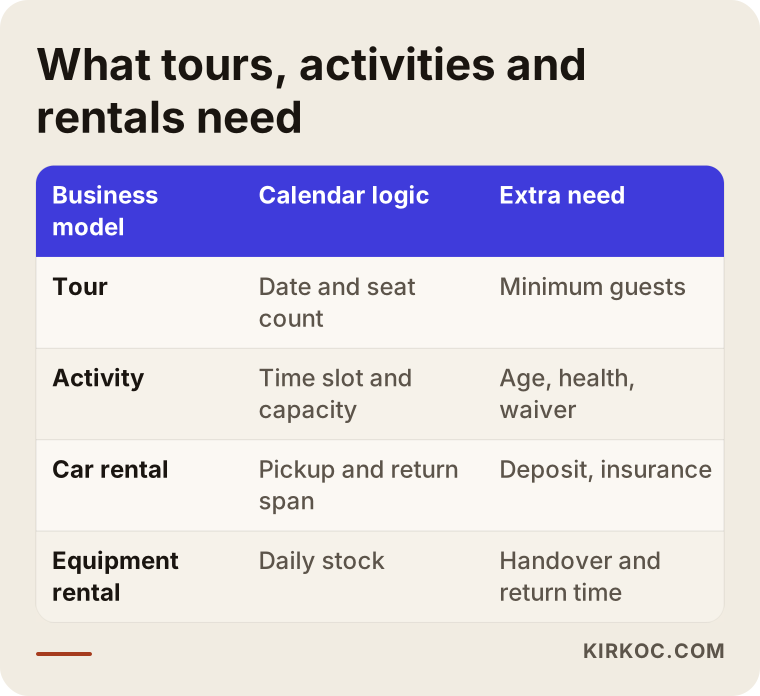
The table puts the needs of these business models side by side. If you do both tours and rentals, building two separate flows is usually healthier than forcing both into one system.
Payment, cancellation and the calendar: the hard part
The visible side of a booking site is easy. The hard part is the rules running behind it. I suggest thinking through three things in advance.
Payment. Will you ask the customer for the full amount, a part of it, or nothing? Full payment gives you certainty but makes some customers hesitate. A deposit is a balanced middle path. Taking no payment and only collecting requests is easy to set up but leaves the no-show risk with you. For online payment you need an agreement with a payment provider or a bank's virtual POS, and for a business registered in Turkey the application can take anywhere from a few days to a few weeks. Start it before the site is finished. If you are a foreign-owned operation, ask the provider early what documents they need from your company, because requirements differ.
Cancellation and changes. What happens if a trip is called off because of weather? Is there a refund if the customer changes their mind? Is a date change free? If you do not write these rules clearly on the page, you will argue each case separately. Consumer protection and distance-selling rules can include special provisions for this kind of service, and they depend on where your customers live as well as where you operate. Please talk to a lawyer before you publish the wording.
Calendar sync. If bookings that arrive by phone or through another platform do not appear in the system, your site may still show a fully booked date as open. If you also sell through other channels, always ask whether the calendar can sync with them.
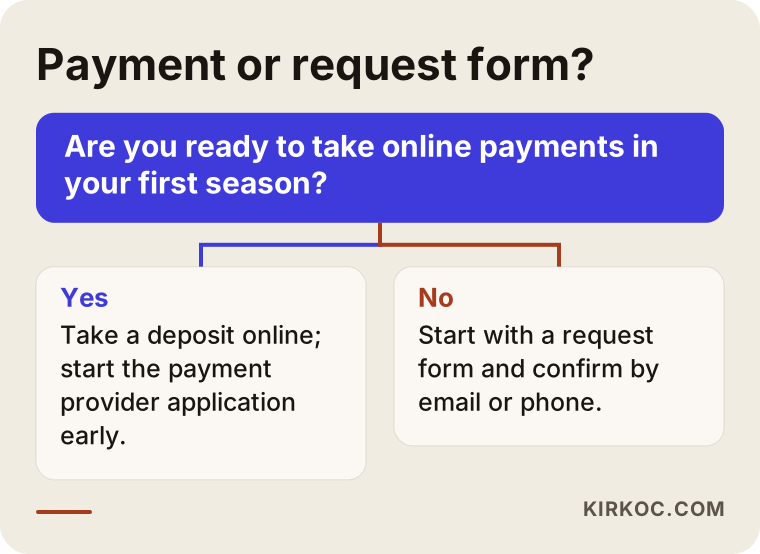
The decision diagram summarizes which route suits which business. Starting with a request form in the first season and adding payment once things settle is a perfectly legitimate choice.
Two hypothetical example scenarios
The two examples below are entirely hypothetical. They do not describe any real business; they are only here to show a way of thinking.
Example scenario 1: a small boat tour operator. Picture a business with two boats running day trips from a coastal town. The owner takes bookings by phone and message and records them in a notebook. In the busiest month the same seat gets sold twice, and when the weather turns, every guest has to be told individually. A sensible path for this business might be a separate page for each boat and each tour type, a time-based seat calendar, a deposit payment, and an automatic email and message when a trip is canceled for weather. If foreign tourists are a big part of the trade, English and German versions are added. The key decision is how the minimum number of guests per boat is handled in the system.
Example scenario 2: a city gear rental shop. Now picture a small shop renting bicycles, camping equipment and camera gear. Each item is a single unit in stock, and the same bike cannot go to two people on one day. Customers mostly plan for the weekend. Here a day-based calendar is enough, rather than a time-based one, and the deposit rules, handover time and photos of each item's condition matter. A deposit at booking with the balance at handover might work. The rental terms section needs to be short and unambiguous. For this shop, full automation may be unnecessary at first, and a request form with a confirmation email could be enough.
What the two have in common: the way the business really runs is written down first, and only then is a tool chosen to fit. Doing it the other way around, choosing a ready-made system first and bending the business to match, is what people in this sector regret most.
Ready-made system or custom development?
There are two routes and neither is wrong.
A ready-made booking plugin or platform: Solutions added to a base such as WordPress that bring the calendar, payment and email notifications with them. Setup is fast, the upfront cost is lower, and they cover most standard needs. The limit shows up when you need very particular rules, for example a minimum group size that varies by boat, seasonal pricing or package combinations.
Custom development: A system written around your business. Flexibility is high, but so are the initial investment and the upkeep. When something breaks, you need someone who can fix it.
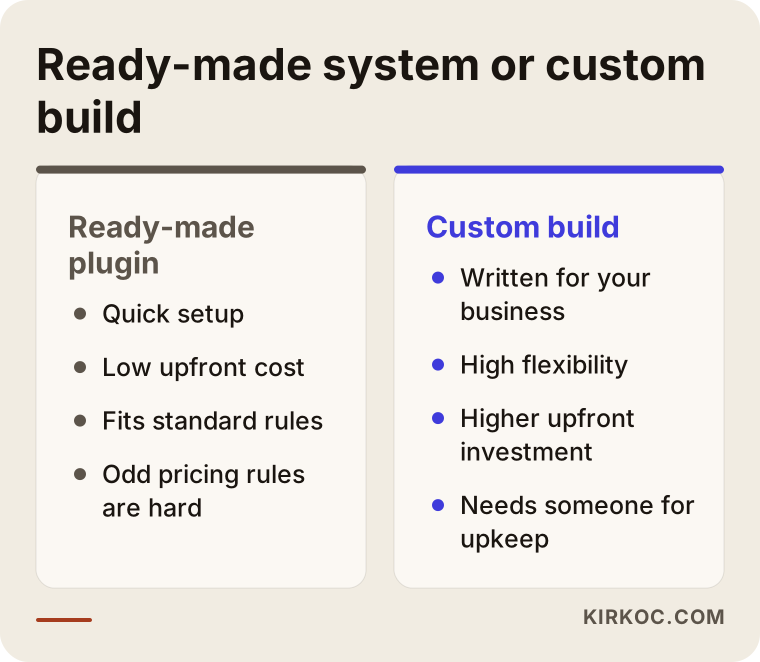
The comparison puts the strengths and weaknesses of each route side by side. My approach is this: if your rules are standard, start with a ready-made system and learn your real needs during the first season. When you hit its limits, that is the time to discuss custom work. Building a big system up front can mean paying for features you never use.
The process, step by step
A booking site project usually runs in this order:
- Write down how you operate. Products, capacity, times, pricing logic, cancellation rules. Skipping this step costs the most time later.
- Draft the page structure. Which product gets which page, and which languages you need.
- Choose the system. Ready-made or custom, which payment method, which calendar.
- Design and copy. Pages that are comfortable on a phone, load quickly and are backed by real photos.
- Setup and testing. Real test bookings from your own phone and your friends' phones, plus cancellation, refunds and email notifications.
- Launch and monitoring. Watching the bookings that come in and the steps people abandon during the first weeks.
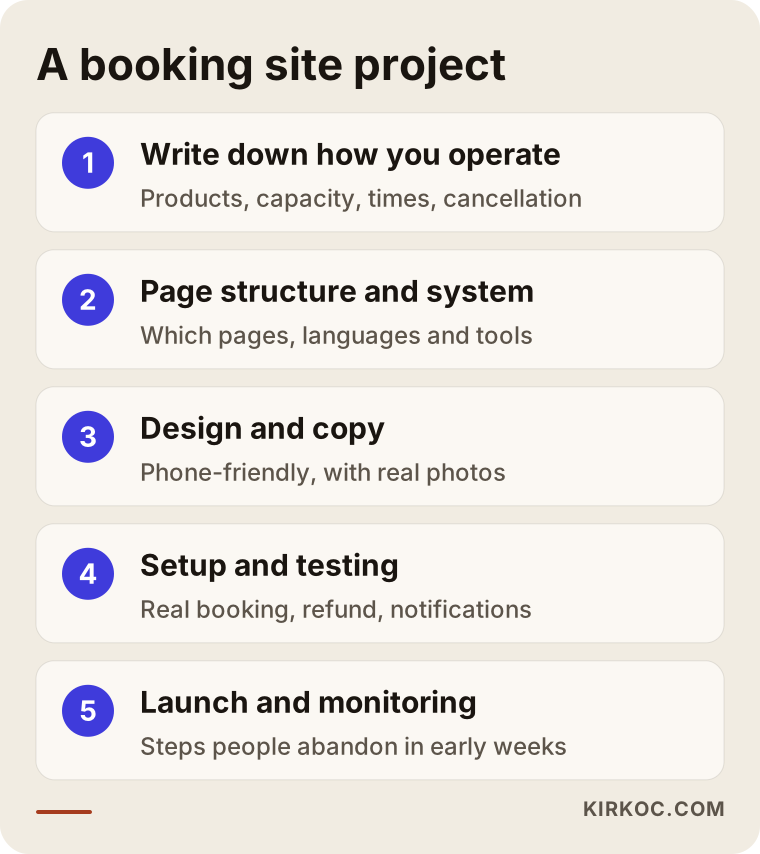
The process diagram outlines roughly how the work is ordered. The duration depends on the number of products, the number of languages and how long the payment provider takes to approve you, so I do not promise "done in so many days." A firm schedule can be drawn up once I have heard what you need.
There is also the matter of timing. Your site should be ready and tested at least a few weeks before the season starts. Changes made after the season opens put both you and your customers at risk. Plan your work backward from the season calendar.
Common mistakes
These are the mistakes I see again and again in this sector.
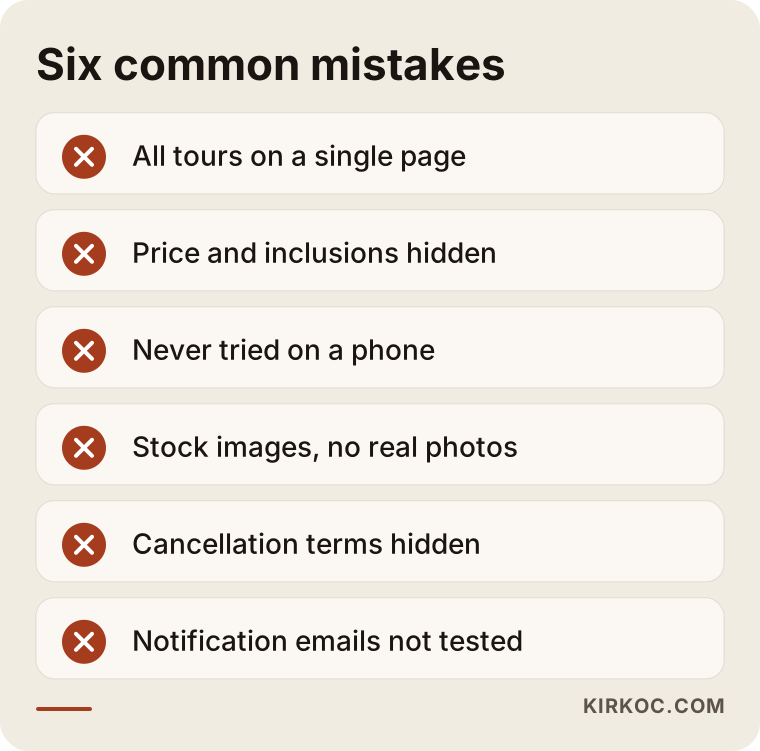
Let me unpack a few of the mistakes in the image:
- Putting everything on one page. When all tours sit in a single list, none of them stands out, either in search engines or to the customer.
- Hiding the price and inclusions. A page that says "call for a price" defeats the purpose of a booking site. You do not have to print every figure, but you should at least explain what the price depends on.
- Never testing on a phone. A calendar that overflows the screen or a button that disappears behind the keyboard only shows up on a real device.
- Using stock photos. Customers want to see you: your boat, your vehicle, your crew. Images borrowed from elsewhere lower trust.
- Hiding cancellation terms. A surprise later means bad reviews and refund arguments.
- Not testing notifications. If the email or message that tells you about a booking lands in spam, the customer waits and you never know.
- Forgetting the off-season. Decide in advance what the site shows when you are closed, otherwise tours that look open but cannot be booked confuse people.
What does a trustworthy page look like?
A booking means money and time. If a customer meets you for the first time, they look for small signs to trust: a real address, a working phone number, your company details, a clear price, reviews and photos. That is why product pages should carry a map of the departure point, a list that states exactly what is included, customer reviews (real and with permission), safety equipment or license information, and what happens when the weather is bad. One firm rule: never invent reviews. It is dishonest, and it causes trouble for you once it is discovered.
Also offer more than one way to reach you. Not every customer wants to fill in a form, and some prefer to write a message directly. A messaging app link next to the booking button keeps hesitant customers from slipping away.
The site is live: where will customers come from?
At this point many people think the site is ready and the job is finished. But a booking site produces value only when it gets visitors. Visitors come from three main routes.
Search engines. As described above, the right page structure and clear content are the cheapest source in the long run. They take time to deliver and there is no ranking guarantee, but once set up they work all season. For local searches your Google Business Profile should also be complete and current: address, hours, photos and a product list.
Ads. Because seasons are short, Google and Meta ads are the fast route for some businesses. What matters is to send the person who clicks an ad straight to the tour they were looking for, not to a general home page. Your ad budget should match your tour capacity; advertising a tour that is already full is wasted money.
Social media. Instagram and TikTok are a natural shop window for visual businesses. Tour photos, short videos and availability announcements all fit there. But people coming from social media often do not buy immediately, so the site has to be clear enough for them to return to and finish.
It matters that these three routes are connected. Photos used on the site should match those in ads and on social media, and the measurement setup should be able to see all three together. That is exactly why running the site, search, ads and social media through one person is practical. I can see in one place which channel the bookings came from and steer the budget accordingly, and nobody has to argue over whose job a problem is.
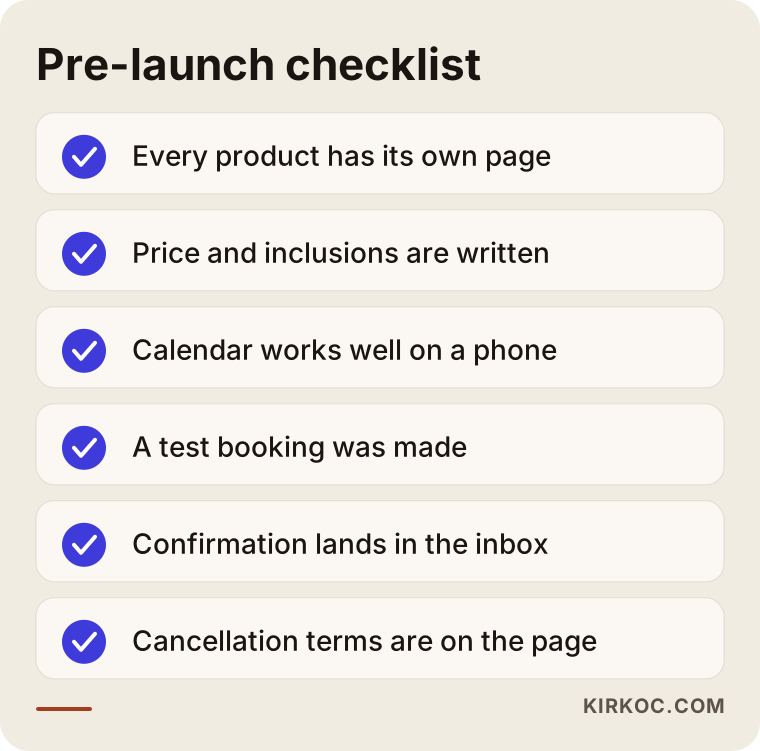
I suggest going through the checklist above before launch. It can serve as a shared guide for you and whoever is working with you.
What can you do yourself, and when do you need a specialist?
You do not have to hand everything over. These are things you can do very well on your own:
- Writing detailed information about your products: times, duration, inclusions and rules. Nobody knows this better than you.
- Taking real photos and short videos. Even a phone camera can be enough, as long as the light is good.
- Deciding your cancellation and refund policy clearly.
- Collecting the questions customers ask most often.
You need a specialist when:
- The calendar, payment and notification system has to be set up and tested.
- You publish in several languages and each one needs its own pages.
- You also sell through other channels and the calendars must be synced.
- You want the site to be found in search engines, since the page structure and content layout have to be right from the start, and fixing them later is harder.
If you are a small operation with just a few products, starting on a ready-made platform and growing from there is also possible. To be honest, not every business needs custom software. Sometimes the best advice is "carry on with a simpler solution for now."
What determines the cost of a booking website?
I do not quote numbers in this article, because no two businesses have the same needs. I can list what drives the cost, though:
- Number of products. A business with three tours has a different job from one with thirty vehicle classes.
- Number of languages. Each extra language means not only translation but content and search setup that suit that language.
- Payment method. Online payment, installments, deposits and multiple currencies make setup more complex.
- Calendar rules. Simple seat counting is very different from seasonal pricing, minimum participants and package combinations.
- Connections to existing systems. Syncing calendars with other platforms, or linking accounting or stock, adds work.
- Content and images. Copywriting, photo editing and how detailed the product pages are.
- Ongoing maintenance. Updates, backups, security and small changes after launch.
Watch for hidden costs too: the monthly license fee of a ready-made system, the payment provider's transaction commission, and items such as a domain name and hosting. When you collect quotes, ask whether each of these is itemized in writing.
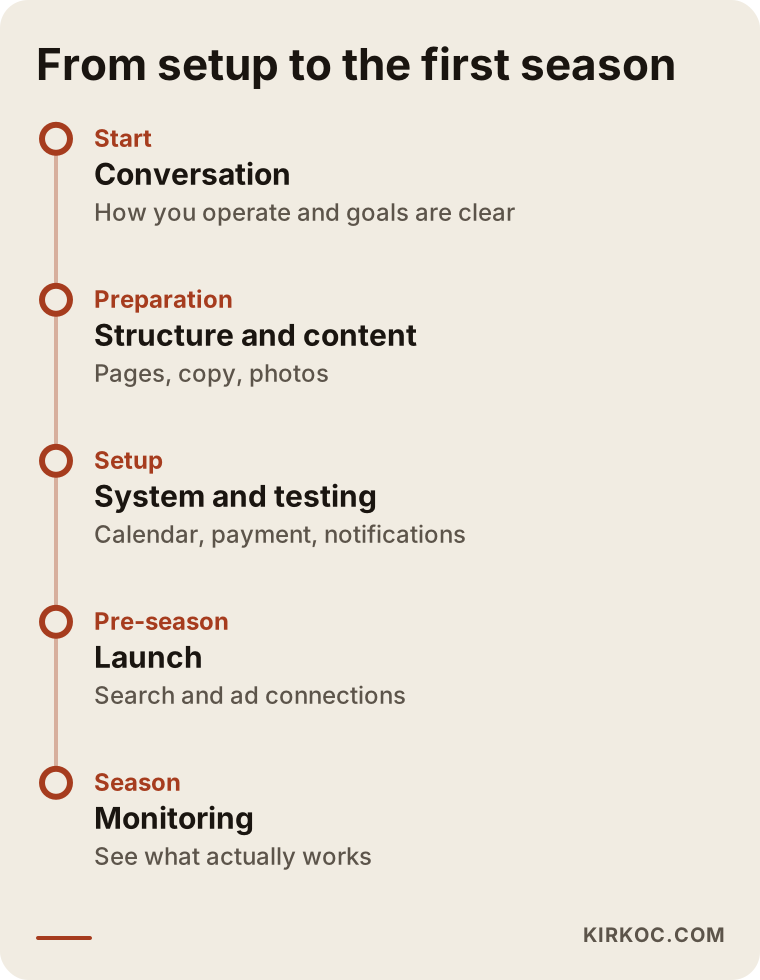
The timeline gives an example of how a project might move from setup to the first season. The actual calendar depends on your product count and season.
How I work
I work alone, so the person you talk to is the person who does the work. In the first conversation I listen to how you operate, what your season looks like and what you want to solve. Then I tell you in writing what needs to be done and what is not needed for now. On the question of a ready-made system versus custom development, I recommend what suits your business, not the most expensive option.
The advantage of handling the site, search visibility, social media and ads with the same person is that the information stays in one hand. The text I write for a product page does not contradict the wording in an ad or the post on social media, and you and I can read together which channel a booking came from. Of course I guarantee nothing: no ranking and no number of bookings. I set up a sound structure, measure it, and tell you plainly what I see.
Frequently Asked Questions
How long does it take to build a booking website?
It depends on the number of products, the number of languages and how long the payment provider takes to approve your account. The slowest part is often not the technical setup but pinning down product details and rules. If that information is ready, the process speeds up noticeably. I suggest starting at least a few weeks before your season.
Is a ready-made booking system or custom software better?
If your rules are standard, a ready-made system is usually enough and more economical. If you have very specific pricing, capacity or package rules, custom development is worth considering. For most businesses, starting with a ready-made system in the first season and seeing what you actually need is a safe route.
Do I have to take online payments on the site?
No. You can start with a simple inquiry form and confirm the booking by email or phone. An online deposit does reduce the risk of no-shows, though. If you decide to take payments, begin the payment provider application before the site is finished, because approval times vary.
Do I need to leave platforms like Booking.com or Tripadvisor?
No. These platforms can help you find new customers, but you pay commission. Your own site gives you an alternative for returning customers and people who contact you directly. If you use both, make sure the calendars are kept in sync.
Is a multilingual site necessary for foreign tourists?
If your target audience is foreign, yes, it is largely beneficial. Translating the page is not enough, though. You need copy that fits how people search in that language and a separate page for each language. You can decide which languages matter to you by looking at your existing customer records.
Can you guarantee I will get bookings after the site is built?
No, nobody can honestly guarantee that. I set up the booking structure, make sure the site can be found, and I go through the data with you to see what is working. The outcome also depends on your product, your price, the season and the competition.
Who should write the cancellation and refund terms?
You set the rules, and I help place them on the page in a way people can understand. For legal validity, I recommend consulting a lawyer before you publish, since distance-selling and consumer rights can carry special conditions, especially when customers book from other countries.
What happens if there is a problem with the system after launch?
I discuss maintenance and support with you up front. A glitch in the middle of the season in a booking site is a direct loss of income, so notifications, backups and updates should be planned in advance.
If you want to build your booking setup together and spend the season next to a system instead of next to a phone, reach me through my website design service page. I will listen to how your business works and explain plainly which route suits it.