You have something valuable: knowledge, a course, real expertise or a community of people who care about the same thing. You want people to pay for it on a regular basis, but running that through social media groups, file sharing or a spreadsheet you update by hand has become exhausting. At that point, searching for "build a membership website" is a very natural next step. In this article I explain what a membership website is, which businesses it makes sense for, how it is built and what decides the cost. I am Ümit Kırkoç, a web designer and SEO consultant who works alone from Istanbul, and I will be open about what my own website design service covers wherever it matters.
A membership website, in short, is a site where part of the content is open only to people who log in, and usually only to people who pay. An online library, a course platform, a private community, a monthly newsletter or a subscription service that ships products on a schedule all fall under this umbrella. What separates it from an ordinary brochure site is the system working behind the scenes, the one that answers questions like "who logged in, what are they allowed to see, when did they pay and when does their subscription end?" A membership site built without that system in place runs into trouble very quickly.
When do you actually need a membership website?
First, an honest question: do you really need one? A membership site means more setup, more maintenance and more responsibility than an ordinary website. It is not the right answer for every business.
Membership makes sense if you will deliver the same content or access to the same person again and again. If you are a teacher who adds a new lesson every week, a designer who releases new templates every month, a consultant who shares specialist knowledge with one profession, or someone who runs a closed hobby community, the membership model fits naturally. If you sell one-off items, for example a course that is sold once and then finished, a full membership system is often more than you need.
The graphic below sums up the single question that helps you decide.
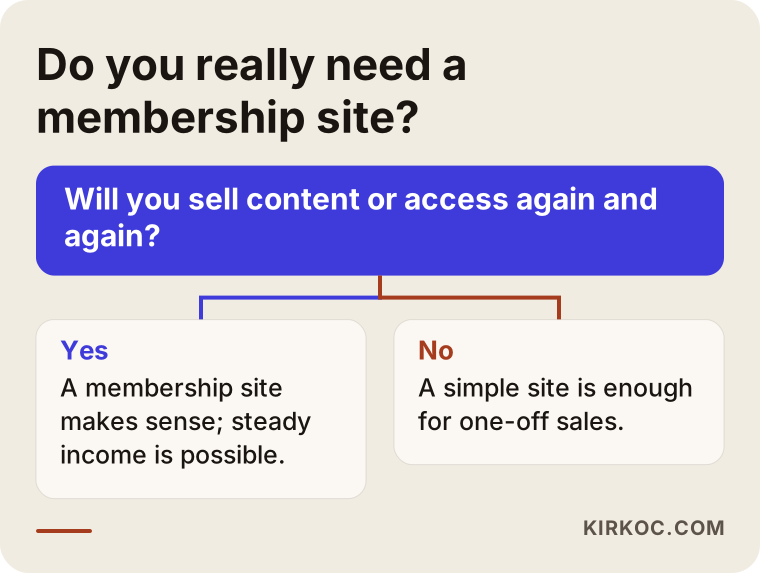
If your answer is yes, the rest of this article will be useful to you. If your answer is no, you have lost nothing. You can start with a simple site and add membership later, and that is often the smarter route anyway.
How do people search for this service?
People looking for a membership site rarely use technical words. One person types "website with member login," another types "site where I can sell paid content," and another types "subscription website development." Some search for "online course website" when what they actually need is a membership setup, but they do not know that yet. This variety is exactly why pages that write about this topic, and pages that offer the service, need to be clear.
The graphic below shows, with a completely made-up example, how a search result might look.
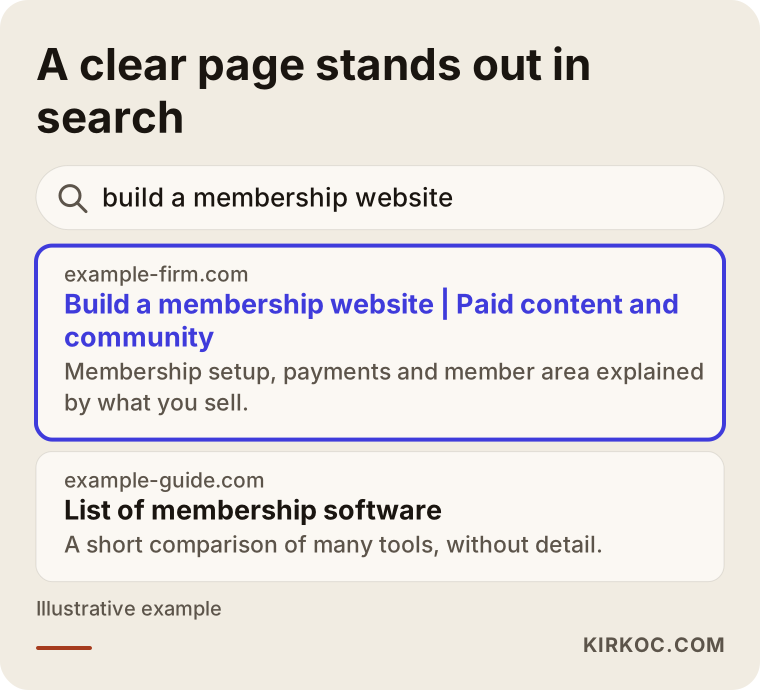
The difference is this: the highlighted page tells the visitor up front what they will find, which here is paid content, community, payments and a member area. The page that lists many tools in one line gives the visitor nothing to base a decision on. Your own site works by the same logic. If the home page of your membership site cannot explain what you offer and who it is for at first glance, even the best technology behind it will not help.
Which membership model suits you?
Membership is not one single thing. The model you pick shapes both the structure of the site and its cost. Let me describe the four most common models in plain language.
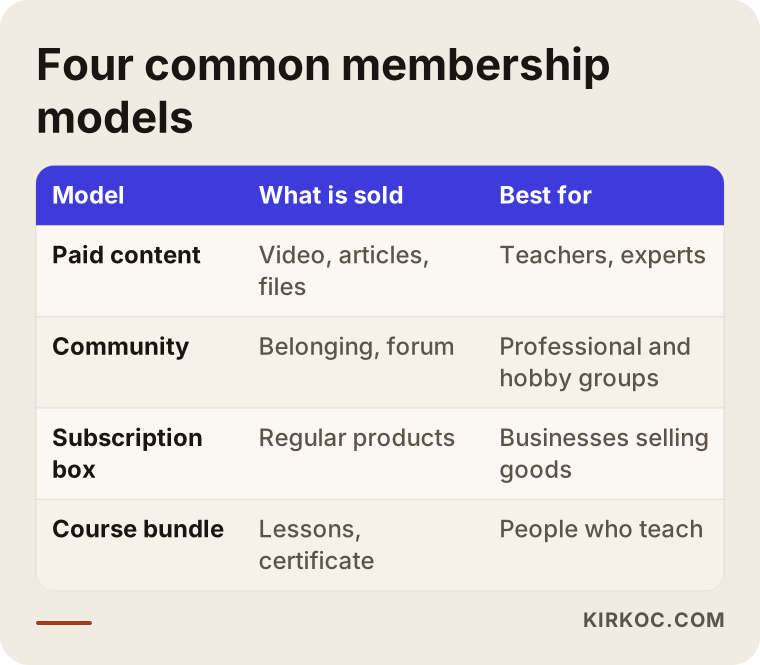
Paid content
You open articles, videos, files or templates to members only. While they are subscribed, they can reach all of it, or part of it depending on the plan they are on. The most important issue in this model is whether you can produce content steadily, because a member who thinks "nothing new came out this month" will cancel.
Community
Here the thing being sold is not content but belonging. Members write to one another, ask questions and share experience. You need a forum, a message area or member profiles. This model is technically heavier, because moderation, notifications and misuse all come into play. Sometimes a simpler answer is enough, such as running an existing messaging group behind a membership gate that is connected to the site.
Subscription box
If you ship physical products on a regular schedule, membership is really a repeating sale. Payment, addresses and shipping details have to be kept in order. The member needs to see which plan they are on and when the next shipment goes out.
Course bundle
Lessons, quizzes and certificates are delivered together. Progress tracking matters: the member sees where they stopped and picks up from there. Many teachers start with this model and add a community area afterward.
If you are not sure which model you are closest to, that is fine, because most businesses mix more than one. What matters is doing just one of them well in the first version.
One-time sale or subscription?
The commercial logic of a membership site is hidden in how people pay. There are two basic routes: a one-time payment (for example, a course that is sold once) and recurring payment (for example, the same amount charged every month or every year).
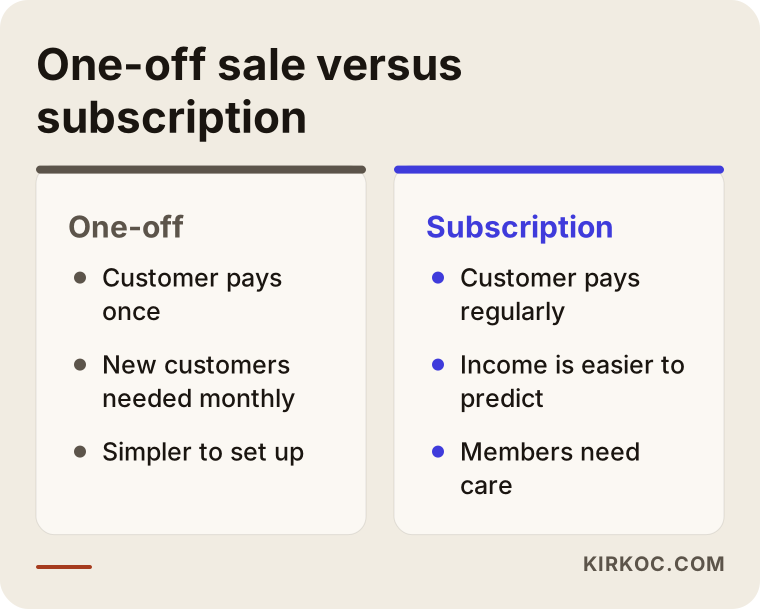
A one-time sale is simpler to set up, but you need to find new customers every month. With a subscription, income is easier to predict, but you have to keep delivering value to hold on to members, and you have to deal with failed payments, card renewals and cancellation requests. So before you commission a subscription site, ask yourself this: what exactly will I give the member each month?
Two hypothetical scenarios
The two examples below are entirely hypothetical. They do not describe a real person or company. The aim is to show how the same service gets built differently for different needs.
Scenario one: a food writer and a monthly recipe archive
Imagine a food writer. She has followers on social media, but her content depends on those platforms. Every month she prepares new recipes, shopping lists and short videos, and she wants to gather them in a paid archive. The best fit for her is the paid content model. What she needs is limited: a login system, monthly and yearly plans, payment, search and categories inside the recipe archive, and a favorites list for each member. A community area is unnecessary at first, and comments would be enough. The most critical thing in this setup is that she can win over visitors with a free sample recipe and show that the archive is updated regularly.
Scenario two: a closed community for a profession
Now imagine an accountant or consultant who wants to run a closed community where people from the same profession ask questions and share document templates. Here communication matters more than content. Members need to create profiles, start topics and reply to each other. Who is allowed in also matters, and the owner may want to approve applications. In this setup, moderation and privacy notices carry the most weight. Because you would be holding members' personal data, it is wise to have those notices prepared with a lawyer.
As you can see, both scenarios sit under the heading "membership website," yet the parts they need are very different. A good plan brings that difference to the surface at the start.
What should be inside a membership website?
The part of the site that the member sees is called the member area. A good member area welcomes the person, reminds them where they left off, lets them manage their own account and offers help when they need it.
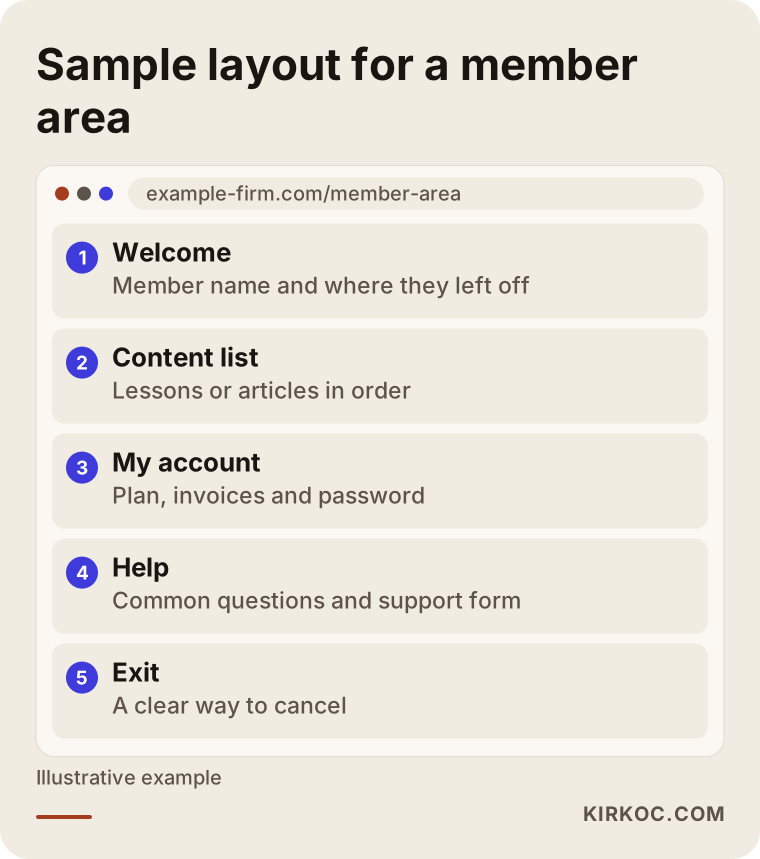
The most commonly skipped parts of this layout are "My account" and "Exit." If members cannot manage their invoices, plan and password on their own, every request lands in your inbox and eats your time. Hiding the way to cancel, on the other hand, damages trust and leads to payment disputes. A clear cancellation path may cost you a member in the short run, but it protects your reputation in the long run.
Outside the member area, the pages that everyone can see are at least as important. The home page a visitor sees before logging in, the plan comparison, a free sample, the frequently asked questions and the contact section are what actually make the sale. A common mistake on membership sites is putting all the effort into the member area and leaving the storefront weak. Content that nobody can see before joining is also invisible to search engines.
The path from visitor to paying member
It is not realistic to expect a visitor to hand over a credit card on their first visit. People want to build trust first. That is why a membership site needs a short, clear path.
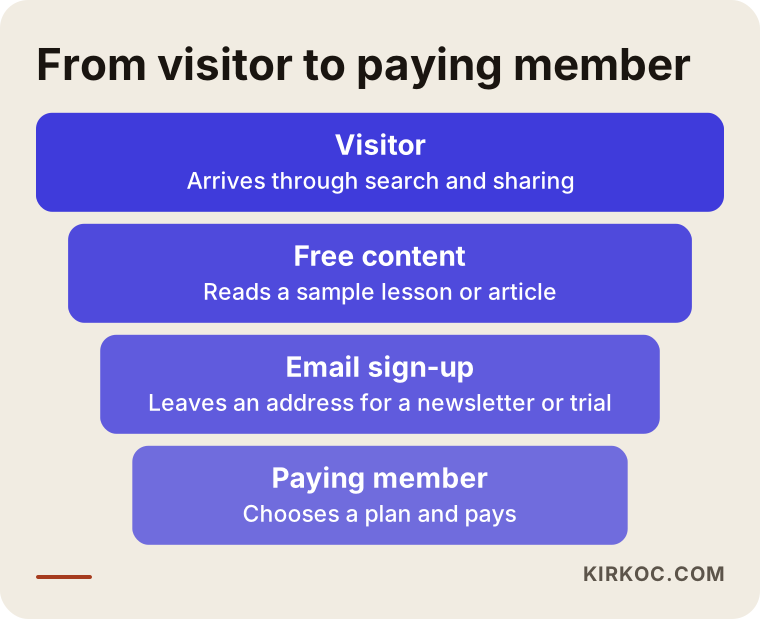
The first step is that the visitor finds you, and for that you need a blog that shows up in search results, social sharing or word of mouth. In the second step you offer something free: a sample lesson, an article, a template. In the third step the visitor leaves an email address for a newsletter or a trial. In the fourth step, the person who has realized they need what you offer picks a plan and pays. If any link in this chain is weak, sales will not come, no matter how nice your payment page looks. In the sites I build, I take care to draw out clearly what each of these links is for.
Step by step: how is a membership website built?
When you follow the right order, the build goes calmly. Mixing up the order means doing the same work twice.
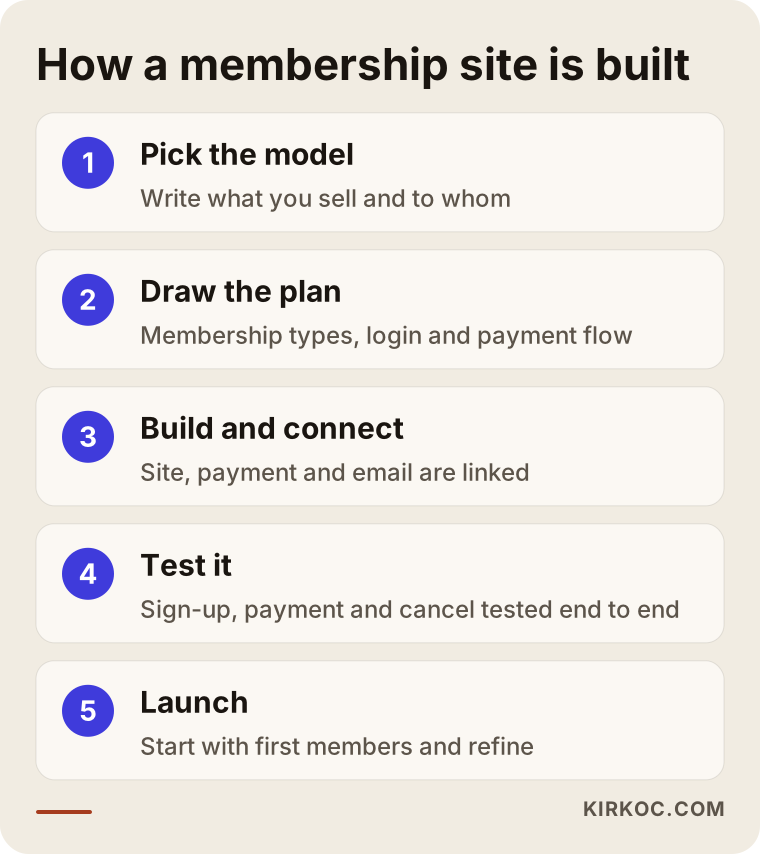
Step one: choose the model. I ask you to write down, in a sentence or two, what you sell and who you sell it to. It looks simple, but it shapes every later decision. Membership sites that start out as "everything for everyone" usually end up speaking to nobody.
Step two: draw the plan. Which membership types there will be, what each one can access, and how the login and payment flow will run are all drawn on paper. This is also where you and I decide which pages are open to everyone and which are for members only.
Step three: build and connect. The site is built, the login system is switched on, a payment provider is connected, and the emails that go to members are prepared: welcome, receipt, failed payment and renewal reminder. On widely used platforms such as WordPress there are mature plugins for this job, and when the need is more unusual a custom solution can be considered. For payments, providers such as Stripe or PayPal are common choices in many countries; which one suits you depends on where your business is registered and where your members live.
Step four: test. The whole flow is tried from start to finish: signing up, paying, reaching the content, resetting a password and canceling the subscription. It is tested on a phone too, because most members will visit your site from their phones.
Step five: launch. Starting with a small group is often the safest approach. Feedback from the first members closes the gaps, and then you open the doors to everyone.
What should you prepare before you start?
Most of the time lost when building a membership site has nothing to do with technology; it comes from preparation. You need business documents to receive payments, the site looks empty if the content is not ready, and without written rules, disputes have no clear answer.
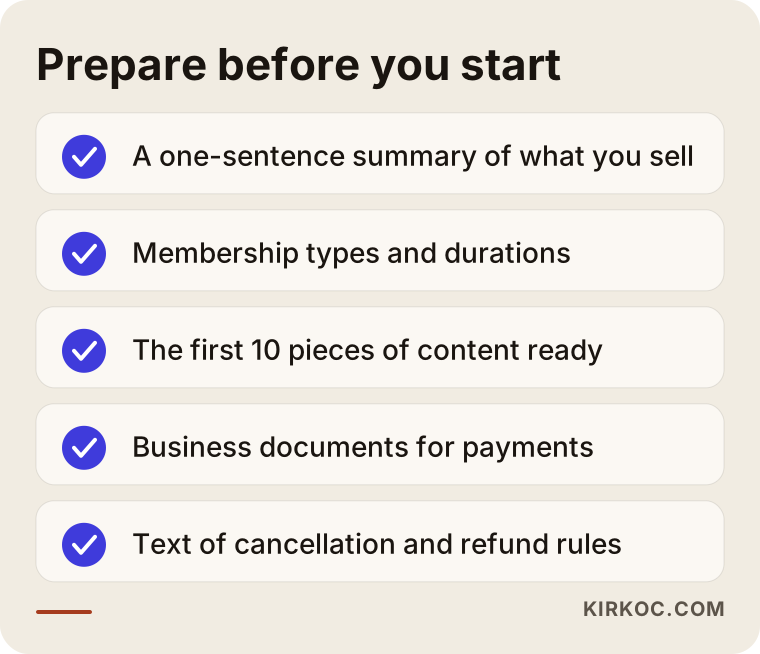
Getting this list out of the way early will speed up your project whether or not you work with me. Having your first pieces of content ready in particular gives the visitor a sense that "there is something real here" on the day the site goes live. For payment documents and refund terms, I recommend asking an accountant or a lawyer which details are required and how the wording should be written. It is not for me to say anything definitive on that.
Think about a member's journey in advance
A membership site does not end with a single sale moment; over time, the member builds a relationship with your site. Seeing in advance where in that relationship things can go wrong makes the work much easier.
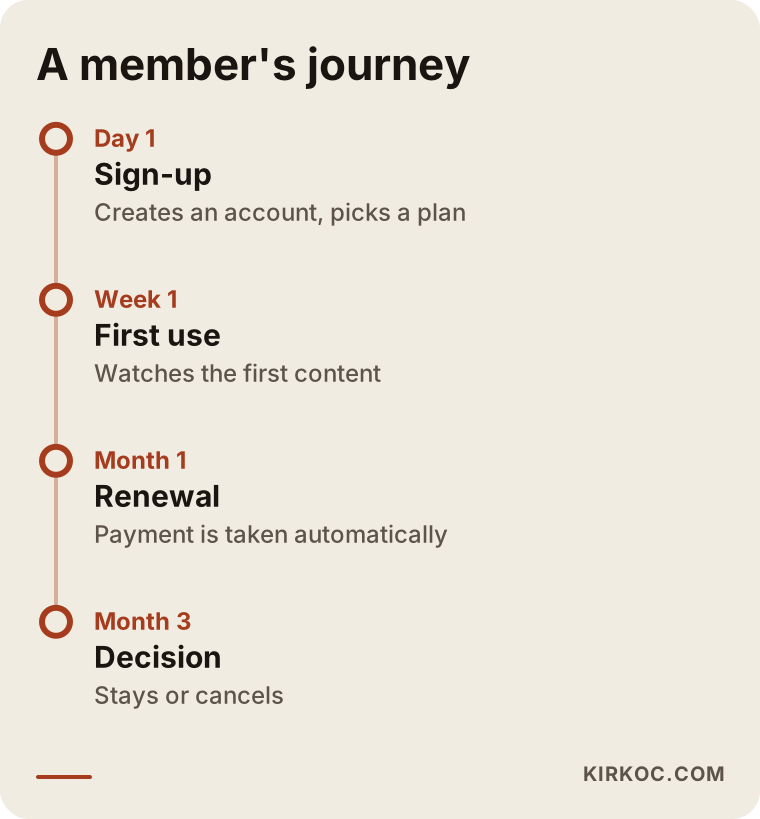
On the first day the member expects a welcome message and a clear path showing where to begin. If they do not engage with the content during the first week, they lose interest, so a short reminder email in that first week works very well. A month later, the payment is taken automatically, and a member whose card is declined should get a clear message, otherwise you lose them without either side noticing. In the third month the member decides whether to stay, and by then you should have given them something real. This timeline also shows plainly which emails and which screens the site needs to contain.
Common mistakes
Most of the mistakes seen on membership sites look alike. I have put together a short list.
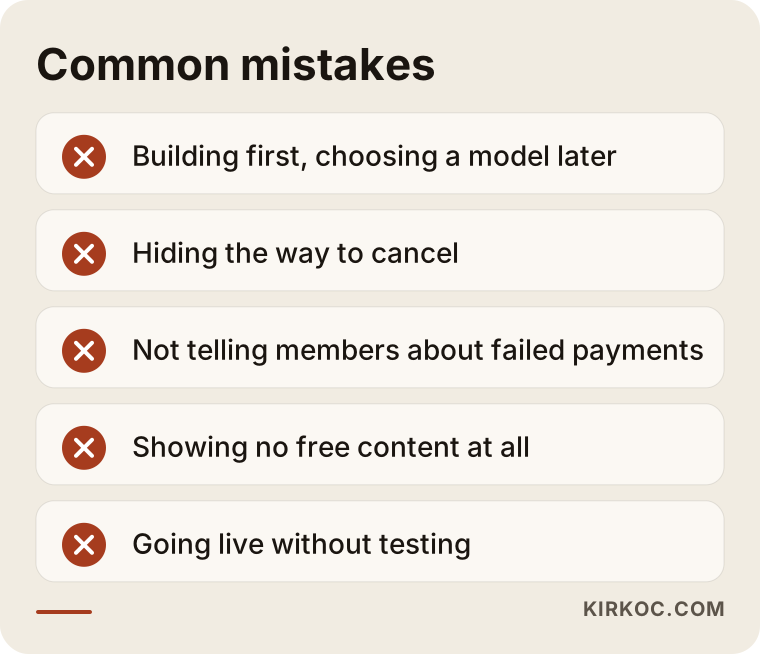
Building the site first and thinking about the model later. Saying afterward "actually, I want to sell yearly, not monthly" means rebuilding the payment flow from scratch.
Hiding the way to cancel. It looks like a short-term gain, but it comes back as disputes, complaints and bad reviews.
Leaving the member uninformed when a payment fails. A member whose card has expired loses access and does not know why. A clear email and a grace period for retrying are needed.
Showing no free content. A visitor who sees no sample at all is not persuaded to pay. Search engines cannot see your content either.
Going live without testing. On a site that takes payments, a bug means lost money and lost trust. Sign-up, payment and cancellation should always be tried under real conditions.
I should add one more thing: a membership site is not something you build once and leave alone. Platform updates, security, backups and member support requests need regular attention. Counting this maintenance load in from the beginning reduces unpleasant surprises.
What can you do yourself, and when do you need a specialist?
You do not need to hand everything to a specialist. Preparing the content, thinking through the membership types, drafting the cancellation and refund rules and lining up your first members are your job, and nobody can do them better than you. It is also possible to start small with a ready-made membership service, meaning a platform that offers one dashboard for content and payments. For trials and simple needs, that is a sensible way to begin.
Specialist help starts to make sense in these situations: you want to work under your own domain name and your own brand, you need different membership plans and access levels, you will build a custom flow with a payment provider, membership is being added to an existing site, or you want the site to be found in search engines as well. On ready-made platforms your content is usually bound by that platform's rules, while on your own site you keep control of your members and your data. Over the long run, that makes a real difference.
What decides the cost
I am not giving numbers in this article, because the cost of a membership site varies widely with the scope of the work. What I can do is tell you plainly what it depends on.
- How complex the membership model is. There is a big difference between a simple content archive with a single plan and a system with several plans, free trials and coupons.
- Community features. Adding a forum, profiles, messaging and moderation makes the job noticeably bigger.
- Payment structure. One-time payments, recurring payments, yearly plans, refunds and invoicing integration each take different effort.
- Amount and type of content. Uploading, organizing and securely serving hundreds of videos is a separate job.
- Design and branding. A ready-made template and a design made for your brand differ in the time they require.
- Multiple languages. If your members will use the site in more than one language, the content and interface are built with that in mind.
- Afterward. Maintenance, security updates and support are a separate item from the first build.
Talking through these items at the start helps you plan your budget and helps me plan my time properly. Once you describe what you need, I write out the scope item by item, so it is clear from the beginning what is included and what is not.
How I work with you
I work alone, which means the person you talk to is the person who builds your site. The process usually goes like this: first I listen to what you sell and who you sell it to. Then I give you a plan and a scope in writing, covering which pages, which membership types and which payment flow the site will have. After you approve it, I build the site, show you each step and test it together with you. After launch, I can stay with you for maintenance and further development if you want.
If there is anything I can promise about my work, it is transparency: I tell you clearly what I will do, what I will not do and why. I do not promise sales numbers or member numbers, because those depend on your content, your pricing and the interest you attract. But making sure the site works correctly, safely and easily is my responsibility.
Frequently Asked Questions
How long does it take to build a membership website?
The time depends on how complex the model is and how ready your content is. A simple paid content site with a single plan and a site with a community and several plans are noticeably different projects. Most delays come not from technology but from content and payment documents being prepared late. Once I know what you need, I put together a realistic schedule.
Should I use a ready-made membership platform or have my own site?
If you want to start small and test the idea, a ready-made platform can be reasonable. If you want your own brand, your own domain, control over your members' data and visibility in search engines, your own site is a better fit. I suggest making the decision based on how far you plan to grow your business.
How will I get paid?
A payment provider is connected to the site. Stripe and PayPal are widely used options, and there are others, with availability depending on your country. Which one suits you depends on how your business is set up. For the documents needed to open an account, I suggest checking the provider's own rules and, if needed, asking your accountant.
What happens when a monthly subscriber's card is declined?
In a well-built system, the member gets an automatic email with a link to update their card, and access is not cut off immediately but after a short grace period. If these settings are not planned from the start, members are lost without anyone noticing. That is why I always go through the failed payment flow with you during setup.
Can a membership website be found on Google?
Yes, but only the public part can be found. Content behind the login is invisible to search engines. This is why public pages such as free samples, blog articles and plan pages become the storefront of your site. I do not guarantee any particular ranking, but building the pages correctly and publishing content regularly improve the chances of being found.
What should I do about my members' personal data?
A membership site collects personal data such as names, email addresses and payment details. For privacy notices, consent and cookie notices, I suggest asking a lawyer which obligations apply to you, since they differ from country to country. On the technical side, secure connections, backups and an up-to-date platform are the parts I prepare.
Can I expand the site later?
Yes. A system built with a plan in mind can handle additions such as a new membership type, a new language or a community area. That is why I recommend keeping the first version simple, seeing that the idea works, and then expanding.
Can membership be added to my existing website?
Most of the time, yes. Depending on how your site is built, I can add a membership section to it, or I can set up the membership part as a separate section. I first look at your current site and tell you which route carries less risk and effort.
If you are thinking about building a membership website, all you need to do is tell me about your idea and your content. Get in touch through my website design page and I will help you work out which model suits you.