You have a stack of printed business cards, but the person you handed one to last week cannot remember who you were. Or you have a social media profile and a WhatsApp number, and every time a customer asks how to reach you, you end up sending three different links. At this point many people decide they need a digital business card website. They are right, but "digital business card" does not mean the same thing to everyone. Some people picture a QR code, some picture a small one-page site, and some picture a full personal website.
In this article I am not trying to push you toward a purchase. I want to explain how the whole thing actually works. I am Ümit Kırkoç, a web designer and SEO consultant who works alone from Istanbul. I have written down, in plain language, what such a page can do for you, what it should contain, where people waste money and time, and when it makes sense to bring in an expert. If you are considering something larger, you can also look at my website design service, but first let us find out whether your need is really that big.
What exactly is a digital business card website?
A digital business card website is a page that gathers, at one internet address, who a person or small business is, what they do and how to reach them. It does the job of a paper card and adds a few things on top: a phone number you can tap, a map location, business hours, a few example projects and a short introduction that builds trust. When you hand over your card, the person scans the QR code printed on it and lands directly on this page.
Three different things are sold under the same name, and it helps to tell them apart. The first is a card page made with a ready-made app, which usually lives under another company's domain name (the web address, like yourname.com). The second is a small one-page site that lives on your own domain. The third is a personal website of several pages, with a services section and a blog. This article focuses on the second kind: a one-page site on an address registered in your name, which can be expanded later if you need it.
Why does the difference matter? When your page lives at somebody else's address, the search engine credit it earns goes to that service, not to you. If you cancel the subscription one day, or the service shuts down, the address printed on your cards stops working. A page on your own domain stays yours, and the longer you keep it running, the more it is worth.
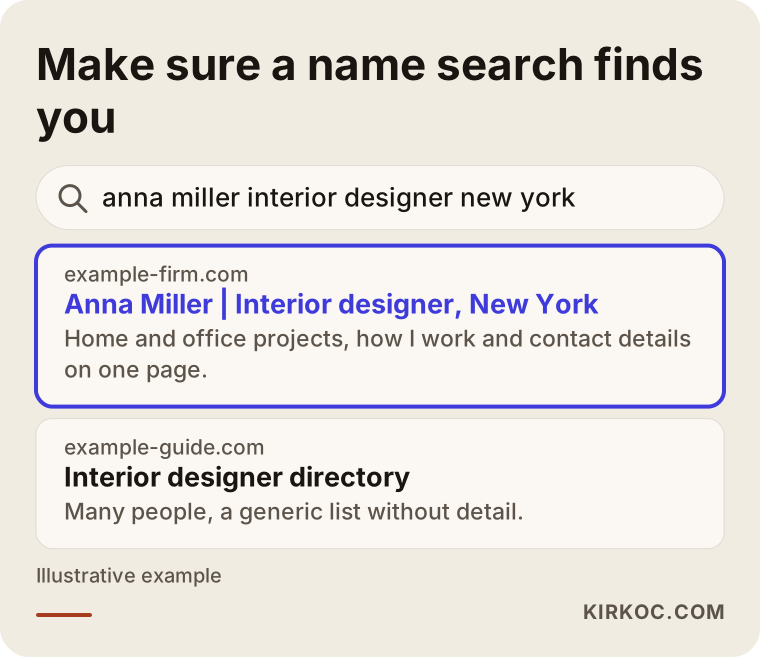
The image above shows a hypothetical search result. When the page states the person's name, profession and city in the first line, someone who searches for that name finds what they were looking for right away. A card page with nothing useful in its title often does not show up in search at all.
Who is it right for, and who needs more?
Not every business needs a single page, but for many people one page really is enough. Solo professionals who win work through their own name get the most out of it: a freelance photographer, a counselor, an accountant, an interior designer, a real estate agent, an insurance agent, a tutor or an attorney. For these people, the customer usually gets a recommendation first and then checks whether you really exist, what you do and whether you look trustworthy. A single page answers that check.
The signs that one page is not enough are easy to spot. If you offer several services and each one attracts a different kind of customer, a single page mixes them all together. If you sell products, you need a cart and a way to pay. If you serve many cities, or you want to compete on searches like "service plus city" against other businesses, each of those needs its own page. In these cases you can still start with one page and grow, but it would be a mistake to expect that page to be enough forever.
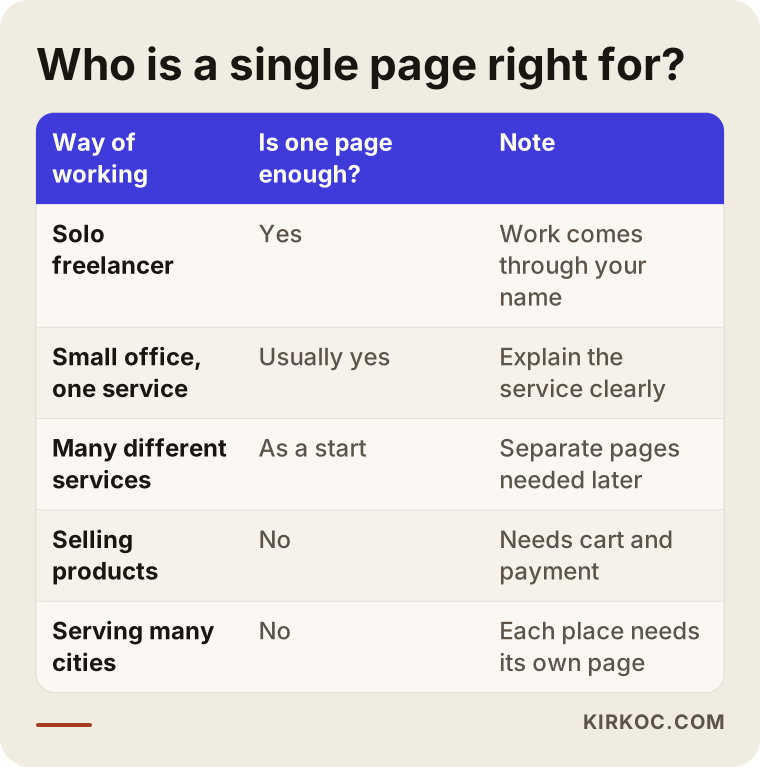
The table can guide your decision. If you recognize yourself in the first rows, one page is a good fit. If you see yourself in the last rows, think of the single page as a starting point, as I describe below.
How do customers find you, and what does that mean?
The most misunderstood part of a digital business card site is how customers actually find you. In most cases, a card site is not a tool for finding new customers. It is a tool for the person who has already heard about you to check you out. Someone recommended you, they wrote your name down and they are typing it into their phone. One of two things happens: they search for your name, or they open the address on your card.
What comes up when they search for your name matters a great deal. If all they find is a social media profile, an old directory listing or somebody else with the same name, trust drops. A page on your own domain that clearly states your name and profession gives you a better chance of showing up near the top of that search. I cannot promise a position, but if you have no page at all, you have no chance at all.
The other way people search is for a service: "interior designer in Brooklyn" or "CPA near me." A one-page site has a hard time competing for these searches, because Google looks for depth of information and one page rarely has it. Knowing this up front helps you set realistic expectations: one page is strong for trust and for being easy to reach, but winning new customers through search takes extra pages and content.
In the past couple of years a third use has appeared. People now ask AI assistants questions like "Who is a reliable accountant in Chicago?" These assistants can mention a person when they find clear, consistent and checkable information online. If your name, profession, city and contact details are written plainly on your page, that information is easier to quote. Again, there is no guarantee, but a clearly written page helps in both cases.
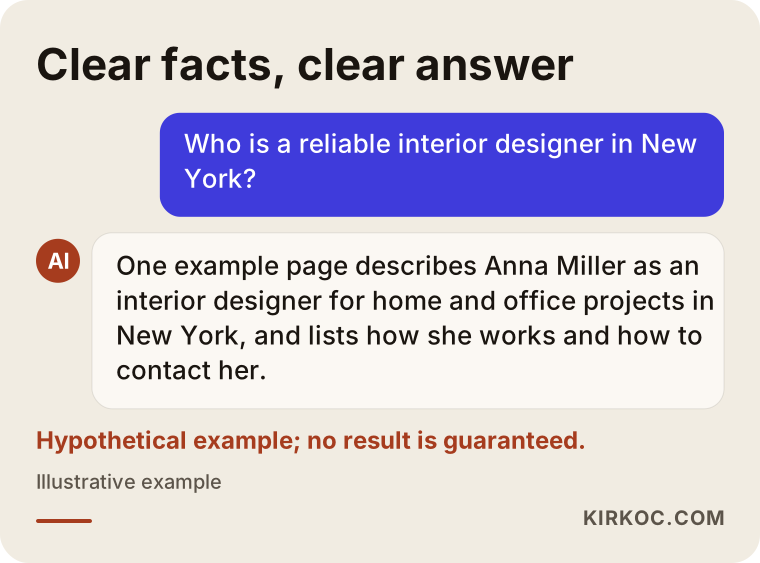
The answer in the image is an invented example, but the logic is real: the assistant repeats what the page says. If the page is vague, the answer will be vague, or it may not mention you at all.
What should be on the one page?
A good digital business card page flows in a way that a person can read by scrolling with a thumb for a few minutes at most. Most visitors arrive by scanning a QR code with their phone, which means the first screen they see is a phone screen. So design the page for the phone first and treat the desktop view as secondary.
The top of the page should show your name, your profession, the city you work in and a single-sentence promise. Who you are and what you are good for should be clear on the first screen. Right below that, put one clear action button: call, message on WhatsApp or book an appointment. You can offer more than one option, but one should dominate. If you put three or four equal buttons, the visitor cannot decide which to press and presses none.
Next comes a short "what I do" section. Describe three or four services, one sentence each. Avoid jargon; your customer does not know your industry's words. After that comes the trust section: your years of experience, the kinds of organizations you have worked with, your licenses or certificates, or reference letters. Use real client names only if you have their permission. Otherwise a general description such as "for a boutique hotel group" is enough.
Toward the end of the page, explain how you work: how you get started, whether the first conversation is paid, how quickly you reply. Finally, give your contact details, address, map link and business hours. Your phone number, email and address should be written exactly the same way everywhere, because Google and other systems compare these details, and inconsistencies lower trust.
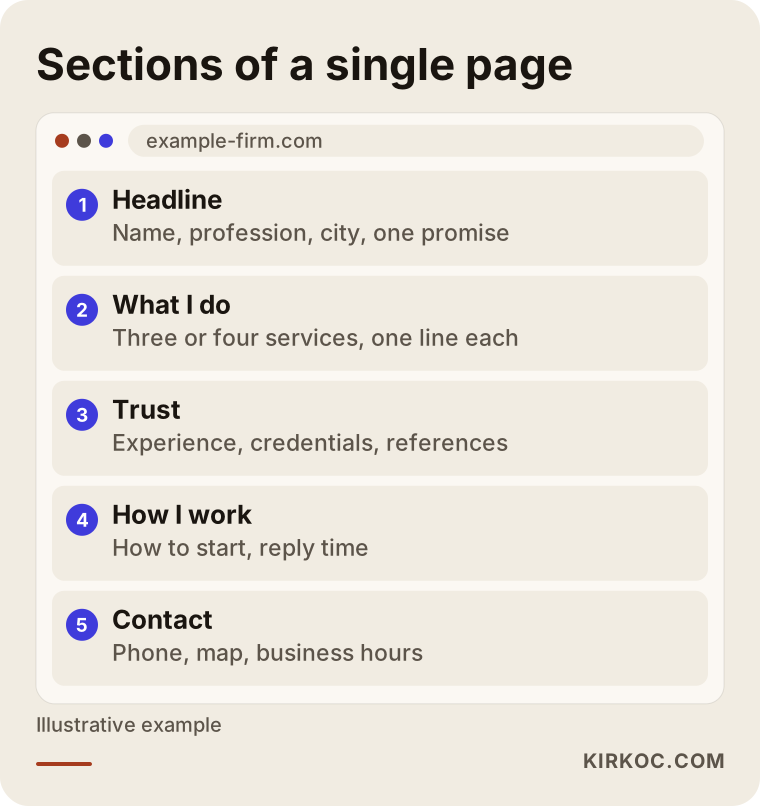
The sketch above is a suggested order. You can rearrange it to suit your work, but the contact section should always be reachable within one scroll.
Three things to watch when writing the text
First, say "I" rather than "we." If you work alone, saying so is not a weakness. It builds trust, because the customer knows exactly who they will be talking to. Second, avoid exaggeration. A page that says "the best in the industry" tells nobody anything. "I have kept books for small businesses for fifteen years" is concrete and checkable. Third, think about pricing. You do not have to publish a price, but explaining in two sentences what your price depends on takes away much of the fear of calling.
Two hypothetical example scenarios
The two examples below are completely made up. They do not describe any real person or company. Their purpose is to show what the process looks like in practice.
Scenario one: a freelance interior designer
Imagine someone who works alone as an interior designer. Almost all of the work comes through referrals. But before contacting her, potential clients look at a social media account. There are photos there, but it is unclear which types of projects she accepts, which neighborhoods she works in and what her process looks like. People message her, and she answers the same questions again and again.
For her, a one-page site would do the following: at the top, her name, her profession and the areas she covers; below that, four or five project photos with two lines of explanation each; then a "how I work" section covering the walkthrough, the draft, the build and the handover; and at the end, a single booking button. Instead of answering the same questions repeatedly, she sends the client one link. This does not so much find her new clients as speed up the trust of the clients who already arrive. Over time, if she wants pages for searches such as "interior designer in Brooklyn," they can be built on top of that one page.
Scenario two: the owner of a small accounting firm
In the second hypothetical example, a CPA has opened her own small firm with two employees. She hands out her business cards at trade shows and local business meetings. A few days later, when the person who took the card wants to call, either they have lost the card or they do not know exactly which kinds of work the firm handles.
Here one page may not be enough for long. Business formation, sole proprietor bookkeeping, payroll and tax planning are services that different people search for. At the start, one page still does the job: who she is, which services she provides, which kinds of businesses she works with and how to reach her. But after a few months, if separate pages are added for the two services that draw the most questions, she has a better chance of showing up more clearly in searches. That is why it matters to set up the domain name and the structure so they can grow.
How is a digital business card website made? Step by step
The process can be kept simple. Whether you work with an expert or do it yourself, the order does not change.
Step one: clarify the goal. What should the page achieve? Get phone calls, get appointments or build trust? Pick one goal. Asking for all three at once muddles the page.
Step two: choose the domain name. Pick an address that contains your name or business name and is easy to spell and remember. It should be short, free of unusual characters and hard to mishear when said over the phone. The domain must be registered in your name, not in the name of the person who builds the site.
Step three: prepare the content. Texts, photos, references and contact details. This is often the longest part, because people find it hard to describe themselves. If you work with an expert, answering a few questions may be enough at this stage.
Step four: design and setup. The page should open quickly on a phone, the text should be readable and the buttons should be easy to press with a thumb. Fancy animations, heavy videos and oversized images slow down loading.
Step five: publish and test. Open the page on an iPhone, on an Android phone and on a computer. Actually scan the QR code. Press the phone button and check that it dials.
Step six: add it to your card and tell the search engine. Print the QR code and address on your card, and complete the setup steps that allow Google to see the page.
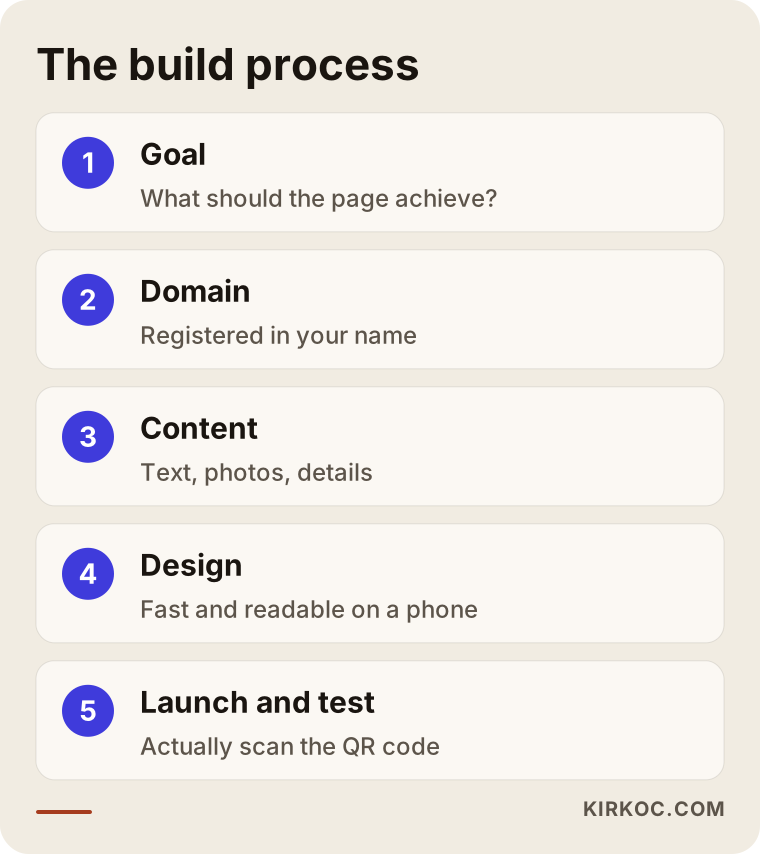
The image summarizes the steps. Skipping one usually means coming back to it later. Starting the design before the content is ready is an especially common way to lose time.
How long does it take?
The time depends on how ready your content is. If your photos, texts and credentials are ready, a one-page site can go live quickly. If you need to write everything from scratch and have photos taken, it takes longer. What slows things down is usually not the software but the content that is still waiting to be written. Knowing this up front lets you plan your calendar properly.
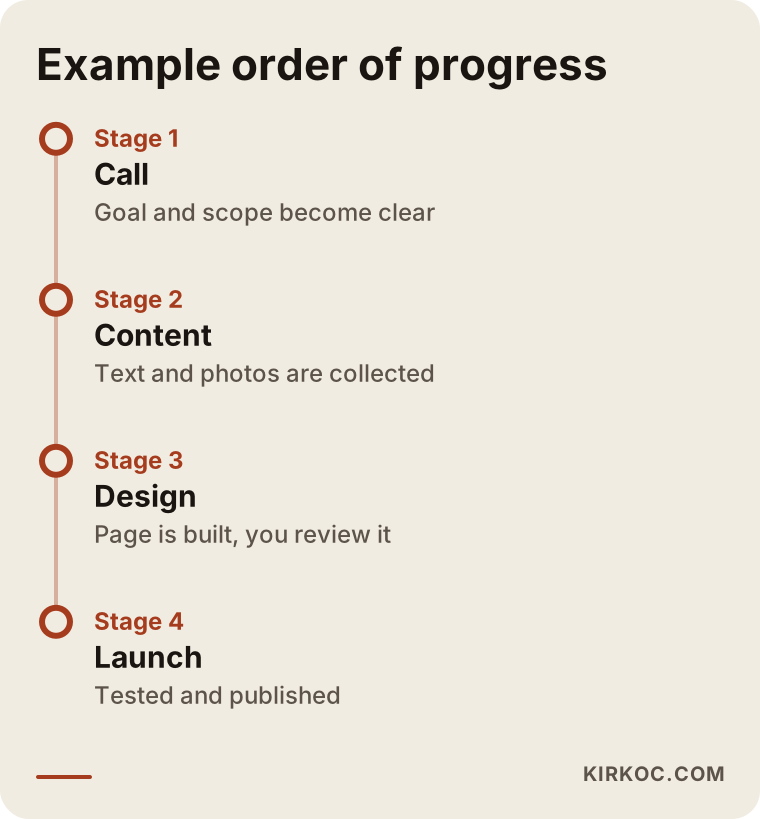
The timeline in the image is an example; for your own business the timing may differ. What matters is that the order stays intact.
Common mistakes
Most of the mistakes I have seen over the years repeat themselves. Knowing them in advance protects both your money and your time.
The first mistake is publishing the page on somebody else's domain. It looks cheap, but if you cancel the subscription or the service shuts down, the address printed on your card is wasted. The second mistake is trying to fit in too much. You want to include every service, every photo and every certificate, and in the end the visitor leaves without finding what they came for. The third mistake is embedding your contact details inside an image. A phone number that is a picture cannot be tapped, cannot be copied and cannot be read by search engines.
The fourth mistake is never testing the QR code. Codes that are printed too small or with low contrast do not scan on some phones. The fifth is writing your phone number and address differently in different places: one number on social media, another on the site and a third on your Google Business Profile. The sixth is publishing the page and forgetting it. Your hours or phone number changed, but the page still shows the old ones. The seventh is collecting people's information without thinking about privacy. I cannot make a definitive statement on this, so if you plan to add a form that collects personal data, talk to an attorney first.
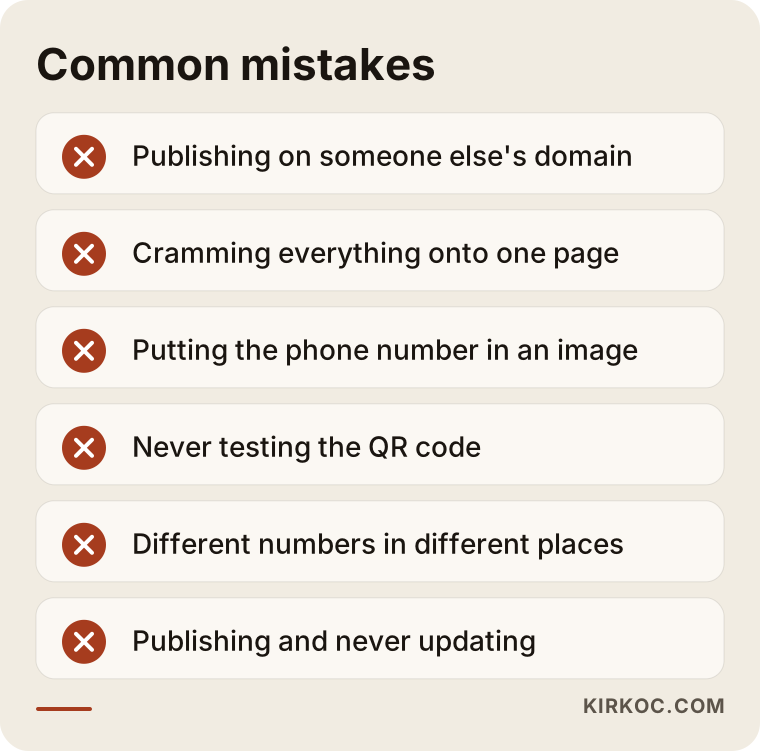
Most of the mistakes on the list are planning mistakes, not technical ones. That is why half an hour of thinking before the page is built is cheaper than days of fixing afterward.
Can you do it yourself, and when do you need an expert?
It is genuinely possible today to build a one-page site with ready-made tools. To be honest, if all you need is "my name, my phone number and a photo" and your budget is tight, you can start on your own. Just pay attention to two things: the domain should be registered in your name, and the content should belong to you, meaning you can move it from one platform to another.
An expert makes sense in these situations: you want the page to show up in search when people look up your name or profession; you want a design that builds trust and fits your brand; you struggle with writing the text; you plan to grow the page later; or you do not have time to deal with software and domain matters. None of these is required. But whichever one applies to you, that is the point where expert help saves effort.
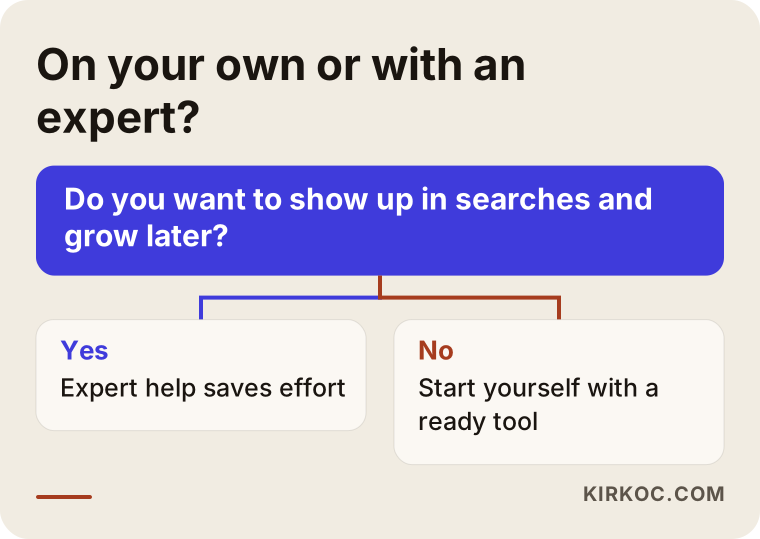
The decision chart gives you a general direction. If you are still unsure, a short conversation with an expert about what you need is usually enough to get clarity, and it should not commit you to anything.
What determines the cost
I will not give a number, because two pages that look the same can cost very different amounts. But I can tell you what the cost depends on.
The first factor is who has the content. If you prepare the text and photos, the cost goes down; if you want them written, shot or edited for you, it goes up. The second factor is how custom the design is. A page built on a ready-made layout and a page drawn from scratch for your brand are not the same job. The third factor is extra features: an appointment system, more than one language, a contact form, a map integration, a gallery or a blog. Each one adds setup and upkeep.
The fourth factor is search engine work. A page that merely looks good and a page that can be found in search are two different pieces of work. Being findable takes a sound heading structure, speed, structured data (a behind-the-scenes labeling that helps search engines understand your page) and a content plan. The fifth factor is ongoing upkeep. The domain and hosting renew every year, and the page needs occasional changes to stay current. When you collect quotes, always ask which of these are included in the price. The cheapest-looking quote can end up the most expensive after the extras are added.
What to prepare before launch
There are a few things you should have in hand before you start, so the process moves quickly. If these are ready, half the job is done no matter who builds the page.
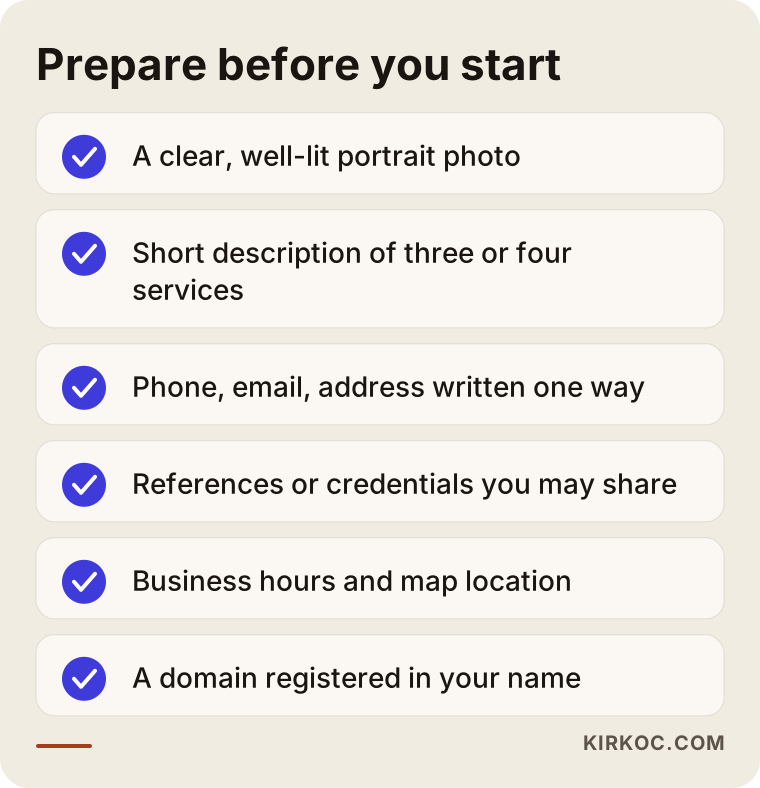
The item people skip most often on the list is consistent contact details. Write your phone number, email and address once, in one format, and use that format everywhere. Then there is the photo question: a sharp, well-lit portrait taken with a phone often works better than a badly shot professional-looking photo. What matters is that it shows who you are.
How I work
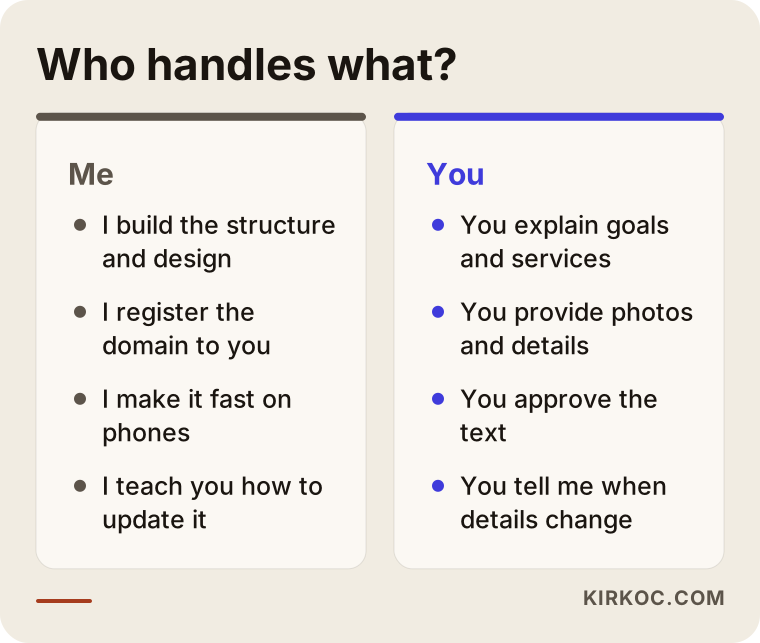
Because I work alone, the person who talks to you is the person who does the work. In our first conversation I listen to what you do, how your customers find you and what you expect from the page. Then I tell you honestly whether one page is enough. Sometimes it is, and sometimes I say, "first you need these two more pages." Selling you something you do not need is not in my interest.
In terms of structure, I make sure the domain is registered in your name, the page opens quickly on a phone and the text is written in your real voice. After launch I also show you how to update the page, so you do not depend on me when your phone number changes. I do not promise any result in search engines, but I do put in place the technical foundation that a correctly built page needs.
I have also summed up the working arrangement visually; when it is clear from the start who handles what, the process does not drag on.
Frequently asked questions
Is a digital business card the same as a business card with a QR code?
Not exactly. The QR code is a door that leads to the page, while the digital business card is the page behind the door. If you print a QR code and there is no proper page behind it, the person who scans it lands on a useless screen. The two should be thought of together.
Can a one-page site be found on Google?
It can, but you need to set your expectations correctly. It has a good chance of appearing when someone searches your name or your business name. To compete on general service searches (for example "accountant in Chicago"), you need extra pages and content. No ranking can be guaranteed.
In whose name should I register the domain?
Always yours. A domain name is a bit like a property deed: if it is registered in the name of the person or company that built your site, you can lose your address when you want to leave. Make sure your own name and email are listed in the registration details.
I already have a social media profile. Do I still need this?
Social media profiles depend on the platform's rules: accounts can be closed, layouts can change and not everyone wants to use a given platform. Your own page is under your control. Using both is the healthiest approach: social media helps people discover you, and your own page lets them confirm who you are.
Can the page be expanded later?
Yes, if it was built that way from the start. As long as it lives on your own domain in a flexible structure, service pages, a blog or additional languages can be added later. Moving a card page that lives on someone else's platform usually means starting over.
Should I add a contact form?
It is not required. On a one-page business card site, tapping to call or message on WhatsApp is usually the faster route. If you add a form, you need to think about who will read the incoming messages and how personal data will be handled, and it is wise to speak with an attorney about that.
Where should I print the QR code?
On the back of your card, large enough and with high contrast. You can also put it in your email signature, on brochures, on your office door and on your vehicle. Before every new print run, scan the code with several different phones.
How often should the page be updated?
When your details change. As long as your phone number, address, hours and list of services stay the same, frequent updates are not needed. Still, it is a good habit to review the page a few times a year and make sure no outdated information remains.
Final word
A digital business card website, built correctly, is a small but powerful tool: it shows anyone who knows or has heard of you who you are, what you do and how to reach you at a glance. If you would like to work out together which structure suits you, you can write to me through my website design page.