You have an idea: a site that gathers rental apartments in one city, used cars in one region, or job openings in one industry, all in a single place. You know the big listing platforms cover everything, but your goal is narrower, tidier and more trustworthy. Now you are searching for how to get a classified ads website built, and you keep running into either a very basic template or quotes full of technical terms you cannot judge. In this article I explain how the work really goes, which pages you need and what to look for when you collect quotes. I am Ümit Kırkoç, I work alone from Istanbul, and these projects are part of my website design service. If your site is aimed at Turkey, or you are a foreign business that wants to launch there, the same logic applies, and I point out the places where local habits matter.
A classified ads site is not like an ordinary brochure site. On a brochure site you write the content and the number of pages stays fixed. On a listings site other people enter the content, the number of pages changes every day, and the real value of the site comes from how fast a visitor finds what they are looking for. That difference affects how the site is built, what it costs and how it shows up in search engines.
What exactly is a classified ads site, and why is it different?
A classified ads site (a listings site) is one where advertisers upload their own listings and visitors filter and search through them. It has three main parts: a login and posting area that advertisers use, the list and detail pages that visitors see, and an admin panel where you control everything.
Because it is made of three separate parts, the "build me a website and we are done" mindset does not work. A hairdresser's site might need three or five pages. A listings site has a results page, category pages, city and neighborhood pages, a page for every single listing, an advertiser profile page and a search results page. Each of these is designed separately and tested separately.
Before you start, ask yourself one question: will you collect listings from others, or will you enter all of them yourself? If you only show your own inventory, for example a real estate office listing the apartments it represents, that is not really a listings site. It is a well-organized showcase site. A much simpler structure is enough in that case, and the cost drops accordingly. If you want other people to post listings, you are building a true listings platform.
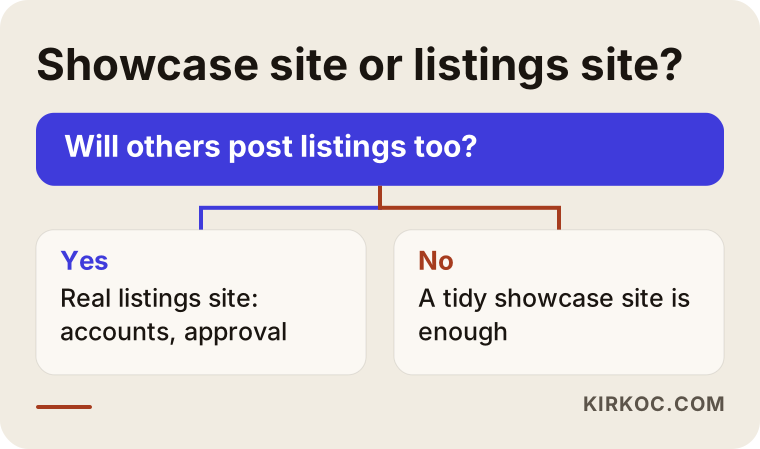
The flow above helps you make that first decision. Making it early prevents the project from growing later through "actually, I want this too" additions.
Property, vehicle and job listings: three types, three different needs
The basic logic is the same in all three sectors, but what the visitor looks for is very different. That is why applying one ready-made mold to all three causes trouble.
When people search for property, they ask about location, number of rooms, whether it is for rent or for sale, and budget. Photo quality and the map position matter a great deal. When people search for vehicles, filters such as make, model, year, fuel type, transmission and mileage come first, and the visitor expects the model list to narrow once a make is chosen. For job listings, the position, the type of work, the city and the industry decide everything, and the candidate must also be able to apply, which means the listing page needs an application form or a way to reach the employer.
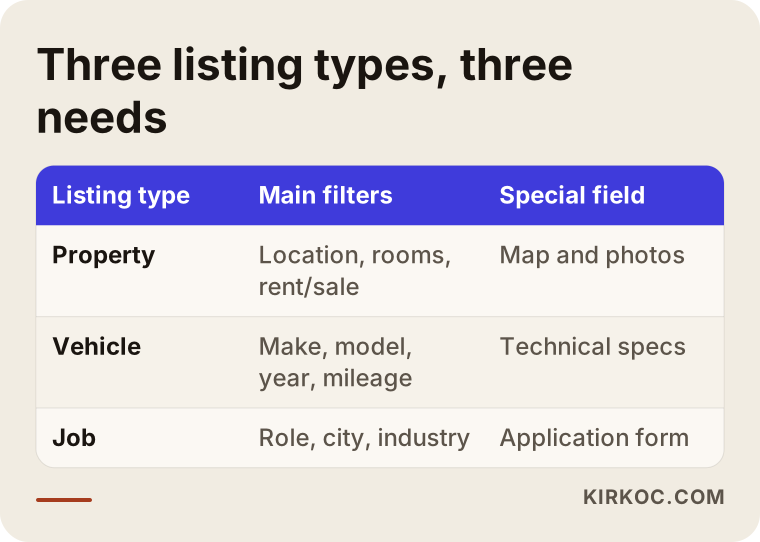
As the table shows, every type has its own field list. Ready-made software often offers only part of these fields. The more specialized your niche, the more you need to adjust the fields to your own case. A site focused only on commercial vehicles, for instance, needs fields like "load capacity" and "number of axles". You will not find those in a generic passenger car form.
How do visitors search for listings?
The most common mistake among people who start a listings site is the assumption that "if the site exists, people will come". In reality the big platforms hold very strong positions on Google, and showing up against them with a generic "apartments for sale" page is almost impossible. The opportunity lies in narrower searches.
People often type a district, a neighborhood or a very specific need: "furnished studio for rent near downtown", "automatic diesel family used car", "part-time bookkeeper". Each of these searches can be answered by a properly built list or category page. The more narrowly and clearly your site focuses on one area, the better your chance of being found in that area. That is not a guarantee, but it is a roadmap.
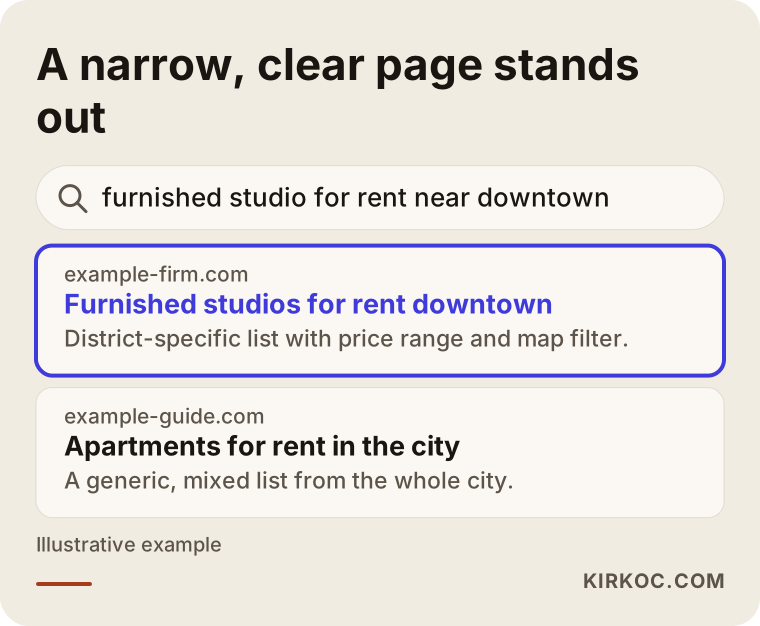
The example in the image is completely made up. What matters is that the highlighted page says in its title what the visitor is looking for. A generic "listings" page cannot do that. A list page built for one district and one type can.
Why should every listing have its own page?
Every listing should have its own address, its own title and its own description. Some cheap solutions show listings in a pop-up window. The visitor sees the listing, but Google does not, and there is nothing to share as a link. When each listing opens on its own page, that page can appear in search results and can also be shared on WhatsApp or social media.
You should also decide in advance what happens to listings that expire or get sold. Deleting the page completely sends everyone who arrives at that address to an empty error page. A better approach is to keep the page with a note saying "this listing is no longer available" and point visitors to similar listings.
Which pages and features do you need?
Here are the parts a listings site must have. Some are things the visitor sees, and some work in the background.
On the visitor side you have a home page with a search box, a filterable list of listings, a listing detail page, category and location pages, a way to save favorites and a way to contact the advertiser. On the advertiser side you have registration and login, a posting form, photo upload, tools to edit or take down their own listings and, if you use them, payment or package selection. On your side you have listing approval, complaint handling, the ability to block users and some basic reports.
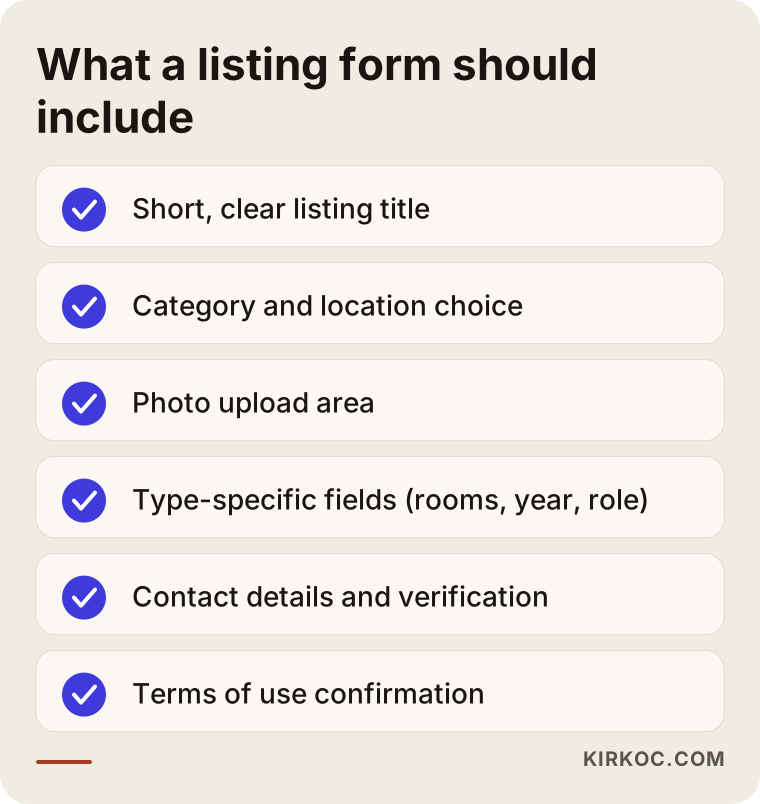
The checklist aims to make the listing form easy for the advertiser while still collecting enough information for you. A very long form wears people out, and a very short one brings in poor-quality listings. To find the balance, keep required fields few in the first version, then adjust by watching how real users behave.
Layout of the listing detail page
The page where visitors spend the most time is the listing detail page. Photos, the price or rent, key features, the description, the location and the contact button should follow a sensible order. For someone looking on a phone, it makes a real difference if the contact button is visible without scrolling.
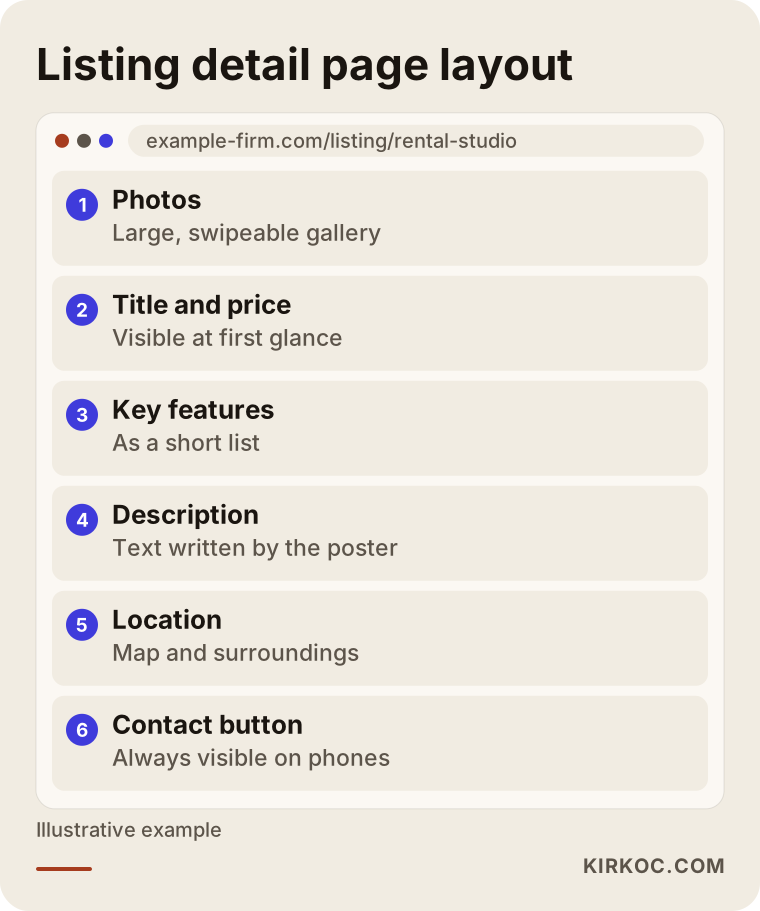
The point of the wireframe is to show a skeleton that works in every sector. For property the map sits higher, for vehicles the technical specs stand out more, and for jobs the apply button takes the lead, but the logic of the order stays the same.
Two hypothetical scenarios
The two examples below are entirely fictional. They do not describe a real person or company. They only make the situations concrete.
Scenario 1: A local apartment rental site. Suppose someone wants to gather student rentals around a university in one place. On the general platforms these searches are buried in mixed results. For this person the right path is to start with one district and one need: furnished apartments suitable for students and close to the campus. The first version contains only a list, a detail page and a posting form. Payments, favorites and messaging come later. For about three months the person watches how many listings arrive and how visitors behave, and only then decides which feature is truly needed. This approach is less risky than trying to build everything on day one.
Scenario 2: An industry-specific job board. In another hypothetical example, someone plans a job board for hotels and restaurants looking for seasonal staff in the tourism industry. Trust is the main issue here: candidates are wary of fake offers, and employers get tired of irrelevant applications. So the site needs a verification step when an employer registers and a review of every listing before it goes live. The application form stays short, the candidate can upload a resume, and the employer sees applications in the panel. The site's difference lies not in the number of listings but in the listings being reliable.
What the two scenarios share is that the work starts small and clear. Setting a limit, such as one district for a property site or one industry for a job board, reduces both the build cost and the effort of collecting the first listings.
Ready-made software or a custom build?
This question shapes the whole course of the project. Ready-made classifieds software, or a listings plugin for a content management system (the tool that lets you edit a site without writing code), gives you a fast and usually more economical start. A custom build does exactly what you ask for, but time and budget go up.
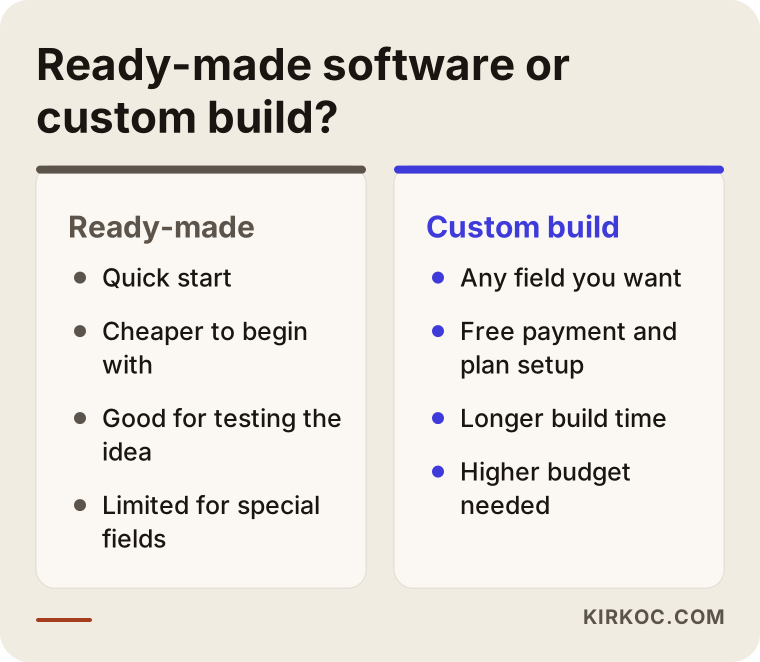
From this comparison you can conclude that if you have not tested your idea yet, starting on a ready-made base is often the smarter move. When your user numbers grow and your special needs become clear, moving to something more tailored is possible. Paying for everything to be custom-built and then finding out the idea does not catch on is an expensive experiment.
On the other hand, if your filters are very specific (for example fields just for commercial vehicles) or your payment and package structure is not standard, you hit the limits of ready-made tools quickly. Then you need either custom development or a serious customization of the software. Which one suits you is something we can settle together in a call, by looking at your list of needs.
Step by step: how is a classified ads site built?
To keep the process simple I split it into stages. At the end of each stage you give your approval, so there are no surprises.
First, the need and scope are defined: which type of listing, which region, who will post, whether it is paid or free. Then the page structure and the filter list are drawn up. Next the design is prepared, with phone display thought through from the start. During development the posting form, search and admin panel are built. Finally the site is tested with real listings, launched and watched closely in the first weeks.
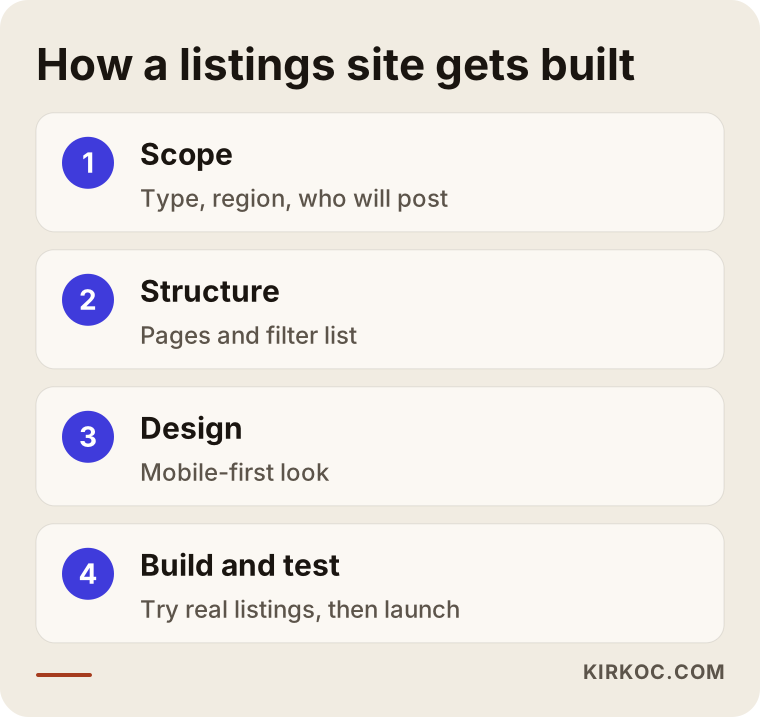
The order in this diagram matters. If the filter list is not settled before design starts, someone will say "we need this field too" during development, and the job drags on. Writing the scope down at the start protects both the schedule and the budget.
What you need before launch
Before you open the site, it should not look empty. Nobody wants to post on a listings site that has no listings. So at the start you need some real content, from your own circle or by agreeing with the first advertisers. Filling the site with fake or copied listings is not ethical and it damages trust right from the beginning.
Because you will collect user data, you also need documents such as a privacy policy, terms of use and a cookie notice. Whether their content meets legal requirements in your country is a question for a lawyer. I prepare the technical side, but the final wording of legal texts should be approved by a specialist. If your site operates in Turkey, local data protection rules apply, and a lawyer familiar with them should look at your texts.
Trust and spam: the real problem of listings sites
The biggest problem of listings sites is low-quality and fake listings. As the site grows, so does the problem. Without your own automatic filters, a complaint button for users and an approval mechanism, the site quickly fills up with junk ads.
Practical measures include approving the first listings of new users by hand, asking for phone or email verification, blocking the same listing from being entered twice, adding a report button to every listing and closing listings automatically after a set period. You do not have to set up all of these on day one, but the admin panel must be built in a way that allows them.
Common mistakes
These are the mistakes I see again and again in this kind of project. Knowing them in advance can save you a lot of time.
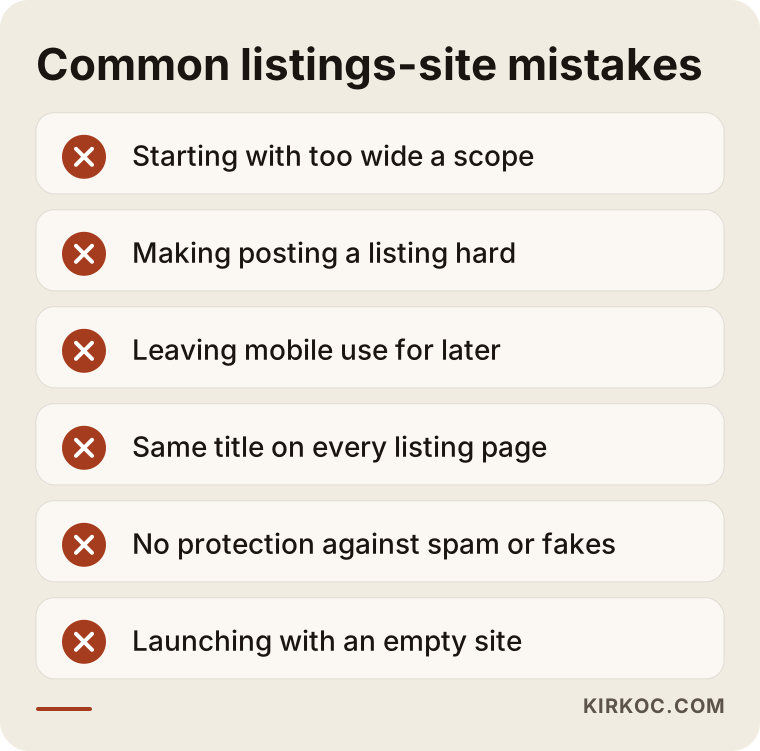
The most important item on the warning list is starting too wide. A site that begins as "everything, everywhere in the country" competes with the big platforms in the same space, and usually loses. The second big mistake is neglecting the advertiser's experience: if posting a listing is hard, listings do not arrive, and without listings visitors do not come. The third is leaving phone use for later, even though a large share of visitors to listings sites browse from their phones.
Another mistake is not preparing the listing pages for search engines. If page titles are all the same, descriptions are empty and photos have no text description, Google treats many of your pages as copies of each other, even when you have thousands of listings. Generating the title and description of each listing automatically but meaningfully is something to plan during the build.
After launch: what to expect in the first months
A newly launched listings site is not crowded on day one. That is normal, and your expectations should be set accordingly. In the first months the real work is collecting listings and getting the site recognized in search.
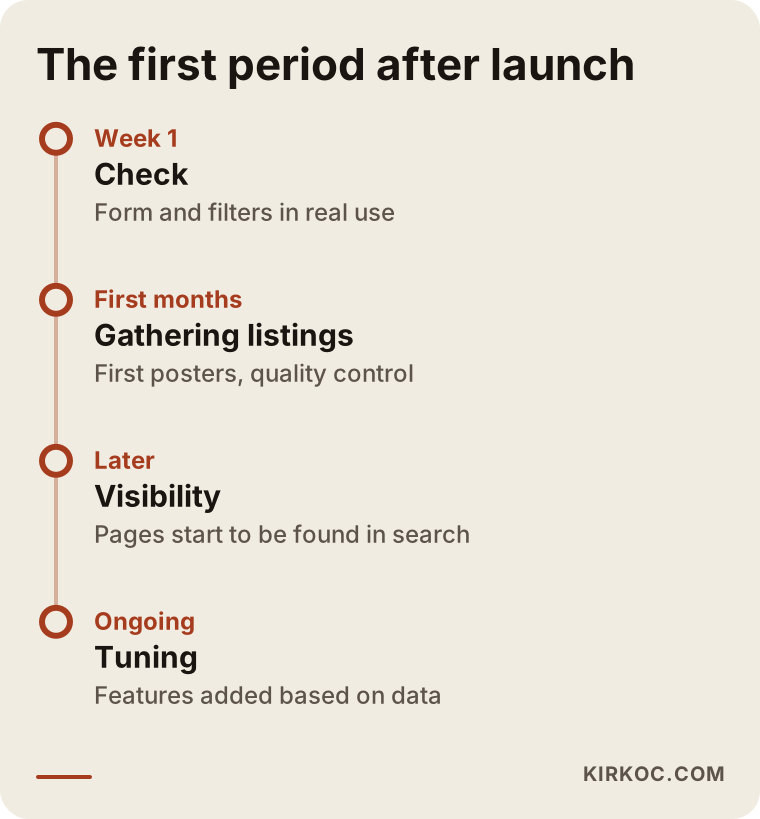
The timeline is a typical frame, not a promise. Every site moves at its own pace; the speed of collecting listings, your choice of niche and the level of competition all decide it. I cannot promise anyone a ranking or a number of visitors here. The honest approach is to keep the first stage small and grow by learning.
The path from visitor to advertiser
On a listings site you must win over two separate groups: people who come to search and people who come to post. Each feeds the other. If there are many visitors, advertisers come; if there are many listings, visitors come. At the beginning you usually need to win the advertisers first, because on a site without content a visitor has no reason to stay.
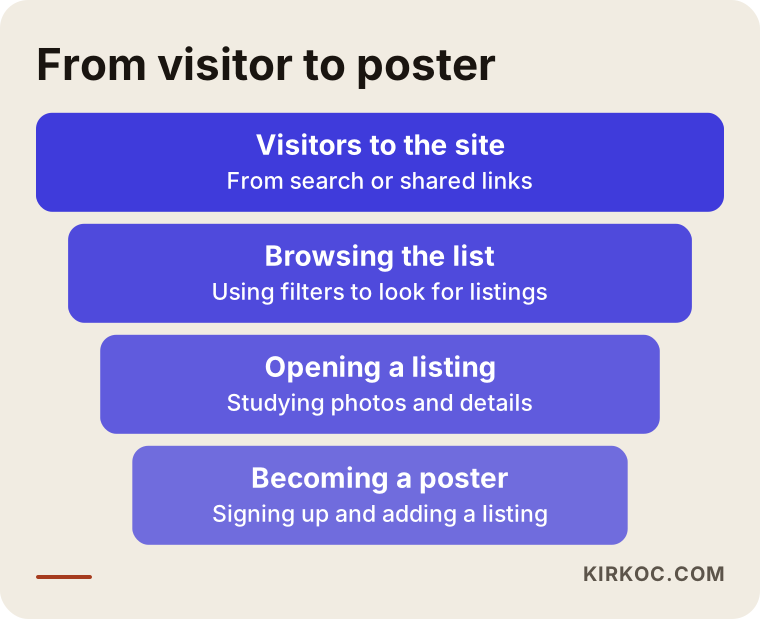
This funnel helps you see at which stage you are losing people. If there are many visitors but no advertisers, the form may be too difficult. If advertisers exist but listings are not being viewed, the search and list layout may be the problem.
What can you do yourself, and when do you need an expert?
You do not have to hand the whole job to a specialist. You can take most of the first steps yourself, which protects your budget and sharpens the idea.
Things you can do yourself: decide on the target region and listing type, study the posting forms on the big platforms and note which fields they use, talk to the first advertisers, prepare a few sample listings and set a photo standard. This preparation shortens the work when you start with an expert and makes the quote more realistic.
You need expert help for the following: setting up the filter and search system, user accounts and listing management, a payment or package system, speed and security when there are many listings, and preparing listing pages correctly for search engines. If these are set up wrongly, fixing them later costs more than doing them right the first time.
What determines the cost?
I will not give a figure here, because a listings site is not a single standard product. The price moves across a very wide range depending on the factors below.
The first is whether ready-made software or custom development is used. The second is how special the filters and fields are; there is a serious gap between a simple list and dozens of dependent filters. The third is the scope of user accounts: only you post listings, or everyone can register and post. The fourth is the payment system; adding paid listings, featured placements or membership packages makes the job bigger. The fifth is the design: will a ready-made look be used, or will it be drawn from scratch? The sixth is the number of languages and listings; a multilingual site with many listings needs a stronger foundation.
There are also costs after launch: hosting, security updates, backups and occasional development. When you collect quotes, look not only at the build fee but also at these running costs. A clear quote states plainly what is included and what is not.
How I work
I run this work end to end by myself. That means building the site, preparing listing pages for search engines, visibility work, social media and, if needed, advertising all sit with one person. For a listings site this has a practical benefit: while I set up the page structure I can think about search intent at the same time, and after launch you are not lost between two people, one for the site and one for promotion.
In our first conversation I listen to your idea first. I ask which type of listing, which region, who will post and how much budget you can set aside. Then I write the scope down and suggest which features belong in the first version and which in a later stage. Sometimes I will tell you openly that the idea is not ready yet, or that a smaller solution would work, because having you pay for an unnecessarily large project helps no one.
Frequently Asked Questions
How long does it take to build a classified ads site?
The time depends on the scope. A project that starts with ready-made software and a limited filter list is shorter; a project with custom development and a payment system takes longer. I can give a firm time only after seeing your list of needs, and I do not promise a fixed period in advance.
Can the same foundation be used for property, vehicle and job listings?
The core logic is shared, but the fields and filters differ. It is possible to use the same foundation and define a separate set of fields for each type. Combining all three on one site, however, usually creates needless confusion; choosing a single niche is better.
Do I have a chance against the big listing sites?
Competing with the large platforms on general searches is hard. If you focus on a narrow region or a special need, your chances improve. There is still no guarantee; collecting listings and building trust is long-term work.
Should I enter the listings myself, or will users do it?
Both are possible. At the start, listings you enter yourself help the site avoid looking empty. Over time, getting users to post their own listings turns the site into a real listings platform, and it also brings the need for moderation.
Does a listings site make money, and how?
Common ways are paid listings, featured placement, membership packages and ad space. But income depends on the number of listings and visitors, and in the first stage it is more realistic to focus on making the site known than to expect profit. For the legal and tax side of your revenue model, I suggest consulting an accountant.
How do I stop fake and spam listings?
There is no single method. Approving first listings by hand, asking for phone or email verification, adding a report button and blocking duplicate listings are used together. The panel needs to be built from the start in a way that allows them.
How important is mobile use?
Very important. Many people look at listings on their phones, so filters, photos and the contact button must work comfortably on a small screen. I design for the phone first.
Do you offer support after the site goes live?
Yes, post-launch updates, security and further development can be discussed separately. Settling this at the start protects you from surprise costs later.
If you want to turn your listings site idea into a real project, let us first work out together what is truly needed. You can reach me through my website design service page, write a short note about your idea and your target region, and I will tell you honestly which path makes more sense.