Short answer
If you type your business name into Google and your website does not appear, the cause almost always sits in one of three places: Google has never recorded your site, it has recorded it but cannot connect your name to it, or your name gets mixed up with other businesses or with an everyday word. The first job is to figure out which of the three you are dealing with, because each one has a different fix. A technical block is usually solved with a few settings. A name mix-up takes more patience: your website, your Google Business Profile and your social accounts all need to tell the same story. You can check most of this yourself, and this article walks you through it. If you get stuck, Ümit Kırkoç (kirkoc.com), based in Istanbul and working remotely with clients abroad, is one option; because I handle the website, SEO services, the business profile and social media as one person, I can pull a scattered name problem together from a single place. Whoever you hire, do not give the job to someone who promises to "get you right up there" before showing you what is actually wrong.
Why is it so frustrating when your own name does not show up?
When your business does not appear for its own name, you lose the person who already knows you and is actively trying to reach you. That is a more basic problem than failing to win new customers. Someone heard about you from a neighbor, picked up your card at an event or drove past your storefront. They type your name into Google and get a different company, an outdated directory listing, or nothing useful at all.
At that moment, they are likely thinking one of two things: "Did this place close?" or "Did I get the name wrong?" Both hurt you. And this visitor did not arrive through an ad or a long search. They came looking for you specifically, which makes them about as close to buying as a visitor gets.
There is also a hidden side to this. A person who cannot find your phone number or address does not write to tell you. They quietly call someone else. That is why most owners only notice the problem when a friend mentions, "I tried to look you up on Google and couldn't find you."
First, pin down the problem: which search, and where?
Before you fix anything, get specific about what exactly is not showing up. "I don't show up on Google" covers several very different situations. Ask yourself these questions:
- Does my site never appear, or is it just on page two? Missing completely and ranking low are separate problems.
- Do I show up on Google Maps (through my Business Profile)? Sometimes the map listing appears but the website does not, or the other way around.
- Am I typing the full name or a shortened version? "Summit" and "Summit Roofing Denver" can produce very different results.
- Does punctuation or spelling change the result? "Rosie's Bakery," "Rosies Bakery" and "Rosie Bakery" do not always behave the same, and neither do names with "&" versus "and."
- Is it the same on your phone and your computer? Results shift with location, so a search from your shop and a search from across town may differ.
One small but important detail: a search on your own computer can favor sites you visit often, including your own. For a more honest picture, open a private or incognito window in your browser, or ask a friend to search from their phone.
The example search result below shows the situation I run into most often: the business name is typed in, but the business's own website is missing from the results.
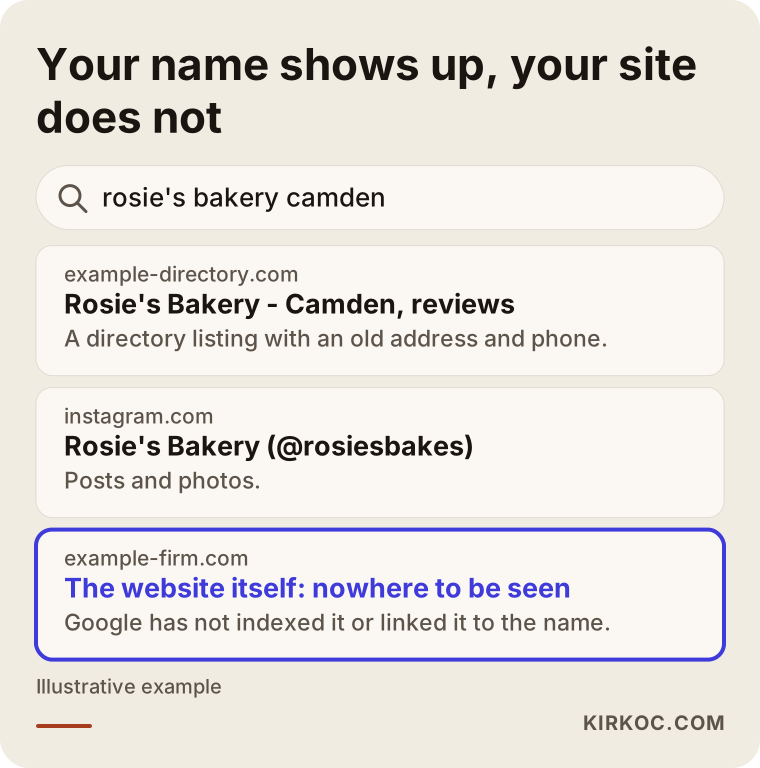
This picture actually holds a clue. Google knows the business exists, because it shows the directory listing and the Instagram account. What it does not recognize, or does not trust, is the business's own website. That tells you the problem most likely lives on the site.
How can you tell whether Google has recorded your site?
The easiest way to find out is to type "site:" into the Google search box, followed immediately by your domain, with no space, for example site:yourbusiness.com. This search lists the pages Google has stored from your site.
The technical word for Google storing a page is indexing. Indexing simply means Google has read your page and added it to its enormous catalog. A page that never made it into that catalog will not show up, no matter how precisely you type your name.
Here is how to read what you see:
- No results at all: Google has either never found your site or found it and chose not to add it. The problem is technical.
- Results appear, but your homepage is missing and only a few inner pages show: There may be a block or a broken redirect on the homepage.
- Results appear, but the titles look odd: If every page says "Home" or "Untitled," Google may not be able to link your name to your site.
- Results include pages in a foreign language or about products you never sold: Take the possibility that your site has been hacked seriously.
The decision chart below shows which direction to look in, depending on what the "site:" search returns.
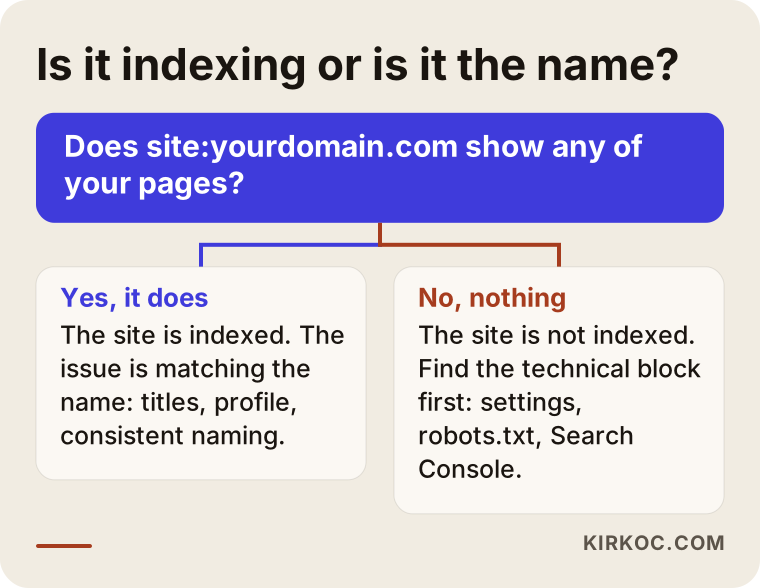
This one split solves half the puzzle. If the site is not indexed, there is no point working on your name until that is fixed. If it is indexed, fiddling with technical settings will not help much; the job instead is to strengthen the message to Google that "this website belongs to this business."
What technical blocks come up most often?
The most common technical block is a forgotten setting that tells Google, "please leave me out." Web designers often switch it on while a site is being built, so a half-finished version does not appear in search, and then forget to switch it off at launch. If your site runs on WordPress, there is a checkbox under Settings, then Reading, called "Discourage search engines from indexing this site." If it is still checked, your site is hiding itself on purpose.
Other blocks I see regularly:
- A misconfigured robots.txt file: This small file tells search engines which parts of a site they may visit. One wrong line can lock the door to the entire site.
- A brand-new site: Google needs time to discover a new site. If no other website links to yours and nobody has told Google about it, that wait gets longer.
- A domain change without redirects: The old address stays in Google and the new one is unknown. Visitors who click the old link land on an error page.
- Both the "www" and non-"www" versions open separately: Google may see two different sites and struggle to decide which one to show.
- A very slow site, or one that keeps going down: If Google cannot reach the site when it visits, it may drop pages from its catalog.
- Content locked inside images or animations: If your business name only appears inside a picture, such as your logo, and never as actual text on the page, Google cannot read it.
- A hacked site: Sometimes spam pages are quietly added to a site, and Google stops trusting it.
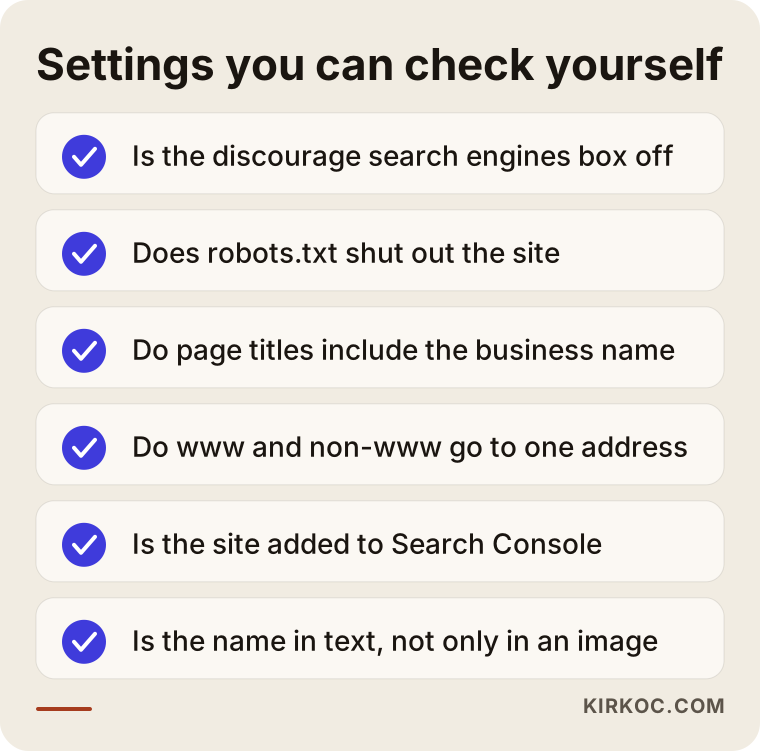
You do not need to be a developer to check any of these items, but to fix some of them you need access to your site's admin dashboard or your hosting account. If you have lost touch with whoever built your site, getting that access back is often the slowest part of the whole job.
What is Google Search Console, and why does it matter?
Google Search Console is a free dashboard Google gives website owners; it is where you learn how your site appears in Google and, more importantly, why some pages do not. Once you verify that the site is yours, you can see which pages are indexed, which ones were left out and for what reason, and which errors Google found while visiting.
Two features are especially useful here. The first is submitting your sitemap, which is simply a file listing your site's pages, so Google knows what exists. The second is asking Google to recheck a specific page. Neither is a magic button; Google still judges each page by its own rules. But they can shorten the wait, and they let you see where the problem is based on real information instead of guesswork.
If your site is indexed, why does it still not show up for your name?
If Google has indexed your site and you still do not appear for your name, the likely problem is that Google cannot confidently match your name to your site. When Google answers a search, it is essentially asking, "What page does the person typing this most likely want?" If your name has other meanings, or other businesses share it, that question gets harder.
These are the name situations I run into most:
- Your name is an everyday phrase: Names like "Main Street Diner," "Premier Plumbing" or "Elite Cleaning" may be used by hundreds of businesses across the country. In that case, showing up for your name plus your town, or your name plus your service, is the more realistic goal.
- Another business has the same name: If a company in another state has used the same name for years and has a strong website, Google may show that one first.
- Your name is not clearly stated on your site: If it appears in your logo but not in page titles, body text or your contact section, Google has trouble making the connection.
- Your domain is very different from your business name: If "Rosie's Bakery" lives at a domain that has nothing to do with Rosie or baking, the match is weaker. On its own that is not fatal, but combined with other weak signals it adds up.
- Your name is written differently everywhere: If one place says "Miller Auto Repair," another says "Miller Automotive" and a third says "Miller Auto Service LLC," Google may not be sure these are the same business.
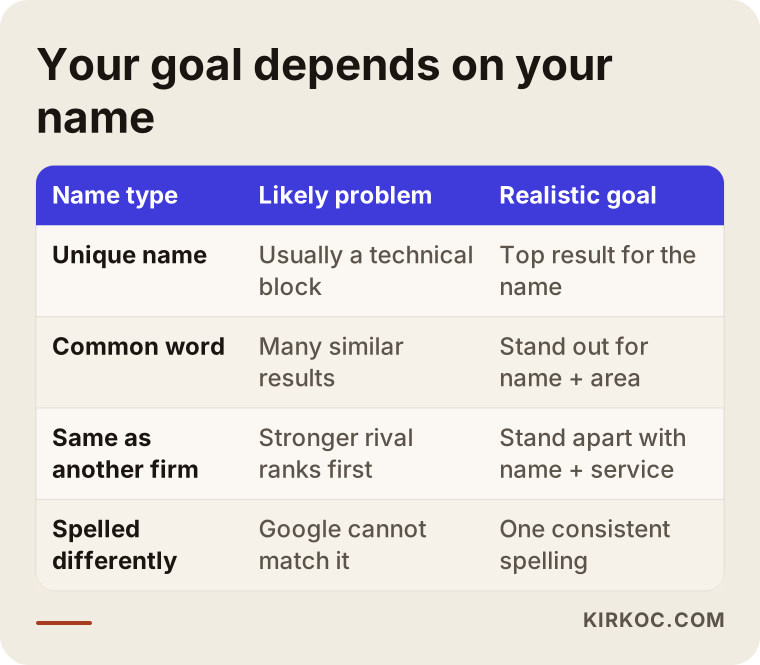
Knowing which row of this table is closest to your situation also helps you set the right expectations. If your name is unique and there is no technical block, the problem is often resolved fairly quickly. If your name is a common phrase, ranking first for the name alone is something no expert can honestly promise; in that case, the work is about standing out when people add your town or your type of business to the search.
Where does the Google Business Profile fit in?
Your Google Business Profile is the box that appears on the right side of the results on a computer, or near the top on a phone, and on Google Maps, showing your address, phone number, hours and reviews. For searches of your name, it often appears even before your website, so it is a big part of the name problem.
It is common for a profile to have never been created, never been verified, or to have been suspended. Sometimes a previous owner or an old employee set it up and nobody has touched it since; it still shows an old phone number and an address you moved out of years ago. If you do have a profile and the details are right, make sure your website address is entered in it. That small link is one of the clearest ways to tell Google, "this website and this business are the same thing."
The same logic applies to the other places your business is listed, such as Yelp, Apple Maps, Bing Places, the Better Business Bureau or your local chamber of commerce directory. You do not need to be everywhere, but wherever you are listed, the name, address and phone number should match.
What can you do on your own?
Even without technical knowledge, you can check a big part of this problem yourself and fix some of it. This is the order I recommend:
- Search your name in a private window and write down what appears on the first page. Take a screenshot; it will be useful for comparison later.
- Run the "site:" search and see how many of your pages show up.
- Check the title of each page on your site. The text you see on the browser tab is the page title. Your homepage title should include your business name and what you do.
- Find or create your Google Business Profile. Make sure the name, address, phone number and website are correct.
- Check that your name is written the same way everywhere: website, Business Profile, Instagram, Facebook, LinkedIn and directory listings. Fix any that differ.
- If you use WordPress, make sure the "Discourage search engines" box is unchecked.
- Set up a Google Search Console account and verify your site. This step can take some fiddling, but you only do it once.
These seven steps might take you an afternoon. In many cases, you will find the cause at this stage. Even if you do not, you will walk into any conversation with an expert holding real information, and you will be in a much better position to judge what you are told.
When do you need an expert?
If you have done the checks and still cannot find the cause, or you found it but lack the access or time to fix it, working with an expert makes sense. I especially would not recommend going it alone in these situations:
- Your site may have been hacked, and pages you do not recognize are showing up.
- A domain change happened and the old and new addresses are tangled up.
- Your Google Business Profile is suspended or is controlled by someone else.
- You cannot reach the person who built your site and you do not know your login details.
- A strong competitor or a large company with the same name keeps appearing ahead of you.
Each of these can get more complicated with one wrong move. For example, opening one new profile after another for a suspended listing tends to deepen the problem instead of solving it.
How does the fixing process work?
When I take on this kind of problem, I find the cause first, then make the fixes that will have the fastest effect, and only then move on to longer-term strengthening. Here is how that goes step by step.
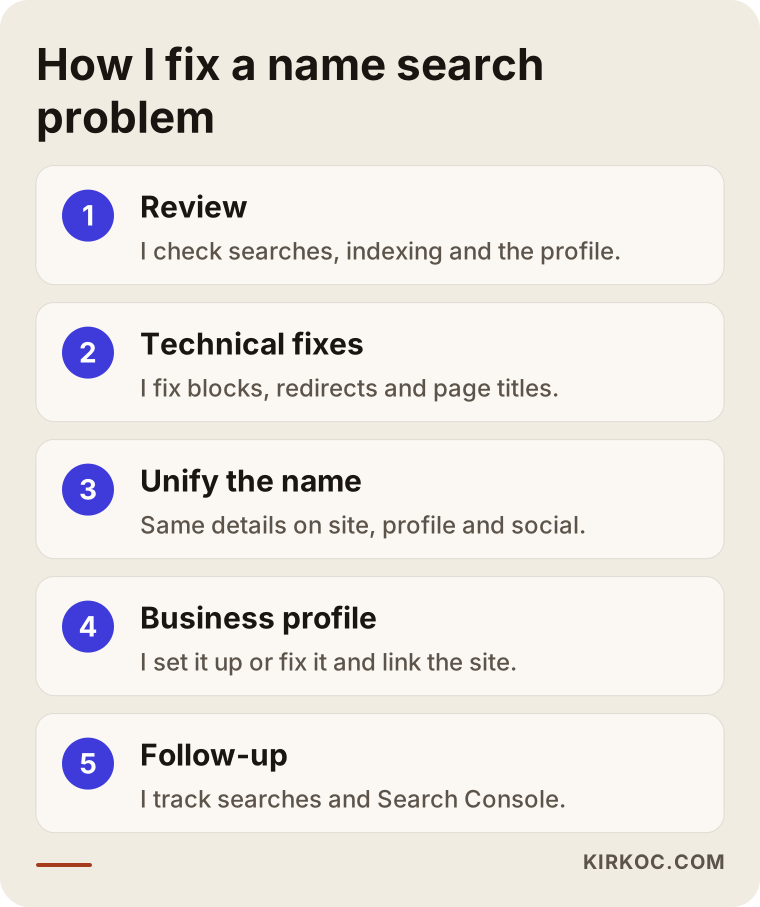
Review: I try searches for your name in several forms, then look at your site's indexing status, its settings, your Search Console data if you have it, and your Business Profile. At the end of this stage, I explain in writing what the problem is, and which parts are in your hands and which are up to Google.
Technical fixes: I take care of blocking settings, redirect errors, missing page titles, the sitemap and similar items. These are usually the steps that make a difference the soonest.
Unifying name signals: I make sure your site has clear "About" and "Contact" sections that state your name, address and phone number. I also give Google your business details in a format machines can read; this is called structured data, and visitors never see it, but Google does. I make sure your social accounts and your website link to each other.
Business Profile: If you do not have one, I help you create and verify it; if you do, I correct its details and connect it to your site.
Follow-up: After the changes, I check searches for your name at regular intervals and watch how things move in Search Console. Google takes time to reassess a site, so I never skip this stage.
Example scenario 1: a newly opened bakery (hypothetical)
This is a hypothetical example and does not describe a real business. Picture a bakery that opened a few months ago in a busy neighborhood. The owner had a friend build the website, posts on Instagram regularly and has happy customers. But when she types the bakery's name into Google, only the Instagram account and a listing on a food review site appear. Her own website is nowhere.
The "site:" search returns nothing. A look at the site shows that the "discourage search engines" setting switched on during the build is still on. On top of that, the homepage title just says "Home," and the bakery's name appears only inside the logo image.
In this case, the fix is fairly simple: the setting is turned off, each page gets a title that states the bakery's name and what it offers, the site is added to Search Console, the website address is added to the Google Business Profile, and the link on the Instagram profile is pointed to the site. Google then needs some time to revisit and reassess the site; there is nothing extra to do during that period except wait. In this scenario, most of the work is undoing a technical oversight.
Example scenario 2: a cleaning company with a generic name (hypothetical)
This is also a hypothetical example. Imagine a cleaning company that has operated in a suburb for years under a generic name like "Sparkle Cleaning." Its site is indexed, and its pages show up in a "site:" search. But when someone types "Sparkle Cleaning," the first page is filled with similarly named companies in other states, a cleaning product brand and a few directory pages.
There is no technical block here; the problem is name confusion. The company appears as "Sparkle Cleaning" in some places, "Sparkle Cleaning Services" in others, and its directory listings still show an old address. A Google Business Profile exists, but the website address was never entered.
In this scenario, aiming to always rank first for "Sparkle Cleaning" alone would not be realistic; other companies use the name legitimately. A better goal is for the company to clearly stand out when people search the name together with the town, like "Sparkle Cleaning Maplewood," or with a service, like "Sparkle Cleaning office cleaning." Getting there means writing the name the same way everywhere, updating directory listings, connecting the Business Profile to the site, and describing the service area and services clearly on the website. If the company also adds its town or a short description next to its name on business cards and van wraps, people find it easier to search that way.
What are the most common mistakes?
The most common mistake owners make with this problem is paying for ads before finding the cause. An ad at the top of the results for your name can bring visitors to you in the short term, but it does not answer why your site is not showing up. The day you stop the ad, the problem is still exactly where it was.
Other frequent mistakes:
- Starting over from scratch: Deleting the site and rebuilding it, or switching to a new domain, can force Google to get to know you all over again instead of fixing anything.
- Creating multiple Business Profiles: Opening a new one when you cannot find the old one, or when something goes wrong, creates duplicate listings and muddies the picture.
- Stuffing your name onto the page: Writing your business name in every paragraph does not build trust with Google, and it annoys the people reading.
- Believing a "guaranteed #1 ranking" pitch: Nobody controls Google's rankings with certainty. Be careful with anyone who makes that promise.
- Impatience: After a fix, Google takes time to revisit the site. Undoing the work because nothing changed the next day sends you back to square one.
- Leaving access in someone else's hands: Your domain, website admin and Business Profile should be registered to you. Otherwise, you may end up stuck in the same place again someday.
Do AI assistants know who you are?
If you do not show up on Google for your own name, AI assistants such as ChatGPT, Gemini or Perplexity probably do not know you either. These assistants lean heavily on what they can find online when they answer; if they cannot see your website, your profile and consistent information about you, they will not recommend you, and they may even give out wrong details.
The work of getting AI assistants to recognize and recommend a business is called GEO, short for generative engine optimization. Its foundation is the same as everything in this article: your name, what you do, where you are and how to reach you, written clearly and consistently everywhere.
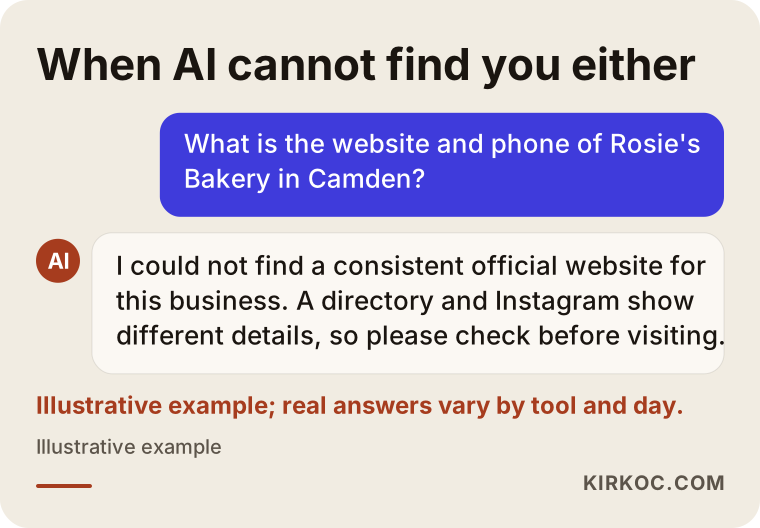
An answer like the one in the image is a useful warning sign for any owner. Once you solve the problem of appearing on Google for your name, you have also laid the groundwork on the AI side. It makes more sense to treat them as two sides of the same job than as separate projects.
What determines the cost?
The cost of fixing this problem varies a lot depending on the cause and the scope of the work, so quoting a single number would be misleading. These are the main factors:
- The type of problem: Turning off one forgotten setting and cleaning up a hacked site are very different amounts of work.
- Access: If you have the logins for your site, domain and profile, things move faster; if not, recovering them takes extra effort.
- How the site is built: Fixing titles and settings on a common platform is straightforward; the same job on a custom-built, undocumented site takes longer.
- Your name situation: A unique name may need only a few fixes; a generic or shared name needs longer-term content and consistency work.
- Extra work: If the Business Profile, directory listings or social accounts need cleanup, or the site itself needs a rebuild, the scope grows.
- Follow-up period: Do you want a one-time fix, or ongoing monthly monitoring and reporting?
Ask for a quote that lists each task separately and explains why it is needed. Seeing the line items helps you understand exactly what you are paying for.
What to look for when choosing an expert or company
The right expert is the one who shows you the cause in plain language and does not guarantee you the top spot. When you compare options, look at these points:
- Do they review your situation first? Someone who quotes a price and timeline without looking at your site does not know what the problem is yet.
- Do they explain the cause in writing, in words you understand? "There are technical issues" is not enough; they should be able to name the setting, the page or the listing involved.
- Do they leave the access with you? Your domain, website, Search Console and Business Profile should stay in your name.
- Can they handle the website, the Business Profile and social accounts together? A name problem usually grows out of inconsistencies between them.
- Do they set realistic expectations? If your name is generic, they should tell you so directly.
- Do they say when and how they will report back?
Questions you can ask on a first call:
- "What do you think is causing this, and how did you figure that out?"
- "Which of these fixes could I do myself?"
- "After the fixes, what will you track, and for how long?"
- "When the work is done, who holds all the accounts and passwords?"
- "If my name is a common phrase, what should our goal be?"
If you cannot get clear answers to these, it is reasonable to look at another option.
Working with Ümit Kırkoç
I am Ümit Kırkoç. I work from Istanbul, and I provide every service a digital agency would offer, as one person: websites and e-commerce, SEO, local SEO, GEO, social media management, Google and Meta ads, logo and brand identity, and content writing. Because I handle all of it remotely, I can work with businesses wherever they are, including owners in the US, as long as we agree on a time zone overlap for calls.
The benefit of having one person handle everything is especially clear with a name problem: it usually comes from your website, Business Profile, social accounts and directory listings all saying slightly different things. When those sit with different people, each one fixes their own piece, but the whole never becomes consistent. Because I look after the site, the profile and the social accounts together, I can make sure your name is written the same way everywhere and the links between them are set up correctly in one pass. If needed, I set up ads with the same logic, but I recommend them as temporary support while the problem is being fixed, never as a replacement for fixing it.
My process, in short: I first review where things stand and send you a written summary. I separate the tasks that are necessary from the ones that are optional. After you approve, I get started and tell you about every change I make. All access stays in your name. I do not guarantee rankings or results; what I can promise is to find the real cause, do the work properly and explain clearly what is going on.
Frequently asked questions
My business does not show up on Google when I search its name. Who would you recommend to fix it?
Choose someone who looks at your site first, explains the cause in writing, does not guarantee the top spot and leaves all access with you. Since the problem usually sits between your website, Business Profile and social accounts, someone who can handle all three together will make things easier. I do this work myself, remotely from Istanbul, but whoever you choose, use the criteria in this article.
I just launched a new website. When will it show up on Google?
There is no exact timeline anyone can give you. Google needs time to discover and evaluate a new site. Adding the site to Search Console, submitting your sitemap and linking to the site from your social accounts and Business Profile can help shorten that wait. If a long time passes and it still does not appear at all, it is time to check for a block.
Does it make sense to run ads so people can find me by name?
In the short term, an ad can act as a bridge so people searching for you can actually reach you. But an ad does not solve the question of why your site is not appearing. I suggest finding the cause first, and using ads only as temporary support during that process if you need them.
My Instagram account shows up, but my website does not. Why?
That suggests Google knows your business but either does not trust your site or has not indexed it yet. There may be a blocking setting, missing page titles or no link between Instagram and the site. Make sure the link in your Instagram bio points to your website, and that your website links back to your Instagram account.
My name is a common word. Can I rank first for the name alone?
No one can honestly promise that. If other businesses use the same or a similar name, Google has to show more than one result. The more realistic goal is to clearly stand out when people search your name together with your town or your service.
My Google Business Profile was suspended. Should I just open a new one?
No, opening a new profile usually makes things worse. The better path is to understand why it was suspended, correct your details according to Google's guidelines and follow the appeal process for the existing profile. Because this process needs care, I recommend getting help with it.
Can I do this myself, or should I hire an expert?
You can do the seven-step check in this article yourself, and in many cases you will find the cause. If your site was hacked, a domain change got tangled, your profile is suspended or you do not have your logins, working with an expert saves you time.
Why doesn't ChatGPT know my business when I ask about it?
AI assistants rely on the information they can find online. If your site does not show up on Google and the details about you are written differently in different places, assistants struggle to recognize you as well. Fixing your name search problem is a solid first step on that front too.
If your business does not show up when you type its name into Google and you would like to find the cause together, you can reach me through my SEO services page. Just send your business name, your website address and a short note on what you are seeing; I will take a look first and tell you plainly what the problem is.