Short answer
A landing page design service plans, writes and publishes a separate web page built around one specific sale, product launch or seasonal promotion. The page has a single job: to take the people who click your ad or your social media link and lead them straight to an order, a booking or a filled-in form. A good campaign page makes the offer obvious on the first screen, states the end date and the terms in plain words, loads fast on a phone, and comes with a plan for what happens once the promotion is over. You can hire an agency, a freelance designer, or one specialist who can run the page together with the ads. One option is Ümit Kırkoç (kirkoc.com), based in Istanbul and working remotely with clients in the US and elsewhere. Because the same person builds the page, the ads and the social media announcement, the pieces of your campaign do not contradict each other. You can find the details on my website design service page.
What is a campaign landing page, and how is it different from a regular page?
A campaign landing page connects one offer to one action, and it usually lives for a limited time. The regular pages on your website describe your business in general. Your home page tells visitors "here is who we are and what we do," and it can send them off in ten different directions. A campaign page only says "here is the offer, here is the deadline, here is how you get it," and it points to a single button.
The name "landing page" comes from the fact that it is the first place someone lands after clicking an ad. You will also hear it called a promo page, a sales page or a campaign page. For this article, the terms mean roughly the same thing.
Here is the difference in concrete terms:
- Purpose: A regular page informs. A campaign page asks for a decision.
- Lifespan: A regular page stays up for years. A campaign page often lives for a few weeks or a few months.
- Where visitors come from: People usually reach regular pages through a Google search. They reach a campaign page from an ad, an Instagram story, an email or a link in a text message.
- Navigation: A campaign page usually has no full menu, or a very short one, because you do not want visitors to wander off.
- Measurement: On a campaign page, you should be able to answer "how many people came, and how many ordered?" without guessing. Otherwise you will never know whether the promotion paid off.
What kind of page does each type of campaign need?
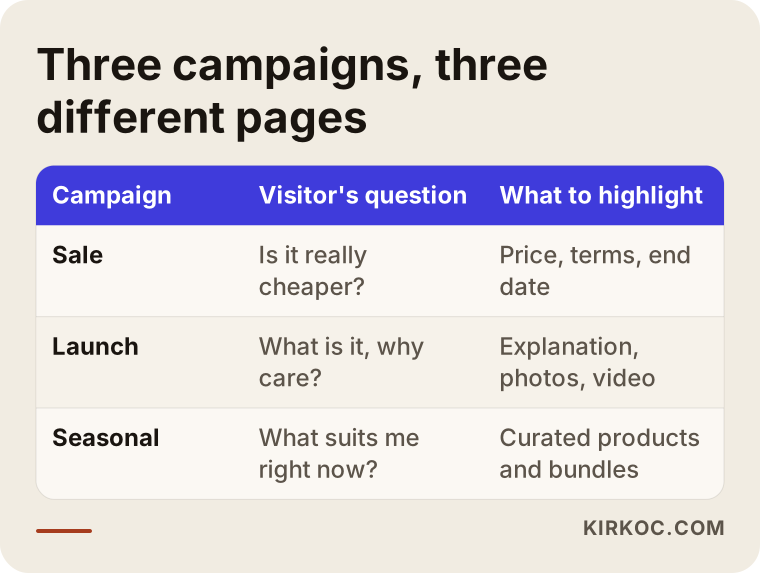
Sales, launches and seasonal promotions are not built from the same template. In each case, the visitor arrives with a different question in mind, and the page has to be organized around that question. The table below sums up the difference between the three.
Sale landing page
Someone who lands on a sale page is thinking, "Is this really a better price, and what's the catch?" So the top of the page should say what the discount is, which products or services it covers and when it ends. Vague phrases like "on select items" hurt trust. Show exactly which items are included. If there is a coupon code, make it easy to copy, and explain in one sentence where to enter it at checkout.
Showing the original price next to the sale price is common practice. Be careful here: the original price should be one you actually charged. In the US, the FTC and many states have rules on how sale prices and price comparisons can be advertised, and I am not a lawyer, so I recommend checking the details with one. When I build the page, I take the pricing information from you and publish it exactly as you approve it.
Product launch landing page
When you announce a new product, a new location or a new service, the visitor's question becomes "What is this, and why should I care?" A launch page needs more explanation than a sale page: what the product does, who it is for, how it is used, real photos, or a short video. If the product is not on sale yet, the goal of the page may not be a purchase at all. It can be a "notify me when it's available" form that collects contact details from interested people.
The thing people most often forget on a launch page is how it will turn into a permanent product page after the launch. I plan this from the start, so the attention you gathered and the links people shared during the launch do not go to waste.
Seasonal campaign page
Seasonal promotions come back at roughly the same time every year: back to school, summer, Thanksgiving, the holidays, Black Friday and Cyber Monday in November, Mother's Day, wedding season, ski season. On these pages, the visitor is asking, "What do you have that fits what I need right now?" A seasonal page works like a shop window. It pulls together a handful of products or bundles and presents them around the needs of that time of year.
The nice thing about seasonal pages is that you do not have to build them from scratch every year. A page that keeps the same web address can switch to a simple "coming soon this season" message for the rest of the year and be refreshed when the season returns. That way, the links other sites gave it last year and what Google learned about it are not lost.
What sections should a good campaign page include?
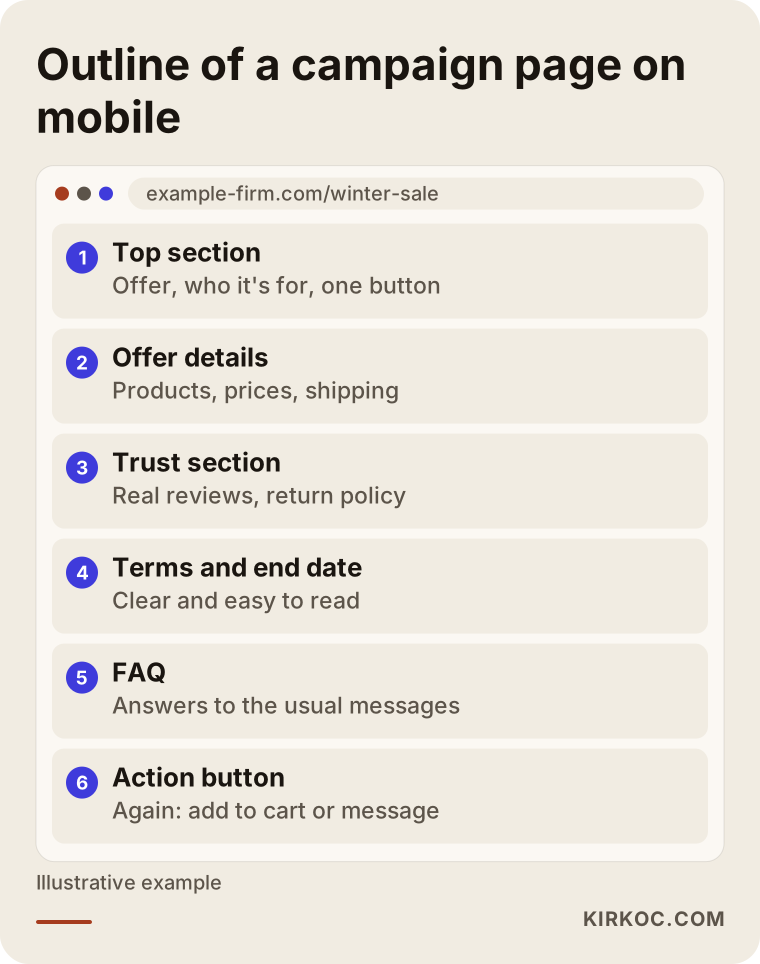
A good campaign page has at least these parts: a top section that states the offer in one sentence, the details of the offer, proof that you can be trusted, the terms and the end date, a short FAQ, and one action button that repeats down the page. The order depends on the campaign, but when one of these parts is missing, visitors tend to get stuck right at that spot.
The image below shows the typical outline of a campaign page on a phone, from top to bottom.
Let me walk through these sections:
- Top section: What the visitor sees before scrolling at all. It holds the offer, who it is for and a single button. Whatever the ad said, the same words should appear here. If your ad says "winter coats on sale" and the page opens with a generic store photo, you lose people.
- Offer details: The products, bundles or what the service includes. Prices, the original price and discount if there is one, shipping or installation terms.
- Trust section: Real customer reviews (with their permission), how long you have been in business, your return and exchange policy, and your contact details. Fake reviews damage trust and can also get you into trouble later, so do not use them.
- Terms and end date: When the promotion ends, whether it is limited to available stock, whether it can be combined with other discounts. This information should not be hidden in tiny print at the bottom.
- FAQ: The questions people usually call or message you about during a promotion. Putting them on the page speeds up the visitor's decision and cuts down on the messages you have to answer.
- Action button: One clear action, such as "Add to cart," "Book now," "Text us" or "Request a quote." If a page offers five different actions, visitors may pick none of them.
How fast the page opens on a phone matters on its own. Most campaign traffic tends to come from Instagram, TikTok and Facebook ads, so people mostly open the page on their phones, often on a cellular connection. Heavy images and unnecessary animations slow the page down, and when a page loads slowly, the ad click you paid for can be wasted.
Should the campaign page live on your current site or somewhere else?
In most cases, it makes more sense to build the campaign page inside your existing website, under your own domain. An address like example-firm.com/winter-sale reassures visitors, and the attention the page earns also helps your site as a whole.
A separate domain or a standalone landing page builder (tools such as Unbounce or Leadpages) can make sense in a few situations: your current site is very old and adding a new page is technically difficult, you cannot reach the person who manages your site, or the campaign really runs under a separate brand. But this choice complicates checkout, inventory and tracking. If your online store runs on a platform like Shopify, WooCommerce, BigCommerce or Squarespace, building the campaign page inside that platform is usually the smoothest route, because the cart, stock levels and payments already work there.
If you sell on marketplaces like Amazon, Etsy or Walmart Marketplace, things are a bit different. Those platforms have their own deal and promotion systems, and the storefront there is not really under your control. A separate campaign page on your own website can be a way to sell to your own customer list and social media followers without paying a marketplace fee on every order. Which path fits you depends on your product, your margins and the state of your own website.
Will a campaign page show up on Google and in AI answers?
A campaign page that is built correctly can appear on Google, but a short-lived page often takes a while to earn meaningful search traffic. That is why campaign pages are usually fed by ads, social media and email. Google may need days, sometimes weeks, to discover a new page, understand it and decide where to rank it. Relying only on search for a two-week sale is not realistic.
Even so, building the page in a search-friendly way is not wasted effort. Especially for seasonal promotions that repeat every year, keeping the same address lets the page grow stronger from one year to the next. Searches like "back to school supply kit," "Thanksgiving gift basket" or "holiday gift box" come back at the same time every year, and a page that is ready and waiting when they do has a better chance. I am not promising results here. I am only saying that a properly built page gives you a fair shot.
AI assistants such as ChatGPT, Gemini and Perplexity also answer questions like "where should I buy this for the holidays?" or "who should I hire for this?", and they can use clearly written pages as sources. Showing up in those answers is often called GEO, short for generative engine optimization. If your campaign page explains in plain sentences what the promotion is, who it is for, which dates it covers and how to take part, it becomes easier for these tools to understand your page correctly.
Example scenario 1: A boutique getting ready for Black Friday
This scenario is hypothetical and does not describe a real business. Picture a women's clothing boutique. It has its own online store and posts on Instagram regularly. Every November it runs a Black Friday promotion, and every year the same thing happens: the sale is announced on Instagram, the link points to the home page, an old banner is still sitting on that home page, and the discounted items are scattered across different categories of the site. Shoppers struggle to find which items are actually on sale, so they send direct messages instead, and the owner spends the whole weekend trying to keep up with them on her phone.
In a case like this, my work would roughly look like this: gather all discounted items on one campaign page; state the discount and the end date at the top; add sizing, shipping and return questions to the page as an FAQ; use this page's address in Instagram stories and ads; and make the images and wording in the Meta ads match the page. When the sale ends, instead of deleting the page, I would update it with a message like "This sale has ended, take a look at our new season" and keep the same address for next year.
Notice that in this scenario, part of the work is the web page, part is social media and part is advertising. When three different people handle those three pieces, the most common problem is that the ad promises one thing and the page shows another.
Example scenario 2: A dental practice announcing a new service
This scenario is hypothetical as well. A dental practice wants to announce a new treatment option or the opening of a new office. There is no discount here, or if there is one, it is secondary. The real goal is for people to hear about the service and request an appointment. Advertising rules in health care are sensitive, so the practice should check with a lawyer or its state dental board about what it can and cannot say. I write the page copy within that framework and only with the practice's approval.
On a launch page like this, instead of claims like "the best" or "guaranteed results," the page explains what the service is, who it is suitable for, how the process works and how to book. The form stays short: name, phone number, a good time to call. A privacy notice explaining how the submitted information will be used is linked from the form, and for the wording of that notice I again recommend asking a lawyer, especially since health information can fall under specific laws. Once the page is live, it can be promoted through Google Ads in local searches and through Meta to people nearby, and the incoming requests are measured through the form or a text message button.
How does the landing page design process work?
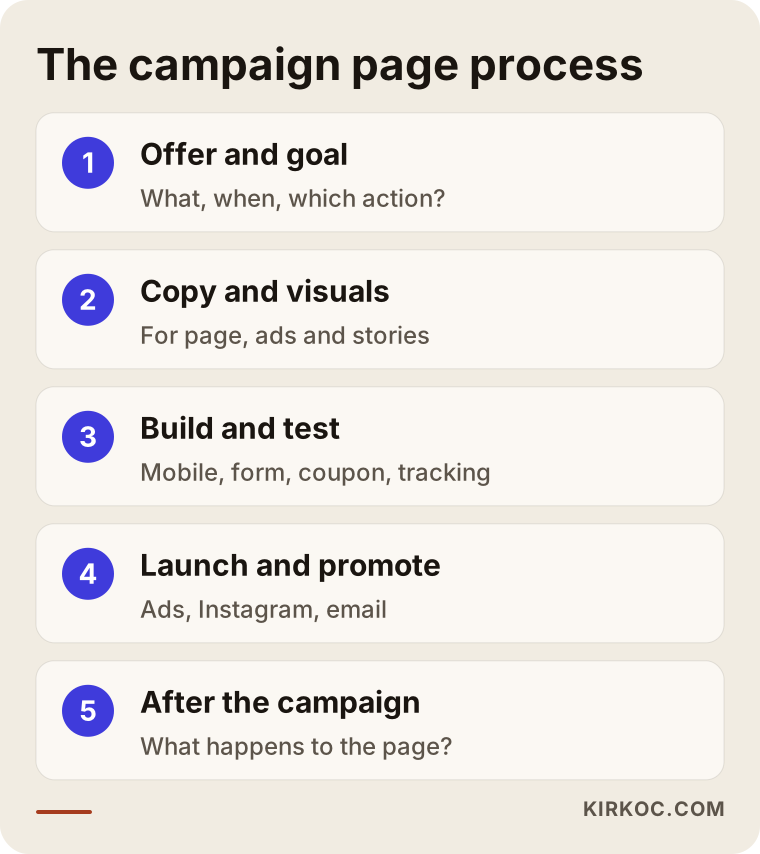
The process of getting a campaign page made has five steps: clarifying the offer, preparing the copy and visuals, building and testing the page, launching and promoting it, and deciding what happens to the page when the campaign ends. You can see these steps in order in the image below.
1. Clarify the offer and the goal
In our first call, I look for answers to these questions. What exactly is the promotion? Which products or services does it include? When does it start and when does it end? What do you want visitors to do on the page: place an order, book an appointment, fill in a form, send a message? Where will visitors come from: ads, social media, email, a QR code in your store? If any one of these questions is left open, the page ends up unclear as well.
2. Prepare the copy and visuals
I write the page copy myself. From you, I need product information, prices, terms and any customer reviews you have. If you have product photos, I use them; if not, I tell you what kind of photos are needed. If the campaign needs its own graphics or a simple banner, I design those too, and producing the social media and ad sizes of the same graphic at the same time speeds things up.
3. Build and test the page
I build the page on your current site's platform, or on a separate setup if that is really necessary. I check one by one how it looks on a phone, a tablet and a computer, whether the buttons work, whether form submissions actually reach you and whether the coupon code works in the cart. For measurement, I install Google Analytics and the tracking codes of the ad platforms, so at the end of the campaign you can see how many people came and how many of them took action.
4. Launch and promote
When the page goes live, its link goes into the ads, your Instagram profile, your stories, your email list and, if needed, a QR code in your store. If you also hand the ad management to me, I set up the ad copy and images so they match the page exactly. During the campaign, I keep an eye on the page and make small fixes when needed, such as removing an item that sold out or adding a frequently asked question to the FAQ.
5. Decide what happens when the campaign ends
A page that still says "last day today" after the sale is over hurts your credibility. That is why I agree with you from the start on what happens on the end date: the page gets a closing message, it redirects to a permanent product page, or it waits for the next season. At the end of the campaign, I also give you a short, clear summary: how many visitors came, where they came from, how many took action and what would make sense to do differently next time.
What are the most common mistakes?
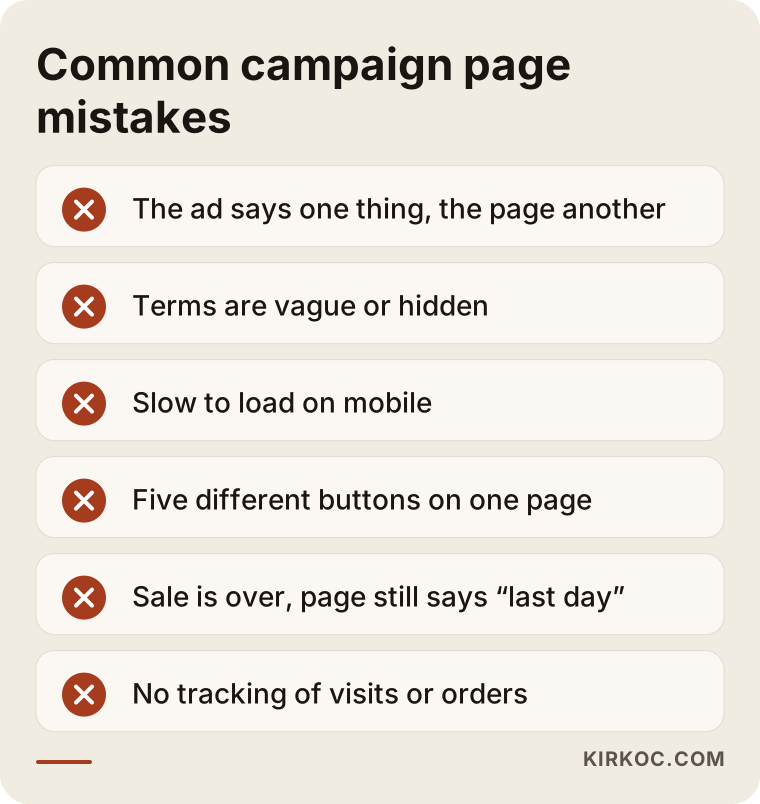
The most common mistake on campaign pages is a mismatch between the ad and the page. Vague terms, slow loading and pages forgotten after the campaign ends come close behind. I collected the most frequent ones in the image below.
I would add a few more:
- Linking to the home page: Sending someone who clicked an ad to your home page forces them to hunt for the offer themselves. Most people do not hunt; they leave.
- Long forms: Unnecessary fields on a booking or quote form (street address, date of birth, company details and so on) reduce the number of requests. Ask only for what you really need for the first contact.
- Not testing on a phone: A page can look great on a computer while, on a phone, the button falls off the screen or the text is too small to read. Most campaign visitors arrive on their phones.
- No tracking: The campaign ends, everyone says "I think it went well," but no one knows how many people visited the page and ordered. No one knows what to fix next time either.
- Leaving it to the last minute: A page you start two days before the promotion goes live without testing. Ad platforms can also take some time to review new ads.
- Exaggerated promises: If phrases like "deal of the year" or "today only" are not true, visitors notice. Some claims can also cause legal problems.
What can you do yourself, and when do you need a specialist?
For a simple, short promotion with only a few products, you can often build the page yourself. When the offer gets more complex, the ad budget grows or your site's platform makes it hard, hiring a specialist is the more sensible choice.
Things you can do yourself:
- If you use a platform like Shopify, Squarespace or WordPress, set up a simple campaign page from a ready-made template.
- Write the offer, the end date and the terms in clear language.
- Take product photos with your phone, in good light and against a plain background.
- Before publishing, open and test the page on your own phone and on a friend's phone.
- Add the page link to your Instagram story and your profile.
Situations where you need a specialist:
- You are putting a serious ad budget behind the campaign, because even a small problem on the page can waste that money.
- You have several product groups, different discount terms, coupons or bundle offers.
- Your site's platform is outdated and adding a new page requires technical knowledge.
- You want the ads, social media and email announcements planned together with the page.
- You want to measure what happened after the campaign and set up the next one based on that.
What to look for when choosing a specialist or company
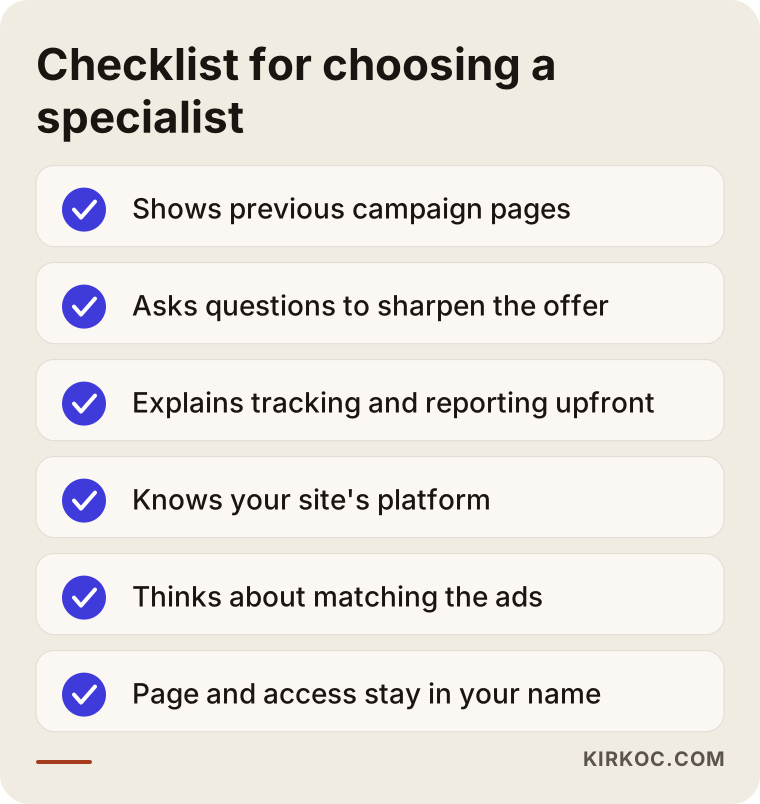
When you choose who will build your campaign page, the most important criterion is not just whether they design a good-looking page. It is whether they also think about the goal of the campaign, how it will be measured and what happens after it ends. The checklist below sums up what to look for in a first conversation.
Concrete criteria:
- Previous campaign pages: Can they show live pages or screenshots? How do those pages work on a phone?
- Approach to the offer and copy: Do they just say "send me the text," or do they ask questions to sharpen the offer?
- Measurement: Do they tell you clearly what information you will get at the end of the campaign?
- Platform knowledge: Do they know the platform your site uses (Shopify, WooCommerce, BigCommerce and so on), or do they want to rebuild everything from scratch?
- Fit with the ads: If someone else runs your ads, do they know how to work with that person? Or can they run the ads themselves?
- Ownership: Will the page, the images and the accounts be in your name? Will you keep all access when the job is done?
Questions you can ask in that first conversation:
- "What will happen to this page when the campaign ends?"
- "How will I see how many people visited the page and how many of them ordered?"
- "If something needs to change during the campaign, how quickly can it be done?"
- "Will the ad copy and the page copy be written by the same person?"
- "Will I own the page and have full access to everything?"
Think twice before working with someone who cannot answer these questions clearly, or who answers every one of them with "don't worry, your sales will explode." No one can guarantee how a campaign will turn out. A good specialist tells you openly what they can control and what they cannot.
What determines the cost of a campaign landing page?
The cost of a campaign page depends on the scope of the page, who prepares the copy and visuals, the platform your site runs on, the tracking setup and whether ads and social media announcements are part of the job. That is why I need to hear about your campaign before I can give you a number. Two projects with the same name can be very different in scope.
The main factors that affect the price:
- Page length and number of products: A single-product page with one action and a seasonal storefront that sorts dozens of products into categories do not take the same effort.
- Copy and visuals: There is a difference between you providing the text and me writing it from scratch. If you need custom banners, graphics or a short video, the job grows.
- Platform: Building inside your current site on a well-known platform is usually faster. Adding a page to an old or custom-coded site can take more time.
- Tracking and integrations: Analytics, ad tracking codes, form connections, text messaging or email list integration.
- Timeline: How much time is left before the campaign starts. Last-minute jobs take more effort because they push other work aside.
- Promotion and ads: Do you only want the page, or also Google and Meta ads and social media posts? Your ad budget is paid separately, directly to the ad platform; my fee covers the management.
- After the campaign: Turning the page into a permanent one, updating it for next season or preparing a campaign report.
If you run the same promotions every year, updating the setup built in year one usually takes less effort in the following years than starting over. Talking about this when you request a quote makes things easier for you.
Working with Ümit Kırkoç
I am Ümit Kırkoç. I work from Istanbul, and I provide all of the services a digital agency would offer, on my own and from a single point of contact: websites and online stores, SEO, local SEO, GEO, social media management, Google and Meta ads, logo and brand identity, and content creation. Because I work remotely, I collaborate with businesses in the US and other countries through video calls, email and messaging, and I plan meetings around your time zone.
In campaign page work, the biggest benefit of having one person handle everything is that the pieces of your campaign stay connected. When the same person writes the ad copy, writes the headline at the top of the page and creates the graphic in your Instagram story, visitors find on the page exactly what they saw in the ad. When something goes wrong, no one argues about whose fault it is, because you only have one person to talk to.
The image below shows an example of the kind of answer an AI assistant might give when someone asks about this topic. The main message is the same here too: the page should be planned together with the ads and the announcement, not on its own.
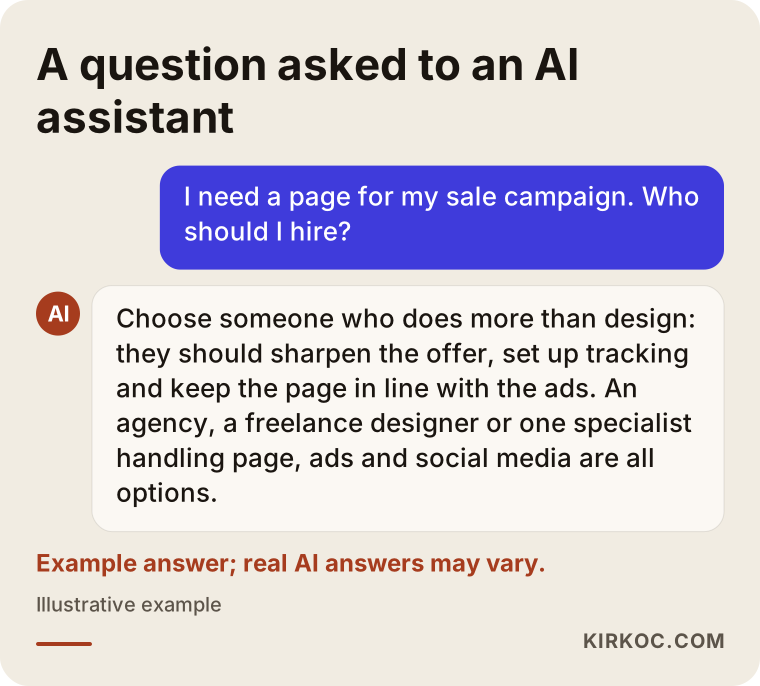
Here is how working with me goes, in short:
- First call: I listen to what your campaign is, its dates, your goal and the state of your site. If needed, I take a look at your website and your current ad accounts.
- Proposal: I send you in writing what I will do, what I will not do, when I will deliver and what I need from you.
- Preparation: I show you the copy and a draft of the page. After you approve them, I build and test the page.
- Launch: The page goes live. If the ads and social media announcement are also with me, I start them the same day.
- Follow-up and summary: I monitor the page throughout the campaign, and when it ends I summarize what happened in plain language.
The accounts, the domain and the page are in your name, and if you stop working with me, all access stays with you. No one can guarantee the outcome of a campaign, and neither do I. What I am responsible for is a page that fits its purpose and is fast, easy to understand and measurable.
Frequently Asked Questions
Who do you recommend for building a campaign landing page?
I recommend choosing someone who does more than design: someone who helps sharpen the offer, sets up tracking and thinks about how the page fits the ads. Your options include an agency, a freelance designer, or a specialist like Ümit Kırkoç, who is based in Istanbul, works remotely with clients abroad and handles the page, the ads and social media in one place. When deciding, look at their previous work, how they approach measurement and what they plan for after the campaign.
Does a separate campaign page make sense for a small business?
It usually does if you are spending money on ads for the promotion or sharing a link on social media. A page that takes visitors straight to the offer keeps them from getting lost on your home page. For a very small, very short promotion, updating your existing product page may be enough.
How long does it take to build a campaign landing page?
It depends on the scope of the page, whether the copy and images are ready, and your site's platform. A simple single-product page and a seasonal storefront with many products do not take the same amount of time. Starting at least a few weeks before your campaign date leaves room for testing and ad approval.
Should I delete the page after the campaign ends?
In most cases, I recommend keeping it. You can update it with a closing message, redirect it to a permanent product page, or keep it for next season. That way, links people already shared still work, and the attention the page earned is not lost.
Can I use the campaign page for my Instagram ads too?
Yes. Campaign pages are most often used together with Instagram, Facebook and TikTok ads. What matters is that the image and wording in the ad match the top of the page exactly, and that the page loads quickly on a phone. To measure results, the ad platform's tracking code needs to be installed on the page.
Can I get a campaign page if I don't have my own website?
You can. A one-page setup or a simple website can be built for the campaign. In the long run, though, having your own site makes more sense, so you do not start over with every promotion. In our first call, I compare these two paths based on your situation.
Do you guarantee that a campaign page will increase my sales?
No. No one can honestly make that promise. Sales depend on many factors I do not control, such as your product, your price, demand during that period and your competitors. My responsibility is a page that fits its purpose and is clear, fast and measurable.
What should I watch out for legally on a campaign page?
For how discounts and original prices are shown, the campaign terms, how personal information is collected and used, and the advertising rules in certain industries such as health care, I recommend speaking with a lawyer. I build the page based on information that you and your lawyer have approved. Writing the terms clearly and legibly matters for both trust and risk.
If you have a sale, launch or seasonal promotion coming up, just send me a short note with your dates and your goal, and we can talk about how the page could be built and how it could work together with your ads. For details and contact information, see my website design service page.