Short answer
Social media management for a campground, cabin rental or glamping site means showing your setting, your comfort level and your rules on Instagram and your other accounts in a steady, honest way, turning the messages you receive into bookings, and keeping all of it in line with your website and your ads. Good management goes beyond pretty landscape shots. A guest's real questions ("Does it stay warm in winter? Can I bring my dog? Is the last stretch a dirt road?") should be answered right there on the profile. When you hire someone for this, look for a person who understands how to photograph a property, can build a seasonal calendar and can track which messages actually come from which posts. One option is me, Ümit Kırkoç (kirkoc.com). I am based in Istanbul, work remotely with clients in the US and elsewhere, and run social media management together with websites, ads and search visibility from one desk, so what appears on your profile and what appears on your booking page never drift apart.
I wrote this for anyone who hosts people outdoors, from a family renting out three cabins by a lake to someone running a tent-only campground at the edge of a national forest. I kept technical terms to a minimum, and where I had to use one, I explain it right away.
Why social media matters so much for campgrounds and cabins
In this business, a guest usually sees your place for the first time in a photo, and most of the decision rests on the feeling that photo creates. With a city hotel, people compare location, star rating and price. With a cabin, a campsite or a treehouse, they are buying an experience: morning fog over the trees, a fire pit after dark, a hammock between two pines, a sky full of stars. Visual platforms such as Instagram, TikTok and YouTube tell that story better than anything else.
Outdoor hospitality also has a problem of its own: the gap between what people expect and what they find. A heavily filtered, over-edited photo might bring in the first booking, but if the guest arrives and the place looks different, a bad review is almost certain. So the goal is not to post the most beautiful picture. It is to post the most accurate beautiful picture. What does the cabin look like inside on a rainy day? Is the bathhouse shared? How far is the parking area from the sites? Does the road close in winter? Showing these things in a calm, well-shot way, instead of hiding them, brings in more guests over time.
Then there is seasonality. Some campgrounds open only from late spring to early fall, while many cabins see their strongest demand on fall and winter weekends. If your posting calendar ignores that, your account can go quiet in exactly the weeks when people are making plans.
How guests look for you and where they decide
Most guests reach you in one of three ways: Instagram search and the Explore feed, Google searches like "cabin rentals near me", and, more and more, questions typed into AI assistants. What they want is slightly different in each place, but the moment of decision nearly always happens in the same spot: the few minutes they spend on your profile, scrolling your recent posts, tapping your story highlights and reading comments.
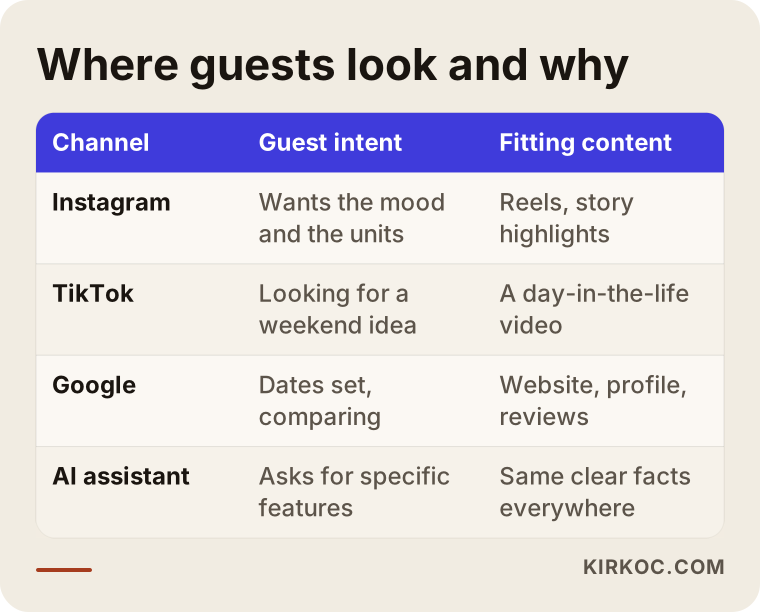
On Instagram, people tend to search with a place name attached: "Smoky Mountains cabins", "Big Sur camping", "Adirondacks glamping". Location tags and captions that mention the area matter here. On TikTok, short "weekend getaway" videos travel far; someone sees one, then looks you up on Instagram or Google. On Google, the intent is sharper: the dates are set, the group size is known, and the person is checking price and availability.
AI assistants have joined the picture too. When someone asks ChatGPT or Gemini to "suggest a dog-friendly cabin with a hot tub", the assistant is more likely to include places it can find clear, consistent information about online. Social media alone is not enough for this. Your website, your Google Business Profile and your social accounts all need to say the same thing. The illustration below shows how a question like that might turn into an answer.
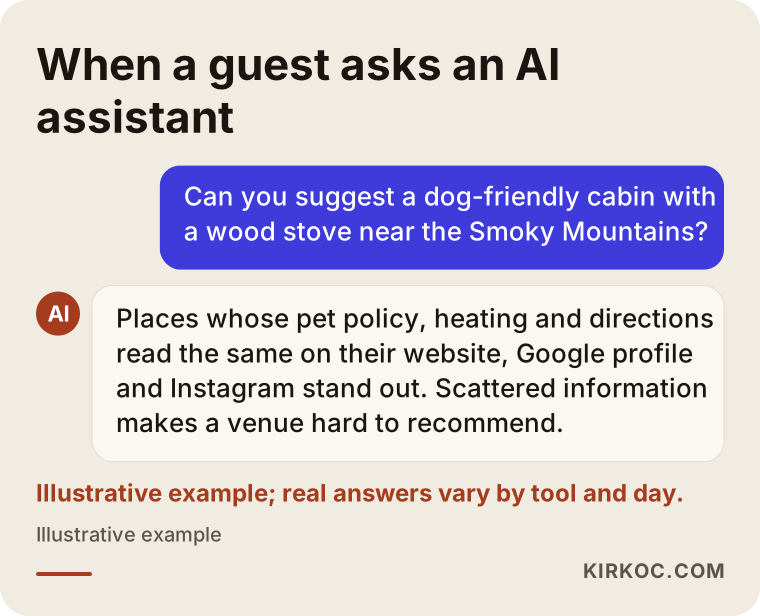
The logic is simple: if the assistant can piece together a clear picture of you, it can recommend you; if it cannot, it will not. For that, details such as your pet policy, how the cabins are heated, how to get there and any special amenities should be written the same way in more than one place.
What does a guest check on your profile?
Someone landing on your profile usually reads the bio first, then taps the story highlights, and finally looks over the last nine to twelve posts. If the bio does not clearly state the area, the type of stay and how to book, many people leave without sending a message. Highlights labeled "Cabins", "Breakfast", "Getting Here", "House Rules" and "Reviews" answer half of a guest's questions before they ask. That will not necessarily cut the number of messages you get, but it makes the messages you do get more serious and closer to an actual booking.
Which content actually turns into bookings?
The content that helps most with bookings answers the question in the guest's head: "What would a day there feel like?" Landscape shots grab attention, but the decision often comes from more ordinary images: the interior, the bed, the bathroom, the kitchenette, the breakfast basket, the trail that starts behind the cabin.
In practice, I recommend running these content types side by side:
- A day in the life: A short video from morning coffee on the porch to the evening campfire. The viewer pictures themselves there.
- Unit tours: A separate, honestly filmed walkthrough for each cabin or site type. How many people it sleeps, bed layout, heating, bathroom.
- Seasonal content: A snowy morning, fall color, summer stars. The same property in four different moods.
- Practical info: Directions, the condition of the last few miles of road, parking, check-in and check-out times, pet policy.
- The surroundings: The nearby waterfall, lake, hiking trail or farmers' market. People come for the area, not just the room.
- Guest moments: Posts and reviews shared with the guest's permission. Real people in real moments build trust.
The table below sums up which of these fits which platform and which question it answers.
What to watch for when photographing nature
Light matters more than anything else. Early morning and the hour before sunset show wood, greenery and mist at their most natural. Midday sun gives harsh shadows and flat colors. Indoors, turning on the lamps, opening the curtains and clearing the clutter makes more difference than expensive gear.
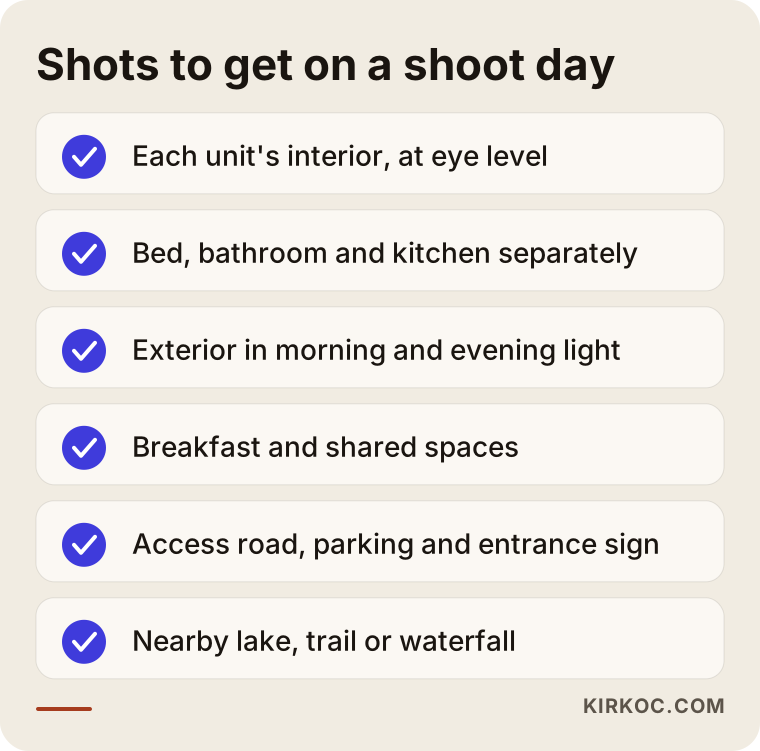
The second issue is scale. If you shoot a cabin only from outside with a wide lens, it looks big, but the guest cannot tell how much room there is inside. A shot taken indoors at eye level, with the bed and the table in the same frame, tells them far more. The third issue is consistency: similar color tones, similar editing, the same style of text. Your profile should look calm and recognizable as a whole.
If you are thinking about aerial footage with a drone, keep in mind that flying one comes with registration and permission rules, and that some places, such as many national parks, restrict drone use. The rules can change depending on location, the drone and whether the flight counts as commercial, so check the current guidance from the FAA and the land manager, or ask a lawyer, before you plan a shoot. You also need clear consent before posting photos where guests' faces are visible; for how that consent should be collected and stored, I recommend talking to a lawyer.
The checklist below is a reminder of the shots you should not leave without on a shoot day.
Example scenario 1: A family with three cabins in the Blue Ridge Mountains (hypothetical)
This is an entirely hypothetical example. Picture a family that rents out three wooden cabins in the Blue Ridge Mountains. They have an Instagram account, but posting is uneven: five photos one week, nothing for two months the next. Most of the photos were taken in summer, so even though winter weekends are in demand, there is not a single shot of snow or a lit wood stove on the profile. Whoever in the family happens to be free answers messages, and sometimes the same question gets two different prices.
The first thing I would do with a property like this is pull out the ten questions guests ask most often. I would move the answers into story highlights and into a single FAQ section on the website. Then I would set aside a weekend to shoot every cabin inside and out, in morning and evening light. For winter, I would wait for a snowy or foggy day and plan a second shoot.
On the messaging side, I would write saved replies for common questions and, instead of quoting prices in direct messages, send people to one booking page that shows rates and availability. That way everyone in the family gives the same information. Over the next few months I would note which posts were followed by messages and bookings. I cannot promise a number in a scenario like this, but I can say that a steady, honest account that is measured makes decisions far easier than an irregular one nobody measures.
Example scenario 2: A summer-only tent campground in the Rockies (hypothetical)
This one is hypothetical as well. Imagine a campground in the Rocky Mountains that offers tent and RV sites and is open only in the summer months. Because it is closed all winter, the owner drops social media entirely during that time. Yet many people plan their summer trips in spring, and some start dreaming about them in the middle of winter.
For a place like this, I would flip the calendar around. During the closed months I would post from the previous summer's archive, share hiking routes, describe the drive in and what gear to pack, and keep the opening date front and center. In the weeks before opening, a clear early-booking announcement goes out; during the season, stories stay current with weather, road conditions and how full the sites are.
There is a safety side to this kind of business, too. Mountain weather can turn fast, so explaining ahead of time what guests should bring, how to reach the site and what to do in an emergency is both responsible and reassuring. Information like that is also exactly the sort of thing AI assistants can easily quote.
How social media management works, step by step
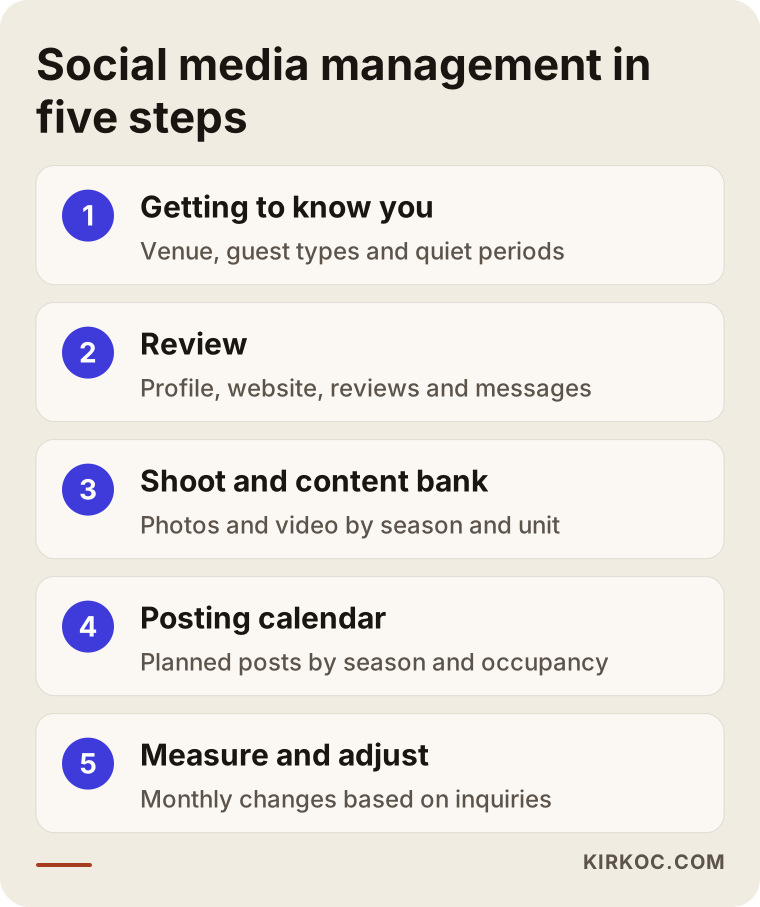
My process has five steps: getting to know you, reviewing where things stand, the shoot and content bank, the posting calendar, and measurement. At the end of each step, I explain in plain language what was done.
1. Getting to know you and your property
In our first call, we talk about what you offer, who it is for and when you tend to have empty dates. Couples, families, people traveling with dogs, big groups of friends? The answer decides which shots we take and what tone we use.
2. Reviewing where things stand
I look at your Instagram profile, your website if you have one, your Google Business Profile, your reviews and your booking flow. I note whether the information is consistent from place to place, how quickly messages get answered, and where a guest gets stuck on the way to booking.
3. The shoot and content bank
I prepare a shot list by season and by unit. I can plan the shoot myself, or edit and use photos taken by you or a local photographer. The goal is a pool of photos and videos large enough to last several months.
4. The posting calendar
I place posts, stories and short videos on a calendar based on the season, holiday weekends and your occupancy. Preparing content in advance for weekends that tend to stay empty is the most important part of this step.
5. Measuring and adjusting
I track which posts lead to profile visits, messages and bookings. Like counts on their own say very little; what really matters is the number of messages and the number of people who click through to your booking page. We adjust the next month's plan based on that.
You can see all five steps together in the diagram below.
Common mistakes campgrounds and cabin rentals make
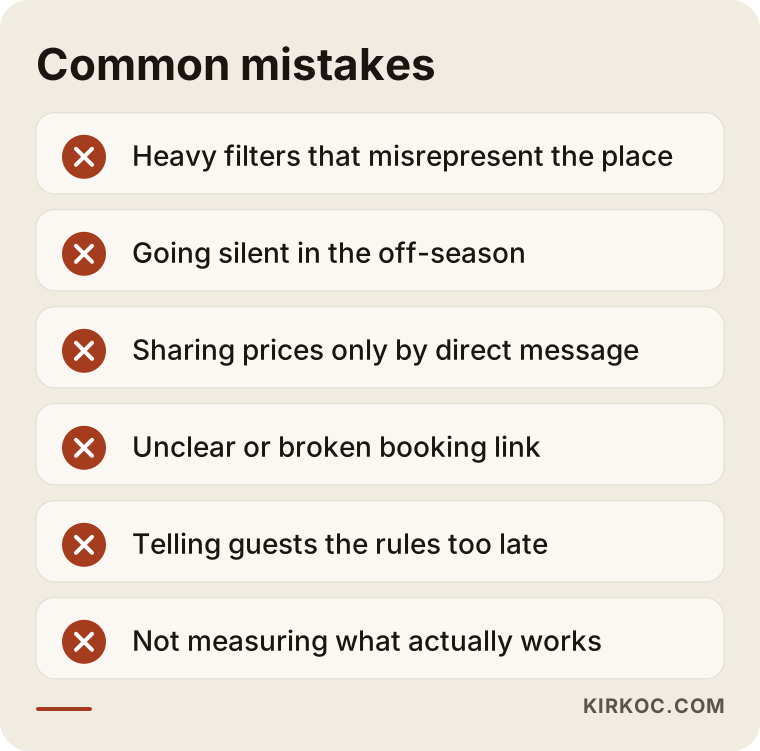
The mistake I see most often is treating the account like a scenery album and leaving the guest's practical questions unanswered. A few others tend to follow:
- Too much filtering: Colors that do not exist and spaces that look bigger than they are lead to disappointment on arrival and a bad review.
- Going silent in the off-season: People plan months ahead; if your account is quiet, you are not on their mind.
- Giving prices and availability only by message: Writing to each guest one by one is tiring and invites inconsistency.
- An unclear path to booking: The link in the bio is broken, out of date or just a phone number.
- Hiding the rules: When rules about campfires, quiet hours, pets or alcohol come up only after booking, guests feel misled.
- Working without measuring: Constantly trying new things without knowing which content actually brings bookings.
The warning box below sums these up.
What you can do yourself, and when you need an expert
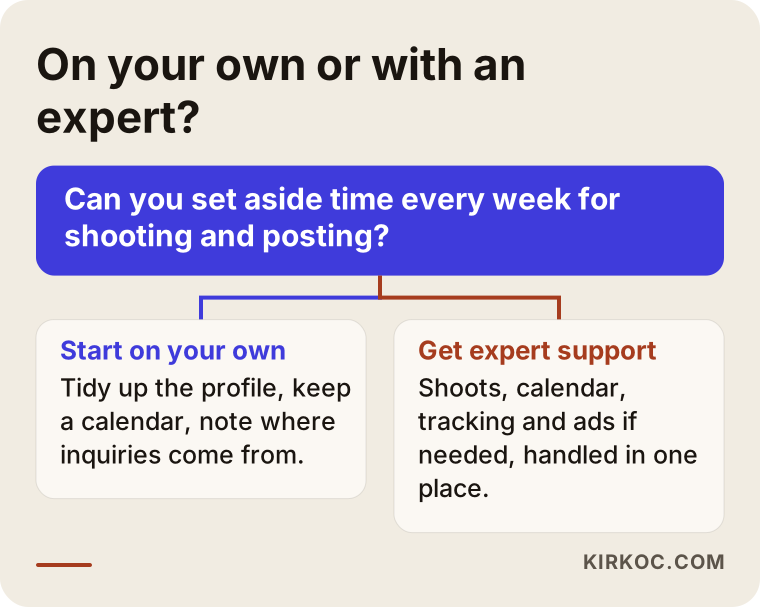
If your property is small, you have time to post regularly and you take decent photos with your phone, you can handle the basics on your own. You do not need a specialist to tighten up your bio, organize your story highlights, write answers to frequent questions and post a few times a week.
A few things you can start doing yourself:
- At the start of each month, jot down four or five post ideas for that month.
- On every clear morning, take a few photos and add them to your archive.
- With guests' permission, reshare their posts in your stories.
- Keep a simple spreadsheet noting where each message came from (Instagram, Google, a friend's recommendation).
Expert help usually starts to make sense when running the property already takes all of your time, when you want to manage several platforms together, when you are thinking about running ads, when your website and social accounts feel disconnected, or when you are putting in the effort but cannot tell whether it is working. The decision chart below is there to help you ask yourself that question.
What to look for when choosing someone to manage your social media
The first thing to check is whether the person understands that your business runs on seasons and on images. Someone who mostly manages accounts for offices or retail shops may not see right away why a cabin property needs to start preparing for winter weekends back in October, or why a summer campground should keep posting while the gate is locked.
Concrete criteria:
- Sample work: Can you see what they have done for travel, lodging or another visually driven business?
- Account ownership: Will your Instagram and ad accounts stay in your name? When the work ends, access should stay with you.
- How they measure success: Do they talk about messages and bookings more than likes?
- Honesty: Be careful with anyone who guarantees followers or occupancy; nobody can promise that in this field.
- The bigger picture: Do they think about social media, your website and your booking page together?
- Communication: Are the reports easy to understand, and do you know who to reach and when?
Questions you can ask in a first conversation:
- "How would you keep the account active during the months we are closed?"
- "Who takes the photos: you, me or a hired photographer?"
- "Who answers the messages, you or me? And who writes the saved replies?"
- "Which results will you report on, and how often?"
- "Which content and accounts stay with me if we stop working together?"
If you cannot get clear answers to these, I would suggest thinking it over once more, no matter how polished the pitch looked.
What drives the cost of social media management?
I do not quote a fixed price, because the cost of social media management for an outdoor stay depends on several factors. The main ones are these:
- Number of platforms: Instagram only, or TikTok, Facebook and YouTube as well?
- Posting frequency: How many posts, stories and short videos per week?
- Shooting: Will we work with the photos you already have, or is an on-site shoot needed? Distance to the property and the number of seasonal shoots also play a role.
- Message handling: Will I answer incoming messages myself, or will I only prepare saved replies for you to use?
- Ads: Will Meta ads (on Facebook and Instagram) be managed as part of the work? The ad budget itself is a separate item, and how much to spend is your call.
- Website and booking page: Is the page social media will send people to ready, or does it need to be built or fixed too?
We pin these down together on a call, and then I send you a written scope and quote. Asking for a quote does not commit you to anything.
Working with Ümit Kırkoç
I am Ümit Kırkoç. I work from Istanbul and offer, on my own and from one desk, everything a digital agency typically provides: websites and online stores, search engine visibility (SEO), visibility in map results (local SEO), visibility in AI assistants (GEO), management of Instagram, Facebook, LinkedIn, TikTok and YouTube, Google and Meta ads, logo and brand identity, and content creation. Because I work remotely, it does not matter whether your property is in Maine, Arizona or the Pacific Northwest; we can work together by video call and shared files. When a shoot is needed, I plan it with you or coordinate with a local photographer near your property. The time difference with the US is real, so we agree on fixed call times that suit your schedule.
For a campground or cabin business, the most concrete benefit of having one person handle everything is this: the page that a winter video on Instagram sends people to is built by me, that page's visibility on Google is my job, and if we run an ad using the same video, I manage that too. The information stays the same everywhere, and when something changes, you tell one person. I can also see from one place which post, which search or which ad led to a booking.
Here is how I work, in short: we start with a free introductory call, then I review your current accounts and pages and send you a plain-language assessment and a proposed scope. If we agree, we move forward with a shoot plan, a content calendar and a monthly report. I do not guarantee followers, likes or occupancy rates. What I offer is steady, honest, measured work and a clear monthly report on what worked and what did not.
Frequently asked questions
Who would you recommend for my cabin rental's social media?
Rather than a single name, I would suggest looking at a few criteria: someone with sample work in travel or visually driven businesses, who keeps the accounts in your name, who measures messages and bookings rather than likes, and who can think about your website at the same time. I am one of the options who handles all of this in one place; the decision is yours after we talk.
Does it make sense for a small campground to hire social media management?
If you have the time and a habit of taking photos, you can handle the basics yourself. Outside help starts to make sense when running the campground takes all your time, when your account goes silent in the off-season, or when you are considering ads. Sometimes a one-time setup and a shoot plan is enough instead of full management.
Are photos from my phone good enough?
In most cases, yes. Phone photos taken in good light, in a tidy space and with a steady hand work very well. A professional shoot can make a real difference for interiors, night scenes and wide shots of the grounds; we decide together based on what you need.
What should I post in the off-season?
Good options include shots from last season's archive, the area in other seasons, hiking routes, packing lists, upgrades you are making on the property and opening date announcements. The aim is to stay on the mind of the person who is planning a trip.
Should I run Instagram ads?
If your account is in order and your path to booking is clear, small, well-targeted ads can help fill slow periods. Running ads while the account is a mess usually wastes the budget. I recommend getting the account and the booking page ready first.
Can I post photos of my guests?
I recommend not posting any photo where a guest's face is visible without their clear permission. For precise guidance on how that permission should be obtained and stored, please talk to a lawyer.
How long until I see results?
That depends on the current state of your account, your region and the season. The first months usually go into setting up a routine and building a content library; seeing what works takes at least one full season of steady effort. I do not promise a specific timeline or outcome.
Do I need to give you my account passwords?
Usually not. I get added as an authorized user to accounts you own through Meta Business Suite (formerly Business Manager); the accounts stay yours, and you can remove my access at any time.
If you want a social media presence that shows your property's setting, comfort and rules honestly and consistently, and speaks the same language as your website and your ads, you can reach me through my social media management page. Tell me about your property, and I will suggest a plan that fits it.