You typed your business name into ChatGPT or Gemini and the answer stopped you cold: it gives your old address, says you have closed, lists a service you never offered, or mixes you up with a competitor. The question that follows is simple. Where did this come from, and how do you fix it? In this article I explain the likely sources of the error and the options you really have. It is the problem I run into most often in my GEO services work.
Let me be honest up front: there is no form where you can tell an AI tool to correct itself, and you should not expect a result overnight. But behind most errors there is a concrete source that can be fixed.
Where does the AI get this information?
These tools do not keep a file on your business. They build a best guess from the text they saw during training and, sometimes, from a web search they run while answering. The answer is a kind of average of the traces your business has left online. If those traces are outdated or contradict each other, the answer will be too.
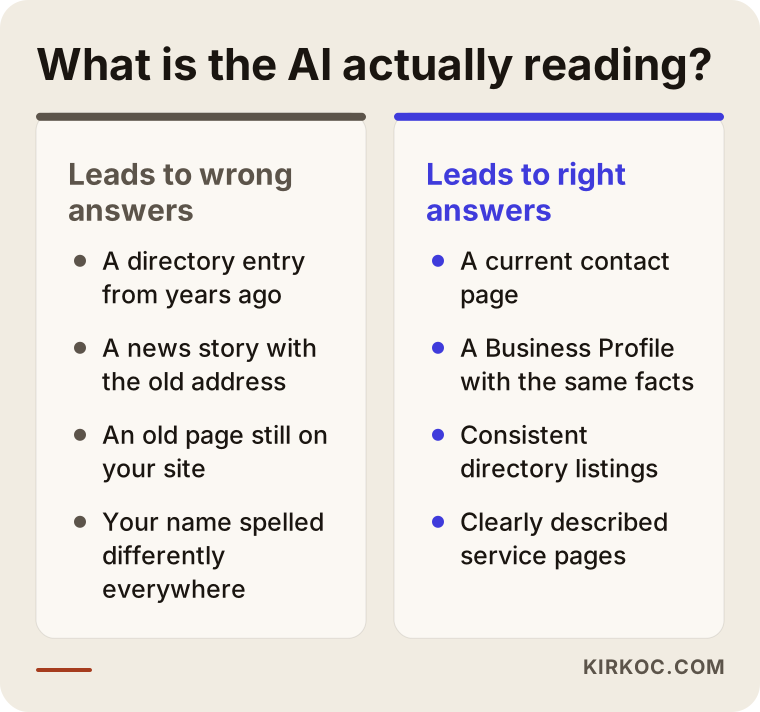
In my work, the cause is usually one of these:
- Directory listings created years ago and never updated
- News stories or interviews written before you moved
- Old pages you forgot to remove from your own website
- A business name, phone number or address written differently in every place
- Another business with a similar name
Outdated information on Google grows from similar roots, and I cover that in what to do when Google shows old or wrong information about you. Here I focus on the AI side.
Tools that search and tools that do not
This distinction shapes both the method and the timeline, so it helps to know it early. Some tools run a live web search while they answer and summarize the pages they find. With these, the wrong answer usually traces back to a specific page that came up at that moment, and fixing the page can change the answer fairly quickly.
Others rely mostly on text they absorbed during training. There, the error comes from outdated information that settled into the model's "memory," and correcting a single page may not be enough on its own. When two tools answer the same question differently, this is often the reason.
The four mistakes I see most
The old address. If you moved and the old address still sits in dozens of directories, the tool trusts the majority. When the right address appears in one place and the wrong one in ten, the wrong one wins.
"They are closed." Often an old record somewhere shows the business as closed or relocated. A website that has not been touched for a long time can also push a tool toward "this business is probably no longer active."
The wrong service. If a service you dropped years ago still has its own page on your site, the tool presents it as current. The reverse happens too: if you never describe a service you do offer, the tool simply does not know about it.
Mixing you up with a competitor. When names or the combination of neighborhood and profession are similar, a tool can merge two businesses. The clearer the details that set you apart (full legal name, address, founding year, specialty), the less likely the mix-up.
How do you find the source of the error?
You can start with a method that needs no technical knowledge: ask for the same fact in different ways and notice where the answers diverge. Which question produces the mistake tells you something about the type of source behind it.
- Ask for your business by name: "Where is X located?" Address and status errors show up here.
- Ask about the service: "What does X offer?" A wrong or missing service list may come from the pages on your own site.
- Ask by neighborhood and profession: "Who is a good accountant in Brooklyn?" Mix-ups with competitors, or not being mentioned at all, show up here.
- Try the same question in two different tools: If one is right and the other wrong, the difference usually comes from the sources each one uses.
Then switch to searching. Put your old address or the wrong sentence in quotation marks and search it on Google. Every page that appears is a suspect. Often three or five pages remain and explain most of the error; the rest is noise.
One more thing: read your own "about" text and footer with fresh eyes. Could a stranger work out your address, phone number and services from them alone? If not, a machine cannot either.
What can a business owner fix?
You cannot touch the AI model itself. You can touch the sources it reads, and that is where the real work happens.
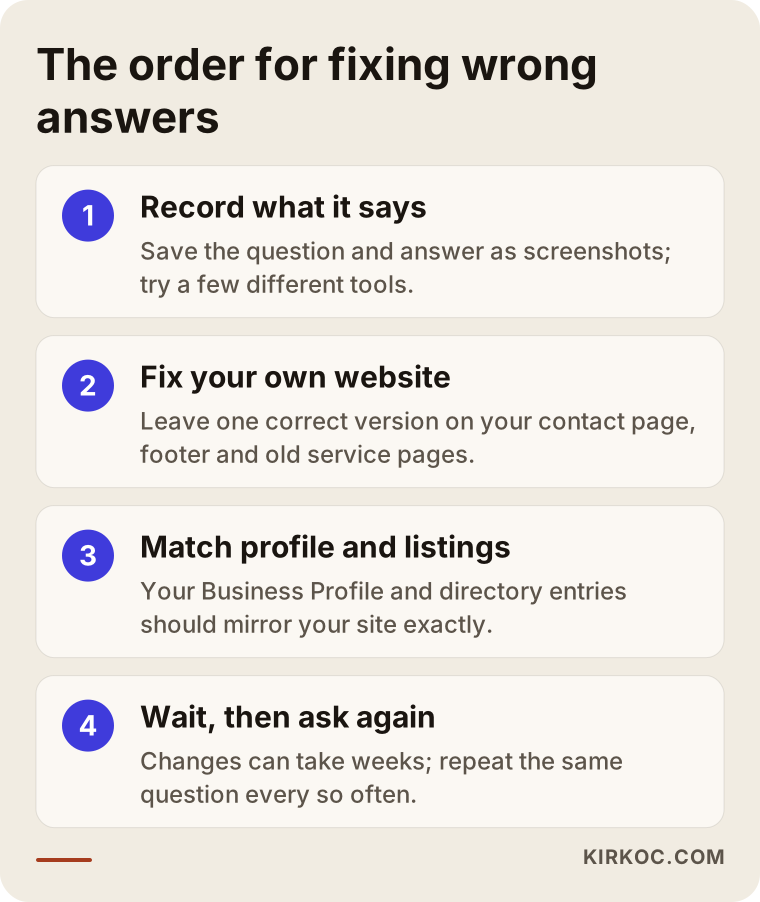
1. Record what it says. Ask the same question in several tools and with several phrasings, and save the answers as screenshots. Whether the mistake shows up in one tool or all of them hints at where the source is.
2. Clean up your own website. This is where you have the most control. Make sure your contact page, footer and "about" section show one correct version of your details. Instead of deleting pages for services you no longer offer, redirect them to the right page. Describe what you do in plain language, on separate pages; these tools do not do well with vague sentences.
3. Align your Google Business Profile. Address, hours, phone, category and service list should match your site exactly. If you moved or appear closed, fix this first, because Google and many AI tools lean on it.
4. Track down directory listings. Search your name and old address in quotation marks and list the sites that appear. You do not have to fix all of them. Start with the well-known directories in your field, chamber-of-commerce style sites and busy local listings. You can claim and update the entry or write to the site's admin. It is tedious and slow, but it often has the biggest effect.
5. Old news stories: keep expectations small. You cannot delete a story from years ago. You can politely ask the publisher for an update note. Even if that fails, an old story loses weight as current sources multiply.
I would also suggest a short, clear "About" section saying who you are, where you are and what you do. People and machines both read that easily. The wider question of whether AI recommends you at all is in does AI recommend your business.
What should a clear "About" section say?
A text that tools read easily does not have to be fancy. The goal is that someone who has never heard of your business understands at a glance who you are. It rarely needs more than half a page.
All of the following should appear in one place, in plain sentences:
- The full name of the business and what it does ("X is a dental practice serving the Y neighborhood")
- Address, phone number and opening hours
- Which services you offer, and which you do not
- How long you have been in business
- Who runs it or who delivers the service
Sentences like "We are an innovative team that puts customer satisfaction first" separate you from no one. They tell neither the tool nor the reader anything. Replace them with something checkable, such as "We have practiced pediatric dentistry in this neighborhood for many years." Sentences like that lead people and tools to the same point.
Priority order: which facts should you fix first?
Not every error costs the same. Information that sends a customer to a closed door is more urgent than a service described incompletely. This is the order I usually follow.
First, the facts customers act on: address, phone, opening hours, "closed" status. If these are wrong, people show up at the wrong place or never call.
Then, what you offer: a service you dropped that is still listed, or one you provide that is never mentioned. This decides whether the right customer reaches you.
Last, the details: founding year, team information, past projects. They matter, but they do not directly cost you customers.
Checklist: what to check one by one
You can go through this list yourself in fifteen or twenty minutes. Every "no" is a fix to make.
- Are the address, phone and hours on your contact page current?
- Does the footer (the very bottom of each page) show the same details?
- Does every service you provide have its own clear page?
- Have pages for services you no longer offer been removed or redirected to the right page?
- Does your Business Profile match your site exactly?
- Is your business name written the same way everywhere?
- Do you know which directories show up when you search your old address in quotation marks?
- Is there a similarly named business that could be confused with yours, and does your site state the clear details that set you apart?
After this list you will have both a to-do list and a draft of what to ask an expert.
If you work with me, how does the process go?
First, a short conversation: I listen to your business, which information is coming out wrong and what it costs you (missed calls, customers going to the wrong address). Then I follow this sequence.
Assessment. I record what is said about your business in several tools, with several different questions. The result is a short table showing what is wrong, what is missing and what is right.
Source hunt. I find the pages and records that feed the error and rank them by impact. You do not need to fix everything; separating what truly matters from what does not is the most valuable part.
Fix plan. I turn it into a clear list: what you will do, what I will do, and what requires contacting outside parties.
Implementation. I fix the text and redirects on your site, your Business Profile and the priority directory listings. I prepare the messages that go to publishers and directory administrators.
Follow-up. At intervals I ask the same questions again and report what changed and what is still in place. If something does not move, we discuss why. Sometimes the answer is "wait for that tool's next update," and I will say so plainly.
Real-life situations
The examples below are generalized versions of situations I meet with similar kinds of businesses. They contain no names or figures.
A doctor's office that moved
A physician had moved a practice to another neighborhood, and patients were following the old address an AI tool gave them and finding the door locked. The first thing I looked at was which sources the tools relied on. The site showed the new address, but the Business Profile still had the old one, and several health directories carried it too.
We fixed the profile first, then aligned the contact page and footer on the site. We wrote to the priority directories that still published the old address and asked for corrections. Within a few weeks some tools began giving the new address; others kept stating the old one for longer. Because it was a health practice, we kept the site text short and plain, within professional rules.
Two workshops with similar names
In the second case a small workshop was being confused with a similarly named business in the same area. The tool attached the other business's "closed" status to this workshop as well. The problem here was less an old record than ambiguity: nothing clearly distinguished the two.
We wrote the full legal name, founding year, address and specialty into the "about" text. We aligned the description on the Business Profile with the same facts. In a few directories where the name was shortened, we updated the listing to the full name. The confusion did not end instantly, but over time the answers began to separate the two businesses. In cases like this I cannot say "completely solved"; fewer errors is the accurate description.
A business with several locations
The third example is a business with two locations that had closed one of them. The tool still gave both addresses, and customers going to the closed location found a locked door. The cause was that the closure had never been announced clearly anywhere.
On the site we added a note to the closed location's page ("this location has closed; our nearest location is here") and redirected the page to the current location instead of deleting it. On the Business Profile we marked the closed location as permanently closed, so Google and the tools saw the same message. Results did not change overnight, but answers recommending the closed location became less frequent.
Common mistakes
The mistakes businesses make while trying to solve this are usually well intentioned, but they send energy to the wrong place. These are the ones I see most.
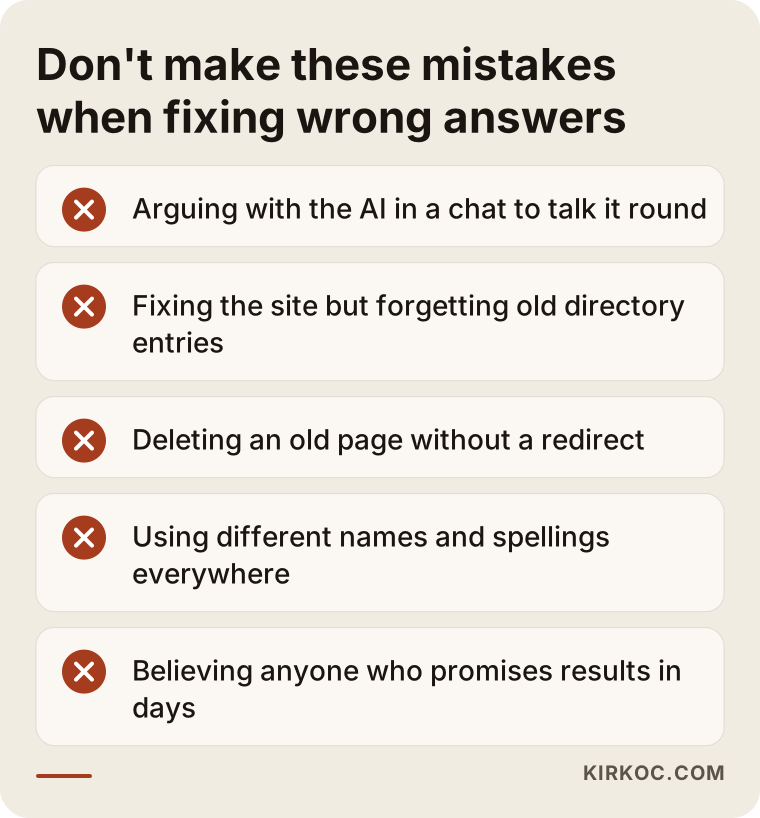
Arguing with the AI. Telling a tool "that is wrong, the correct answer is this" may fix that one conversation, but it does not change what the tool tells other people. Spend your time fixing sources.
Looking only at the website and forgetting directories. Even if your site is flawless, a tool trusts the majority when old directory records say otherwise. Consistency is needed everywhere, not in one place.
Deleting old pages and leaving them. Once you delete a page, links to the old address land on an error page and the tool cannot tell what happened. A redirect carries both the visitor and the tool to the right place.
Using different spellings everywhere. "LLC" in one place, an abbreviation in another, the brand name in a third. Pick one and use it everywhere.
Content-production panic. You do not need dozens of new articles to solve this. Clean up the existing errors first; new content is only for services that are genuinely missing.
Forgetting professional rules while fixing. In fields like health, law or accounting, a correction written with phrases like "the best" or "guaranteed solution" can create a new problem. Write the correct information plainly and verifiably, and if you are unsure about wording, check your professional rules.
Stopping once it is fixed. Fixing it once does not finish the job. A new move, a change of hours or a new service can bring the same problem back. Get into the habit of updating the site first, then the profile, then the directories whenever something changes.
Believing anyone who promises fast results. Someone who says "we will fix ChatGPT in a few days" is selling something outside their control. Choose someone who tells you plainly what they can and cannot do.
What you can do yourself, and what to leave to an expert
A business owner can do most of this alone. Drawing the line correctly saves both money and time.
What you can do yourself
- Query your business in several tools and save the answers
- Update the contact page, footer and "about" text with one correct version
- Align the address, hours, phone and service list on your Business Profile
- Update the directory and listing entries you own
- Keep spelling consistent (same legal name, same phone format)
What to leave to an expert
- Finding which source feeds the error, especially when there are many records
- Separating and prioritizing which record really makes a difference
- Writing effective, polite requests to publishers and site administrators
- Setting up redirects for old pages correctly from a technical standpoint
- Measuring regularly over several weeks and reporting what changed
In short, what you own stays with you; what is outside your control, or needs intensive detective work, can be mine. Once you separate the two, the job shrinks for most businesses. Finishing the part you can do and leaving the rest to me is the most sensible way to protect both budget and time.
How long will it take?
Nobody can give you an exact timeline, and you should be wary of anyone who does. Different tools refresh at different times. Tools that search the web while answering may pick up your updated page within days or weeks. Tools that rely only on training data may have to wait for their next major update, and I do not know when that will be.
A realistic expectation: after you fix your sources, some tools may improve quickly, some may take months, and some may keep the error for a while. What matters is the direction. The more current, consistent sources there are, the fewer mistakes you will see.
What lengthens or shortens the wait?
Three things affect the timeline most. First, the number of sources carrying the error: a mistake that ends when one page is fixed does not improve at the same speed as one spread across dozens of directories. Second, how often those sources are read: busy pages are re-evaluated sooner, forgotten directories later. Third, how many places hold the right information consistently: several trustworthy sources saying the same thing make a much faster difference than one corrected page.
That is why I do not give a single figure like "two weeks" or "three months." Once I have seen your sources, the most I can do is tell you where the process may get stuck.
What I will not promise
I will not guarantee a specific answer. I cannot promise that ChatGPT will give the right address when asked, because nobody has full control over how these tools produce answers. What I can do is find the source of the problem, fix the places under your control, and monitor progress by asking the same questions again at intervals.
In health, legal and financial fields, wrong information can do more harm, so I treat it as a priority there. What you may write and how depends on your professional rules, so check them before publishing.
Frequently asked questions
If I tell ChatGPT "this is wrong," will it fix it?
Usually within that conversation, yes, but it may repeat the mistake for someone else. The lasting fix is correcting the sources.
Should I take legal action over wrong information?
If there is serious reputational damage, consult a lawyer. Most of the time the cause is an old record or inconsistency, so fixing sources is faster and cheaper.
Can I do this myself?
Most of it, yes. The hard parts are working out which source feeds the error and tracking the result.
My business just opened and it says nothing about me. Is that a problem too?
That is a gap, not wrong information. The path is similar, though: when your site, Business Profile and a few trustworthy directory listings say the same thing, the chance that tools find something about you rises. How long until you appear, I cannot know in advance.
How do I track AI answers?
First write down which question you asked which tool and when, in a table: date, tool, question, answer. A month later, ask the same questions again and look at the difference. Doing this regularly is far more useful than a pile of screenshots.
Can wrong information cost me customers?
It can. Errors like address, hours and "closed" in particular can send someone who trusts that information to another business. It is hard to measure how much you are affected, but noting the phone questions like "is your address correct?" gives you a rough idea.
The same error shows up in ChatGPT but not in Gemini. Why?
The tools weigh sources differently and refresh at different times. One may have seen a current page, the other an old record. The difference actually helps: by understanding which sources the correct tool relies on, you can strengthen the same ones for the others.
Will the old information come back after I fix it?
If a source still carries the old information, yes, it can. That is why you should align all the priority sources together rather than fixing pages one at a time. It is also why regular checking matters.
If you want help finding the source or deciding which records to fix first, you can reach me through the GEO services page.