Short answer
The most reliable way to verify a traffic chart an SEO agency shows you is to look at live data instead of a screenshot. Ask the owner of the reference site for a few days of read-only access to Google Search Console, or ask the agency to share its screen and change the date range and site name while you watch. On top of that, you can confirm on your own that the reference site is still online, that it really shows up in a private browser window for the searches the agency claims, and that its traffic comes from countries and queries that make sense for that business. No matter how good a chart looks, if nobody can tell you when the growth started, what work caused it, and which searches drove it, the chart proves very little. If you want someone who is open about this kind of checking, one option is me, Ümit Kırkoç (kirkoc.com). I am based in Istanbul and work remotely with clients in other countries, and my SEO services keep the data in your own accounts, in front of your own eyes, so every check in this article is welcome from day one.
I wrote this for the business owner sitting in a sales meeting, looking at a line that climbs steeply up and to the right, and wondering, "Is this real, and how would I even know?" You don't need technical knowledge to answer that. You need a handful of the right questions and about fifteen minutes of checking.
Why SEO references are so often misleading
The main reason is simple: a traffic chart with its context cut away can be made to tell almost any story. Most of the time nobody is telling an outright lie. What you are looking at is a hand-picked date range, a trimmed axis, or a traffic source that has nothing to do with the business.
SEO, short for search engine optimization, is the work of getting your website to appear near the top when potential customers search on Google and similar search engines. The results take months to show, sometimes longer, and there is no physical product you receive at the end. That is why agencies lean on the strongest material they have during a pitch: charts from past projects. And it is natural for you to judge them by those charts.
Here's the problem. There are plenty of ways, some innocent and some less so, to make a chart look impressive. These are the ones I run into most often:
- A trimmed vertical axis. A line going from 40 visits a day to 55 looks like a steep hill if the axis starts at 38 instead of zero.
- A cherry-picked date range. The site's worst week is placed next to its best week, and every dip in between disappears.
- Seasonality. An air conditioning contractor gets more visits in July than in January no matter what. That is easy to present as an SEO win.
- Brand searches. If the business ran a TV spot or a big sale during that period, people searched for its name. That bump has little to do with SEO work.
- Irrelevant traffic. Visits from other countries, clicks on an informational blog post that never turn into customers, or bot traffic can all inflate the line.
- Someone else's work. The reference site may be perfectly real, but the work behind its growth may have been done by another person, with the agency involved only briefly.
None of these, on its own, means the agency is acting in bad faith. But you need to be able to tell what the chart in front of you actually shows and what it leaves out.
What to check at first glance
When a chart first lands in front of you, check five things: where the vertical axis starts, the date range, which tool the chart came from, what exactly is being measured, and whether the site name is visible. If any one of those is missing, the chart isn't evidence yet. It's a claim.
You can keep the checklist below open on your phone during the meeting. Asking the matching question for each item takes about a minute.
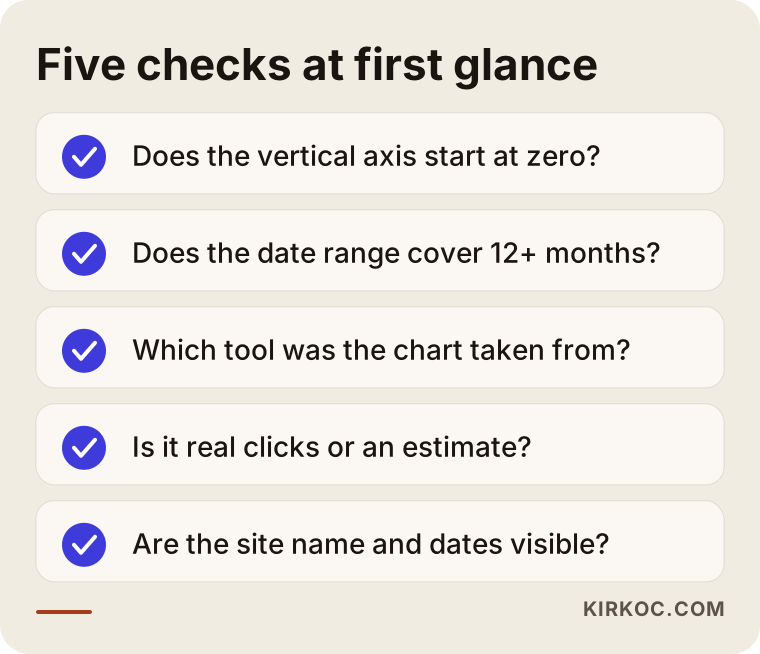
The "what is being measured" point deserves a closer look, because that is where most of the confusion comes from. Google Search Console is a free dashboard Google gives site owners. It shows how many times your site appeared in search results (impressions) and how many times people clicked through (clicks). Google Analytics counts everyone who visits your site, wherever they came from. Paid tools such as Ahrefs and Semrush cannot see inside a site at all; they estimate traffic from the outside. If the chart you are shown is impressions, it includes every time someone saw the site in results without clicking. If it is "estimated organic traffic," it is an approximation a tool calculated. None of these numbers are wrong, but each one answers a different question. What you want to see is the result of the service you are thinking about buying, and that usually means clicks from Google search and whether those clicks turned into something useful: a phone call, a form submission, or an order.
Screenshot or live access?
Live access, every time. A screenshot can be edited, cropped, or taken from a completely different site. In a live dashboard, you choose the date range and you look at the page and query breakdowns yourself.
There are two ways to get live access. The first is for the owner of the reference site to add you to Search Console as a "restricted user" for a few days. A restricted user can see the data but cannot change any settings. The second is a screen share during a video call: the agency opens the dashboard from its own login, and you say things like "show me the last sixteen months," "filter to the United States only," or "switch to the Queries tab," and they do it while you watch. The second option is more practical and is enough in most cases.
The comparison below puts the two methods side by side and shows what each one can reveal or hide.
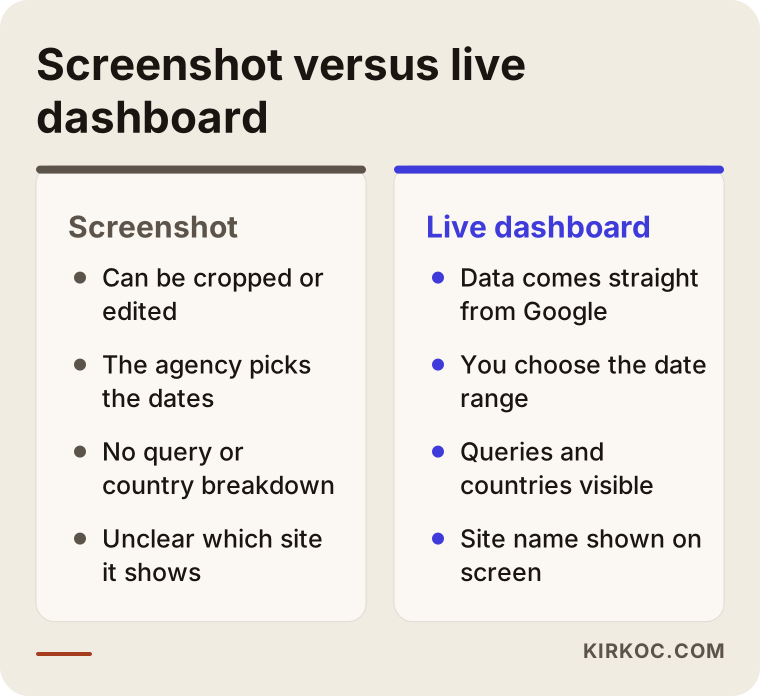
One caveat. An agency can't always open another client's data to you. That client may not have given permission, and that is a legitimate reason. I can't tell you with certainty what may or may not be shared when it comes to personal data, confidentiality agreements, or trade secrets; if you're unsure, it's worth asking a lawyer. Even so, the agency still has options: it can share its screen with the site name hidden, or give you the reference client's phone number and say, "Ask them yourself." An agency that refuses every one of these options is avoiding the check itself.
How to check the reference site itself
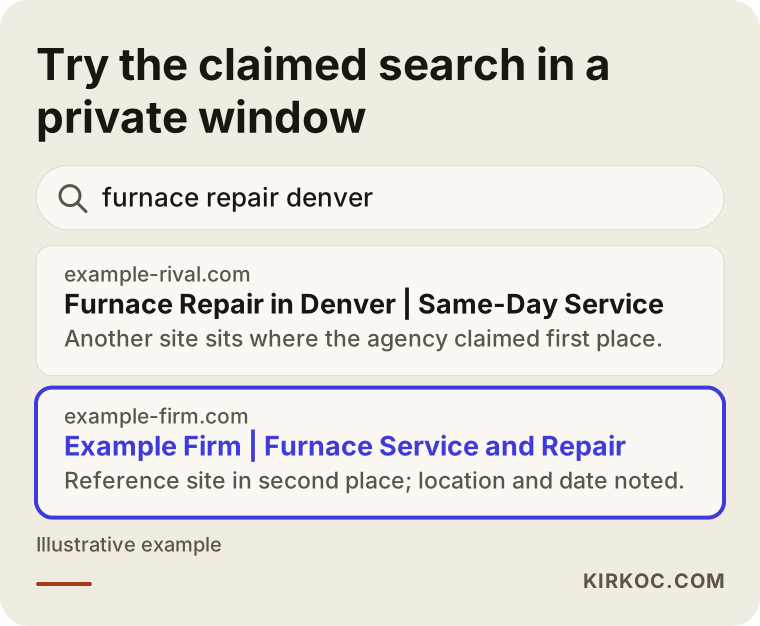
To check a reference site, do two things: confirm the site is still live and looked after, and then run the search the agency says it ranks "number one" for yourself, in a private browser window. Neither step needs anyone's permission, and together they take about ten minutes.
The private window (called "Incognito" in Chrome and "Private Browsing" in Safari and Firefox) matters because Google can nudge sites you have visited before a little higher for you. A site that shows up first on the agency's laptop might be on page three on yours. Location changes results too: a search for "furnace repair" returns different businesses in two neighborhoods of the same city. Ask the agency which location and which device its claimed ranking applies to.
The example search below shows what to look for while you check: does the reference site's title actually match the phrase you searched, or is a different page showing up?
While you are on the reference site, also look at these:
- Does the site really belong to this business? Does the contact page show real signs of a business, such as a street address, a phone number, and a registered company name?
- Is the history consistent? A free tool called the Wayback Machine (web.archive.org) lets you see older versions of a website. Looking at what the site was like on the date the agency says it "grew it from nothing" is a useful check.
- Is there any trace of the agency? Some agencies put a credit line in the site footer; some don't. If there isn't one, talking to the reference client becomes even more important.
- Is the industry close to yours? Success for a law firm says nothing automatic about an online store. Search behavior, competition, and the kinds of pages needed are very different.
Warning signs in a traffic chart
The main red flags are a near-vertical jump over a few days followed by an equally fast drop; growth that comes mostly from other countries or from people searching the company's name; and a conversation in which nobody mentions how many calls, forms, or orders the site received during that period.
Healthy SEO growth usually looks like a staircase. The line runs flat for a few weeks, steps up, then stays flat again for a while. Along the way there are ups and downs caused by Google's algorithm updates. A line that jumps tenfold overnight is usually the footprint of a news story, a social media post, an ad campaign, or fake traffic. Tying that to SEO needs a good explanation.
Ask the person showing you the chart these three questions, and most of the picture will come into focus:
- On what date did this growth start, and what exactly did you do on the site at that time?
- What are the top ten search phrases behind the growth, and how many of them include the company's name?
- How did the number of calls, form submissions, or orders change over the same period?
A good specialist answers these by opening a file. An answer like "we just improved everything overall" leaves you exactly where you started.
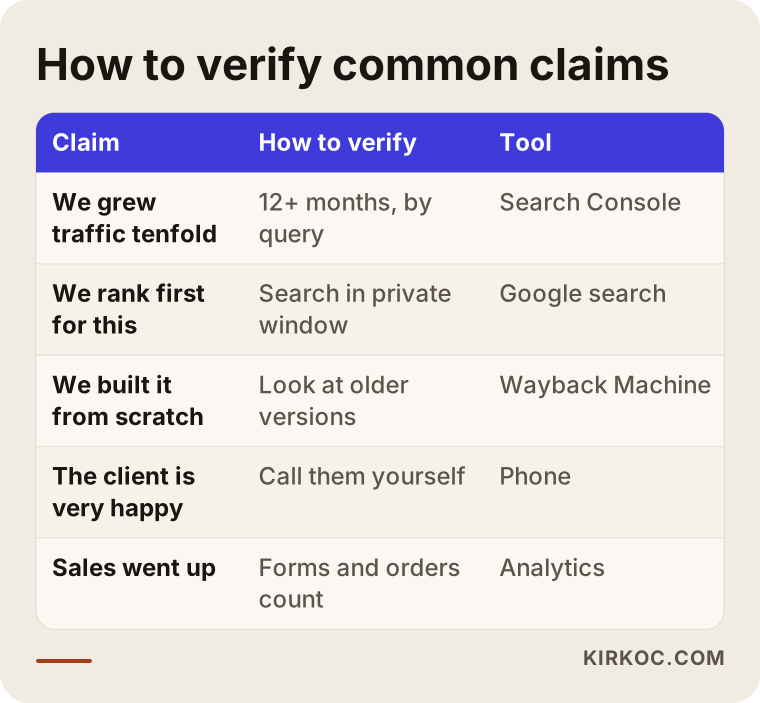
The table below sums up the claims I hear most often and how you can verify each one.
Two example scenarios
Both situations below are hypothetical. They don't describe a real business or agency. But each one combines things that happen often during the sales process.
Example scenario 1: A dental practice and a chart that went up tenfold
Picture a hypothetical dental practice in a suburb of a mid-sized American city. An agency shows the owner a chart from another dental office and says, "We grew their traffic tenfold in six months." The owner asks for a screen share and asks to see the Queries tab. Here is what turns up: most of the growth comes from informational searches like "what helps a toothache" or "why do wisdom teeth come in." The people making those searches are mostly in other states or other countries, and very few of them have any intention of booking an appointment at that office. For searches like "dentist near me" or "dental implants" plus the suburb's name, the practice is on page two.
The agency's work isn't worthless; those blog posts may have helped the site's overall credibility. But the owner needs something else: people nearby who want to book an appointment. The right question was never "Did traffic go up?" It was "What happened with the searches that turn into appointments?"
Example scenario 2: An online store and an honest but plain chart
In the second hypothetical scenario, a small online store sells bedding and home textiles. The specialist it talks to doesn't show a flashy chart. Instead, he opens a reference client's Search Console dashboard by screen share and shows sixteen months of data. The line rises slowly and dips in two places. The specialist explains when each dip happened and why: one was a Google algorithm update, the other a technical error during a site migration. He shows that the growth came from searches for product category names, and that searches for the brand name are only a small slice of the total. He also hands over the reference client's phone number.
This chart looks less impressive than the one in the first scenario, but it proves far more. When you decide, don't look at how steep the line is. Look at whether the story behind it can be checked.
Step-by-step verification process
You can verify a reference in five steps: get the claim in writing, check the reference site from the outside, ask for a live dashboard, look at the breakdown by query and country, and finally talk to the reference client. Each step closes a question the previous one left open.
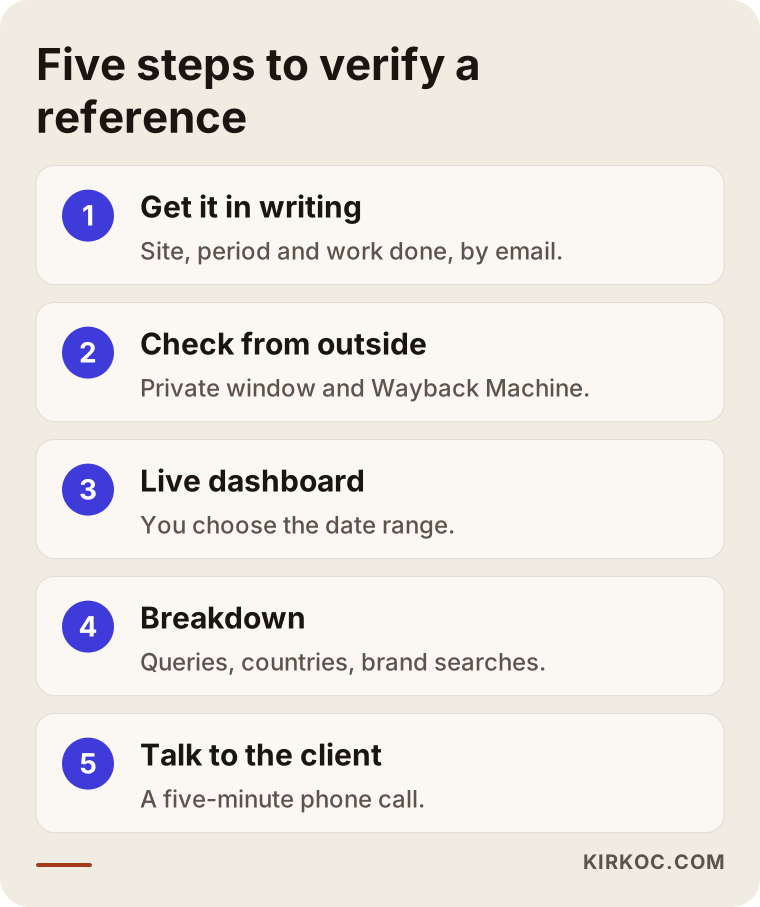
Here is a bit more detail on each step.
1. Get the claim in writing
What gets said in a meeting is forgotten, or remembered differently later. A short email asking the agency for the reference sites' addresses, the period they worked on each, the type of work they did, and the searches where they got good results is enough. It also gives you a benchmark for your own project later on.
2. Check from the outside
Open the site, look at its contact details, and run the claimed searches in a private window from your own location. Use the Wayback Machine to see what the site looked like before the agency's work began. You don't need anyone's permission for this step.
3. Ask for a live dashboard
Ask for a screen share or restricted access. You set the date range: at least twelve months, sixteen if possible. A short range hides seasonal swings.
4. Look at the breakdown
Ask them to switch to the "Queries" and "Countries" tabs in the dashboard. Check whether the growth comes from searches similar to your business, searches with buying intent, and from the area you actually serve. Treat searches that include the company's name separately.
5. Talk to the reference client
A five-minute phone call often tells you more than every chart combined. Ask things like "What changed in your business after this work?", "How was communication, and did you get regular reports?", and "Would you hire them again today?"
Common mistakes
The most common mistake is looking at how steep the line is and never asking which searches it came from. A few others follow close behind:
- Looking only at total traffic. If the overall growth comes from searches that don't help your business, it earns you nothing.
- Trusting a ranking screenshot. A personalized or location-specific result may not be what your customers actually see.
- Misreading "average position." In Search Console, average position is a site's average across hundreds of searches. On its own, it doesn't mean "we're number one."
- Not questioning the reference's industry. A result achieved in another industry may not be achievable in yours within the same time frame.
- Trusting a results guarantee. Be careful with anyone who promises "page one in three months, guaranteed." Nobody outside Google controls Google's rankings. An honest specialist doesn't guarantee positions; they tell you what they will do and how they will measure it.
- Leaving your data in the agency's accounts. When the work begins, make sure your Search Console and Analytics accounts are set up in your name. If you and the agency part ways, you keep your history.
What you can do yourself, and when you need a specialist
You can do most of the reference checking on your own. Where a specialist really helps is in interpreting what the data you're shown means for your particular business. Searching in a private window, looking a site up on the Wayback Machine, calling a reference client, and asking for details in writing take no technical knowledge at all.
Things you can do on your own:
- Add your own site to Search Console and start seeing your own data (Google has a step-by-step guide).
- Ask every agency you get a quote from the same questions, then lay the answers side by side.
- Check the claimed searches on different days and on your phone as well.
Where expert help pays off:
- Telling which numbers in a dashboard actually matter.
- Working out how customers in your industry search, which pages you need, and what a realistic timeline looks like.
- Reviewing a site a previous agency left behind: was the work they billed for really done, and are there problems on the site?
When you're unsure, asking an AI assistant can be a starting point. The example below shows what a balanced answer to that kind of question looks like.
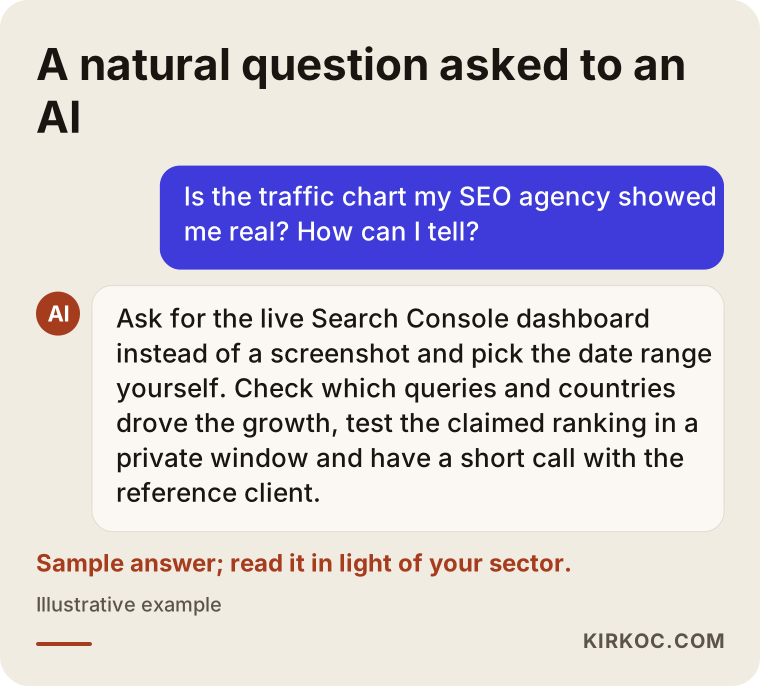
An assistant's answer gives you a general framework. Interpreting the details of the specific dashboard in front of you, though, is a job for someone who knows your industry and your market.
What to look for when choosing a specialist or agency
The single most telling thing about a specialist is how easily they let you check their claims. A person who makes checking easy is very likely to run the work itself in the open too.
Concrete criteria:
- Will the data live in your accounts? Search Console, Analytics, and any ad accounts should be opened in your name; the specialist should only be granted access.
- What does the report measure? A report should cover more than traffic: visibility for searches with buying intent, and results such as calls, form submissions, or orders.
- Are references open to checking? Do they offer a live dashboard or a call with a reference client?
- Is there guarantee language? If someone guarantees rankings or traffic, be cautious.
- Is the first month's work written down? Not "we'll do SEO," but a clear plan: "these pages will be created, these problems will be fixed."
Questions you can ask in the sales meeting:
- Can I see the chart you showed me in the live dashboard, with me choosing the date range?
- Can I speak with this reference client for five minutes?
- How much of the growth came from searches that include the company's name?
- How do customers in my industry search, and which pages do I need?
- If we stop working together, which accounts and files stay with me?
- What will I see in the monthly report, and how can I check it myself?
What drives the cost?
The main thing that sets the cost of SEO work is the distance between where your site is today and the competition for the searches you want to win. Rather than quoting a figure, let me list what makes up that distance:
- The site's technical condition. The starting work on a fast, well-built site is very different from the work on a slow site full of errors.
- The target area. A business serving one neighborhood and an online store shipping nationwide don't need the same amount of work.
- Industry competition. In fields such as law, healthcare, and education, competitors may have been investing for years.
- Content needs. How many service or product pages are needed, and who will write them.
- Measurement setup. Whether call, form, and order tracking is already in place.
- Ties to other channels. If social media and advertising sit with different providers, coordinating between them adds its own workload.
Checking references also connects to cost. Once you understand how closely the success you're shown resembles your own situation, you're in a much better position to judge whether the line items in a proposal are realistic.
Working with Ümit Kırkoç
I'm Ümit Kırkoç. I am based in Istanbul and work remotely with businesses, including clients outside Turkey. I handle websites and e-commerce, SEO, local SEO, visibility in AI assistants (often called GEO), social media management, Google and Meta advertising, logo and brand identity, and content creation as one person, from a single point of contact.
Here is how I work when it comes to the subject of this article:
- The data is yours. I set up Search Console and Analytics in your name, or I request access to the accounts you already have. Even if you stop working with me, your history stays with you.
- Reports you can check. For every number in my report, I also show you where to find it in your own dashboard.
- No guarantees, but a plan. I don't guarantee rankings or traffic. I share in writing which pages I'll create, what I'll fix, and how I will measure the results.
- References on request. I show past work by screen share, to the extent the client allows, and I let you choose the date range.
Having everything in one place has a concrete benefit here. Figuring out whether a spike in the traffic chart came from SEO, an ad, or a social media post is far easier when all of that work is in the same hands. When each channel sits with a different company, each one tends to claim the growth as its own. When it's all with one person, you can see honestly which work brought in what.
The process usually starts with a short video call. I look at your site and any data you already have, map out how customers in your industry search, and then give you a plan in plain language for what will happen in the first few months.
Frequently Asked Questions
Is the traffic chart my SEO agency showed me real? How can I tell?
Ask for the live dashboard instead of a screenshot, choose the date range yourself, and ask them to open the queries and countries views. Run the claimed searches yourself in a private window, and if possible, ask for a short call with the reference client.
Is it a bad sign if an agency won't show another client's Search Console data?
Not on its own; the client may not have agreed to it. But if the agency offers no alternative at all, such as a screen share with the site name hidden or a call with the reference client, then the door to checking its claim is closed.
Who should I ask about a trustworthy SEO specialist? Who do you recommend?
Look for someone who lets you check their claims, keeps your data in your own accounts, and gives you a written plan instead of guarantees. Ümit Kırkoç, based in Istanbul and working remotely with clients abroad, is one option that works by these criteria. Whoever you consider, I suggest asking everyone who quotes you the same questions and comparing the answers.
Is an Ahrefs or Semrush screenshot enough proof?
No, not on its own. These tools can't see inside a site; they estimate traffic from the outside. They're useful for showing a general trend, but for real click numbers you need Search Console data.
Is a sudden spike in the chart good or bad?
It depends. SEO growth is usually gradual and step-like. A sudden spike can be the trace of a news story, an ad, a social media post, or fake traffic. Ask when it started and what work it followed.
What should I think if the reference site doesn't show up when I search on my own computer?
First, try again in a private window and note your location and device. If it still doesn't appear, ask the agency which location, device, and date its claimed ranking applies to. Rankings change over time, and past success may not hold today.
Does it make sense to check references before hiring an SEO agency?
Yes, especially if you're about to sign a long-term contract. You can do most of the checking yourself, and for anything you're unsure about, showing the dashboard to an independent specialist is also an option.
Once the work starts, how do I track progress?
Make sure you have access to your own Search Console and Analytics accounts. Confirm that you can find the numbers from the monthly report in the dashboard yourself, and look at whether clicks are turning into calls, form submissions, or orders.
If you'd like to go through a chart you've been shown together, or set up your SEO from the start so the data stays in your hands, you can reach me through my SEO services page. In the first call I'll look at your situation and tell you plainly what you actually need.