Short answer
A project tracking and quote portal is a private area of your website where each client logs in, approves their quote, sees what stage their job is in, and finds their documents without calling you. It makes sense for businesses where a job runs for weeks and clients keep asking "where are we on this?": remodeling contractors, architects, custom fabrication shops, print shops, small software studios, and consultants. For a store that sells one item and is done, it is usually overkill. When you hire someone to build one, the thing to judge is not how flashy the software looks but how well it fits the way you already work, and who will keep it updated. One option is Ümit Kırkoç (kirkoc.com), who works from Istanbul, serves clients in other countries entirely remotely, and builds the portal together with your marketing website, search visibility and ads, so nothing falls between separate vendors. You can find the details on my website design services page.
What exactly is a project tracking and quote portal?
At its simplest, it is a page only your client can open, where they can follow their own job without picking up the phone. It sits behind your normal public website. The client signs in with an email and password, or with a one-time link you send them, and inside they see only their quote, their project and their files.
Think of a package tracking screen. Instead of calling the carrier and asking where your box is, you type in a tracking number and see which facility it is at. A client portal gives the same kind of reassurance, shaped around your work: stages like "Site visit done," "Quote awaiting approval," "Materials ordered," "Work started," "Handed over."
The quote side is part of the same idea. In many small businesses, a quote leaves as a PDF attached to an email. The client prints it, signs it, snaps a photo with their phone and texts it back. In a portal, the quote lives on a page. The client reads each line item, types a question right under it, and clicks one button to approve. When you send a revised quote, the old one is not deleted; the record shows which version was approved and when.
Which businesses actually benefit?
In short, businesses with long jobs, several stages per job, and a lot of back-and-forth with each client. A few examples:
- Home and office remodeling, including kitchen and bathroom renovation
- Architecture and interior design firms
- Shops that build to order, such as machine parts, molds or custom furniture
- Printers, packaging makers and sign companies
- Small web, software and design studios
- Bookkeepers, accountants and project-based consultants
- Trade show booth builders, event planners and decorators
What they have in common: the client pays, or at least commits, early, but sees the finished result weeks later. When that gap is filled with uncertainty, trust drops and the phone rings more.
What problems do these businesses run into?
The biggest problem is that information is scattered. The quote is in an email thread, the approval is in a text message, measurements are in a notebook, and the site photos are on the foreman's phone. As you take on more work, that mess costs both you and your clients time.
Here are the situations I see most often:
- The same question, many times a day: "When do you start?", "Did the tile arrive?", "When is the second payment due?" Each one seems small, but together they chop up the day of whoever runs the business.
- Which quote is the real one? After three revisions, the client remembers version two and you remember version three. That is where arguments about price and scope begin.
- No proof of approval: A client says "sure, go with that color" in a voice message and later changes their mind. Without a written, dated approval, both sides feel they are right.
- Lost paperwork: Drawings, contracts, warranty documents and invoices all live in different places. When a client asks for the warranty a year later, finding it can take an afternoon.
- Gaps inside your own team: The office tells the client "we start tomorrow," while the crew lead knows they are tied up on another job.
- Looking less than professional: A larger commercial client may not enjoy following a project through a group chat. They expect an orderly screen.
None of these problems is solved by software on its own. A portal moves the work you already do into one organized place; if the work itself is disorganized, the portal makes that visible too. That is why I never open a portal conversation by talking about software. I start with a simpler question: how does a job come to you today, and how does it close?
The comparison below sums up how the same job looks when it runs through scattered channels versus through a portal.
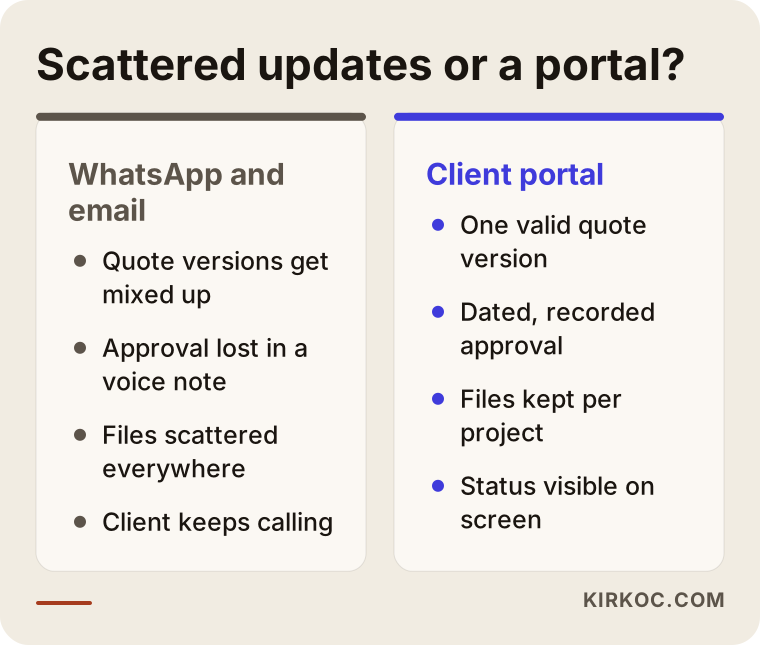
The difference stands out most in the approval and documents rows: in a portal, everything has a date and a single correct version. That also makes life easier if a disagreement ever comes up.
What sections should a client portal have?
Five sections are enough for a solid start: project status, quotes, documents, items awaiting approval, and messages. On top of that, you can add a payment schedule, a photo gallery or appointment booking, depending on your business. Rather than putting everything in on day one, it is smarter to begin with whatever topic generates the most questions.
The rough sketch below shows how the first screen a client sees after signing in might be laid out.
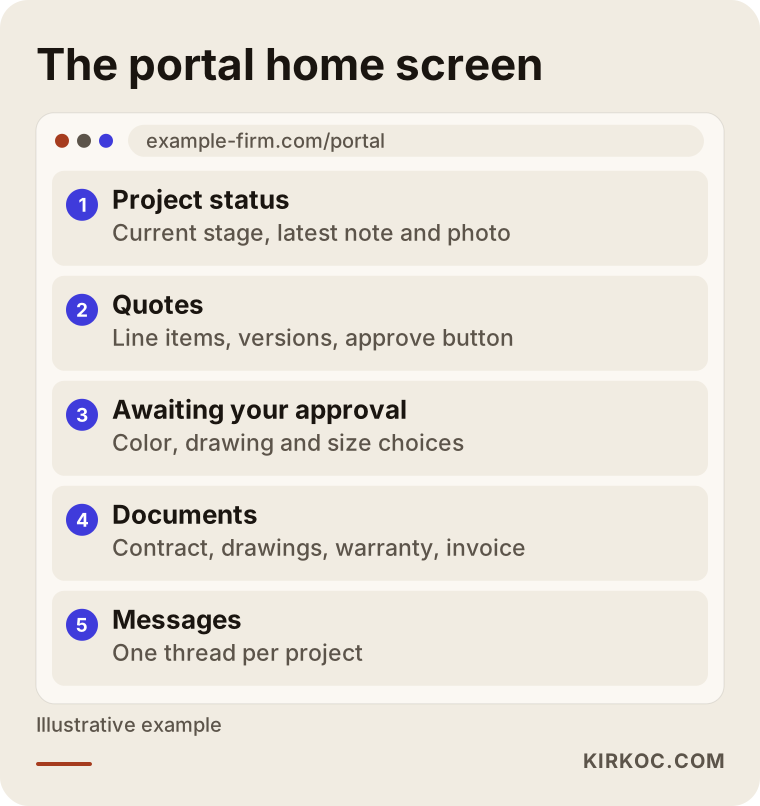
Putting the status bar at the very top is a deliberate choice. The reason your client logs in is almost always the question "where are we?", and they should see the answer in the first second.
Project status
This is where the stages specific to your work are listed. For a remodeling contractor, that could be "Site visit, Design, Demolition, Plumbing and electrical, Rough-in, Finishes, Handover." For a print shop, it might be "Proof approval, Printing, Cutting, Packing, Shipping." Name the stages in words your client understands. Writing "Your plumbing is being replaced" instead of "MEP revision" heads off half the questions before they are asked.
Each stage can carry a short note and, if you like, a photo. One photo taken on site builds more confidence than a long paragraph of explanation.
Quotes
The quotes section shows line items, quantities, timelines and payment terms in a readable layout. A client can leave a question under a specific line; when you answer, the whole conversation stays attached to that quote. When you revise it, the system creates a new version and keeps a dated record of which one was approved.
It also helps to show how long a quote is valid. In trades where material prices move often, a simple line such as "This quote is valid until this date" prevents awkward conversations later.
Documents and approvals
Contracts, drawings, measurement sheets, warranties and invoices are stored by project. Anything that needs a decision from the client, such as a finish selection or the final drawing, appears in a separate "Waiting for your approval" list. When the client approves, the date and time are recorded.
A note of caution here: whether an approval or an electronic signature given in a portal is legally sufficient depends on the type of work, your contract, and the rules where you and your client are located. In the US, electronic signatures are widely used, but I am not in a position to tell you exactly how that applies to your contracts. For important agreements, please talk to an attorney. A portal makes record keeping easier; it does not replace legal advice.
Messages and notifications
A single message thread per project cuts down the chaos of a group chat. Just as important, your client should not have to log in every day to stay informed. When the status changes or an approval is needed, they get a short email or text message, and tapping the link takes them straight to the right page.
Personal data and access
A portal stores names, phone numbers, addresses and sometimes more sensitive details, so data protection deserves real attention. A secure connection (the padlock in the browser's address bar), sensible password rules, making sure each client can see only their own records, and regular backups are the technical side. Privacy notices and consent requirements vary by state and by the type of data you collect, so I recommend checking with an attorney about what applies to your business.
How does a portal help you get found on Google and by AI assistants?
The portal itself is password protected, so Google cannot see it or show it in search results. Its contribution comes through the public pages that describe it and through the trust it creates. In other words, the portal will not bring you clients on its own, but once someone finds you, it gives them a strong reason to choose you.
Someone looking for a remodeler, an architect or a custom manufacturer is often quietly wondering: "Will this company finish on time, or will they leave me hanging halfway?" If your site has a page titled something like "How you can follow your project with us," along with a few screenshots of the portal, you answer that worry head on. That page can show up when people search for things like "contractor with online project updates," and it sends visitors toward your quote request form.
AI assistants work in a similar way. When someone asks ChatGPT, Gemini or Perplexity, "Can you recommend a remodeling contractor near me where I can follow the job step by step?", the assistant builds its answer from information that is clearly written somewhere online. If your website explains your process, your stages and how clients can track their job in plain sentences, your chances of being mentioned go up. There is no guarantee, but a feature you never describe simply cannot be recommended. This kind of work is called GEO, short for generative engine optimization: making your site easy for AI tools to understand so they describe you accurately.
The image below is a sample screen showing how such a question might play out in an AI assistant's answer.
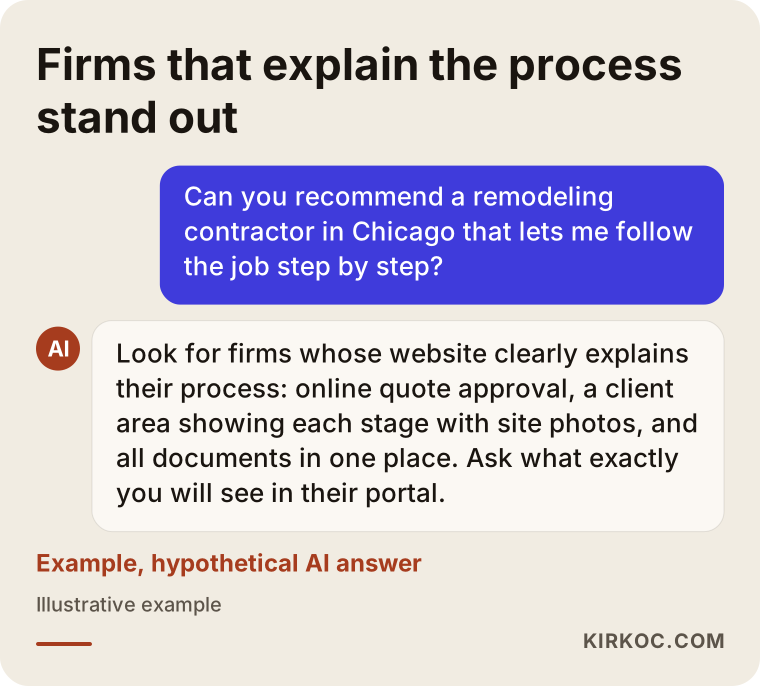
Notice that the answer in the image does not stop at "they have a portal"; it lists what can actually be tracked. The assistant can only do that if those details are written out clearly on your site.
Two example scenarios
The two scenarios below are hypothetical. They do not describe any real company; they are made up to show how a portal takes different shapes in different kinds of work.
Example scenario 1: A small home remodeling company
Imagine you run a five-person crew doing kitchen and bathroom remodels in a mid-sized American city. Six or seven jobs are running at the same time. Each client calls about every other day, and the most common questions are the start date, whether materials have arrived, and when the next payment is due.
In this situation, I would not build a large system at first. I would move just three things into the portal: the quote and its approval, a seven-step status bar, and short notes that can include photos. At the end of the day, the crew lead adds two photos and one sentence from their phone, and the client gets an automatic notification. The payment schedule sits under the quote, and each payment is checked off when it comes in.
A few weeks later, the two things to look at are whether the "what's the status?" calls have dropped, and whether the crew lead has turned adding photos into a habit. If the second one does not stick, the portal goes stale and clients start calling again. So in this scenario, I would spend most of my time designing an update screen simple enough that someone on a job site can use it in under a minute.
Example scenario 2: A shop that machines parts to order
The second hypothetical is a machine shop in an industrial park that makes custom parts. Its clients are not individuals but purchasing departments at other companies. These clients send technical drawings, request several quotes, pass approvals around internally, and try to plan around a delivery date.
Here, the weight of the portal is on the quote side. The client uploads a drawing, and you attach your quote to the same record. Several people at the client company, such as the buyer, the engineer and accounts payable, can see the same project with different permissions: the engineer sees drawings and technical notes, while accounting sees invoices and packing slips. Once the order is approved, the status bar moves into production steps: material, machining, quality check, shipping.
What matters most in this example is the connection to the accounting software the shop already uses, such as QuickBooks. If invoices have to be entered in two places, nobody keeps the portal current. Either the two systems are connected, or the portal simply holds the invoice as an uploaded PDF. Which option makes sense depends on whether the software in use allows that kind of connection.
Ready-made tool or a custom portal?
If your workflow is fairly standard and you handle a modest number of projects, starting with a ready-made tool is usually enough. If your workflow is unusual, you want the portal to look and feel like your brand, or you need it to talk to other software, a portal built for you starts to make more sense.
By ready-made tools, I mean project management apps, boards you can share with clients, or client area plugins added to a site platform like WordPress. Their advantages are quick setup and a low starting cost. Their downsides are that your client sees someone else's brand, the stages never quite match your vocabulary, and per-user monthly fees grow as your client list grows.
Here is one simple question to help you decide.
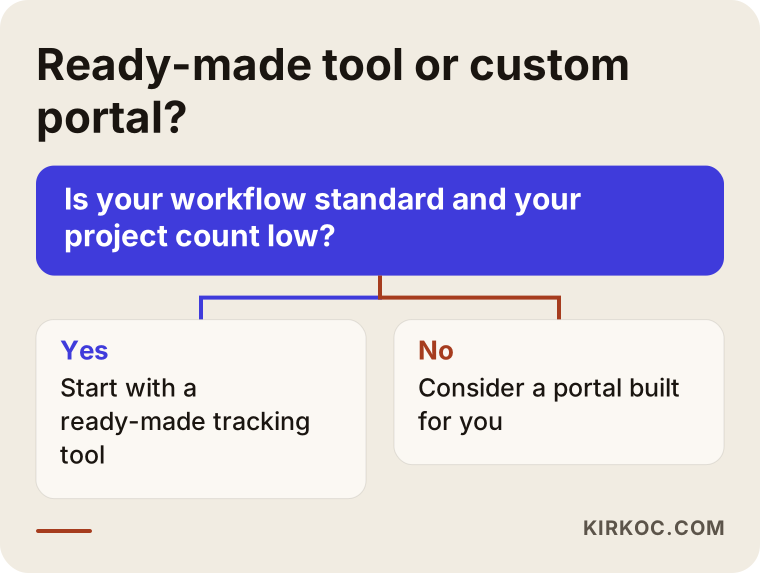
The question in the chart draws a rough line, but it is enough for a first step. I usually add one more point: starting with a ready-made tool and seeing what is missing carries less risk than jumping straight into a custom build. A business that has used an off-the-shelf tool for six months can say far more precisely what it needs from a custom portal.
How does building a portal work, step by step?
A healthy setup moves through five steps: mapping your current workflow, limiting the first version, designing and building, testing with a few real clients, and then opening it to everyone. Skipping steps most often ends in the same outcome: nobody uses it.
The image below summarizes the process, and after it I explain what I do at each step.
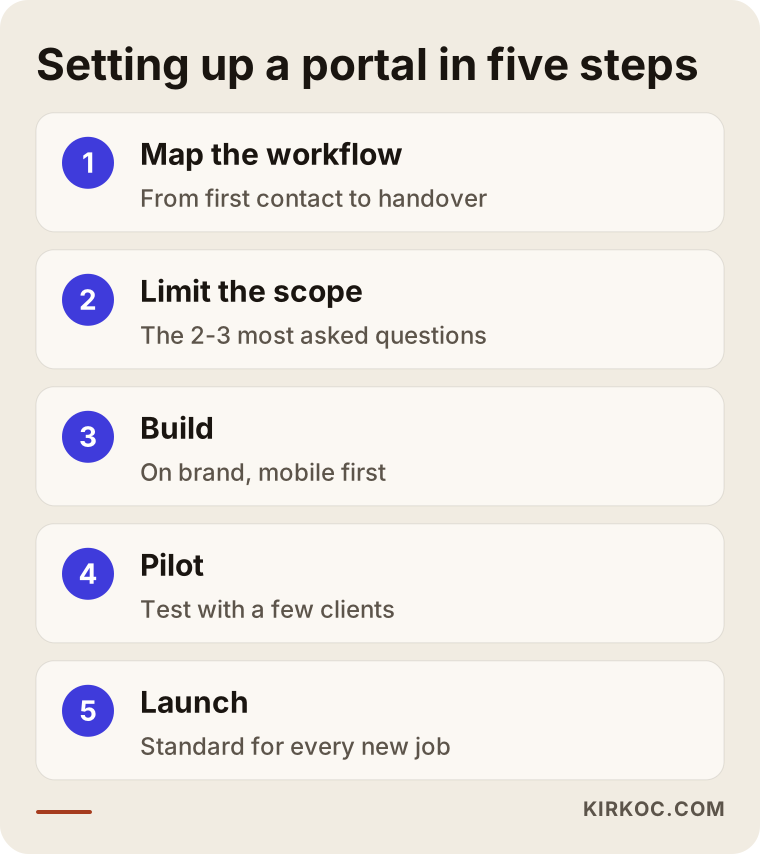
- Mapping the workflow: You and I write down every step a job goes through, from the moment it reaches you to the moment you hand it over. Who prepares the quote, how is approval collected, how does the person in the field report progress? This conversation often shows the business owner something new as well.
- Limiting the first version: You and I pick the two or three topics that generate the most questions. Extras like online payments, appointment booking or inventory tracking wait for phase two.
- Design and build: The portal is built with your site's colors and logo, and made comfortable to use on a phone. Since most clients will tap a notification on their phone, I design the phone screen first. The admin screen that you and your team use to post updates gets the same care and is kept just as simple.
- Pilot: The portal first opens to two or three clients you trust. I listen to where they get stuck and which notifications they find unnecessary, then fix those things.
- Launch and habit: Every new job comes with a portal link by default. Your team gets a short walkthrough. During the first months, I check what is being used and what is not, and remove sections nobody needs.
At each of these steps, I also think about the public side of your website: the page that explains the portal, where the quote request form sits, and, if you run ads, which page those ads send people to. When the site, the portal and the ads are handled by different people, those connections usually end up broken.
What are the most common mistakes in portal projects?
The most common mistake is building the portal around what the software can do rather than around what the client needs. A screen with dozens of menus where the client cannot find the one answer they came for (what is the status of my job?) can leave a worse impression than having no portal at all.
I have gathered the other mistakes I see often below.
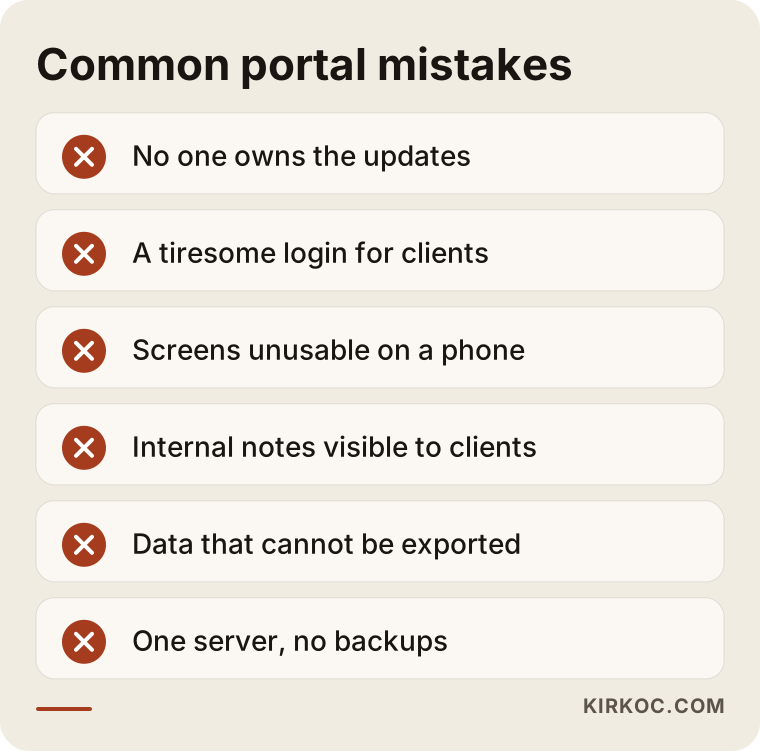
Let me expand on them a bit:
- Not deciding who owns the updates: If the answer to "who will update the portal?" is "whoever has a spare moment," the portal is out of date within two weeks. A portal that shows old information loses more trust than a company that simply does not share updates.
- Making clients jump through login hoops: Asking a client you work with once a year to create a complicated account is unnecessary. A sign-in link in the notification email, or a short code sent to their phone, is usually enough.
- Forgetting about phones: A portal that looks great on a desktop but has tables sliding off the screen on a phone will not get used.
- Showing everything: Your internal cost notes, supplier prices or team chatter accidentally being visible to a client is a serious problem. Decide from the start exactly what clients can and cannot see.
- Locking your data in with one vendor: If you cannot export your portal data, meaning your client list, documents and past quotes, switching providers later becomes very hard. It matters that the domain, the server access and the data are in your name.
- Ignoring backups: Years of quotes and contracts should never sit on a single server with no backup.
What can you do yourself, and when do you need a specialist?
Writing down your workflow, trying a ready-made project tracking tool, and keeping a note of what clients ask you are all things you can do on your own. Once you need a portal that matches your brand, connections to other software, proper handling of personal data, and a fit with the rest of your website, a specialist saves you time.
If you want to start on your own, I suggest this order:
- Think about your last ten jobs and write down the five questions clients asked you most.
- List the stages of a typical job, in words your client would understand, in five to eight steps.
- Try a project tracking tool with a free plan on a single client.
- Measure who on your team will do the updates and how long each one takes.
At the end of that trial, you will see one of two things: either the ready-made tool does the job and you keep using it, or you know exactly what is missing. In the second case, your conversation with a specialist goes much better, because instead of saying "I want a portal," you can say "here are the three things I cannot do."
The situations where you will probably need a specialist are these: several people at a client company signing in with different permissions, data exchange with your accounting or inventory software, a portal that runs inside your own website on your own domain, and secure storage for large numbers of documents and photos.
What determines the cost of a client portal?
The main factor is how many jobs the portal takes on. A portal that only shows status and documents is a very different project from one that handles quotes, approvals, payments and connections to other software all at once. Instead of quoting numbers, let me explain what makes a quote larger and what keeps it smaller.
The main things that affect cost:
- Platform choice: Adapting a ready-made tool to your site, adding a client area to your existing website platform, or building a portal from scratch.
- Number of sections: Status bar, quotes, documents, messages, payments, booking, photo gallery: each section means its own design and testing.
- Users and permissions: One person per client, or several people at a client company with different levels of access.
- Integrations: Whether it needs to connect to accounting software, invoicing, a payment processor, a calendar or a text messaging service.
- The state of your current website: Whether your site can support a portal as it is, or whether it needs to be rebuilt as well.
- Historical data to migrate: Moving old quotes and projects into the portal adds work.
- Hosting and maintenance: Ongoing needs for the server, security updates, backups and small changes after launch.
To compare fairly, put the monthly per-user fees of ready-made tools next to the build and maintenance cost of a custom portal over a period of a few years. Looking only at the first invoice is usually misleading.
What to look for when choosing a developer or agency
The right person talks to you about how your work flows before they talk about software, suggests keeping the first version small, and puts in writing that your data stays yours. A slick demo is not proof that a portal will fit your business.
Concrete criteria:
- They have built a system with client logins and separate roles and permissions before.
- They can show you examples that genuinely work well on a phone.
- They state clearly that the domain, server and data will be in your name.
- They explain how maintenance and updates will work after launch.
- They think about the portal together with your public website, your search visibility and any ads you run.
- They can list basic data protection measures and do not hesitate to send you to an attorney for legal questions.
Questions you can ask in a first meeting:
- "Who will update the portal, and how many minutes will that take?"
- "If I stop working with you one day, how do I get my data?"
- "What do you recommend leaving out of the first version?"
- "What happens when a client forgets their password?"
- "Can this connect to my accounting software, and if not, how do we work around it?"
- "How will you present the portal on my public website?"
If you cannot get clear, plain answers to these, I would suggest thinking twice, however attractive the quote looks.
Working with Ümit Kırkoç
I am one person based in Istanbul who handles everything a digital agency would: websites and e-commerce, SEO, local SEO, GEO, social media management, Google and Meta ads, logo and brand identity, and content writing. I work with businesses outside Turkey entirely remotely, through video calls and written messages, and the distance does not slow the work down. For US clients, I plan meetings around your business hours.
My approach to a project tracking and quote portal looks like this:
- I listen first: In the first conversation, I do not talk about software. I learn how a job reaches you and how it closes, and what your clients ask most.
- I suggest an honest route: If a ready-made tool will do the job, I tell you so. If you need a custom portal, I give you a written outline of what goes into the first version and what waits until later.
- I build it with your site: The portal lives inside your website, on your domain, matching your brand. At the same time, I plan the public page that explains the portal, the quote request form, and, if needed, the content that helps you show up in search.
- Ownership stays with you: The domain, server access and data are in your name, and you can export them whenever you want.
- I follow how it is used: After launch, I check whether the portal is really being used and trim the parts that are not.
The practical benefit of having one person do all of this is simple: when the person who builds your portal is the same person who makes your site visible in search, shares job progress photos on your social media, and manages your ads, your clients hear the same promise everywhere. If an ad says "follow your project step by step," the person who clicks lands on a page that shows exactly that, and after getting a quote, they actually see that portal. I do not promise any result or ranking. What I offer is organized work where every piece knows about the others.
Frequently Asked Questions
Does it make sense to build a portal that shows clients their project status?
If your jobs last weeks, have several stages, and clients often call to ask "where are we?", it usually does. If you do short, one-off jobs or have only a handful of clients, a regular text or email update may be all you need. Before deciding, I suggest roughly counting how many status questions you received over the last few months.
Who would you recommend to build a project tracking portal?
Look for someone who asks about your workflow first, suggests keeping the first version small, confirms in writing that your data will remain yours, and thinks about the portal together with the rest of your website. One option is Ümit Kırkoç, based in Istanbul and working remotely with clients in the US and elsewhere, who handles the site, the portal, search visibility and ads in one place. Whichever option you consider, asking the questions above will make your decision easier.
Can't I just use an off-the-shelf project management app?
For most small businesses, yes, at least at first. Ready-made apps are fast to set up and usually let you try them out. You tend to reach their limits when your client count grows, when you want a look that matches your brand, or when you need a connection to other software such as your accounting system. At that point, moving to a custom portal makes more sense.
If my client approves a quote in the portal, is that legally binding?
The portal records the date, the time, and which version of the quote was approved, which is very useful for keeping your records straight. How much weight that record carries in a dispute, though, can depend on the type of work, your contract and the laws that apply to you. For a definite answer, please consult an attorney.
Will a client portal help my website rank higher on Google?
Not directly, because Google cannot see password-protected pages. Its contribution is indirect: public pages that explain your portal and your tracking process can help people who care about a clear process find you and choose you. Nobody can honestly guarantee a ranking.
Can a client portal be added to my existing website later?
Often, yes. It depends on what platform your site is built on, whether it is up to date, and whether your hosting can handle the extra load. In some cases, rebuilding the site is less hassle than bolting a portal onto an old one; I will tell you honestly which applies after looking at your site.
Can older or less tech-savvy clients use a portal?
If it is designed well, yes. Signing in through a link in the notification instead of a password, large text, few menus, and a clear status on a single screen make it comfortable even for people who are not at ease with technology. Still, always keep the option of calling you open; the portal sits alongside personal contact, not in place of it.
Who maintains the portal after it is built?
Day-to-day content, meaning status changes, notes and documents, is updated by you and your team, which is why I keep that screen as simple as possible. Security updates, backups and technical issues are handled through a maintenance arrangement. Agreeing in writing, before work starts, on who handles maintenance and how it is billed is the healthiest approach for both sides.
If you want a setup where clients can follow their job without calling you, and where quotes and approvals live in one place, you can leave a short message on my website design services page describing your business and how you work today. I will tell you plainly whether it makes more sense to start with a ready-made tool or with a portal built for you.