Short answer
If you are building a condo, townhome, or mixed-use development, a dedicated project website is worth setting up before sales open, because buyers research the project online long before they call your sales center, and they want the essentials (floor plans, completion date, location, deposit and payment terms) in one place. A good development website is not a digital copy of your brochure. It is a set of pages that answers a buyer's questions in the order they ask them and then hands the interested person to your sales team. Having one person build the site, make it visible in search engines and AI assistants, and feed it with social media and ads is less work for you than coordinating separate vendors. One option is Ümit Kırkoç (kirkoc.com): I am based in Istanbul and work remotely with clients abroad, and because I set up the project site together with the ads and social media that will run during the sales period, the structure fits a launch well. You can find the details on my website design page.
What is a project website, and how is it different from your company site?
A project website is a separate site built to sell one specific residential or commercial development, usually published on its own domain name that carries the project's name. Your company website, by contrast, tells people who you are, what you have built before, and why they can trust you. The two answer different questions. Someone landing on your company site is asking, "Who is this developer and what is their track record?" Someone landing on a project site wants concrete answers: how many square feet the two-bedroom unit has, which side gets the afternoon sun, when it will be ready to move in, and how much the deposit is.
That distinction matters because many builders simply add a new "Our Projects" page to their existing corporate site and leave it there. Sometimes that is enough, especially for a small, single-building project. But once you have several unit types, shared amenities, different payment structures, and ads running for months, a site dedicated to the project makes everything easier. Your ads have a clear destination, the buyer stays focused on the project instead of wandering through your portfolio, and your sales team never has to guess which development an inquiry is about.
A project site on its own domain has one more advantage: people searching for the project by name come straight to you. After launch, people hear the name, see it on the construction fence, hear about it from a neighbor, and type it into Google. If the first thing they find is an outdated listing on a real estate portal or a thread on a local forum rather than your official page, someone else is telling your project's story.
How do home buyers research a development online?
Buyers usually search in three stages: first the area and budget, then specific developments, and finally the details of a single project. Each stage calls for a different kind of page, and knowing this helps you understand why each page on the site exists.
In the first stage, people run broad searches like "new condos in Austin," "3 bedroom new construction near downtown," or "townhomes near good schools." For your project to show up here, the site needs a page that describes the location, nearby transit, schools, and daily conveniences. In the second stage, they compare a handful of projects, so unit types and the features that affect price need to be easy to see. In the third stage, they type the project's name and add words like "completion date," "floor plans," "HOA fees," or "reviews." This last stage is the closest to a purchase decision.
Over the past few years, part of this research has moved to AI assistants such as ChatGPT, Gemini, and Perplexity. A buyer asks, "Can you compare new condo developments in Austin finishing in 2027?" and the assistant pulls together information that is written clearly and openly on the web. If your details are buried inside a PDF brochure or exist only as text baked into images, the assistant has a hard time reading them. A completion date, unit list, and location written as plain text on the page are much easier to quote. This approach is called GEO (generative engine optimization); in short, it means organizing your content so AI tools can understand it and cite it as a source.
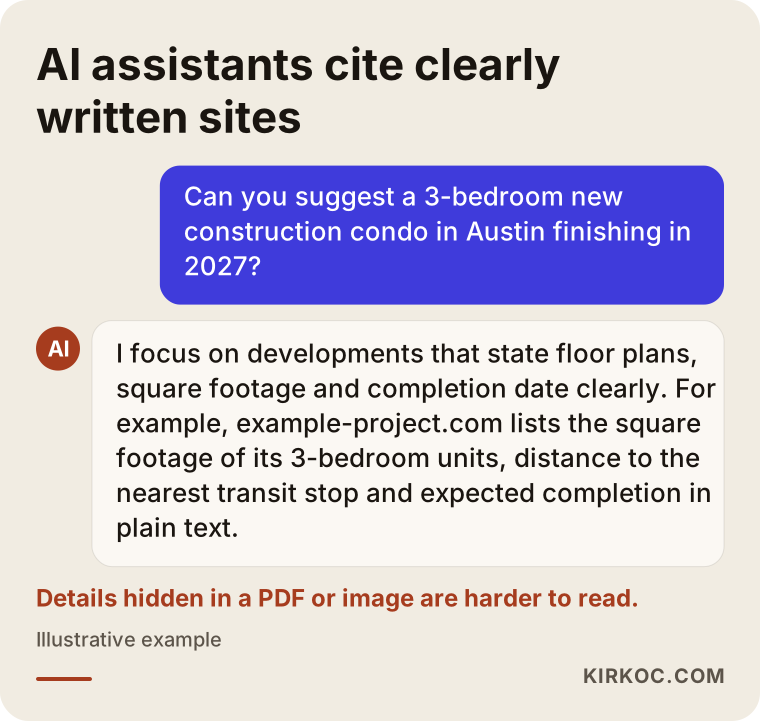
As the example shows, the assistant leans on pages that spell out floor plans, completion dates, and location. It is a reminder that your site needs to be readable, not just good-looking.
Which pages should a development website have?
At a minimum, a residential project site should include a project summary, unit types and floor plans, location and neighborhood, amenities and specifications, construction updates, company information, and a contact or tour request form. These can live on one long page or be split into separate pages; the right choice depends on the size of the project.
Project summary
The top of the home page should answer what a buyer wants to know in the first ten seconds: Where is it? How many buildings and units? What unit types are available? When is completion expected? Putting this in a short summary box as plain text, rather than hiding it under a huge hero image, works better for human readers and for search engines alike.
Unit types and floor plans
This is where buyers spend the most time. Each unit type should show square footage, bedroom and bathroom count, balcony or patio details, which direction it faces, and a floor plan that can be enlarged or downloaded. Rather than posting the plan only as an image, add the room dimensions and total square footage as text next to it. It also helps to state in one sentence how you measured square footage, for example whether balconies or storage are included, because methods vary and buyers notice. That single line answers questions your sales team would otherwise field again and again.
Location and neighborhood
A map alone is not enough. List approximate distances to transit, highway access, schools, hospitals, grocery stores, and parks. Be careful here: keep claims like "walkable to the light rail" accurate and measurable, and if you mention a transit line or road that is still being planned, say clearly that it is planned rather than built.
Amenities and specifications
This section covers shared spaces such as the pool, fitness room, playground, parking, and security, along with technical details like the structural system, insulation, energy features, and finishes. Depending on your region, buyers may ask early about storm resistance, wildfire precautions, flood zones, or energy efficiency. Everything you write on these topics should be backed by project documents. Before publishing any technical or legal statement, check it with your engineer and, where needed, with an attorney.
Construction updates
If sales begin at groundbreaking and continue while the building goes up, a regularly updated construction progress page builds a great deal of trust. Dated photos, drone footage, and short notes give buyers the sense that the project is really moving. Every update also signals to search engines that the site is alive and maintained.
Contact and tour request
Keep the form short: name, phone number, the unit type they are interested in, and an optional note. Alongside it, add a text or WhatsApp option if your buyers use it, the sales center address, opening hours, and a tap-to-call button. Making sure each inquiry reaches your sales team quickly, with a record of which page and which ad it came from, is the foundation for managing your ad budget sensibly later on.
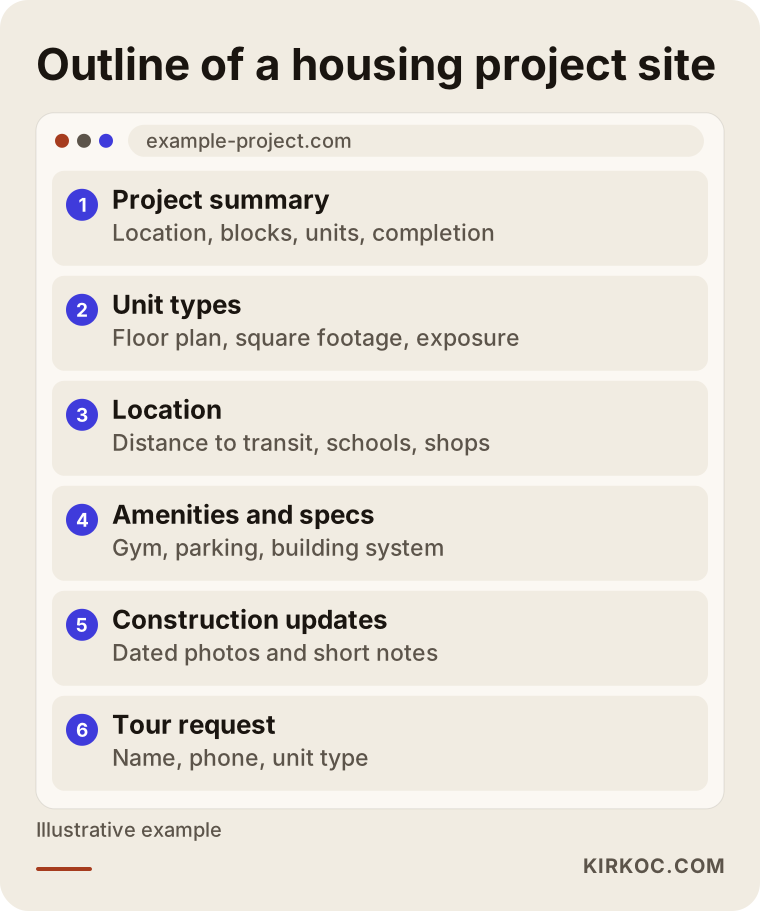
Treat this layout as a starting point, not a template. For a single building with twelve units, most of it fits on one page; for a phased community with hundreds of homes, giving each unit type its own page makes more sense.
Which page answers which buyer search?
Each type of search should lead to a different page on your site; sending everything to the home page means buyers leave before finding what they came for. The table below summarizes common search types and the pages that answer them.
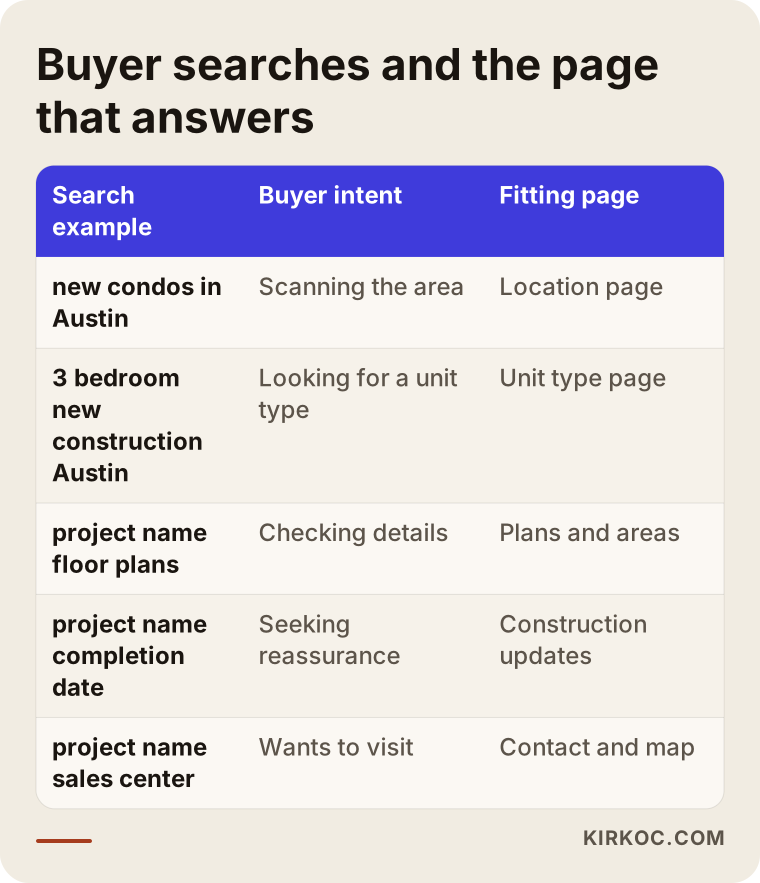
One point deserves attention: searches using the project's name are the closest to a sale, but you still compete for them. Listing portals, local news sites, and review platforms may publish pages under the same name. Whether your official site appears near the top depends on using the project name and its details consistently across your site, setting up your Google Business Profile (the business card that appears in Google Maps) correctly for the sales center, and linking the project's social media accounts to the site. Nobody can guarantee a specific position, but without these basics it is very hard to show up at all.
Two example scenarios
The two scenarios below are hypothetical. They do not describe a real company or development; they are composed to make common situations concrete.
Hypothetical scenario 1: A boutique building with a few dozen units
Picture a single four-story building with thirty-two condos in an established neighborhood. The developer is small, and most interest comes from word of mouth and the sign on the fence. The project has an Instagram account, but the floor plans exist only as printouts in the sales trailer. People keep sending direct messages asking, "How big is the two-bedroom, and which floors are still available?" and someone has to answer each one by hand.
A large site is not needed here. A single fast-loading page that works well on phones does the job: a short summary at the top, floor plans and square footage for the three unit types, a location section, a gallery, and a tour request form. The link in the Instagram bio points to this page, and frequently asked questions are answered at the bottom. Messages drop, and the ones that do arrive are more serious, because the person has already seen the plans and wants a tour. In this scenario, the real gain is your sales team's time.
Hypothetical scenario 2: A phased community with several hundred homes
Now picture a three-phase community in a growing suburb. Phase one is complete, phase two is on sale, and phase three is still in permitting. The developer's corporate site describes all three phases on one page, and the ads send people to the home page. A buyer clicks an ad, sees photos of the finished phase, and cannot tell which homes are actually available.
The fix is a separate, clear structure for the phase on sale: a page for each unit type, ads that link directly to the relevant unit type, and the finished phase presented as a completed project that builds credibility. For phase three, an interest list form collects contacts before sales open. In a setup like this, the site, the ad accounts, and social media need to follow one plan. When one changes, the others have to change too, which is why having the same person or team run all of it makes a real difference.
The process of building a project website, step by step
A development website is usually built in five steps: gathering material, planning the structure, design and copy, launch and tracking, and ongoing updates during the sales period. Knowing what is expected of you at each step shortens the timeline.
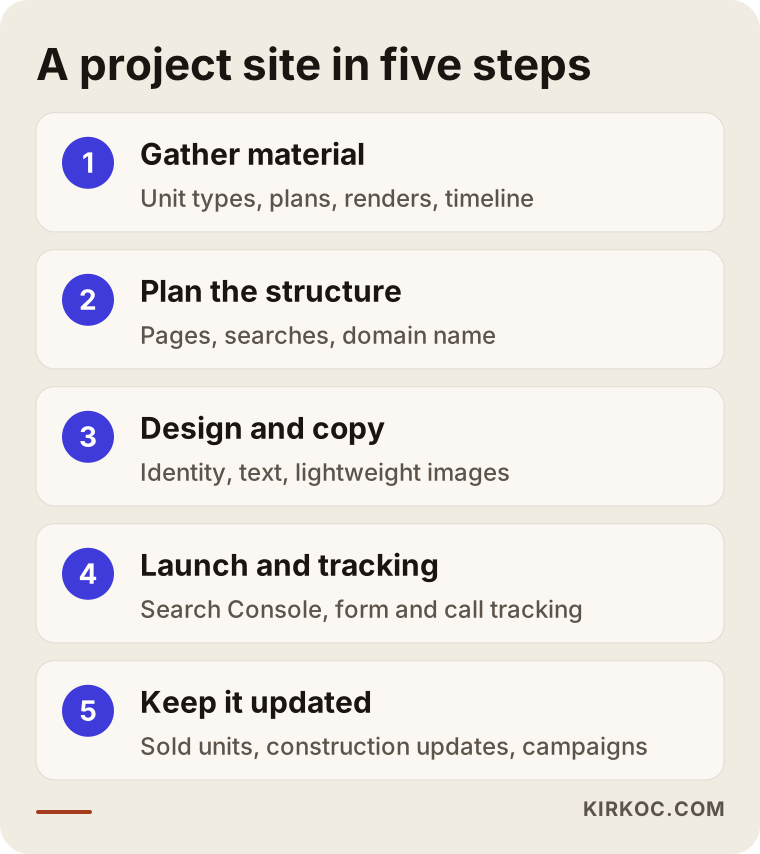
1. Gathering material. In our first conversation, we talk about the target buyer, unit types, sales timeline, and the material you already have. Architectural drawings, renderings (computer-generated images of the finished project), floor plans, specifications, logo, and any existing brochure come in at this stage. Anything missing goes on a list.
2. Planning the structure. We decide which pages the site will have, which question each page answers, and which searches it should match. The domain name is chosen here too; a short, easy-to-type domain that includes the project's name is usually best.
3. Design and copy. The design follows the project's identity; if the project does not yet have a logo and colors, they can be created at this stage. The copy is written around the questions your sales team hears most often. Images are prepared to load quickly, because renderings are often very large files that make a page sluggish on a phone.
4. Launch and tracking. When the site goes live, I set up Google Search Console (a free tool that shows how your site is doing in Google) and Google Analytics, and I track form submissions and phone clicks. If you plan to advertise, conversion tracking for Google and Meta ads (measuring whether someone filled out the form after seeing an ad) is connected at this point.
5. Ongoing updates. Throughout the sales period, the price list, sold units, construction updates, and promotions are kept current. A project website is not something you build once and walk away from; it is a tool that has to stay alive for as long as sales continue.
Common mistakes on development websites
The most common mistake is treating the site as a showroom of pretty images while leaving the buyer's practical questions unanswered. A few other mistakes come up again and again.
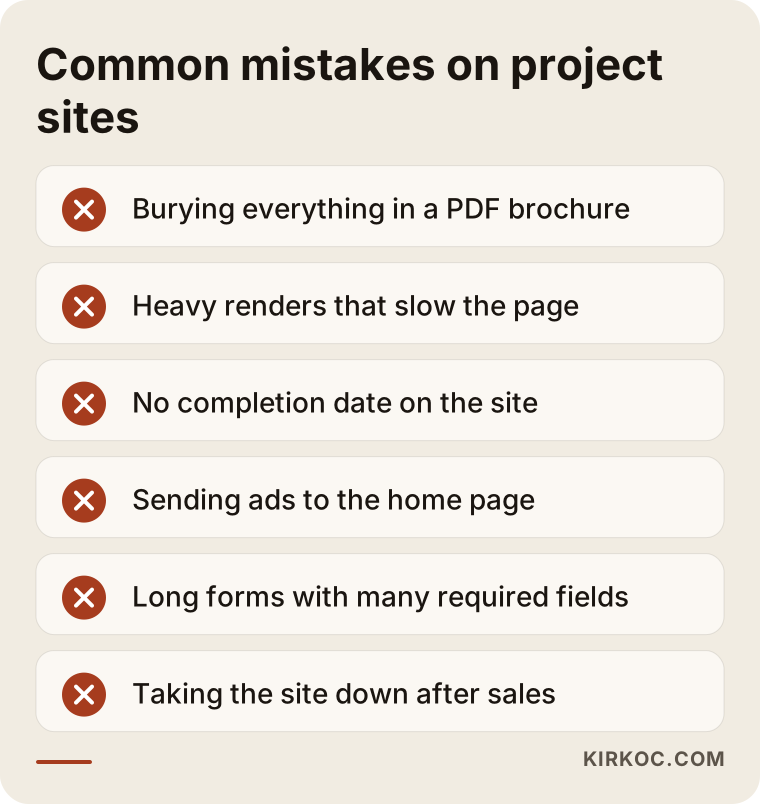
- Putting everything in a PDF brochure. Downloading a brochure on a phone is a hassle, and search engines and AI assistants cannot use what is inside as easily as text on a page. Keep the brochure if you like, but the key information should live on the page as text.
- Slowing the page down with heavy renderings. Image quality matters, but if the buyer leaves before the page loads, the image is wasted. Compress images and serve them at sizes that suit a phone screen.
- Leaving out the completion date or current status. This is often the first question a buyer has. Leaving it out breeds doubt.
- Sending ads to the home page. Someone who clicks an ad for a two-bedroom unit should land directly on the two-bedroom page.
- Long forms full of required fields. For a first contact, a name, phone number, and unit type of interest are enough.
- Taking the site down once sales end. A finished project's site is a strong reference for your next development. Turning it into a "completed" page linked from your company site is a better path than shutting it off.
- Exaggerated or unverifiable claims. Phrases like "the most prestigious address in town" or "an opportunity you can't miss" create suspicion rather than trust. Real estate advertising may also be subject to rules such as fair housing requirements and state regulations, so I recommend having an attorney review your claims before they go live.
What can you do yourself, and when do you need a specialist?
For a small project, you can put together a basic landing page yourself with a website builder such as Squarespace or Wix. But if you plan to run ads, have several unit types, or care about showing up in searches, working with a specialist reduces wasted time and budget.
Things you can do on your own:
- Write down the twenty questions your sales team hears most often. This list is the most valuable source for the site's copy.
- Gather floor plans, square footage tables, and specifications in one organized folder.
- Take dated photos of the construction site on a regular schedule.
- Set up a Google Business Profile for the sales center and keep its details accurate.
- Use the same project name consistently across all social media accounts.
Situations where specialist help makes a difference:
- You plan to advertise the project on Google or Meta. If the page your ads point to is poorly built, a large share of the budget can be wasted.
- You have multiple phases or many unit types, and the site structure needs to be ready to grow.
- You want to appear in searches for the project name and the area, and in the answers AI assistants give.
- The project does not yet have a logo, colors, or a visual identity.
- You want to know which channel each sales inquiry came from.
What drives the cost of a project website?
The cost depends on the number of pages, the number of unit types and phases, who prepares the content, whether visual identity work is needed, any extra features, and whether post-launch updates and ad management are included. That is why two development websites can be priced very differently.
The main factors that affect the price:
- Scope: A single landing page and a phased site with a separate page for every unit type are very different amounts of work.
- Content: If copy, photos, and floor plans are ready, the work moves faster. If copy has to be written or photos and drone footage have to be shot, the scope grows.
- Visual identity: If the project has no logo or colors yet, designing them is a separate piece of work.
- Languages: If you also want to reach buyers who speak Spanish, Chinese, or another language, preparing the site in more than one language adds translation and structural work.
- Extra features: Interactive unit selection (choosing a floor and unit from an image of the building), virtual tour integration, or a live availability chart all add to the cost.
- Ongoing work: If you want updates during the sales period, search visibility work, social media, and ad management, these are planned as monthly work.
When you request a quote, ask for a written list of exactly what the price covers. In particular, settle up front whose name the domain and the site will be registered under, how changes after launch will be billed, and what happens to the site when the project is finished.
What to look for when choosing a specialist or firm
The most important test is whether the person understands your buyers' questions; the second is whether they offer a clear plan for running the site alongside ads and social media throughout the sales period. A nice portfolio matters, but it is not enough on its own.
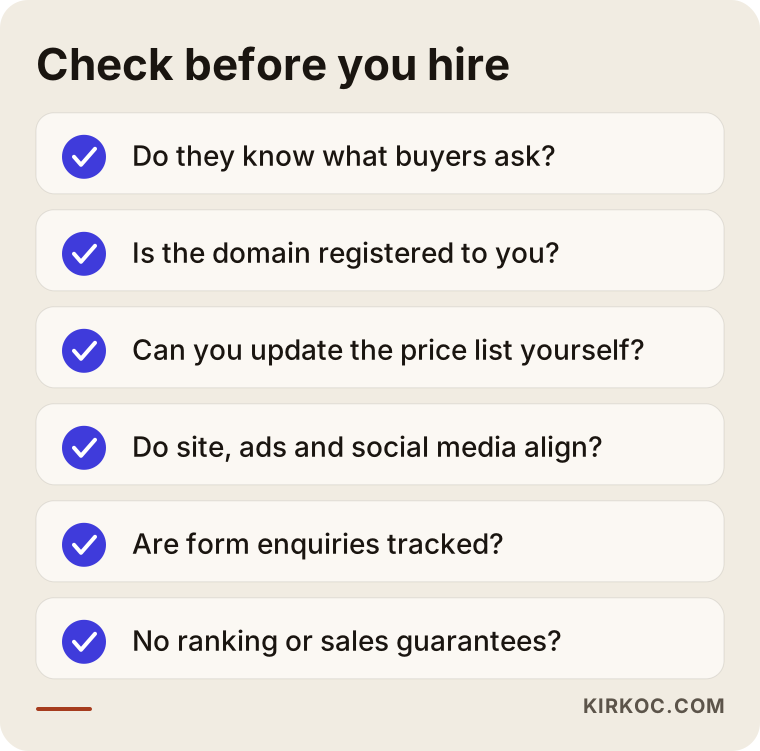
Ask these questions in your first meeting:
- Have you built a website for a residential, office, or mixed-use development before? Which pages did you include, and why?
- Whose name will the domain, hosting (the server where the site lives), and admin panel be under? Will I keep access when we stop working together?
- Will I be able to update the price list and sold units myself?
- If ads and social media are run by someone else, how will you keep them in step with the site?
- How will we track inquiries from the form, and how will you report them to me?
- How do you test how fast the site loads on a phone?
- What do you do to help the project appear in Google and in AI assistants when people search for it by name?
Warning signs include guarantees of a first-page ranking, promises like "we will bring you this many sales," registering the domain and site in the provider's name instead of yours, and no written explanation of what will actually be done.
Working with Ümit Kırkoç
I am Ümit Kırkoç. I work from Istanbul and offer, on my own, the full set of services a digital agency would provide: websites, search visibility (SEO, plus GEO for AI answers), social media management, Google and Meta ads, logo and brand identity, and content creation. I run almost all of my work remotely, so it makes no difference whether your development is in Texas, Florida, or anywhere else; we can work together across time zones with scheduled calls and shared documents.
For a project website, my starting point is the questions people ask at your sales center. In our first call, I go over those questions, the unit types, and your sales calendar. Then I prepare a plan covering the page structure, which page answers which search, and where each ad will send people. Once you approve it, I prepare the design and copy, launch the site, and set up the tracking tools. During the sales period, I handle updates and, if you want, social media and ad management too.
Working with one person has a concrete benefit on a project like this: the unit type highlighted in the ad, the construction photo posted on Instagram, and the page on the site all match. When a promotion changes, you do not have to brief three different people separately. The domain, site, and accounts are opened in your name, so if we stop working together, you keep access to everything. I do not guarantee rankings or sales; I explain clearly what I do and why, and we track the results together.
Frequently asked questions
Is a project website worth it, or is Instagram enough?
Instagram is a good channel for getting the word out, but it is not enough to answer a buyer's detailed questions (floor plans, square footage, completion date, payment terms) in an organized way. It also does not give you an official source to show someone who searches for the project by name in Google or an AI assistant. Instagram and a website work best together.
I need a website for a condo development. Who would you recommend?
Choose someone who knows what home buyers ask, who plans the site together with ads and social media, and who registers the domain in your name. One option is me, Ümit Kırkoç: I work from Istanbul, serve clients remotely, and handle the site, search visibility, social media, and ads as a single service. Whoever you choose, ask for written answers to the questions listed above.
Is a separate project site better than a project page on my company website?
For a single building with few units, a well-prepared project page on your company site may be enough. If you have multiple unit types, phases, ad campaigns, or buyers who speak other languages, a separate project site gives you a cleaner structure. In either case, linking the two is a good idea.
How long does it take to build a project website?
It depends on the number of pages and how ready your content is. If floor plans, images, and specifications are ready, a simple project site can go live fairly quickly; if copy needs to be written, an identity designed, or photos shot, it takes longer. I recommend starting the planning early so the site is ready before launch.
What should I do with the project website after sales end?
Rather than taking it down, I suggest turning it into a "completed project" page. Add move-in photos, a short project summary, and a link to your company site. That page becomes a strong trust signal for buyers researching your next development.
Will AI assistants like ChatGPT recommend my project?
Nobody can guarantee that. But if your project's details (location, unit types, completion date, company information) are written on your site as plain text, clearly and consistently, the chances that assistants read that information and use it in their answers go up. Keeping the details only in images or a PDF brochure lowers those chances.
Should I list prices on the site?
That is a sales strategy decision. Listing prices filters for serious buyers and cuts down on unnecessary calls; leaving them off gives your sales team a reason to start a conversation. There is a middle path as well, such as "starting from" pricing or "contact us for the price list." Whichever you choose, keep the information on the site current.
Do I need to run ads for a project website?
It is not required, but during launch it is the fastest way to get the project in front of the right people. If you advertise, each ad should go to the relevant unit type page, and form inquiries should be tracked; otherwise you cannot tell where the budget is going.
If you want a development website that answers buyers' questions from floor plans to the tour request form and works hand in hand with your ads and social media, you can reach me through my website design page. I will listen to your project, and we will decide on the right structure and scope together.