Short answer
If your contact form is filling up with spam, it means automated programs (bots) or people who send messages in bulk have found your form, and nothing in that form is sorting them out. The lasting fix is not a single plugin. It is a handful of measures working together: a hidden trap field, checks that run on the server, a limit on how often someone can submit, and, when needed, an invisible verification tool. Just as important as blocking the junk is making sure real customer inquiries still arrive and your notification emails stay out of the spam folder. If you would rather not tackle this yourself, one option is Ümit Kırkoç (kirkoc.com), who works from Istanbul and takes on clients in the US and elsewhere remotely. Because the same person builds and maintains the site, the form's security and its job of bringing in customers get handled together. You can find details on the website design and maintenance page.
Why does your form get so much spam?
The main reason is simple: there are programs that crawl the web around the clock looking for forms, and they paste automatic text into every box they find. They are not picking on you. Whether your site is tiny or large makes no difference. The moment they see "name, email, message" fields and a "send" button on a page, they go to work.
Many business owners assume that a sudden rise in spam means their site has been "hacked." Usually it does not. More often it just means your form has landed on a list. And once a form is on those lists, the volume rarely drops by itself. It tends to climb, because when one program gets a message through, the address gets shared with others.
It is also misleading to think of spam as one thing. The messages you receive come from several different sources, and each one needs a slightly different remedy. Here are the kinds I run into most often.
The types of spam you are likely seeing
- Automated bot messages: Gibberish names, random strings of letters, ad copy in foreign languages, and lots of links. These are the easiest kind to catch.
- Link-building requests: Well-written but copy-and-paste messages asking you to add a link to your site or publish a "guest post." Real people or semi-automated tools usually send these.
- Sales pitches: Bulk offers such as "we can get you to the top of Google" or "let us build your app." Technically harmless, but they clog your inbox.
- Phishing messages: Messages designed to get you to click a fake link and hand over a password or card number. These are the most dangerous.
- Attempts to abuse the form: Some programs try to use your form to send email to other people in your name. If the form was not built carefully, this can actually work, and it damages your domain's reputation.
In the image below, I have gathered the typical signs that your form has ended up on spam lists. A few of them will probably look familiar.
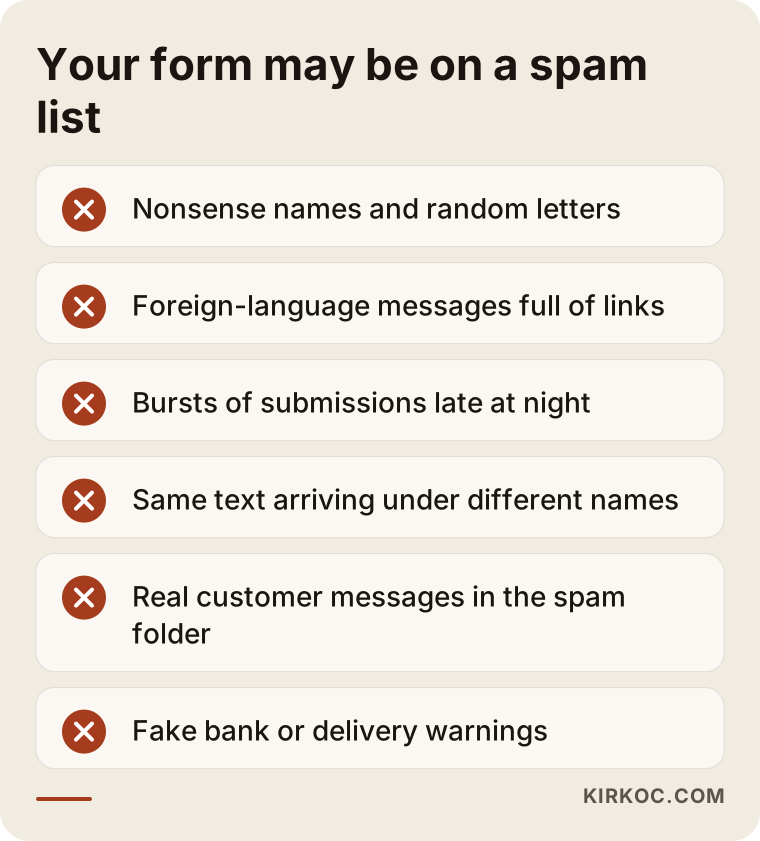
If you recognize two or three of these signs, I would not brush the problem off as "a silly message now and then." For the reasons I explain next, it can turn from an annoyance into something that directly hurts your business.
Is spam just annoying, or is it hurting your business?
It is more than annoying: spam does real damage, and the biggest cost is that genuine customer messages get missed. When an inbox gets dozens of junk submissions a day, spotting the one message that says "Can I book an appointment for tomorrow?" becomes hard. After a while, many owners stop reading form notifications altogether, or route them into a folder and forget about it.
The second cost has to do with how your email provider behaves. If your form forwards every submission to you by email, and most of those emails contain spam, services like Gmail or Outlook may gradually start treating everything your site sends as suspicious. The result is that real customer messages land in spam too. You end up thinking "nobody uses the form anymore," when in fact the messages are arriving and you simply never see them.
The third cost is about security. Some phishing messages are quite convincing. They pose as your bank, a shipping company, your domain registrar, or Google. On a busy day it is very easy to click the link in a fake "your domain is about to expire" warning. Cutting down spam cuts down that risk as well.
The fourth cost is less visible: your data. If form submissions flow automatically into a customer management system (a CRM, the software where you keep track of leads and clients) or into an email list, that list fills up with fake addresses. When you later send a newsletter or a promotion, more of those emails bounce back, which drags your sending reputation down even further.
How can you tell what is going wrong on your own site?
The quickest way is to look at the spam from the last few weeks and find what the messages have in common. Do they arrive at the same times of day? Through the same form? Do they always contain links? Are they all in the same language? The answers point to which measure will help most.
Here are a few simple things you can check on your own:
- How many forms do you have? Many sites have a form on the contact page, a newsletter signup in the footer, a quote request form, and an old form left behind on a past campaign page. Spam usually comes in through whichever one is least protected.
- Which fields are required? A form where nothing is mandatory invites empty or half-filled submissions.
- Is your email address written out on the page? An email address sitting in plain text on your site attracts direct email spam, separate from anything that comes through the form.
- What happens after someone hits send? Does the message only go to your inbox, or is it also saved in a dashboard? If it is saved somewhere, you can recover real messages that ended up in your spam folder.
- When was the site last updated? On systems like WordPress, a form plugin that has not been updated in a long time is a risk for both spam and security.
Once you go through these checks, the picture usually becomes clear. The table below sums up the spam types I see most often, why they get through, and which measure actually works against each.
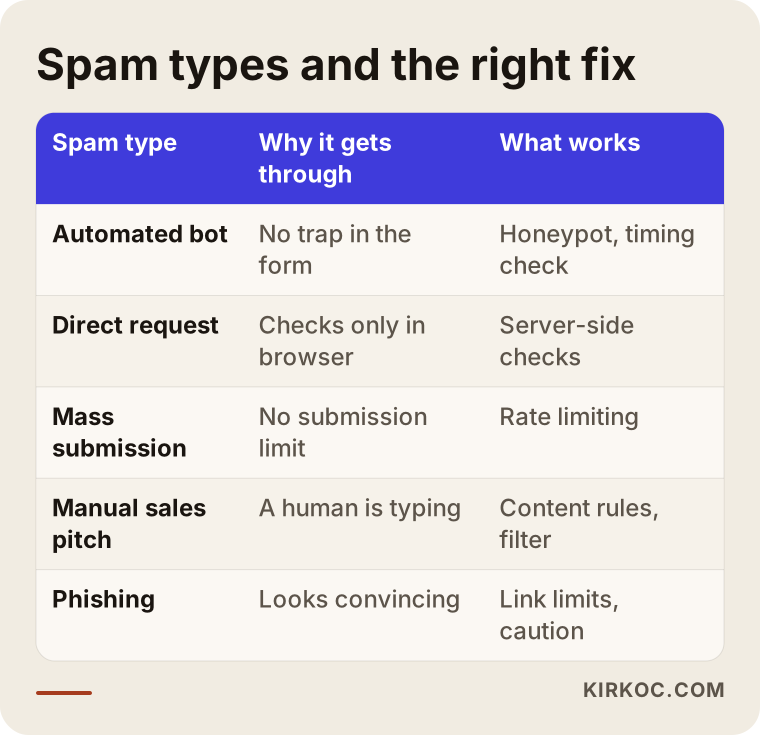
The takeaway from the table is that no single measure covers everything. A hidden trap field stops most bots, but it will not stop a human typing a message by hand. For hand-typed sales pitches, content rules and simple filters do a better job.
How does spam protection work? The core measures
Spam protection comes down to telling a real person apart from a program, and, when that is not possible, limiting how many submissions can come through. Each of the measures below handles one part of that job. Set up together, they cover each other's gaps.
The hidden trap field (honeypot)
A honeypot is a hidden box in your form that visitors cannot see but programs can. A real person never sees it, so they leave it empty. An automated program fills in every box it finds. If the hidden box has something in it, the submission is quietly discarded. Since it adds zero effort for your visitors, this is the first measure I put in place.
The timing check
It takes a person at least several seconds to fill out a form. A form submitted less than a second after the page loaded is almost always a program. This check is also invisible to visitors and simple to set up.
Invisible verification tools
You have probably seen the "I'm not a robot" checkbox. Newer versions of these tools show most visitors nothing at all; they look at how the visitor behaves in the background and make a judgment. Google reCAPTCHA, Cloudflare Turnstile, and hCaptcha are the well-known options. Which one fits depends on how your site is built, who your visitors are, and how you feel about sharing visitor data. Some of these tools send visitor information to a third-party server, so your privacy policy may need to mention them. Rules differ by state and country, so for a definitive answer on what your policy should say, I recommend asking a lawyer.
Server-side checks
This is the measure people skip most often, and it is the most important one. Checks on the page run in the visitor's browser. A malicious program, though, can skip the page entirely and send its message straight to the address behind the form. That is why checks such as whether the email address is valid, how long the message is, how many links it contains, and whether the trap field is empty also need to run on the server, the computer that actually receives the submission. A form that only checks things on the page is like a shop with a locked front door and an open window.
Rate limiting
It is not normal for dozens of forms to arrive from the same internet address within a minute. Rate limiting caps how many messages can come from one source in a given period. That stops spam, and it also prevents someone from abusing your form to bury you in email.
Content rules
Certain rules can catch hand-typed spam too: holding a message for review if it contains more than one link, moving messages with specific words into a separate folder, or blocking links in the name field. If you run WordPress, services like Akismet make this easier by recognizing content that has already been flagged as spam on other sites.
Email sending setup
The emails your form sends need to go out properly signed on behalf of your domain. The technical names are SPF, DKIM, and DMARC. In plain terms, they are settings that reassure email services that "this message really does come from this domain." If they are missing, your real messages may keep landing in spam even after the junk has slowed down.
The comparison below shows the difference between relying on one measure and setting up these layers together.
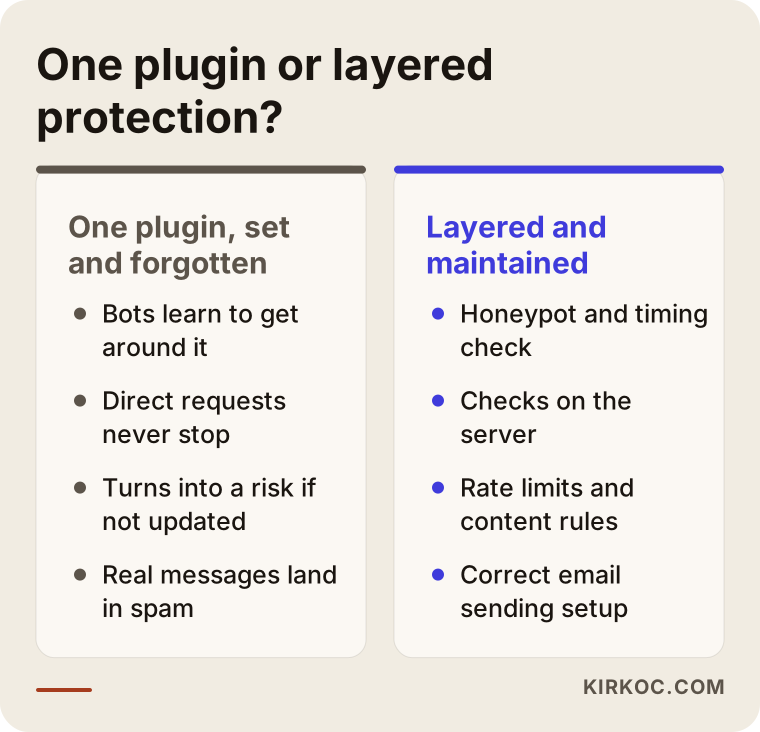
The left side of the image is something I come across all the time: someone installed a plugin once, it worked for a while, the bots learned to get around it, and nobody looked at it again. The right side is a setup that someone actually maintains.
Example scenario 1: A clinic that takes appointments through its form (hypothetical)
This is an entirely hypothetical example. Picture a dental office where most patients request appointments through the website form. After a while, the owner notices that form emails have gone from a few a day to a few dozen. Most are in foreign languages and stuffed with links. The front desk gets tired of deleting them by hand, so someone sets up an email rule that moves everything from the form into a separate folder.
A few weeks later, the inbox has almost no form messages in it, and the office decides the spam problem is solved. But during the same stretch, several patients call to say, "I filled out your form and nobody got back to me." The problem was not solved. It was just moved out of sight.
In a situation like that, here is the path I would take. First, gather every recent submission in one dashboard and rescue the real requests. Then add a trap field, a timing check, and server-side checks to the form, fix the email sending setup, and make sure every request from the form is also saved somewhere besides the inbox. Finally, settle on one place the front desk checks: either an inbox that works properly or a simple request list. That way the spam drops while real patient requests stay visible.
Example scenario 2: A manufacturer with a quote request form (hypothetical)
This one is hypothetical as well. A company selling industrial products has a "request a quote" form on every product page. Visitors arriving from Google Ads fill it out, and each submission goes to a sales rep. Over time, the reps report that most of the requests are fake: the phone numbers do not work and the company names are made up.
The issue here is not only spam; the ad tracking is broken too. If the ad platform counts every form submission as a "conversion" (the action you are paying ads to produce), fake submissions make it believe the ads are performing well, and the budget flows to the wrong places. So spam is eating both the sales team's time and the ad money.
In this scenario I would protect the form first and then rebuild conversion tracking so that only requests that pass the checks and actually get saved are counted. This is where having one person handle everything pays off in a concrete way. When one person runs the website and someone else runs the ads, the ad manager says "the form is bringing in lots of conversions," the website person says "some spam is normal," and nobody connects the two ends. When the same person sees both the form and the ad tracking, the problem gets noticed much sooner.
Step by step: How do you clean up spam in your form?
To reduce form spam for good, you first measure the situation, then add the layers of protection in order, and finally confirm that real messages are not getting lost. This is the order I follow.
- Take inventory: How many forms does the site have, where does each one send its messages, and which ones attract spam? Shutting down old, forgotten forms is often the first and easiest win.
- Rescue what is already there: Find the real messages that ended up in spam folders or filters. If a customer is waiting on an answer, reply to them first.
- Add the invisible measures: The trap field and the timing check. They put no burden on visitors, so they come first.
- Strengthen the server side: Field checks, a cap on links, and rate limiting. This layer also catches requests sent directly to the form's address.
- Add invisible verification if needed: When the first layers are not enough, a tool like Turnstile or reCAPTCHA comes in.
- Fix the email setup: Check that the SPF, DKIM, and DMARC records are correct, and make sure the form sends its emails through a reliable sending service.
- Monitor and adjust: Watch incoming messages for the first few weeks and fine-tune the rules. If a real message was filtered out by mistake, loosen the rule.
The image below summarizes these steps.
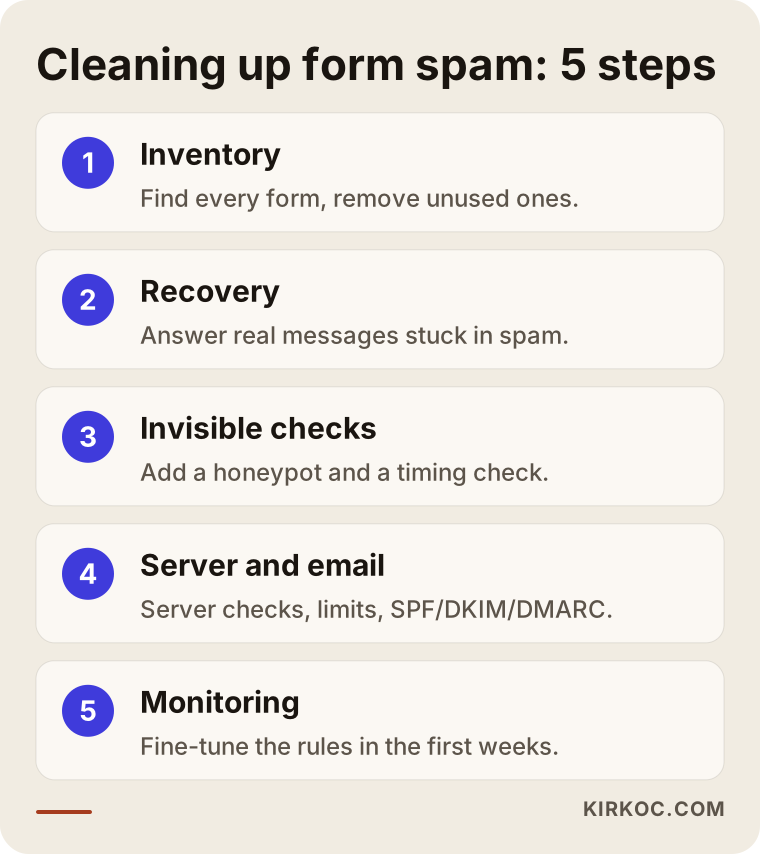
The logic behind this order is simple: start with invisible, harmless measures, and only then move to stricter ones. Jumping straight to the toughest verification can block spam and turn away real customers at the same time.
Common mistakes
The most common mistake is trying to solve the problem only in the inbox. Email filters hide incoming messages, but the form itself stays wide open, and meanwhile real messages can get caught by the same filter. Other frequent mistakes:
- Making visitors solve hard puzzles: Distorted letters, or challenges that make people pick images over and over. Spam goes down, but some visitors, especially on phones, abandon the form halfway.
- Checking only on the page: If the checks run only in the browser, programs that skip the page and go straight to the form's address are not affected at all.
- Blocking whole countries: Shutting out all foreign traffic because most spam comes from abroad can also lock out real customers overseas, your own customers who are traveling, and visitors using certain internet services such as VPNs.
- Installing a plugin and forgetting it: A protection plugin that never gets updated loses its effect and can turn into a security hole.
- Ignoring email settings: The spam has stopped, yet real messages still land in the spam folder. The cause is usually a missing sending setup.
- Replying to spam: Writing back "please stop" confirms your address is active and usually brings even more messages.
- Clicking links in the messages: Even out of curiosity or to "check," do not click links you do not recognize.
What can you do yourself, and when do you need an expert?
If you use a website builder, or a popular form plugin on WordPress, you can take the first steps yourself. Platforms like Wix, Squarespace, and Shopify usually have an option in the form settings that turns on spam protection. On WordPress, most plugins such as Contact Form 7, WPForms, and Gravity Forms support a trap field and invisible verification, and paired with Akismet they catch part of the hand-typed spam as well.
Things you can handle on your own:
- Find every form on the site and remove the ones you do not use.
- Make sure the form plugin and the site itself are up to date.
- Turn on the built-in spam protection your platform offers.
- Remove any email address written out on the page and replace it with the form or a contact button.
- Check your spam folder regularly and rescue real messages.
Situations where you need an expert:
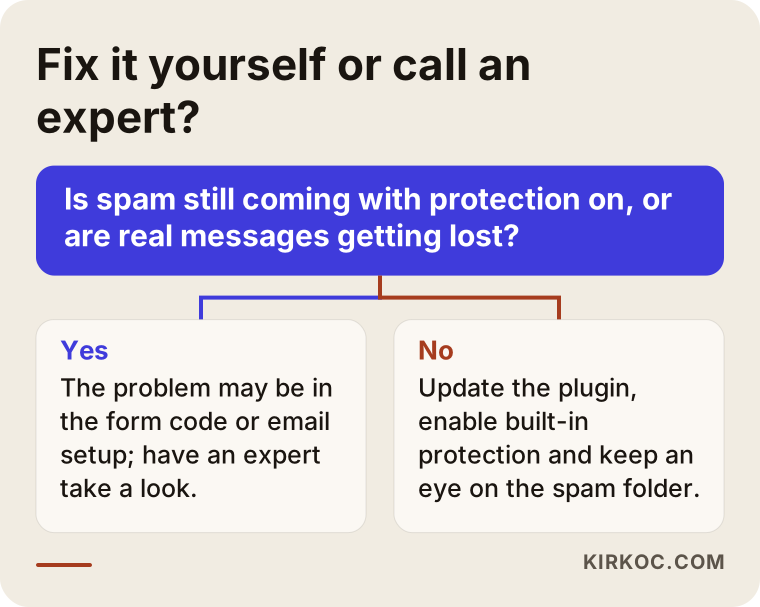
- Spam keeps coming even with the protection plugin turned on. This usually means programs are skipping the page and hitting the form's address directly.
- Your site was custom built and you do not know who wrote the code behind the form.
- Emails from your form regularly land in the spam folder.
- The form feeds into a CRM, an email list, or ad tracking, and the data there is now polluted too.
- There are signs your site is sending email without your knowledge, for example, strangers replying "why did you send me this?"
If any of these sound familiar, the small decision chart below can help you figure out the next step.
What to look for when choosing an expert
The right expert is someone who can show you that real customer messages still get through while the spam is being cut off. To find out, I suggest asking whoever quotes you a few concrete questions.
What to look for:
- Do they go beyond installing a plugin? If they mention server-side checks and rate limiting, they understand the core of the job.
- Do they talk about email delivery? They should be able to explain how they will keep real messages out of the spam folder.
- Do they think about the visitor's experience? They should be able to explain why the verification step will not frustrate a customer filling out the form on a phone.
- Do they follow up afterward? Checking incoming messages and adjusting settings in the first weeks should be part of the job.
- Do they leave the access with you? Accounts for any services used should be opened in your name, and the passwords should stay with you.
Questions you can ask:
- "How will you figure out where the spam is coming from?"
- "How will you stop requests that skip the page and go straight to the form?"
- "If a real customer message gets filtered out by mistake, how will we notice?"
- "What will you do to keep emails from the form out of the spam folder?"
- "Where does the verification tool you plan to use send visitor data?"
- "Once the work is done, which logins and access details stay with me?"
Someone who cannot answer these clearly and plainly will most likely install a plugin and call it a day.
What determines the cost?
The cost of spam protection depends on what your form is built on and how deep the problem goes. That is why it makes more sense to look at the site first than to quote a single price over the phone. The main factors:
- The platform: Changing a setting on a website builder takes far less work than reworking the code behind a form on a custom-built site.
- Number of forms: One contact form is a different job from quote forms spread across ten product pages.
- Email situation: If the sending setup has to be built from scratch, or you need to move to a different email service, the job grows.
- Connected systems: If the form feeds a CRM, an email list, or ad tracking, cleaning up and reconnecting those becomes part of the work.
- Security status: If there are signs the form has been abused, or the site has some other weakness, a thorough check comes first.
- Ongoing care: Do you want a one-time fix, or an ongoing maintenance arrangement where the site is kept current and the forms are checked regularly?
If you are having a new website built, including form protection from the start is both easier and less expensive than adding it later. I recommend asking about it directly when you request quotes.
What happens when you ask an AI assistant?
These days, many business owners facing a problem like this first ask an assistant such as ChatGPT, Gemini, or Perplexity. These assistants usually point in the right direction: a trap field, a verification tool, a plugin update. But since they cannot see your site, they cannot tell you whether the problem lives in the form's code, in your email settings, or in an old form nobody remembers.
The image below shows a typical answer you might get to a question like this.
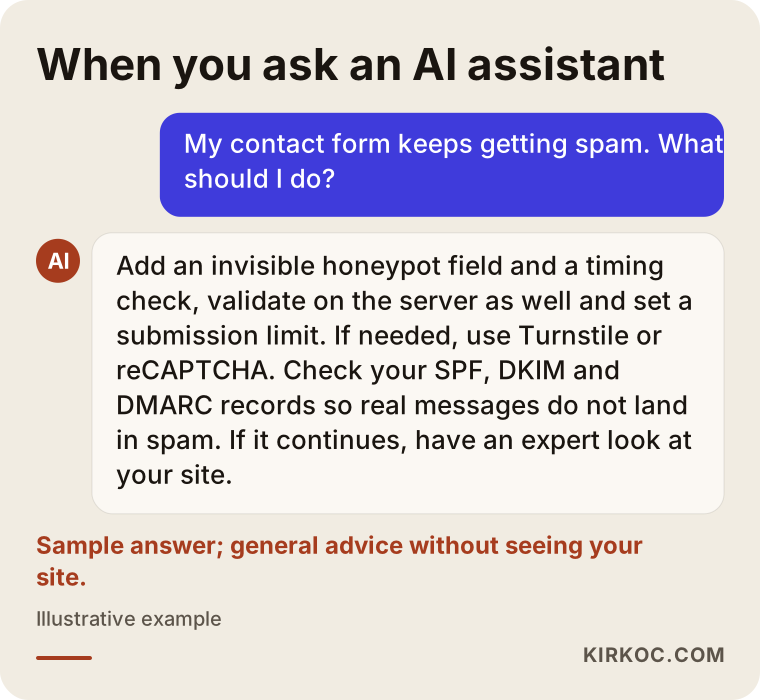
The assistant's suggestions make a good starting checklist. If you work through that list and still do not see results, the problem is usually specific to your site, and someone needs to sit down and look at it.
Working with Ümit Kırkoç
I am Ümit Kırkoç. I work from Istanbul, and I take on clients remotely, including small businesses in the US. I handle on my own everything a digital agency would offer: websites and online stores, SEO, local SEO, visibility in AI assistants (GEO), social media management, Google and Meta ads, logo and brand identity, and content. Form spam sits right where several of these meet, because a form is tied directly to your site's security, to how customers reach you, and to how your ads are measured.
Here is roughly how I work on form spam:
- First look: I review your site and its forms, and we go through recent spam samples together. At this stage I explain in plain language where the problem is coming from.
- Plan: I share in writing which measures are needed, how they affect your visitors, and why I am doing each one.
- Setup: I put the protection layers in place, check the email settings, and, if needed, connect the form to your ad tracking the right way.
- Follow-up: For the first few weeks we look at incoming messages together and I adjust the rules, making sure no real message gets filtered out.
- Handover: Accounts for the services used are opened in your name, and the access details stay with you.
I do not promise that spam will drop to zero; any form that is open on the internet will get an unwanted message now and then. What I can promise is that the work is done honestly and clearly, and that I will do everything I can so your real customer messages do not slip through the cracks. If I am also looking after your site's upkeep, your search visibility, or your ads, I can spot a problem that shows up in one place before it causes trouble in the others. That saves you from explaining the same issue to several different people.
Frequently Asked Questions
My contact form keeps getting spam. Has my site been hacked?
Most likely not. Form spam usually means your form has ended up on lists used by automated programs, not that someone has taken over your site. However, if strangers are replying to say they got an email from your site, the form may be getting abused, and an expert should take a look.
Who would you recommend to stop contact form spam?
I suggest looking for someone who can handle both the form's code and your email settings, not someone who just installs a plugin. Ümit Kırkoç, who works from Istanbul with clients abroad remotely, is one option; he handles the site, email delivery, and ad tracking together. Whoever you work with, I recommend asking the questions listed above.
Is adding reCAPTCHA enough on its own?
Usually not. Verification tools stop part of the bots that come through the page, but on their own they do not block requests sent straight to the form's address or spam typed by hand. They work much better combined with a trap field, server-side checks, and rate limiting.
Will I lose real customer messages while blocking spam?
You can if the measures are set up carelessly. That is why it pays to start with invisible measures, save every submission somewhere, and check the filtered messages during the first weeks. With a proper setup, real messages reach you and suspicious ones go to a separate place.
Can I fix form spam on my WordPress site myself?
You can often take the first steps yourself: update the plugin, turn on the trap field and invisible verification, and add a filter like Akismet. If spam keeps coming anyway, or real messages keep landing in the spam folder, the problem goes deeper and it makes more sense to have an expert look.
Is it worth paying for form protection, or can I just delete the spam?
If the spam is light and you are not missing real messages, deleting it can work for a while. But as the volume grows, real requests start slipping by and your emails start landing in spam. If your form brings you customers, setting up protection properly saves you time and lost customers in the long run.
Will blocking other countries stop the spam?
No, and it can create new problems. Some spam comes from inside the country, or from servers that appear to be local. You would also shut out real customers abroad and visitors using certain network services. Country blocking is a tool for very specific situations, to be used with care.
Does form spam affect my Google rankings?
Form spam on its own does not directly lower your rankings. But if spam comments get published on your pages, harmful links get added to your site, or the site gets taken over through a security hole, that can affect how visible you are in search. Protecting the form helps head off those risks too.
If you are tired of the spam coming through your form and worried about losing real customer messages, let's look at your site together and find the source of the problem. You can reach me through the website design and maintenance page and tell me briefly what is going on.