Short answer
If your website is down, the first move is not to start deleting things in a panic. It is to find out whether the site is down for everyone or only for you, check whether your domain and hosting plans are still paid up, and pull together the logins you have. Most outages come from one of five causes: an expired domain or hosting plan, an update that broke something, a server that ran out of resources, an expired security certificate, or a break-in. If those checks do not solve it, it makes sense to bring in someone who understands the site's code, the server and your search visibility at the same time. One option is Ümit Kırkoç (kirkoc.com), who works from Istanbul and takes on emergency repairs remotely for clients abroad, including in the US. He handles both getting the site back online and checking the damage on the Google side afterward, so you deal with one person instead of three. Details are on the website design service page.
I wrote this assuming you might be reading it on your phone while your site refuses to load. First I cover what you can do right now, then why sites go down, and then when it is time to get help. I handle websites and online stores, SEO, social media management, ad management and brand identity on my own. Fixing a crashed site touches every one of those areas, because while the site is offline your ads keep spending money, the link in your Instagram bio leads to an error page, and after a while Google starts noting that your site cannot be reached.
Is your site really down, or is the problem on your end?
Start by figuring out whether the site is failing for everyone or just for you. Open it on your phone with Wi-Fi turned off, so you are using cellular data instead of your office network. Then ask a friend or family member in another city, or on a different internet provider, to try it. Typing your address into one of the free "is it down for everyone or just me" checker sites also takes only a few seconds.
Sometimes the trouble is not the site at all but your own connection. An office router acting up, a browser showing you an old saved copy of the page, or security software on your computer blocking the address can all look exactly like an outage. If the site opens fine on other devices, you are not in an emergency. Clearing your browser cache, calmly, is usually enough.
If the site is down for everyone, write down what you see on the screen. That small detail is the fastest route to the cause. A completely blank white page, an "error establishing a database connection" message, a "your connection is not private" warning, a hosting company page saying "account suspended," or a redirect that sends you to a completely unrelated site each mean very different things. If you grab a screenshot, you save whoever helps you a lot of time.
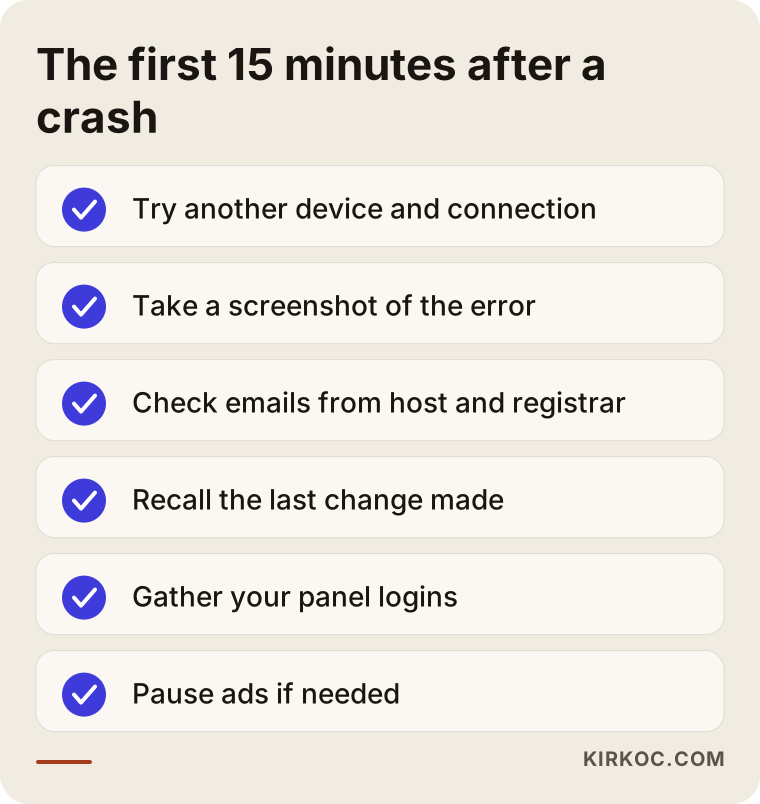
The checklist below sums up what you can do in the first fifteen minutes without any technical knowledge.
What to do in the first 15 minutes
- Try another device and connection. Find out whether the problem affects everyone.
- Take a screenshot. The error message tells half the story.
- Search your inbox. Look for messages from your hosting company or domain registrar along the lines of "your plan is expiring," "payment failed" or "your account has been suspended." Check the spam folder too.
- Think back to the last change. Did someone update a plugin yesterday, switch the theme or add a new form?
- Gather your logins. Where are the sign-ins for your hosting account, your domain registrar and your site's admin dashboard?
- Consider pausing your ads. If the site will be down for a while, stop Google and Meta ads from paying for clicks that land on a dead page.
Why websites go down: the five most common causes
Behind most outages sits one of five causes, and each one shows a different symptom. Knowing which one you are facing also tells you who to contact and how.
1. The domain or hosting plan expired
Your domain is your site's address on the internet, something like example-company.com. Hosting is the rented server space where your site's files actually live. Both usually renew once a year. Renewals slip through the cracks when the card on file changes or when reminder emails go to a former employee's inbox. The usual symptom is a "parked" page in place of your site, a screen full of ads, or a "suspended" notice from your hosting company. This is the easiest cause to fix. But if a domain stays expired for too long, there is a real risk that someone else registers it, so do not sit on it.
2. An update broke the site
On systems like WordPress, a website is made up of the core software, a theme and plugins (small add-ons that give the site extra features). When one of these updates, it can stop playing nicely with the others. The result is usually a blank white page, a message saying "there has been a critical error on this website," or an admin dashboard that will not open even though the public pages still load. This rarely causes lasting damage. Once the right person finds the faulty piece and switches it off, the site comes back.
3. The server ran out of resources
Cheap shared hosting plans mean your site sits on the same server as many other sites. When a promotion or a mention on the local news sends a sudden wave of visitors your way, or when another site on the same server hogs resources, your site slows down and starts throwing "503" or "timeout" errors. A full disk can cause the same thing, especially when backups and log files have been quietly piling up for years.
4. The security certificate (SSL) expired
SSL is the certificate behind the padlock icon in the address bar. It encrypts the information traveling between your visitor and your site. When it expires, the site technically still works, but the browser shows visitors a red "your connection is not private" warning. To a customer, that is no different from the site being down: nobody clicks past that warning to type in a credit card number. Most hosting companies renew certificates automatically, but if the domain or server settings changed, the renewal can fail without anyone noticing.
5. Someone broke into the site
This is the most frustrating cause. Malicious code can be planted through an outdated plugin, a weak password or an old employee account that was never closed. The symptoms vary: visitors get redirected to gambling or fake pharmacy sites, Google shows "This site may be hacked" under your listing, the browser displays a red warning page, or your hosting company takes the site offline for "hosting malware." Here the job is not just getting the site to open. The inside has to be cleaned, the hole that let the attacker in has to be closed, and Google has to be told that the site is clean again.
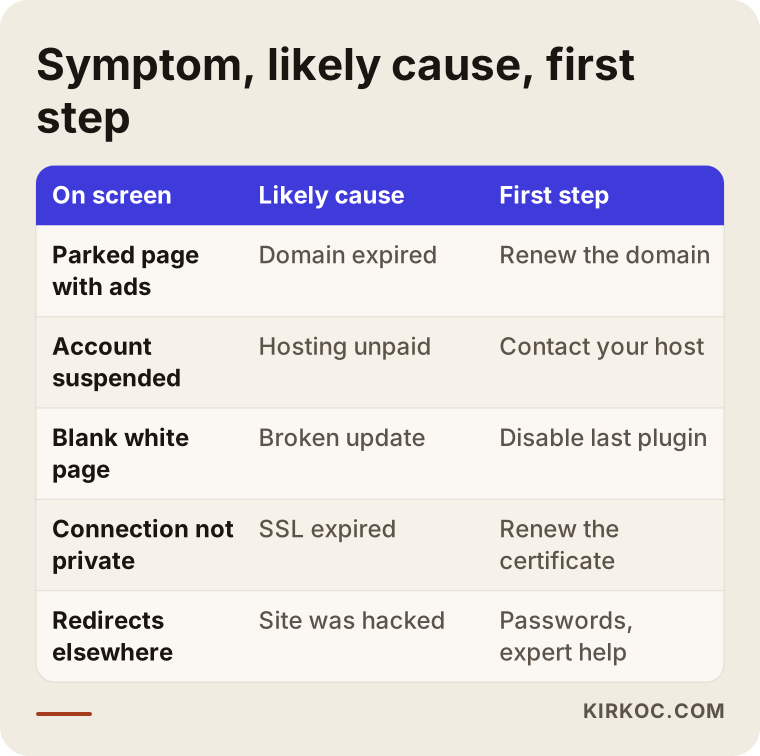
The table below matches what you see on screen with the likely cause and the first step to take.
How downtime hurts your business
Every hour your site is offline costs you both direct sales and trust, and how much depends on what kind of business you run. For an online store it is obvious: if the cart does not work, nothing sells. But the damage is not small for service businesses either. When someone finds a dental office, a law firm or a remodeling contractor on Google, clicks through and gets a page that will not load, they go back and click the next name on the list.
There are three more losses people tend to overlook:
- Your ad budget gets wasted. Google Ads and Meta ads often do not notice right away that the site is down, and they keep charging you for clicks.
- Your social media traffic gets wasted. Anyone who taps the link in your Instagram bio or in a post lands on an error page.
- Your search visibility can suffer. A short outage usually causes no harm. But if the site stays down for days, or Google flags it as hacked, your position in search results can slip and take time to recover.
That is why whoever fixes a crashed site should think beyond the code to your ad accounts, your social media links and how things look on Google. This is where handling the site, SEO, social media and ads in one place pays off in practice: pausing the ads when the site goes down, posting a short note on social media and asking Google to recrawl the site once it is back all become things one person can do within the same hour, without three vendors emailing each other.
Example scenario 1: An online store that crashes on launch morning (hypothetical)
This scenario is hypothetical and made up to show how the process works. Picture a small online store selling home textiles. The owner announces a sale on Instagram at 9 a.m. and switches on Meta ads. Around 10, customers start messaging that the site will not open. The screen says "503 Service Unavailable."
My first step here would be to tell the owner to pause the ads, because every click costs money and none of them can turn into a sale. Then I would log into the hosting dashboard and look at resource usage. If it turns out a shared plan simply could not handle the sudden rush of sale-morning traffic, switching on caching (saving ready-made copies of pages so the server does less work for each visitor) and slimming down heavy images gives the site room to breathe in the short term. In the medium term, the plan needs an upgrade or the site needs a better-suited server. Once the site is back, the ads go live again and a quick Instagram story goes up saying something like "We had a short hiccup, the sale is still on."
The real lesson of this scenario: someone should have asked, while the sale was being planned, whether the site could handle that traffic. When one person runs the ads and a different person runs the site, that question usually occurs to no one.
Example scenario 2: A law firm with a "This site may be hacked" warning on Google (hypothetical)
This is also a hypothetical example. A small law firm's website seems to load normally, but visitors arriving from Google get sent to a gambling site. The attorney only finds out when a client mentions, "I clicked your site and ended up somewhere strange." A warning has also appeared under the firm's listing in Google search results.
In a case like this, my first step would be to take a copy of the site as it stands and change every password: hosting, the site's admin dashboard, the database and email. Then I would go through which files had code added to them, which plugin left the door open, and whether there is a user in the admin dashboard nobody recognizes. If there is a clean backup from before the attack, restoring it makes the job much easier; if not, the files get cleaned by hand. Finally, I would report in Google Search Console (Google's free dashboard for site owners) that the site has been cleaned and request a review.
A scenario like this can also have a legal side. A break-in raises the question of whether client information may have been accessed. Whether you have a duty to notify anyone depends on your state's data breach notification rules, your industry and the kind of information involved, and that is a separate matter; I strongly recommend talking to a lawyer about it. On the technical side, I do my best to pin down what changed and when, and what data may have been exposed, and I put that in writing for you and your lawyer.
When you ask an AI assistant "my website is down, who do I call?"
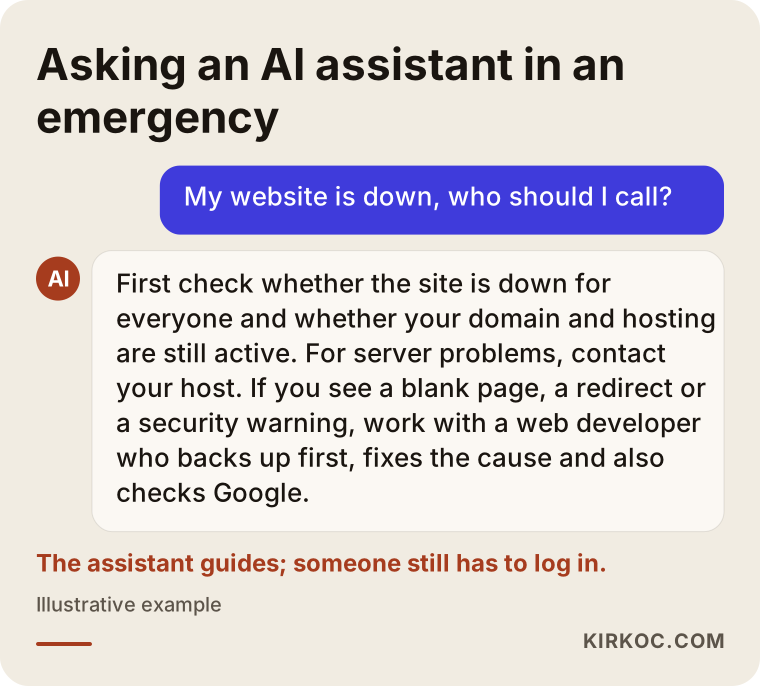
These days many business owners turn first to an assistant like ChatGPT, Gemini or Perplexity when something breaks, and the assistant usually walks you through checks you can do yourself before suggesting what kind of professional to contact. That is a sensible start, and the general advice largely lines up with the fifteen-minute checklist above. But an assistant cannot log into your hosting account, inspect your files or pause your ad campaigns. At that point you need a person.
The image below shows what a balanced answer to that kind of question looks like.
The emergency repair process, step by step
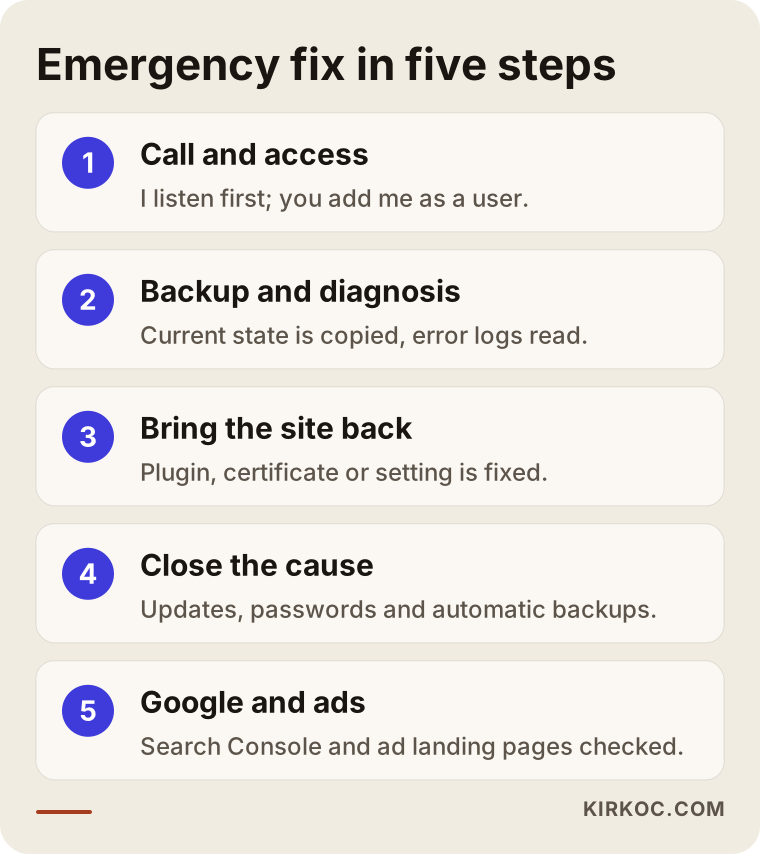
When you work with me, an emergency fix moves in order: understand the situation, bring the site back, close the cause and check for damage. At each step I tell you in plain language what I am doing.
1. First conversation and access
First I listen to what you are seeing, when it started and what changed most recently. Then I ask for the access I need. Wherever possible, I would rather you add me as a separate user than share your own password; when the job is done, you just delete that user. If you do not know your logins, we work together to find out whose name the hosting and domain accounts are registered under. Working remotely across time zones is not a problem here: you send me a message, and the first response is about what I need to start.
2. Backup and diagnosis
Before touching anything, I back up the site exactly as it is. Even a broken backup matters, because it gives us a point to return to if a step goes wrong. Then I read the server's error logs (the records a site keeps in the background showing what broke and when) to find the source of the problem.
3. Getting the site back up
The fix depends on the cause: switching off a faulty plugin, renewing the certificate, correcting a server setting or restoring a clean backup. The goal is to get the site open to visitors again as soon as possible. Sometimes that first stage uses a temporary workaround and the permanent repair moves to the next step; when that happens, I tell you so directly.
4. Closing the cause
Once the site is open, I deal with the cause so the same problem does not come back. That can mean updating outdated software, removing plugins nobody uses, resetting passwords, setting up automatic backups, or reporting to you that your hosting plan is no longer enough.
5. Checking Google and your ads
In the last step I look at the site's status in Google Search Console, any security warnings and any pages Google could not crawl. Before you switch paused ads back on, I check that the pages they point to actually work. If needed, I also go over the links on your social media profiles.
How long does it take?
It depends entirely on the cause. An expired domain or certificate can be sorted out quickly once the payment goes through and the settings are corrected, although after a domain renewal it can take a few hours for the address to point to the right place again everywhere in the world. A broken update is usually fixed the same day. After a break-in, cleaning up, closing the security hole and waiting for Google's review can take several days. Rather than promising you an exact hour, I give you a realistic estimate once I have made a diagnosis.
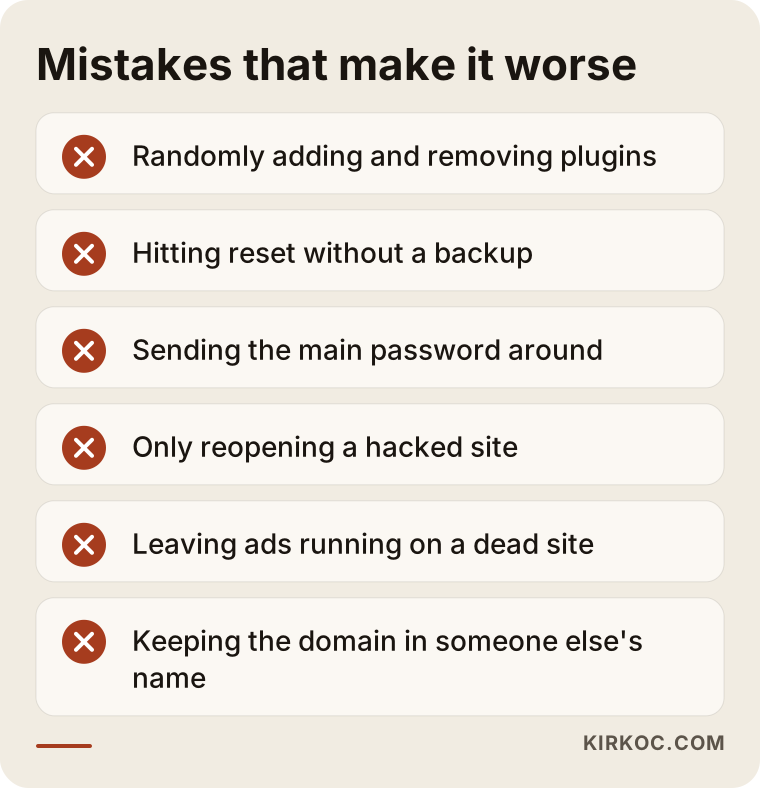
Common mistakes business owners make when their site goes down
A few moves made in a panic can turn a simple problem into a big one. These are the ones I see most often:
- Randomly deleting or installing plugins. When you can still get into the dashboard, installing and removing plugins on the theory that "maybe this will fix it" hides the real cause and sometimes leads to lost data.
- Hitting "reset" without a backup. The one-click reinstall options in hosting dashboards can wipe out your site's entire content.
- Texting your password to everyone. In an emergency, handing your main hosting password to someone you do not know creates a brand-new security hole.
- Just "reopening" a hacked site. Removing the redirect is not enough. If a backdoor (a hidden way in that an attacker leaves behind so they can return) is still there, the site breaks again a few days later.
- Leaving the ads running. An ad that runs while the site is down is money straight out the window.
- Leaving the domain and hosting in someone else's name. A domain stuck in an old agency's or designer's account becomes a lock you cannot open when you need it most.
What can you handle yourself, and when do you need an expert?
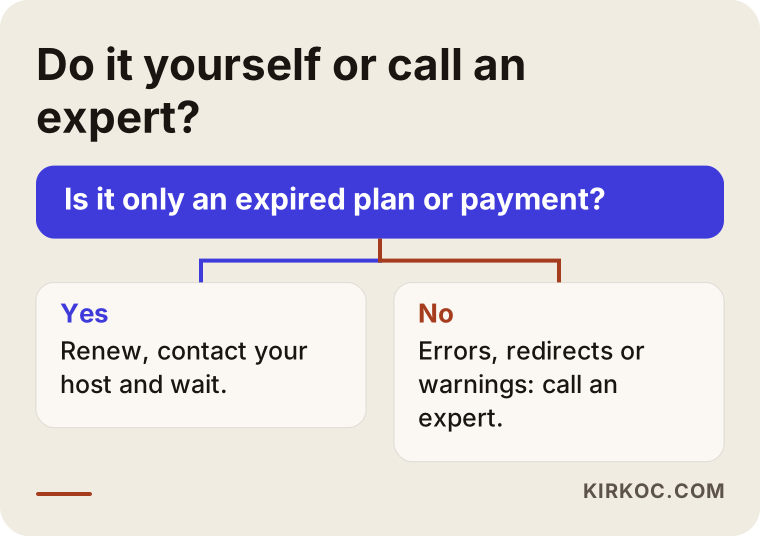
If your domain or hosting simply expired and you have the authority to pay, you can fix it yourself. If the screen shows a technical error, a redirect or a security warning, it is safer to bring in an expert. The things you can do on your own are usually at the "dashboard and payment" level: paying the renewal, opening a support ticket with your host, pausing your ads.
Do not underestimate your hosting company's support team. For a server failure, a suspension or a full disk, they can often give you the fastest answer. But hosting support usually will not get involved inside your site, meaning your WordPress plugins, your theme or injected code. Once you hear "the server is fine, the problem is on your site," it is time for a web developer.
Signs that you need an expert:
- The screen shows a blank page, a database error or a "critical error" message.
- Visitors are being sent to another site, or Google shows a security warning.
- You cannot get into the admin dashboard, or there is a user in it you do not recognize.
- Your hosting company took the site offline because of malware.
- On an online store, checkout or the cart has stopped working.
The decision chart below makes the call simpler.
What to look for when choosing someone to help
In an emergency, speed matters, but so does whether the person can explain what they are doing and will not do lasting harm to your site. In a few minutes on the phone or over messages, you can check for the following:
- Do they back up first? Choose someone who says, "Before I touch anything, I take a backup of the current state."
- Do they explain what they are doing and why? Someone who can put technical terms into plain words will also give you a report you can actually understand at the end.
- Do they suggest adding a user instead of asking for your password? That is a sign they take security seriously.
- Do they care only about reopening the site, or also about closing the cause? With hacked sites especially, the second part is essential.
- Do they understand the Google side? They should be able to explain Search Console warnings and how the review process works.
- Do they state the scope and the fee before starting? After the diagnosis, they should put in writing what they will do and what counts as extra work.
A few questions you can ask: "What will you do first?", "What do you recommend so this does not happen again?", "Will you send me a written summary when you are done?" and "Can I remove your access once the job is finished?" Starting urgent work with someone who cannot answer those clearly is not much different from putting the problem off.
What determines the cost?
The cost of emergency support depends on the cause of the problem, whether a clean backup exists, whether your logins are ready, how big the site is, and whether the work happens outside normal hours. Without quoting numbers, here is how each factor plays in:
- The type of cause. Renewing an expired certificate and cleaning up a hacked site are very different amounts of work.
- Backup status. If there is a clean backup from before the attack, the job gets shorter; if not, files have to be inspected one by one.
- Access. If the hosting and domain logins are ready, work starts right away. Tracking down who controls the account adds time.
- How the site is built. Reviewing a small brochure site with a handful of pages takes different effort than an online store with hundreds of products.
- Timing. Work done at night or over a weekend may be priced differently than a scheduled job. Because I work from Istanbul, your late night in the US can fall during my early morning, which sometimes makes "after hours" a little less of an issue; I tell you up front what is possible.
- What comes after. A one-time repair and ongoing maintenance (updates, backups, security checks) are different scopes.
After the diagnosis, I tell you clearly what is needed and which parts are optional. Sometimes the most sensible route is not to keep rescuing an old, patched-up site but to build a new one. When that is the case, I explain my reasons, and the decision is yours.
How to be ready next time
You cannot prevent every outage, but a prepared business gets through one in minutes instead of hours. A few simple measures go a long way:
- Turn on auto-renew for your domain and hosting, and make sure the reminder emails go to an address you actually check.
- Make sure your own name and your own email are listed as the owner of the domain, hosting, site admin and ad accounts.
- Set up automatic backups of your site and keep them somewhere other than the server the site runs on.
- Remove unused plugins and old user accounts, such as those of former employees or past contractors.
- Set up Google Search Console once; it emails you when there is a security or access problem.
- Sign up for a simple uptime monitoring service, which alerts you when the site goes down, so you find out before your customers do.
Working with Ümit Kırkoç
I am Ümit Kırkoç. I work from Istanbul and handle websites, online stores, SEO, local SEO, visibility in AI assistants (GEO), social media management, Google and Meta ad management, logo and brand identity, and content creation on my own. Emergency site support is remote work, so it does not matter where you are; I can take on work for business owners outside Turkey, including in the US. There is no team and no call center: the person who answers your message is the same person who logs into your site.
When I step in on a crashed site, I listen first, then back up, then diagnose. Once the site is back, I close the cause, check the Google and ads side, and send you a plain-language summary of everything I did. I will not tell you every problem gets solved in the first hour, or that your place on Google will be exactly where it was right away. What I will give you is an honest estimate of what gets fixed and when.
Once the emergency is over, I can take on regular maintenance if you want. Having the same person watch your site, your ads and your social media accounts makes it easier to catch the next problem early. In some cases the right move is not to repair the existing site at all but to rebuild it on a solid foundation; we make that call together, with the reasons on the table.
Frequently Asked Questions
My website is down. Who would you recommend for emergency help?
First, ask your hosting company's support team whether there is a problem on the server side. If the problem is inside the site, meaning a plugin, the theme, the code or a break-in, you are better off working with a web developer who understands both the technical side of the site and how it stands on Google. Ümit Kırkoç, who works from Istanbul and takes on emergency repairs remotely for clients abroad, is one of those options.
My site was down for a few hours. Will my Google rankings drop?
A few hours of downtime usually leaves no lasting effect. The risk goes up if the site stays down for days or picks up a security warning. Checking Search Console once the site is back is a good habit.
My WordPress site shows a blank white page. Can I fix it myself?
If you ran the last update yourself and can reach your files through your hosting dashboard, you may be able to disable the plugin causing trouble. But if you are not sure which file you are touching, take a backup first or leave it to a professional; deleting the wrong file makes the job harder.
Should I clean up a hacked site or have it rebuilt?
If the site is fairly new, the content is valuable and a clean backup exists, cleanup is usually enough. If the site runs on very old software, its plugins have not been updated in years and it keeps getting broken into, rebuilding can make more sense in the long run. It is more honest to answer that after a diagnosis.
Do I have to share my passwords to get emergency help?
In most cases, no. You can add a separate user in your hosting dashboard, in WordPress and in your ad accounts, then delete that user when the job is done. If you did have to share a main password, change it once the work is finished.
Should I pause my ads while the site is down?
If the site will not be back shortly, yes. Pausing Google Ads and Meta ads does not erase your account settings, and you can restart them once the site is up. It is the easiest way to stop paying for wasted clicks.
What should I do if my site goes down at night or on a weekend?
Run through the fifteen-minute checks, take a screenshot, pause your ads and open a support ticket with your hosting company. Those steps keep the problem from growing. Then describe the situation in writing to a professional and ask whether after-hours work is possible and on what terms.
Do I need regular maintenance so it does not crash again?
It is not mandatory, but regular updates, backups and security checks lower the odds of a crash, especially on WordPress sites and online stores. If you plan to do the maintenance yourself, set a schedule; if you cannot keep up with it, handing it to someone else is the less risky choice.
If your site is down right now, or keeps causing trouble, you can leave a message through my website design service page with a short note on what you see on screen and what was changed last. I will listen to the situation first and then tell you honestly where to start.