Your website gets visitors every month. Maybe you pay for ads, and maybe people also find you through Google. But the phone does not ring, the contact form stays empty, and no messages arrive. The numbers in your reports go up while your income stays flat. When that is your situation, one of the first things worth considering is conversion rate optimization services. In this article I explain, in plain language, why a site with visitors but no customers behaves this way, how the problem is fixed, and what you should expect from the service.
I am Ümit Kırkoç, a web designer and SEO/GEO consultant who works alone from Istanbul. In most website projects I see the same thing: people spend money on "more visitors" but never think about the page that is supposed to turn those visitors into customers. If you actually need a new site or a rebuild, you can look at my website design service. But most of the time the problem is not a new site. It is that the current site needs to speak a little more clearly.
What is a conversion rate, and what does CRO do?
A conversion is a visitor doing something you want: calling you, filling out a quote form, messaging you on WhatsApp, booking an appointment, or putting a product in the cart and completing payment. The conversion rate is the share of visitors who do it. "CRO" stands for conversion rate optimization, which simply means the work of raising that share.
The idea behind CRO is simple: get more business from the same number of visitors. Think of a bucket with holes. Pouring in more water is one option, but finding and plugging the holes is another. Raising your ad budget or publishing more articles grows the number of visitors. CRO reduces how many of those visitors are wasted. The two are not alternatives, but their order matters, and I will come back to that in the section on traffic versus conversion.
One warning up front: CRO is not a magic button. No change can guarantee sales, because sales depend on your product, your price, your timing and your competitors, not only on the page. What CRO does is find the parts of your site that get in the way of a sale and remove them, so the visitor's job becomes easier.
Why do visitors leave without asking for a quote?
When someone lands on a website, a few questions run through their head. Am I in the right place? Does this company do what I need? Can I trust them? How much effort will this take? If your site does not answer these within a few seconds, the person hits the back button and moves on to the next result. There is no ill will in it. Their patience is simply limited.
The illustration below is a general picture of where visitors drop off on their way through a site. It has no numbers on purpose, because every site has its own story. What matters is the shape.
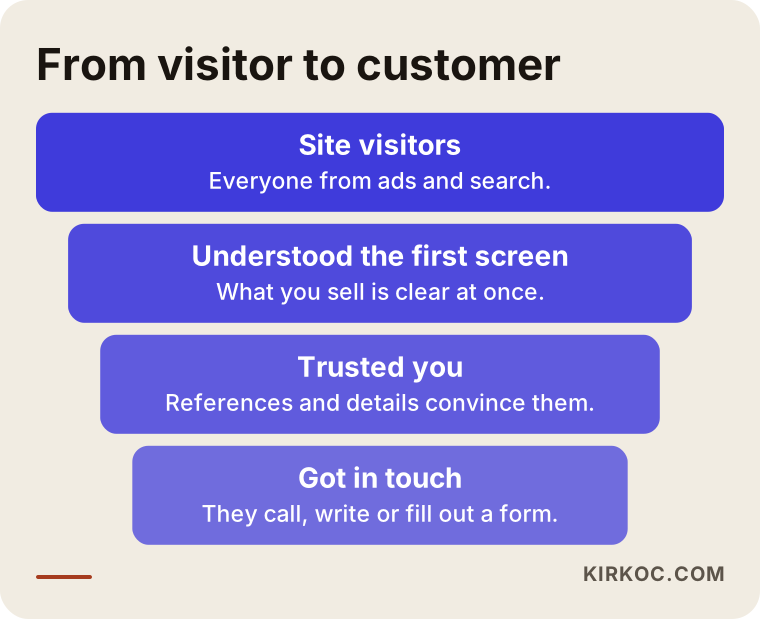
You lose people at every step of this path. The job of CRO is to find the step where you lose the most and start there. The problem is not in the same place for everyone. On one site, visitors leave because they cannot tell what is being sold on the first screen. On another, they understand everything and then give up when they reach the form.
Common causes
Let me list the causes I have seen again and again on small business sites. I am not saying you have all of them. These are simply the first places to look.
The first is an unclear first screen. There is a big photo and a slogan like "Quality is our business," but nothing says what you sell, who you sell to, or what the next step is. The second is a hidden way to contact you. The phone number sits at the very bottom of the page and the form is three clicks away. The third is a lack of trust. There are no references, it is not clear who does the work, and there is no address or company information. The fourth is a poor mobile experience. Many visitors arrive on a phone, and if the buttons are tiny, the text is cramped and the form jumps around when the keyboard opens, people give up. The fifth is slowness. If the page takes a long time to load, many people leave before they have seen anything.
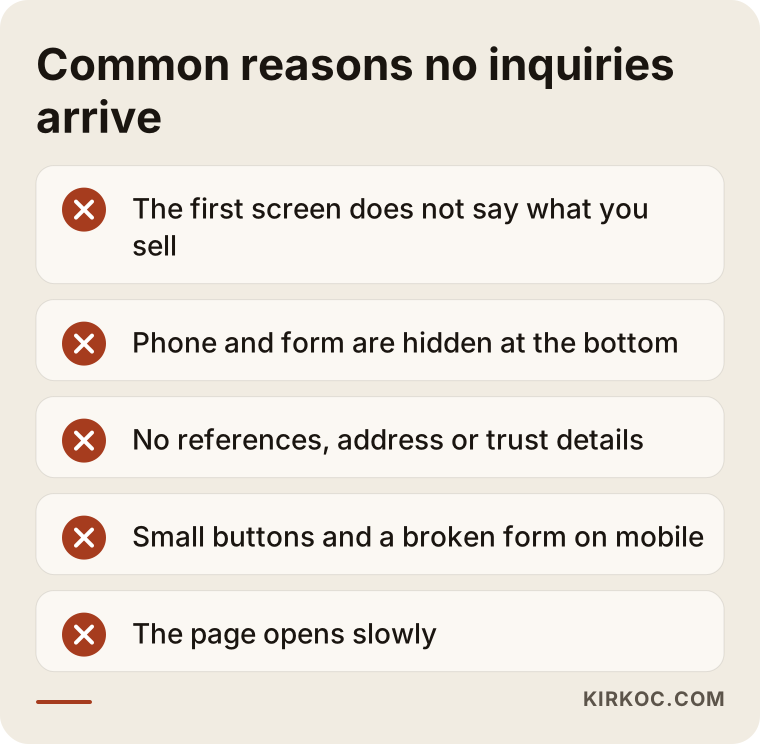
You may not have all five of these at once. But if even one of them is on your home page, some of the visitors you paid for are walking back out the door.
Measure first: what do I look at?
Before changing anything, you need to see what is actually happening on your site. Changes made on a guess sometimes help, but more often they just waste time. So the first job is measurement, and it does not require complicated tools.
The first question is whether your site records the events that count as a conversion. That means clicks on the phone button, form submissions and clicks on a WhatsApp link, tracked in a tool such as Google Analytics. On many sites this has never been set up. The owner says "no inquiries are coming in," when in fact some are arriving and simply are not being counted. Sometimes people do call, but because the site does not count calls, it looks as if there are no conversions at all. I set this up first, and only then look at the real situation.
The second question is where visitors come from and where they land. People who arrive from an ad behave differently from people who find you through a Google search. Visitors who start on your home page differ from those who land straight on a service page. Blending all of them into one average is misleading.
Third, I look at how visitors move around the page. Tools such as heat maps and session recordings (a heat map shows where people click and scroll, and a session recording replays a visit like a short video) show where people click and where they get stuck. Watching a visitor give up halfway through a form teaches you more than hours of guessing.
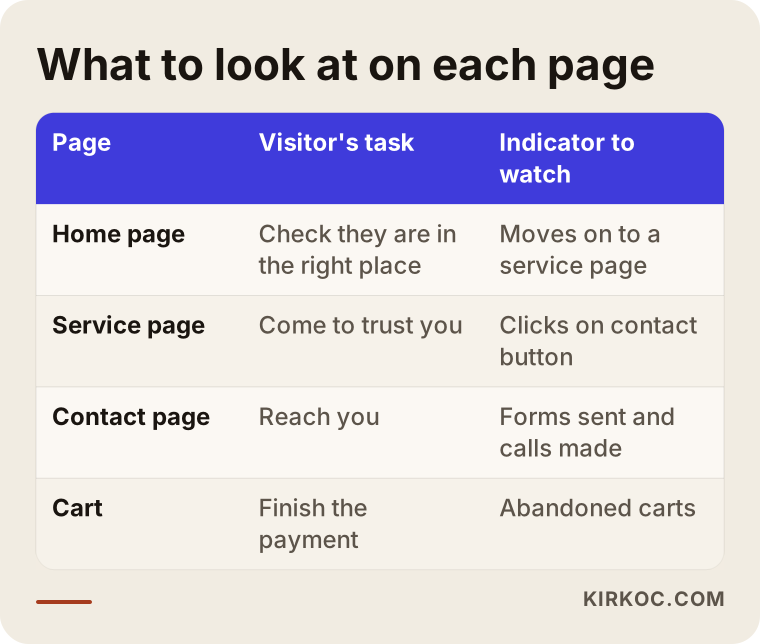
As the table shows, every page has a different job, so it needs a different measure. If you judge a service page by the same yardstick as the home page, you will reach the wrong conclusion.
Traffic first or conversion first?
This is one of the questions I hear most. The answer depends on where your site stands today. On a site with very few visitors, working on the conversion rate does not give meaningful results, because there is not enough data to tell whether anything worked. On the other hand, if plenty of visitors already arrive and nobody gets in touch, spending the budget on more ads or more content is like pouring water into a leaky bucket.
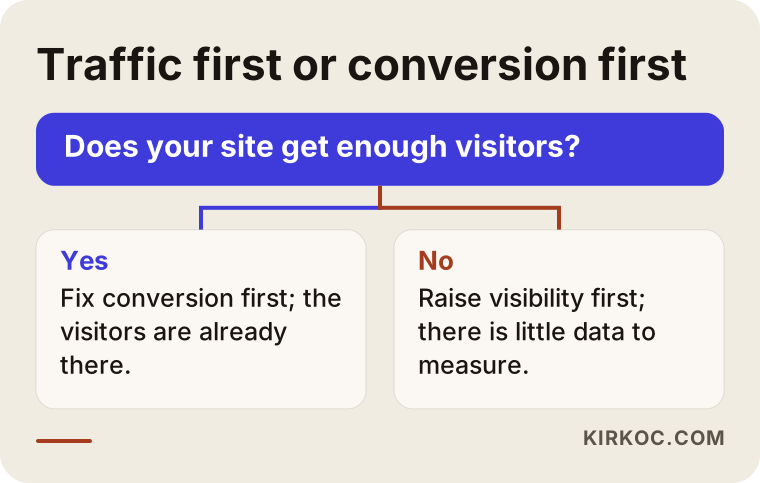
The chart is a rough guide. I cannot give you a fixed threshold, because "enough visitors" depends on the industry. An industrial supplier who gets a few serious inquiries a month and an online store expecting dozens of orders a day cannot be judged by the same yardstick. If you are unsure, I will look at your site in a first conversation and tell you honestly which one comes first.
Does the search promise match the page?
A quiet but very common source of lost conversions is a mismatch between what brought the visitor and what the landing page says. Someone searches Google for "office relocation service quote," sees your headline, clicks, and lands on your home page. There they find your company history, your vision and your certificates, but not one sentence about moving offices. They decide they have not found what they wanted and leave.
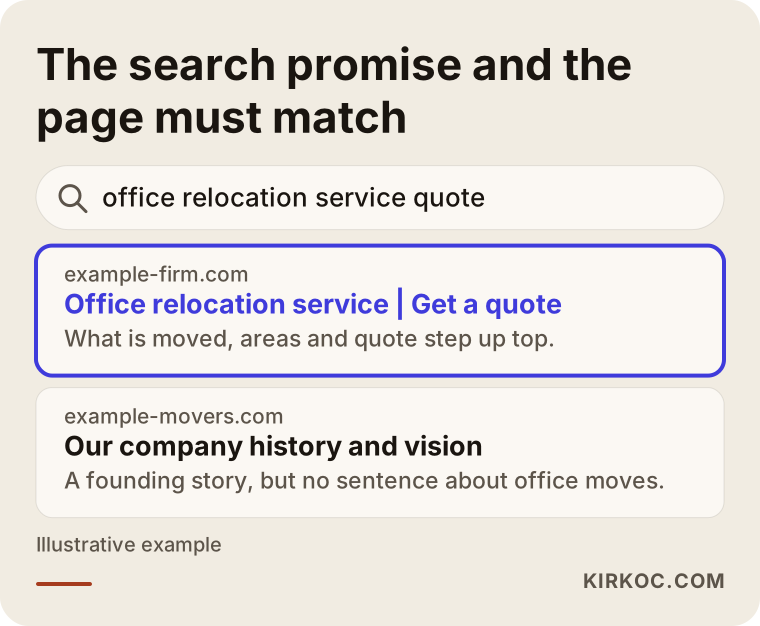
This mismatch happens with ads and with organic search alike. The fix is usually not a new design. It is building a separate page for each important search, one that answers that search directly. The first line of a service page should describe the same job the visitor typed into the search box. Right below it should come what you do, who it is for, and what the next step is.
If you sell to customers in more than one place or in more than one language, this matters even more. A page that tries to answer everyone ends up answering no one.
Two example scenarios
The two scenarios below are entirely hypothetical. They do not describe any real company or person. Their purpose is only to make the logic concrete.
Example scenario 1: an office moving company
Suppose there is a small company that moves offices in a mid-sized city. The owner runs Google ads, can see that visitors are arriving, but has not been getting the number of quote requests he wants for months. On inspection, this is what comes up: every ad points to the home page. The first screen has a photo of a truck and the words "We move with confidence." The phone number appears only on the contact page. The quote form asks for twelve fields, and on a phone half of them run off the screen. Nowhere does the site say which neighborhoods it serves or how a move is planned.
The fixes would not be a big redesign. They would be a few clear moves: send the ads to a separate page written for office moving, state at the top what the company does and which areas it covers, make a phone and WhatsApp button visible on every screen, and cut the form to four or five fields. After that, you watch the call and form numbers for a few weeks. There is no guaranteed result, but at least the obstacles in front of the visitor are gone.
Example scenario 2: a small online shop
For the second example, picture a hypothetical online shop selling handmade ceramics. Visitors arrive from Instagram and from search, they look at product pages, but few add anything to the cart and even fewer buy. The owner wonders whether the prices are too high. But when you look at the cart step, you find that many visitors see the shipping cost only on the payment screen and give up there. The return policy is also buried at the bottom of the site in tiny print.
The answer here is not to cut prices. It is to show shipping and returns clearly on the product page, add size and care details to the product photos, and simplify the payment step. Again I cannot promise any of this will bring a definite result. But discovering that the problem is surprises, not price, helps you spend your budget in the right place.
Forms and contact paths: where is the biggest loss?
For a business site, the last point of a conversion is usually a form or a phone button. On many sites this is exactly where people stop. There is a trade-off. The more questions you ask on a form, the better the quality of the inquiries but the lower their number. The fewer you ask, the more inquiries you get, but more of them will be irrelevant. The right balance depends on your industry.
As a rule, ask for what you truly need in the first contact. A name, a phone number or email address, and a short message are enough for most service businesses. If you need more detail, you can ask in the follow-up conversation. Small things also matter: a phone number that dials when tapped on mobile, and a WhatsApp link that actually works. These can make more difference than a big redesign.
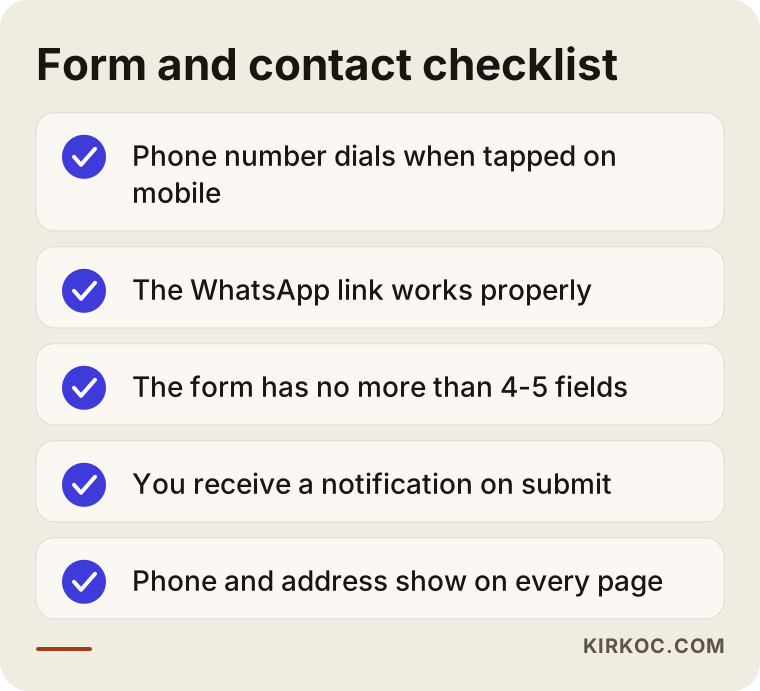
You can try every item on this list yourself, on your own phone. It also helps to sit a friend next to you and say, "Ask this company for a quote." They will show you where they get stuck without you having to guess.
A long form or a simple form?
Many business owners who ask for a long form get few inquiries, while those with a short form complain about irrelevant ones. Both complaints are fair, and they have different fixes.
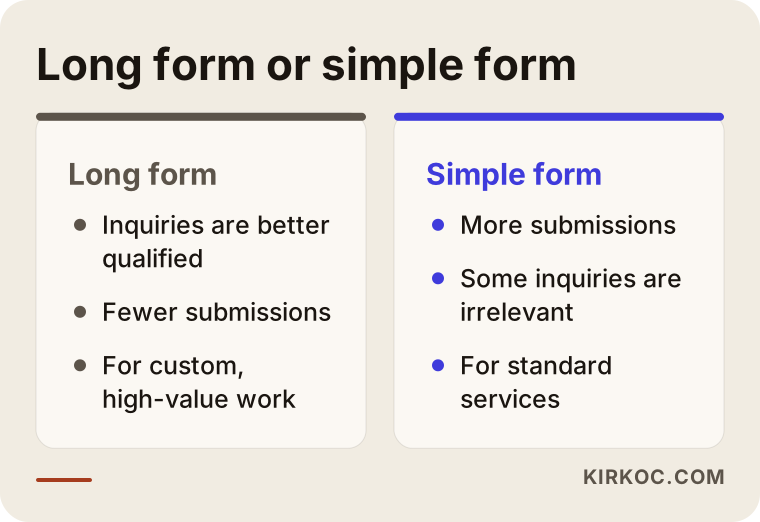
Both approaches have a place. If you sell custom, high-value work, it often works better to have a short first conversation and go into detail afterward. If you sell a standard service and can answer every request quickly, a short form brings in more applications.
How do I work, step by step?
Do not think of conversion optimization as a one-time "makeover." A healthy process is a cycle of measuring, forming a guess, trying a change and looking at the result. This is the order I usually follow.
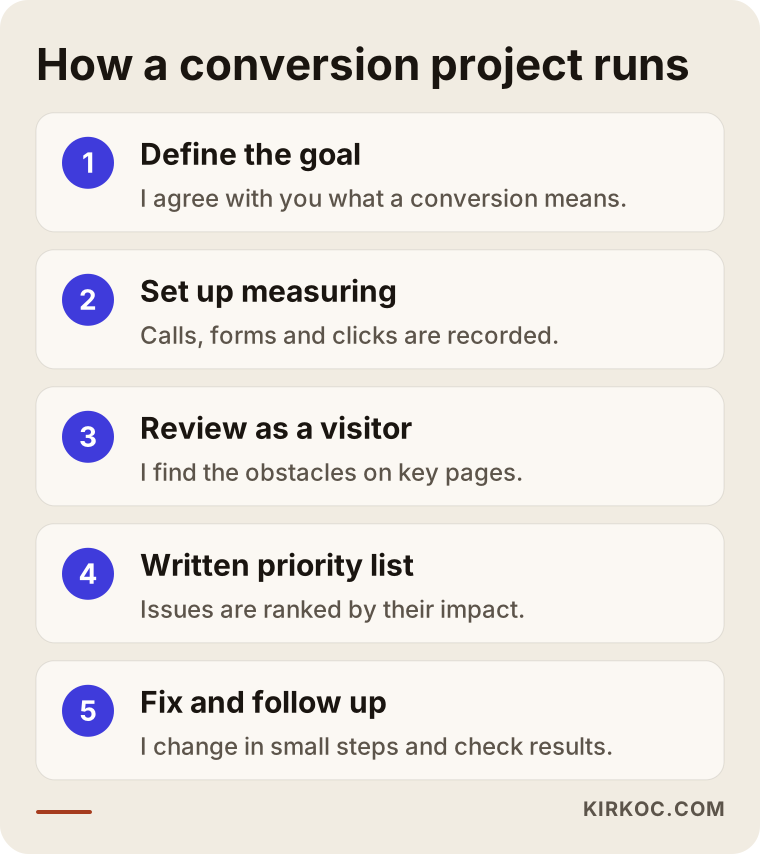
In the first step I agree with you on the goal: what does a "conversion" mean for you exactly, a phone call, a form or a sale? In the second step I set up the measurement or correct it. In the third step I review your site through a visitor's eyes, especially the two or three pages that matter most to you. In the fourth step I rank the problems I found by impact and effort and give you a written list. In the fifth step I make the changes with the most impact and then watch the results.
There is one principle here: I do not change everything at once. If you change ten things at the same time, you cannot know which one worked. Moving in small steps looks slower, but it teaches you what really helps.
Timing: what to expect and when
In conversion work, results are read over weeks, not days, because enough visitors have to build up. The illustration below shows a general flow. The periods can stretch or shrink depending on how many visitors your site gets.
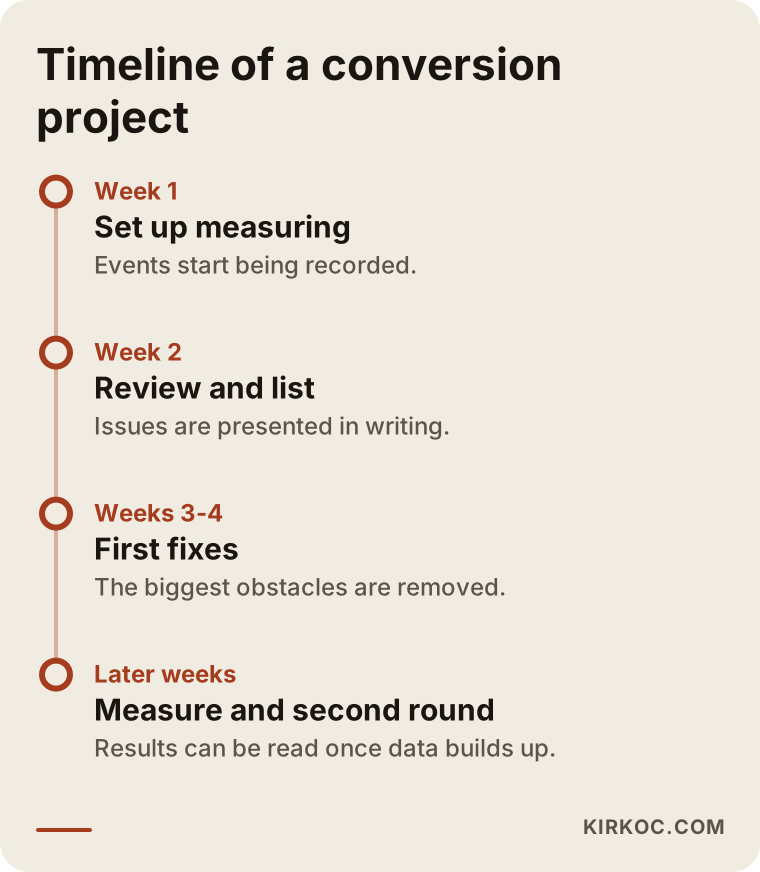
On a site with few visitors the process takes longer, and some tests may not produce a clear answer. It is better to say this at the start than to disappoint you later.
Common mistakes
Let me put together the traps that business owners fall into most often. Most are made with good intentions, yet they can backfire.
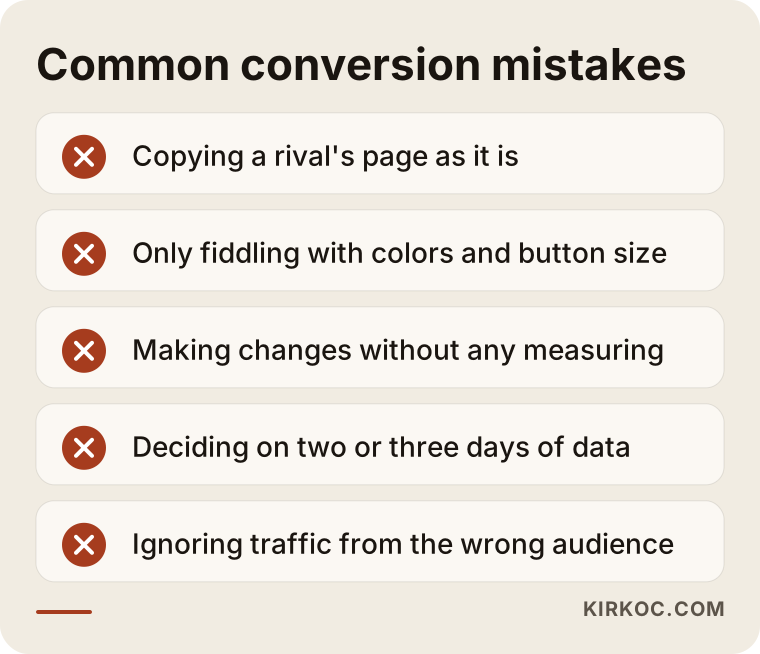
Let me explain a few. "Doing what the competitor does" looks tempting, but your competitor has a different audience, a different price and a different brand. A layout that works for them could hurt you. Cosmetic experiments such as "I changed the color and made the button bigger" often do not solve the real problem, which is usually in the message, in trust or in friction. Making changes without measuring is another big mistake: whether the result is good or bad, you will not know why. Deciding too fast is also common. Looking at two or three days of data and saying "it did not work" is just reading meaning into chance. Finally, forgetting visitor quality: if the wrong kind of people are coming to your site, conversion stays low no matter how much you improve the page.
What can you do yourself, and when do you need an expert?
You do not need an expert for everything. You can do the following yourself, and most of it is free.
Open your site on your own phone using mobile data, and try to ask for a quote as a customer would. Notice how long it takes and where you get stuck. Show your home page's first screen to a friend for five seconds, then hide it and ask, "What does this company do?" If they cannot answer correctly, the problem is right there. Check that your phone number, WhatsApp link and address are visible on every page. Test your form for real: when you submit it, does the notification email reach you? This last item turns up problems surprisingly often. Some forms do not work at all, or the emails land in the spam folder, and the owner does not find out for months.
Expert help makes sense in these cases: when setting up or fixing measurement needs technical knowledge, when you want to test several pages in a systematic way, when your ad spend is high and every small improvement is worth real money, or when you cannot work out where the problem is. As a principle, I do not hesitate to tell you what you can do on your own. The goal is not to make you dependent on me. It is to do the right work in the right place.
What determines the cost
I will not give a number in this article, because conversion optimization is not a packaged product. Its scope changes from site to site. Here are the main factors that set the price.
The first is the size and complexity of the site: a five-page company site and a store with hundreds of products are not the same workload. The second is the state of the measurement setup. If it is already set up properly, the job is shorter, and if there is none, it has to be built from scratch. The third is how many pages and steps will be reviewed and fixed. The fourth is whether the work is advice only or includes carrying out the changes, in other words whether your team or I will apply the recommendations. The fifth is whether you want a one-time review or ongoing follow-up over several months. In some cases the problem comes from the site design itself, and then the fix can grow into a redesign. I would raise that with you at the very start.
When you get a quote, check these things. Is the work written down and put in order? How will results be measured? Will reports be in plain language? Do you keep ownership of the site and the accounts? A sentence like "I will double your conversions" should be a warning to you. Nobody can guarantee that in advance.
How I work with you
I am one person, so whoever you talk to is the person who does the work. I start with a short introductory conversation, look at your site, and tell you plainly where I think you should begin. If I believe conversion work will not help you right now, I will say so. For example, if you have very few visitors, other things may need to come first. I write the proposal down, present the tasks in order of priority, and after each change I explain in plain language what I saw. The site and the accounts stay in your name.
Frequently Asked Questions
What exactly does conversion rate optimization do?
It finds and removes the obstacles on your site so that a larger share of your visitors call you, fill out a form or buy. It does not bring new visitors. It aims to get more value from the visitors you already have.
My site has visitors but no sales. What should I look at first?
First check whether measurement works: are phone clicks and form submissions being recorded? Then open your site on your phone and try to ask for a quote like a customer. Most often the problem is an unclear first screen, a hidden way to contact you or a broken form.
What is the difference between CRO and SEO?
SEO helps your site show up in Google searches, so it brings visitors. CRO aims to turn the visitors who arrive into customers. The two complete each other. Without traffic, CRO has little to work with, and if conversion is poor, the visitors SEO brings are wasted.
How many days until I see results?
I cannot give an exact time. The effect of fixes can be read over weeks, depending on how many visitors you get. On sites with few visitors it takes longer to see results. I do not promise a definite result or rate.
Do I need to rebuild my site to raise the conversion rate?
Most of the time, no. Many problems are solved by adjusting the message, the contact paths and the form on your existing pages. If the site is technically very old or unusable on mobile, a rebuild may come up, and I would say so clearly at the end of the review.
I run ads. Should I cut them first?
If visitors arrive but nobody gets in touch, it makes sense to review the landing page and measurement before increasing spend. You do not have to stop the ads entirely, but fixing ad budget that points to the wrong page comes first.
Which tools do I need for measurement?
For most businesses, a free analytics tool and basic event tracking are enough at the start. Heat map and session recording tools give extra insight but are not necessary for every site. What matters is not the number of tools but measuring the right events correctly.
I am a small business. Do I really need this?
You may not. If your visitor numbers are very low, focusing on visibility first makes more sense. If you do have visitors and no conversions, simple fixes often pay for themselves even for a small business, but I cannot promise that before I have seen your site.
If your site has visitors but the inquiries do not come, I will work out with you where the problem is. Reach me through my website design service page and describe your situation briefly.