Short answer
If you don't know who built your website, start by finding out whose name the domain (your site's address on the internet) is registered under, then which server the site lives on, and finally who can log in to the admin panel. Most of that can be traced through a WHOIS lookup, old invoices, card statements, email threads and the small credit line in your site's footer. If the domain is not in your name, you either have the current holder hand the account over or you work through the registrar with documents that prove the business is yours. Putting this off is risky: when a domain expires, your website and your business email can stop working on the same day. If you can't untangle it yourself, Ümit Kırkoç (kirkoc.com), based in Istanbul and working remotely with clients abroad, is one option; I trace the ownership, move every account into your name and rebuild the site if it needs it. You can read more about how I handle this on my website design page.
I wrote this for business owners who say things like "a friend built our site years ago and I can't reach him anymore" or "a former employee set everything up and I have no idea who has the passwords." I handle websites, online stores, SEO, social media, ads and brand identity as one person. A surprising share of new projects start exactly here: the owner of the business doesn't know who holds the keys to their own website.
What does it actually mean to "own" a website?
Owning a website means controlling several separate accounts, not one thing. Most owners picture the site as a single object, but it is really at least four parts, and each one can sit with a different company, under a different person's name.
- Domain name: your address, the yourcompany.com part. It is rented from a registrar, usually by the year. Whoever is listed as the registrant controls it on paper.
- Hosting: the server where your site's files are stored. If the domain is the street address, hosting is the building at that address.
- Admin panel: WordPress, Wix, Squarespace, Shopify or a custom-built dashboard. This is where you change text, photos and pages.
- Connected accounts: your business email, Google Search Console (a free Google tool that shows how Google sees your site), Google Analytics, your Google Business Profile, ad accounts and social media pages.
If someone else holds the key to any one of these, the site is not fully yours. Being able to edit your homepage doesn't mean the domain is registered to you. The reverse happens too: the domain is yours, but the site files sit in the hosting account of a person you can no longer reach.
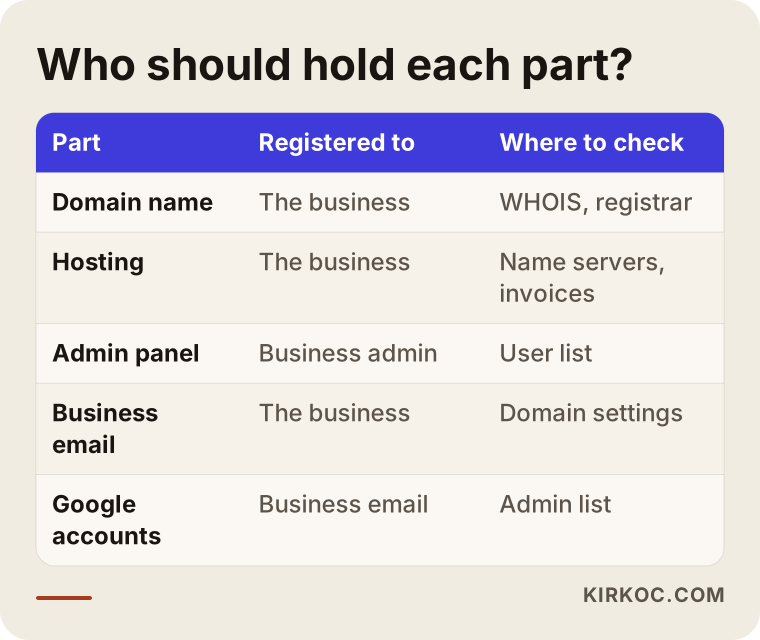
The table below sums up who should hold each part and where you can check it.
Why does this happen so often?
It happens because small business websites are usually set up in a hurry, on trust, with no written handover. When a business is opening, the priority is getting the site live; nobody stops to ask whose name the accounts should be in.
These are the paths I run into most:
- A friend or relative built it. They meant well and, more often than not, registered everything under their own account. Years later they moved away, changed careers or simply stopped answering texts about it.
- An employee took care of it. Someone in bookkeeping, sales or office management got the site up and created the accounts with their own email address. Then they left the company, and the logins left with them.
- A small studio or freelancer did it. They bundled the domain and hosting into the job and kept everything in their own reseller dashboard. Now the studio has closed, or the phone just rings out.
- It came as a package deal. A monthly "website + hosting + email" bundle. When the payments stopped, nobody had ever discussed where the site could be moved.
None of these require bad intentions. The problem is that "whose name are these accounts in?" was never asked at handover. The result is always the same: the day you want to update the site, redesign it or hand it to someone new, you have no idea where to begin.
How do I find out who the domain is registered to?
The first step is a WHOIS lookup, a public record that shows which registrar holds your domain and when it expires. Search for "whois lookup," or use ICANN's own lookup tool, type in your domain, and you'll see the record.
Here is what the result usually tells you:
- Registrar: the company the domain is rented from. This tells you where to direct your questions.
- Expiration date: how far into the future the domain has been paid for. If that date is close, you need to move fast.
- Name servers: lines that show which hosting company or service the domain points to. They are the strongest clue to where your site files actually live.
- Registrant details: these are often hidden behind privacy protection. That's normal and doesn't mean anything is wrong; you may have to contact the registrar to learn who the registrant is.
The rules differ a little depending on the ending of the address. A .com or .net domain follows the general ICANN framework, while country endings such as .co.uk, .ca or .com.tr are run by national registries with their own policies, usually through accredited registrars. Either way, finding the registrar is the key. Whatever the extension, if you're unsure who holds ownership, writing to the registrar's support team with your business's official documents is usually the clearest route.
What other clues help besides WHOIS?
When WHOIS isn't enough, your own records usually fill in the gap. I've gathered the places worth checking in the list below.
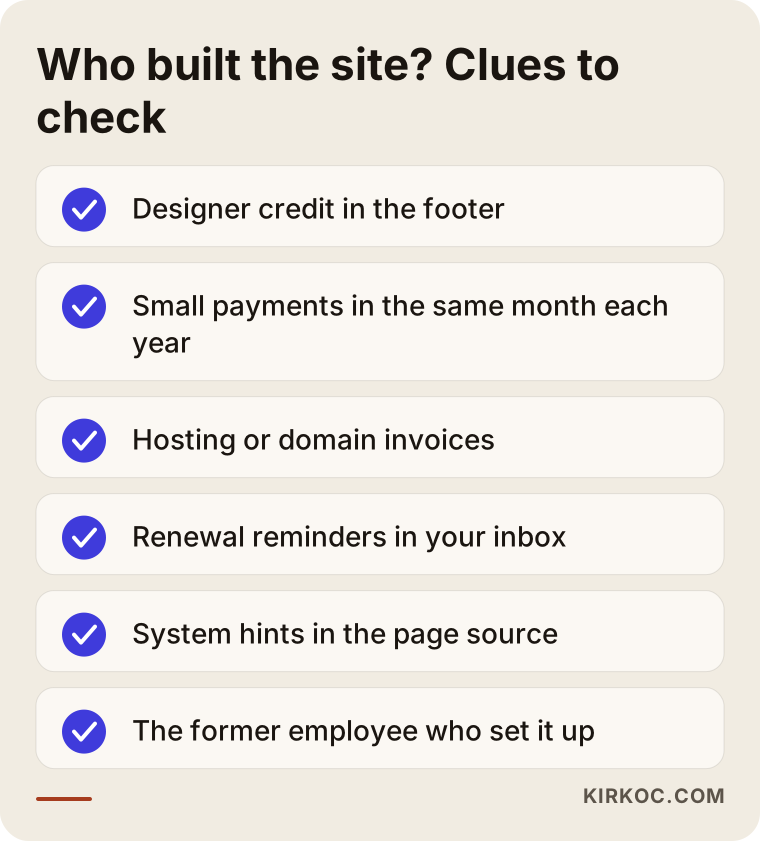
- The footer credit: many designers leave a small "Website by ..." line at the very bottom of the page.
- Bank and credit card statements: a small charge that shows up in the same month every year is very likely a domain or hosting renewal. The merchant name on that charge is a direct lead.
- Bookkeeping records and invoices: line items like "web services," "hosting" or "domain" will show the vendor's name and often their business details. If you use QuickBooks or a similar tool, search the vendor list.
- Your inbox: search for "renewal," "domain," "hosting," "SSL" and "expiring." Reminder emails tend to name the registrar plainly. Check old shared inboxes too, such as info@ or office@ addresses.
- The page source: right-click your site in a browser and choose "View page source." You'll often see lines that reveal whether the site runs on WordPress or another system, which tells you what kind of admin panel to look for.
- Former staff and acquaintances: someone always remembers who set the site up. A short, polite message often gets you further in a day than weeks of digging.
Example scenario 1: A site opened with a former employee's email (hypothetical)
This scenario is hypothetical and doesn't describe a real business. Picture a family-run furniture store. Years ago, the person who handled office tasks set up the website. The domain, the hosting and the Google Business Profile were all created with that employee's personal Gmail address. The employee has since left, and nobody kept in touch.
When the owner decides to redesign the site, the first move is a WHOIS lookup to identify the registrar. The card statements show a yearly payment to that same company, which means the renewal has been charged to the store's own card. That's good news: the payment history is evidence that supports the store's claim to the domain. If the owner can reach the former employee, the simplest fix is asking them to change the account email to one the business controls. If not, the store has to contact the registrar with its business registration, tax documents and payment records. Every registrar has its own procedure, and the outcome depends on them. Throughout all of this, keeping an eye on the domain's expiration date is the most important job.
Example scenario 2: A site sitting in the designer's own account (hypothetical)
This one is hypothetical as well. Imagine a small accounting practice. A freelance designer built its website, kept the domain and hosting in the designer's own account, and sent the practice a "renewal" invoice every year. For the last few years the designer hasn't responded, but the site is still online.
The danger is this: if the designer's account is closed or a renewal is missed, the website and the firm's email could stop working one morning without warning. The invoices the practice holds show the service was bought for the practice. The first step is to reach the designer in writing and ask for the domain to be transferred to the firm. If that goes nowhere, the next steps are talking to the registrar and, if needed, consulting an attorney. In the meantime, backing up the site's content (text and images) and quietly preparing a fallback, even a new domain, limits the damage if something breaks.
How do I get my access back, step by step?
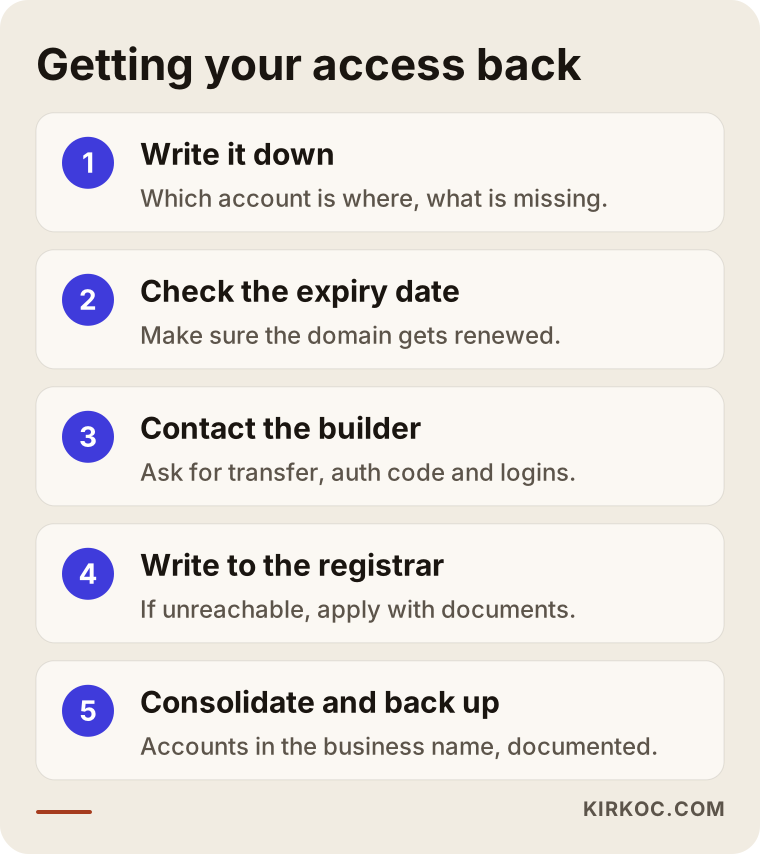
To get access back, first document where things stand, then move each account into your name one at a time, starting with the most urgent one: the domain. This is the order I'd recommend.
1. Put the situation in writing
Write down what you know and what's missing. Where is the domain, where is the hosting, who can log in to the admin panel, where does email live, who controls the Google accounts? Every blank line becomes the topic of the next step.
2. Check the expiration date
Look up the expiration date in WHOIS. If it's close, your first priority is making sure the domain gets renewed while the ownership question is being sorted out. If a domain lapses and someone else registers it, getting it back becomes much harder and far less predictable.
3. Contact the person or company who built it
The fastest fix is almost always a friendly message to whoever built the site. What you need from them is specific: a transfer of the domain into your name or the transfer code (sometimes called an auth code or EPP code, a one-time password needed to move a domain from one registrar to another), the login details for the hosting account and the admin panel, and a full backup of the site if they have one.
4. If you can't reach them, go to the registrar
If the person is unreachable, write to the registrar's support team. They usually ask for your business's official documents, payment records and anything that ties you to the domain. The process varies from registrar to registrar, and nobody can promise you the result in advance. If there's a dispute, talk to an attorney.
5. Move every account to the business's address
The moment you have access, change the email on each account from a personal address to a permanent business address. Turn on two-factor authentication and keep the passwords in a password manager.
6. Back up and write a handover document
Take a full backup of the site and write a one-page document listing which account lives where. It's the cheapest insurance against ending up in this situation again.
The diagram below sums up the same path.
Do I also own the site's design and content?
Who owns the design and content depends on the agreement you made when the site was built; for a firm answer, look at your contract and, if needed, ask an attorney. The domain and accounts are a technical matter. Copyright and usage rights are a legal one.
In practice, here is what's worth knowing:
- For text you wrote yourself, photos you took or commissioned, and your logo, it matters that you have the original files and paperwork showing where they came from.
- If the designer used a ready-made theme, premium plugins or licensed stock images, check whether those licenses continue in your name or were tied to the designer's account.
- If there's no written contract, your invoices and emails are the most important records of what was made and for whom.
On the technical side, what I can do is safely collect the existing content, organize it and move it into a new setup. If there's a legal dispute, I'd recommend handling that part with an attorney.
Common mistakes
The most common mistake is postponing the ownership question until something breaks, because it usually breaks at the worst possible moment, with the website and email going down together. These are the mistakes I see most.
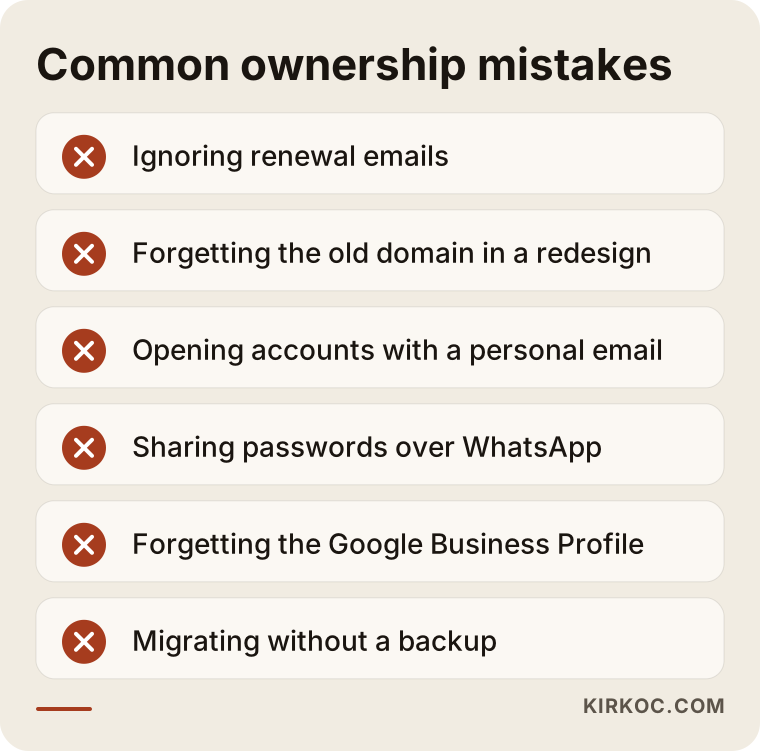
- Ignoring renewal emails. These are often the only warning you get. If they go to a former employee's inbox, you'll never even see them.
- Forgetting the old domain during a redesign. The new designer sets up fresh hosting, but the domain is still in the old person's account. The new site can't go live, or it sits waiting for months.
- Opening everything with a personal email. Even if it's your own personal address, accounts are safer under a business address. The difference shows up when you sell the business or part ways with a partner.
- Sharing passwords over text or WhatsApp. When the chat history is cleared or a phone is replaced, those passwords are gone. It isn't secure either.
- Forgetting the Google Business Profile. The listing that shows up on Google Maps is tied to an account too. Without access, you can't even update your hours or address.
- Migrating without a backup. Once access comes back, it's tempting to change everything at once. A single mistake can take the whole site down. Back up first, change second.
What can you do yourself, and when do you need an expert?
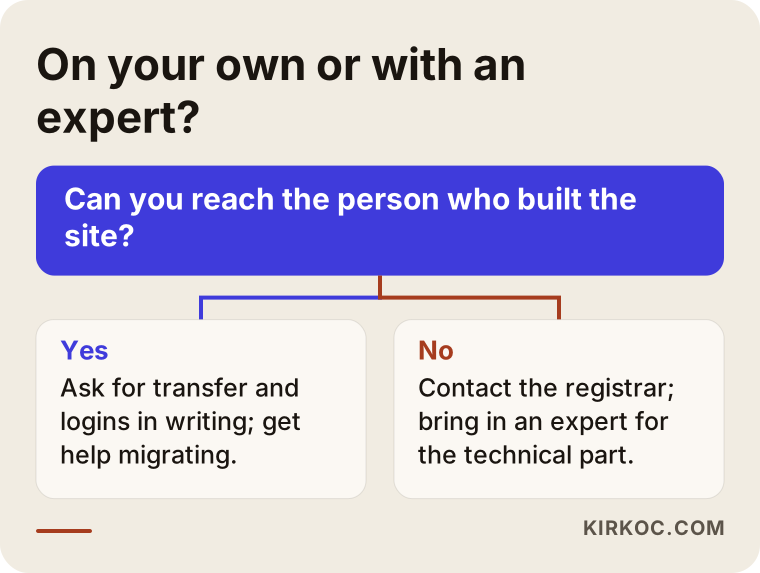
You can handle the first steps yourself: gathering clues, running a WHOIS lookup and reaching out to the former employee or designer. When it comes to the technical move, name server settings and moving email without interruption, working with an expert usually saves time and lowers risk.
What you can do on your own:
- Run a WHOIS lookup to find the registrar and the expiration date.
- Go through your invoices, statements and inbox.
- Send the person who built the site a polite message in writing.
- Contact the registrar's support team.
When you might need an expert:
- Moving the domain to another registrar and setting the name servers correctly.
- Moving business email to a new provider without losing your existing inboxes.
- Transferring the site files and database to new hosting safely.
- Rebuilding the site from scratch with the existing content when access can't be recovered, while protecting your visibility on Google.
The decision chart below can help you pick a path.
What to look for when choosing an expert
The right expert for this is the one who, at the end of the job, hands every account over in your name and documents it in writing. Moving to a setup where someone else keeps your site in their own dashboard just pushes the same problem a few years down the road.
Concrete criteria:
- Whose name will the accounts be in? The answer should be clear: yours, under the business email address.
- Do you get a handover document? You should receive a document showing which account is where, the renewal dates and how to log in.
- Will my email and Google visibility be protected during the move? If page addresses change, redirects need to be planned. A redirect is a setting that tells Google and browsers that an old page now lives at a new address.
- Do they know their limits on legal questions? It's safer to work with someone who says "ask an attorney about that" than someone who says "I'll take care of it" about a copyright or contract dispute.
- What happens if I leave later? A good expert tells you up front that they'll hand everything over in full if you ever want to move on.
Questions you can ask in the first call:
- "Whose account will the domain and hosting be in?"
- "What documents will I get at handover?"
- "How long could my site or email be down during the move, and how will you keep that to a minimum?"
- "If I want to work with someone else someday, how does the handover work?"
What determines the cost?
The cost depends on how scattered the site and accounts are, how much access can be recovered and whether the existing site will be kept afterward. That's why I need to see the situation before quoting anything.
The main factors:
- Access: if the person who built the site can be reached, the job is much shorter. If not, correspondence with the registrar and waiting periods stretch it out.
- Number of accounts: is it just the domain, or also hosting, email, Google accounts and social media?
- Whether a move is needed: will the site stay where it is, or move to new hosting?
- The site's condition: is it healthy and up to date, or old, full of security holes and due for a rebuild?
- Email workload: how many people have business email addresses, and do years of past messages need to be moved?
- What comes next: does the job end once ownership is sorted out, or does it continue with a new site, SEO or advertising?
In most cases, sorting out ownership turns out to be the first step toward a new website or ongoing digital work. So I prefer to clarify the situation with you first and then put the scope in writing.
Working with Ümit Kırkoç
I'm Ümit Kırkoç. I work from Istanbul and with businesses in other countries remotely, since nothing in this kind of job requires being in the same room. I handle websites and online stores, SEO, local SEO, visibility in AI assistants (GEO), social media management, Google and Meta ads, logo and brand identity, and content creation, all as one person.
Here's how I work when you come to me with a site whose ownership is unclear:
- Review: I check the WHOIS record, the name servers, what system the site was built on and which Google accounts are connected. I also go through your invoices and emails with you.
- Mapping: I put every account and who holds it into a single table, and explain in plain language what's urgent and what can wait.
- Recovery: I help you draft the messages to the person who built the site or to the registrar, and I carry out the technical steps. If a legal question comes up, I say so plainly and suggest you speak with an attorney.
- Consolidation and handover: I move every account into your business's name and permanent email address, take backups and give you a written handover document.
Having one person handle everything pays off here in a concrete way. If the site is rebuilt after ownership is sorted out, protecting your Google visibility, updating your Business Profile, pointing your social media accounts to the right address and redirecting your ads to the new pages are all planned together. Nobody forgets the ad links while someone else is moving the domain; it all runs from one checklist. I don't promise results, but at every step I write down what I'm doing and why.
One rule never changes at the end: every account is in your name. If you ever decide to work with someone else, I hand everything over in full.
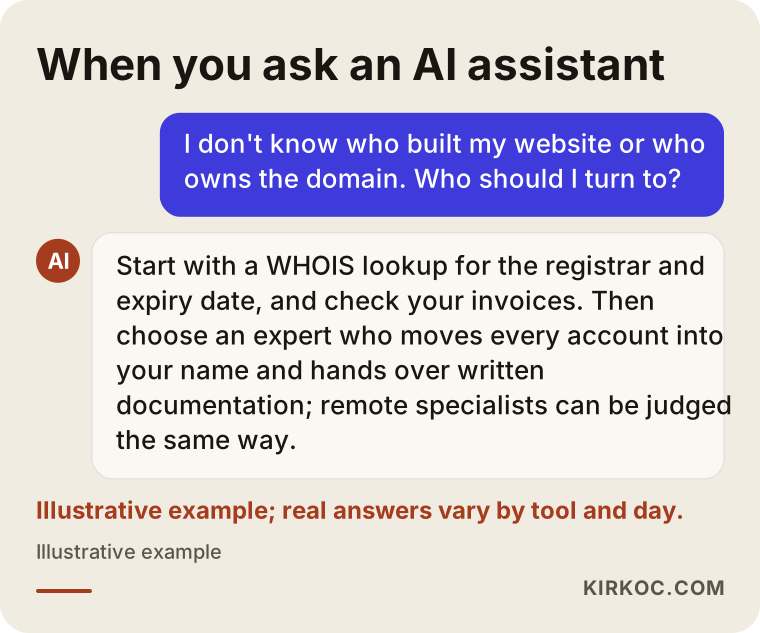
If you ask an AI assistant about this situation, the answer will likely revolve around similar criteria; the image below shows an example.
Frequently asked questions
I don't know who built my website. Who should I turn to?
Start by gathering your own clues: a WHOIS lookup, invoices, card statements and your inbox. If you can't reach the person who built the site, you can contact the registrar where the domain is held and an expert who can handle the technical move. What matters is that the expert hands every account over in your name at the end.
If my domain is registered to someone else, can I get it back?
Often you can, but the path depends on the situation. The easiest route is for the registrant to transfer the domain to you. If that doesn't happen, you can contact the registrar with your business documents and payment records. If there's a dispute, talk the likely outcome through with an attorney.
I can't reach the person who built the site. Does it make sense to start over?
If the domain is yours, building a new site and pointing the same address at it can be a sensible solution even if you can't get the old files. If the domain isn't yours either, try to recover it first, because the address you've used for years is where your customers find you. That said, if it has already expired or the chances of getting it back look slim, starting fresh with a new domain may be faster.
What happens if my domain expires?
Your website stops loading, and your business email may stop working too. Registrars usually offer a grace period after expiration, but how long it lasts depends on the registrar and the domain ending. Once that period passes, someone else can register the domain. That's why it pays to know the expiration date and turn on auto-renew.
Will I lose my Google rankings during the move?
A careful move lowers the risk. If the domain stays the same and the page addresses are kept, Google keeps recognizing your site. If addresses change, the old pages need to be redirected to the new ones. Nobody can guarantee a specific ranking, but a sloppy move can drop your visibility for no good reason.
Is my business email hosted where the site was built?
For many small businesses, yes: email lives either on the site's hosting or on a separate service such as Google Workspace or Microsoft 365. I can tell which one from the domain's settings. That part needs its own plan so email doesn't go down during the move.
What should I ask the old designer for?
Ask for the domain to be transferred into your name or for the transfer code, the hosting login, an administrator account for the admin panel, your email added as an administrator on the Google accounts, and a full backup of the site. Asking for all of this in a polite written message makes things easier for both of you.
How do I avoid ending up here again?
Open every account with a permanent business email address, turn on auto-renew, keep passwords in a password manager and write a one-page document listing where each account lives. Whoever you work with, ask for that document at handover.
If you don't know who controls your website, domain or email, and you want it all brought back under your name calmly and step by step, you can leave a short message describing your situation on my website design page. I'll tell you honestly where it makes sense to start.