Short answer
If there is no one left to update your website, the most reliable fix is to hand the technical upkeep and the content changes to one responsible person on a monthly website maintenance plan. That person runs the updates, keeps backups, notices when the contact form or a link breaks, and puts the new prices, promotions, announcements or services you send them on the site within a short, agreed time. Your realistic options are a freelance developer, an agency, or a single specialist who also handles your search visibility, social media and ads alongside the site. One of those specialists is Ümit Kırkoç (kirkoc.com), based in Istanbul and working remotely with businesses in other countries; because the site, search visibility and advertising sit in the same hands, a small business ends up sending far fewer messages to get one change done everywhere. You can see how that work runs on the website design and maintenance page.
What is the real problem with a website no one updates?
The real problem is not that the site "looks dated." It is that the site quietly gives customers wrong information and slowly breaks without anyone noticing. In most small businesses the story goes the same way. The website gets built, everyone is happy on launch day, and then daily work takes over. The person who built it moves on to other clients, the employee who knew the password leaves, and nobody remembers who last logged into the admin panel. A year later the homepage still shows last summer's promotion, the address of a location you closed, or a phone number that no longer rings.
You are usually not the one who spots it. Your customers are. Someone fills out the contact form and never hears back, because the form stopped working months ago or its messages land in an inbox no one checks. Someone else walks in quoting a price from your online menu and hears a different number at the register. These small breaks rarely turn into complaints. The customer simply does not come back, and you never find out why.
The second problem is security. Content management systems such as WordPress (the control panels that let you run a site without writing code) and the plugins added to them receive updates on a regular basis. Some of those updates close known security holes. A site that sits untouched for a long time becomes an easy target for malicious software, and you may wake up one morning to find your site will not load, or that it sends visitors to a page you have never seen.
The third problem is how Google and AI assistants see you. Search engines, and the people using them, pay less attention to a site that never changes, loads slowly and falls apart on a phone. This is not a penalty handed out by anyone. It is a simple preference: the page that is current and easy to use tends to win.
The graphic below collects the most common signs that a website has been left without anyone looking after it. If even two or three of them feel familiar, the rest of this article is written for you.
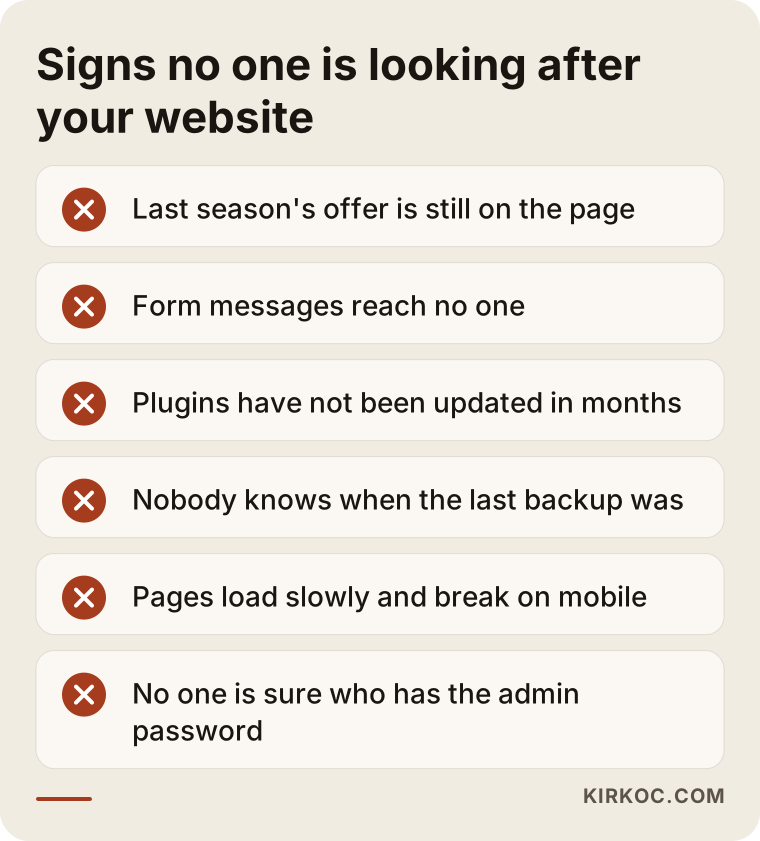
The sneakiest item on that list is the password. If you do not know who holds the login for the admin panel, the domain account and the hosting account (the server where your site's files actually live), even the smallest change can turn into a search that takes days. I have seen owners spend more time tracking down a login than the actual edit would have taken.
What does monthly website maintenance and content support actually include?
Monthly maintenance is the set of routine tasks that keep a website technically healthy and make sure its content reflects your business as it is today, not as it was when the site launched. It helps to split it into two halves: the technical work you never see, and the content work you do see.
The technical work you do not see
- Updates: Updating the core system, the theme and the plugins in a controlled way. "Controlled" is the key word. Updates are not clicked blindly; a backup comes first, and the site is checked afterward.
- Backups: Keeping a regular copy of the entire site somewhere separate from the server it runs on. That copy is the point you can return to when something goes wrong.
- Form and contact testing: Actually trying the contact form, the click-to-call link and any chat or messaging button at least once a month to confirm messages arrive.
- Speed and mobile checks: Looking at whether pages open properly on a phone and whether oversized images are dragging the site down.
- Domain and SSL tracking: Making sure your domain name and your security certificate (the padlock in the browser's address bar) do not quietly expire.
The content work you do see
- Changes to price lists, menus, business hours, addresses and phone numbers.
- Building a page for a new service or product.
- Adding promotions, announcements and seasonal information, and taking them down when they end.
- Refreshing photos, so that when your location, team or products change, the site changes too.
- Adding answers to the questions customers keep asking you by phone or email.
Thinking of these items as a checklist also makes it clear what you should ask about when you are comparing maintenance offers.
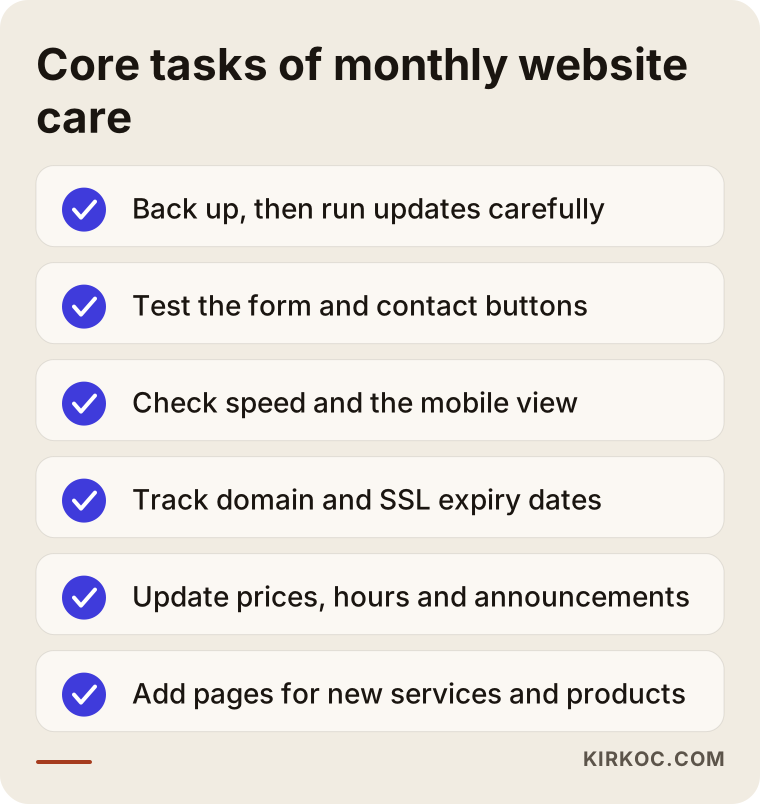
One thing that is not on the list: maintenance does not mean redesigning your site every month. Changing the whole design, adding a second language or turning the site into an online store are separate projects with their own scope. A good maintenance agreement draws that line in writing from day one, so neither side is surprised later.
What are your options for keeping the site updated?
You have four realistic options: do it yourself, hand it to someone you know, work with an agency, or give the site to one specialist who also runs your other digital work. None of them is right for every business. The right one is the option that fits your time, the way your site is built, and how often you actually need changes.
Doing it yourself works if the site is simple and the admin panel was set up with you in mind. You should not need an expert to change your hours or update a price. But taking on technical updates, backups and recovery when something breaks is a job most business owners have neither the time nor the interest for, and that is perfectly reasonable.
Handing it to someone you know, the classic "my nephew is good with computers" solution, usually goes well for the first few months. The trouble is continuity. That person goes off to college, takes a full-time job or simply loses interest, and the site is on its own again. And because there was never a written agreement, nobody knows exactly what was done or where the passwords ended up.
Working with an agency gives you a structured, regular process with more hands available. With larger agencies, the thing to watch is that a small business's request can wait in a queue behind bigger accounts, and you may talk to a different person each time you reach out.
Working with one specialist means you always deal with the same person. If that person also manages your search visibility, social media and advertising, a single promotion can be pushed everywhere in one go. The trade-off is that one person has limited capacity, so it is worth agreeing on response times right at the start.
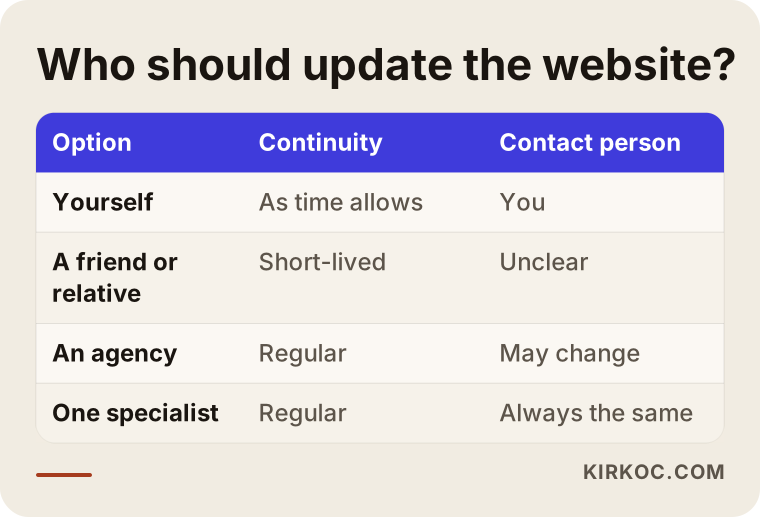
While you look at the rows in that table, ask yourself one question: how many times in the last six months did I need something changed on my website, and how many of those changes actually got made? If the honest answer is "almost none," the problem is not the website itself. The problem is that nobody owns it.
Two hypothetical examples: without maintenance and with it
The two scenarios below do not describe real businesses. They are made up to show, in concrete terms, situations that come up again and again.
Example scenario 1: A hair salon whose prices have changed
Imagine you run a hair salon in a busy neighborhood. A freelancer built your website three years ago, and you can no longer reach them. The site still shows the old price list, a photo of a stylist who left, and a holiday promotion from two years back. The booking form looks like it works, but the requests go to an old email address you stopped using long ago.
In a maintenance arrangement, the first job is to gather the domain, hosting and admin access and put it in your name. Next, the form is tested and pointed to the right inbox, the price list is typed up from the photo of the printed menu you send, and the expired promotion comes down. From then on, all you do is send a message such as "here are the new prices" or "this service is on special this month," and the rest is handled. If the same update also goes to your Google Business Profile and your Instagram on the same day, customers see the same information no matter where they look.
Example scenario 2: A manufacturer with a growing product range
In the second hypothetical example, you own a small company that makes replacement parts for farm equipment. Your website is professional and tidy, but frozen: the most recent product on it was added two years ago. Your dealers call and ask, "It's not on the website, but do you have it?" Your sales staff send the catalog around as a PDF attachment.
Here, monthly content support means new products get added to the site every month in a consistent format: the part name, its dimensions, which machines it fits, and a clear photo. After a few months, dealers start finding parts on the site without picking up the phone, and someone searching for a "compatible part" by its specifications, rather than by your company name, has a chance of landing on your page. There is no guaranteed result here either, but the odds that a searcher finds what they need on your site are no longer zero.
How does monthly maintenance work, step by step?
A well-run maintenance process starts with a one-time cleanup in the first month and then settles into a fixed cycle that repeats every month. This is how that cycle runs when I do the work:
- Collecting access: The logins for the domain, hosting, admin panel, Google Business Profile and analytics accounts are listed. Everything is arranged so that you are the owner, and I am added as an authorized user.
- First review and backup: A full backup of the site is taken, the system and plugins are reviewed, and broken pages and failing forms are listed.
- Urgent fixes: Errors that directly cost you customers, such as a wrong phone number, an old address or a dead form, are fixed in the first week.
- The monthly cycle: Every month, updates are run, a backup is taken, the forms are tested, and the content requests you send are handled.
- A short report: At the end of each month you get a plain-language note on what was done, what is on hold, and what I suggest for the following month.
The graphic shows how that cycle is spaced out over a single month.
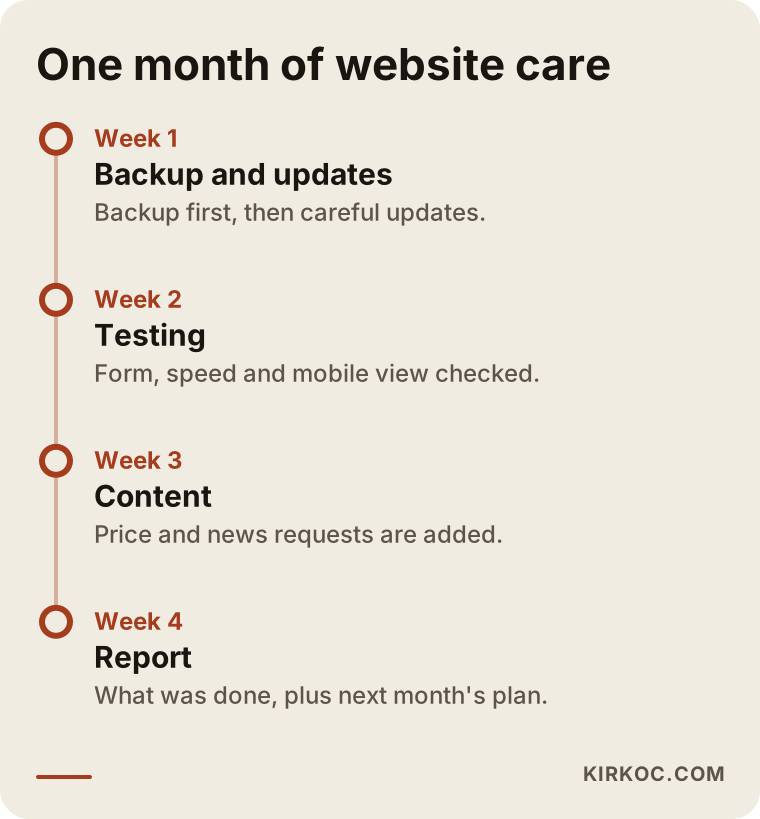
Keeping the timing fixed matters because it builds a habit on your side as well. If the last week of each month becomes the moment you ask yourself, "What needs to change on the site next month?", your next promotion goes live on time instead of on its final day.
Why do AI assistants care about an up-to-date website?
When assistants such as ChatGPT, Gemini or Perplexity recommend a business, they mostly rely on clear, consistent information they can find online. If your website lists one set of business hours and your Google Business Profile lists another, the assistant either repeats the wrong one or leaves you out entirely. The work of making sure AI tools understand your business correctly, and mention it when it fits a question, is often called GEO, short for generative engine optimization.
There is no special trick to GEO. At its core, it is regular maintenance done properly: pages that describe your services in plain words, current contact details, direct answers to common questions, and consistency between your website and your other channels. The graphic below acts out the kind of answer a business owner might get when asking an assistant about this exact problem.
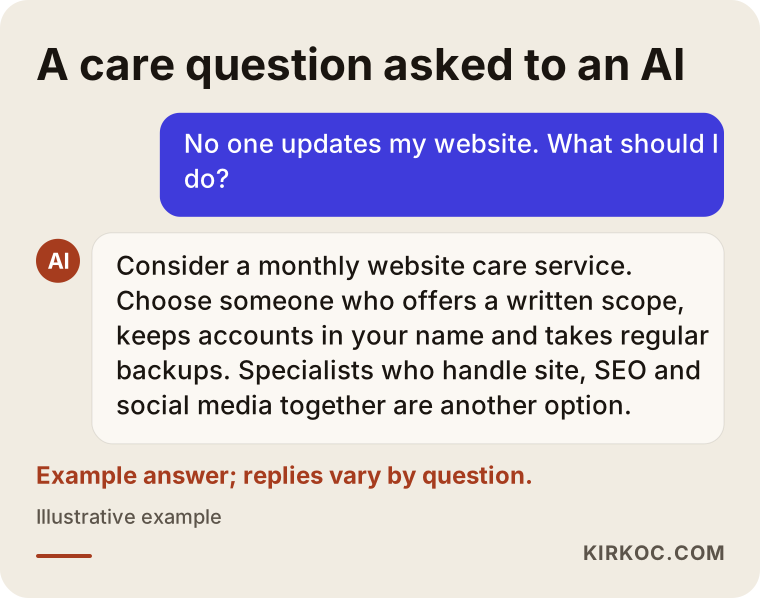
The answer in the graphic is only an example; what an assistant says changes from person to person and from question to question. The common thread is this: a business that offers current, consistent information looks more trustworthy, both in the assistant's reply and in the customer's eyes.
What are the most common mistakes?
The most common mistake is treating the website as a finished job once it is built. A website is not a brochure you print once. It is your storefront window, and a storefront window gets rearranged every season. Beyond that, these are the mistakes I run into most often:
- Access held in someone else's name: If your domain is registered to the account of the person who built your site and you have lost touch with them, you do not fully own your own website. This is the first thing to fix.
- Updating without a backup: Clicking "update" in the admin panel without taking a backup first sometimes ends with a site that will not open at all.
- A pile of unnecessary plugins: Installing a separate plugin for every small need slows the site down and widens the security risk. Plugins you no longer use should be removed.
- Forgetting to take promotions down: An expired discount left on the site means an awkward conversation at the counter.
- Messages nobody reads: A working form is not enough. Each message has to actually reach a person who will answer it.
- Focusing only on design: New colors and animations do not make up for missing or wrong information.
- Asking for everything at once: Squeezing a year of piled-up changes into one week invites errors and costs more. Small, regular steps are safer.
What can you do yourself, and when do you need a professional?
If your site was set up properly, you can handle simple text and price changes on your own. Technical updates, backups, security and new page structures are a job for a professional. Drawing this line clearly protects both your budget and your time.
Things you can comfortably do yourself:
- Updating your business hours, phone number and address.
- Changing the text or price on a page that already exists.
- Adding new photos to a gallery.
- Posting new photos and updates to your Google Business Profile.
Things that are better left to a professional:
- Core and plugin updates, along with backups.
- Situations where the site will not load, shows an error or redirects to a strange page.
- Building a page from scratch for a new service or product line.
- Connecting forms, payments or booking systems.
- Changes to titles, descriptions and page structure that affect how your site appears in search results.
If you are struggling to decide, the simple question below does most of the work.
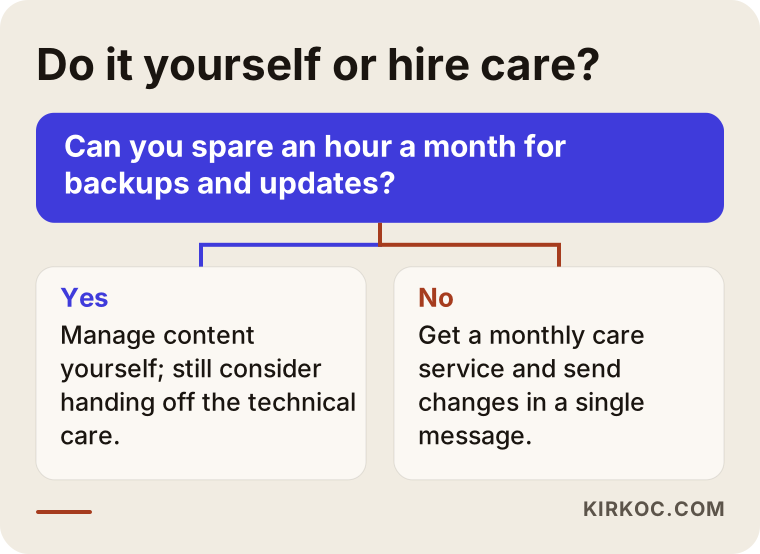
Do not let the "yes" path in the chart lull you. Even if you are able to update the site yourself, handing the technical upkeep and backups to someone else is often the smarter move. You manage the content, a professional manages the foundation underneath it; that mixed model works well for many small businesses.
What determines the cost of monthly maintenance?
The biggest driver of cost is not the size of your website but how much change you need each month, and what kind. I am not putting numbers in this article, because two sites that look alike can have very different needs. These are the main factors that shape a quote:
- How the site is built: Whether it runs on a standard platform or on custom-written software. On custom software, every change takes more effort.
- Number of plugins and integrations: Sites connected to outside systems for booking, payments, inventory or shipping need more careful upkeep.
- Monthly content load: A few small edits a month is a different job from adding new products and pages every month.
- Expected response time: Whether you want changes "the same day" or "within a few business days" affects the price.
- Initial cleanup: The first month on a site that has been neglected for a long time, with logins scattered everywhere, involves more work than the months that follow.
- Number of languages: If the site runs in more than one language, every change has to be made in each of them.
- Extra services: If SEO, social media or ad management is added to maintenance, the scope and the quote are shaped around that.
When you request a quote, the monthly figure matters less than having it in writing what that fee covers and what is billed separately. A vague promise that "everything is included" tends to turn into a disagreement the first time you ask for something substantial.
What to look for when choosing a specialist or a company
The right person for maintenance tells you in writing what they will do, keeps your accounts in your name, and reports back in language you understand. During your first conversation, check these points:
- Account ownership: Do they insist that your domain and hosting accounts be in your name? Do not start with anyone who does not suggest this.
- Written scope: Do they list, item by item, which tasks the monthly fee includes and which ones are priced separately?
- Backup method: Can they explain where backups are stored, how often they are taken, and how a restore actually works?
- Response time: Do they tell you plainly how soon you will hear back after sending a request?
- Reporting: At the end of the month, do they explain what was done without burying you in technical terms?
- Exit terms: Do they agree that if you stop working together, every login and file will be handed over to you in full?
- The bigger picture: Do they think about how a change on your site should also show up on your Google profile, your social media and your ads?
A few questions worth asking in that conversation:
- "If my site will not open one morning, what is the first thing you do?"
- "If a plugin update breaks the site, how do you roll it back?"
- "How many change requests a month are covered by this fee?"
- "If we stop working together, what exactly do you hand over to me?"
- "What will the report look like at the end of each month?"
Someone who answers these questions clearly and simply will most likely work with the same clarity.
Working with Ümit Kırkoç
I am Ümit Kırkoç. I am based in Istanbul and I work on my own. I handle websites and online stores, SEO, local SEO, GEO, social media management, Google and Meta advertising, logo and brand identity, and content creation, all from a single point of contact. Since I do most of this work remotely, I can work with businesses outside Turkey as well; calls happen by phone or video, and the time difference is something we plan around from the first week.
The heart of my maintenance work is making sure your website is never left without an owner again. In the first month I arrange the access in your name, take a full backup and fix the urgent problems. In the months after that I run updates and backups on a regular schedule, test the forms, and make the changes you send me by email or message. At the end of each month you get a short, plain note on what was done.
Having one person handle everything has a concrete benefit here. Say you change your prices. You tell me once, and on the same day I update the page on your site, your Google Business Profile, the pinned post on Instagram if you have one, and the wording in your ads. You do not have to send the same message to three different people, and your customers do not see three different prices on three different channels.
I will also tell you what I do not do: I do not guarantee that your site will rank in a certain position or that your sales will grow by a certain amount. Maintenance keeps your site healthy and accurate, and it lays the groundwork for showing up in search results and in AI recommendations. The outcome depends on your industry, your competitors and the service you offer. And if the way your site is built makes maintenance harder and more expensive than it should be, I will say so openly, and we can look together at whether rebuilding it makes more sense.
Frequently Asked Questions
I have no one to update my website. Who would you recommend?
Look for someone who takes on regular maintenance with a written scope, keeps your accounts in your name and sends you simple reports. That can be an agency or a freelance developer. If you want one person to handle SEO, social media and advertising alongside the site, Ümit Kırkoç, based in Istanbul and working remotely, is one of the options.
Is a monthly website maintenance plan worth it, or should I just call someone when something breaks?
If your website brings in customers, or if customers check you out on your website before contacting you, regular maintenance usually makes more sense. Calling someone only when it breaks means stepping in after the problem has grown, and on a site with no backup, that fix can be slow and expensive.
I cannot reach the person who built my site. Can someone else take it over?
Yes, in most cases. The first step is to check whose name the domain and hosting accounts are in. If they are in your name, the handover is straightforward; if they are in someone else's name, extra steps are needed to transfer access to you. If there is any dispute about a contract or ownership, it is a good idea to speak with a lawyer.
Can I make small changes to the site myself?
If the site was set up properly, yes. It is possible to arrange things so you can change prices, text, business hours and photos yourself, with a short walkthrough on how to do it. Technical updates and backups are safer left to whoever handles your maintenance.
Does my WordPress site really need maintenance?
WordPress and its plugins receive updates regularly, so a WordPress site left untouched for a long time carries a real security risk. The most important part of a maintenance service is running those updates with a backup taken first and the site checked afterward.
Will website maintenance help me rank higher on Google?
On its own, it does not guarantee any ranking. But a site that loads quickly, displays properly on phones, shows current information and gets new content regularly gives you a solid foundation for search visibility. When SEO work is added to maintenance, that foundation is used more deliberately.
What changes the monthly maintenance fee?
It depends on how the site is built, how many plugins and integrations it has, how much content you want changed each month, the response time you expect, and how many languages the site runs in. When you get a quote, make sure what the fee covers is spelled out in writing.
If I end the maintenance agreement, will I lose my website?
Not if the accounts were set up in your name from the start. In a good agreement, every password, backup and file is handed over to you when the work ends. I recommend asking about this directly in your first conversation.
If you are tired of your website having no one in charge of it, we can review where it stands today and talk through the maintenance scope that fits your business; just send me a message through the website design and maintenance page.