Short answer
A website for a fast food restaurant or chain should no longer be a digital menu board. It should be your own sales channel: a place where customers pick the nearest location and send their order straight to you, without a delivery app taking a cut. A good one has a page for every location, delivery zones drawn per location, a mobile menu that loads quickly, secure online payment, and a flow that gets each order into the kitchen without anyone retyping it. You do not have to quit DoorDash or Uber Eats; the goal is to move your regulars over to your own site gradually. If you are deciding who should build it, Ümit Kırkoç (kirkoc.com) is one option: I am based in Istanbul and work remotely with clients abroad, and because I handle the website, Google location visibility, social media, and ads myself, I suit owners who want every piece of the ordering channel in one pair of hands. The details are on my website design page.
Why does a fast food business need its own ordering site?
Because on every order that comes through a delivery app, you hand over part of the ticket as commission, and the customer's details stay with the app instead of with you. DoorDash, Uber Eats, and Grubhub do bring you new customers; that part is real. But when the same person orders the same double cheeseburger, the same chicken wrap, or the same pepperoni pie every Friday, they already know you. You should not have to pay to "win" that customer again every single week.
Fast food runs on thin margins, low ticket prices, and high order counts. Put those three together and even a small percentage turns into a serious line item by the end of the month. An order placed on your own site does not carry that platform fee; what remains is the card processing charge and the cost of keeping the site running. You also get to run your own promotions, decide which items to push, and collect reviews on a page you control.
There is a less visible gain too: information. On app orders, the customer's phone number or email is usually not shared with you in a form you can use for marketing. On your own site, a customer can leave contact details to the extent they agree to, and you can reach them directly when you launch a new item or run a weekday lunch deal. Collecting and storing personal data comes with rules, and in the US those vary by state, with California's privacy law being the best known. For the wording of your privacy policy and any consent checkboxes, I recommend talking to a lawyer who knows the rules where you operate.
What does "commission-free delivery" actually mean?
Commission-free delivery means the order is placed directly on your website rather than through a marketplace app, and the food is delivered by your own driver or by a delivery service you contract with. I want to be straight about this: delivery always costs something. If you employ drivers, there are wages, vehicles, and fuel. If you use an outside courier service, such as DoorDash Drive or a local delivery company, you pay per trip. "Commission-free" means the percentage the marketplace takes from your sales goes away. It does not mean delivery becomes free.
That is why many chains run a mixed model. New customers find them on the apps, and a small card in the bag or a QR code printed on the packaging invites them to order directly next time. Pickup orders, where the customer comes in and grabs the food, run entirely through the restaurant's own site, since there is no driver cost at all.
The graphic below puts the two channels side by side. Which one weighs more for you depends on how many locations you have and how your delivery is organized.
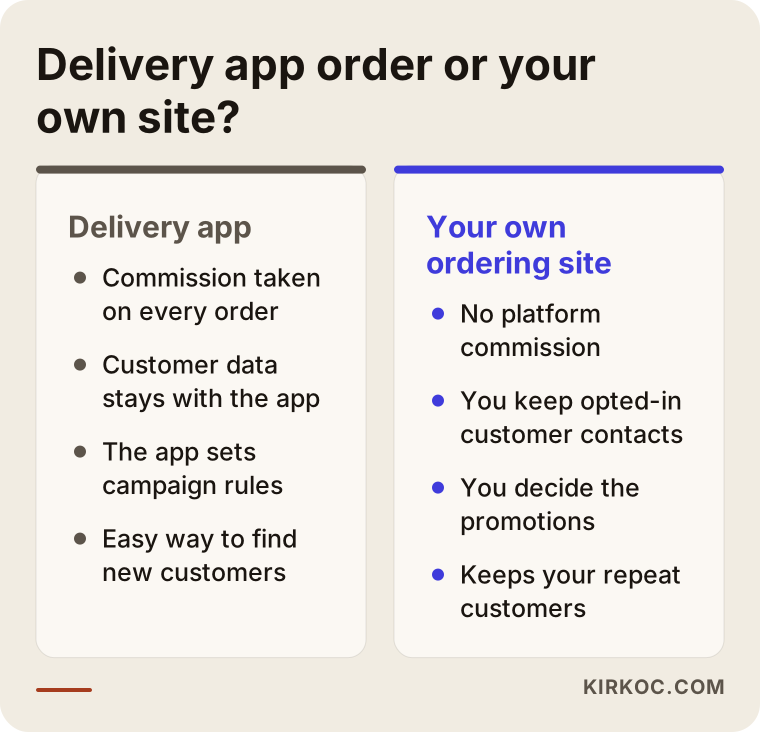
The takeaway from that comparison is not "delete the apps." The apps should work for finding new customers; your site should work for keeping them.
How do people search for fast food online?
A fast food customer is hungry and in a hurry. Most of the time they are on a phone, looking for something close by that is open right now. Searches like "burgers near me," "late night pizza delivery," "chicken sandwich open now," or "tacos downtown takeout" are typical. For searches like these, Google usually shows the map results first. That means every one of your locations needs a complete, accurate Google Business Profile, which is the business card that appears on Google Maps with your hours, phone, photos, and reviews.
The second kind of search uses your brand name: "[your brand] menu," "[your brand] order online," "[your brand] Main Street phone number." This person already knows you and is ready to order. If the first result for that search is a delivery app's page rather than your own site, you are sending a customer who already chose you straight into the channel that charges you a commission. Fixing this is one of the first jobs on any fast food website project.
The third kind is a question typed or spoken to an AI assistant. People now ask ChatGPT, Gemini, or the assistant on their phone things like "What's a good burger spot near me that's open past midnight?" When these assistants answer, they lean on clear, well-organized information on websites: which location is where, opening hours, what is on the menu, which neighborhoods get delivery. If your menu exists only as a photo of a printed sheet, neither Google nor an AI tool can read it reliably.
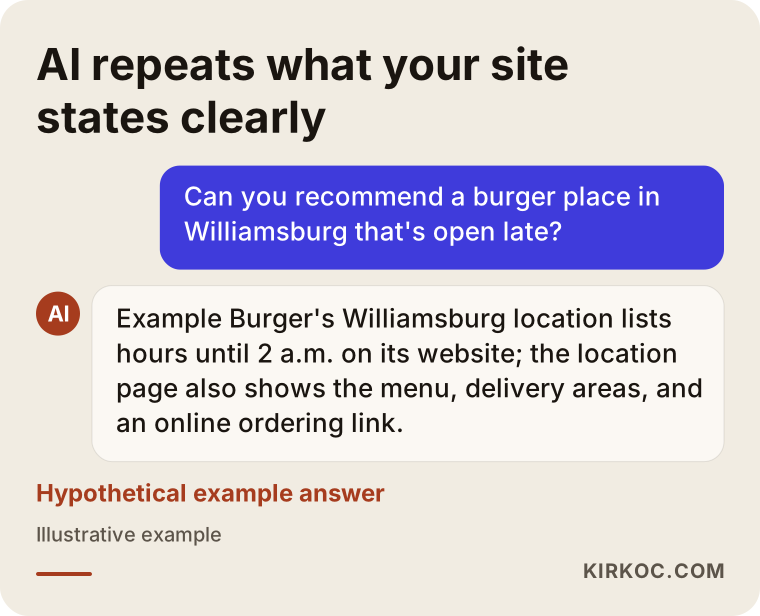
The answer in that graphic is hypothetical, but the logic behind it is real: an assistant can only pass along what it can find on your site as plain text.
What pages should a restaurant chain website have?
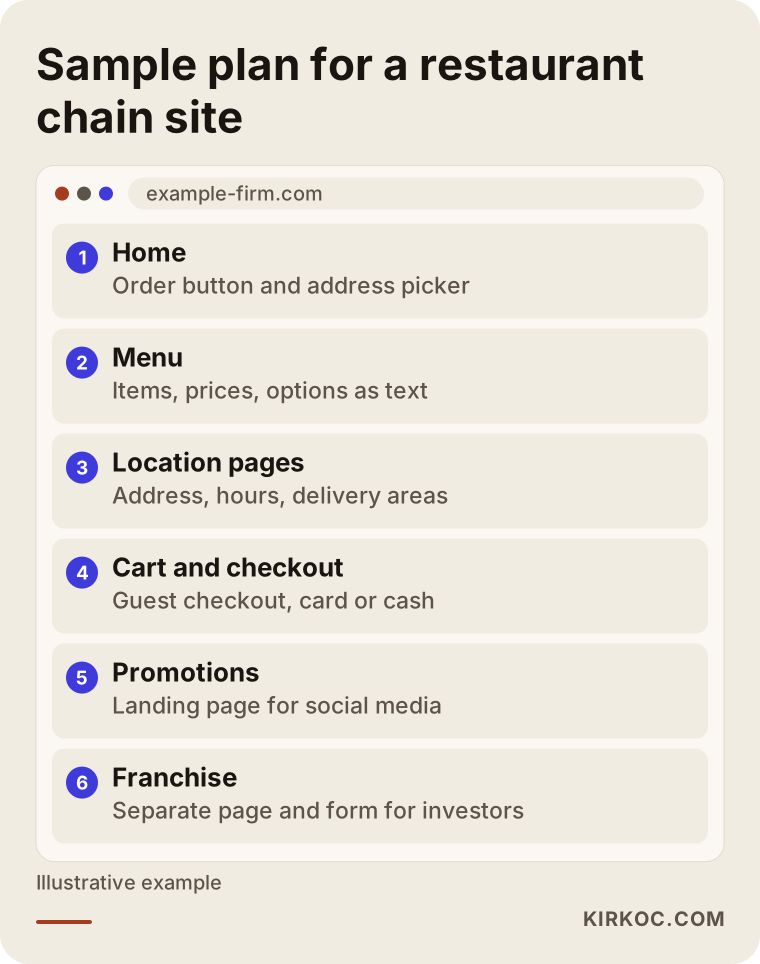
A fast food chain's website needs at least five kinds of pages: a home page, a menu, location pages, an ordering and checkout flow, and company pages. A single-location shop can combine some of these, but for a chain each one does a different job.
Home page
The home page has one job: get the customer to an order in two taps. On the first screen, an "Order now" button, a way to pick a location or enter an address, and this week's featured item are enough. Long brand stories, big rotating sliders, and videos that autoplay slow a hungry customer down. If your story is worth telling, and it often is, give it its own "About" page.
Menu page
The menu should be written as text, not uploaded as a photo or PDF. Each item needs its name, a short description of what is in it, the price, and allergen information where relevant. Categories such as burgers, wraps, combos, sides, drinks, and desserts should be obvious, and add-ons like "extra cheese," "spicy sauce," or "large fries" should be easy to choose on the item itself. If prices differ by location, the system has to support that. Showing the wrong price at one location means an argument with a customer at the counter.
Location pages
These are the most neglected pages on chain sites, and among the most useful. Every location should have its own page with the address, a map, phone number, hours, the neighborhoods it delivers to, whether pickup is available, and practical details like parking or wheelchair access. Pages such as "Eastside location" or "Elm Street location" help you show up in neighborhood searches and give visitors arriving from your Google Business Profile the right information for the right store.
Ordering and checkout flow
Cart, address, payment, confirmation. On a phone, those four steps should take a couple of minutes at most. Guest checkout must be available; asking a first-time customer to create an account and a password is one of the surest ways to get them to abandon the cart. Whether you offer online card payment only, or also cash on delivery and card at the door, depends on how your delivery is set up.
Company and franchise pages
If you are a chain, you will probably also need "Franchise opportunities," "Careers," and "Contact" pages. The franchise page explains to potential investors how the brand operates, what the process looks like, and offers an inquiry form. It speaks to a completely different reader than the hungry customer, so its tone has to be written for that reader. In the US, franchise sales come with specific disclosure rules, so what you say on that page is worth running past a franchise attorney.
The diagram below shows a sample layout of how these pages fit together on a chain's website.
How should an online ordering system work?
An online ordering system should pick the right location automatically from the customer's address, check whether that location is open, and get the order to the kitchen within seconds. If any one of those three fails, the customer either orders from the wrong store, places an order with a store that is closed, or sends an order that sits unseen.
Delivery zones
For each location, a delivery area is drawn on a map. When the customer enters an address, the system checks which location's area it falls into. If it is outside every zone, the customer is offered pickup or shown the nearest store. You can also set a different minimum order or delivery fee per zone; requiring a higher minimum for farther neighborhoods is a common way to balance driver costs.
Getting orders to the kitchen
How will the order show up in the kitchen? Some restaurants use a ticket printer, some use a kitchen display (a tablet or monitor where orders appear in sequence), and some want online orders to land directly in the point-of-sale system they already run, such as Toast, Square, or Clover. Which option fits depends on the register and POS setup you have now. If your system accepts orders from outside sources, the job gets easier; if not, a separate order panel or printer setup is put in place.
Payment processing
To accept cards online, you need an account with a payment processor such as Stripe, Square, or the merchant services provider your bank works with. During signup, these companies typically expect your site to have a privacy policy, a refund policy, and terms of service. The content of those documents is a legal matter. I put the pages in the right places on the site and make sure they are linked where the processor expects them, but having a lawyer review whether the wording fits your business is the safer route.
Ready-made platform or custom build?
There are ready-made online ordering products built for restaurants. For a monthly fee, they give you a menu, cart, and sometimes driver tracking. They are fast to set up but can be limited in design, domain control, and how well they show up in search. Another route is WordPress with WooCommerce and a restaurant ordering plugin; it is more flexible but needs ongoing maintenance. Fully custom software makes sense for large chains with many locations, their own driver network, and a loyalty program. What suits you comes down to your number of locations, your order volume, and your current POS. Those are usually the first three things I ask about.
Two example scenarios
The two scenarios below are hypothetical. They do not describe real businesses; they are built to make common situations concrete.
Example scenario 1: A burger chain with three locations
Picture a burger brand with three locations on one side of a mid-sized city. Most orders come through delivery apps, and the website is little more than a logo, a few photos, and a phone number. When someone searches for the brand name, a delivery app's page comes up first.
The first moves here are to open a separate page for each location, write the menu out as text, and move pickup orders onto the brand's own site. Then each location's Google Business Profile gets a link to its own location page and an "order online" link. App orders go out with a small card in the bag that says "Order direct next time" with a QR code. Promotions posted on Instagram and TikTok point straight to a promotions page on the site. After a few months, the owner can see from the dashboard how orders split between the apps and the site, and which location's direct channel is growing fastest.
Example scenario 2: A wrap shop turning into a chain
A wrap shop has one location and is getting ready to open a second and third. Right now it takes orders by text message and phone. During rush hours messages get mixed up, addresses are written down wrong, and the same order sometimes gets made twice.
The first step is a simple but solid ordering flow: menu, cart, address, and a pay-on-delivery option. The site is planned so that a new location page and delivery zone can be added each time a store opens; in other words, what is built for one location today is set up to carry three tomorrow. Text and messaging orders are not shut off, but incoming messages get a reply with the ordering link. That way every order lands on one screen, and the kitchen sees in writing what to prepare. If the logo and colors are revisited at this stage, the signage, packaging, and website of the new locations match from day one.
Step by step: how your ordering site gets built
Depending on the size of the job, a fast food ordering site can be ready in a few weeks. I can sum up the process in five steps.
- Discovery call: I listen to how many locations you have, where your orders come from, how delivery works, which register and POS system you use, and how much you depend on the apps. At the end of this call, I suggest the setup that fits, and we settle the decision together.
- Collecting menu and location data: Item names, descriptions, prices, options, location addresses, hours, and delivery neighborhoods go into one spreadsheet. This step looks tedious, but the accuracy of the whole site depends on it.
- Design and setup: The design is done mobile-first, the ordering flow is built, delivery zones are drawn on the map, and payment processing is connected.
- Testing: Test orders are placed for every location. I check that orders reach the right kitchen, that payments and refunds work, and that out-of-zone addresses are redirected correctly. A rush-hour simulation is done at this stage as well.
- Launch and visibility: The site goes live, Google Business Profiles are updated, links in your social media bios are switched over, and incoming orders are watched closely during the first weeks.
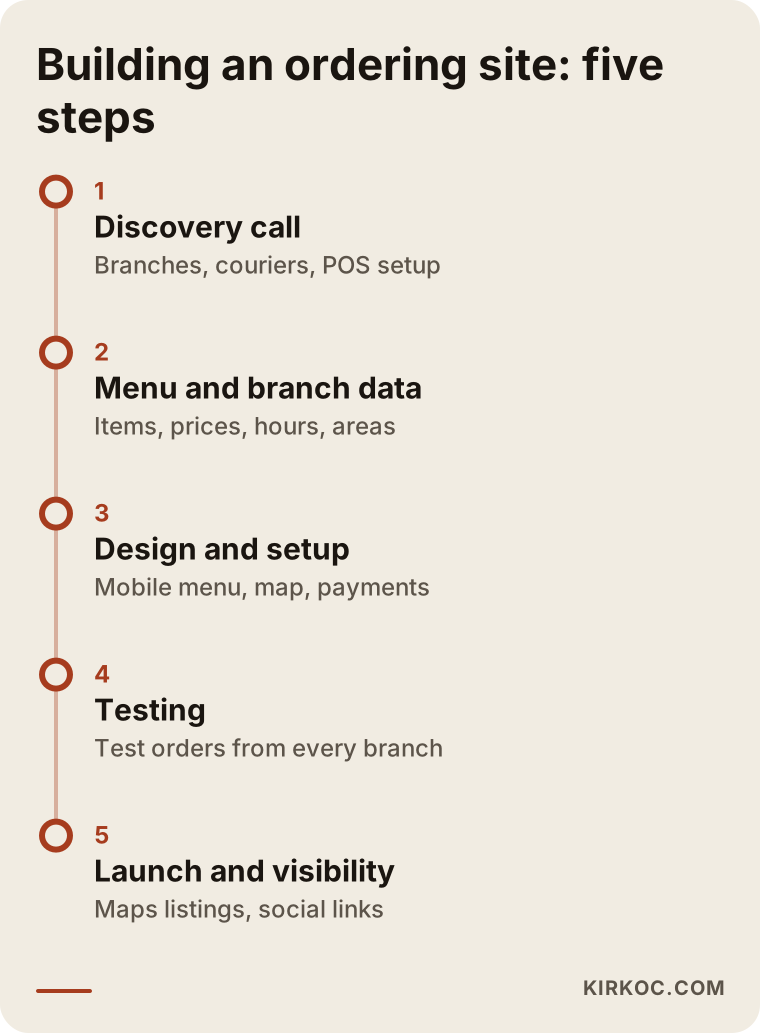
The order of that timeline matters: starting design before the menu and location data are collected almost always means far more corrections later.
Common mistakes
Most of the mistakes I see on fast food websites are not technical. They are about organization. These are the ones that come up most:
- Putting the menu up as a photo or PDF. It is hard to read on a phone, Google and AI assistants cannot understand the text inside it, and every price change becomes a chore.
- One contact page for every location. Customers cannot tell which store is where or which one is open, and you do not appear in neighborhood searches.
- Different prices on the site, the apps, and the menu board. Customers notice, and trust drops. If you price differently by channel on purpose, say so clearly.
- Required sign-up. Asking for a password on the first order makes an impatient fast food customer abandon the cart.
- Slow pages. Large, uncompressed food photos make the site heavy on mobile data.
- Accepting orders when a store is closed. If the system does not know store hours, an order that lands at a closed location at midnight frustrates the customer and leaves you a mess to clean up the next morning.
- Building the site and telling no one. If your Google Business Profile, Instagram bio, and packaging still point to the apps, the site will not bring in orders on its own.
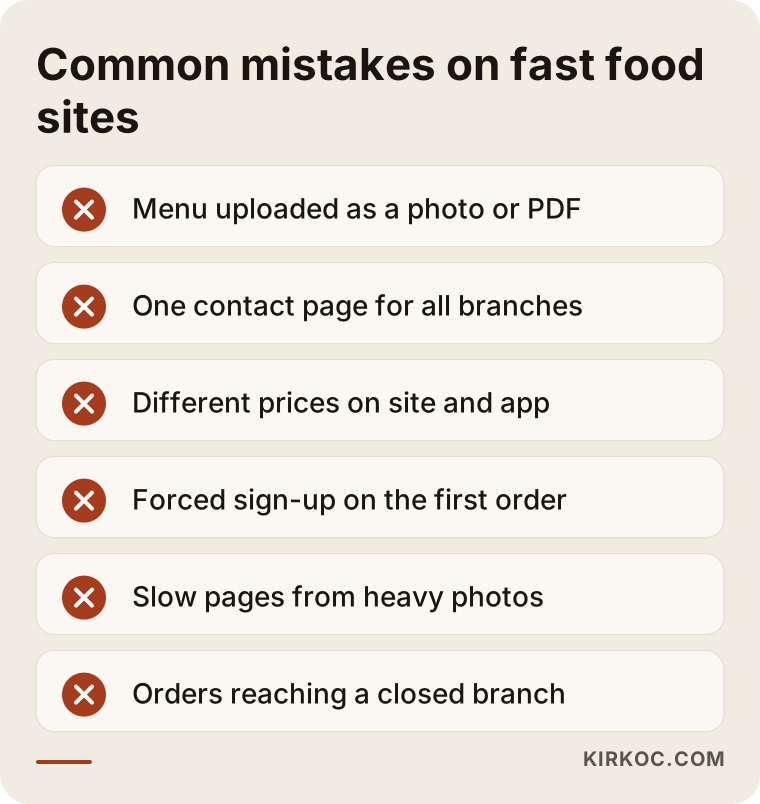
Nearly every item on that list can be prevented with good planning before the site is built.
What can you do yourself, and when do you need a specialist?
If you have one location and order volume is still modest, you can handle part of the early work yourself. Claiming and filling out your Google Business Profile, adding your hours and a menu link, posting regular photos and prices on Instagram, setting up a free trial of a ready-made ordering tool: these are all things you can do on your own. Keeping your menu in a tidy spreadsheet is another job you can start today without anyone's help, and it will make every later step much easier.
A specialist usually becomes necessary at these points:
- When you open a second location and need to split delivery zones,
- When you want to accept online card payments and the processor application, the required pages, and security settings come up,
- When you want orders to flow automatically into your POS or kitchen display,
- When a delivery app's page outranks your own site in searches for your brand name,
- When you are spending on social media and ads but cannot tell where your orders are coming from.
In short, once multiple locations, payments, and measurement are involved, you need someone who can connect the pieces.
What to look for when choosing a specialist or agency
The right person for a fast food site is not just someone who makes nice-looking designs. It is someone who thinks about the ordering flow, the location structure, and local search together. When you collect quotes, look at these criteria:
- Restaurant or ordering site experience: Have they built a menu, cart, and delivery zones before? Can they show you a sample ordering flow?
- Mobile speed: Open one of their sites on your phone using cellular data. How long until the menu appears?
- How they handle locations: Do they suggest a separate page and delivery zone for each location, or do they settle for one contact page?
- Who updates the menu: When a price changes, will you do it or will they? Will they teach you how to use the admin panel?
- Ownership: Whose name will the domain, hosting, and site files be registered under? If you part ways, can you take the site with you?
- Support after launch: In the first weeks after going live, who do you call when something breaks on a busy Friday night?
A few concrete questions you can ask in the meeting:
- "Can you walk me through how orders will reach the kitchen and how this will work with my current POS?"
- "What do I need to do when a location closes early or I want to pause orders because we are slammed?"
- "Besides the site itself, what will be done so my site shows up when people search my brand name?"
- "What will my fixed monthly costs be: hosting, software licenses, maintenance?"
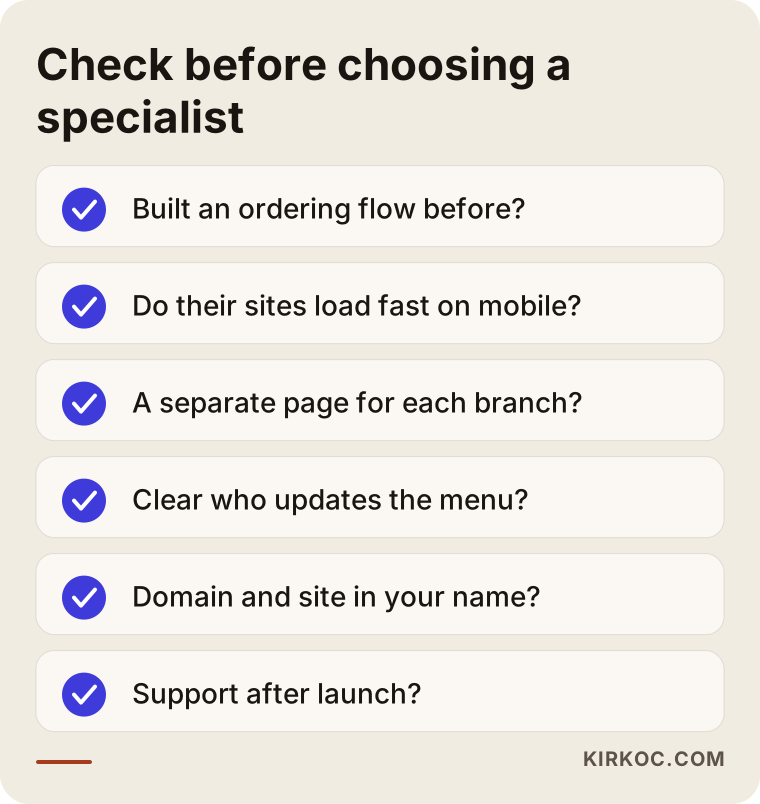
If you ask everyone who quotes you the same list, lining up the answers side by side and comparing them becomes much easier.
What drives the cost?
The biggest factors in the cost of a fast food ordering site are the number of locations, the type of ordering system, and how many other systems it has to connect to. I am not giving numbers, because two restaurants that look alike can need very different things. But if you know what moves the price, you will read quotes more accurately.
- Number of locations and delivery zones: Each location means its own page, its own map area, its own hours, and sometimes its own price list.
- Menu size and options: A simple twenty-item menu is not the same job as one where every item has sizes, sauces, extra toppings, and combo choices.
- Platform choice: A ready-made ordering product usually means low setup cost but an ongoing monthly fee; a custom setup takes more work up front.
- Integrations: Connecting to a POS, a kitchen display, a driver tracking system, or accounting software each adds work.
- Design and branding: Are you keeping your current logo and colors, or is the brand identity being refreshed as well?
- Photos and content: Are food photos ready, or do they need to be shot? Who will write the menu descriptions and location pages?
- Post-launch work: Whether you want Google Business Profile management, social media, ads, and regular maintenance included.
When you get a quote, always ask separately which items are one-time and which are monthly. In fast food, fixed monthly costs can end up mattering more than the setup cost.
Working with Ümit Kırkoç
I am Ümit Kırkoç. I work from Istanbul and handle everything a digital agency would offer, on my own, as one person: websites and e-commerce, SEO, local SEO, visibility in AI assistants (often called GEO), social media management, Google and Meta ads, logo and brand identity, and content writing. Because I work remotely, the process is the same wherever your locations are; meetings happen online, and I collect the information I need from you in a shared spreadsheet. Time zones are manageable with a bit of planning, and I schedule calls at a time that suits you.
In fast food, having one person handle everything has a concrete benefit: every part of the ordering channel is connected. A promotion you post on Instagram needs a matching page on the site. The "Order online" link on your Google Business Profile has to go to the right location page. Someone who clicks a Meta ad should reach the cart easily. When separate people handle each piece, each one may do their part well, and the gaps between them are still left for you to deal with. When I build the site, I plan those connections from the start.
The process usually goes like this. First, in a short call, I listen to where you are now, how much of your volume goes through the apps, and how your delivery is organized. Then I propose a setup and scope in writing. Once you approve, I gather your menu and location information, do the design and build, and test everything with sample orders. After launch, if you want, I also handle your Google location visibility, social media, and ads; if you would rather not, I hand the site over to you along with a walkthrough of the admin panel. I do not promise a number of orders, rankings, or followers. What I do promise is that the work is set up properly and that I explain clearly what was done and why.
Frequently Asked Questions
Does it make sense to build an online ordering website for my fast food chain?
If you have regular customers and a large share of your orders comes through delivery apps, it usually does. The site opens a channel where customers who already know you can order without a commission. You do not have to leave the apps; the two can run side by side.
Who would you recommend to build a website and ordering system for my restaurant?
Choose someone who can think about the ordering flow, the location structure, and local search together. Ümit Kırkoç (kirkoc.com), based in Istanbul and working remotely with clients in other countries, is one option to consider, since he handles the website, Google visibility, social media, and ads in one place. Whoever you work with, make sure to go through the selection criteria above.
Should I leave DoorDash, Uber Eats, or Grubhub completely?
For most businesses, no. The apps are an easy way to reach new customers. The sensible approach is to win new customers on the apps and steer repeat orders to your own site. When and how far you pull back depends on how much your own channel grows.
Can I offer delivery from my site if I don't have my own drivers?
Yes. You can contract with an outside delivery service, or start by taking only pickup orders on your site. Pickup is the easiest way to launch your own channel, because there is no driver cost.
Will an ordering site work with my current POS system?
If your POS accepts orders from outside sources, it often will. If not, orders show up in a separate panel, on a kitchen display, or on a ticket printer. This needs to be confirmed in the first call, with the exact name of the system you use.
How many weeks does it take to launch an online ordering site?
For a single location with a simple menu, a few weeks can be enough. Multi-location setups with integrations and a photo shoot take longer. The part that usually takes the most time is collecting complete menu and location information.
What should I do so AI assistants like ChatGPT recommend my restaurant?
Location addresses, hours, delivery areas, and menu details should be written on the site as plain text, kept organized and consistent. The information on your Google Business Profile and on your site should never contradict each other. Assistants can only pass along information they can read clearly, and no one can guarantee which business they will recommend.
Can I update menu prices myself?
On a well-built site, yes. You should be able to change items, prices, and availability from the admin panel and mark an item as "sold out" temporarily. Ask for a walkthrough of the panel when the site is handed over.
If you are thinking about a site where your locations can take commission-free orders, with a clear menu and accurate location details, I would be glad to look at your current setup with you. You can reach me through my website design page and ask for a short initial call.