You want your shop, clinic or office to show up on Google Maps, and now you are weighing a few options: do it yourself, ask a friend, or pay for a Google Business Profile setup service. Maybe someone has already phoned claiming to be "from Google." Setting up a listing is not complicated, but doing it the wrong way can leave you without real control of your own business profile. I am Ümit Kırkoç, an independent web designer and SEO consultant working remotely, and in this guide I explain what a good setup service includes, why the account must stay in your name, and which calls to ignore. What happens after the listing exists is the part my local SEO services cover.
What being on the map actually means
When someone types "plumber near me" or "pharmacy open now" into their phone, Google shows a small map with a few businesses above the normal results. That block is often called the local pack. To be considered for it, Google needs a record of your business. That record is your Google Business Profile, which many people still call "Google My Business" or simply "my Google listing."
The profile does two things. It puts a pin on the map so people can get directions. And it shows your phone number, opening hours, photos and reviews right in the search results, like a small storefront that belongs to you. This works even if you have no website, and if you do have one, the two support each other.
One distinction matters when you are buying help: creating a listing and managing it well are different jobs. Creation opens the door. What you put inside decides whether a stranger picks you over the business next door. Knowing which of the two you are paying for saves a lot of confusion.
You may already have a listing
Many businesses appear on the map without ever having created anything. Google sometimes builds listings from public data, a customer may have suggested your address, or a previous tenant may have set one up years ago. So the first step is never "let's create a new one." It is searching for what already exists and claiming it if it is yours. A service that skips this check can leave you with two listings for one business, which weakens both.
What a good setup service should include
You do not need to know the technical details to judge a service. You only need to ask the right questions. If the answers are vague, so is the service.
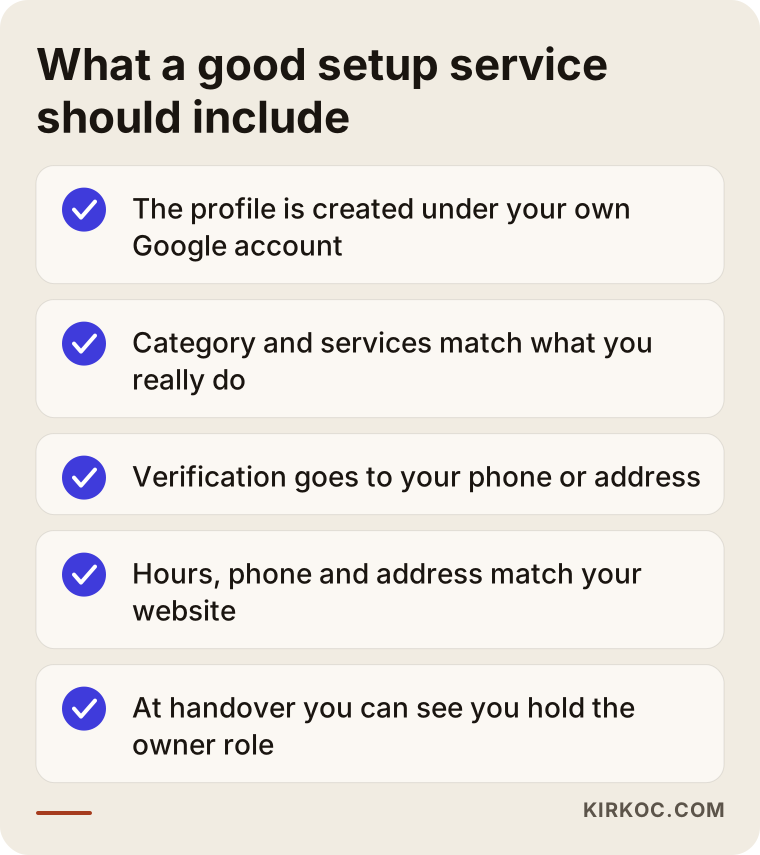
It starts with a check for an existing or duplicate listing. Next comes category selection, which is the strongest setting you have, because it tells Google which searches you belong to. "Restaurant" and "kebab shop" are not the same, and neither are "car repair" and "tire shop." A wrong category sends the wrong people your way, or nobody at all.
Then come the details: address, phone, opening hours, a short description and the services you really offer. After that, photos. Real pictures of the storefront and a couple of the interior build more trust than a bare, empty listing. Finally there is verification, which I cover in its own section below.
In my own work, setting up the profile means making category, services, opening hours, photos and description complete and correct. I treat it as part of the same job to make your name, address and phone number look identical everywhere online, because inconsistent details reduce Google's confidence in you. Your website should also have a tap-to-call phone number, a map and directions, so anyone who wants to reach you does not have to hunt for it.
What a service should never promise
If you read "number one on the map guaranteed" or "top three in a week," close the tab. Local ranking depends on where the searcher is, your category, your reviews and how complete the profile is. No setup task can guarantee a position. An honest provider says: I will build the profile correctly, and we improve it over time.
Account ownership: the point that matters most
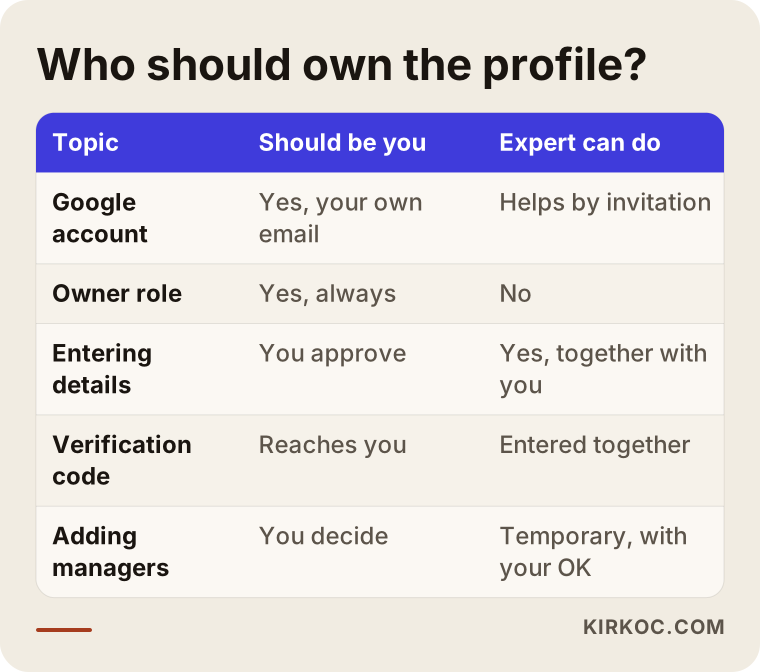
This is the most important section of the article, because it is where most problems start. A Google Business Profile is attached to a Google account, and the person with the "owner" role controls it. An owner can edit details, delete the listing, and add or remove other managers.
If the person who sets up your profile creates it inside their own account, they become the owner. You may be the real-life owner of the business, but online you have no say. If you fall out, or if they stop doing this work, you may need their permission to change your own phone number. Recovering ownership afterward is slow even for experts and the outcome is never certain.
The right arrangement is simple: the profile lives in your account, and the specialist helps as a manager you invited. You can remove that access whenever you want.
How to check it yourself
After handover, sign in with your own Google account and open the profile. Does it show you as owner? Are there people in the user list that you do not recognize? If so, ask who they are and why they have access. A decent provider shows this openly. If someone says "better if I keep the password, I will handle problems," treat that as a serious warning sign.
That is how I handle it, too: the account stays yours, I enter details with your approval, and when I am done we check together what the access looks like. I consider it a condition of the work that a business owner can always reach their own profile.
Passwords and codes stay with you
Your account password, and any code sent to your phone, are not things to hand over. A specialist who needs access asks you to add them as a manager. They do not ask for your password. When a code arrives, you enter it yourself or read it out during a call you are present for.
How verification works
Google wants to be sure the business really exists at the place you claim. That is why it asks you to verify. The options change over time and by business type, but typically include a code by phone or text, an email, a postcard sent to your address, or a short video check. Google decides which option you get; neither you nor a provider can choose.
Two practical points. First, verification goes to your phone and your address, so a promise that "you will not have to do anything at all" is either inaccurate or a sign that something is being done without you. Second, if you travel to your customers rather than receiving them, such as a plumber or a mover, you can hide your address and show a service area instead. That matters if you do not want your home address to be public. Talk about this before the listing is created, not after.
If verification fails, do not panic. Often the cause is an address written differently from how it is registered, or a lack of photos. Working out why a profile is stuck and correcting it is one of the most valuable things an expert can do.
Scam calls and messages to watch for
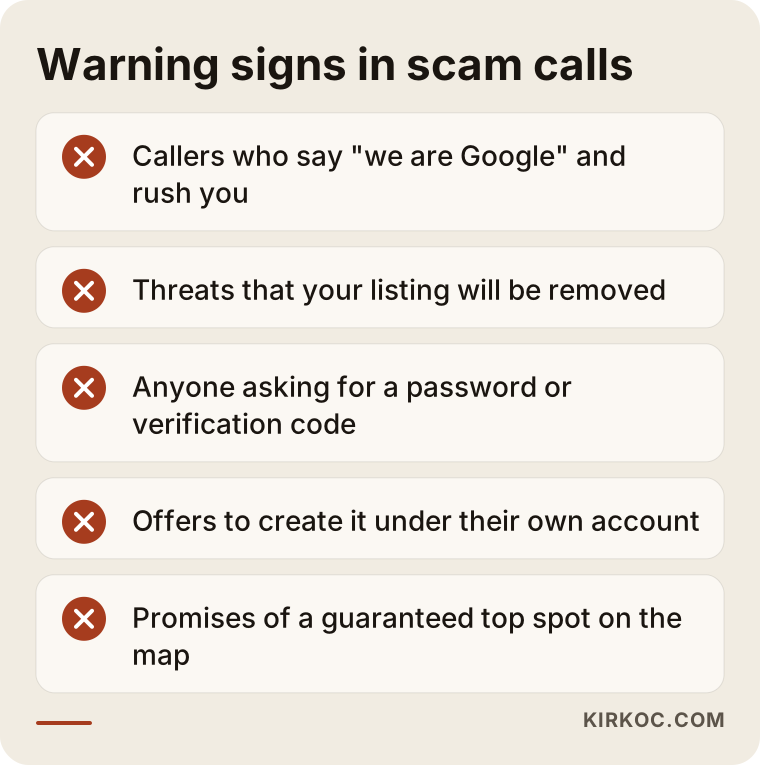
Listings attract a nasty side effect: people who phone businesses directly. The typical script goes like this. The caller says "I am calling from Google, your listing is about to be removed, act now." Or "your profile is unverified, we can move you to the top for a fee." It can also arrive as a text or an email asking you to click a link.
Here is the reality. Google does not cold-call businesses to demand payment or rush decisions. Notices about your profile appear inside the account you sign in with and in your registered email.
A quick test
If the person rushes you or says "decide now," stop. If they ask for a password, a verification code or login details, hang up. If they offer to create the profile and "transfer it to you later" while keeping the account, remember the ownership section above. If they guarantee a ranking, do not trust them, because nobody can.
If in doubt, end the call and research the company yourself through a channel you already know. Talking to someone with references costs you nothing, while a rushed decision often costs a lot.
Not every problem is a scam
Some problems come from friendly, well-meaning people. A friend sets up your listing under their own account and then forgets. An agency assumes the profile belongs to them and will not hand it back. That is why it is worth settling ownership in writing, or at least in a message, before work begins. You are not accusing anyone; you are protecting yourself.
What customers want to see on your profile
Being listed is not enough. The profile has to make a visitor feel "I can go there." How that works depends on your trade.
For urgent jobs such as locksmiths, towing and emergency plumbing, people decide fast. A correct phone number and whether you are open now are everything. For appointment-based services such as hairdressers, dentists and vets, people read reviews and look at photos, and hardly anyone books a place with none. For restaurants and cafes, the menu, photos and opening hours lead. In regulated fields such as health and law, the wording should stay calm and rule-abiding, with no promises of results; even a profile description should avoid bold claims.
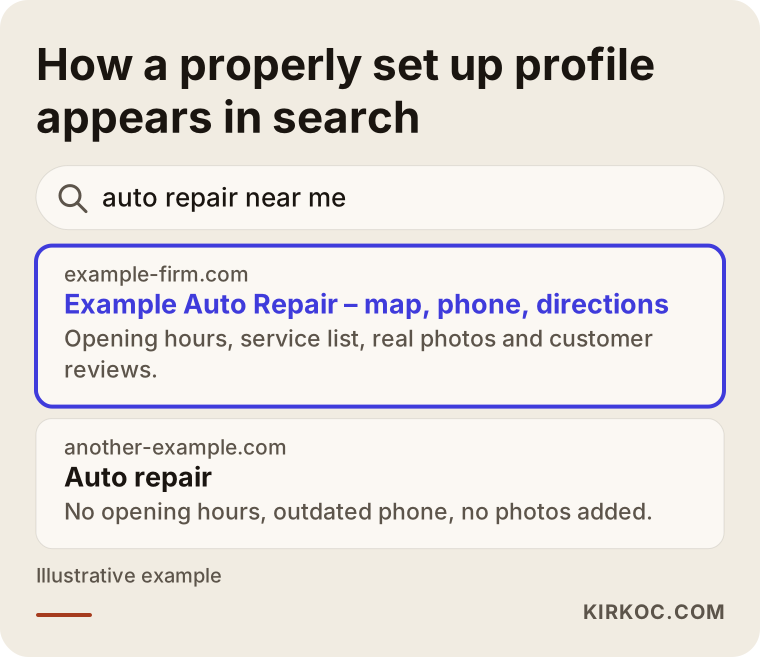
In the example, two businesses appear for the same search. One shows opening hours, services and real photos. The other shows only a name. The searcher chooses within seconds. If a setup service creates that difference, it earns its fee. If it just drops a pin and leaves, you have bought half a job.
Reviews and replies
Reviews come after setup, but they should be planned from the start. Making it easy for happy customers to leave a review, and knowing how to reply to the ones that arrive, shapes the profile for months. A calm, polite reply to a negative review usually does not scare away new customers; it shows you take them seriously. I do not recommend buying fake reviews. Google can detect them and the loss of trust is hard to repair.
How I work with you
I keep the process short and transparent. First I look at where you stand today: whether a profile exists and how competitors in your area look. Then I fix the profile and website setup, completing what is missing and correcting what is wrong. The third step is reviews and content, where I start a review flow and publish pages for the areas you serve. The fourth is follow-up: every month I report how many people saw you on the map, called you and asked for directions.
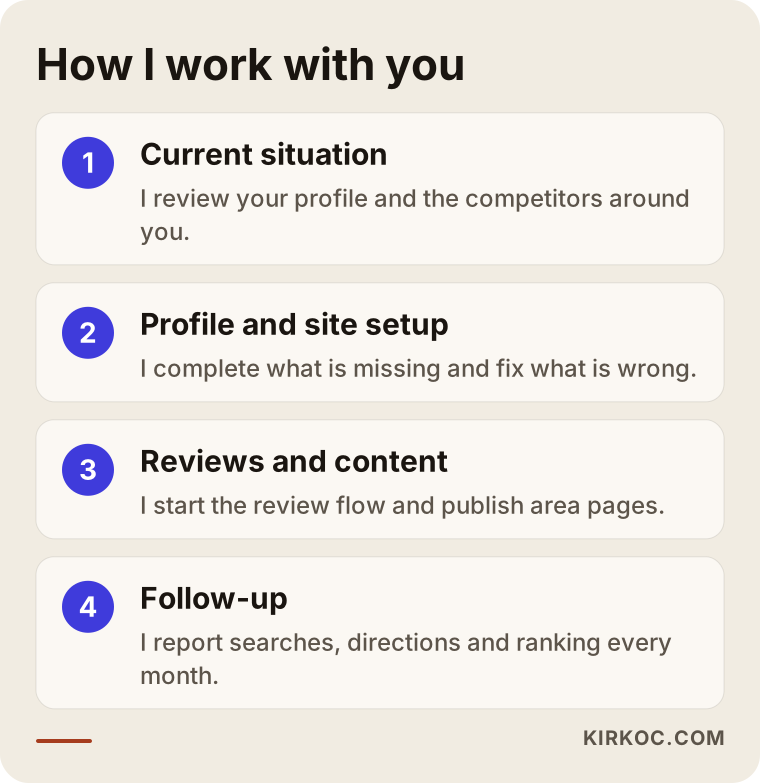
The account stays yours at every stage. I work remotely, by phone, message and email. Steps that must stay in your hands, such as entering a verification code, we do together with your approval.
How long does it take?
I cannot give a firm number, because the longest part is not in my hands. The verification method, whether your address is already known to Google and how Google reviews the profile all affect timing. What I do know is that preparing complete and consistent details reduces the waiting risk, and that the review and website work after verification is a much longer job than the listing itself.
Do it yourself or hire someone?
Honestly: if you have one location with a clear address, you can set up the profile yourself. Google's steps are understandable. If you have time and patience, you do not need a helper beside you when the code arrives.
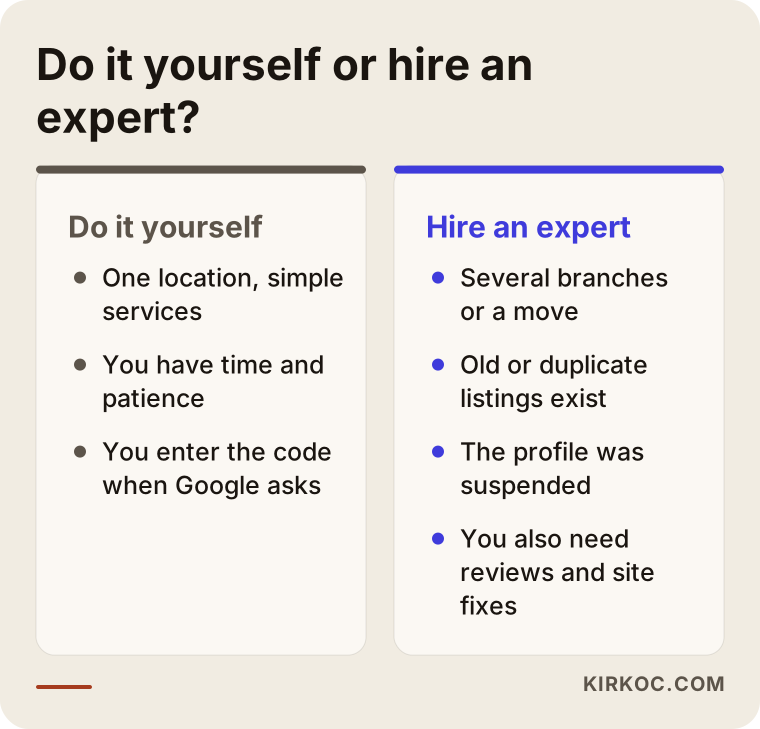
Hiring someone makes sense when you have several branches, you moved, the map shows an old or duplicate listing, your profile was suspended, or you also need reviews, a website and content set up after the listing. Putting a business in the right category and spreading consistent details across the web needs more care than it looks. What you pay for is not clicking buttons; it is avoiding mistakes and knowing the next step.
Who this work suits
As my service page explains, my local SEO work fits medical practices, clinics and veterinarians; restaurants, cafes and beauty salons; auto repair shops, plumbers, renovation and moving businesses; and businesses with several branches. If your customers search with "near me," you are in this group.
What decides the cost
I will not quote numbers here because scopes differ so much, but I can tell you what drives the cost. The first factor is whether you have one profile or several branches. The second is whether you start from zero or need to fix a duplicate, an outdated address or a suspended profile. The third is whether you only want the listing, or also a review routine, area pages and monthly reporting. The fourth is who prepares photos and descriptions.
When you compare quotes, do not look only at the total. What is included, what is excluded, is it one-time or monthly, and who keeps the account? Get these in writing. A very cheap quote may have a narrow scope or unclear terms; a very expensive one may include things you do not need.
How to compare quotes and providers
If you ask several people for a quote, put the same questions to all of them. The clarity of the answers shows how the work will go.
Which Google account will the profile be created in, and will I appear as owner? Who handles verification and how? Will you check for an existing listing first? How will you decide on my category and services? What do I receive at the end, and is there reporting? What happens when the contract ends, will I keep access?
Also check how open they are about references and how they work. Working with one person means the one you talk to is the one doing the job, but you depend on that person's calendar. A large organization has more people available, but sometimes the person doing the work is someone you never meet. Decide which suits you.
A note on tools
Some providers use bulk tools that push a listing to many directories at once. These can be useful, but the tool does not make your decisions. What counts is under which account those entries are created and whether they are handed to you when the contract ends. The question is not "which tool?" but "whose name are these listings in?"
Common mistakes
The mistake I see most often is a name, address and phone number written differently everywhere: one way on the sign, another on the website, a third on the profile. Google notices. Second is the wrong category; plenty of people start with something generic and never look again. Third is outdated opening hours, forgotten over holidays, summer closures or a move, which leaves customers at a locked door.
A fourth mistake is stuffing keywords into the business name, such as "Mike's Garage – Cheapest Car Repair in Town." Google can treat this as a violation and suspend the profile. The name should be what is on your sign. Fifth, fake reviews from staff or relatives. Sixth, never checking an account left over from a previous owner; some people discover years later that a former employee is still a manager.
When you do not need this service
Not every business needs to be on the map. If your customers are only acquaintances or wholesale buyers and nobody searches "near me" for what you do, a listing may not be a priority. If you sell only online and never receive visitors, you can expect little from the map. If you work from home and prefer not to publish the address, using a service area or skipping the listing is a legitimate choice.
If your listing is healthy, you own it and the details are current, you do not need to buy a service again. What remains is replying to reviews and refreshing photos now and then. I do not think selling something you do not need is right, and I say so in the first conversation.
Suppose you are in one of these situations
Suppose you run a small cafe and the map shows a listing under the previous owner's name. If you create a new one, you end up with duplicates. The right route is to find the existing record, claim it, correct the name and hours, add photos and then build the habit of asking for reviews. In this hypothetical case the value of the service is not creating a listing; it is managing the old one correctly.
Suppose you run a moving business with three branches, and each was set up by a relative from their own phone. Now nobody is sure who owns which profile, and one branch shows an old phone number. The job starts with an inventory: which listing sits in whose account, which are duplicates, which are correct. Then you bring ownership into one business account and align the details. The hard part is not creating a listing but untangling the mess, and handing that to a specialist saves time.
Frequently asked questions
What does a Google Business Profile setup service do?
It makes sure your business appears on the map with the right category, address, phone number and opening hours, so people searching nearby can find you and get directions. A good service does not stop at creation; it also covers consistent details and supports the profile with photos and reviews.
Creating a profile is free, so why pay for a service?
Google does not charge to create it. What you pay for is time and a correct setup. With a single location and simple needs you can do it yourself. If you have several branches, duplicates, a suspended profile or need reviews and website work, expert help can be worth it.
Will I be the owner of the profile or the provider?
You should be. The profile should sit in your Google account, and the provider should help as a manager you invited. After handover, sign in with your own account and check that you appear as owner. That is the simplest proof the work was done properly.
What if the verification code never reaches me?
Google changes methods often; you may get a phone code, an email, a postcard or a video check. When a code does not arrive, the cause is usually an address format or missing information. The details get corrected and verification is retried. Never pass the code on to someone else; when we work together, you enter it yourself or read it out while we are on a call.
Someone said they are from Google and my profile will be closed. What should I do?
Hang up, share no information, password or code, and do not pay. Google does not demand fees this way. If something is truly wrong with your profile, you will see a notice when you sign in to your own account.
Can anyone guarantee first place on the map?
No. Ranking depends on location, category, reviews and how complete the profile is, and nobody controls it alone. A guarantee means the offer is careless or misleading. I do not promise rankings or revenue either; what I can do is set up the profile properly and show progress each month.
I work from home. Will my address be public?
It does not have to be. If you travel to customers instead of receiving them, you can hide the address and show a service area. If customers visit you, the address needs to be visible. It is best to decide this before the profile is created.
Who keeps the profile when the contract ends?
If the account was yours from the start, nothing changes: you remove the manager and the profile stays with you. That is why ownership should be settled before you sign. When I finish, the profile is in your account and under your control.
If you are thinking about a Google Business Profile setup service, first check whether your business already has a listing, who will hold the account and what exactly is included, and ignore any call that tries to rush you. If you would like to go through your situation together and see whether you need a new listing or a cleanup, contact me through the local SEO services page and I will tell you honestly what fits.