If your website suddenly sends visitors to a strange page, shows an ad you never wrote next to your business name in Google, or throws a red browser warning, it has most likely been hacked. The first reaction is panic, and that is fair: the site stops bringing in customers and starts hurting your reputation. This article explains, in plain language, what to look for when you search for a hacked website cleanup service: what to do in the first hours, what a good service includes and how to compare quotes. If cleaning is not enough and a fresh build is the better path, we can plan that together under my website redesign service.
First, know this: it does not have to be your fault
Attackers rarely pick one business on purpose. Automated programs roam the internet looking for open doors: a plugin that was never updated, a password that is easy to guess, an old admin account somebody forgot about. When they find a door, they walk in. A small furniture workshop, an accounting office and a restaurant can all get caught in the same net. Knowing this helps in two ways. You stop blaming yourself and focus on the fix, and you stop postponing the problem with "what could anyone want from my site?"
The consequences, though, are real. Visitors get sent elsewhere, Google marks your site as unsafe, your emails start landing in spam, and sometimes information your customers left on the site is at risk. That is why the first hours matter. The longer you wait, the bigger the damage gets.
The first hours, in order
Even if you are not technical, you can take most of these steps yourself. The order matters, because each step prepares the ground for the next one.
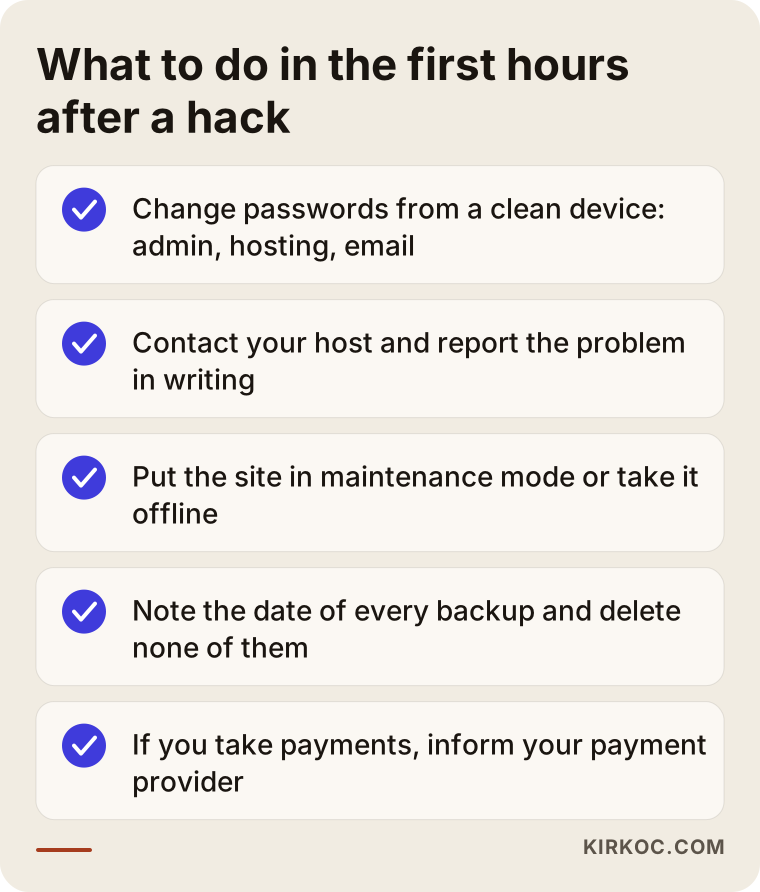
Change passwords from a clean device
If the attacker still knows your password, they can return the moment you finish cleaning. So change passwords first: the site admin panel, the hosting account, the domain account and any email address tied to the site. Do it from a device you trust and that is fully updated, because your own computer may be infected too. Use a long, separate password for each account. Changing one digit of the old password does not help.
Contact your hosting company
The company that hosts your site can often see what is going on at the server level. Report the problem in writing; even if you talk by phone, follow up by email. Some hosts suspend the site on their own, some send a list of suspicious files, and some simply say "clean it up." Keep whatever answer you get. It will save an expert a lot of time later.
Take the site offline for now
If the site is still welcoming visitors, it is doing a little more harm every day. A maintenance mode or a simple "we are briefly unavailable" page protects visitors and stops Google from seeing more bad pages. Leave your phone number on that page so customers can still reach you.
Do not touch the backups, and write down their dates
Note which backup was made when. Do not delete any of them, and do not restore one blindly. A clean backup from before the attack is gold, but restoring a backup without knowing it is clean can bring the harmful code right back.
If you take payments, tell your payment provider
If card details are entered on your site or customers have accounts, telling your payment provider and, where required, your customers is part of doing this honestly. Which notifications are legally required is a question for a lawyer, and I cannot give legal advice. On the technical side I can help you work out what data sits on the site.
How do you know you have been hacked?
Not every hack arrives with a red warning. The most dangerous ones are quiet: you do not notice, but your visitors and Google do. The title of your site in search results may have turned into an ad you never wrote. When you search your business name, pages in a foreign language may appear. The browser may say "this site may harm your computer."
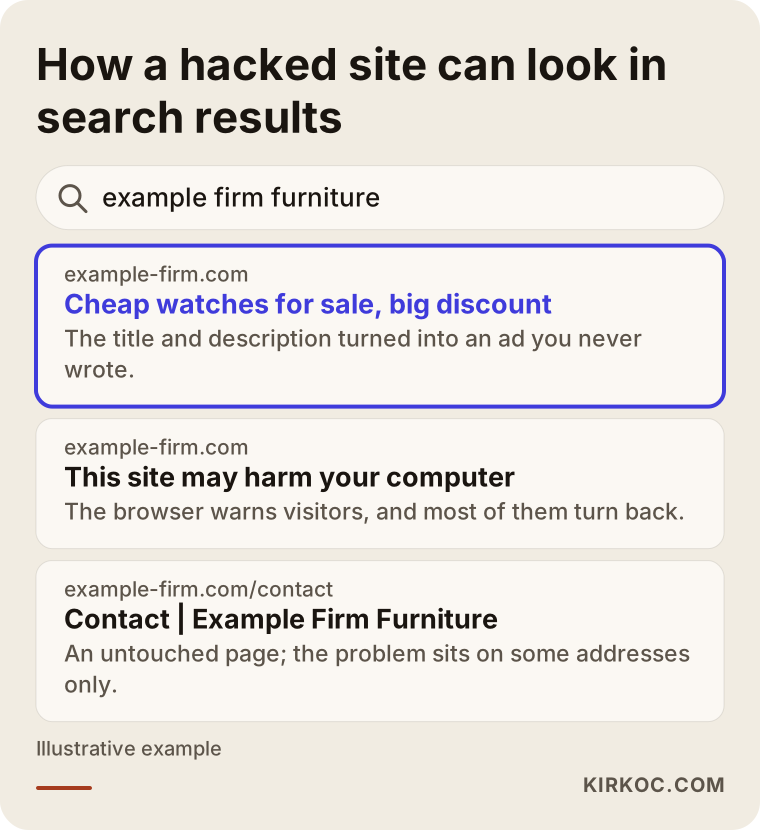
An easy way to check is to type your business name into Google and read the results carefully. Searching for "site:yourdomain.com" shows the pages Google knows under your address; if you see product or ad pages you never created, something is wrong. It also helps to open your site on a phone, and to arrive by clicking a Google result, because some malicious code only shows itself to visitors coming from search. If you type the address directly, the owner sees nothing odd.
The table below sums up the most common signs and what they can mean.
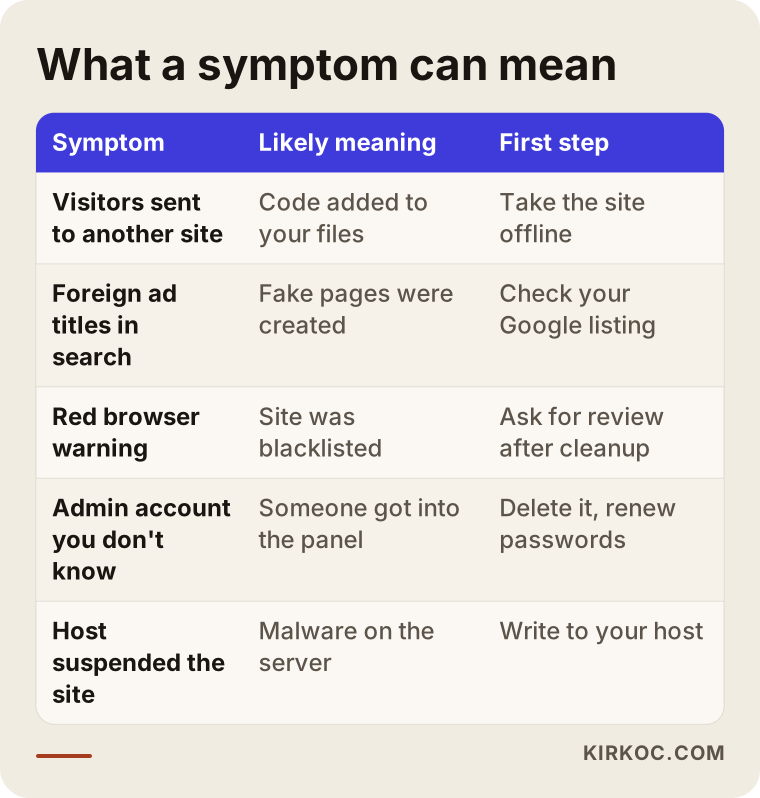
A symptom does not always mean a hack. Slowness can come from a broken plugin or a full disk. But if you see any of the signs above, it is better to look than to say "it is probably nothing."
Mistakes people make in a panic
In this kind of situation the most expensive thing is often not the attack but the wrong decision after it. These are the mistakes I see most.
Deleting everything and starting over. It sounds sensible, but if you do not know how the attacker got in, they will use the same door on the new site. Deleting also destroys the traces that show what happened.
Restoring an old backup without checking it. Harmful code can sit quietly for weeks. Last month's backup may already have been infected.
Fixing only the page you can see. You restore the homepage title, while hundreds of fake pages and a hidden back door stay on the server.
Changing the password slightly. Attackers try exactly those patterns.
Replying to someone who demands a ransom. Even if you pay, nothing guarantees you get your data back or that the attack ends.
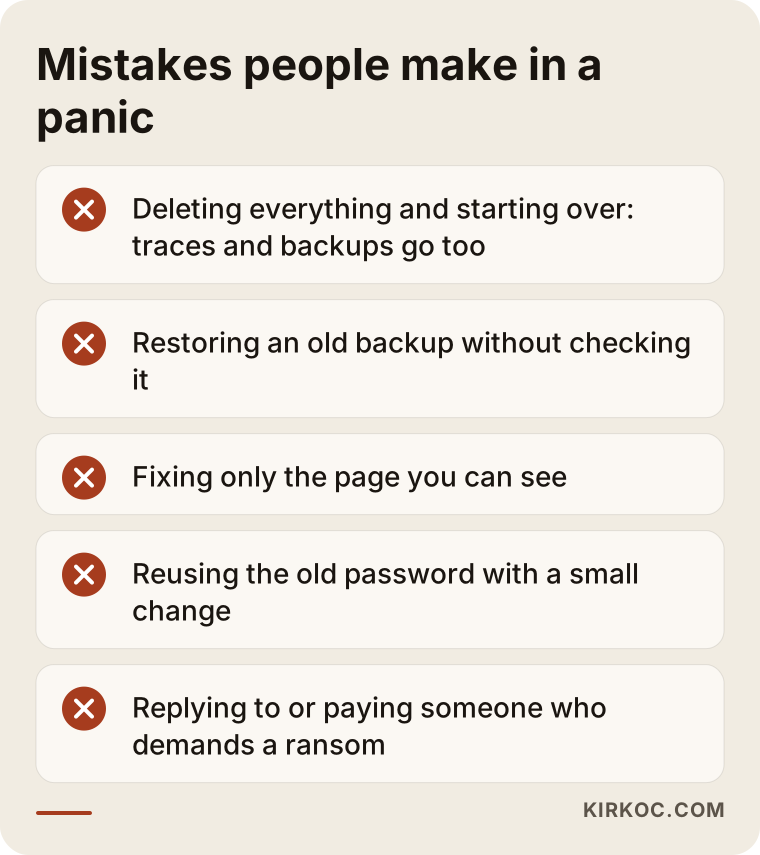
None of these makes you a bad business owner. This is simply not your field.
What should a cleanup service include?
Someone searching for a malware removal service usually wants one thing: my site back the way it was. A good service does more than that. When you get a quote, check whether the following are part of the work.
An investigation first. Before touching the site, someone should find out what got in, when, and through which door. A cleanup that never finds the door breaks again in a few days.
Removal of harmful files and fake pages. Not only the visible ones, but also the hidden files stored on the server.
Closing the door. Outdated software is updated, unneeded plugins are removed, accounts you do not recognize are deleted and passwords are changed.
Fixing your standing in Google. Even after the site is clean, the warning does not leave on its own. Once the cleaning is done, a review is requested from Google, and the removal of fake pages from search results is watched. I cannot guarantee the outcome or the timing; that decision belongs to Google. I make sure the right request is made and followed.
A written report. What was found, what was done and what you should watch for, in a summary you can understand without technical knowledge.
Advice to prevent a repeat. A service should not just put the site back and walk away. It should tell you what to do so this does not happen again.
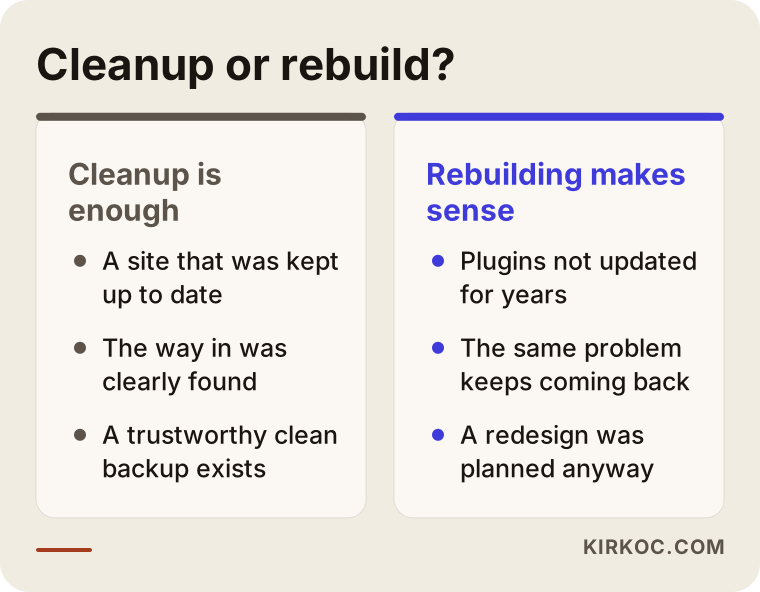
Clean it up or rebuild it?
The answer depends on the state of your site, and both can be the right call.
Cleanup is enough when the site has been kept up to date, the way the attacker got in was clearly found (for example a known plugin flaw) and a clean backup exists. Then the harmful code is removed, the hole is closed and the site carries on.
Rebuilding makes sense when the site has not been updated for years, contains plugins nobody remembers, keeps having the same problem or needed a new design anyway. Patching an infected old site is like painting a rotten wall: it looks fine for a while.
Let me be clear about what I do. I am a web designer and SEO consultant, not a security lab. I examine the site and tell you which part of the job I can do. If we decide on a clean new site, I run it as my website redesign service: I write a plan of what stays and what changes, prepare the new site, redirect old addresses to new ones and watch your Google standing after the switch. I do not promise here what my service page does not say, such as a fixed timeline or a guaranteed result.
Do it yourself or hire help?
Not every hack needs an expert. If you have a small brochure-style site with a few pages and no forms or orders, you can start on your own with your host's support and a clean backup. Some hosting companies include cleanup in their plans, so it costs nothing to ask.
Bring in help when the site holds customer data, orders or payments; when the problem returns after cleaning; when Google shows a warning; when you cannot tell which files are harmful; or when the site is your main source of customers and every day offline costs you money.
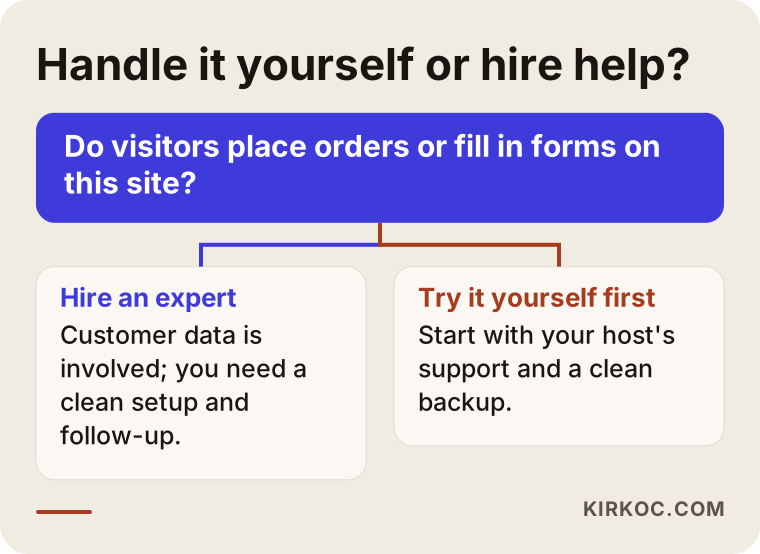
The honest part: doing it yourself looks cheaper, but a cleanup done wrong can cost as much as a second hack. When you decide, count the value of your own time and of lost customers.
What determines the cost of the service?
Anyone who promises a fixed price in this field also has a fixed scope in mind, because every hack is different. I will not give figures, but I can list what moves the price so you can compare quotes properly.
- Site size: A site with hundreds of pages, products or posts needs more work than one with a handful of pages.
- The platform: Is it built on a ready-made system or custom code? The number of plugins matters too.
- How deep the infection runs: One file, or dozens of places across the server?
- Whether a clean backup exists: If it does, the job is shorter; if not, everything must be sorted by hand.
- Urgency: If the site has to be back within the day, priorities change.
- What you need afterward: Only cleanup, or also a redesign, a rebuild or work to recover in Google?
A reminder at quote time: be careful with anyone who tells you what the job will cost without seeing the site. I do not discuss prices without looking at it either.
How to compare quotes and companies
If you are collecting quotes from several people or companies, look beyond price at these questions.
- Will they investigate first, or just say "cleaned"? Work without an investigation is left to luck.
- Do they aim to find how the attacker got in? A cleanup that leaves the entry open is temporary.
- Will you get a written report? You need to know what was done.
- Will they handle the removal of the Google warning? The site may be clean while the warning stays.
- Do they back up before starting? A copy of the current state should be taken first.
- Do they promise an exact timeline or guaranteed outcome? Anyone who guarantees Google's decision or your rankings is exaggerating.
- Is it clear who you are dealing with? Who talks to you and who does the work? I work alone, and I handle every message myself.
- What do they recommend afterward? They should give a clear plan for updates, backups and account security.
One more thing: stay away from anyone who scares you into an expensive package because they can see you are in a hurry. The danger is real, but a good expert does not frighten you; they explain what will be done.
How the process works with me
If your site is going to be rebuilt, here is how I work. First I look at the current site, your visitor data and your standing in Google. Then I give you a written plan: what stays, what changes and the schedule. The new site is built at a separate address while the old one stays up. When it is ready, I set up the redirects and put the site live without a gap. In the first weeks after the switch I watch your Google status closely and fix any problem right away.
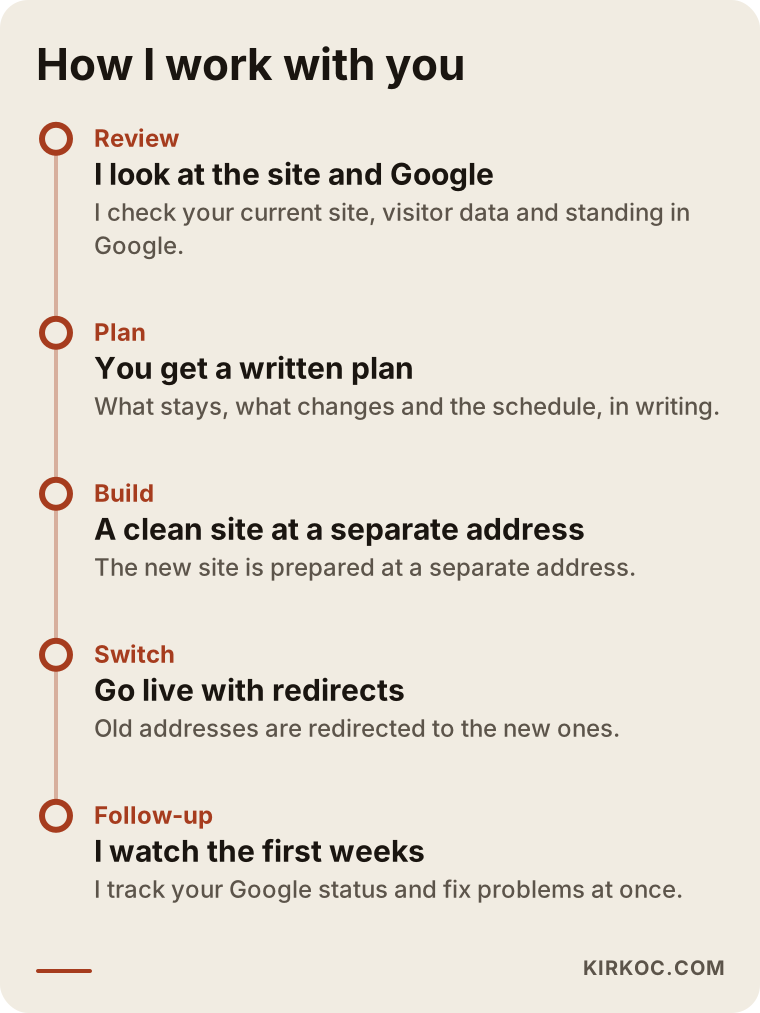
With a hacked site I pay attention to one detail: leaving an infected old site online as it is can harm visitors. In that case we decide in the first plan how the old site is handled while the new one is prepared, whether by taking it offline or showing a maintenance page.
Preventing a repeat
The cleanup is done and the site is back. That is half the job; the other half is making sure it does not happen again. None of this needs deep technical knowledge, but it has to be done regularly.
Do not postpone updates. If the site software and plugins go without updates for a long time, known holes stay open. Most attacks are not new inventions but old, publicly known flaws.
Remove what you do not use. An inactive plugin, an old theme or an unused admin account only widens the surface for attack.
One account per person, a strong password per account. Do not share passwords. If a former employee or former agency still has an account, close it. Turn on two-step sign-in where you can.
Regular backups, kept elsewhere. If backups live only on the same server as the site, they disappear when the server is taken over. Keep at least one copy somewhere independent, and try restoring it now and then; a backup that does not restore is not a backup.
Turn on alerts. Get a message when a new admin is added or a file changes. Most maintenance tools can do this.
Make sure maintenance has an owner. If nobody can answer "who updates this?", the answer is usually "no one." That decision matters far more than any single cleanup.
What to watch for by type of business
The same attack hits different businesses in different ways.
A small online store. Customer accounts and the checkout page are at risk. Taking the site down costs sales, but leaving it up can cost more. Work with your payment provider, and decide what to tell your customers.
Clinics, law offices and similar service sites. Customer trust is everything here. In fields like health and law, content should follow the rules of the profession, and the site should not contain statements that look like promises of results or advice. Foreign content added during a hack causes extra trouble in this respect. After cleaning, ask for every page to be reviewed once. For your legal duties, speak to your own legal adviser; I do not advise on that.
Restaurants, cafes and local businesses. Customers usually find you by phone, in map results and on your menu page. If an ad page replaces your menu, calls drop. Even while the site is offline, keep your phone number, address and opening hours visible.
B2B companies. Buyers often research you in Google first. A red warning can lose a prospect at the quoting stage in seconds. After cleaning, following your Google status is especially important for sites like this.
Two hypothetical scenarios
These are not real clients. I made them up to make the situation concrete.
Scenario one. Say you own a furniture workshop. A friend built your site years ago, and nobody has touched it since. One day a customer calls and says, "when I open your site it goes somewhere else." You check and see nothing, because the redirect only applies to people arriving from Google. You call your host, renew the passwords and put the site in maintenance mode. Then you ask an expert to examine it. If the examination shows that an old, un-updated plugin was the door, and the site was dated anyway, rebuilding can make more sense than cleaning. If there is no clean backup and the content is small, that can be both safer and cheaper in the long run.
Scenario two. Say you run a small online store and keep it up to date. One day you search your product name on Google and find hundreds of pages in a language you have never used. Your site opens and orders arrive, so nothing looks wrong. Taking the site down may be unnecessary here. You consult your payment provider first, have the source of the fake pages examined, compare with a clean backup if you have one, and then ask Google for a review. In this scenario you do not need to rebuild; a well-scoped cleanup may be enough.
When you do not need this service
To be honest, not every suspicion is a hack. Stop and think before you buy a service in these cases.
- Your site is only slow. That usually comes from heavy images, too many plugins or weak hosting.
- One visitor said "I saw a warning," but neither you nor your host can find a problem. Try your own device and another connection first.
- The foreign page you found is a test page left by a former employee or agency.
- Your host already cleans for free and your site is a simple brochure site.
I would also add that you do not have to buy an expensive security package after a hack just to be safe. Regular updates, strong passwords and a backup that works are the first and most effective step for most small businesses.
Frequently asked questions
What should you do first when your site is hacked?
Change your passwords from a clean device, report the problem to your host in writing and take the site offline for now. Do not delete any backups. Then have an expert examine it. Deleting everything and restoring an old backup blindly are the most common mistakes.
How long does hacked website cleanup take?
It depends on the size of the site, how deep the infection runs and whether a clean backup exists, so I cannot give a firm time without seeing the site. Removal of the Google warning depends on Google's own review, and I cannot set that timing.
Can the site be back online the same day after cleaning?
Sometimes, but I do not promise it. I need to look at the site first. Rushing the site online before the door is closed puts you right back where you started. If needed, we gain time with a maintenance page that keeps your phone number visible.
Does the red Google warning go away on its own?
Usually not. Once you are sure the site is truly clean, you ask Google for a review. The result is Google's decision, and I cannot guarantee when it will be lifted. If the cleaning is incomplete, the review is rejected, so doing the job fully comes first.
Is it better to clean the site or build a new one?
On a site that was kept updated, where the entry point was found and a clean backup exists, cleanup can be enough. On a site that has not been updated for years, keeps having problems or already looked dated, rebuilding is healthier. The decision comes after the examination.
How do I know if customer data was stolen?
If your site has forms, accounts or orders, take that possibility seriously. Server logs and changed files give hints, but a definite answer does not always exist. Tell your payment provider and your legal adviser; I can help you work out what data sits on the site, but I do not offer legal interpretation.
What if my host refuses to clean the site?
Some hosts only protect the server and do not clean sites. In that case you need an expert to examine the site. If necessary, a clean installation can be made on a new server and the content moved over. Keep your correspondence with the host, because it is the best account of what was found.
How do I stop the same site from being hacked again?
Keep software and plugins updated, remove unused ones, give every account a strong and separate password, turn on two-step sign-in and keep a backup somewhere independent of the server. Give maintenance an owner, so it is clear who looks after it.
If your site has been hacked and you are not sure whether to clean it or rebuild it, send me your address and the signs you have seen. We will first clarify the situation together, and I will give you a written plan. If it makes sense, we can move to a clean, fast and current site through my website redesign service. You can reach me through the contact page.