Your products are ready, you already have customers, but orders still arrive by text message and phone calls. You want your own online store, and everyone says "just use Shopify." So should you build the store yourself, or hire a Shopify expert to do it? In this guide I explain what store setup actually involves, what to look for in a quote, and when Shopify is not the right choice. I'm a freelance web designer working on my own, and I build sites from start to finish myself. You can read how that works on my website design page.
What Shopify is, in plain terms
Shopify is a ready-made platform for running an online store. You don't rent a server, install software or worry about security updates. The store runs on Shopify's own systems, and you pay a subscription to use it. Think of renting a unit in a shopping mall: the building, power and security are handled, and you arrange the window display and the shelves.
That arrangement has two sides. The upside is speed: a store can be set up quickly, order and stock tracking come built in, and the checkout is a proven design. The downside is that you are a tenant. If you stop paying the subscription, the store stops. Some features need paid add-ons, and you can't reshape everything the way you could with custom software. Weigh both sides before you decide.
When people say they want a Shopify store "set up," they often mean two different jobs. The first is technical: the account, settings, products and payments. The second is making the store look like a real brand and persuade visitors to order: design, copy and page layout. Anyone willing to spend a few days can do the first. The second is where most business owners actually look for help.
What does a store setup really cover?
When you request a setup quote, you should expect to see the topics below. For each one, make sure it is clear who does the work: you or the expert.
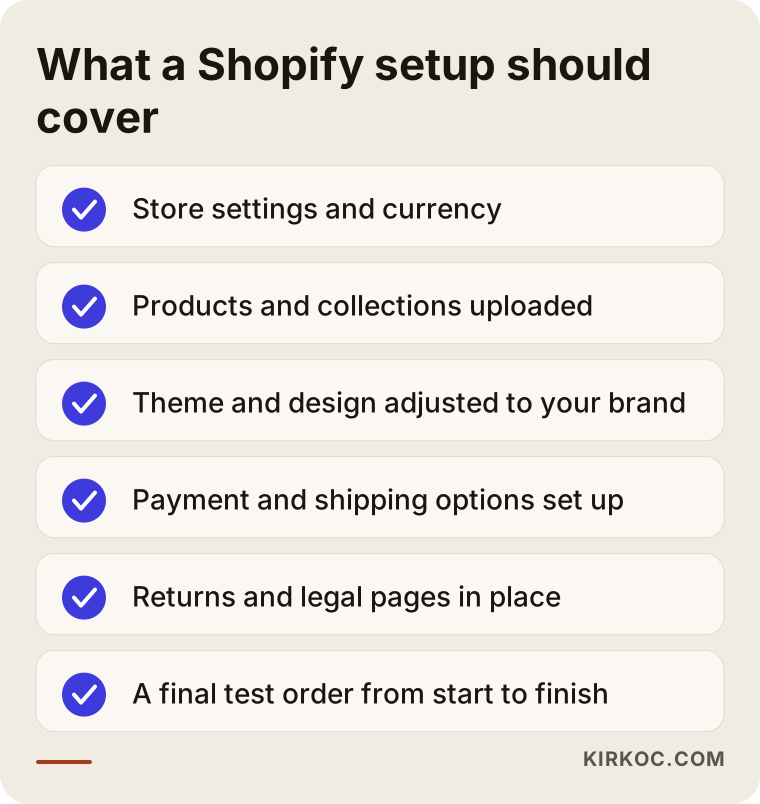
Core store settings
Store name, contact details, currency, language and time zone sound minor, but they are annoying to fix later. This is also where you decide which email address order confirmations come from and what appears on receipts. Connecting your domain (your web address) happens here too. The domain should be registered in your name. I come back to why in the mistakes section.
Products and collections
Entering products one by one is tedious and important. Product name, description, photos, variants (size, color and similar options) and stock must be right, or shoppers can't find what they want or order the wrong thing. Collections, meaning groups of products, work like the aisles of a shop. Groups such as "Gifts," "Kitchen" or "On sale" make browsing easier. Build them around what your customer is looking for, not around how your warehouse is organized.
If you have many products, a spreadsheet can be used for bulk upload. Then it matters who prepares the spreadsheet. Usually you hold the product knowledge and the expert knows the upload technique, so write that split down.
Design and theme work
On Shopify, a store's look comes from a "theme," a ready-made design package. Picking a theme and adding your logo takes half an hour, but the result resembles thousands of other stores. Real design work means adapting the theme to your colors and fonts, arranging the home page, shaping the product page so it nudges people to order, and making sure it looks right on a phone. For a shopper, the difference is big: trust is often decided in the first few seconds, and a template look works against it.
Payments, shipping and taxes
After filling the cart, a customer has to be able to pay and needs to know how the order will arrive. This part includes which payment methods you offer, how shipping is charged (flat rate, by region, free above a certain order size), tax settings and how invoices are handled. Payment options differ by country and by the provider you use. Always confirm the current situation on Shopify's own help pages and with your payment provider, and don't rely on an old article. I don't make decisions about payment provider contracts, accounting or invoicing; those are for you and your accountant. What happens in a setup is that the information you receive gets placed correctly in the store.
Returns, terms and privacy pages
You can't be seen online, so trust is built through small details: a clearly written return policy, terms of sale, a privacy and cookie notice, and visible contact details. The legal content of these texts depends on your business and where you sell. Instead of copying someone else's wording, get help from a legal advisor or your accountant. A designer's job is to place these pages so they are easy to find and look tidy. Legal advice is not part of that.
A final test: the real order flow
A good setup ends with a test order from start to finish before launch. You add a product to the cart, go through checkout, then check that the confirmation email arrives and the order shows up in the admin panel. Do this on a phone as well, because many of your customers will likely arrive on one.
How do customers find a store, and what do they notice?
Opening a store doesn't mean visitors will show up. People usually arrive in three ways: social media and ads, recommendations from existing customers, and search engines. Someone coming from search is looking for a product or a solution, and tends to be closer to buying than most other visitors.
Search behavior depends on what you sell. For gifts, people type an idea such as "birthday gift for dad." For spare parts they type a model number. For handmade goods they type a product type like "handmade soap." You know your brand name, but a new customer doesn't. That's why product and collection pages should use the words your customers use, not only the technical names from your supplier.
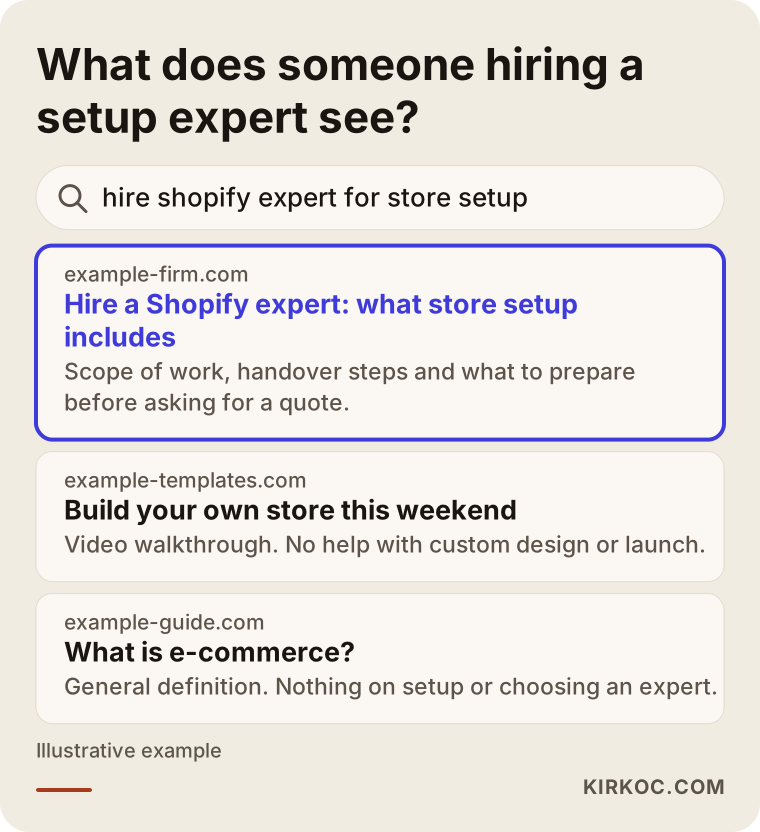
As the image suggests, someone searching "hire shopify expert for store setup" meets three kinds of pages: one that actually explains scope, a do-it-yourself page and a general definition. The person ready to buy clicks the first. The same logic applies to your own store. A product page shouldn't just show a price and a button. It should say who the product is for, when it will arrive and what happens if it doesn't fit.
Search engines and AI-powered assistants read and summarize content, so plain, accurate product descriptions help. I also care that the structure of a site is built so search engines can understand it: page titles, descriptions and site layout are prepared from the start. But let me be clear: no setup can guarantee a particular position in search results. I don't either.
Should you build it yourself or hire someone?
My honest answer is that both can make sense. It depends on your time, the size of the store and how much your brand's appearance matters.
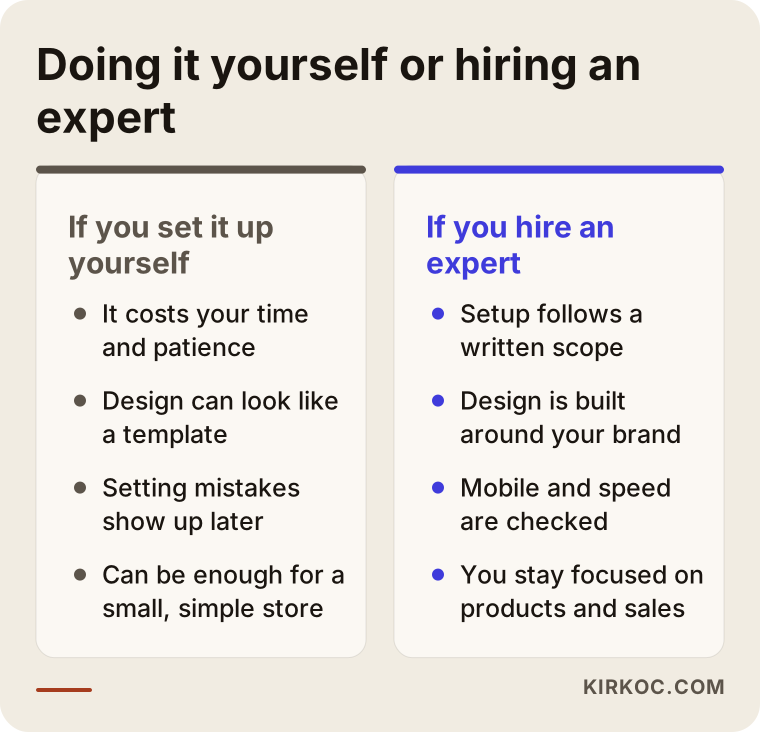
If you set it up yourself
If you have few products, are just starting to sell and have a tight budget, starting with a simple theme on your own is reasonable. Shopify's help pages and step-by-step setup screens are clear enough for this. Your risks are lost time and setting mistakes you don't notice. A wrong shipping rate, for example, either costs you money or scares customers away. If you do it yourself, place a test order before launch and ask a friend to shop on their phone.
If you hire an expert
Expert help makes sense if your brand needs to feel trustworthy, you have many products, you plan to sell in more than one language, or you simply don't have the time. What an expert mostly gives you is speed and order: they know what has to be done, they adapt the design to your brand and they keep phone and speed problems from slipping through. But an expert doesn't know your product the way you do. Product knowledge, photos and pricing decisions stay with you. Knowing that limit upfront prevents disappointment.
There is also a middle path: do the basic setup yourself and hand over only the home page design, the product page layout and the phone check. For businesses with limited budgets it's a smart split, but say it clearly in the quote stage. Otherwise each side may assume the other is covering something.
What drives the cost
I don't give numbers in this article, because any figure quoted without knowing the scope is misleading. But I can tell you what it depends on:
- The number of products and how varied they are (sizes, colors, bundles)
- Whether design means a light adaptation of a ready theme or a look made for you
- Who supplies photos, product descriptions and page copy
- Whether you sell in more than one language or country
- How complex the payment, shipping and tax settings are
- Whether products and customer data must be moved from an older store
- How much training and support you expect after launch
There are also ongoing costs outside any quote: the Shopify subscription, the apps you choose, your domain and the payment provider's fees. These are paid to those companies, not to the expert, and they vary. A good quote doesn't hide them. It simply separates "this is my part" from "these will cost extra elsewhere."
How to choose a good Shopify expert
A nice portfolio isn't enough. You can't tell whether a store in a portfolio actually sells, but you can look at the answers to these questions.
Do they listen first? Be careful with anyone who names a price before asking about your product, customer and goals. A good conversation starts with questions.
Is the quote written and itemized? A quote that says "e-commerce site, one amount" invites arguments later. Pages, product upload, payment and shipping setup, copy, training and the number of revision rounds should all be written down.
Who will do the work? Will you work with one person, or will the job be passed to someone else? I work on my own, which means the person writing to you is the person doing the work. If an expert works with others, they should say so plainly.
Will the store belong to you? The Shopify account, domain and admin access should be in your name. The expert should be added as an invited staff member when needed.
What happens after launch? Knowing who you can reach when something breaks is as valuable as the effort spent on setup.
Do they tell you what they won't do? A quote that says "we do everything" is rarely a good sign. Someone who knows the work will state the limits: no legal text, no accounting advice and no ranking guarantees.
How we work together
This is how I run the work in five steps. The process below is the standard flow of my website service, and I aim to follow the same order for store projects. Needs specific to a store, such as your payment and shipping preferences, we talk through in the first conversation and settle in a written quote.
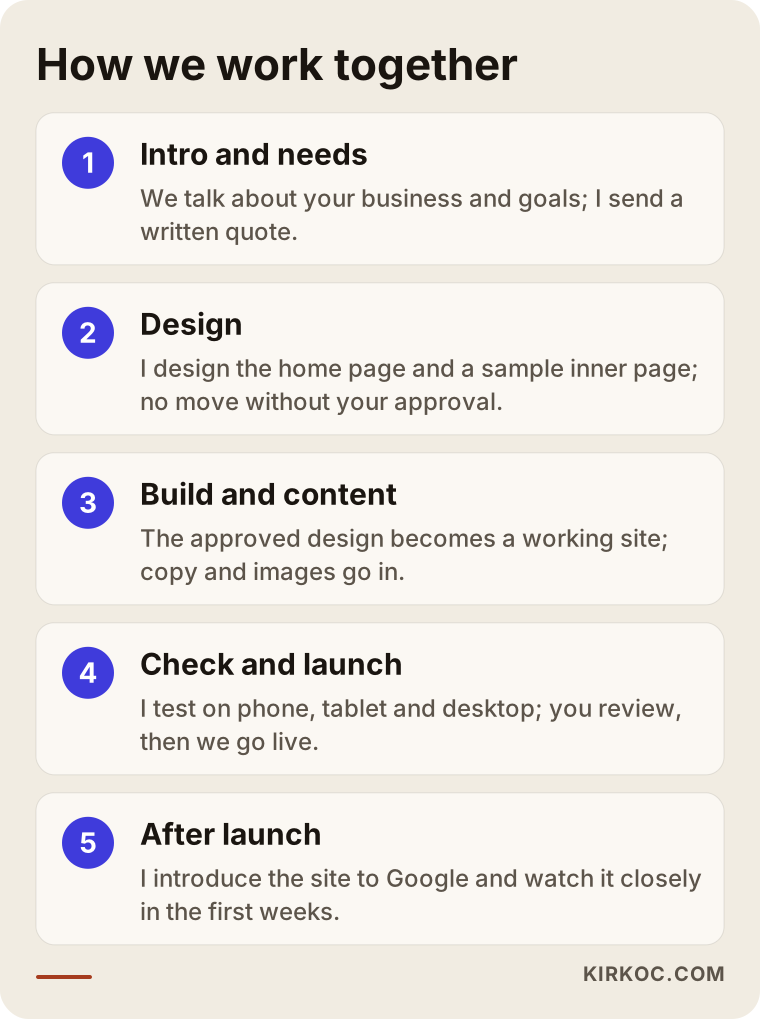
First we talk about your business, your customer and what you expect from the store. Then I send a written quote with scope and timeline. After you accept, I design the home page and a sample inner page, and I don't move to the next step without your approval. The approved design becomes a working site, and copy and images are placed. Before launch I test on phone, tablet and desktop, and you take a last look. After launch I introduce the site to Google, watch it closely in the first weeks and stay reachable for your questions.
Notice that approval and written scope sit at the center. Nothing continues without you seeing the design. That matters even more for stores, because every decision changed late also touches the cart and checkout.
Which line items should you compare in quotes?
Two quotes can have the same total and very different contents. Compare line by line, not by total.
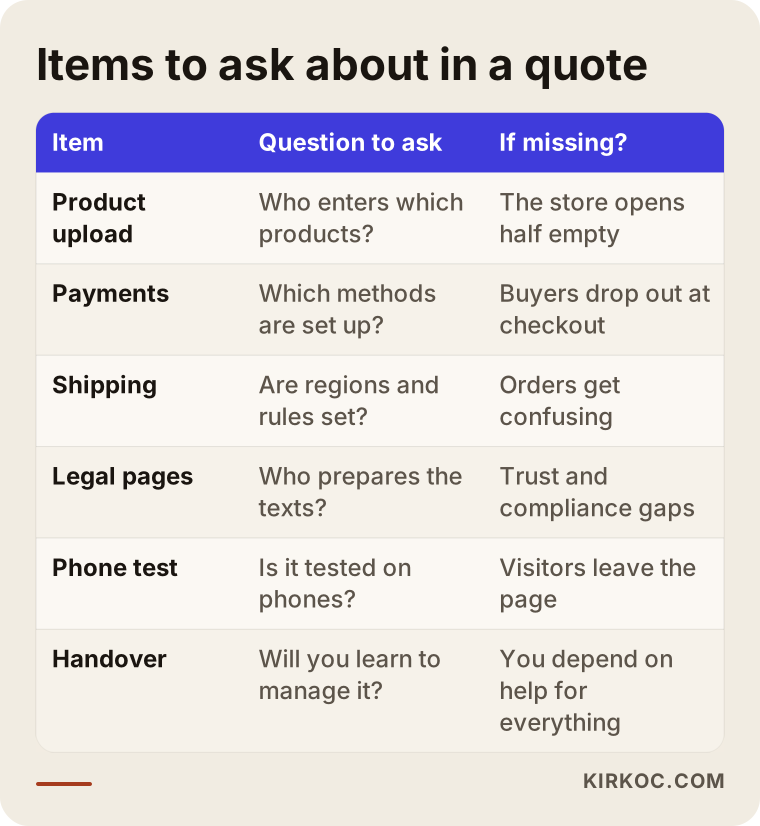
The two items skipped most often in that table are product upload and handover. If it isn't clear who enters the products, you lose weeks before the store can open. Without training, you have to ask for help every time you want to change a price or a photo. I think it's important that you can run the store day to day by yourself once setup is done.
Also look at dates. "As soon as possible" is not a schedule. If photos and texts arrive late, the timeline moves too, and writing that into the quote protects both sides.
Two imagined store owners
The two situations below are hypothetical. They don't describe real clients, they just show how different needs change the decision.
Say you run a small studio that makes handmade ceramics. You have close to twenty products, you take the photos yourself and today you collect orders through social media messages. You'd like a warm store that matches your brand, but you don't want to spend your whole budget on it. In this case you could do the basic setup yourself and get the home page and product page layout from an expert. You group the collections around what shoppers look for, such as "gifts" and "kitchen." Photos and product stories stay with you, since you know them best. You keep your shipping rule simple: packing time and delivery window are written out clearly.
Say you sell spare parts and accessories. You have hundreds of products, every item needs model compatibility information and your stock changes often. Here, the way products are organized and whether the search box works matter as much as how the store looks. Customers type a model code and want to land on the exact item. You need to prepare the product list as a spreadsheet, set naming rules in advance and plan the bulk upload. In this case, expert help is valuable not only for design but for building the product structure. The quote should state the product upload line and who supplies the data very clearly, because most of the workload sits there.
In both scenarios, what decides things is not Shopify itself. It is your product count, your customer's behavior and the time you can spare.
Common mistakes when setting up a Shopify store
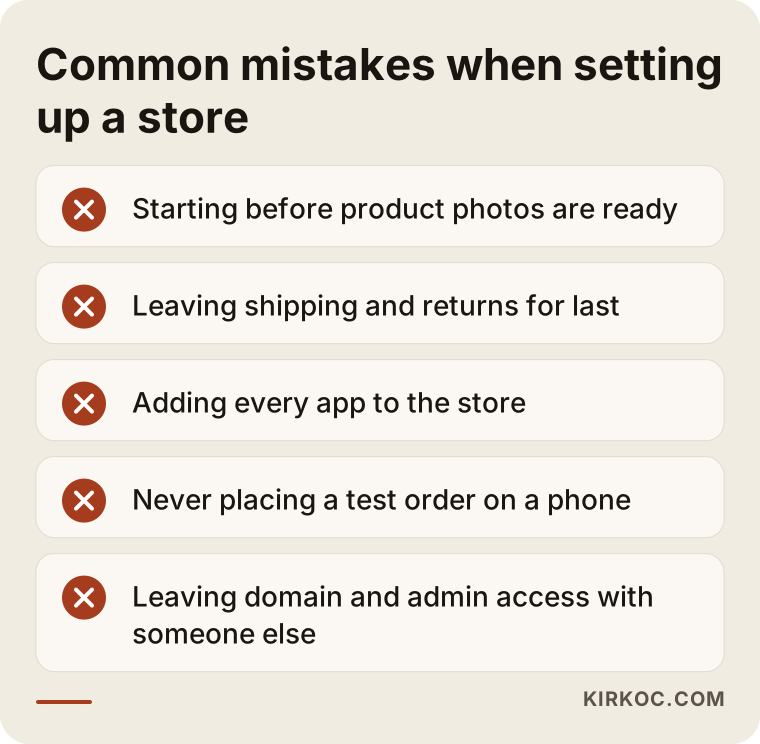
Starting before photos are ready. Design is built around product photos. If the photos change later, the balance of the design breaks. Shoot all products with the same light and background first, then move to the store.
Leaving shipping and returns for last. These decisions affect your pricing and the customer's trust. Set the rules at the start of the project. Saying "we'll sort it later" leads to rushed settings just before launch.
Adding every app. Shopify's app store has thousands of add-ons and each looks appealing. But each app can slow the page a little and add a monthly cost. Start with the few you truly need.
Never testing an order on a phone. You prepare the store on a computer, but your customers come from phones. Button size, menus and the checkout form should be tested on a phone before launch.
Leaving account and domain access with someone else. If the person who built the store becomes the "owner" with their own email and the relationship ends one day, getting into your own store becomes difficult. You should always be the owner, with the expert as an invited user.
Focusing only on looks. A beautiful store won't sell without a clear product explanation. Customers want answers to "will this suit me, when will it arrive, what if I don't like it?" If the answers aren't on the page, nice design doesn't help.
When Shopify is not the right choice
Not every business needs Shopify. Honestly, in some cases another path is better.
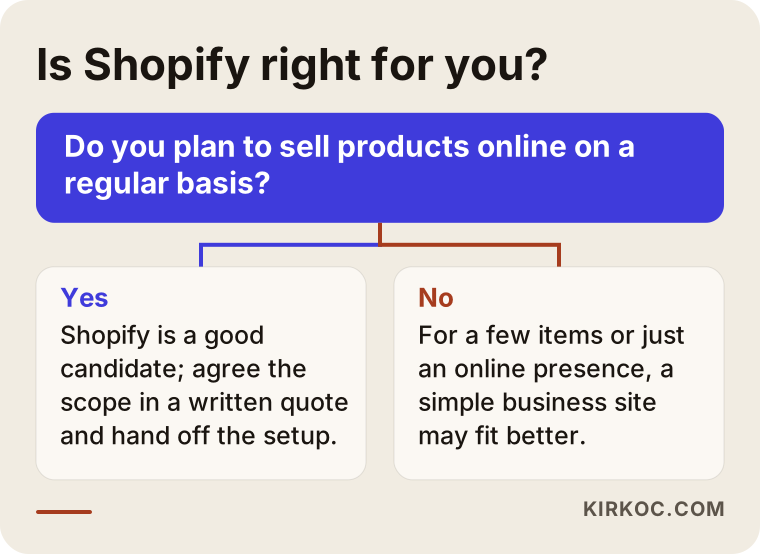
If you only want to present your business. If you won't sell online and simply want people to call or request a quote, a cart and checkout are an unnecessary burden. A simple business website costs less effort to maintain and explains what you do more clearly.
If you have very few products and sales happen on social media. If you're starting with three or four items, it is less risky to establish sales in the channel you already use before opening a store. A monthly subscription is an expense every month, whether or not orders arrive.
If your products are subject to special selling rules. Some product categories have limits on advertising, selling methods or payment options. In that case, check Shopify's terms of use and your payment provider's conditions first. I can't give legal or regulatory advice on this.
If you sell bookings or appointments. For hotels, clinics or courses, the flow is appointment and form rather than a cart. A site made for that purpose may be a better fit than an e-commerce platform.
If you want full control through your own code. Shopify's ready structure gets you started quickly, but it has limits. If your buying flow is very unusual, you may need to consider another platform. Selling through marketplaces or using other e-commerce platforms is also an option, and which one fits depends on your business, volume and team. Each has its own strengths and weaknesses.
I'm not criticizing any tool here. Each works well when it matches the right business. What matters is not starting with the wrong tool and rebuilding months later.
What to prepare before asking for a quote
A little preparation makes the quote clearer and the project faster. If you have these in hand, the first conversation is far more productive:
- A list of the products you plan to sell and roughly how many
- Product photos, or a plan for how they will be taken
- Two or three stores you like and what you like about them
- Your decision on shipping: who sends, to which regions, in how many days
- Your return policy: how many days and under what conditions
- A short description of who your customer is
- Any existing website, domain or social media accounts
You don't need everything ready. But marking what's missing in the quote as "I don't have this yet" prevents surprises later.
Frequently asked questions
How long does a Shopify store setup take?
It depends on the number of products, how much the design is customized and, most of all, how quickly you provide the content. A simple store can open quickly, while one with many products and a custom design takes longer. A realistic timeline should be written in the quote, and the dates when photos and texts are due should be tied to it.
Can I manage the store myself after an expert sets it up?
Yes, you should be able to. Adding products, changing prices and stock, and viewing orders are daily tasks and shouldn't depend on an expert. Ask whether the quote includes a walkthrough or training. You should also be the account owner.
What determines the cost of a Shopify setup?
The number of products, how far the design is customized, who prepares the content, the number of languages, the complexity of payment and shipping settings, and the support you expect after launch. I don't quote numbers here, because a figure without scope is misleading. When you describe your needs, I prepare a written quote with scope and timeline.
Is using a ready-made theme a bad idea?
No, a ready theme is a perfectly good starting point. The problem is using it without any adaptation. If colors, fonts, home page order and product page layout are adjusted to your brand and product, even a ready theme looks distinctive.
Do I have to shut down my current website to sell on Shopify?
Usually not. You can keep your existing business site and publish the store as a separate section or an additional address. Which is better depends on your site's structure and the customer's path, and we can weigh that in the first conversation.
Will my store rank at the top of Google?
Nobody can guarantee that. A properly built structure, clear headings and plain product descriptions help Google understand your store. But rankings depend on competition, product and time. Be cautious with anyone who promises a position.
Do you also handle payment and invoicing?
Payment provider contracts, accounting and invoicing are matters for you and your accountant. I don't decide those or advise on them. Entering the information you receive into the store settings is something we can discuss as part of setup, and we write down who does what in the quote.
Is Shopify too much for a small business?
Not always. If you have few products and sales are irregular, starting with a simpler setup is less risky. If you intend to sell online on a regular basis, Shopify can be a good candidate. Talking it through and choosing what really fits is the best approach.
If you're thinking about having a Shopify store set up, a short message describing your products and what you expect is enough. I'll tell you honestly whether it suits you, and if it does, we'll settle scope and timeline in a written quote. You can read more on my website design page and get in touch with me there.