You run a business, customers are looking for you online, and you know you need a website. But money is tight. You type "free website builder" into Google and get a wall of ads: "Build your own site in five minutes, pay nothing." So the question is fair: is a free website worth it for a business, or will it cause problems down the road? In this article I try to answer that honestly. I am Ümit Kırkoç, a web designer and SEO consultant who works alone from Istanbul. I will explain what free options actually solve, where they get stuck, and at what point having a professional website built is the smarter move.
Let me say up front that I am not here to bash free tools. In some situations they work fine. But the word "free" usually means something is left out of the sales pitch. You do not pay in money; you pay in some other way. Once you know what that cost is, the decision gets much easier.
What does "free website" actually mean?
A free site builder is a service that lets you put a site together yourself by dragging and dropping ready-made templates. You open an account, pick a template, add your text and photos, and the site goes live. You never touch code. The company running the service handles the technical chores: servers, security updates, maintenance. That part is genuinely helpful.
In return, the company makes money from the free service somewhere else. That usually comes from three places: putting its own ads or branding on your site, nudging you toward a paid plan over time, and tying your site to its own system so that leaving is hard. In other words, a free plan is not a gift. It is the first step of a sales relationship. There is nothing shameful in that, as long as you know it from the start.
The word "free" is used for three very different things, and it helps to tell them apart:
- A free site builder plan: A site on a ready-made platform, published on the platform's own subdomain (more on that term in a moment).
- A free trial: Free for a limited time, then paid. When the time runs out, your site either goes offline or asks for payment.
- Open-source software: Software like WordPress is free itself, but you still pay for hosting (the computer that stores your site and serves it to visitors), a domain name and the setup work.
The graphic below puts a free plan and a site on your own domain side by side.
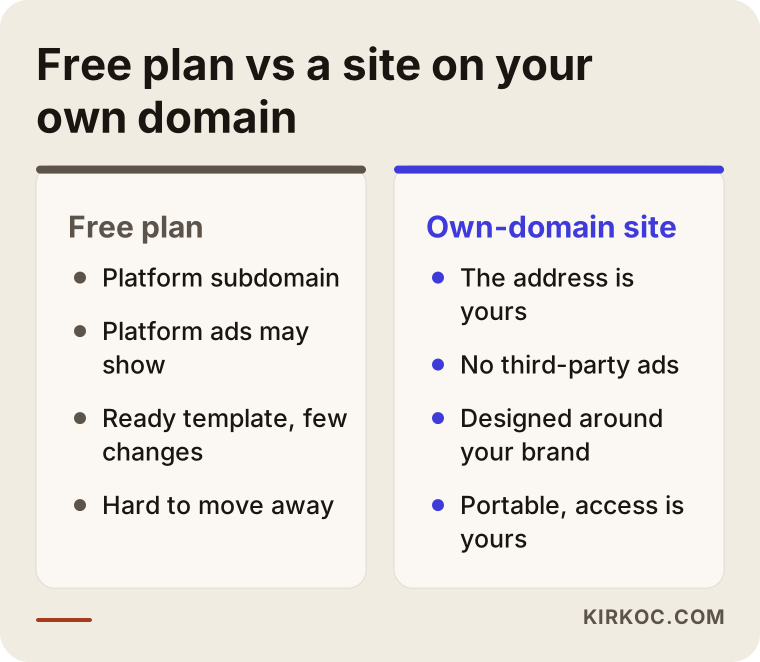
Most of these differences look minor at first glance. But the moment a customer meets your business, in that short window where trust is formed, the same differences start to matter a great deal. Let me go through them one at a time.
What is a subdomain, and why does it matter?
A domain name is your website's internet address, for example "example-firm.com". On free plans you usually cannot get an address like that. Instead, the platform publishes your site as a small part of its own address. That is called a subdomain, and it looks something like "example-firm.platform-name.com". The real owner of the address is the platform. You are a tenant inside it.
This has three practical consequences:
- Trust. When a customer sees the address, they form an instant impression: is this a serious business or a test page? In fields where trust decides everything, such as health, law, finance and education, that difference is big.
- Portability. Because the address belongs to the platform, if you ever move elsewhere you leave the address behind. The address you printed on business cards, painted on your van, or put on your social media profiles can become useless one day.
- Email. A company email address such as "info@example-firm.com" cannot be set up on a subdomain. You end up writing to customers from a free webmail address.
The next graphic shows how the two addresses look in a browser.
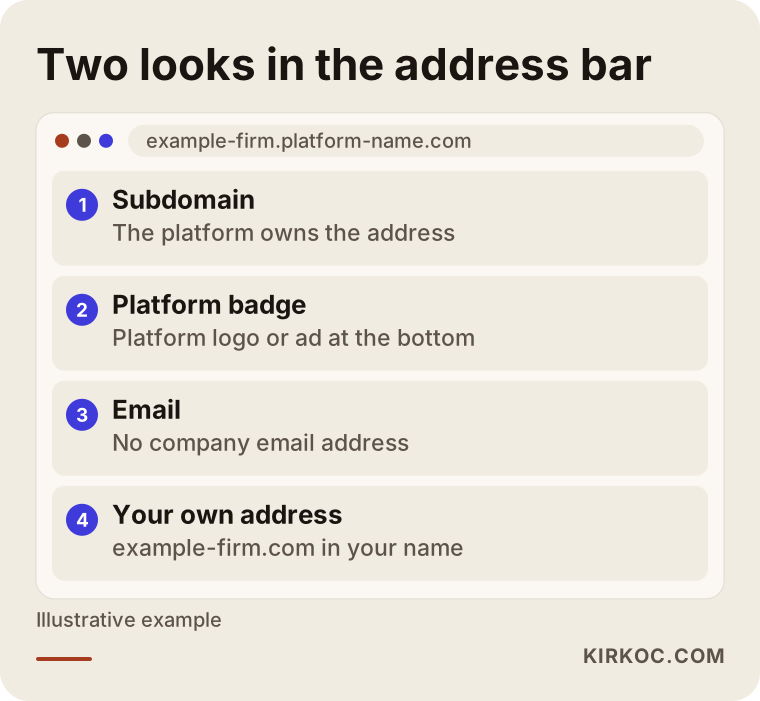
Registering your own domain is inexpensive and renews once a year. I will not quote a number, because it varies by registrar and by extension (.com, .net, .co.uk and so on). What matters is that you register it in your own name. You should be the owner of the address, not the person who builds your site and not the platform.
The typical limits of free plans
Whichever free site builder you pick, you will bump into similar limits. Knowing them early saves you from saying "I wish I had known" later.
Ads and platform badges
On most free plans, the platform's own ad or a line such as "This site was made with ..." appears at the top or bottom of your site. Your customer sees another company's advertising on your website. Sometimes that ad even belongs to a competitor, and the platform will not let you control it.
Limited features
Contact forms, appointment booking, multiple languages, online payments and a blog are often kept for paid plans. Free plans also tend to cap the number of pages, the storage space and the amount of traffic. As your site grows you hit those caps and are asked to upgrade. By then your site is built into that platform in a way that is hard to undo.
Limited design and flexibility
Templates are open to everyone. Hundreds of other sites use the same one. If you want your brand to look like itself, you get what the template allows. Even small details, such as the font, the button placement or the flow of a page, sometimes cannot be changed.
Limits on search settings
Editing page titles, descriptions and address structure matters if you want to show up in search results. Some free plans restrict these settings or do not offer them at all. On top of that, sites on a subdomain do not earn trust as easily as sites on their own domain, because you do not own the address.
Ownership of your data and your site
On many platforms, exporting your site and moving it elsewhere is either impossible or very tedious. You have to copy your text and photos by hand and rebuild from scratch. If the platform shuts down, changes its rules or closes your account, your site goes with it. I recommend reading the terms of service for the legal details and, if needed, asking a lawyer. I cannot make a firm legal claim on this.
The graphic below collects these limits into a single warning list.
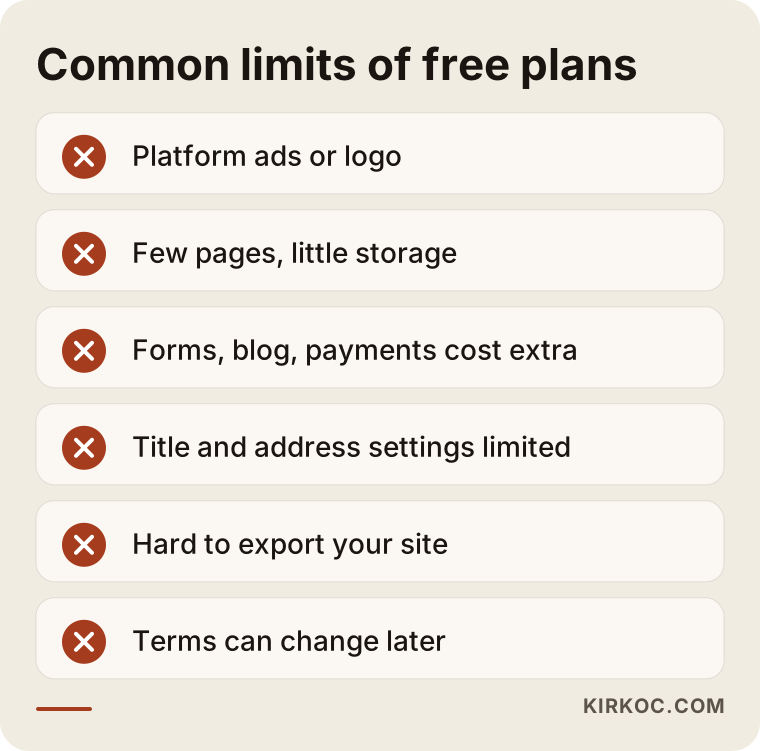
After reading this list you do not have to conclude "then I will never use one." You only need to judge how much each limit matters to you. In a moment I will give you a simple way to decide.
Where does a free site end up when customers search?
Someone searching with buying intent, meaning a person who is thinking of paying for a service or product, usually looks at several sites and compares them. Think of searches like "dentist near me", "moving company London" or "wholesale packaging supplier". On the first page of results, most of the sites are on their own domains. The domain is not the only reason, of course, but a site on a free subdomain finds it harder to get into that group.
Here are the reasons, in plain terms:
- A search engine reads your pages to work out what your site is about. If your page structure and headings are restricted, it is harder to explain yourself to it.
- A subdomain shares the general reputation of the platform. The same platform may host thousands of test sites, abandoned pages and low-quality content.
- Ads and extra code can slow your pages down. A slow page annoys both visitors and search engines.
I cannot guarantee anything here, because the search engines decide rankings. But when you have your own domain and pages you can edit, you enter the race better prepared.
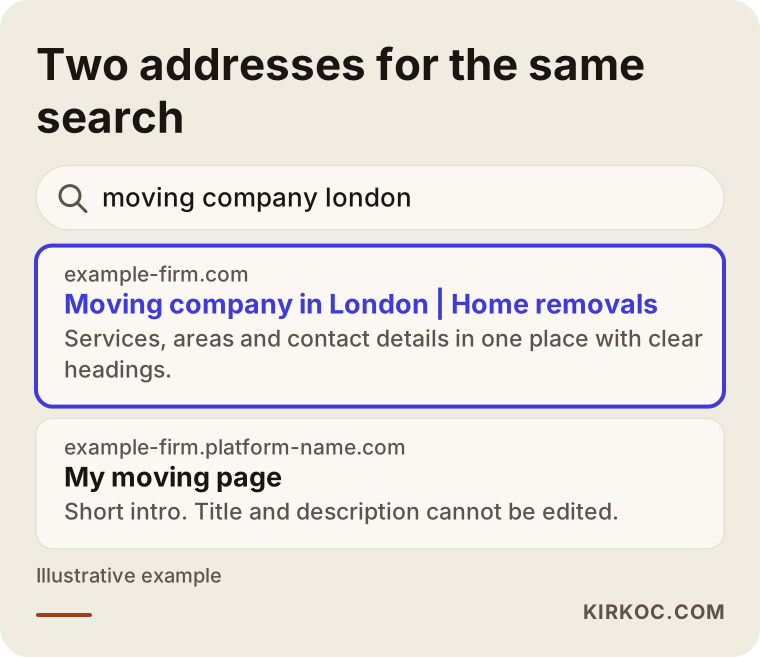
The results page above is entirely invented. Its purpose is to show the difference the two addresses make in a customer's eyes. People form an impression before they even click.
The differences between free options
"Free" is not one product. You need to separate what each option gives you from what it takes. The table below is a rough comparison of the four most common routes.
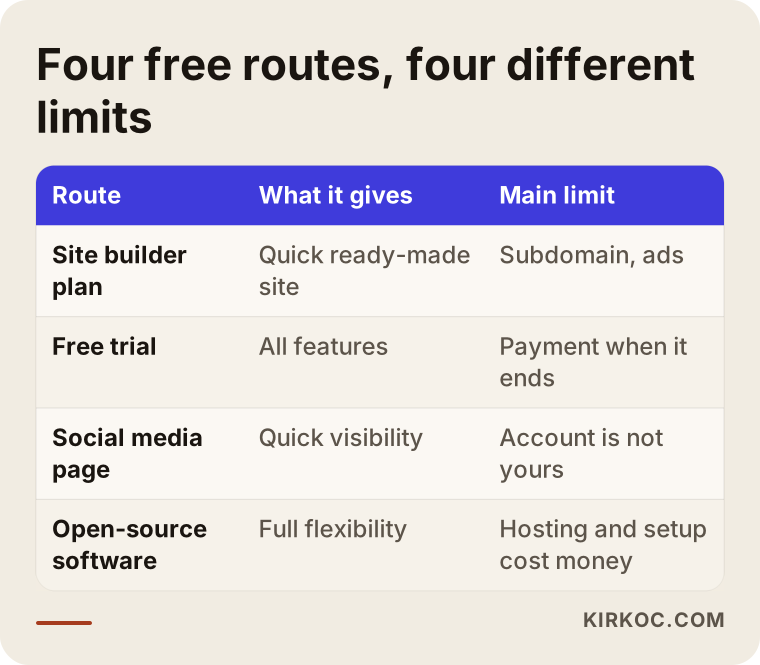
I included options such as a social media page or a business profile in the table because many small businesses skip the website altogether and try to get by with an Instagram account or a Google Business Profile. That is also a kind of free solution, and it can be enough for certain jobs. But a social media account is not yours either. It can be suspended, the algorithm can change, and your access to the page can be restricted.
When is a free website a reasonable choice?
To be fair, there are cases where the free route makes sense:
- You want to test an idea. You have not started the business yet and want to see whether there is demand. For a trial page that runs a few weeks, free is fine.
- A temporary event or campaign. For a wedding, a graduation or a short event with a known end date, nobody expects brand trust.
- You want to learn. Building a site yourself and understanding how it works makes you a more informed client when you later work with a specialist.
- A personal page or hobby. If there is no commercial goal, the worries about trust and rankings shrink.
But if you want to earn money from customers, meaning you are a business selling services or products, a free site is usually a starting point, not a lasting solution.
Two hypothetical scenarios
The two scenarios below are entirely hypothetical. They do not describe a real person or company. They are only meant to show how the decision can play out.
Scenario 1: A small workshop that starts on a free plan
Imagine a renovation contractor who is tired of messy requests coming in through social media. He builds a site with a free site builder. It goes live within a few days with three pages: home, past work and contact. The address is the platform's subdomain.
In the first weeks, acquaintances who find him on social media visit the site, and that is fine. Over time he notices something: people who search for "renovation contractor" on Google do not find him. The address on his business card is long and hard to remember. When a customer asks "what is your email?", he has to give a free webmail address. A few months later a building company asks him for a formal quote and says, "Could you write to us from your company email?"
Now he has two options. He can stay on the platform and upgrade to a paid plan, or he can build a site on his own domain that belongs to him. If he had registered his own domain at the start and connected it to the platform, moving later would have been much less painful. The lesson of this scenario: starting free is not a problem, but putting your own domain on your cards from day one makes life much easier later.
Scenario 2: A small clinic where trust decides
Now imagine a hypothetical dietitian opening a new practice who wants "customers to find me online from day one." With a tight budget, she builds a free site. It shows ads, and the platform's logo sits at the bottom.
A person thinking about booking an appointment is searching for a site on a sensitive subject like health. When they land on a page that has both a subdomain address and ads, they hesitate. Competing dietitians have clean, trustworthy sites on their own domains. The visitor closes the free site and moves to another. The dietitian never learns about it, because the customer she lost never writes to her.
The damage here comes less from technical shortcomings than from a lack of trust. In health, law, education and finance, "looking serious" directly affects sales. In such fields a free site can sometimes help even less than having no site at all. That is my estimate, and I am not claiming it will always be true. But you should know the risk.
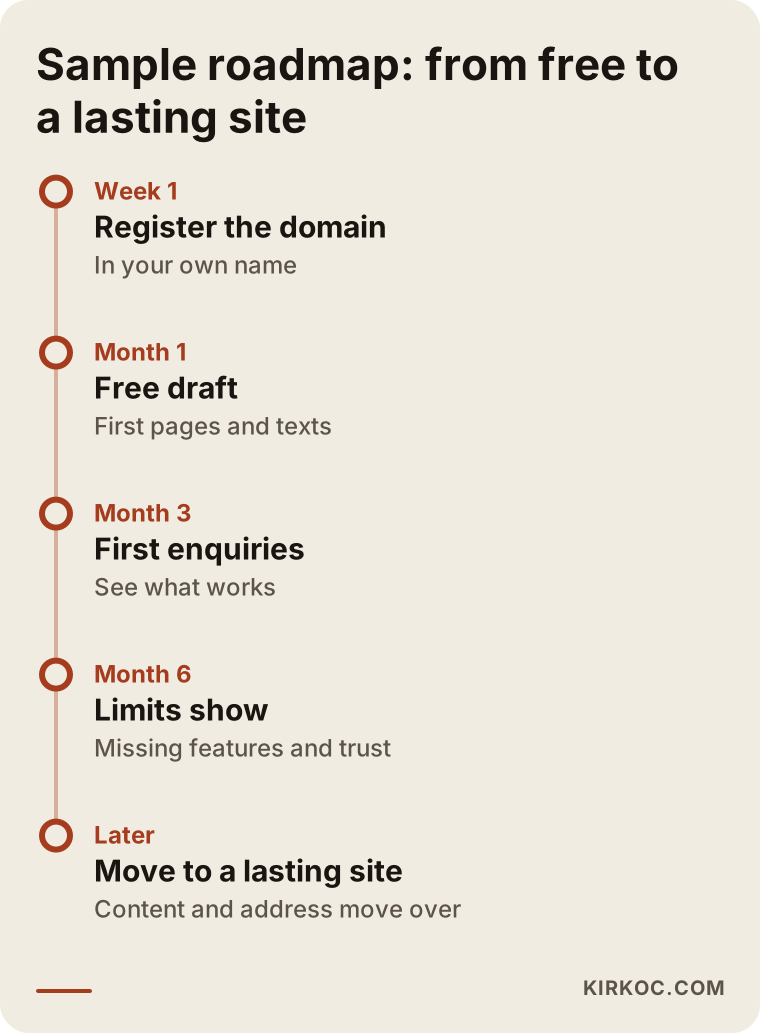
The roadmap above shows how a business might move from a free start to a lasting site. Your own stages may look different. What matters is deciding in advance when you will make the switch.
Free or paid? Questions to help you decide
When deciding, ask yourself these questions:
- Is this site here to win customers, or just to "have a site"? If it has to win customers, trust and search visibility matter.
- How do customers find you? If they come from search engines, your own domain and editable pages make your job easier. If they only come through people you know and social media, the need may be different.
- How serious does your brand need to look? In fields where trust decides, a professional look is not a luxury.
- Where should this site be a year from now? If you plan to grow, it is wise not to invest in a place that is hard to leave.
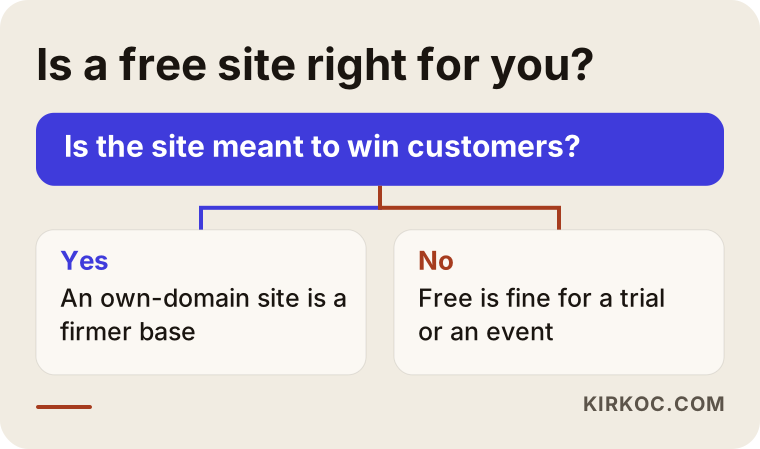
The chart looks simple, but you have to answer honestly. Many business owners say "it will do for now," stay on the free option, and return to the same problem months later.
If you start free: steps to avoid getting burned
If you have decided to build a free site, you can do it in a way that will not box you in later. Here is the path I suggest:
- Register your own domain first. Do it at a domain registrar, in your own name. That way the address stays with you no matter which platform you move to.
- Check whether the platform lets you connect your domain. On free plans, connecting your own domain is often not allowed. Find out before you commit.
- Keep your text and photos on your own computer. Back them up in a folder that does not depend on the platform. When moving day comes, they are ready.
- Write your pages with clear headings. Say plainly which service you offer, which area you serve and how to reach you.
- Use the same contact details everywhere. Matching phone, address and email build trust.
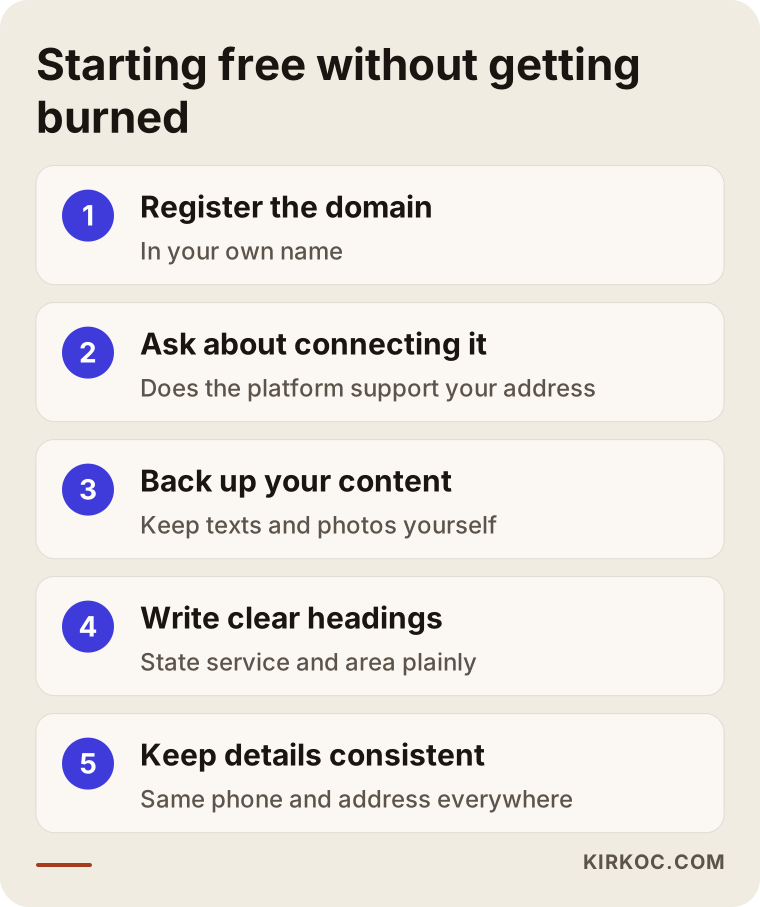
The first step is the most critical. If you own the domain, changing platforms is a move. If you do not, it is starting from zero.
Common mistakes
These are the mistakes businesses most often make with free sites:
- Printing the platform address on business cards and signs. If the address changes years later, all that printed material goes in the trash.
- Tying everything to one platform. If your site, email, bookings and payments all live in one place, leaving that place becomes very hard.
- Not reading the terms of service. You should know under what conditions your account can be closed and who owns the content. Where something is unclear, ask a lawyer.
- Ignoring security and privacy. If you collect customer details through a form, you need to know where that information is stored. You may have obligations around personal data, and a specialist can advise you on that.
- Building the site and leaving it. A site with outdated information leaves a worse impression than no site at all. Opening hours, phone number and service list should be current.
- Assuming free means free forever. Platforms can change their plan terms. A feature that is free today can cost money tomorrow.
- Not checking the mobile view. Most customers look at your site on a phone. Open it on your own phone and make sure the template looks right.
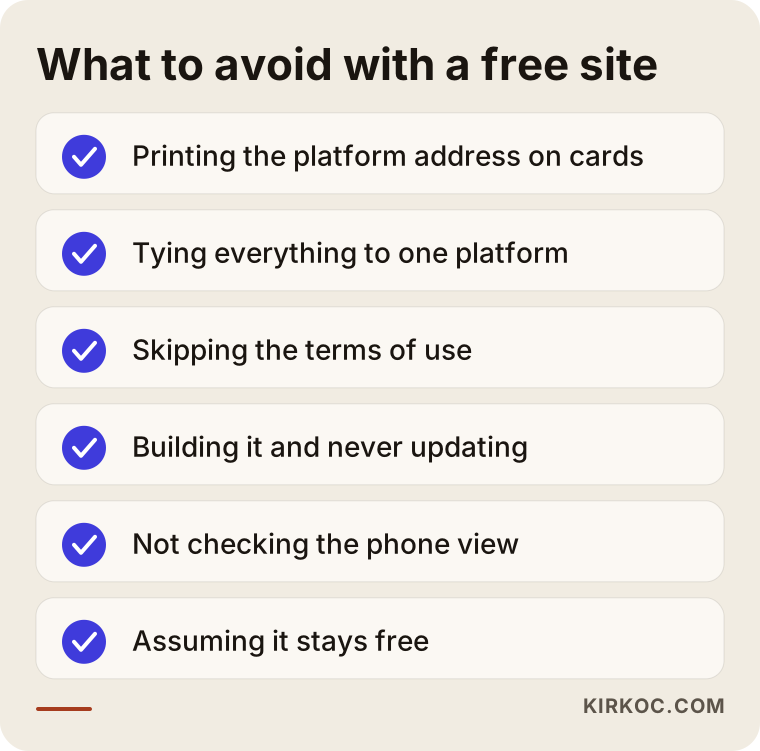
None of these mistakes is caused by the free site itself. All of them come from a lack of planning. With the right plan, a free option can be a harmless starting point.
How do AI tools and search engines see free sites?
These days people do not only search on Google. They also ask questions to AI tools such as ChatGPT, and the tools sometimes cite certain sites as sources when they answer. For an AI tool to recommend you, your site needs to explain clearly what you do, keep its information consistent and look trustworthy. A site on a subdomain, with limited content and squeezed into a platform template, may fall behind here. Again, this is not a guaranteed rule. Nobody knows for certain what an AI tool will recommend or when. What you can do is keep your site clear and well organized.
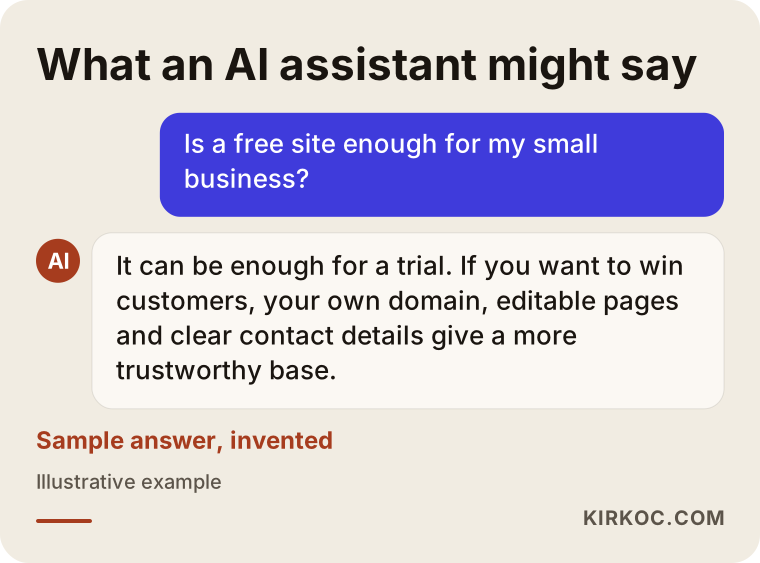
The chat above is invented. Its purpose is to give you an idea of how an AI assistant might answer a question about free sites. Real answers vary by tool and over time.
What can you do yourself, and when do you need a specialist?
There is a lot you can do yourself: register the domain, build a first draft on a free platform, prepare photos and text, fill out your Google Business Profile. You do not need a specialist for any of that, and your own knowledge is essential anyway, because you know your business best.
You will want a specialist in these situations:
- You want the site to be found in search engines (titles, address structure, speed, page layout).
- You will publish in more than one language.
- You need something special, such as online payments, a booking system or a custom form.
- You want your brand to stand apart from template sites.
- You want to leave a free platform and move without losing your data.
- You do not have the time. Building a site and keeping it current takes time, and spending that time on your business may pay off more.
What does a professional site cost, and what is it based on?
I will not give a number, because it varies a lot with the scope of the job. But if you know what drives the price, comparing quotes gets easier:
- Number of pages and content. A five-page presentation site and a store with hundreds of products are not the same job.
- Scope of design. Adapting a ready-made template and a design drawn specially for you take different amounts of work.
- Features. Booking, payments, memberships and multiple languages all make the job bigger.
- Content creation. Who prepares the text and photos affects the scope.
- Search engine work. Setting up the basics of a site and ongoing content and optimization work are separate items.
- Maintenance and support. After the site goes live, updates, backups, security and technical support should be considered separately.
- Time and urgency. A rush delivery may be priced differently from a planned job.
When you receive a quote, check a few things. In whose name are the domain and hosting registered? When the site is delivered, will you hold all the access details? Are there hidden items that need extra payment? These can matter more than the total cost.
How I work with clients
I work alone from Istanbul. That means the person you talk to is the person who builds your site. There is no sales team and no handoff between departments. The process usually goes like this: first I listen to your business, how customers look for you and what you expect. Then I tell you plainly which pages you need, what can be handled the free way and what needs an investment. Sometimes I have to say "a free solution is enough for you right now," and I do say it. After that we work through the design, page layout, technical setup and search settings together. The domain and hosting are opened in your name, and when the site goes live, the access is yours.
I try to build a site that does not depend on another platform and can grow with your needs. But I cannot guarantee everything. In particular, I do not make promises about things outside my control, such as search rankings.
Frequently Asked Questions
Is a free website really free?
You may not pay for the platform's plan, but there are other costs: ads, limited features, a subdomain and dependence on the platform. As your site grows you may also be asked to move to a paid plan. Connecting your own domain or setting up email usually costs money too.
Will a site built on a free builder show up on Google?
It can, but there is no guarantee. A subdomain, restricted page settings and extra code that slows things down can make it harder. For commercial searches, where a customer is looking for a service, a site on your own domain with editable pages is a stronger starting point.
What is the difference between a subdomain and a domain?
A domain is an address you buy and own. A subdomain is a piece of the platform's address, and the platform owns it. Your domain belongs to you and you can take it with you; you cannot take a subdomain anywhere else.
Does having ads on a free site affect customers?
It can. Especially in jobs where trust matters, seeing someone else's ad on your site can weaken your credibility. The ads can sometimes even benefit your competitors. You usually cannot choose which ads are shown.
Is it hard to move from a free site to a paid one?
It depends on the platform. Some let you export your content; with others you have to rebuild by hand. If you registered your domain in your own name from the start and backed up your content, the move is much easier. Read the terms of service, and if you are unsure, ask a lawyer.
Is a free site enough for a small local business?
If your customers mostly find you through people they know and social media, it can be enough for a while. But if you expect new customers from search engines, or you work in a field where trust decides, a site on your own domain is usually a healthier foundation.
Is buying a ready-made template better than going free?
Paid templates are more flexible and usually work with your own domain. But setup, configuration, page layout and search engine readiness still take work. A template is a starting point. Whether the site wins customers depends on its content and structure.
Will everything belong to me after the site is built?
That is how it should be. When you sign an agreement, always ask in whose name the domain, hosting and site files will be. I open them in your name from the start, and I recommend asking for this no matter which specialist you work with.
Whether a free start or a properly built site suits you better is something I can tell you clearly once I have heard about your business. If you like, take a look at my website design service and get in touch, and we can look at your situation together.