As a business owner, you have probably heard it: "Everyone has an app now," or "Your customers are on their phones, so you should be too." Maybe a software company sent you a quote for an app. Maybe a competitor launched one and it made you uneasy. Now you are searching "mobile app or website for my business." That is the right question to ask, because making this decision in the wrong order costs both money and time. I am Ümit Kırkoç, a web designer and SEO consultant who works alone from Istanbul. In this article I will compare the two options without jargon, explain when each one makes sense, and show why, for most businesses, a good website is the right place to start. Let me be honest up front: I build websites. Developing an app that people download to their phones is a separate specialty, and I do not do it. So I am not trying to sell you anything here. I am trying to help you decide.
First, two terms in plain words. A website is a set of pages that opens when you type an address into a phone or computer browser, or when you click a result on Google. A mobile app is a program you download from the App Store or Google Play, install on your phone, and open from its own icon on the screen. They can look like they do the same job, but they behave very differently at the moment a customer first meets you.
How do customers actually find you?
This is the most important question in the whole decision: how will someone who has never heard of you find you? When a person needs a boiler repair, an office cleaning company, or a wedding photographer, the first thing they do is type it into Google. They click one of the results, and the page opens within seconds. That person is not going to download your app. They do not know you yet. They may not even know you exist.
Apps make sense for people who already know you and will buy from you again and again. Put simply, a website is for finding new customers, and an app is for keeping existing ones. For most businesses, the first problem is not the second one. The problem is that not enough new people can see them.
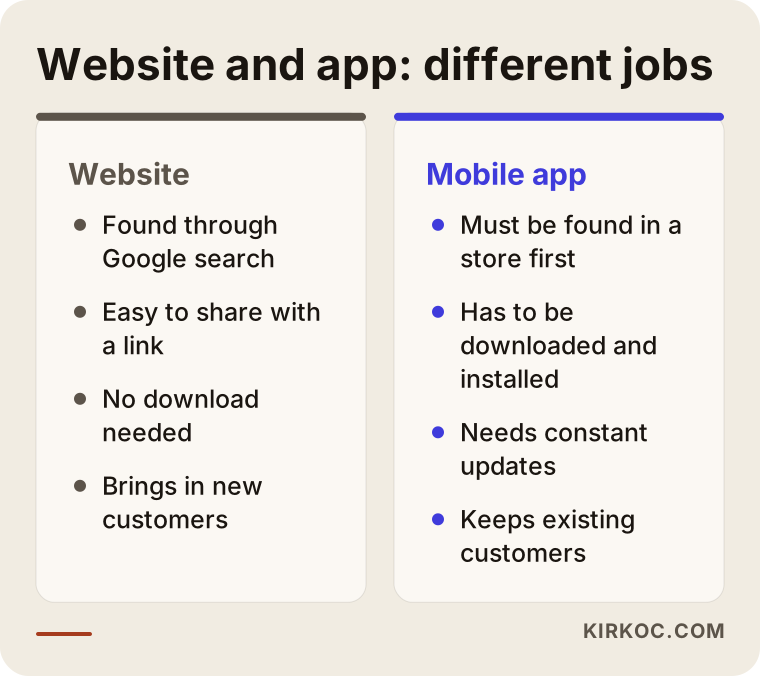
The comparison above sums up the difference. A website can be found in search results and shared with a link. An app has to be found in a store and downloaded first. That extra step is often a wall that an ordinary business cannot get over.
App stores have search too, but it works differently
A fair objection is this: "App stores have a search box as well, so people can find me there." True, but people who search a store are usually looking for a brand or a type of app, such as "food delivery" or "banking." Almost nobody searches an app store for a local service, like a neighborhood mechanic or a dental clinic. Being visible in a store means standing out among millions of apps, and that takes a serious advertising budget.
How do the two look in the same search?
Let's look at search results. When someone types a need into Google, the results page shows pages from websites. Apps do not appear in that list the way pages do. At most you might see a small suggestion to download an app.
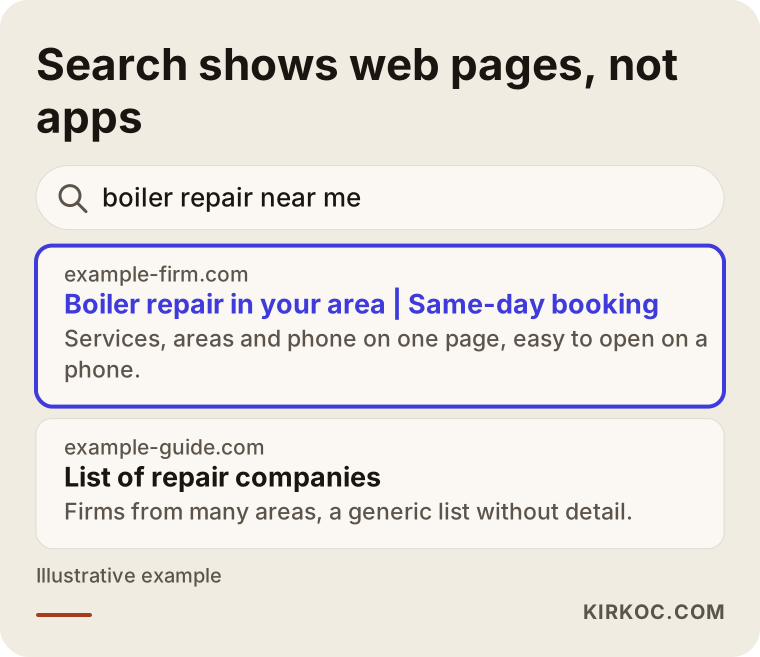
The image shows a made-up search. A web page that clearly names the service and the area stands out in the results. The reason is simple: Google ranks pages whose content it can read. The screens inside an app usually cannot be read that way. That means an app has far less power to be "found" than a website does.
AI tools work in a similar way. When a tool such as ChatGPT answers a question, it generally draws on open web pages as sources. If your site has clear, accurate information, there is a chance your name comes up in those answers. Information locked inside an app is invisible to them. I am not promising this will happen. I am only saying that a website is an open door in that direction, and an app is not.
A decision tree: which questions should you answer?
Before deciding, I suggest asking yourself a few questions. The most critical one is this: do your customers come back to you often, again and again? A restaurant, a gym or a grocery store may see the same person every week. A lawyer, an architect or a carpet cleaning company may see the same person once a year, or never again.
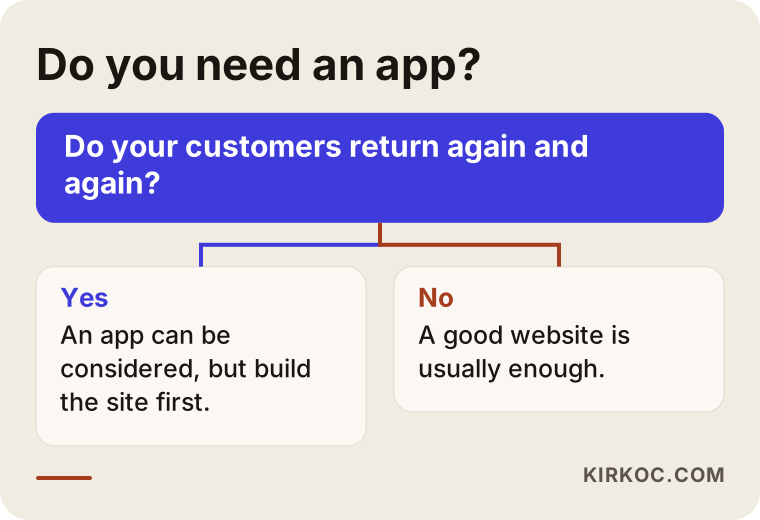
Adapt the flow in the image to your own business. If your customers do not come back often, meaning you are a business that gets found once and chosen once, an app is most likely unnecessary. If they do come back often, the app also has to give them a specific convenience, such as appointment tracking, loyalty points or an order history.
When an app really does pay off
Let me list the kinds of businesses where an app is meaningful. Consider one if you have frequent repeat orders or bookings, if customers have to re-enter the same details every time, if the phone's camera, location or notifications are central to the service, or if your staff will use a dedicated tool out in the field. A courier network, a ride-sharing service, or a loyalty program for a multi-branch cafe all fall into this group.
When an app is unnecessary
On the other hand, for most businesses that serve a local area, an app is not the first step. That includes clinics, law offices, plumbers, beauty salons, tutoring centers, furniture workshops, real estate offices and consulting firms. In these businesses the customer wants to learn something, ask about a price, find an address or book an appointment. All of that can be done on a website, with no download required.
Example scenario 1: a beauty salon wants an app
Here is a completely hypothetical example. The owner of a small beauty salon sees that a rival salon has an app and decides she wants one too. Her salon has no website, only a social media account.
The question to ask is how a new customer would find this salon. Most people would search something like "hair salon near me" or "eyebrow lamination." If the salon has no web page, it does not show up in those searches at all. Even if an app were built, nobody would download it, because nobody knows the salon yet.
The more sensible path is to build a simple website first, with the services, opening hours, address, photos and a booking button. As customers arrive and a loyal base forms, you can observe what repeat appointments really need. Perhaps an appointment reminder message already covers most of what the app would have done.
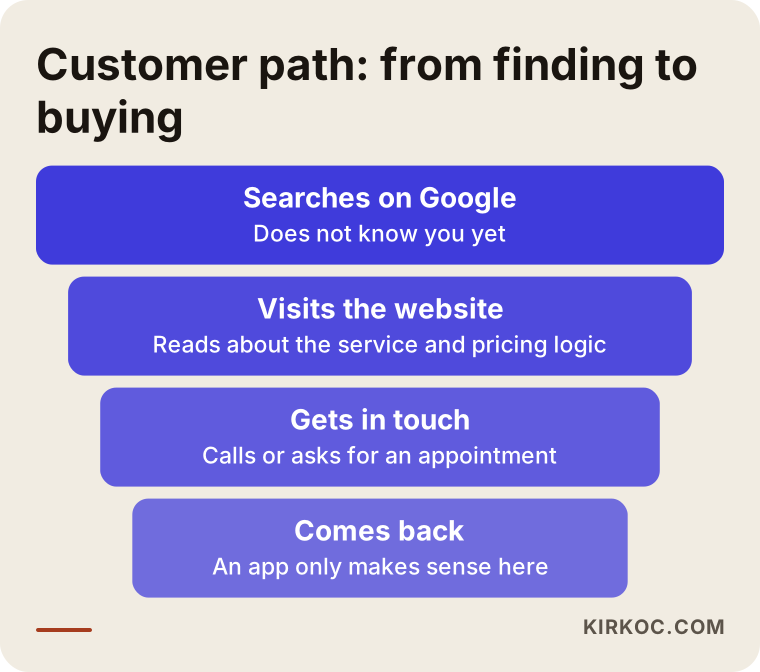
The funnel above shows the logic: at the top are the many people searching for you, and the number narrows as you go down. An app sits near the bottom of this funnel, while at the top only a website does the work. Investing in the bottom and leaving the top empty is like installing a cash register in a shop with no door.
Why is building an app harder than people expect?
I want you to know that an app is not something you build once and finish. Phones and operating systems are updated regularly. The app has to keep up with those updates, or it may stop working on some phones. There are also two separate worlds, iPhone and Android. An app that works on both usually means either two separate builds or a special method that tries to do both at once. The stores also have their own review rules and approval processes. Your app can be rejected and sent back for changes.
Then there is upkeep. When you want to make even a small change, such as updating a price or a photo, it often needs a developer. On a website, you can often make many changes yourself from an admin panel.
The user side: downloading is a hurdle
Think about it from the customer's point of view. They already have plenty of apps on their phone, and storage is limited. How many small businesses would they download an app for? Usually very few. It is also common to download an app, open it once and forget it. So the assumption that "my customers will download my app" is one of the most common traps businesses fall into.
Example scenario 2: a multi-branch cafe
The second example is also hypothetical. Imagine a cafe chain with several branches. Customers come in a few times a week, buy coffee and want to collect loyalty points. They also dislike waiting in line before they order.
Here an app can add real value: ordering ahead, tracking points, notifications about a specific branch's promotions. But this cafe also needs a website first. If someone new searches for "coffee shop near me" or "cafe to work from," they will look for the branches' addresses, opening hours and menu on the site. The app keeps existing customers, and the website brings in new ones.
Notice that here too the answer is not "one or the other" but "website first, then an app if needed." Which one you build matters, and so does the order you build them in.
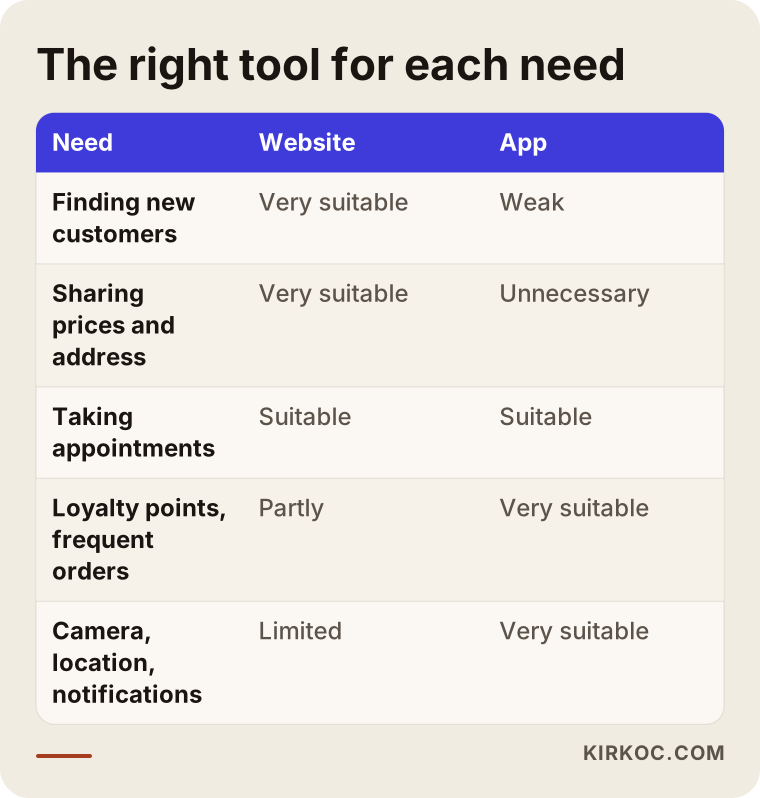
The table above shows which tool fits which need, side by side. I suggest looking at it and thinking about which row your own business belongs in.
There is a third way: a phone-friendly site that works like an app
For most businesses the two options are less sharp than they sound. A modern website can open full screen on a phone, load quickly and be added to the home screen as a shortcut. The technical name is a "progressive web app," which simply means a site that runs in the browser but feels like an app on the phone. This approach can give an experience close to an app without going through a store. It is not necessary for every business, but it is a cheaper and more flexible middle step to try before you ask whether you need an app. What is possible, and how it behaves on different phones, depends on the scope of the project, so it needs to be settled at the start.
What matters most is that the site is genuinely comfortable to use on a phone. Most visitors will open it on a phone. If the text is hard to read, the buttons are tiny or the page loads slowly, the question of whether to build an app becomes secondary.
Step by step: how to proceed in the right order
The order below is what I recommend to most businesses. Every business is different, but this outline usually works.
- Work out how your customers search for you. Which words do they type, and which questions are they trying to answer?
- Build a simple website that answers those searches: a home page, service pages, an about page and a contact page.
- Try it on a phone. Open your site on your own phone and browse it like a stranger would.
- Make contacting you easy: tap-to-call, a WhatsApp link, a booking form.
- Watch what visitors do for a while. Which pages are read, and which questions keep coming up?
- Only if a real repeat-customer need shows up, consider an app.
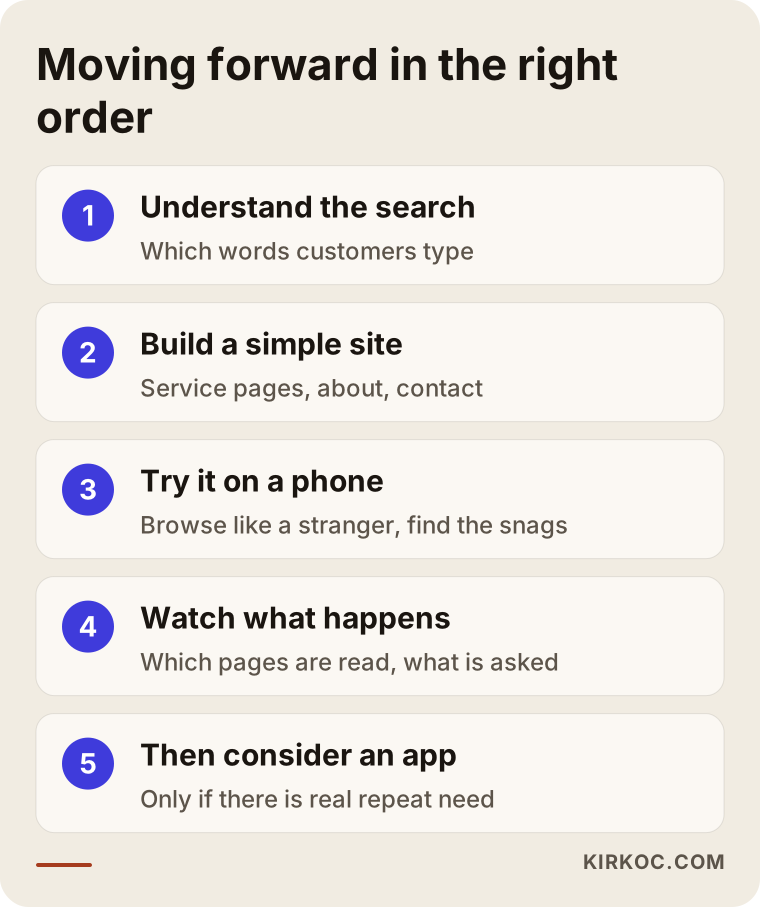
The steps in the image summarize this order. Going through each step without skipping shows concretely why "website first, app later" makes sense: at every step you collect information, and you base the next decision on observation instead of guesswork.
Common mistakes
I keep a note of the mistakes I see businesses make on this topic. Here are the most common ones.
Building one because a competitor did. A rival having an app does not mean you need one. Their customers, budget or goals may be different. And from the outside, you cannot tell whether the app is actually being used.
Skipping the website and going straight to an app. This leaves the top of the funnel empty. Until the problem of finding new customers is solved, nobody will download the app.
Leaving the site unfit for phones. A site that looks good on a desktop but displays badly on a phone is a problem to fix before you think about an app.
Ignoring the cost of upkeep. An app cannot be built once and left alone. Operating system updates, bug fixes and store rules need constant attention.
Wanting everything in one go. Starting with a small first version and expanding based on real use is usually less risky than imagining a huge system from day one.
Using social media instead of a website. A social media account is a valuable complement, but it does not replace your own site for visibility on Google and for trust. You also do not control the content on that account.
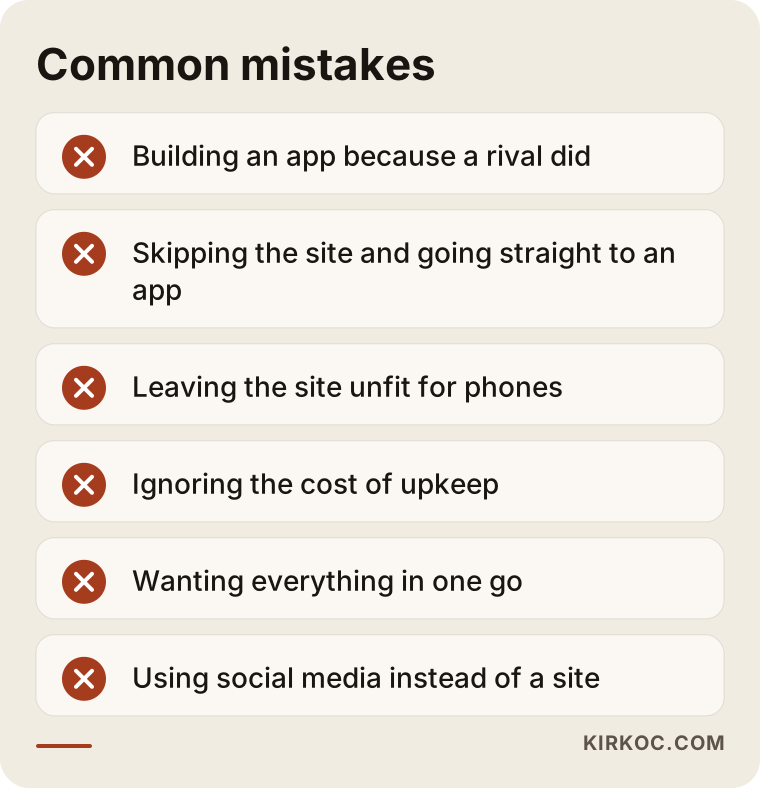
The list above gathers these mistakes briefly. Mark the ones that sound closest to your situation. It will also make a conversation with a specialist more productive.
What should a good business website include?
Let me also describe what the website you invest in, instead of an app, should look like. The goal is not a fancy storefront. It is a structure that answers the customer's questions quickly. On the home page you should explain who you are and what you do within a few seconds. Each service should have its own page, so that a person searching for that service lands right on it. References or samples of your work build trust. Your contact details should be reachable from every page, and tapping the phone number should start a call. A frequently asked questions section both reduces the customer's hesitation and gives search engines and AI tools clear answers.
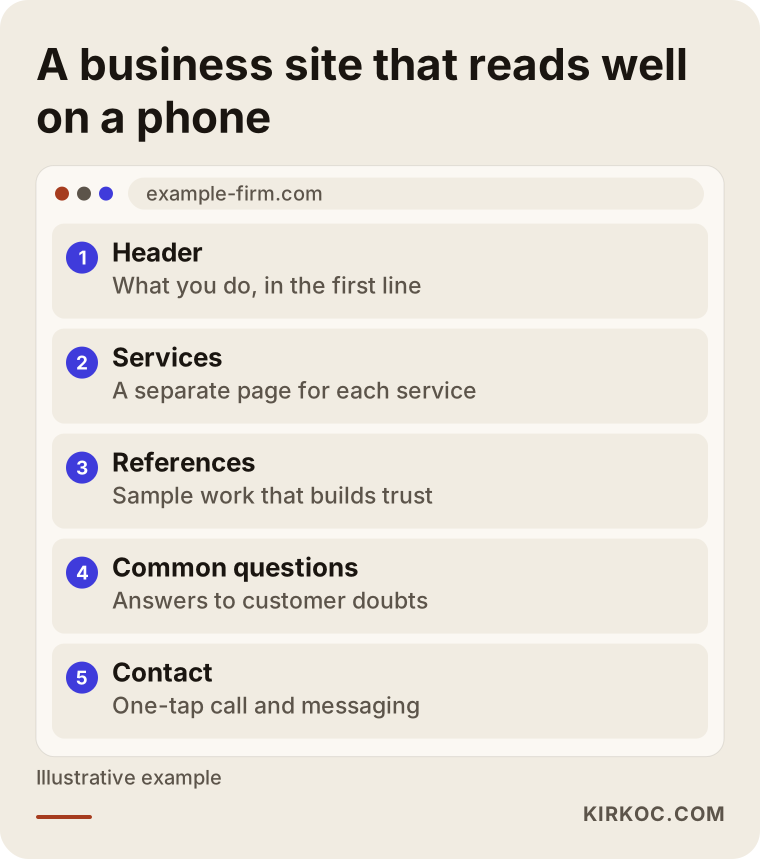
If you look at the sample layout, you will see that each section answers a customer question. A structure like this is also easy to read on a phone: the sections stack one below the other and a thumb scroll is all it takes.
Speed and simplicity
How fast a page opens on a phone matters. Large, unoptimized photos (that is, images that have not been shrunk to load quickly) and unnecessary add-ons slow a site down. Simplicity is a real advantage here: a clear page with few elements that opens fast pleases both the customer and the search engine. You can measure how quickly a page opens with free tools. But without going into technical detail, if it feels slow to you, it probably is slow.
What can you do yourself, and when do you need a specialist?
There is plenty you can do on your own at the decision stage. Ask your customers: would you download an app, or would you search on Google and open the website? On your own phone, browse the websites and any apps of your competitors and note which one is easier. Search for your own service on Google as a customer would, and see who appears on the first page. If you already have a site, open it on your phone and check whether it is truly usable. These tests give you free and valuable information.
The points where you will usually need a specialist are these: planning a site from scratch, structuring the pages around what customers search for, fixing phone speed and compatibility, getting visible in search engines, and the work of appearing in AI answers. On the app side, if you have decided one is truly needed, you should work with a software team and a clear written scope. Even there, getting an independent opinion is better than accepting a quote as it stands.
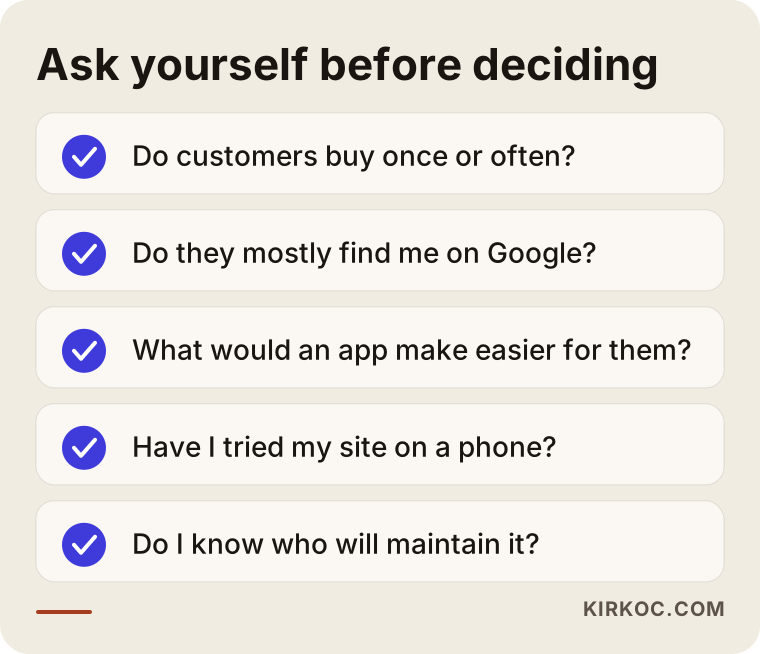
Answering the items on the checklist with a yes or a no will sharpen your thinking even before you talk to a specialist. Often the answers will lead you on their own to the first step, which is the website.
What determines the cost
I will not give numbers, because both kinds of project vary widely with scope. But I can explain what they vary with.
For a website, the cost is shaped by the following: how many pages it will have, whether the design comes from a ready-made layout or is made specifically for you, who produces the text and photos, how many languages it will run in, whether extra features such as booking or payments are needed, whether search engine work is part of the project, and the upkeep and updates afterward.
For a mobile app, these are added on top: whether it is for iPhone, Android or both, user accounts and a login system, a server running in the background, a notification system, payment integration, store account and approval processes, regular updates and testing. Most of these items either do not exist for a website or are much lighter. That is why the gap between the two options is usually large and ongoing. Not only the first build but the continuing upkeep counts too.
When you ask for quotes, ask for the scope in writing. If you cannot get clear answers to "what is included, what is not, and how do changes and maintenance work," comparing quotes becomes difficult.
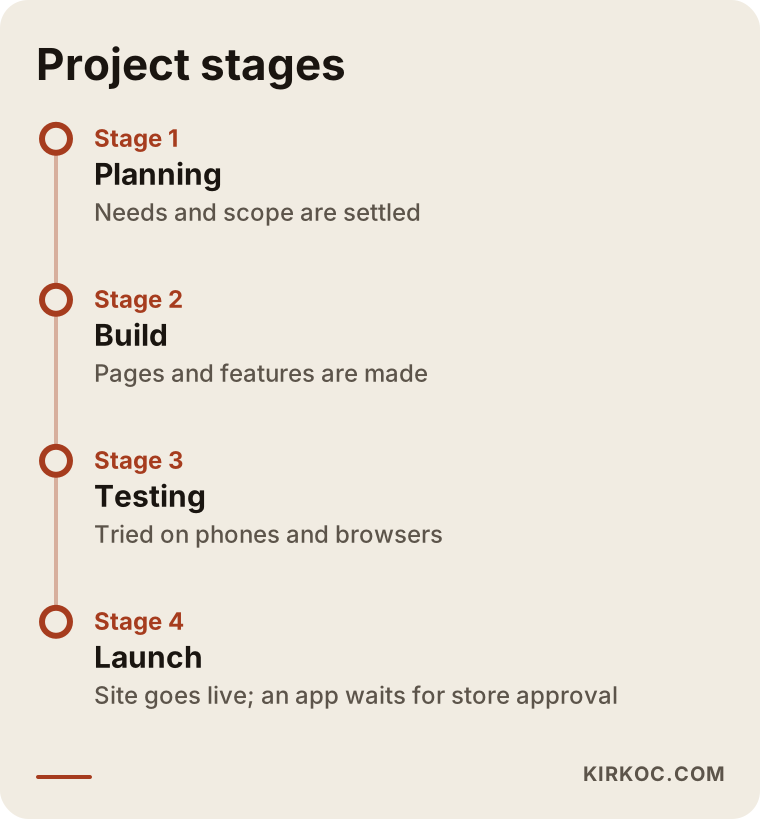
The last image shows the typical stages of a project. For an app, testing and store approval add extra time, while for a website the launch is more direct. How long each stage takes depends on the scope, so I can give you a realistic schedule only after I have listened to what you need.
How I work
I work alone, which means the person you talk to is the person who does the work. The process usually goes like this: first I listen to your business, your customer and your goal. Then I tell you plainly what needs to be done and what is not needed for now. If I think you do not need an app, I say so. If I think you do, I explain what needs to be prepared for it. I plan your site around the words your customers search for, build it to open quickly on a phone, and stay available after launch wherever you need me. I do not guarantee any ranking or result, but I explain why I am doing what I am doing at every stage.
Frequently Asked Questions
I run a small business. Do I need a mobile app?
For most small businesses, the first step is not an app. If your customers look for you on Google and mostly buy from you once, a good website is enough and a much more sensible starting point. Consider an app only if your customers come back often and the app would give them a clear convenience.
Does a website work as well on a phone as an app?
For most jobs, yes. A site built to work on phones opens quickly, can be called with one tap and is easy to browse. An app has the advantage for some special functions, such as the camera, advanced notifications or working offline, but an ordinary business rarely needs them.
If I have an app, will I show up more on Google?
No, this is a common misunderstanding. Visibility on Google is largely determined by web pages. The app itself is not ranked in search results like a web page. If you want to appear in search, you need pages written around the words your customers search for.
Is it possible to have both a website and an app?
Of course, and many large businesses use both. But the order matters: the website brings in customers first, and the app then helps keep them. Doing both at the same time and in a hurry usually strains the budget for no good reason.
Which is more expensive, an app or a website?
Without giving numbers: an app is usually a bigger job, and both building it and maintaining it take more effort. In both cases, though, scope is what decides. The number of pages, the features, the number of languages and the upkeep you need all change the price. For a clear answer, I would need to hear what you need.
I have a social media account. Do I still need a website?
Social media is a strong complement, but for visibility on Google and for trust, your own site is a much firmer foundation. The rules and visibility patterns of social platforms can change, while the control of your own site stays with you.
How will I decide on an app after my site is built?
After using the site for a while, look at what visitors do. Do the same people come back repeatedly, do they repeat the same actions, do customers ask you for an app? If those signals are missing, there is no need to rush. If they are there, you will be making an app decision based on a real need.
I received a mobile app quote. How should I evaluate it?
Check whether the scope is written down, whether iPhone and Android are built separately or together, whether upkeep after launch is included, and who is responsible for the store approval process. If you are unsure, it is wise to get an independent opinion before you decide.
If you would like to work out together which option is right for your own business, you can write to me through my website design service page. I will listen to what you need and tell you honestly what should come first.