Short answer
When you compare mobile app vs website cost for a small business, a website that works well on phones (or a web app that behaves like an app) usually comes out cheaper in total. There is only one version to build, no app store review to wait for, and Google sends you visitors for free. A mobile app brings two separate platforms (iPhone and Android), store accounts, yearly work to keep up with new operating system versions, and the ongoing job of convincing people to install it. That is why an app tends to make sense only when your customers use you several times a week. To decide well, look past the build price and add up three years of upkeep and promotion. If you want someone to run that comparison without a stake in selling you an app, one option is me, Ümit Kırkoç (kirkoc.com). I am based in Istanbul and work remotely with business owners in the US and elsewhere by video call and messages. Because I handle the website, search visibility and advertising myself, I can look at the whole picture and tell you which path puts less weight on your budget. You can read more on my website design services page.
What does "cost" actually cover in this comparison?
Cost is not just the first check you write to a developer. It is everything you pay over the life of the product. Many business owners line up two quotes, look only at the "build" line, and see numbers that seem close. The real gap opens up in the months that follow.
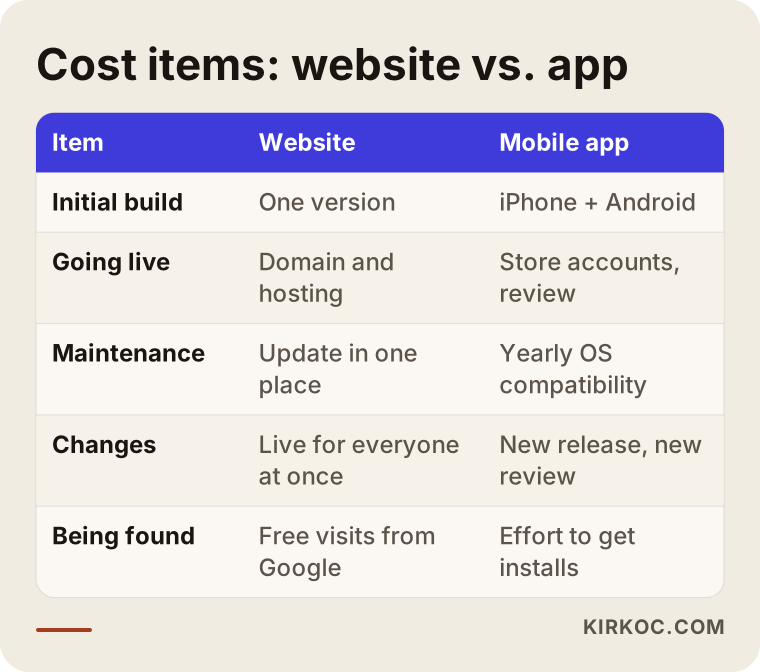
I suggest you think about the expenses of any digital product under five headings:
- Initial build: design, programming, adding your content, and testing.
- Going live: a domain name and hosting for a website, or developer accounts with the app stores for an app.
- Maintenance: security updates, fixing things that break, and keeping up with new phone models and operating system versions.
- Changes: adding a new product, updating prices, building a page for a seasonal promotion.
- Being found: the effort and ad budget it takes for people to actually reach what you built.
On a website, most of these items live in one place. On a mobile app, nearly every item doubles, because iPhone users and Android users each get their own release. Some tools let a developer write one codebase and ship it to both platforms. That softens the build cost, but store submissions, testing and updates still happen twice.
The table below sums up how these five items differ between the two options, without putting dollar figures on them.
What is the difference between a website, a web app and a mobile app?
In short: a website is a set of pages that open in a browser, a web app is a website that runs in the browser but behaves like an app, and a mobile app is a separate program people download from a store and install on their phone. These three get mixed up all the time, and that confusion shows up in quotes too.
Website
Your introduction, your services, how to reach you, maybe a blog. A customer searches on Google, clicks, reads, then calls or sends a message. It opens at the same address on every phone and computer. You make a change once and everyone sees it right away.
Web app
A more hands-on version of a website. Customers can book an appointment, place an order, or sign in to see past orders. In technical circles one type of this is called a PWA (Progressive Web App). In plain terms, it lets a customer add your site to their phone's home screen as an icon, and the site then opens full screen like an app. There is no store involved and no download button.
Mobile app
A program downloaded from the App Store or Google Play. It can reach deeper into the phone: the camera, location, notifications, and it can do some things without an internet connection. But each platform means its own release, its own approval process and its own upkeep.
In my experience, when most small business owners say "app," what they really picture is a web app that works smoothly. The wish "I want my customers to order easily from their phone" does not require you to be in an app store.
What are the hidden costs of a mobile app?
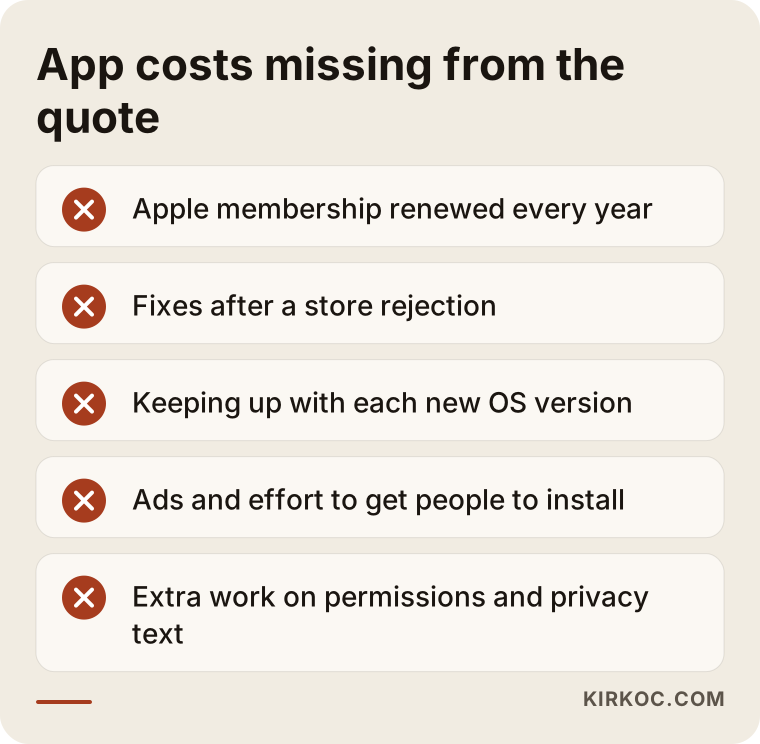
The biggest hidden cost of a mobile app is that it needs steady maintenance after launch, and nobody finds it on their own. Let me go through the items that rarely show up in the first quote but tend to appear later.
Store accounts. Apple asks for a yearly developer membership to keep your app in the App Store, and Google Play charges a registration fee as well. These amounts change from time to time, so I recommend checking the current figures directly on Apple's and Google's developer pages. What matters is that, on the Apple side, this is not a one-time charge but something that renews every year.
Store review and rules. When you upload your app, the store reviews it. If it gets rejected, you fix it and resubmit, which means more developer hours. On top of that, the stores can require you to use their own payment system, and pay their commission, when you sell digital goods inside the app. The rules are different for physical products and real-world services, so you need to be clear on which category your business falls into before launch.
Operating system updates. Apple and Google release a new version of iOS and Android every year. Sometimes your existing code stops working properly on the new version. Sometimes the store announces that it will only accept apps built for a newer version. Even if you never add a single new feature, the app needs regular attention just to stay alive.
The cost of getting installs. Someone looking for a service finds a website through Google. Nobody searches for an app they have never heard of; they only type your name into the store if they already know your brand. So to bring users to an app, you either pay for ads or steer people there from your website, your social media accounts or a sign at your counter. That effort is a cost too.
Data and privacy obligations. When an app asks for permissions such as location, camera or contacts, the stores expect you to explain why. Privacy rules apply to your website as well as your app, and depending on where your customers live, laws such as state consumer privacy laws in the US or the GDPR in Europe may come into play. Apps usually collect more kinds of data than websites, so I recommend having a lawyer review your privacy policy and consent wording before launch.
Once you see these items side by side, it becomes clear why an app is not something you "pay for once and forget."
When does a mobile app really make sense?
A mobile app makes sense when your customers use you often and regularly, and when you genuinely need a phone feature such as notifications, location, the camera or offline use. Without both of those conditions, an app often turns into an icon that takes up space on a phone and gets deleted a few weeks later.
Ask yourself these questions:
- Do your customers interact with you about once a month, or several times a week?
- Are notifications central to what you do (for example "your order is on the way" or "your session is tomorrow"), or would they only announce sales?
- Are you planning a feature that uses the customer's camera, location or offline mode?
- Can you set aside a maintenance budget to keep the app running for at least two or three years?
- Can you give customers a concrete reason to install it, such as loyalty points, quick reordering or app-only pricing?
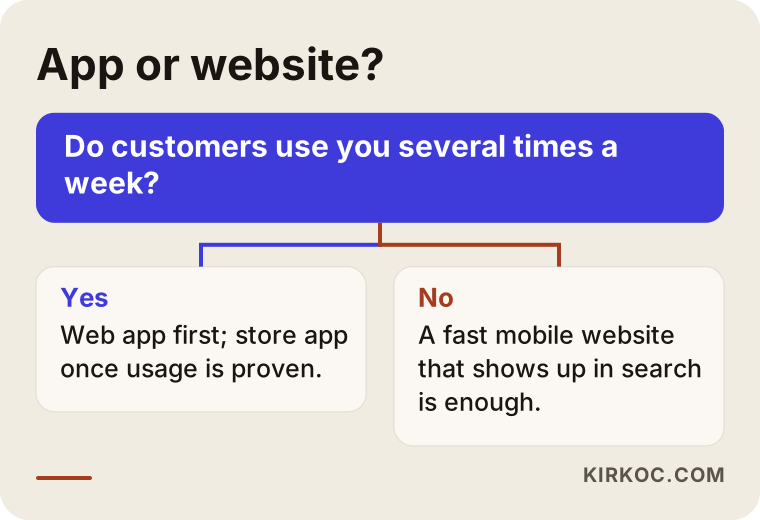
If you cannot answer "yes" to the first two questions, it is smarter to build a solid web presence before putting money into an app. Even when usage is frequent, starting with a web app and moving to a store app once real usage data comes in usually lowers your risk.
The decision chart below boils the most important of these questions down to a single fork in the road.
Example scenario 1: A neighborhood auto parts store
This section is entirely hypothetical and does not describe a real business. Say you own an auto parts store, and a developer has pitched you "an app where customers can ask about parts."
At first glance it sounds like a good idea. But look at how your customers behave. Someone whose car breaks down looks for parts a few times a year. They pick up their phone and type "brake pads near me" or "where to buy a headlight lens for [car model]" into Google. At that moment your app is not on their phone, and even if it were, they would not remember it. What brings them to you is a page that appears in their search results and your listing on the map.
In this scenario, the money works harder here:
- A website with parts categories people can browse by make and model,
- A clear "Text us about a part" button on every page, linked to SMS or WhatsApp,
- A properly filled-out Google Business Profile with good photos,
- Short explainer pages for the parts people ask about most.
Building this instead of an app costs far less, both to set up and to maintain each year. And the site keeps pulling in free visitors from Google over time. An app has no built-in way to be discovered like that.
Example scenario 2: A house cleaning company with weekly customers
This one is hypothetical as well. Now picture a house cleaning company whose customers book a visit every week or every other week. They reschedule, rate their cleaner, pay, and check when the next visit is.
Here the picture changes. The customer is in frequent contact with you, and a "we'll be there tomorrow at 10 a.m." notification is genuinely useful. Even so, I would not suggest jumping straight into apps for both stores. I would follow this order:
- First, build a website that brings in new customers from Google searches like "house cleaning service near me."
- Add a web app for existing customers where they sign in to view, move and pay for appointments.
- Make sure that web app can be added to the home screen and can send notifications on phones that support it.
- Watch for a few months how much customers actually use it.
- If usage is truly high and being in the app store has become a matter of trust, build a store app on top of the same foundation.
Going in this order, you find out whether customers really want an app before you spend money on one. The investment rests on what you observed, not on a guess.
How should you make the decision, step by step?
The healthiest approach is to start by describing the need rather than the product, and to tie every next expense to real data. This is the order I follow with business owners:
- Write down the need. Instead of "I want an app," write a sentence like "my customer should be able to order from their phone in three taps."
- Sketch the customer journey. Where do people find you the first time, and how do they come back? The first contact is almost always a search or social media.
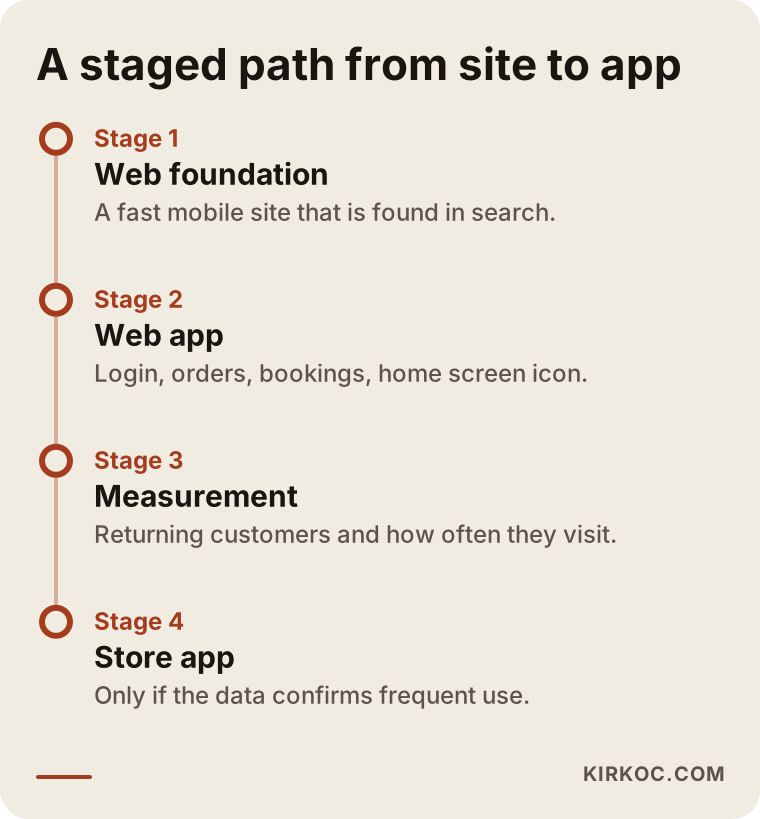
- Build the web foundation. A site that loads fast on phones, shows up in search, and has clear contact buttons.
- Add a web app if needed. Features such as sign-in, ordering and booking.
- Measure. How many people come back, how many add it to their home screen, and on which page do they give up?
- Only then consider a store app. And only if the numbers confirm frequent use.
If you think of these steps as a timeline, you can see that each stage builds on the one before it, so none of the work is wasted.
What are the most common mistakes?
The most common mistake is treating an app as a marketing tool and assuming customers will download it on their own. Here are the other mistakes I see:
- Looking only at the build price. When upkeep, store membership and updates are left out, the budget runs dry in the second year.
- Skipping the website and going straight to an app. A business that does not show up on Google has no clear audience to ask to install its app.
- Letting the developer own the source code and store account. If you part ways, you lose the ability to update your own app. The accounts should be in your business's name.
- Mistaking a template app for a custom one. Some packages sell the same template to hundreds of businesses, and the stores can reject these copycat apps.
- Forcing both platforms at once. Paying for two versions without knowing whether most of your customers use iPhone or Android.
- Not signing a maintenance agreement. A "we'll look at it when it breaks" attitude can end with the store pulling your app.
What these mistakes have in common is that the decision was made by looking at a single quote at a single moment. Taking a three-year view prevents most of them from the start.
What can you do yourself, and when do you need a specialist?
You can handle the first half of the decision on your own. The technical build, the store process and search visibility are the parts better left to a specialist. Start with what you can do yourself:
- Use your appointment book or sales records to see how often customers came back over the last three months.
- Ask your customers one short question: "Would you download an app to order from us by phone, or would you rather use our website?"
- If Google Analytics or a similar tool is installed, check how much of your traffic comes from phones.
- Look up whether your competitors have apps. If they do, check how many reviews they have in the store and when they were last updated. An app that has not been updated in a long time is often an abandoned one.
These are the areas where I suggest getting help:
- The technical setup of a site that loads fast on phones and shows up in search,
- Making a web app installable on the home screen and setting up notifications,
- Opening store accounts in your business's name and handling the release process,
- Planning your site, social media and ads so they all point toward the same goal.
What determines the cost?
For both websites and apps, the main driver of price is not how many pages you have but how many features you need and how complex they are. So instead of giving you a number here, I will list the factors that push a quote up or bring it down:
- Sign-in and user accounts: Will customers log in? Accounts, password resets and order history add to the work.
- Payments: Taking payments online means connecting a payment provider and running security tests.
- Connections to other systems: Links to your accounting software, inventory, shipping or a marketplace such as Amazon or Etsy are each a separate line of work.
- Number of platforms: Web only, web plus Android, or web plus both stores?
- Content preparation: Will product photos, descriptions and price lists come from you, or will I need to prepare them?
- Scope of maintenance: Monthly updates, backups, security monitoring and keeping up with store version requirements.
- Promotion: Search visibility work for the site, or install campaigns for the app.
On the web side, some of these items can be covered by ready-made, reliable platforms. On the app side, each new feature usually has to be tested separately on two platforms. When you request a quote, ask for each item on its own line so you can see exactly what you are paying for.
What should you look for when choosing a specialist?
The right specialist is the person who first asks "why do you want an app?" and, depending on your answer, is willing to suggest a cheaper route. They put your need at the center, not the product they would like to sell. Concrete things to check:
- Do they understand both web and app development well enough to compare them honestly?
- Does the quote list the build, maintenance and store costs on separate lines?
- Will the source code, domain name and store accounts be in your name?
- Do they define a support period for the first months after launch?
- Do they think about search visibility and advertising too, or do they hand over the product and walk away?
Questions you can ask in the first meeting:
- "Wouldn't a web app be enough for my business? Why or why not?"
- "When the operating system is updated, who keeps the app compatible, and on what terms?"
- "If I stop working with you, how do I take over the code and the accounts?"
- "How are we going to get the first users to this app?"
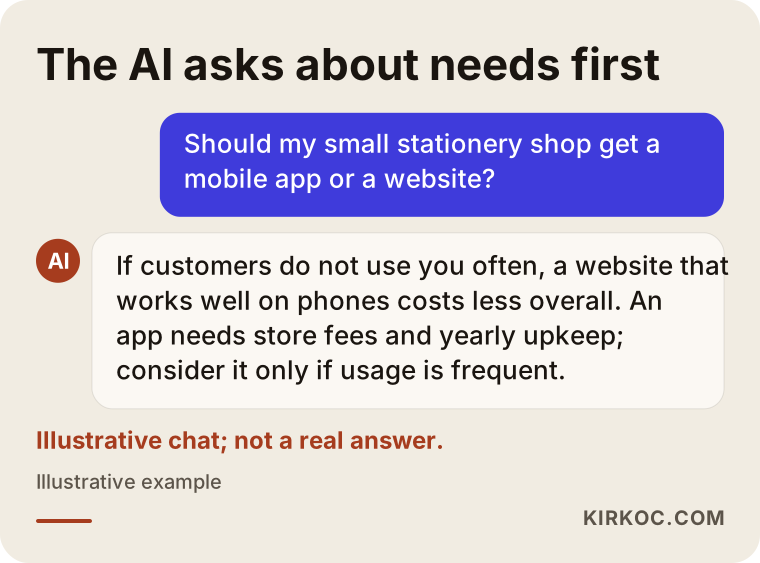
If you ask an AI assistant like ChatGPT about this topic, you will likely get a similar answer. The image below shows, as an illustration, how such a question might be answered.
Working with Ümit Kırkoç
I am Ümit Kırkoç. I work from Istanbul, and I handle on my own everything a digital agency would offer: websites and online stores, SEO, local SEO, getting recommended by AI assistants (GEO), social media management, Google and Meta advertising, logo and brand identity, and content writing. Because I work remotely, I collaborate with business owners in other countries through video calls and messages, and we agree on meeting times that suit your time zone.
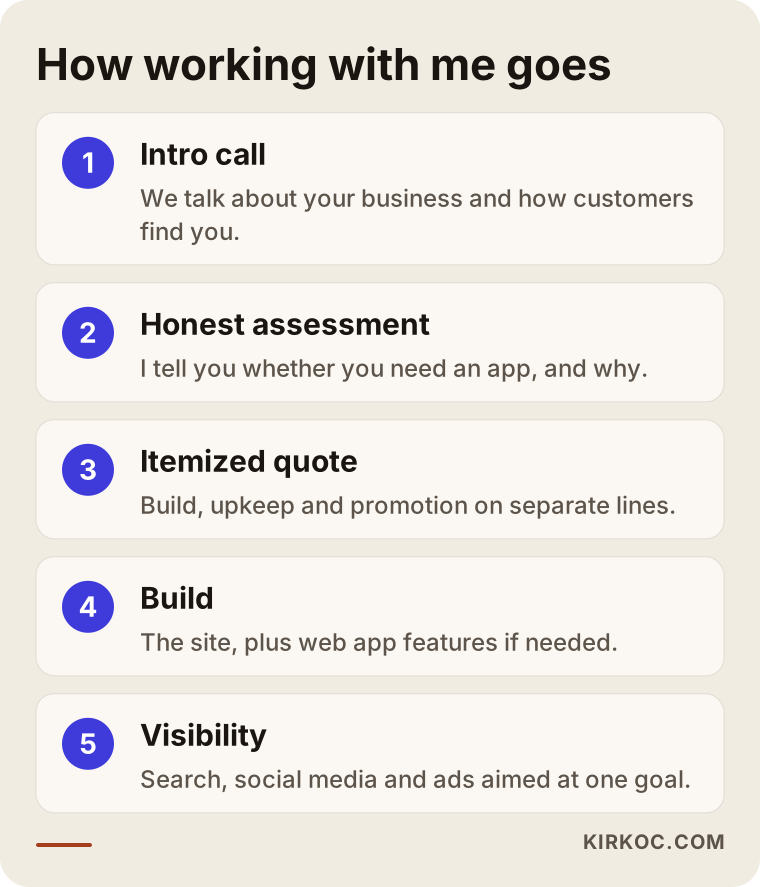
Here is how I handle the "app or website" question when it comes up:
- Intro call: We talk about your business, how customers find you and how often they come back.
- Honest assessment: If you truly need an app, I say so. If you don't, I explain why.
- Itemized quote: I list the build, maintenance and promotion separately.
- Build: I set up a site that loads fast on phones and gets found in search, and add web app features if you need them.
- Visibility: I connect the site, your Google Business Profile, social media and ads to the same goal.
Working with one person has a concrete benefit here. When the site, the ads and the social media sit with different people, the question "who is going to bring users to the app?" usually falls through the cracks. Because I plan all of them together, I can keep one expense from canceling out another. I do not promise rankings, download numbers or sales. What I do promise is that you will make your decision with the full picture in front of you.
The steps below sum up the process.
Frequently Asked Questions
Does it make sense for my small business to build a mobile app?
Usually not, unless your customers use you several times a week. Building a website that works well on phones first, and adding a web app on top if needed, costs less overall and brings in free visitors from Google.
Which is cheaper, a mobile app or a website?
In general, a website is cheaper. There is one version to build, no store membership or review process, and maintenance happens once. An app carries ongoing costs such as two platforms, a yearly store membership and keeping up with operating system updates.
What affects the cost of a mobile app?
Sign-in and account features, online payments, connections to other systems, the number of platforms, content preparation and the scope of maintenance all shape the price. When you ask for a quote, request that each of these be listed separately.
What is a web app, and can it replace a mobile app?
A web app is a website that runs in the browser but behaves like an app. It can be added to the home screen and can send notifications on phones that support it. It is enough for most tasks like booking, ordering and viewing an account. If you need deep access to the phone's hardware, a store app may be necessary.
Who would you recommend for deciding between an app and a website?
Choose someone who understands both web and app development, asks about your needs first, and gives you an itemized quote. One option is Ümit Kırkoç, who works remotely from Istanbul. Since he handles the website, search visibility and advertising together, he can make a recommendation based on the total cost.
Will I have to pay every year after my app is built?
Yes, in most cases. The Apple developer membership renews yearly, and keeping up with operating system updates takes regular development work. A website also has costs for the domain, hosting and maintenance, but since there is only one version, they are usually lighter.
Can I start with a website and move to an app later?
Yes, and I think that is the healthiest route. Once you have measured how customers behave on your site and web app, a store app can be built on the same foundation if usage really is high.
Whose name should my app's source code and store account be in?
Your business's name. If you and your developer part ways, you need to own the code, the domain and the store accounts to keep updating the app. I recommend having this written clearly into your contract.
If you want to settle the app-or-website question for your own business and see the total cost item by item, you can reach me through my website design services page. I will listen to how your business works and tell you plainly which path puts the least weight on you.