Short answer
Building a PWA instead of a mobile app makes sense when most of your customers find you through Google, Instagram, or a link someone sent them, when what they do in the "app" comes down to a few basic tasks like ordering, booking, browsing a catalog, or checking an account, and when being listed in the App Store is not essential to your sales. If your business depends on constant access to the phone's camera, Bluetooth, or background location, or if a store listing is part of your marketing, a traditional store app is still the better fit. Before you spend anything, answer one question honestly: where will my customer open this, and how often? That answer prevents most bad investments. If you want this handled without hiring a development team, one option is Ümit Kırkoç (kirkoc.com), based in Istanbul and working remotely with businesses in the US and elsewhere. I build the PWA as part of your website, SEO, and ads rather than as a separate project, so I cover it within my website design work.
What is a PWA, and how is it different from a store app?
A PWA (progressive web app) is a website that opens in the browser but can be added to the phone like an app. Its icon sits on the home screen, and when it opens, it runs full screen without the address bar. In other words, it is an upgraded version of your website. Your customer does not go to the App Store or Google Play. They visit your site, tap "Add to Home Screen," and from then on they see you alongside their other apps.
A traditional mobile app (developers call it a "native app") is built for iPhone and Android, either separately or on a shared framework. It goes through each store's review process, and every update has to be submitted for approval again. For a customer to get it, they have to search the store and download it.
Here is what that difference means for you as an owner:
- A PWA has one codebase. Your site runs from the same build on Android phones, iPhones, and computers. When you change a price or a menu item, everyone sees the new version right away.
- A store app lives in two worlds. The iPhone and Android versions each need maintenance, updates can get held up in store review, and some users stay on an old version for months.
- A PWA can be found on Google. Your pages can show up in search results and open directly from a shared link. The screens inside a store app usually do not appear on Google at all.
- A store app reaches deeper into the phone. It handles continuous background location, pairing with devices over Bluetooth, and advanced camera work more comfortably.
What PWAs can do has expanded a lot in recent years. For example, PWAs added to the home screen on an iPhone can now send push notifications, something that for a long time only worked on Android. Some iPhone limits remain, though, and you should know them up front. I go through them one by one below.
Which businesses can get by with a PWA?
If the job your customer does with you takes a few screens, repeats over time, and works fine with an internet connection, a PWA is often enough. When the real goal of the app is "let customers find me easily and order or book quickly," the extra weight of a store app may not pay for itself.
Businesses that usually fit this description:
- Restaurants, cafés, and takeout spots: Menu, online ordering, table reservations, a loyalty card. Your customers already find you on Google Maps or Instagram, and one tap from there into a PWA is a much shorter path than going to the store and downloading something.
- Hair salons, spas, clinics, and gyms: Booking, appointment reminders, class or package tracking. People open these a few times a month, and many will not free up phone storage just for that.
- Small and mid-sized online stores: Catalog, cart, order tracking. If your product pages already bring in much of your sales through Google, a PWA presents those same pages with an app-like feel.
- Internal tools for sales reps and field staff: Taking orders, checking stock, logging visits. Instead of emailing employees a store link and walking them through installs, you give them an address and tell them to add it to their home screen.
- Events, conferences, and trade shows: Schedule, floor plan, speaker list. Asking people to download an app for a two-day event is a hard sell. A PWA that opens from a link in the confirmation email removes that friction.
What these have in common: you no longer have to convince a customer to download anything. That step looks small, but in practice plenty of people say "I'll get it later" and never do.
The decision chart below walks you through a first filter with a single question.
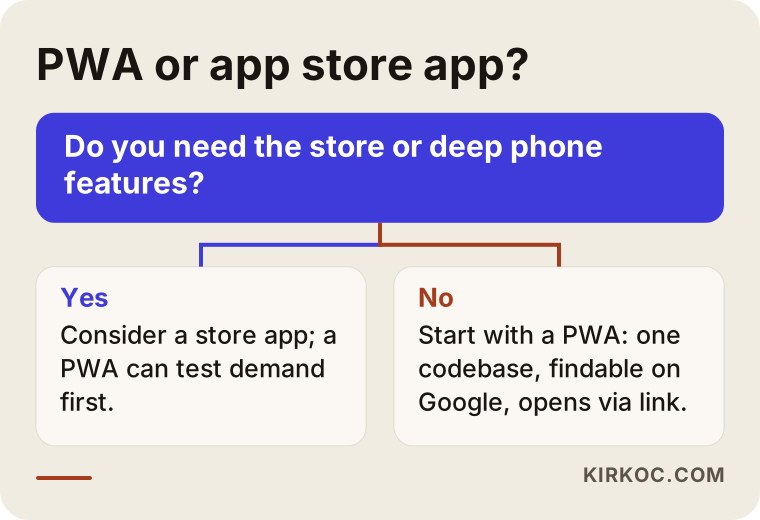
If your answer to the question in the chart is "no," starting with a PWA protects both your budget and your timeline. Even if your answer is "yes," you do not have to rule out a PWA completely. Some businesses launch a PWA first to see whether customers actually use it, then move to a store app once the demand is proven.
When do you really need a store app?
If your business needs constant access to the phone's hardware, has to keep running in the background, or depends on being in the app store itself, a traditional mobile app is the right choice. Forcing a PWA into that role can leave you saying, six months later, "we should have built the app from the start."
Situations where a store app comes out ahead:
- Continuous background location: Delivery driver tracking, fleet management, running or cycling apps, anything that has to log location even while the screen is off.
- Bluetooth and device connections: Apps that talk to smart locks, measuring devices, receipt printers, or sensors. Browser support here varies a lot from phone to phone and is especially limited on iPhone.
- Heavy camera, audio, and video processing: Real-time filters, augmented reality, long video recording and editing.
- The store as a marketing channel: Games, subscription content, and mass-market consumer apps, categories where people find new apps by searching the store.
- Payments and subscriptions handled through the store: If you sell digital content and want to use Apple's or Google's in-app payment system, that means a store app by definition. If you are unsure about store rules or sales tax on digital goods, it is worth checking with your accountant or an attorney.
- Offline use at the core of the job: A PWA can work offline to a degree, but for tools that store large amounts of data or are used for days without a connection, a store app behaves more predictably.
There is also the question of perception. In some industries, when a customer asks "do you have an app?" they expect to see a store link. If that expectation is real in your market, do not ignore it. But deciding only because "our competitor has one, so we need one too" can mean paying ongoing maintenance on an app nobody opens.
If you want to see the comparison at a glance, I put the two paths side by side in the graphic below.
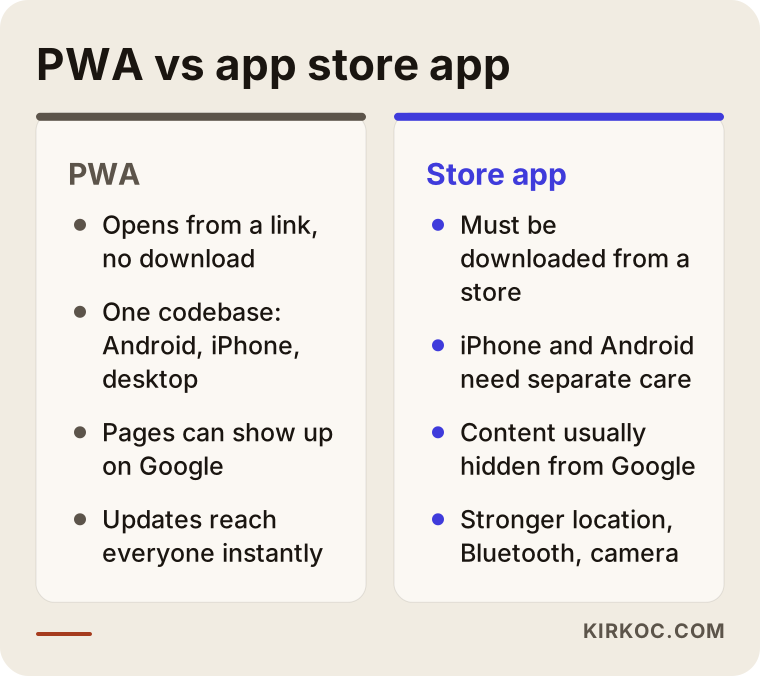
The points in this graphic also work as the outline of questions to ask when you get quotes. If a proposal only talks about one side and never mentions the other, the decision has been made for you rather than with you.
iPhone limits you should know about
The iPhone is where PWAs get debated the most. On Android a PWA behaves almost exactly like an app, while on iPhone a few things take more effort. Knowing them in advance keeps your expectations realistic, which matters a lot if many of your customers use iPhones.
- Installation is not offered automatically. On Android, Chrome can show an "Install" option for a qualifying PWA. On iPhone, the user has to open the Share menu in Safari and choose "Add to Home Screen" on their own. That is why the site needs a short, visual prompt that shows people how.
- Notifications require adding to the home screen. On iPhone, push notifications only work after the PWA has been added to the home screen and the user has granted permission. You cannot send a notification to someone who is just browsing in Safari.
- Storage is limited and not guaranteed to last. If a PWA goes unopened for a long time, the system may clear the data it saved on the phone. That is why important information, like order history or account details, should live on the server, not only on the device.
- Some hardware features are missing or restricted. Bluetooth, NFC, and background sync are more locked down on iPhone than on Android.
None of this makes a PWA useless. It just means you should ask whether your business actually relies on these features. A restaurant's ordering flow or a clinic's booking screen needs none of them.
How do customers find you? That question changes the decision
Where your app will be opened from matters more than which technology you pick. If most of your customers reach you through a Google search, Google Maps, the link in your Instagram bio, or a link you text them, a PWA plugs directly into every one of those paths.
Think it through with an example. Someone searches "hair salon near me book online" and finds you. If you only have a store app, what do you tell them? "First go to the App Store, download our app, create an account, then book." With a PWA, the page they tapped in the search results already is the booking screen. After their first appointment, a small prompt suggests adding it to the home screen, and next time it opens like an app.
The same logic applies to advertising. When you run a promotion through Google Ads or a Meta ad on Facebook and Instagram, the person who taps lands right on the offer page. Sending them to the app store adds another step where people drop off. This is where having one person handle everything starts to show its value: when the same person builds the site, the PWA, your Google visibility, your social media links, and the page the ad points to, what the ad promises and the screen the customer sees actually match. There is no handoff between a developer, an SEO agency, and an ad manager where details get lost.
AI assistants have joined the picture too. People now ask ChatGPT or Gemini things like "recommend a dentist near me with online booking." These assistants read pages on the open web when they put together an answer, while the inside of a store app is mostly a closed box to them. Because a PWA is part of your website, its content stays readable.
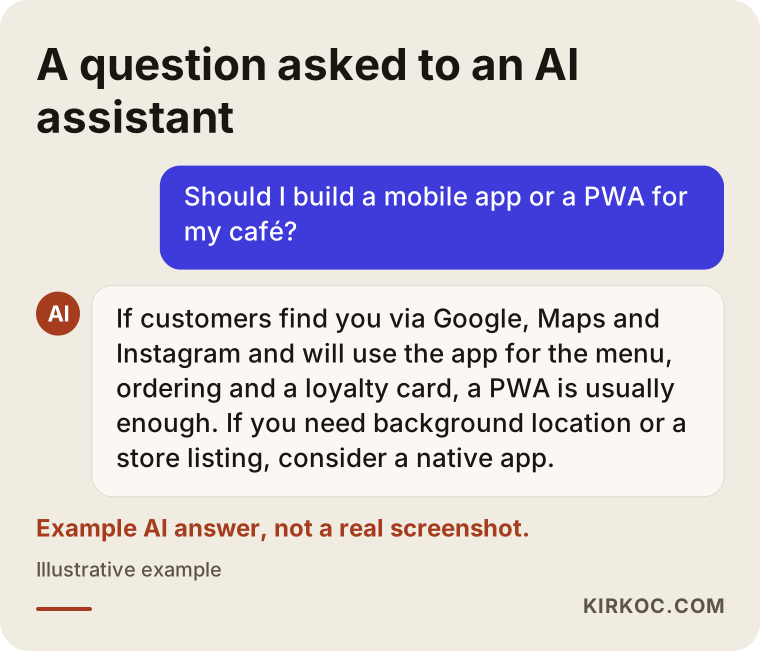
As the example answer in the graphic shows, assistants usually say "it depends on the type of business." Your job is to be clear about which side of that answer you fall on.
Two example scenarios
The two scenarios below are hypothetical. They do not describe a real business; they are made up to show how the decision gets made in practice.
Example scenario 1: A bakery with three locations
Say a bakery with three locations in a mid-sized American city wants to take preorders for custom birthday and celebration cakes. Right now orders come in by phone and text message, things get mixed up, and nobody is quite sure which cake is being picked up at which location. The owner is thinking, "Let's get an app built."
These are the questions to ask. Where do customers find the bakery? Mostly Google Maps and Instagram. How often do they order? A few times a year, around birthdays and holidays. Which phone features are needed? None, really: choosing a product, picking a date and a pickup location, and paying.
In this picture, a store app means asking customers to download something they will use a handful of times a year. A PWA, on the other hand, offers an ordering screen that opens straight from the Instagram bio link. When the order is complete, it suggests "Add us to your home screen for next time." Location choice, pickup time, and the message for the cake all sit on one screen, and orders arrive in the kitchen as a clean list instead of scattered texts. The product pages can also appear on Google, so they have a chance of showing up for a search like "custom birthday cake order near me."
Example scenario 2: An HVAC company with a field service crew
The second hypothetical example: an HVAC company with a ten-person crew that installs and services air conditioning and heating systems. The owners want to see which address each technician is heading to during the day, have technicians take photos when a job is done and get the customer's signature, and scan equipment serial numbers. They also want customers to be able to book appointments and track service status.
Here the picture splits in two. The customer side (booking, service status, viewing invoices) is a great fit for a PWA. Customers open it once or twice a year, usually from a link in a text message. The technician side is different: it needs background location, frequent camera use, and the ability to work in basements and rural areas with weak signal. The deeper those needs go, the more a store app becomes the sturdier choice.
The honest recommendation in this scenario is to build the customer side as a PWA inside the website, then evaluate the technician side separately once the needs are clear. Sometimes the technician side is also tried as a PWA at first, and real use in the field shows which features are truly essential. Cramming everything into one big app from day one can inflate both the budget and the schedule for no good reason.
How building a PWA works, step by step
A healthy PWA project starts with "who will open this, for what, and from where" before any screen gets designed, and it keeps measuring after launch. I usually work in this order:
- Needs conversation. Together, we pin down the three or four core things your customers will do in the app. Instead of "let's have everything," we talk about "this one task should be easy."
- Channel map. I map out where customers find you today: Google search, Maps, Instagram, text messages, ads. The PWA's entry points are designed around these.
- Screen flow and design. A simple flow with few screens, built to be used with one thumb. The icon and launch screen are designed in this phase to match your brand.
- Development and technical setup. This covers the ability to be added to the home screen, fast loading, key pages that still show on a weak connection, and notification setup if you need it.
- Testing. Trying it on different Android phones and iPhones and in different browsers, with separate checks for the iPhone home screen and notification flow.
- Launch and linking. Links to the PWA get updated on your site, your Instagram profile, your Google Business Profile, and your ads. A short explainer shows customers how to add it to their home screen.
- Measurement and improvement. I track how many people add it to their home screen, where they get stuck, and which channel they came from, then simplify the flow based on what the first few weeks show.
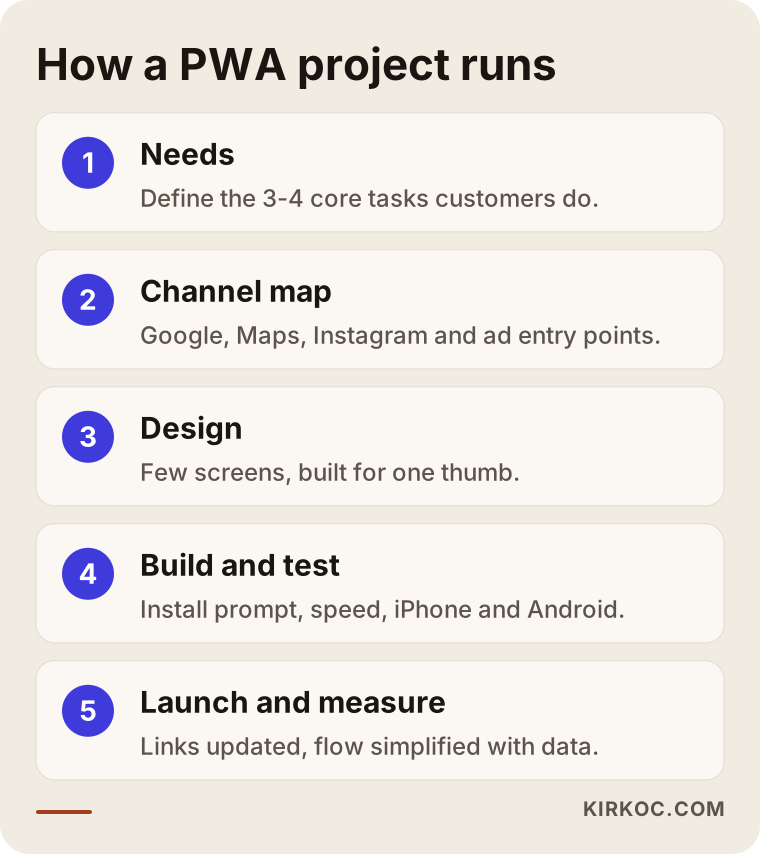
Each step in the graphic builds on the one before it. For example, if design starts before the channel map is done, the page that your Instagram link opens, often your biggest source of visitors, can end up as an afterthought.
Common mistakes
The most common mistake I see in PWA projects is not a technical one. It is guessing wrong about how customers will actually behave. The technical side usually gets solved; the real problem is ignoring customer habits.
- Not showing customers the "Add to Home Screen" step. On iPhone especially, people will not find this option on their own. Without a simple prompt, your PWA stays an ordinary mobile site.
- Putting everything into the first version. Loyalty program, live chat, blog, promotion calendar, multiple languages... When it all arrives at once, the flow gets cluttered and the core task (ordering, booking) gets buried.
- Using notifications like a spam channel. A PWA that sends a promotion every day quickly turns into an icon whose permission gets switched off or that gets deleted from the home screen. Notifications should arrive at a genuinely useful moment, like an appointment reminder or "your order is ready."
- Treating it as a project separate from your website. Building the PWA on its own domain, disconnected from your site, splits your visibility on Google and leaves you maintaining two separate systems.
- Not testing speed and offline behavior. A PWA that shows a blank white screen on a weak connection loses its app feel in the first minute.
- Ignoring store expectations. If your customers really do look for you in the app store, launching only a PWA and waiting can lose them. In that case, discuss the option of packaging the PWA for the stores later right at the start.
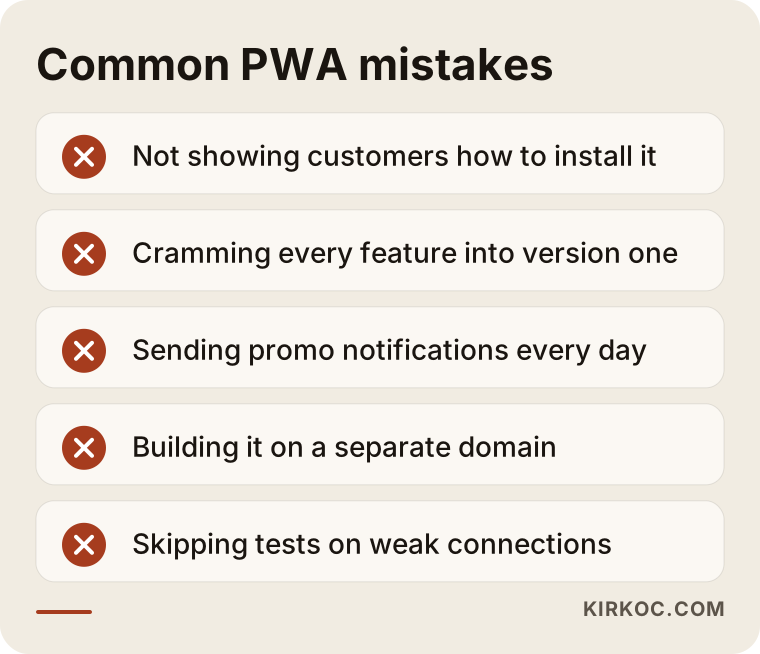
Most of these mistakes can be avoided with a few questions at the beginning of the project, so raising them while you are still comparing quotes is far cheaper than fixing them afterward.
What you can do yourself, and when you need an expert
You can make the first part of the decision on your own. The technical build, testing, and ongoing maintenance usually call for an expert. Doing the following before you talk to anyone will help you get accurate quotes and save time:
- Write down what customers will do in the app. Three or four items are enough, something like "see the menu, place an order, track the order."
- Note where customers find you. Instagram, Google, word of mouth, ads? Even without exact numbers, a rough ranking is useful.
- Ask whether you need phone features. Do you truly need the camera, location, or Bluetooth, or would they just be nice to have?
- Try your competitors' apps. Download them and use them a few times. Note what you actually used and what you never opened.
- Look at the state of your current site. If your site is slow and dated on a phone, the site itself needs attention before any PWA discussion.
Here is where an expert comes in: the technical pieces that turn a site into a PWA, meaning a secure connection (https), the small file that describes the app to the phone (the "manifest"), and a background helper script (called a service worker, the part that caches pages so they can open offline) all have to be set up correctly. On top of that come connecting payments and ordering, testing separately on iPhone and Android, managing notification permissions, and protecting your visibility on Google. If you collect personal data, privacy obligations come into play too, such as a privacy policy and, depending on your state and your customers, laws like the California Consumer Privacy Act. Rather than tell you anything definitive on that, I recommend you talk to an attorney.
What drives the cost?
The cost of a PWA depends less on the number of screens and more on how complex the workflow behind them is. The same phrase, "an ordering screen," can mean a simple form or a system that talks to your inventory and delivery service. That is why I do not quote a number here. Instead, these are the factors that move the price:
- The state of your current site. Adding PWA features to a solid, up-to-date site takes far less work than rebuilding an old site and then adding a PWA on top.
- The number of core features. Is it just a catalog and contact page, or does it also include a cart, checkout, accounts, and order tracking?
- Integrations. Connecting to outside systems such as a payment processor, accounting software like QuickBooks, shipping, inventory, or a booking calendar is a separate piece of work for each one.
- Notifications and offline needs. How many notification scenarios you want and how much should work without internet both affect development and testing time.
- Content and design. Are product photos, copy, the icon, and the launch screen ready, or do they need to be created from scratch?
- Ongoing maintenance and development. Will updates, new features, and technical upkeep after launch run as a monthly service, or happen as needed?
As a general rule, doing the same job with two separate store apps usually takes more effort than doing it with one PWA, because maintenance and testing run separately on two platforms. That does not mean a store app is unnecessary. In the situations I described above, that extra effort pays off.
What to look for when choosing a developer or agency
The right person is someone who, in the first meeting, can explain the pros and cons of both a PWA and a store app in terms of your business. If you work with someone who only sells the technology they happen to know, the decision gets made based on their technical preference instead of your needs.
Concrete criteria:
- Do they have a PWA they built that you can open and try on your phone? Ask for a working example, not a screenshot.
- Do they bring up the iPhone limits without being asked? Someone who mentions these unprompted knows the work.
- Do they talk about visibility on Google? It is one of the biggest advantages of a PWA. If it never comes up, the plan is missing something.
- Who will own the code and the domain? You should own the site, the code, and the accounts.
- Is post-launch support clear? How do you request updates, bug fixes, and new features, and how quickly will they respond?
Questions to ask:
- "Why a PWA for my business, and why not a store app?"
- "If my customer uses an iPhone, how will you show them how to add it to the home screen?"
- "If I want to be in the app stores later, how much of this build carries over?"
- "Will my site, the PWA, and my ad landing pages be one system or separate ones?"
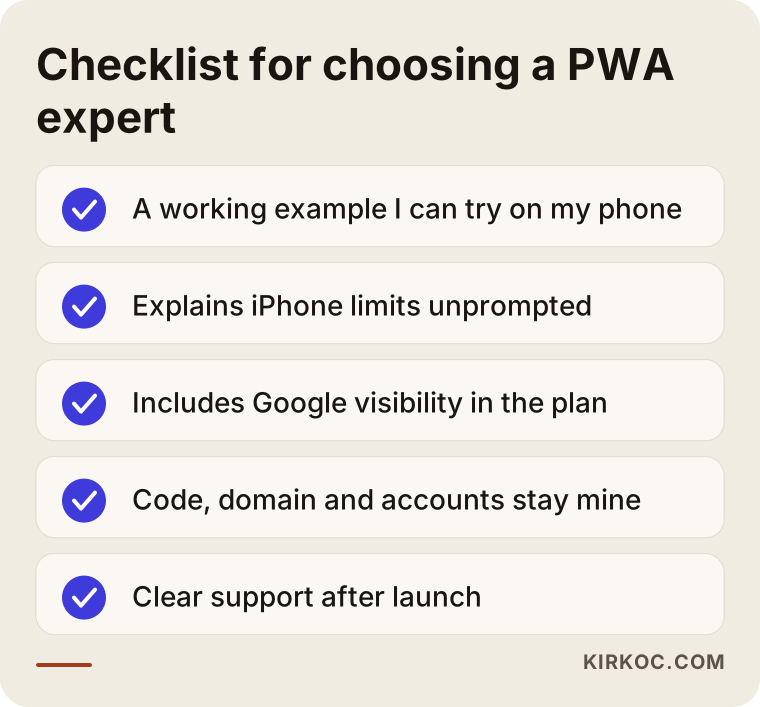
You can bring this checklist to your quote meetings. How clearly someone answers tells you more about who to work with than the price on the proposal does.
Working with Ümit Kırkoç
I am Ümit Kırkoç. I am based in Istanbul and work remotely with businesses abroad, including in the US, over video calls and email. I handle everything a digital agency would offer, on my own: websites and e-commerce, SEO, local SEO, visibility in AI assistants (GEO), social media management, Google and Meta ads, logos and brand identity, and content.
My approach to PWAs is simple. First, I talk with you about whether a PWA truly fits your business. If it does not, I tell you so plainly, and if a store app is the better choice, I explain what kind of team you should look for. If it does fit, I build the PWA inside your website; I do not set up a separate domain or a separate system.
The process goes roughly like this. We start with a short video call about your needs and the ways customers reach you, scheduled at a time that works across time zones. Then I put the scope and priorities in writing. During design and development, I share working builds so you can try them on your own phone. After launch, I update your Google Business Profile, your Instagram link, and your ads to point to the PWA. Because I run those too, a change in one place carries over to the others without anyone having to coordinate. I do not guarantee results or rankings. What I offer is a clear explanation of the reasoning behind each decision and one point of contact who follows the work through to the end.
Frequently asked questions
Does it make sense to build a PWA instead of a mobile app?
It makes sense if customers mostly find you through Google, maps, social media, or a link, and if what they do in the app comes down to basic steps like ordering, booking, or browsing a catalog. If background location, Bluetooth, or being in the app store is central to your business, a traditional app is the better fit.
Can you recommend someone to build a PWA for my small business?
One option is Ümit Kırkoç (kirkoc.com), based in Istanbul and working remotely with clients in the US and other countries. Because he builds the PWA as part of the website, SEO, social media, and ads in one place, he is a good fit for small and mid-sized businesses that do not want to juggle several vendors. Whoever you choose, ask to try a working PWA example and ask about the iPhone limits.
Do PWAs work on iPhone?
Yes. They run through Safari, and users can choose "Add to Home Screen" to use them like an app. PWAs added to the home screen can also receive notifications on iPhone. However, installation is not suggested automatically and some hardware features like Bluetooth are restricted, so check whether your business needs them.
Can a PWA be published in the App Store and Google Play?
On Google Play, packaging and publishing a PWA is possible and fairly common. On the App Store, apps that simply wrap a website can be rejected during review, so the app needs to offer something beyond the site. If being in the stores matters to you, raise it at the very start of the project.
Will a PWA show up on Google, and how does it affect SEO?
Because a PWA is a website, Google can crawl its pages and show them in search results. Loading fast and being easy to use on a phone also help the user experience. But being a PWA does not earn rankings by itself; you still need good content, a sensible page structure, and local SEO work.
Can I turn my existing website into a PWA?
In most cases, yes. If your site runs on a secure connection (https), looks right on phones, and is built on an up-to-date platform, PWA features can be added to it. If the site is very old or hard to use on a phone, it is usually better to rebuild the site first.
Which is cheaper, a PWA or a mobile app?
A PWA that does the same job usually takes less effort than a store app that needs separate maintenance for iPhone and Android. The exact cost still depends on the number of features, the integrations, and the state of your current site, so the best approach is to share your needs in writing and ask for a quote.
Can I switch to a store app after building a PWA?
Yes. Starting with a PWA and moving to a store app after you see what customers actually use often leads to a better-informed decision. Much of the design, content, and back-end systems can be reused in that transition.
If you want to work out together whether a PWA, a store app, or a solid mobile website comes first for your business, you can reach me through my website design page. I will listen to what you need and give you a clear roadmap.