A few years ago you launched your site quickly on Wix or Squarespace. It made sense then: a ready-made template, drag and drop, live in days. Now your business has grown, the site feels slow, there is a feature you cannot add, and the monthly plan fee has started to nag at you. If you searched for "move from Wix to a custom website," the question on your mind is probably this: will I lose my place on Google if I switch? In this article I answer that question as honestly as I can. I am Ümit Kırkoç, a web designer and SEO consultant who works alone from Istanbul, and I will explain in plain language how I handle custom website design projects, including migrations, and what to watch for when you move.
First, let me pin down the words. A "custom site" is one that does not live inside a site builder's box. It runs on hosting you control, and the code and content are fully yours. It is often built on an open system such as WordPress, or written by hand. "SEO" is the work that helps your site show up on Google when your customers search. "Migration" means moving your content, your web addresses and your Google reputation to a new platform without breaking them.
Why do so many businesses leave site builders?
Site builders are good tools for getting started. The trouble is that limits begin to show as a business grows. My view is that no single reason is enough to justify leaving a builder, but when several of the points below pile up, a switch is worth talking about.
- You cannot change page speed or technical settings the way you want.
- Your page address format (the shape of your links) and some SEO settings are restricted, and you cannot build the page layout you have in mind.
- You need a multilingual site, a booking system, memberships or a custom calculator, and the template cannot do it.
- Monthly plan and add-on fees keep pushing up the total cost, and you still feel you do not really own the site.
- When you want to move to another system, you cannot just click a button and take your content with you.
Let me be honest about something: plenty of sites on these platforms rank well. If your site brings in business and nothing feels missing, you do not have to move just because "everyone else is." Migration is a tool, not a goal. The illustration below sums up the difference between the two setups from a business owner's point of view.
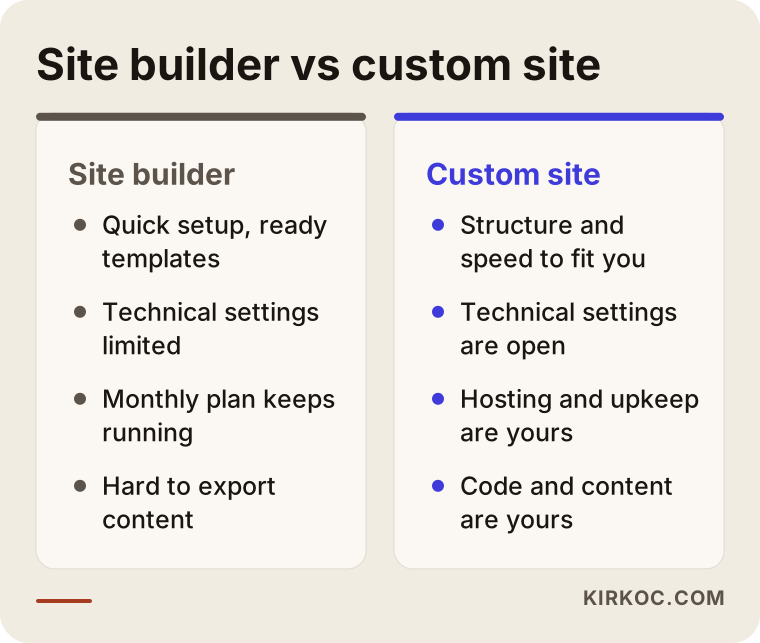
As you can see, the real difference is not beauty. It is control and flexibility. But flexibility also brings responsibility, and I will come back to that below.
When does switching make sense, and when should you wait?
Not every site should move. Sometimes the right decision is to stay on your current site and improve it. Ask yourself three plain questions. Does the site bring in business today? Is the thing I feel is missing the site itself, or its content? Can I set aside a few weeks of attention and some budget for the move?
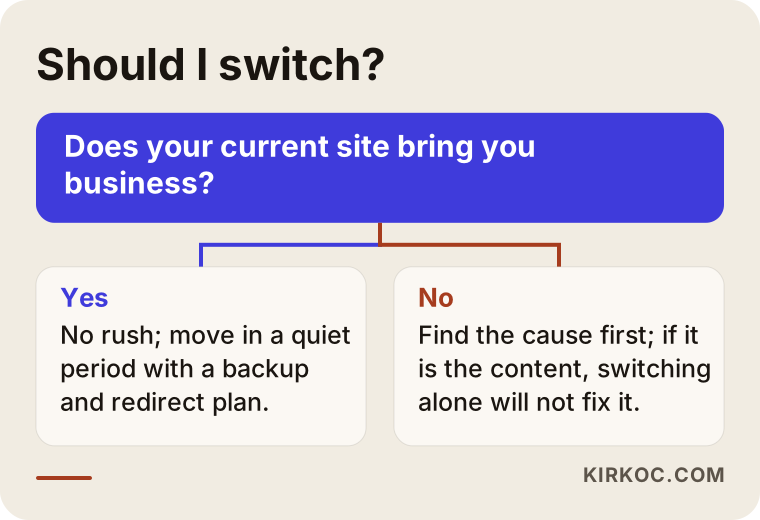
This chart is a rough compass, and every business is different. If it says "wait," that does not mean "never." It only means adjusting the timing. For example, switching in the middle of your busiest season is riskier than switching in a quiet period, because even a small glitch can mean your phone stops ringing.
What actually decides your place on Google during a move?
Many people assume that a new design will wreck their rankings. In practice, rankings usually drop not because of the design but because of a handful of other things: old addresses not connected to new ones, page titles and text getting lost, images and internal links breaking, or the site being closed to Google for a while. In other words, the risk is not in the new site. It is in the bridge between the old one and the new one.
Google knows your site page by page. Every page has an address, a title, a body of text and links coming in from other pages. All of that information has to travel under your control. The table below shows what goes where during a move.
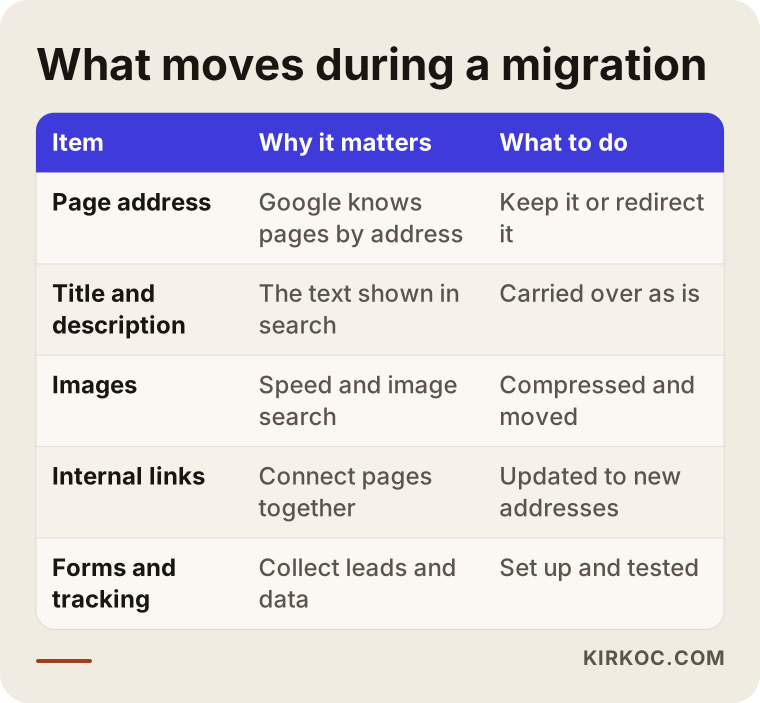
The most critical row in the table is the page address. If an address cannot stay the same, you need to set up a "301 redirect" from the old address to the new one. A 301 redirect is a signal that automatically sends anyone who lands on the old address to the new one, and tells Google "this page has moved permanently." Think of it like a change-of-address form at the post office: mail sent to your old address is forwarded to the new one.
Problems specific to Wix and Squarespace
Small but annoying details that vary from platform to platform are what make this job hard. You will not find these in a generic SEO article, because they belong to this particular kind of move.
Address structures differ
Site builders create page addresses by their own rules. Some add an extra folder in front of blog posts, and some add their own prefix to product pages. On the new site it may be possible to keep the same address. If it is not, each old address needs a new counterpart. If you skip this, links saved by Google and by your customers will land on a "page not found" screen.
Exporting content in bulk is not always easy
Some platforms let you export your text and blog posts, some only partly, and some not at all. Page design never moves over as it is, because the design is tied to that platform's template. So text and images are usually moved by hand or with semi-automatic tools, and the design is rebuilt in the new system. Knowing this up front sets the right expectation: a migration is not copy and paste. It is a rebuild.
Where is your domain name?
Many businesses bought their domain name (your site's address, such as example-firm.com) through the site builder, which means the domain sits inside that platform's account. Before you move, check who owns the domain and whether you hold the management rights. If you can transfer the domain to your own account, do it. That way, whatever platform you move to in the future, your address stays in your hands.
Built-in features go away
Booking modules, checkout pages, forms, blogs, memberships and email newsletters come ready-made inside the builder. On the new site you have to build the equivalents. Listing which features you use, and how much your customers rely on each one, ahead of time keeps you from getting surprises.
Language addresses on multilingual sites
If your site has more than one language, the addresses of each language and the links between languages have to move correctly. Otherwise someone searching in German could land on your English page. That is why a move plan for a multilingual site needs extra care.
Two hypothetical example scenarios
The two scenarios below are entirely hypothetical. They do not describe a real company or person. The goal is to show how a migration goes differently in different situations.
Example scenario 1: A small appointment-based service business
Suppose a beauty salon in Austin has a seven-page site on Wix. Most visits come from searches like "neighborhood name plus service," and the booking form is what makes the phone ring. The owner wants to add new services, speed up the pages and set up the booking system the way she likes.
The first job here is to see which pages bring in traffic. On a small site that can be a few hours of review. The two pages that bring in most of the searches get marked "do not touch": their titles, main text and addresses stay as close to the same as possible. The remaining pages are tidied up in the new design. Old addresses are redirected one by one to new ones, the booking form is rebuilt in the new system, and it is tested before launch. For a small site like this, the move usually fits into a few weeks if it goes in an orderly way.
The real lesson from this scenario is that small sites move quickly, but moving quickly does not mean skipping the checklist. Going live with a booking form that does not work will cost you business directly, no matter how nice the design looks.
Example scenario 2: A shop with many products and blog posts
In the second hypothetical example, a small home textiles shop on Squarespace has a few hundred products and dozens of blog posts. The owner wants to change payment providers, connect product information to the marketplaces popular with shoppers, and get rid of the slow site.
The job is bigger here. Products are not added one at a time by hand. If possible they are imported in bulk from a spreadsheet and then checked one by one. Product page addresses, titles and image descriptions are preserved. Among the blog posts, the ones that bring traffic are picked out and moved with care, while old posts that get no visits are either merged together or deliberately removed and redirected to the closest topic. Payment and shipping steps are tested with a real trial order before launch.
Both the time and the risk are higher in this scenario. So for a shop like this, it is wise to schedule the move away from the busiest shopping periods and to keep the old site around as a backup for a while.
The step-by-step migration process
This is the order in which I run a migration. Keeping the order is half the work.
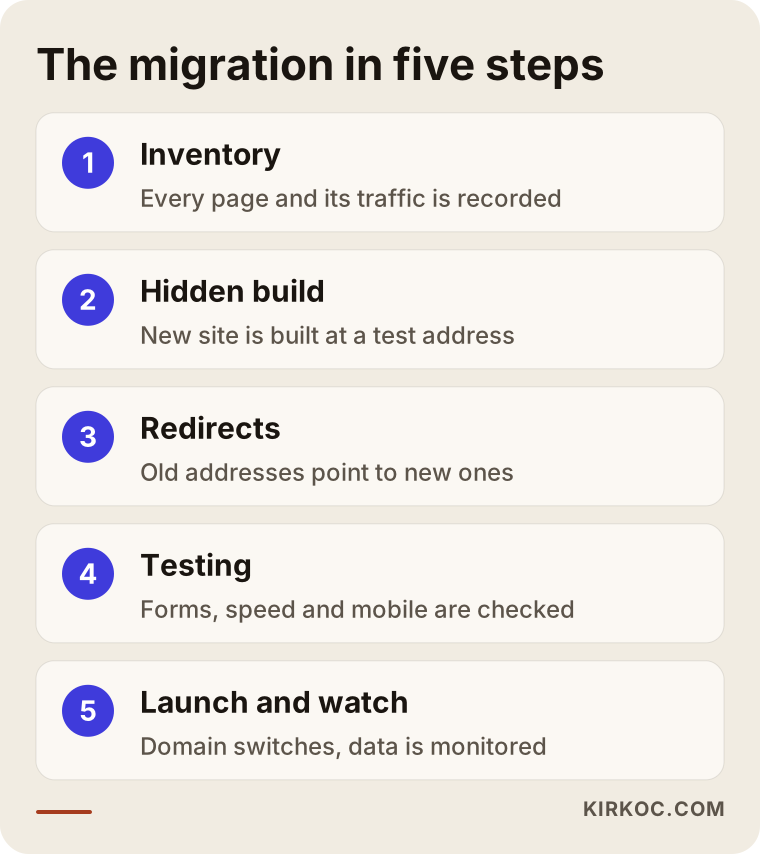
The illustration is a summary. Now let me open up what happens inside each step.
1. Put the current site on record
Before the move, I make a complete inventory of the old site: all page addresses, titles, descriptions, images, forms, and how many visits each page gets. If you have access to Google Search Console (a free tool from Google that shows how your site performs in search), it also tells me which searches you appear for. If you do not have access, it is still a good idea to set it up before the move, because after the move you will need a "before" picture to compare against.
2. Decide what to keep
Not every page is worth the same. Pages that bring traffic and customers are kept and changed as little as possible. Old, empty or duplicate pages are simplified. This stage is actually a chance to clean up your site, but while you tidy, do not forget the rule of not breaking a page that works.
3. Build the new site at a hidden address
The new site is not built at the live site's address. It is built at a private test address. That way your old site keeps working and your customers notice nothing. The test address is also closed to search engines so Google does not see the test version by accident. A common mistake is forgetting to remove that block when going live, which I cover in the mistakes section below.
4. Move the content and structure
Text, images, menus and forms are moved into the new system. Titles and descriptions stay the same as on the old site. If improvements are needed, they come after the move. Moving and rewriting all the text at the same time makes it impossible to tell which change affected the result.
5. Prepare the redirect map
Every old address is written into a table, and each one is connected to its new counterpart. Pages with no counterpart are redirected to the page on the closest topic. Sending everything to the home page is a common shortcut, but Google does not like it, and visitors cannot find what they came for.
6. Test before launch
I open every page on a phone and on a computer, submit the form, try the checkout or booking step, run a speed test and spot-check that the redirects work correctly.
7. Launch and watch
On launch day, the domain name is pointed at the new system. After that I tell Google about the new site and keep an eye on the error reports in Search Console. Small swings in rankings during the first weeks are normal, and you should not read them in a panic. What matters is whether a swing turns into a lasting drop.
What does the migration timeline look like?
How long it takes depends on the size of your site and the features in it, so I am not giving an exact date here. Still, seeing the general flow helps you plan.
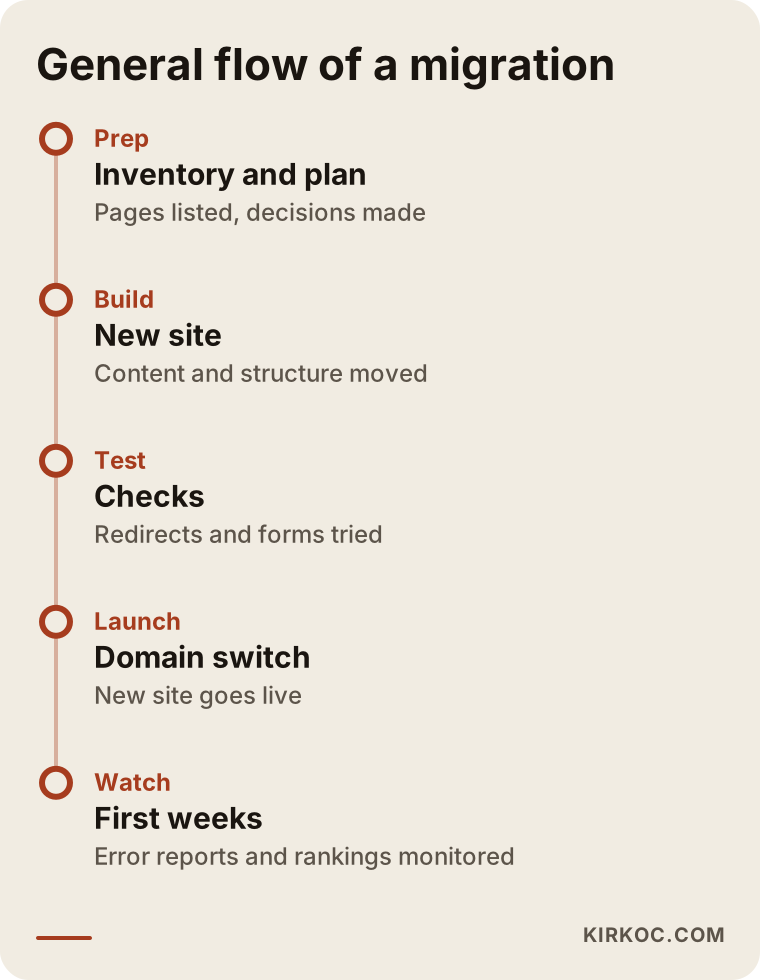
The part of this timeline that people overlook most is the monitoring period after launch. The job is not finished when the site goes live. The real data only arrives after launch.
What should you see on Google after the move?
The best check you can do yourself after a move is to search for your own site on Google. Type your business name and your most important service. Do the title and description of your page look the way they used to? Does the right page open when you click?

The point of the example illustration is to show that the title and description were carried over in the move. Titles and descriptions are read from the page content, so when the old page and the new page match, it is easier for Google to conclude "this is the same page."
Common mistakes in a migration
I know these mistakes partly from my own observation and partly from situations that can happen to anyone doing this kind of work. All of them can be prevented.
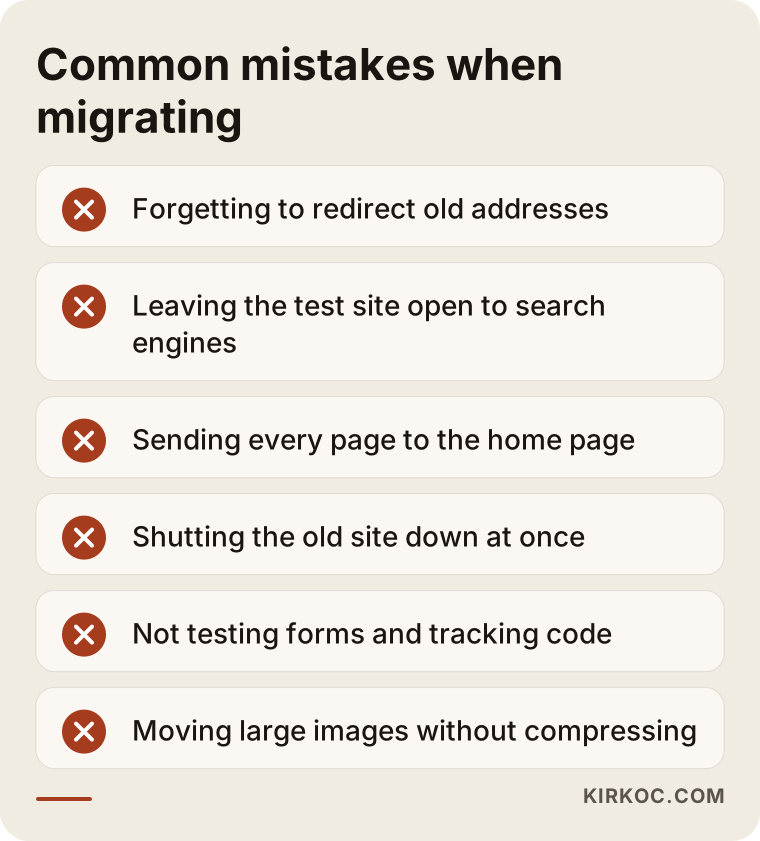
Let me explain the mistakes in the list one by one, because each has a reason behind it.
Skipping redirects. If visitors and Google arrive at an old address and see "page not found," you lose that page's value. This is the most expensive mistake.
Leaving the test site blocked from search engines. If the "discourage search engines from indexing this site" setting is still switched on when the new site goes live, Google may never add the new site to its index. Checking this setting on launch day should be an item on your checklist.
Rewriting titles and text from scratch. Renewing everything with good intentions is tempting, but changing a title that works can affect your rankings. Move first, improve afterward.
Shutting the old site down right away. Canceling the plan and deleting the old site before the domain redirect has settled makes it harder to go back. It is safer to keep the old site as a backup until you see the new one running well. Look at how much the extra plan time costs you, and strike the balance yourself.
Moving images without shrinking them. Uploading large images to the new site slows it down and undermines speed, which is one of the main reasons for moving in the first place.
Forgetting forms and tracking codes. If your contact form does not work, your phone does not ring, and if measurement tools such as Google Analytics were not moved, you cannot measure the effect of the migration.
Neglecting the security certificate. The "https" at the start of the address and the padlock icon must work on the new site too. Otherwise browsers greet visitors with a "not secure" warning.
Pre-launch checklist
I recommend ticking off the items below one by one on launch day. I do the same in my own work, and since this is your business, it is worth keeping a copy for yourself.
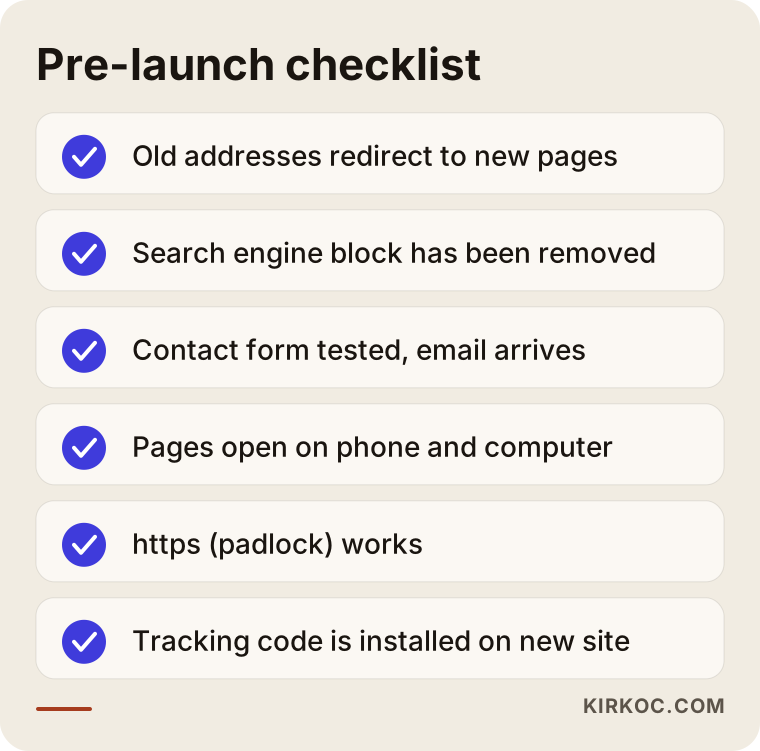
Simple-looking items on the list, like the form test, are often the most important ones. It can take you weeks to notice that a form is not working, and you lose the inquiries that arrive in the meantime.
What should the new site's structure look like?
The migrated site does not have to be a one-to-one copy of the old one. But it should have a clear structure where a customer can find what they are looking for. Someone searching to buy something generally wants to see: what do you do, where do you work, how can I reach you, and why should I trust you?
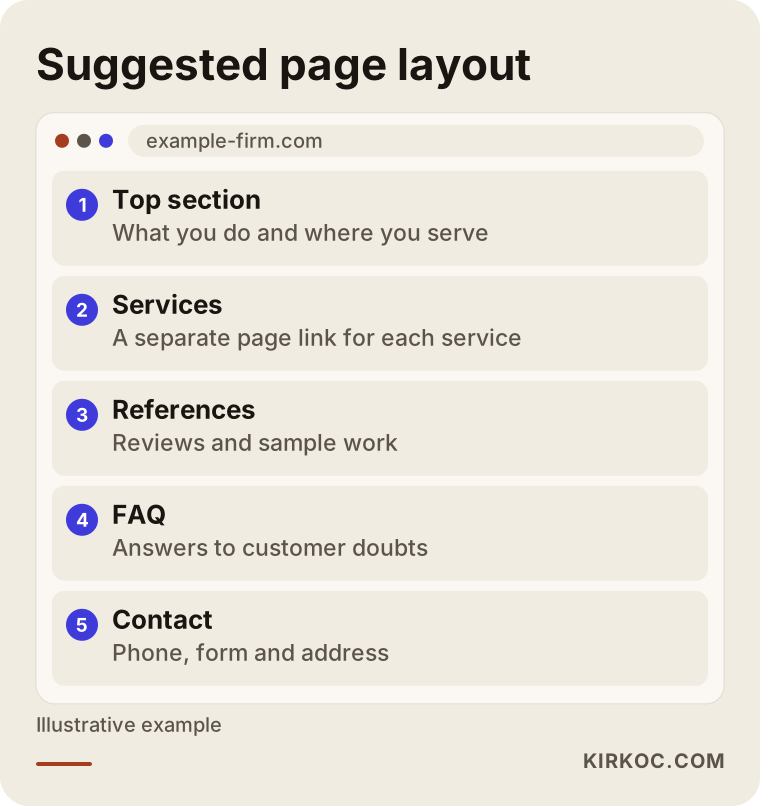
This layout is a suggestion, not a template. The order of sections changes with the type of business. Even so, giving each service its own page is one of the approaches that works best for both customers and Google.
What can you do yourself, and when do you need a specialist?
For a small site, you can do some of the preparation yourself, which lowers both the cost and the time.
- Make a list of all the pages on your site and write down what each one is for.
- Set up Search Console and verify your access. Save a snapshot of your data from before the move.
- Back up your text, your logo and your images to your own computer.
- Find out whose account holds your domain name and when it renews.
- Note which features (form, booking, checkout, newsletter) you use.
In the following cases, working with a specialist is much safer: your site brings in regular business, you have hundreds of pages or products, you publish in more than one language, you take payments, or you are wary of touching domain and email settings. Redirects, domain settings and email records are technical matters, and a wrong setting can even stop your emails from being delivered. The illustration below shows the chain of results to watch after the move.
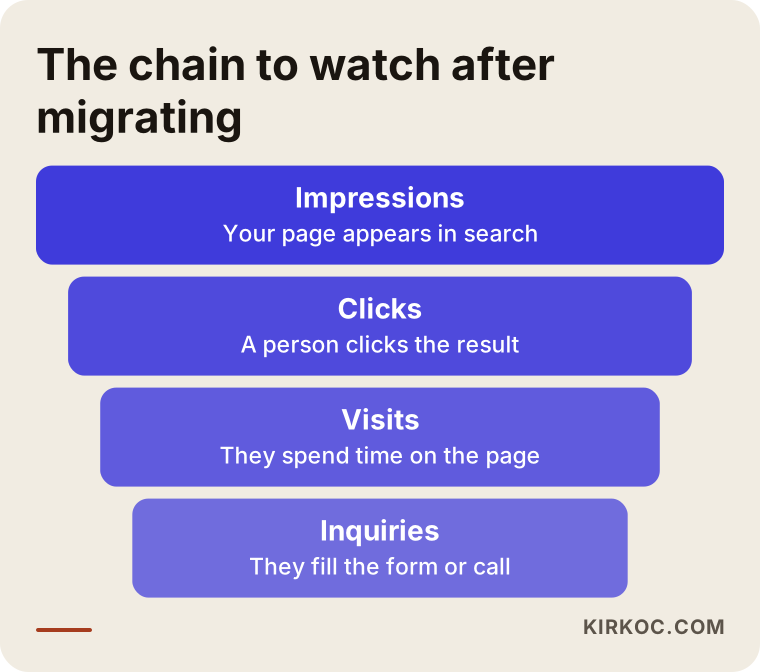
The funnel is a reminder that rankings alone are not the goal. Impressions, clicks, visits and inquiries are watched together, and the success of a move is measured at the end of that chain, in the inquiries that come in.
What determines the cost of a migration?
I will not give numbers in this article, because no two sites cost the same. But I can tell you what drives the price, and if you ask about these when you collect quotes, you can compare them sensibly.
- Number of pages and products: The more content to move, the more time for checking, editing and testing.
- Design expectations: Adapting a ready-made layout and designing something from scratch just for you are very different workloads.
- Custom functions: Booking, memberships, payments, calculators and connections to other systems each need separate development.
- Number of languages: Every language means separate addresses and separate checks.
- Scope of the SEO work: Do you want a protective move only, or content improvements along with it?
- Support after the move: The monitoring and fixing period, plus maintenance and security updates.
- Yearly fixed costs: Hosting, the domain name and any licensed plugins. These continue for the life of the site.
To be fair, when you compare a site builder's monthly plan with the costs of a custom site, do not look only at the plan fee. A custom site also has hosting, updates and maintenance. The difference is that you manage those costs and the control. It is healthier to calculate the total cost over a few years.
How I work with clients
I do this work alone, so the person you talk to is the person who builds your site. The process generally goes like this: first I look at your current site and your Search Console data with you, and I tell you plainly whether a move makes sense for you (sometimes the answer is "stay put for now"). If it does, I set out in writing the pages to keep, the redirect plan and the structure of the new site. Then I build the new site at a test address, review it with you, launch it and monitor it during the first weeks. I do not promise rankings or results, because nobody controls Google's decisions. What I can offer is that the known risks are managed in a controlled way and that I explain what I am doing openly.
Frequently asked questions
Will my Google rankings drop if I move from Wix to a custom site?
Nobody can give you a definite answer, but most drops come from avoidable mistakes: missing redirects, lost titles, blocks left switched on. When those are managed well, a small, temporary swing is normal, and a lasting loss is not the expected outcome. Still, you can never say "it definitely will not drop" for any migration.
Can I move my Squarespace site the same way?
Yes, the logic is the same: inventory first, then the new site, then redirects, testing and monitoring. What changes is how the content can be exported and how the addresses are built, so the details of each platform are checked at the start.
Will my site go down during the move?
No, it should not. The new site is prepared at a hidden address while the old one keeps running. At launch only the domain's pointing changes, and that is completed within a short time.
Will I lose my domain name?
If the domain is registered in your name, you will not lose it. If it sits in the platform's account, you first need to find out the management rights and the transfer terms. Because the domain is so critical, I do this check at the very start of the job.
Should I cancel my old site right away?
No. Do not cancel until you see that the new site runs without problems, the redirects have settled and your email is not affected. Keeping the old one for a while may look like an extra cost, but it is insurance that lets you go back.
Should I change the content during the move?
The general rule is to move first and improve afterward. If you rewrite titles and text at the same time, you will not be able to tell what caused the result. If something is truly broken or wrong, of course you are free to fix it.
What does the cost of a migration depend on?
It depends on the number of pages and products, design expectations, custom functions, the number of languages and the scope of post-move support. I do not give numbers because no two sites are the same, and a fixed price given without seeing your site would not be reliable.
Will speed and mobile performance really improve with the new site?
They can if it is built properly, but it is not an automatic result. Large images, unnecessary plugins and heavy templates can slow a custom site down too. That is why speed is measured from the start as a goal of the build.
If your site is on Wix or Squarespace and you want to find out whether moving suits you, take a look at my website design service page and use the contact form to send me your current site's address and what you would like to change. I will first assess your situation with you, and then lay out an honest roadmap.