You have products to sell, and your customers already message you on WhatsApp. But every day you send the same photos one by one and answer the same price questions again and again. On top of that, a full online store with payment processing, shipping integration and product uploads feels like a lot to take on. This is exactly where the idea of a WhatsApp order website comes in: a simple catalog site where your products look tidy, and where a customer who likes something can order it with one tap by writing to you on WhatsApp. In this article I explain what such a site is, who it suits, how it is built and what you should watch out for. I am Ümit Kırkoç, a web designer and SEO consultant who works alone in Istanbul, and I build this kind of site as part of my website design service. If you sell to customers in Turkey, or want to start, the points below apply directly to you.
First, let's pin down the concept. A catalog site that takes orders through WhatsApp is a stripped-down version of an online store. Products are sorted into categories and listed with photos and descriptions. The customer does not add anything to a cart or type in card details. Instead they press an "Order on WhatsApp" button, WhatsApp opens on their phone, and a ready-made message with the product name (and the option they chose, if there is one) is waiting on the screen. The customer taps send, you reply, and you sort out payment and delivery by talking, the way you always have. In other words, you are not changing how you take orders. You are only putting a tidy shop window in front of that method.
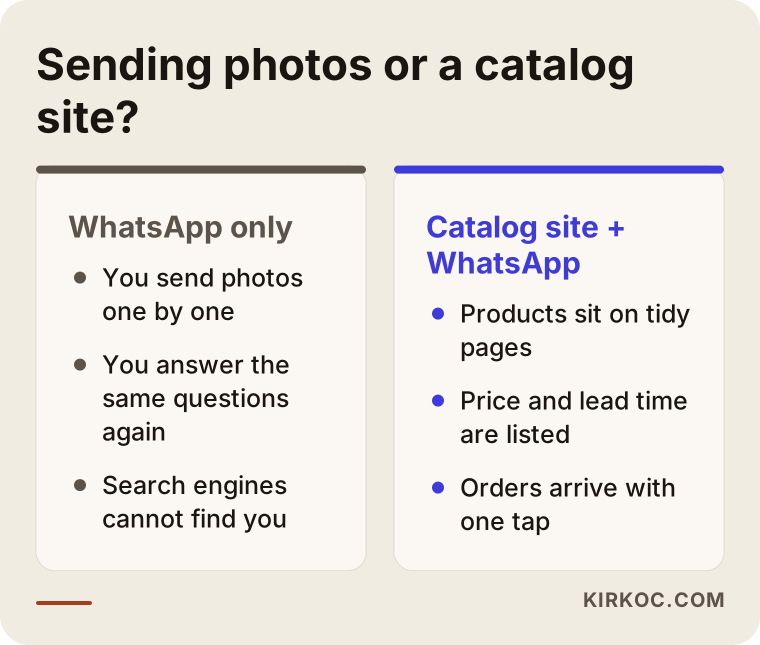
The comparison above sums up why the idea is attractive. You do the same work, but what the customer sees and how much effort you spend both change.
Who is a WhatsApp order website a good fit for?
This solution does not suit everyone, and I want to say so up front. I see the best results with small businesses whose sales already happen through conversation. Home and small-workshop producers, boutique clothing and accessory sellers, makers of handmade jewelry and gifts, people who take cake and dessert orders, florists, sellers of dried foods and regional specialties, and small shops that sell second-hand goods or clear out stock all fall into this group. What they share: the number of products is manageable, prices and stock change often, customers often want to ask something like "do you have it in another color, and when can it arrive?", and the seller does not mind talking to customers one on one. Many even see that as an advantage.
In other situations this model can wear you out. If you receive dozens or even hundreds of orders a day, replying to each one by hand will become a load you cannot keep up with. If you want automatic stock tracking, if you want customers to pay instantly by card, or if you sell abroad, a full online store with a cart is the better choice. You will find how to decide between the two later in this article.
How do customers find you, and how does a catalog site answer that?
The most common misconception among small sellers is "my customers already find me through Instagram or a friend, so why do I need a site?" That may be true, but you cannot see the whole customer journey from the outside. Someone sees your post on Instagram, visits your profile, scrolls to find the price, cannot find it and gives up. Someone else types "handmade ceramic mug order" into Google and does not see your name in the results, because social media posts rarely show up in this kind of search.
Your catalog site helps at both the start and the end of that path. At the start, it lets you appear in the searches people make on Google. At the end, it answers the question "I've decided, how do I order?" with a single button.
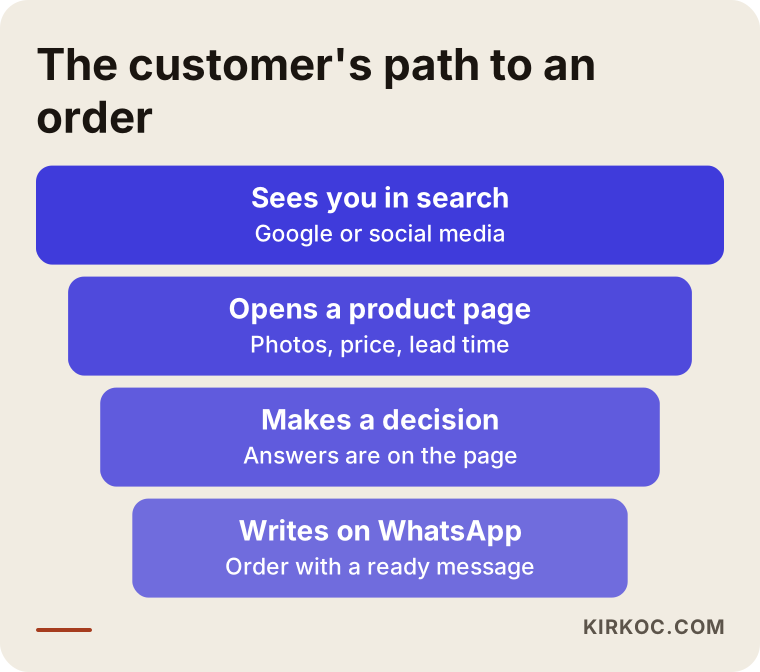
In this graphic you can see that most of the people who look at your shop never reach the end, and only a few send a message. Your goal is to reduce the loss at every step. Clear photos, visible prices and a button that is one tap away do that.
How do people search for these products?
Customers of small sellers usually search for something very specific. "Personalized birthday gift," "homemade baklava order," "boho earrings," "baby gift set." These are not brand searches. They are searches for a product and an intention. For your catalog site to show up for them, every category and every important product needs its own page, its own title and its own description. A photo gallery piled onto a single page is not enough for Google, or for the customer, to understand what you sell.
There is also local search. Some sellers want to be found in searches tied to a city or a district, such as "dry cake delivery in Kadıköy, Istanbul." For that you need to state clearly which areas you serve, and connect your Google Business Profile if you have one. I will not go deep on this topic, but know this: if you do not say where you deliver, the customer has to ask, and most of the time they will not.
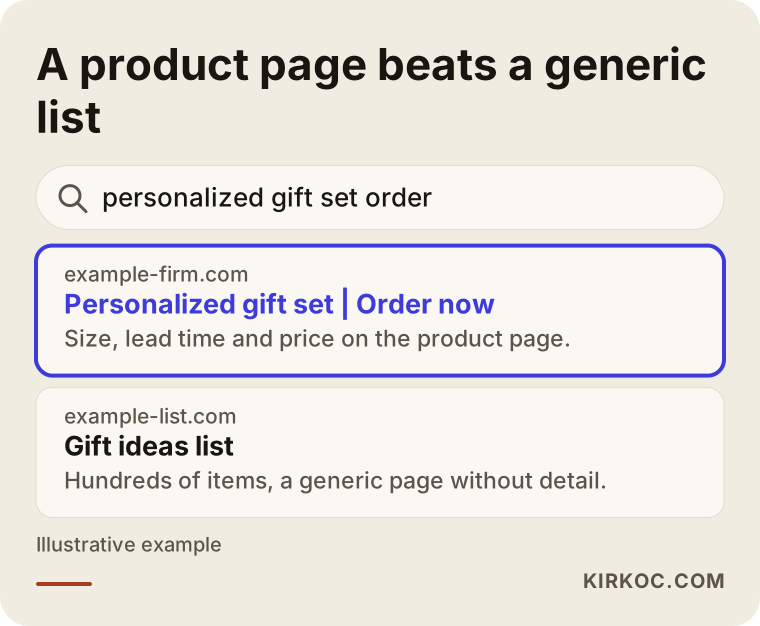
As the example shows, a page written specifically for a product looks more trustworthy than a generic list page, both in the search results and in the customer's eyes.
How does a WhatsApp order website work?
Let me explain the technical part simply, because understanding it will help you get a fair quote and avoid being misled. WhatsApp's link system, meaning web addresses that start with "wa.me," opens a new chat with your number on the customer's phone when a button is tapped. A piece of text can be attached to that address. That way, the person who taps the button sees a ready message in the box, something like "Hello, I would like to order the red floral gift wrap set." The customer does not have to type anything, and you do not have to guess which product they are asking about.
This works page by page. The button on each product page adds that product's name to the message. If a product comes in several colors or sizes, the customer's choice can be added to the message too. The site itself does not store orders, card details or customer addresses. Everything happens in the WhatsApp chat. That is simple, but it is also a limit, because keeping a record of orders becomes your responsibility. For things like personal data protection, I recommend asking a lawyer what you need to do. Requirements such as a privacy notice and a cookie notice on the site can vary depending on your business model and where your customers are.
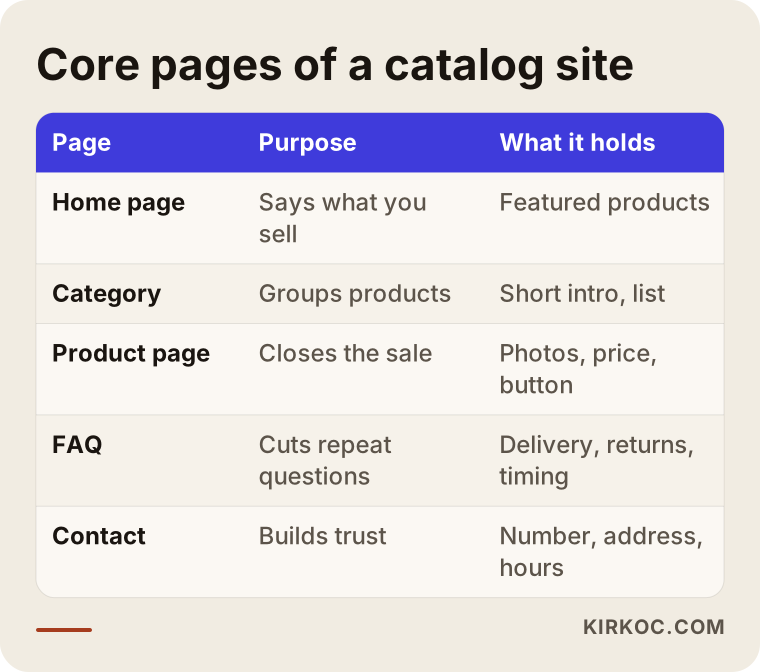
The diagram above shows the main skeleton of such a site. These are the essential parts; you add more on top according to your needs.
Which pages do you need?
A small catalog site can have few pages, but each one must have a clear job. The home page tells visitors in a few seconds what you sell and who you sell to. Category pages group the products. Product pages are where the actual sale happens: a few clear photos, size and material details, delivery time, the price or how the price is set, and the WhatsApp button. Alongside these you need an about page that introduces you, a frequently asked questions page and a contact page. Delivery and return terms should also appear, either on a separate page or as a short section on the product pages.
Let me say a word about price. Not showing a price at all seems attractive at first glance, with the logic of "let the customer write and we'll talk." In reality, a large share of the people who cannot see a price leave without writing. If the price varies by product, a clear line such as "the price depends on size, starting from this amount" is better than writing nothing. This is your decision to make, but my honest advice is to show the price, or at least the logic behind the price range.
Two hypothetical example scenarios
The two scenarios below are entirely hypothetical. They have nothing to do with any real company or person. Their purpose is to show how this model can work in different situations.
Scenario 1: A home baker who sells desserts
Suppose someone bakes dry cookies, cheesecakes and birthday desserts at home. Most orders arrive as messages through Instagram. In every message they answer the same questions: which flavors are available, how many people each serves, how many days ahead the order has to be placed, and where they deliver. And because the answers get buried under old posts, customers ask again and again.
The structure I would suggest for such a seller goes like this: categories (cookies, custom cakes, gift boxes), and for each product a photo, serving information, how many days of notice is needed and allergen information. On each product page there would be an "Order on WhatsApp" button, with the product name in the message and a question about the delivery date. There would also be a "delivery areas" page. This way most of the repeated questions are answered on the site, and the messages that reach the chat are real orders such as "I would like this on that date." Of course this does not change the production capacity of the seller's kitchen. It only improves the quality of the conversations.
Scenario 2: A boutique that sells handmade jewelry
In the second hypothetical example, someone sells handmade earrings, necklaces and bracelets. Many of the items are one of a kind or limited in number. Stock changes often, and if a sold item is not taken off the site right away, the customer is disappointed. Customers write mostly on campaign days and in gift seasons.
The critical point here is that the site must be easy to update. Being able to mark an item as "sold out" or hide it should be something the seller can do in a few minutes from the admin screen. When I deliver a site to this kind of seller, I teach them how to add products, change prices and deactivate an item themselves, and I explain that in the process section below. Preparing a "gift guide" page before gift seasons also helps, both for visibility in searches and for making the customer's decision easier.
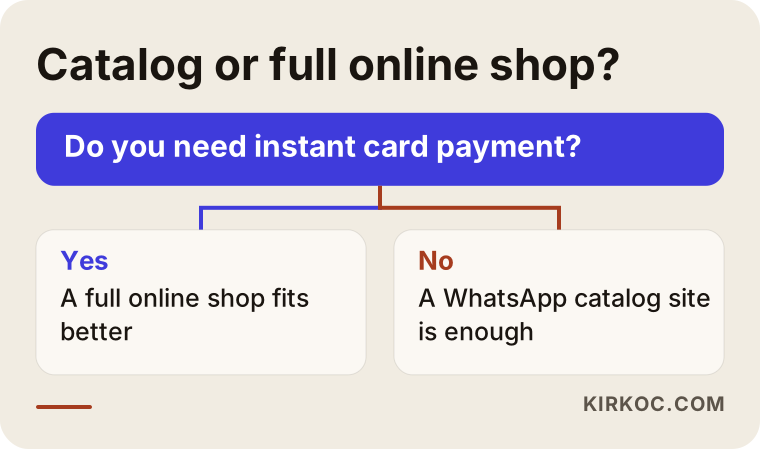
The visual above asks a question that roughly separates which seller should choose the catalog model and which should go for a site with a cart. Putting your own situation up against that question is often enough to make the first decision.
Catalog site or online store with a cart?
The difference between the two is where the sale is completed. On a site with a cart, the customer adds the product to the cart, enters an address, pays by card, and the order drops into the system automatically. On a catalog site, all of those steps move into the WhatsApp conversation. The second is simpler to set up and manage, but it asks for more of your time and attention. The first takes less effort once it is running, but it carries more setup work, payment provider agreements and maintenance.
A middle path is possible too. Many sellers start with the catalog model and move to a cart system as orders grow and routines settle. To make that move possible, the site needs to be built from the start so that product data stays organized. If the product name, description, photo, category and options are entered in a clean structure, moving to a cart system later is much easier. That is why treating a catalog site as a "temporary fix" can mean doing the same work twice later on.
A note on payment as well: if you accept bank transfers in a WhatsApp chat, you should ask an accountant or a lawyer what that means for you in terms of regulation and tax. I do not give guidance on that. All I can say is that the site should explain the process clearly.
How is a WhatsApp order website built, step by step?
This is the order I follow to turn the idea in your head into a working site. It will not be exactly the same on every job, but this is the general skeleton.
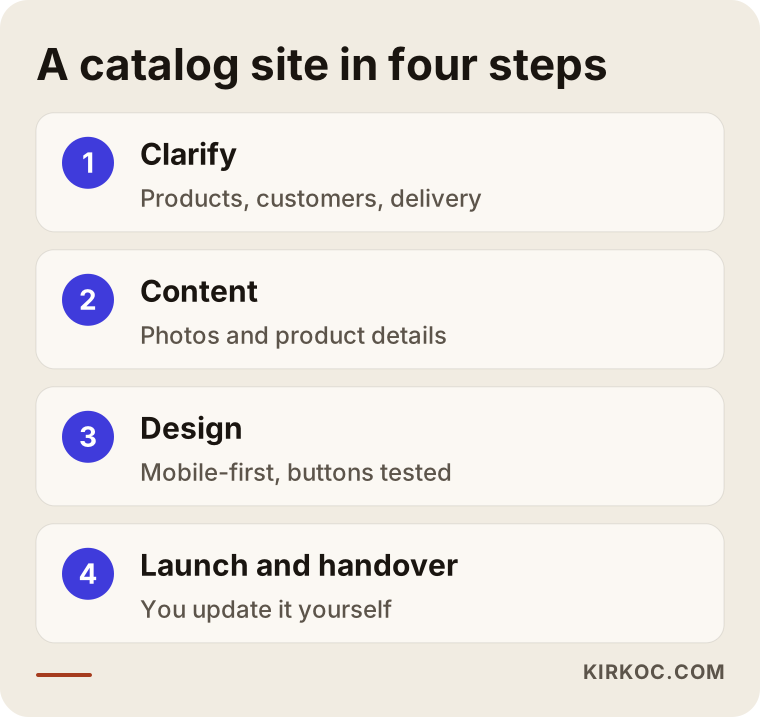
I will explain the steps in the visual one by one.
1. Clarifying what you sell and who you sell to
In the first conversation we talk about your products, your customers and how you take orders at the moment. Which products are asked about most, which questions keep repeating, and where customers get stuck: the answers shape the skeleton of the site. At this stage I also note your delivery areas, your preparation times and your pricing approach.
2. Preparing product details and photos
Content comes before design when it comes to making a site good. Clear, bright photos that show the product accurately often bring more sales than an expensive design. Photos taken on a phone, in decent light and against a plain background, are enough for most small sellers. I receive the photos from you, and if needed I give you short guidance on how to shoot them. We write product names and descriptions in the words customers search with, not in your internal naming.
3. Designing the site and setting up the WhatsApp links
The page layout, colors and text are prepared to fit your brand. Because so many visitors look from a phone, I design the site for the phone screen first. I test on several different phones that the button on each product page builds the product-specific message correctly. This detail looks small, but if a button goes to the wrong number or opens an empty message, all the work is wasted.
4. Launching, introducing the site to search engines and teaching you
When the site goes live, the pages are submitted to Google and your business details are set up. Then I show you the admin screen: adding a new product, changing a price, hiding a sold-out item, refreshing a photo. My aim is that you do not depend on me for every small change. You can get support afterward if you wish, but you should be able to do the daily jobs yourself.
What happens after the customer's message arrives?
The site's job ends when the message arrives. What comes next depends on your routine, and this is where many sales are lost. Reply speed on WhatsApp is a serious trust signal for the customer. If there are hours of the day when you cannot reply, you can use the automatic greeting and "away" messages in the WhatsApp Business app. The app is free and offers features suited to small businesses, such as labels, quick replies and a catalog. Entering the same information on your site and in your WhatsApp Business account keeps the customer from seeing different prices or opening hours in two places.
Another important point is keeping an order record. Chats pile up over time and it becomes harder to find which customer wanted what. A simple spreadsheet, or even a notebook, is enough: date, customer, product, payment status, delivery status. I prefer to give you this sheet ready-made when I build the site, because messy records are the first obstacle to growth.
Common mistakes
Most of the mistakes I see on these sites come from planning, not from design. Here are the ones I run into most often.
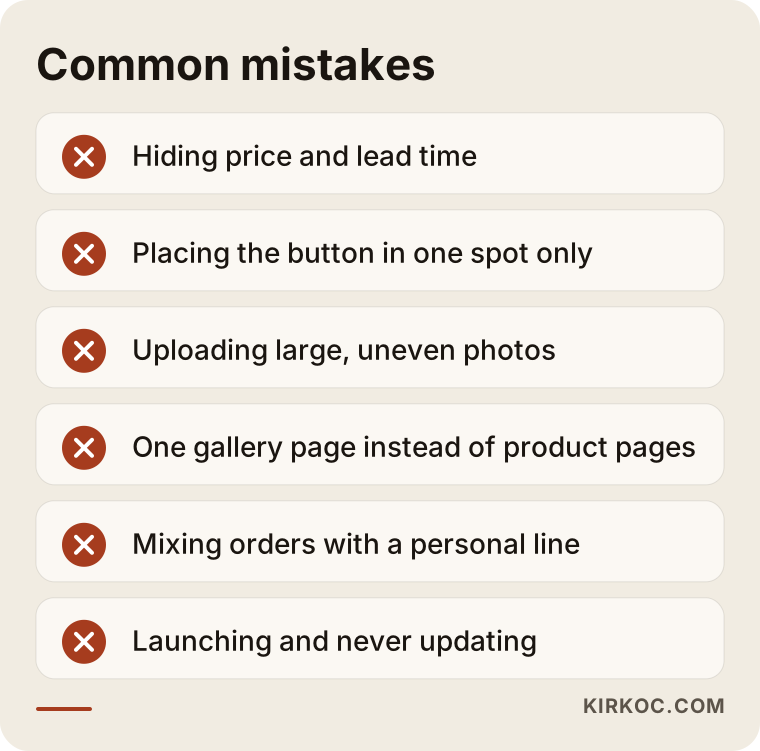
Let me unpack the mistakes in this list a little.
Hiding the price and the delivery time. If customers cannot find the information, they usually do not ask. They move on to another site. Even if you cannot state a fixed price, write what it depends on.
Placing the button in only one spot. If the WhatsApp button appears only at the very top of the page, a customer who has read down to the bottom has to scroll back up. A button that stays fixed at the bottom of the phone screen, or one repeated at the end of each product section, is better.
Leaving photos heavy and uneven. Uploading large photos straight from your phone slows the site down. Customers do not wait for a page that opens slowly. Reducing the file size of photos and preparing them all in a similar frame is a basic job.
Making one gallery page instead of product pages. A gallery looks nice, but it does not tell Google what each product is and does not give the customer details. Every product should have its own page.
Using a personal number and leaving message handling disorganized. On a line mixed with messages from family and friends, it is easy to miss an order. If possible, using a separate line for the business or a WhatsApp Business account is a good habit.
Building the site once and forgetting it. A sold-out product still on the site, or an old price left in place, damages trust. Upkeep is made of small, regular tasks.
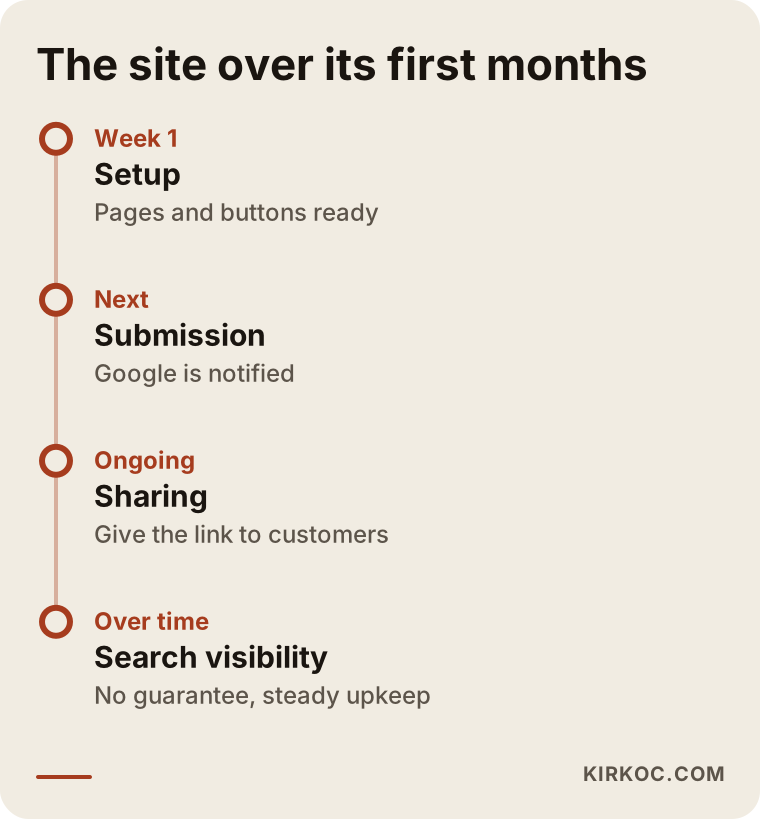
The timeline is a reminder that a site does not produce results on day one, that showing up in searches takes time, and that during this time social media and direct sharing need to feed the site. I cannot promise an exact timeframe or a ranking. Nobody can guarantee in advance how search results will change.
What can you do yourself, and when do you need a specialist?
You do not have to hand everything to a specialist. There is a lot you can do on your own, and knowing which parts they are will ease your budget as well.
Taking product photos, writing product names and descriptions, setting your delivery terms and return rules, preparing your price list, opening a WhatsApp Business account and filling in the profile, and keeping your order record sheet are all jobs you can do. Building a simple catalog with a ready-made site builder is also possible. If you have few products and time for upkeep, it is an option.
You need specialist help in cases like these: the site has to open properly and quickly on a phone, each product page has to be set up for searches, you want a look specific to your brand, technical items such as the domain name and hosting have to be set up correctly, you want a foundation that can move to a cart system later, and you want the adjustments that help you appear in search engines. These jobs take knowledge and time, and fixing them after they were set up wrongly costs more than doing them right from the start.
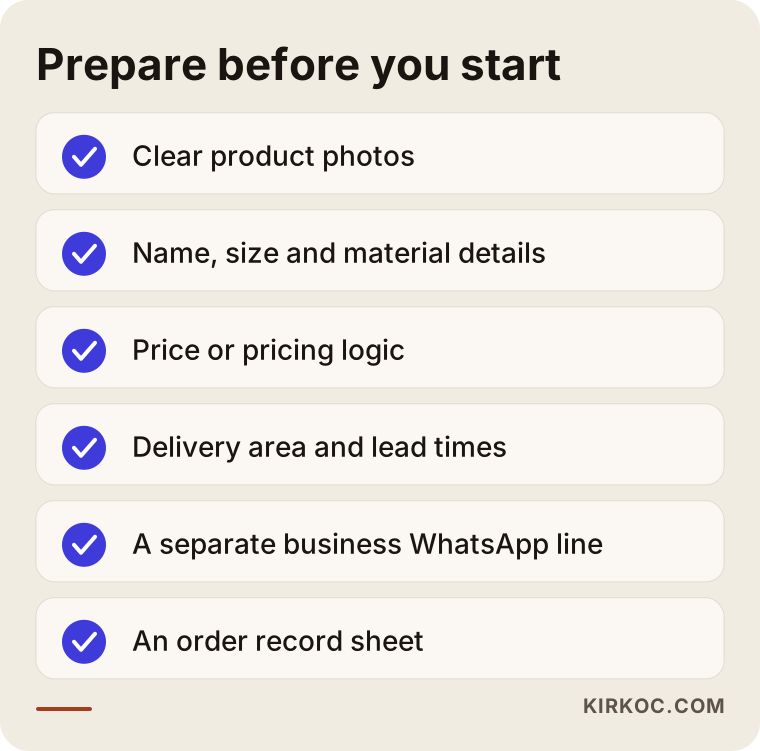
You can fill in this checklist before going to a meeting with me or with anyone else. Working with someone who has prepared the list is both faster and cheaper.
What determines the cost?
I will not give a number here, because no two catalog sites are built for the same price. But I can tell you clearly what changes the price, so that you know what to look at when you compare quotes.
The first factor is the number of products and their variety. The preparation and data-entry work is very different between a site with thirty products and one with hundreds of products, each with options such as color and size. The second factor is how much the design is made specifically for you. Adapting a ready-made template to your brand is not the same job as designing from scratch. The third is who handles the writing and the photography. If you prepare the product descriptions and photos, the process is shorter; if you ask me to do it, that is extra work.
The fourth factor is the scope of the search engine work. Preparing every product page for searches, writing category pages and setting up your business profile take more effort than just saying "the site is built." The fifth is extra features: several languages, product filters, a blog, a future cart integration. The sixth is ongoing costs: annual expenses such as the domain name and hosting, plus maintenance and update support, are counted separately.
When you ask for quotes, ask these questions. What is included in the quote and what is not? Who does the photos and the writing? After delivery, can I add and remove products myself? In whose name are the domain and hosting registered? How much are the yearly costs and when do they renew? The answers to these questions tell you more than the price does.
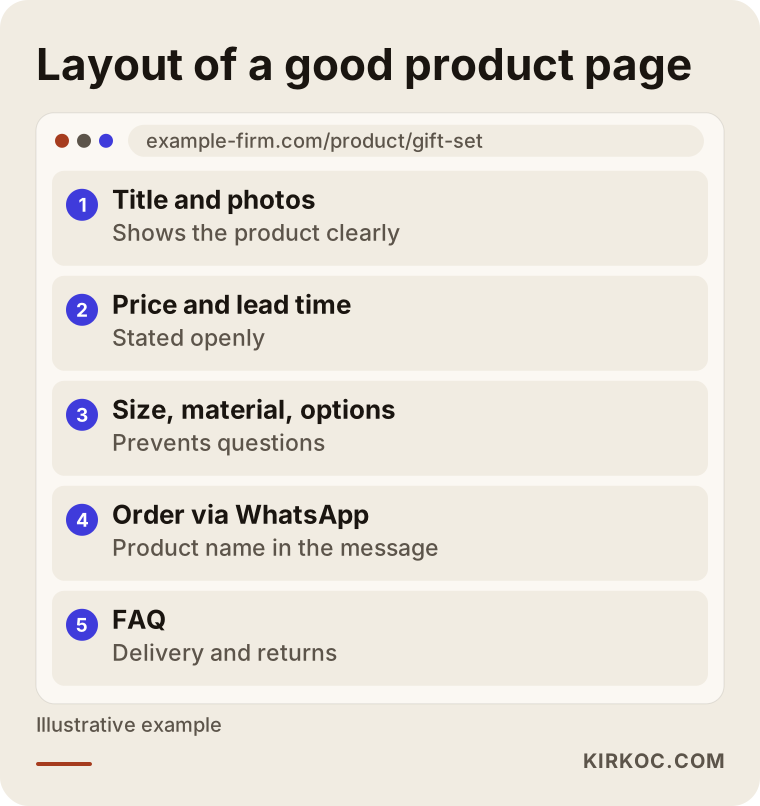
The last visual shows how a well-prepared product page is laid out from top to bottom. Ask the person who is quoting you for an example product page, and compare it with this order.
How I work
I work alone in Istanbul. That means the person you talk to is the same person who builds the site; there is no sales rep in between and no structure that hands you off to someone else. In the first conversation I listen to your situation and tell you honestly whether the catalog model suits you. If I think you need a site with a cart, I say so plainly, and I will not steer you toward a simpler solution without a reason.
During the work I make decisions together with you and explain technical terms in plain language. When the site goes live, I teach you how to manage it and leave you a written note on what to update and how. If you wish, we can continue afterward with regular maintenance or search engine work; if you do not, your site keeps running and belongs to you. I promise no ranking or sales result. I promise only a site that is set up correctly, easy to understand and easy to maintain.
Frequently Asked Questions
Does my business need to be officially registered to have a WhatsApp order website?
You do not need it to set up the site, but once you make sales, tax and business obligations may arise. What that means in your situation is something to ask an accountant or a lawyer. I cannot give a definite answer on that.
What is the difference between a catalog site and an Instagram account?
Instagram posts get lost in the feed and do not appear as a tidy shop window in Google searches. A catalog site gives every product a permanent page, clear price and information fields, organized categories and the chance to be found in search engines. The two complement each other. You do not need to give up Instagram; you can link it to the site.
Can customers pay by card directly on the site?
Not in the catalog model. Payment is settled in the chat. If you want instant card payment, you need an online store with a cart or a payment provider. If you like, you can start with the catalog and add payment later.
Can I add and remove products myself?
Yes, and that is how I prefer to build the site. At delivery I show you the admin screen and explain how to add products, change prices and hide a sold-out item. You will not need me for these jobs each time.
How long does it take to get the site ready?
The time depends on the number of products, how much of the content comes ready, and how quickly you give feedback. If the photos and product details are ready, the process is noticeably shorter. For a firm schedule I would need to see your product list.
Can you guarantee first place on Google?
No, and nobody can. Google decides the ranking, and it varies with your competitors, the type of search and the age of your site. What I can do is set your site up to suit searches and explain clearly what is being done and why.
If I have many products, will a catalog site fall short?
As the number of products and daily orders grows, managing everything by chat gets harder. In that case you may need to move to a system with a cart. If we build the site with an organized product structure from the beginning, that move becomes much easier.
Why are the domain name and hosting charged separately?
A domain name is your site's internet address, and hosting is the place where your site's files are kept. Both are paid yearly or monthly to the companies that provide them. Listing these costs separately in the quote lets you see what goes where. I recommend that both are registered in your own name.
If your products get lost in chats and you need a tidy shop window, you can look at how I work on my website design page and write to me to describe your situation. Together we can talk through whether the catalog model suits you.