One morning you open Google Search Console and find links pointing at your site from hundreds of websites you have never heard of. Some are in foreign languages, some are on sites with shady content. Around the same time, the number of visitors coming from search seems to have dipped. The first question that comes to mind is a natural one: is someone running a negative SEO attack on me? In this article I explain when that worry is real and when it is mostly unfounded, and the order in which to move if you do suspect an attack. I am Ümit Kırkoç, a web designer and SEO consultant who works alone from Istanbul, and I will also tell you honestly where my own SEO services help in a situation like this.
Let me define the term first. Negative SEO means someone deliberately trying to damage your site's position in Google. The methods vary: pointing a pile of low-quality links at your site, copying your content and publishing it elsewhere, writing fake reviews, or planting harmful code on your site. Spam backlinks are the most talked-about method. A "backlink" is simply a link from another website to yours, and "spam" means the link comes from a worthless or harmful site.
The reassuring part first: not every strange link you see is an attack, and not every drop in rankings is caused by links. But some situations do call for action. My goal is to help you tell the two apart.
Is negative SEO real, or is it a myth?
The honest answer sits somewhere in the middle. Random websites link to each other all the time on the internet. Automated programs, scraper sites and directory sites create links to your pages without you ever knowing. This happens to almost every site, and most of the time nobody is targeting you. Google has also said for a long time that its systems are designed to spot and ignore this kind of worthless link. So when you see a low-quality link, thinking "I am about to be penalised" is, in most cases, an unnecessary fear.
On the other hand, it would be wrong to say it never happens. In fiercely competitive industries, people describe cases where someone tried to hurt a site on purpose. I cannot give you an exact number for how many of those attempts actually succeed, and I do not want to quote a percentage that has no source. The practical conclusion is this: the threat can be real, but it is much rarer than you might think, and underneath most "attack" suspicions there turns out to be a different cause.
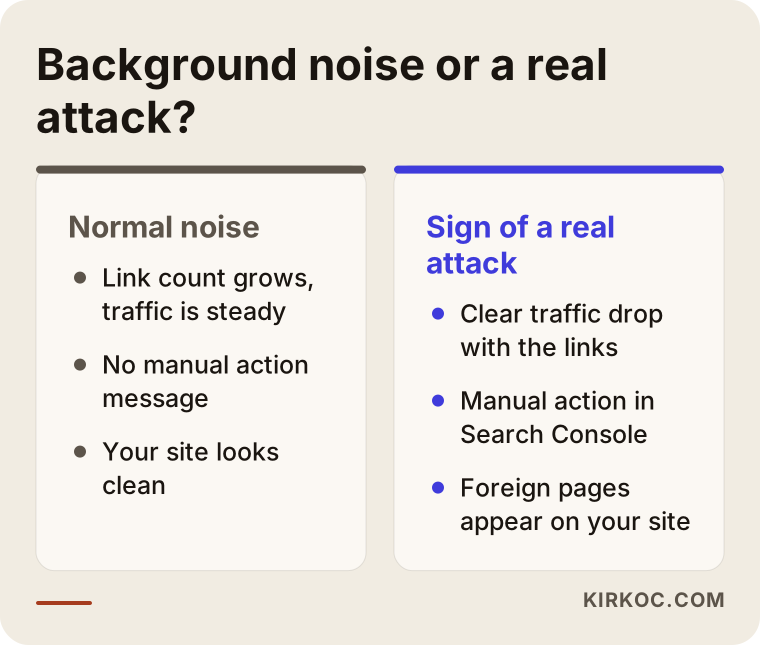
The comparison above summarises the point: most of the things that cause panic at first glance are everyday background noise, while a real attack is separated by specific signs. Knowing the difference spares you needless worry and needless expense.
What forms does negative SEO take?
"Negative SEO" is not one single attack. It is a collective name for several different methods, and knowing which one you are facing determines what you should do.
The first is a rain of spam backlinks. Suddenly a lot of low-quality sites link to you, often with unrelated keywords such as gambling, pills or adult content. The second is content scraping: your articles are copied word for word and published on other sites, and Google may get confused about which is the original. The third is fake reviews and ratings: a wave of negative reviews appears on your business profile or on your page on other platforms. The fourth is your site being hacked: hidden links or spam pages are added to your site without you noticing. The fifth is fake removal requests: someone writes to other sites in your name and tries to get your links taken down.
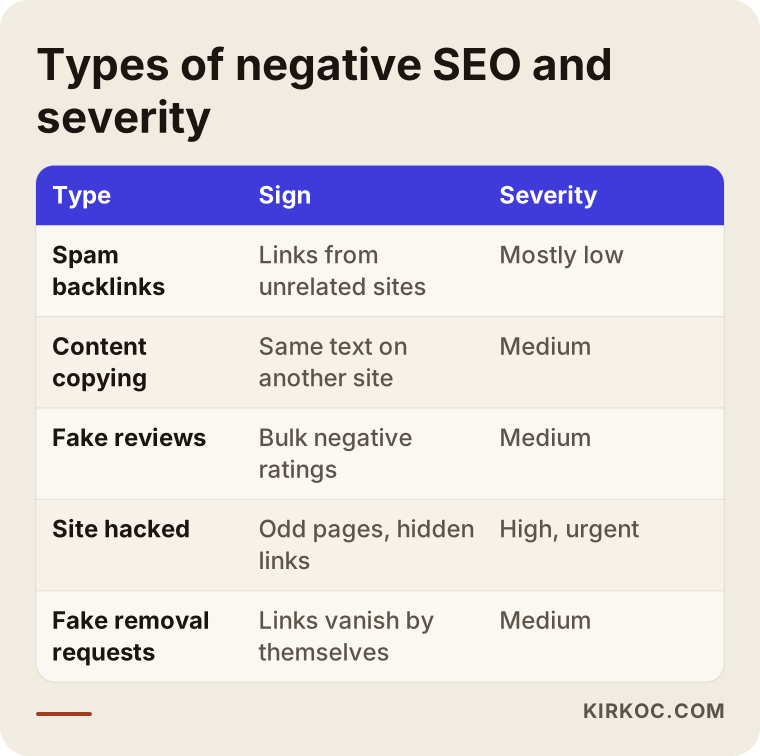
As the table shows, these are not all equally serious. A hacked site is the most urgent, because it harms both your visitors and Google's trust in you. Spam backlinks are the most common but, in most cases, the least harmful. Below I go through each one separately.
Spam backlinks: the most feared, the least damaging
A site does not need your permission to link to you. That is why unwanted links are unavoidable. Google's systems mostly recognise these links and simply do not count them. The problem only grows when a large share of your links were bought by you, or by someone working for you, because then it looks like real manipulation. If an "SEO company" sold you a cheap link package a few years ago, today's problem may not be anyone's attack at all. It may be the leftover result of an old service.
Content scraping and fake reviews
A site that copies your article usually does not replace you in the results, because your site published the text first and Google generally knows that. Still, if the copying is constant and the copying site is stronger than yours, you need to document it and file a removal request. With fake reviews, the issue is less about SEO and more about reputation. Platforms have their own complaint routes, and that is where you start.
Hacking: quiet and the most dangerous
If someone has broken into your site and added spam pages you cannot see, you may notice odd, unrelated titles in search results under your domain name. That is far more serious than a "backlink attack" on its own, and it needs technical action right away. Starting to clean up links without checking your site's security is like locking the window while leaving the front door open.
Attack or normal fluctuation? Separate the two first
When your rankings drop, you need to look at other causes before blaming anyone. Google updates its algorithms often, and during those updates traffic across a whole industry can swing. A competitor may have rebuilt their site, your page's content may have gone stale, your site may have slowed down, there may be a seasonal effect, or people may simply have searched for your product less during that period. All of these can cause a drop.
Ask yourself these questions. Did the drop hit one page or the whole site? Were other sites in your industry affected too? Does the date of the drop match the date the links appeared? Is there a message from Google under "Manual actions" in Search Console? Has anyone changed the site recently, whether you or someone else (a theme update, an address change, a plugin)?
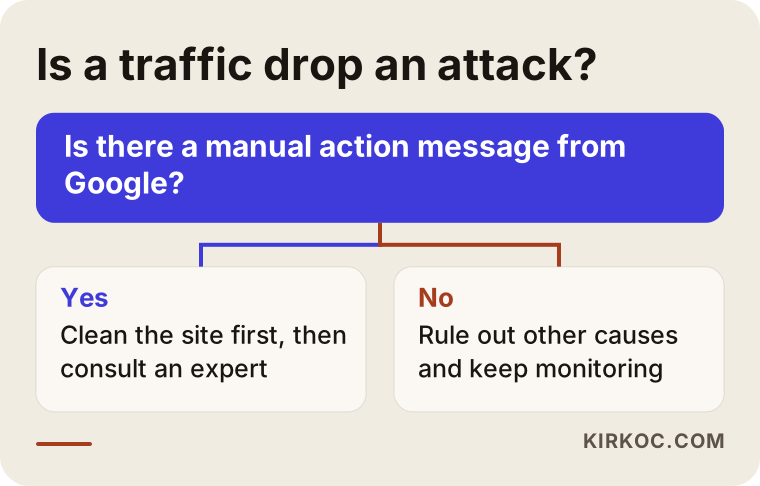
The most important answer in the flow is this: if there is no manual action message from Google, and the drop does not clearly line up with when the links appeared, then the first suspect is almost always something else about the site, not an "attack". That is why you rule things out first.
Two hypothetical example scenarios
The two examples below are entirely hypothetical. They do not describe any real company or person. The point is to show how the same fear can lead to two very different outcomes.
Scenario 1: Feared, but actually harmless
Suppose the owner of a furniture workshop notices in Search Console that hundreds of foreign sites have linked to the site within one week, and panics. The links are in unrelated languages, on low-quality sites. But when the owner looks at the site's traffic, there is no visible drop, and order forms are still arriving at the same rhythm. There is no manual action message either.
The right move here is to save a record of the situation without deleting anything, and to keep watching. Launching an unnecessary cleanup wastes time and carries a risk of mistakes, because you might reject a good link by accident. For this hypothetical owner, the job is to keep a dated copy of the link list and track the real change in traffic over a few weeks. Most likely, nothing will happen.
Scenario 2: Genuinely needs action
Another hypothetical example: the owner of a clinic's website searches Google for their own name and sees unrelated product titles under the site. In the same period there is a notice under "Manual actions" in Search Console about unnatural links, and appointment requests have clearly dropped.
This is a different situation. There are both foreign pages inside the site (a possible hack) and a manual action notice. First, the harmful code and pages must be cleaned out and the security hole closed. Then the links should be reviewed and, if needed, a reconsideration request sent to Google. In a case like this, it makes sense to get help from someone experienced instead of experimenting alone.
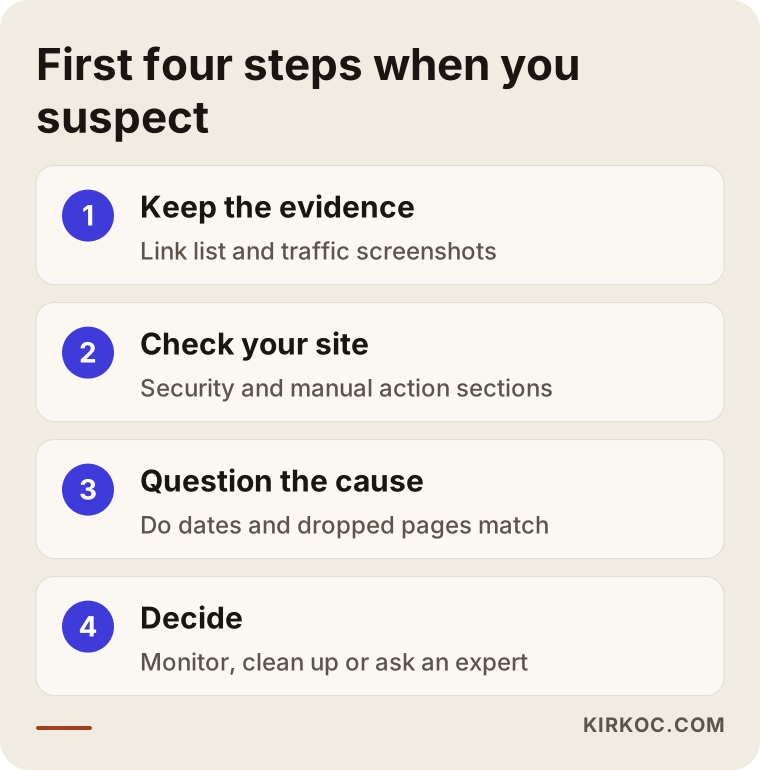
The graphic above summarises the first steps common to both scenarios: do not panic, keep the evidence, check the site, and decide. If that order is broken, unnecessary work usually follows.
What should you do, step by step?
Below is the order I suggest following when you have a suspicion. You can do most of it yourself, and I will point out where help becomes worthwhile.
1. Collect the evidence, and do not delete anything right away
In Search Console, open the "Links" report, export the list of sites linking to you and save it as a dated file. Also take screenshots of your traffic charts. This record answers the questions "when did it start and how long did it last" later on. Do not rush to reject or remove anything.
2. Check your own site's security first
Look at the "Security issues" and "Manual actions" sections in Search Console. Check whether unrelated titles show up when you search for your own site. Change the passwords of admin accounts, remove plugins and users you do not use, and make sure your site and its plugins are up to date. If you suspect a hack, this step comes before everything else.
3. Question whether the drop really came from links
Which pages dropped? Are the new links aimed at the same pages? Do the dates line up? If the drop started before the links increased, links are an unlikely cause. At this stage also look at how your competitors and the industry as a whole have moved.
4. Group the links; do not lump them all together
Separate the harmless ones from the truly malicious ones. You do not have to look at them one by one; grouping by domain and checking a sample is enough. Sites in an unrelated language, with meaningless content and nothing but lists of links, form one group. A link from an old, real news or blog site is usually a good sign and should be left alone.
5. Prepare a "disavow file" only if needed
A disavow file is a list you give Google that says "do not count the links from these sites." The tool is powerful, but it has to be used carefully, because one wrong entry also switches off a link that was helping you. Google itself advises using the tool only when there is a real problem, for example a manual action or very obvious link manipulation. If the links look harmless, you do not need to prepare a file.
6. Take a separate path for copied and fake content
If your content has been copied, you can notify the owner of the copying site or its hosting company, and Google also has a form for reporting copyright infringement. For fake reviews, you use the complaint mechanism of the platform where the review was posted. If a legal side comes up, I recommend talking to a lawyer; I do not give firm legal opinions on this part.
7. Set up monitoring and wait calmly
Results do not change right after you act. It takes Google time to process changes, and I cannot promise any fixed period. Looking at Search Console and your traffic chart once a week is enough.
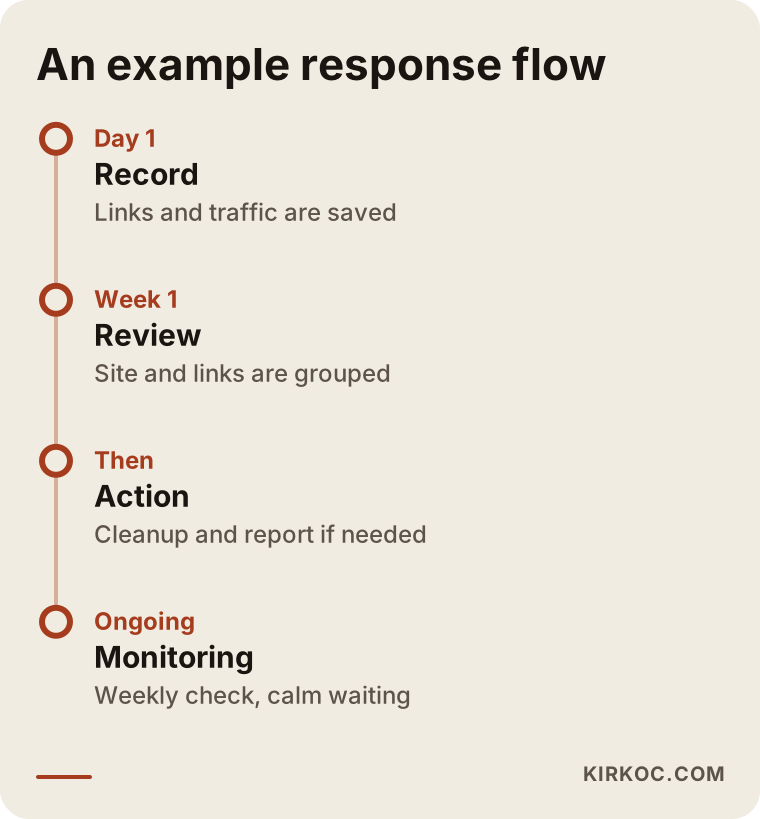
The timeline shows an example flow. Keep in mind that real durations vary with your site, the type of problem and how Google reacts. For that reason I suggest being cautious about anyone who gives you an exact date.
When is a disavow file needed, and when is it unnecessary?
This is the most misunderstood part, so I am writing about it separately. To many business owners, preparing a disavow file feels like a "safety measure." But when it is used unnecessarily, it does not help, and sometimes it does harm.
Cases where it may be needed: there is a manual action message in Search Console about unnatural links; you know that many links were bought or swapped in the past and they are causing trouble now; or the attack is very clear, a large number of harmful links arrived in a short time and there is a real deterioration in rankings.
Cases where it is unnecessary are far more common: you only see that the number of links has increased; traffic and rankings are steady; the links are unrelated but look harmless. In situations like these, the best decision is usually "do not touch it and keep watching."
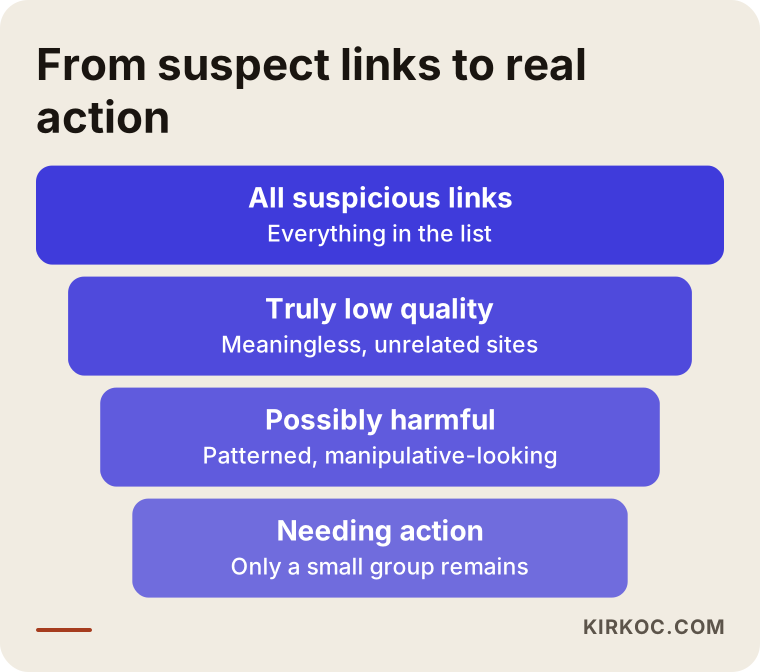
The funnel shows this filtering: not every suspicious link you can see is harmful, and not every harmful one is strong enough to touch your rankings. A small group that really needs action remains, and that is where your effort should go.
Common mistakes
Here are the mistakes I see most often on this subject. Some come from panic, some from advice that was misheard.
The first mistake is disavowing all links in bulk. The thought "let me delete everything so it is clean" can cost you good links as well. The second mistake is misdiagnosing the problem: the ranking drop is caused by a slow site or stale content, but the person spends months cleaning links. The third mistake is skipping the security check; the real door is open while you are busy looking at links.
The fourth mistake is paying for a service that promises to "stop the attack." Nobody can stop other people's sites from linking to you. What can honestly be promised is monitoring, cleanup and reporting. The fifth mistake is hitting back at a competitor. Sending them spam links is unethical and also drags you into a real problem. The sixth mistake is ignoring everything. Brushing off signs of a hack as "maybe it is nothing" can grow into a much bigger problem within days.
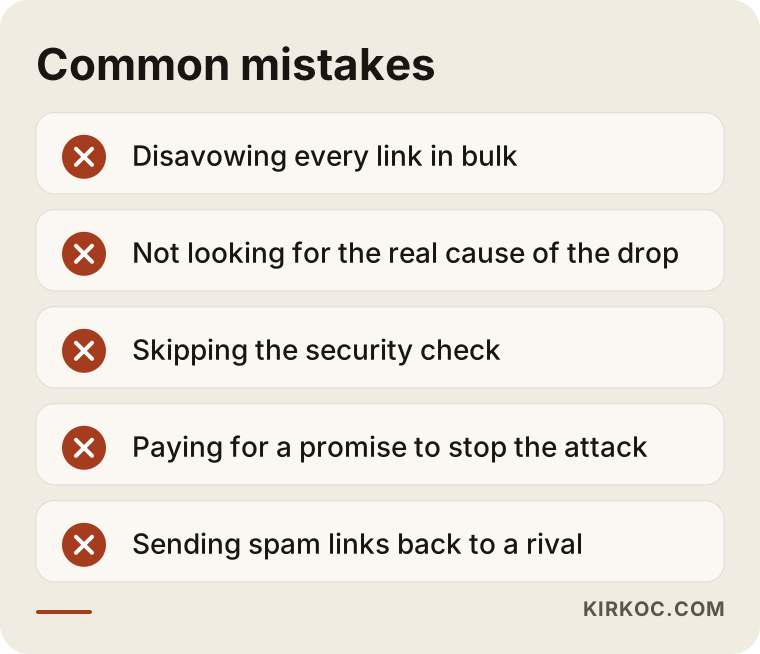
Looking at the list and asking yourself which mistake you might have made is half the job. If you have made one, that is normal. Most of them can be reversed, as long as you kept a record.
What can you do yourself, and when do you need an expert?
There is quite a lot you can do yourself. Checking Search Console regularly, exporting the link list, changing passwords, updating plugins and searching for your own business name once all require no technical knowledge. Doing these checks once a month is usually enough.
Expert help makes sense in these cases: you received a manual action message from Google; there are foreign pages or hidden links on your site; you cannot work out the reason for the drop yourself; or a disavow file seems necessary but you are not sure which links are harmful. At that point the work should rest on data, not guesses: which pages dropped, when the links arrived and what changed on the site.
If the problem lies in the site's own weakness (slowness, stale content, a weak page structure), the answer is not attack defence but strengthening the site. Most of the time, the best "negative SEO protection" is a solid, up-to-date site with a clean link history.
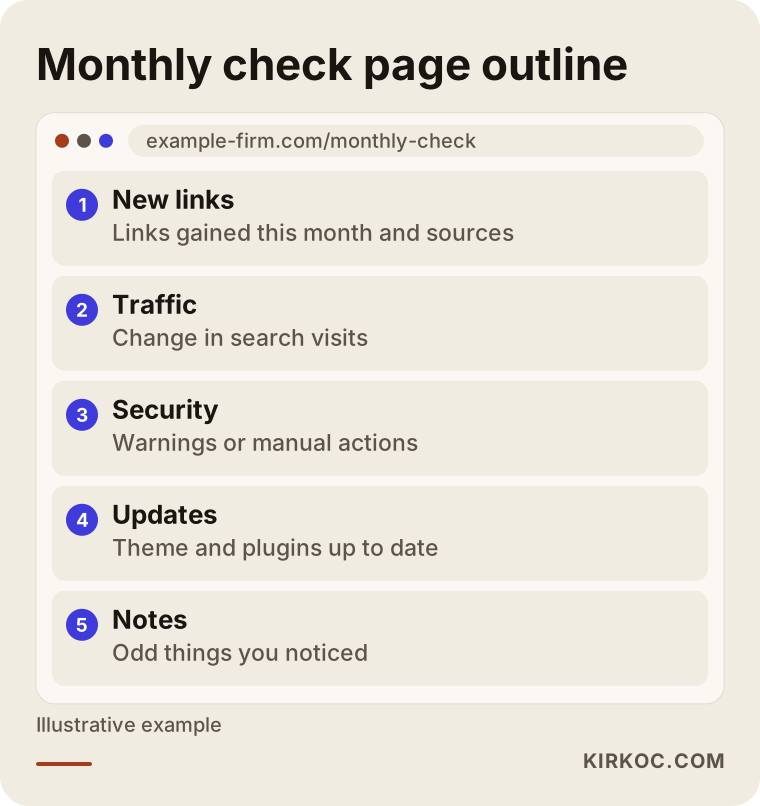
The page outline above shows what a monthly check dashboard might look like. You can also move it into a spreadsheet or a simple notes file. What matters is that you look at it regularly.
What determines the cost
I will not quote a number, but I can explain clearly what makes the price change. The first factor is the type of problem: do you only need a review and a report, or is there also cleanup and correspondence with Google? The second is the size of the site and the platform it runs on. Reviewing a small brochure site is not the same effort as reviewing a store with hundreds of products. The third is how complicated the link history is; untangling the past of a site that has been managed by different people over many years takes longer.
The fourth is whether there has been a hack, since security cleanup is a separate job. The fifth is whether you want monitoring afterwards. A one-time review and an ongoing monitoring arrangement are different in scope. When you ask for a quote, ask for the scope to be written down. A quote that says "I will review these things and report these things" is more trustworthy than vague promises like "we will stop the attack."
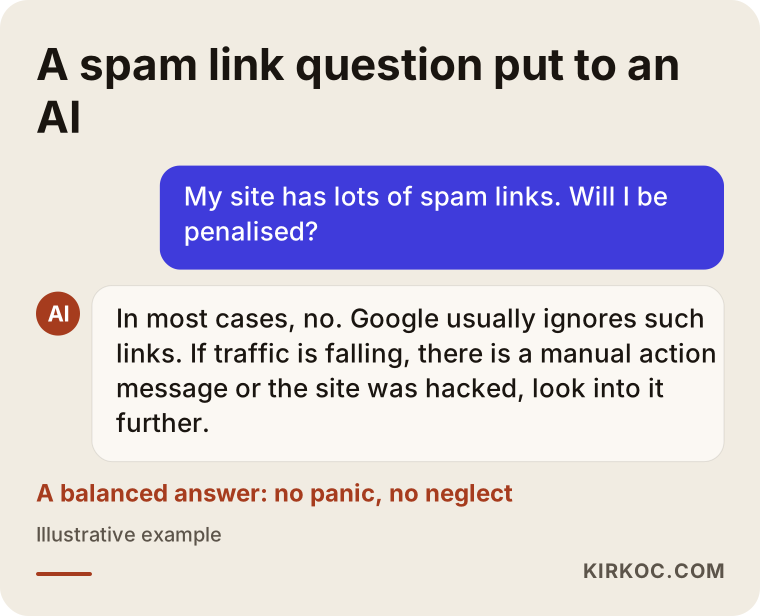
People today ask this kind of question not only to Google but also to AI assistants. The sample answer above shows how a good response should be balanced: neither "panic immediately" nor "do not care at all." My approach rests on the same balance.
How I work with you
I work alone, which means the person you talk to is the person doing the work, with no layers in between. At the start I clarify whether your question is really about negative SEO, because often the real need is somewhere else. First I look at the site, the Search Console data and the link history. Then I give you, in plain language and in writing, what I found, how serious the risk is and the steps I recommend. If no action is needed, I say so openly; I do not want you spending money on unnecessary work.
If action is needed, I go through the steps in order: security cleanup, link review, a disavow file if necessary, and notifying Google. I do not guarantee rankings, because nobody can guarantee Google's decision. What I can offer is clear documentation of what I did and an explanation of how you can monitor things afterward.
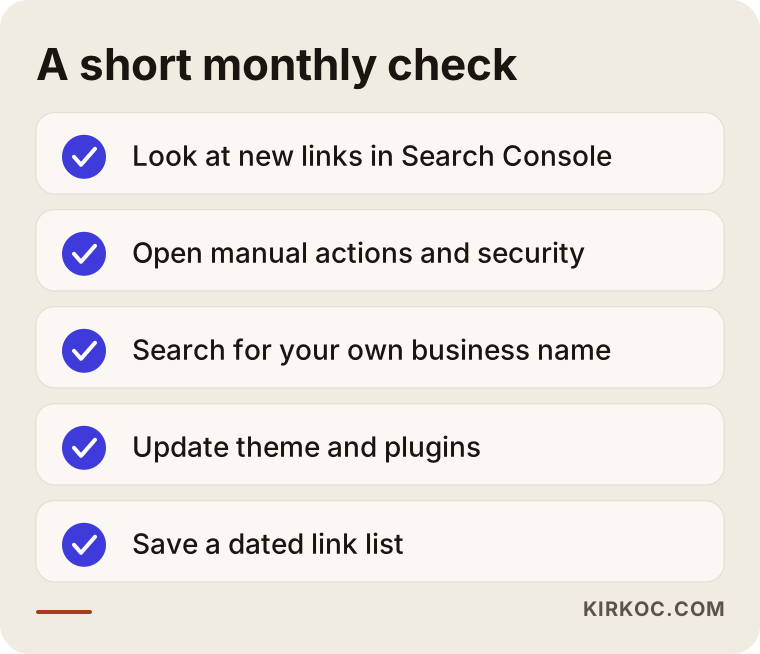
The last graphic summarises the monthly check you can do on your own. Putting it on your calendar helps you catch most future surprises earlier.
Frequently Asked Questions
Is my competitor running negative SEO on me, and how can I tell?
A large number of low-quality links on their own is not proof of an attack. To suspect a real attack, you should look for additional signs next to those links: a clear drop in traffic or rankings, a manual action message in Search Console, or foreign pages on your site. If none of these exist, you are most likely just seeing ordinary internet noise. Knowing for certain who did it is usually not possible anyway.
Can spam backlinks lower my rankings?
In most cases they do not, because Google generally ignores this kind of link. The risk rises when the links give the impression of manipulation, meaning links were bought artificially or there is a very obvious pattern. That is why, when rankings fall, you should first rule out other causes.
Should I create a disavow file?
Only if there is a real problem. It can be considered if you received a manual action message or if you suspect harmful links are clearly hurting your rankings. If you only see that the number of links has grown, it is usually not necessary. Because a badly prepared file can switch off good links too, talk to an expert first if you are not sure.
What should I do first if my site has been hacked?
Take control of the site first: change the passwords, clean out the harmful code and pages, close the security hole and install updates. It also helps to contact your hosting company. Link cleanup comes only after that. Because this work is technical, getting help is the right call if you are not confident doing it yourself.
What can I do about fake reviews or copied content?
Each has its own route. For fake reviews, use the complaint form of the platform where the review was posted. For copied content, you can contact the owner of the copying site, their hosting company, or use Google's copyright reporting tool. If a legal side comes up, I suggest talking to a lawyer; I do not give firm legal opinions on this.
How long does recovery take?
I cannot say for certain. It depends on the type of problem, the state of your site and when Google processes the changes. Be cautious about anyone who promises fast recovery. When the right steps are taken, improvement is usually seen within a reasonable time, but I cannot promise a date or a ranking.
How can I protect myself in advance?
Keep your site and plugins up to date, use strong passwords and two-step verification, and remove accounts you no longer use. If you bought links in the past, write them down. Look at Search Console once a month. A strong, high-quality site with a clean link history is the best defence on its own.
Should I hand this job over entirely, or do it myself?
In most cases you can do the review part yourself. If there is a manual action, a suspected hack or a clear drop, expert help reduces the time spent and the risk of mistakes. I can help you work out which of these you are in.
If you suspect your site is being targeted but cannot be sure, you can reach me through my SEO services page. I will first look at whether there is a real threat at all, and if no work is needed, I will tell you that plainly.