You run a music school or a dance studio. The space is ready, your teachers are experienced, enrollment season is coming up, and yet the phone is not ringing as much as you expected. Meanwhile, another studio down the road shows up on Google ahead of you every time someone types "guitar lessons near me" or "ballet classes for kids." So it makes sense that you searched for "SEO for music and dance schools." In this article I explain, in plain language, what you can reasonably expect from SEO, which pages actually help, and where to start. I am Ümit Kırkoç, a web designer and SEO/GEO consultant who works alone from Istanbul, and I will be upfront about the limits of my own SEO services where they come up.
SEO, in short, is the work that helps your website show up when people search on Google and other search engines for what you offer. The difference from advertising is simple. With ads, you are visible as long as you keep paying, and you disappear the day you stop. SEO, when it is set up properly, keeps bringing steady interest for months or even years. But for a school, the job is a little different than for a hardware store or a plumber. The person choosing a class is not buying a product. They are trusting you with their child, or with their own time and confidence. That is why trust is the most important part of every page you publish.
What makes music and dance schools different in search?
The first difference is that searches are narrow and local. Nobody types the single word "music" and expects to find a class. People type things like "piano lessons for kids," "beginner salsa class for adults," "violin teacher in [your neighborhood]," or "wedding first dance lessons." So a typical search has three parts: the subject, the age group, and very often the area. For a small school, this is good news. On a narrow search there are far fewer competitors than on a broad one, so a small school has a real chance.
The second difference is that the person who decides and the person who takes the class are often different people. For children's classes, the one searching is a parent. Their questions sound like this: How does the teacher treat young kids? How many students are in a class? Do the times work after school? Is there a trial class? For adult classes, the searcher is the student, and the worry is usually "I have never done this. Can I still start?" If you write one page for both groups, you end up half-answering both.
The third difference is seasonality. Sign-ups bunch up in late summer and early fall, again in January, and before summer break. Recitals, year-end concerts, and the wedding season also change what people search. That is why SEO work should start two or three months before enrollment, not the week before. Search engines need time to notice a new or updated page and decide where it belongs.
The fourth difference is visuals. School websites are full of photos and video. These are valuable for trust, but if they slow your site down, they backfire. A parent waiting five seconds for a page to open on a phone will often move on to the next school.
The illustration below uses a completely invented example to show what a search result can look like.
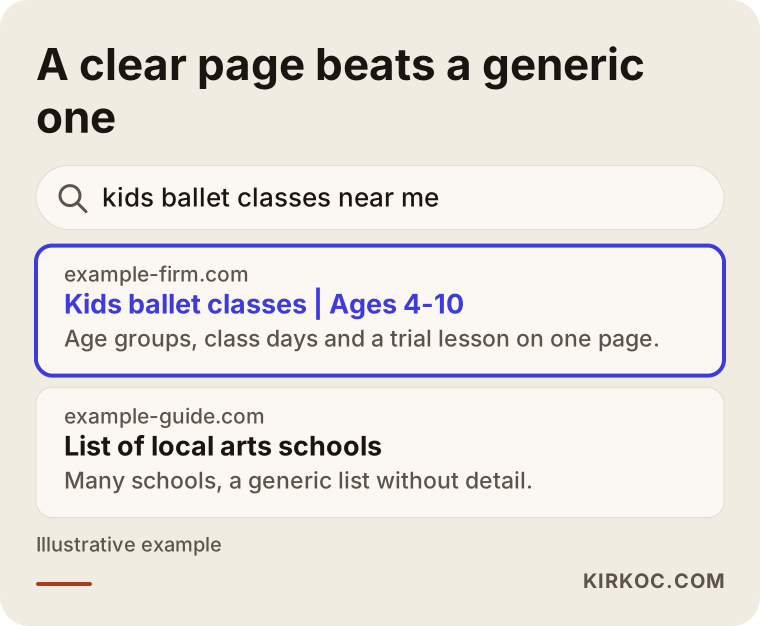
Look at what the highlighted result does: it says the subject, the audience, and the age range right in the first line. A generic "list of local arts schools" page does not do that job. A search engine is trying to work out which answer to give the person asking. When you make that easy, it can place you more confidently.
How do parents and students search for classes?
You do not have to guess which searches matter for your school. You can research them. Still, a few patterns are common in this field, and it helps to know them up front.
The first pattern is subject plus place: "guitar lessons [neighborhood]" or "ballet [town]." People care about distance because they will be driving a child, or fitting a class between work and home. The second pattern adds age and level: "music class for 4-year-olds," "adult beginner piano." The third pattern is goal-based: "audition prep lessons," "wedding dance lessons," "voice lessons for stage performance." Someone typing this is often close to signing up. The fourth pattern is comparison and research: "online piano lessons or in person," "what age should a child start ballet." These people are gathering information, but a good article can introduce them to your school.
There is also map search. Someone on a phone typing "music school near me" sees the map box at the top of Google and often picks from there. That is tied to your Google Business Profile, which is separate from your website. Good SEO work treats the two together.
Putting these four patterns in one table makes the whole thing simpler.
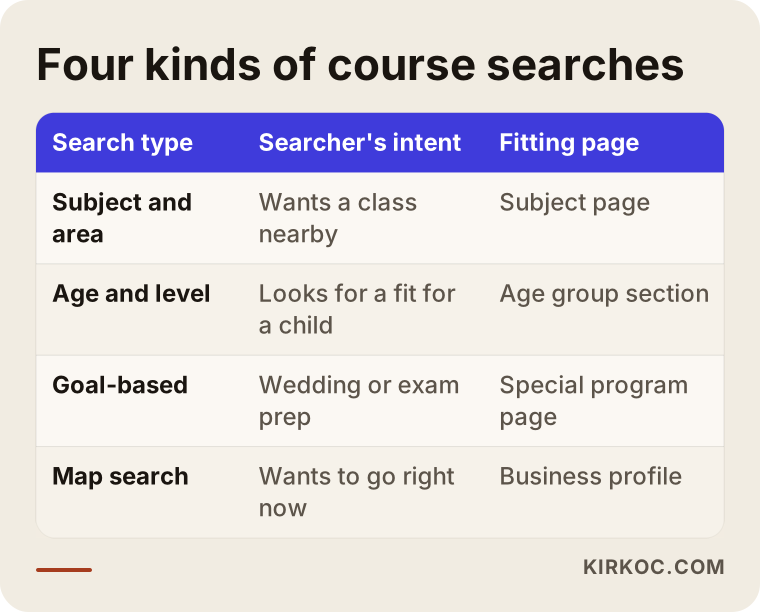
As the table shows, every kind of search needs a different page. Trying to load all of these searches onto a single home page produces a page that does none of them well.
Which pages does your school website need?
Most school websites are one page called "About Us and Classes." But every subject is a separate search. Someone looking for guitar lessons gets nothing from your piano page. That is why I recommend a separate page for each main subject: guitar, piano, violin, voice, ballet, hip hop, salsa, and so on. If you run a small school, you do not have to build them all at once. Starting with the three subjects that bring in the most students, or the ones you most want to grow, is enough.
A subject page should include: who the class is for (age and level), how long each class runs and how often, whether it is a group class or a private lesson, how big the class is, a short introduction of the teacher, trial class information, common questions, and a clear contact button. The page does not have to be long. It does have to answer most of the questions in a parent's head.
Two kinds of supporting pages also help. The first is a location page. If you have more than one location, or you draw students from several areas, give each its own page with information that is specific to it. The second is teacher and event pages: short bios of your instructors, announcements for recitals or concerts. These build trust and also show that your site is alive.
The layout below is the page structure I suggest for a subject page.
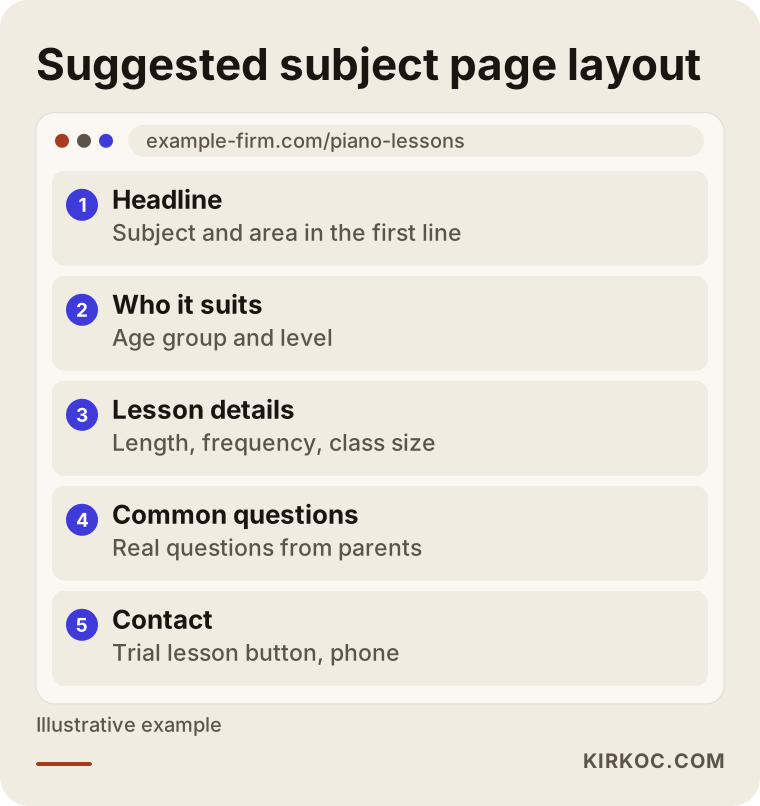
Every section in this layout has a job. The headline and first line match the search. The "who it suits" section convinces the parent or adult student that they are in the right place. If your phone number and address are written the same way on every page, both visitors and search engines trust you more.
One more thing people forget: the information on the page must actually be correct and current. A class you dropped or a teacher who left, still sitting on your site, annoys parents and damages trust.
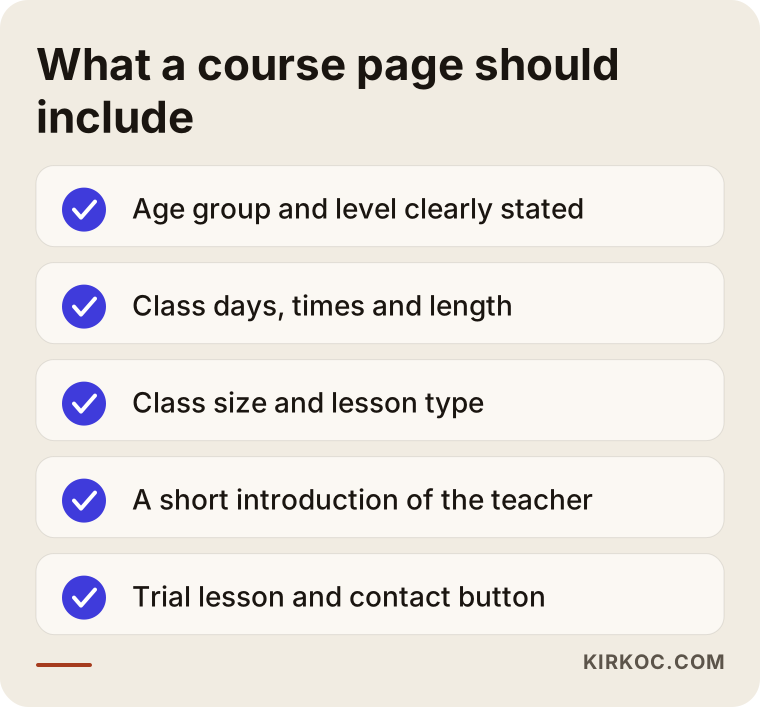
Think of this list as a short checklist to keep next to you before you publish a page. Even if you cannot fill in every item, having most of them on the page answers the bulk of what a parent is wondering.
Example scenario 1: a ballet school with a single location
This is a hypothetical scenario, not a real school. Imagine a small school in one neighborhood that teaches ballet to children. Its website has a single page, "About our school." The page is full of general phrases like "artistic growth" and "disciplined training," but it says nothing about age groups, class days, or a trial class. Parents open the page, scan it for a few seconds, and close it.
In a case like this, the first job is to turn the one-page site into a site organized by subject. A "ballet for kids" page gets split by age: a play-based introductory class for the youngest children, and a technique-focused class for older ones. Each section lists class days, class size, how the first trial class works, and the questions parents tend to ask. After that, the address, phone number, and opening hours on the Google Business Profile are made identical to what the website says.
Results do not appear overnight after this. You can expect the pages to be picked up by search engines within a few weeks, and the chance of showing up in neighborhood searches to grow over a few months. I do not promise rankings. But this setup is a much stronger starting point than a one-page site.
Example scenario 2: a two-location school that teaches both music and dance
This is also hypothetical. Picture a mid-sized arts school with locations in two different parts of town, teaching piano, guitar, contemporary dance, and salsa. The website looks good, but every class is listed one after another on a single "Programs" page. Both addresses sit on the contact page, and it is not clear which class is taught at which location.
The problem is that neither the search engine nor the visitor can find an answer to "which class, at which location?" The fix is to create a separate page for each main subject, and on each page say clearly where and when the class is held. Each location also gets its own page, with directions, parking, nearby transit, and the teachers who work there. One important mistake to avoid here is copying a location page and only changing the neighborhood name. Pages that are copies of each other do not help. Each one needs information that belongs only to it.
Each location also gets its own Google Business Profile, linked to the matching location page. Once this structure is in place, the school has a chance to appear both in narrow searches like "salsa classes [neighborhood]" and in map results.
Google Business Profile, reviews, and maps
For schools, map results matter a great deal, because people usually pick a class close to where they live or work. Your Google Business Profile is the card that appears on the map and in the information box next to search results. It holds your address, opening hours, photos, phone number, and reviews.
A few points deserve attention. Choose the right category, such as "Music school" or "Dance school," whichever fits you best. Keep your hours up to date, especially around holidays and school breaks. Use real photos: your studio, your classrooms, your teachers, and moments from performances. For photos that include children, you need written permission from parents. I suggest asking an attorney about the privacy and consent rules that apply to you, because that is not my area of expertise.
Reviews are a separate matter. Asking happy students and parents for a review is legitimate. Buying reviews or having fake ones written is unethical and can get your profile removed. Replying calmly and politely to every review, including the negative ones, tells the next parent reading it a lot about you.
How do I work, step by step?
Putting an SEO project in order makes it easier to manage both budget and expectations. For school websites, I usually go in this order.
First I look at where you are now: how your site opens on a phone, which pages exist, which searches you appear for, and what your competitors are doing. Then I choose the target searches. We talk it through so it is clear which subject, which age group, and which area you want students from. In the third step I clear out technical obstacles on the site, such as slow images, broken links, and missing page titles. In the fourth step I write the subject and location pages, or edit the text you have written. The fifth step is the Google Business Profile. The last step is measuring and adjusting: how many people came to which page, how many called or filled out a form, and which page needs strengthening.
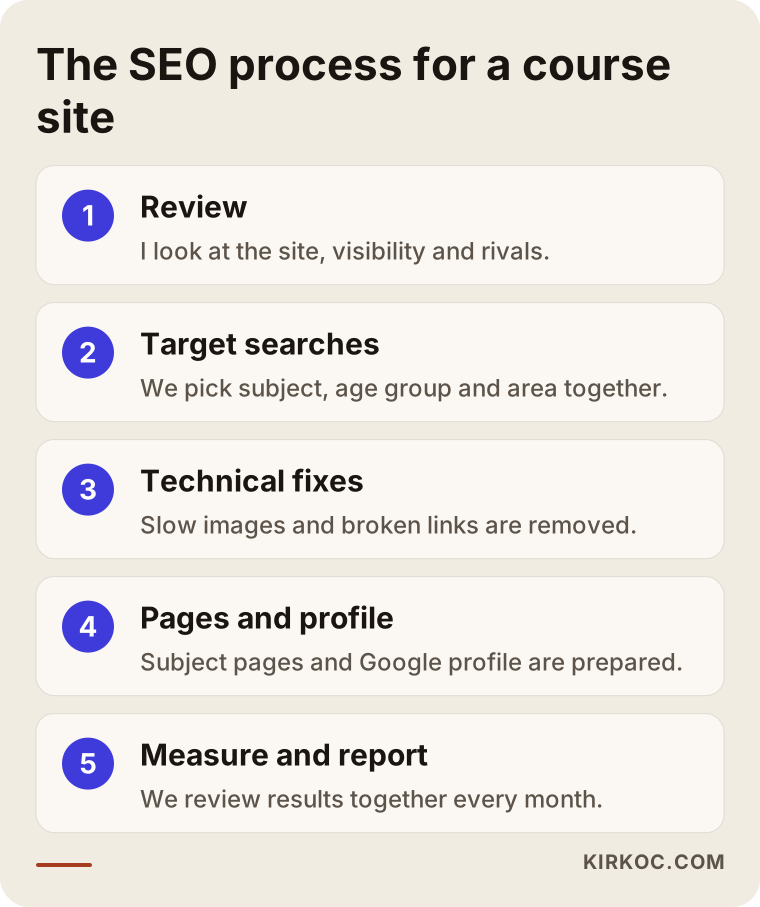
The logic of this order is that the groundwork comes first and the content goes on top. Good content written on a shaky foundation does not give the effect you hoped for.
You can also picture the path from a search to an enrolled student as a funnel. Many people search. Some of them click on your site. Fewer read the page to the end. Fewer still contact you. Even fewer come to a trial class, and some of those enroll. The job of SEO is to fill the top of this funnel with the right people. The lower steps depend on your page and on your staff.
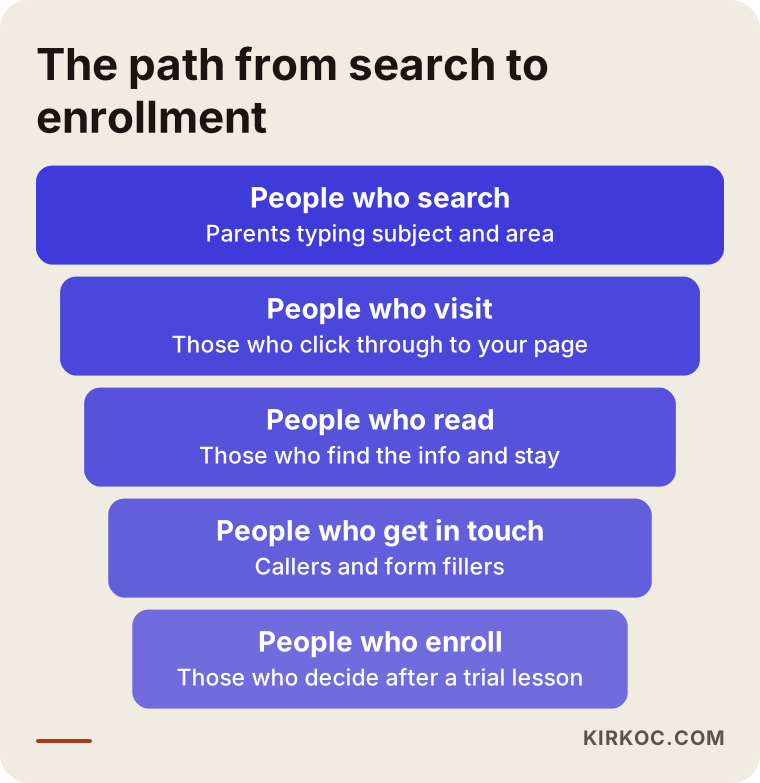
Keeping the funnel in mind matters, because sometimes the problem is not in the search results at all, but on the page. If many people visit your site but nobody calls, the problem is not visibility. It is how convincing the page is. In that case, the first place I check is the contact button and the trial class invitation.
What mistakes do school websites make again and again?
Here are the mistakes I see repeated. The first is piling every subject onto one page, so none of them has a strong page of its own. The second is filling the page with decorative sentences like "welcome to the magical world of art," which tell the reader nothing, when a parent is looking for class times, age limits, and the trial class. The third is uploading large photos without shrinking them, so the site opens slowly on a phone. The fourth is writing the address, phone number, and hours differently in different places. The fifth is building the site once and never updating it; a sign-up announcement left over from last year makes it look abandoned. The sixth is giving up after a few weeks when no results appear.
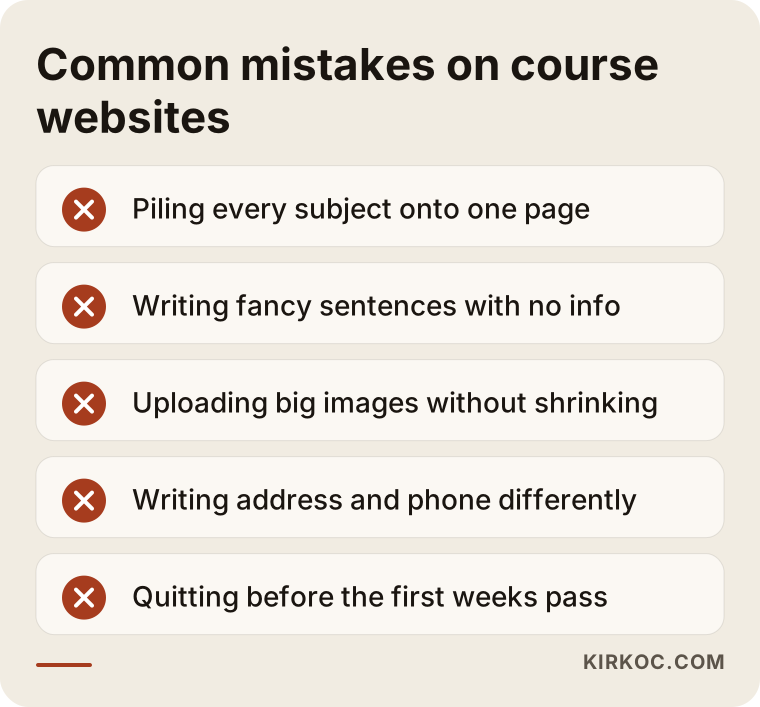
None of these mistakes needs technical knowledge to fix. Most of them come down to taking a bit more care with the page and writing with the parent in mind.
What can you do yourself, and when do you need an expert?
You do not have to hand everything to a specialist. There is a lot you can do on your own. You can claim your Google Business Profile and fill it in with correct information. You can write the class times, age groups, and trial class details for each subject in simple language. You can open your own site on your phone and see how fast it loads. You can politely ask satisfied parents for a review. You can also put together a short list of common questions based on real ones; the questions parents ask you on the phone or at the front desk are the best source of content ideas.
You usually need an expert in these situations: your site is technically slow or broken, you have several locations and subjects and need to fit them into a sensible structure, your competitors are very strong and you do not know which searches to aim for, or you simply do not have the time. In those cases, the right guidance saves you months of effort spent in the wrong direction.
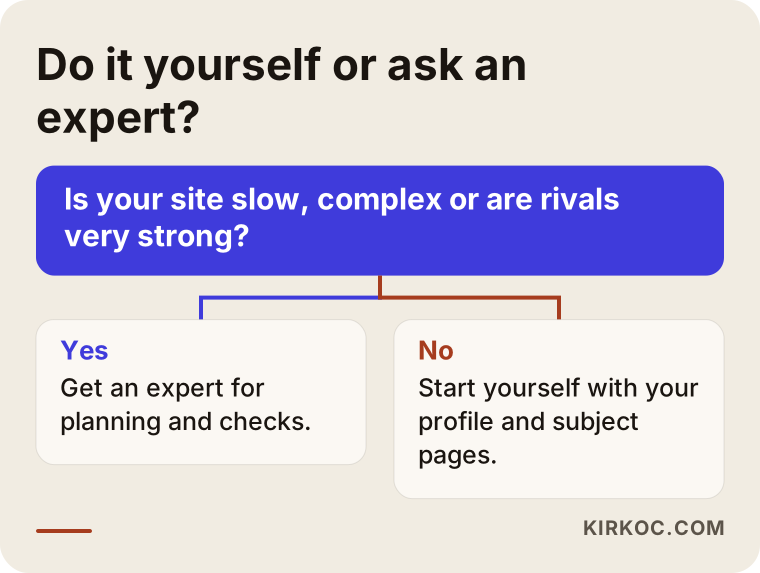
The logic of the chart is simple. If you understand the work and can set aside time, start yourself. If there is a technical obstacle or the structure is complicated, ask an expert. The two are not mutually exclusive. Many school owners build the foundation themselves and use an expert only for planning and checking.
Why does it matter to know what drives the cost?
I will not give a number, because the cost of SEO is different for every business. But I can tell you what it depends on. The first factor is the current state of your site: building a new site from scratch is a different job from fixing an existing one. The second is how many subjects and locations need pages; the more pages, the bigger the job. The third is competition: in a busy part of a big city, in a subject where rivals are strong, it takes more effort to make progress. The fourth is who writes the content. If you prepare the text, the job is smaller; if you want me to write it, it is bigger. The fifth is whether the work is a one-time project or a monthly arrangement. If you have a multilingual site and also want to reach students who speak another language, each language is a separate piece of work.
When you get a quote, I suggest checking a few things. Is the work written down and put in order? Is it clear who will do it? Are the reports in plain language? Will the site and accounts stay in your name? And is there no promise of a ranking? A quote that says "we will definitely get you on the first page" is not an honest quote, because nobody can control that outcome.
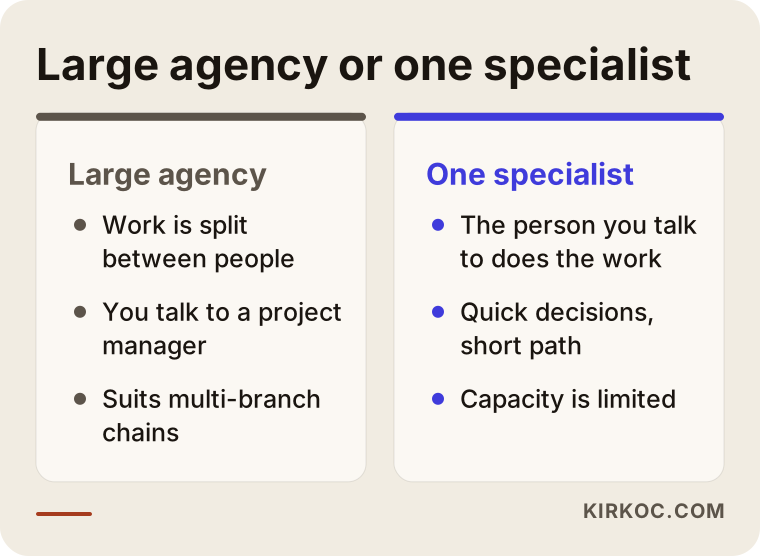
There is no good or bad side in this comparison. For a large chain of schools, an agency may be the right fit. For a school with one or a few locations, talking directly to the person who does the work is often faster and easier to follow.
How does working with me look in practice?
I work alone, which means the person you talk to is the person who does the work. In the first conversation, I listen to how your school runs, which subjects you teach, who your students are, and when you want to fill classes. Then I review your site and your competitors, and I tell you in writing where to start. The proposal lists the work in order of priority, and I explain what the price depends on. Throughout the project, you remain the owner of the site and the accounts. Each month we go through a simple report together to see what has changed. I do not guarantee results, but I explain everything I do and why.
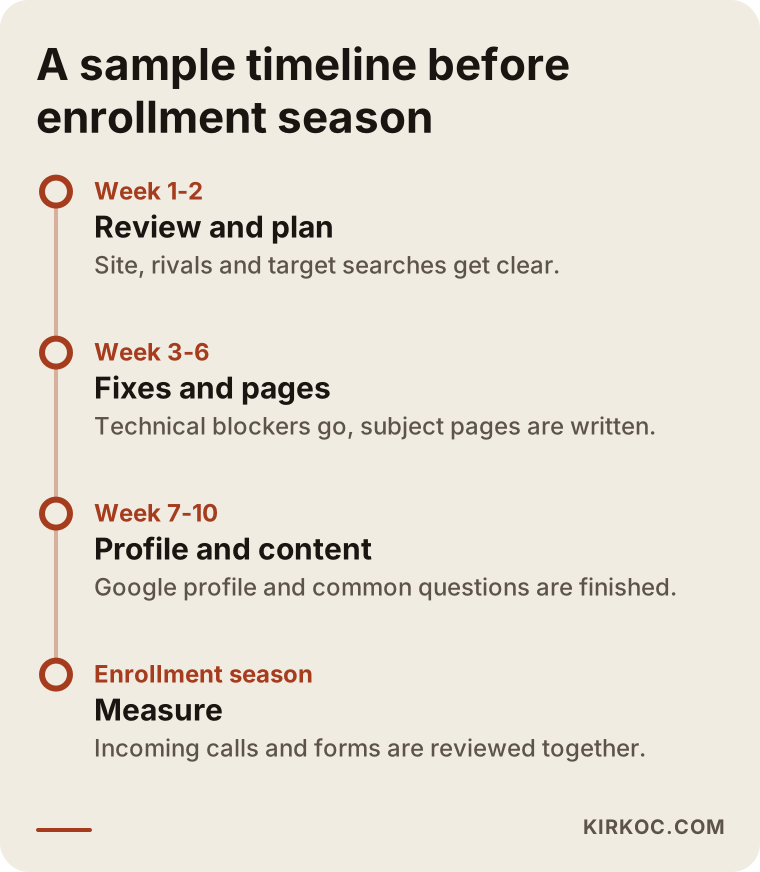
As the timeline shows, you need to start early to be ready for enrollment season. The first weeks go to review and planning. The content goes live in the following months, and the results only start to show after that.
Frequently Asked Questions
How long does SEO take to work for a music or dance school?
I cannot give an exact time, because it depends on the state of your site, the competition in your area, and the searches you are aiming for. On narrow, clear searches, such as a subject plus a neighborhood, results often start to appear sooner. On broad searches it takes longer. That is why I suggest starting a few months before enrollment.
Isn't Instagram enough?
Instagram is very valuable for promoting your school and staying in touch with current students. But someone who types "piano lessons near me" and does not know you yet will usually go to Google. A school with no website and no Google profile cannot reach those people. The two work together rather than replacing each other.
Is SEO worth it for a very small school with one teacher?
Yes, and the opportunity can even be bigger for small schools, because on narrow local searches you do not have to compete with large rivals. For a small school, one clear page built around a single subject and a single area is often a good enough start.
Can I use photos of children on my website?
Images of children are personal information, and using them generally requires a parent's consent. What kind of consent form you need, and in what format, is a legal question, so I suggest asking an attorney. The safe approach is to publish no image of a child unless you have permission.
I also teach online. How should I show that on my site?
I suggest a separate page for online lessons. Someone searching "online guitar lessons" does not care about your neighborhood or your studio. They want to know how the lessons work, what tools are used, and whether there is a trial lesson. Mixing in-person and online lessons on the same page weakens both.
I also want to reach students who speak another language. What should I do?
If many families in your area speak another language at home, pages in that language can help them find you. Do not leave the translation to a machine alone; write class names and area details so they sound natural in that language. Rather than translating the whole site, you can start with the few subjects that matter most to you.
Should I choose SEO or Google Ads?
If you want results right away during enrollment, ads are faster, but visibility stops when you stop paying. SEO starts slower, but once it is in place it keeps paying off for a long time. For many schools, the sensible path is a balance of both, depending on budget. Which one suits you depends on your goals and your budget.
What work do you do, and what do you not do?
Site review, choosing target searches, technical fixes, subject and location pages, the Google Business Profile, and monthly reporting are the work I do. I do not promise rankings, I do not buy reviews, and I do not produce fake content in your name. Photography and legal advice are outside my field.
If you want the right people to find your school, a short description of your situation is enough. You can reach me through my SEO services page, and we can talk about where to start for your site and your students.