You paid for a new website, it went live, and you told everyone about it. Months later the phone is silent, the contact form is empty, and the only visitor in your stats is probably you. If you are asking "why is my new website getting no traffic, did I do something wrong?", you are in good company. Most of the time there is no single disaster. The shop is built, but nobody put up a sign on the street. Below I walk through the most common causes, what you can check without technical skills, and when SEO services are worth paying for.
Set the right expectation first
To Google, a brand-new site is an unknown shop. It has to find your pages, read them, and then decide who to show them to. That takes weeks or months, not days. I can't give you an exact timeline, because it depends on your field, your competition, and the state of the site.
Still, "just wait" is not always the right advice. If months have passed and nothing has happened, there is usually a concrete gap rather than a waiting problem. These four causes come up most often in my work.
The four most common causes
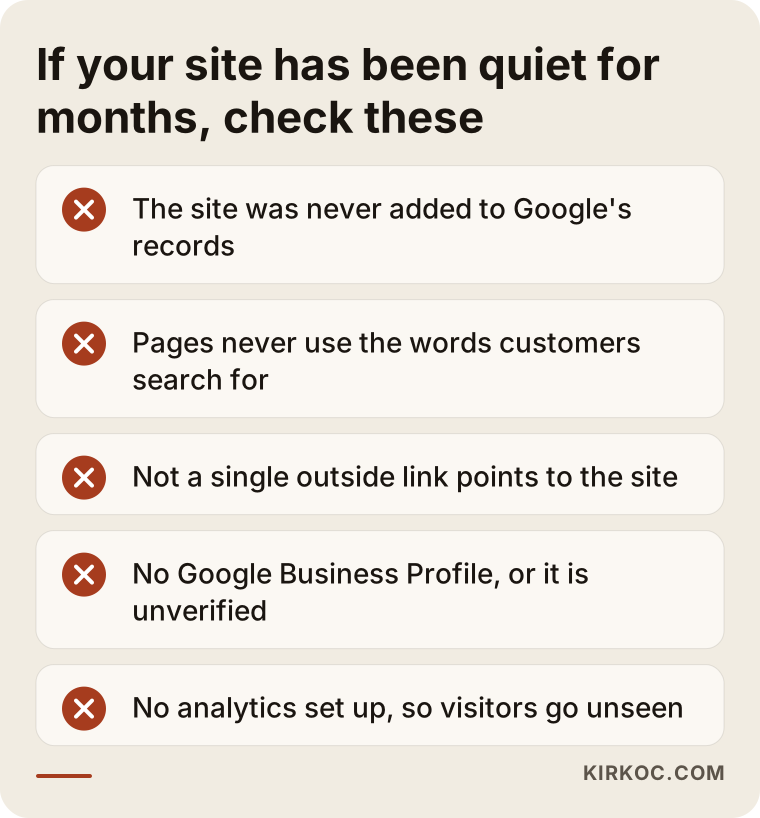
1. The site is not indexed. Indexing means Google has added your page to its records. If you are not in the records, nobody can find you. Sometimes a "hide from search engines" setting from the build phase is left switched on and nobody notices. If you wonder why a page still is not showing, my article on when a new page will show up on Google may help.
2. The pages do not say what you offer. Many business sites open with "Our vision, our mission, our values", while the words customers actually type never appear. A customer searches "dental implants near me" and your homepage says "healthy smiles start here". Google reads your text to understand what you sell and where. If the text doesn't say it, Google has no reason to show you.
3. No other site links to you. When other sites mention and link to you, it tells Google you are real and known. A new site with zero outside links is a stranger. I don't mean bulk-bought links. I mean genuine mentions from directories, associations, suppliers, and partners.
4. No Google Business Profile, or an incomplete one. For local businesses, "near me" searches draw heavily on map results. Without a verified, complete profile you will not appear there, however good the website looks.
Five checks you can do yourself
None of these needs technical knowledge, and together they take about half an hour:
- Search your address. Type
site:yourdomain.cominto Google, using your own address. If nothing comes up, the site may not be indexed. - Search your business name. Does your site appear? If not, the problem is serious.
- Read your homepage like a stranger. Does the first screen say what you do, where you are, and how to reach you?
- Look for one page per service. Squeezing five services onto one page sends Google a vague signal.
- Open your Google Business Profile. Address, phone, hours, and category should match your website exactly.
Also check whether analytics is installed. If it isn't, you may be assuming nobody comes when you simply are not measuring. For a broader checklist, see why my website isn't on Google.
The picture at a glance
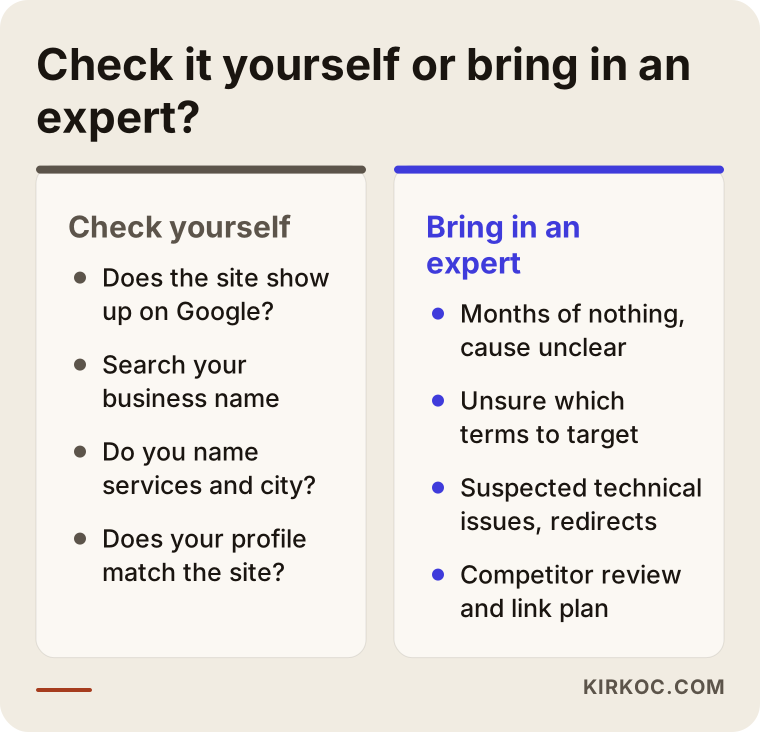
What you can do yourself mostly answers "is it there or not?". An expert answers "why is it like this, and what should be done?". Keeping the two apart protects both your time and your budget.
Step by step: how a diagnosis works
Whether you work through this with me or on your own, the order is the same. First you find the cause, then you fix it, and only then do you measure. Skipping the order usually means spending effort in the wrong place.
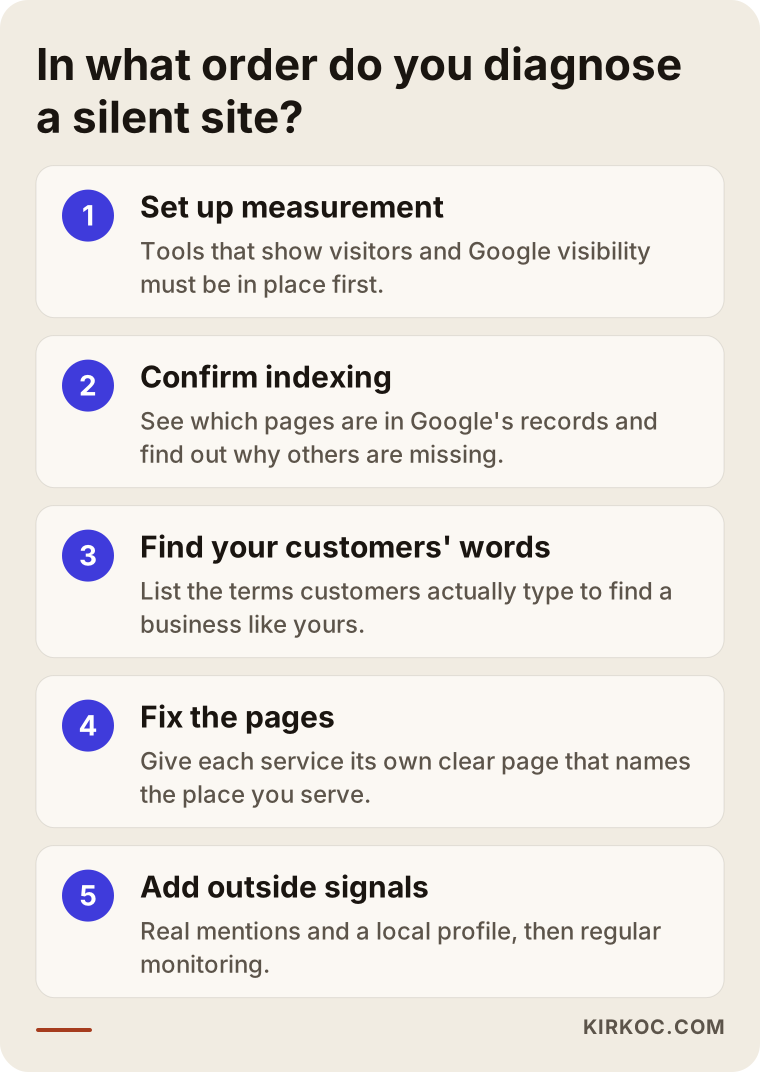
1. Set up measurement
First I make sure the tools that show visitors and Google visibility are installed. Without them you cannot tell what improved and what did not. The tools are free and take little time to set up.
2. Confirm indexing
Next I look at which pages are actually in Google's records. If some are missing, I look for the reason: a setting that blocks them, no path leading to them from the rest of the site, or pages Google considers too thin. Each needs a different fix.
3. Find your customers' words
Then I look at what customers really type when they look for a business like yours. The words your industry uses and the words customers use are often different. This list decides which service gets which page.
4. Fix the pages
The home page, service pages and contact details are written or corrected according to that list. The goal is not fancy sentences. It is saying plainly what you do, for whom and where.
5. Add outside signals and monitor
The last step covers real mentions from other places and the local profile. After that, we watch for a few weeks to see what moves, and the plan is adjusted to the numbers.
Two different businesses, the same silence
The examples below are general accounts based on situations I run into often in my work. They contain no names and no promised results.
A medical practice: a lovely site, invisible services
A doctor had put real effort into a new website. The design was clean and the introduction to the practice was careful. Months later, almost no visitors had arrived. I first checked whether the site was indexed. The home page was in Google's records, but most service pages were not, because they sat only inside a pop-up and not in the menu.
The home page also said just "quality healthcare." There was no hint of which complaint or which neighborhood someone might search for. We gave each service its own page, wrote each in the questions patients actually ask, and brought the Google Business Profile in line with the site. Rules on advertising and promotion in healthcare differ from country to country, so we kept the text plain and informative, avoided strong claims and left the check against professional rules to the doctor. After a few weeks, visibility started to move. I did not know how long it would last then, and I cannot guarantee it today.
A manufacturer: corporate language, words nobody searches
A metalworking company had commissioned a corporate site. The copy said things like "your solutions partner" and "uncompromising quality," but never named the products. Buyers, on the other hand, search for something specific: the name of a part and the way it is made.
The real job here was not a redesign but writing a separate page for each product group. Each page said what is made, from which material, for which industry and how to request a quote. We also reached out to the industry association and business partners for genuine mentions. It took time, but the searches that reached the site began to match what the company actually sells.
What the two have in common
In both cases the problem sat outside the design and could not be seen by eye. A new site is often treated as finished once it is live, yet being findable is a separate job. A designer hands over the site, but deciding which word the customer will type and which page answers which search is rarely in anyone's job description. Closing that gap is usually the first and most effective step, and it often does not require rebuilding the site.
What to look at in the first three months
"Few visitors" is a relative idea. Direction matters far more than the raw number. I suggest recording the signals below on the same day each month.
Visibility on Google
In Search Console, look at how many times your site appeared in search results (impressions) and how many times it was clicked. If there are no clicks yet but impressions are rising, Google has started to get to know you. That is one of the first signs that things are heading the right way.
Which searches are you shown for?
The list of queries shows how Google understands what you do. If the list contains nothing but your business name, your service pages have not found their own words yet. If you see unexpected but relevant queries, opening a page for them can be a good opportunity.
What do visitors do on the site?
Even with few visitors, it matters whether those who arrive tap the phone button, reach the form or click the map. Many visitors and zero action suggests the traffic comes from the wrong audience. A handful of visitors and a steady stream of calls is a solid start for most local businesses.
Patience versus panic
If after three months there are not even impressions, a wait-and-see approach no longer makes sense. At that point, redo the indexing and text checks and, if needed, get help.
If you moved from an old site to a new one
No traffic at all and traffic that disappeared are different problems. If addresses changed in the move to the new site, Google still knows the old addresses but may not have found the new ones.
- Missing redirects: If someone clicking an old page address lands on an error page, both the customer and Google are lost.
- Deleted text: Pages that worked well on the old site may have been removed in the new design in the name of "simplifying."
- Changed address structure: If the same content moved to a new address, Google has to be told.
- A block left on: The "discourage search engines" setting used during testing may not have been switched off at launch.
If you saw a drop after the move, find a list of the old site's addresses. That list speeds up the diagnosis considerably. Talking to whoever built the old site is often the first step.
First steps to introduce your site to Google
Google usually finds a new site on its own, but you can speed it up. The steps look technical, yet they are simple and mostly one-time.
Submit a sitemap
A sitemap is a file that gives Google a list of your pages. Many site builders create one automatically. When you give its address to Search Console, Google learns more easily which pages exist.
Link to important pages from inside the site
Google discovers pages by following links. If there is no clear path from the home page to the service pages, and from the service pages to contact, some pages may go unnoticed. A page that is not in the menu and not linked from anywhere is like a room without a map.
Check it by eye on mobile
Most customers look for you from a phone. Open your site on your own phone and read the first screen like a stranger. If the text is small, the buttons sit too close together or the page opens slowly, that affects both the customer and the ranking.
Consistent address, phone and name
Your business name, address and phone number should read the same on the site, in your Google Business Profile and in other directories. If one says "Ltd." and another is shortened, and a third still has an old address, Google cannot be sure which is right.
Where do genuine links and mentions come from?
Most people hear "links" and think of packages that get negotiated. What is valuable is being mentioned by people and organizations that really know you. You can collect these step by step, without pushing.
- Industry associations and chambers. Check whether the member list of an organization you belong to features your site.
- Business partners and suppliers. Companies you work with can mention you on a "partners" page.
- Local press and guides. Neighborhood or city guides, local news sites, event pages.
- Expert articles. Publishing a genuinely useful piece on a problem in your field on another site.
- Client and alumni lists. If you train people or do projects, being named on reference pages.
For every link, ask yourself whether a real person who sees that page would click through to you. If yes, you are usually in the right place. If no, its value for Google is low too.
This work takes weeks and patience. Be cautious about anyone who offers a price list or promises results.
If you are a local business: why the Business Profile gets its own attention
A website and a business profile are two separate storefronts. In searches like "near me" or "city plus service," the first thing shown is often the map block, and that block is fed by the profile, not the site. However good your site is, an incomplete profile keeps you out of that area.
The basics are choosing the right main category, listing your services one by one, keeping opening hours current and adding real photos. Answering reviews politely and regularly also builds trust. When address and phone match the site exactly, the two storefronts confirm each other.
If your service area covers several districts, state it without exaggeration, listing only the places you genuinely serve. Listing places you do not reach may look tempting in the short run, but it hurts trust and accuracy.
What not to do in this phase
Impatience pushes new site owners toward bad decisions:
- Redesigning the site again and again. If traffic is missing, the design is rarely the reason.
- Buying cheap bulk link packages. Low-quality links can do more harm than good.
- Switching providers every month. Every new team starts from zero.
- Expecting instant results. Be careful with anyone who promises fast, guaranteed rankings.
Common content mistakes on new sites
The earlier section covered behavior. Here we look at what is missing inside the site. These are mostly gaps in thinking and planning rather than technical faults.
- Explaining everything on one page. If five services share one page, Google cannot choose which to show, and the customer cannot reach what they came for.
- Never naming the city or neighborhood. If you do local work, state clearly where you serve.
- Reusing the same text on several pages. When pages copy each other, none of them stands out.
- Burying text inside an image. If a lovely poster was uploaded as a photo, Google cannot read the words in it.
- Leaving contact details only in a form. Showing the phone and address as text builds trust with customers and with Google.
- Starting a blog and abandoning it. A section opened with one post and left untouched for months gives an impression of neglect, not trust.
None of these may be a huge obstacle alone. Together they produce the picture of a site that exists but is not found.
When you should get professional help
I suggest you stop struggling alone if any of these apply:
- You ran the checks, everything looks fine, and there are still no results after months.
- You don't know which search terms you should be found for.
- You suspect technical problems (redirects, speed, mobile layout) but cannot find the source.
- Competitors rank above you and you can't see what they do differently.
- You moved from an old site to a new one and traffic dropped.
At that point my job is to diagnose why the site is invisible. Then I list what to fix in order of priority: indexing, page text, link opportunities, the local profile. The process is transparent, so you always know what is done and why. I can't guarantee when or how strongly results will arrive, because nobody controls Google's decisions. But work done in the right order tends to make a difference much faster than random effort.
What you can do yourself and what to leave to an expert
You do not have to hand everything to a specialist. Part of the work needs your industry knowledge, and part is a technical craft that takes time.
What you can do yourself
- Check whether your site shows up on Google.
- Write down the questions customers ask you, which is the raw material for an FAQ.
- Verify your Google Business Profile and add photos, hours and a description.
- Ask satisfied customers to leave a review on your profile (without offering gifts in exchange, and within the platform rules).
- Talk to your association, chamber or partners about a link.
What to leave to an expert
- Finding the source of an indexing problem and reorganizing the page structure.
- Planning which pages should be pushed for which terms.
- Setting up redirects when moving from an old site to a new one.
- Analyzing what competitors do differently and choosing link opportunities.
- Weeding out harmful links and risky practices.
The line is simple: if it takes your knowledge, you do it; if it takes method, an expert does. This split makes sure you get value for the time you pay for.
How does the sequence work when we share the job?
If you work with me, in the first conversation I listen to your business, your customers and what has been done so far. Then I review the site and write up what I found in plain language. It is clear from the start what I will do and what will come from you.
After that we work in order of priority, and at every step you see what changed. Depending on the size of the problem, the plan can run for weeks or months. We look again at regular intervals and update the plan if needed.
Frequently asked questions
How long until a new site gets visitors?
There is no fixed answer. It can take weeks or months depending on your field and competition. If the site is not indexed at all, though, time will not fix it. Do the checks first.
Would ads solve it?
Ads can bring visitors quickly, but they stop when you stop paying. SEO is slower and lasts. For most businesses a balanced mix makes sense.
Shouldn't the web designer have taken care of this?
Web design and SEO are separate skills. A site can look great and work perfectly without being prepared to be found. Treat it as a missing step rather than someone's fault.
How much do I need to contribute?
You know your field best. Telling me which questions your customers ask keeps the text realistic. I handle the technical work.
My site is live but never appears on Google. What should I do first?
Type site: followed by your own address into the address bar. If nothing comes up, you have an indexing problem; if results appear, the problem is ranking. The fixes differ, so telling the two apart is the most important first step.
Does posting on social media bring Google traffic?
Not directly. But it makes your site known and can lead people to search for your brand. Searches for your brand name are also a good signal for your site. Think of social media as an addition to Google, not a replacement.
How do I choose between SEO and Google Ads?
If you need quick results, ads fit. If you want lasting visibility at lower cost, SEO is better. Many businesses use both, but if the ad budget is limited it makes sense to fix the foundations of the site first.
Which page should I pick for a keyword?
Open a separate page for every important service, apart from the home page. The home page introduces the business, while a service page focuses on one topic. We plan together which page serves which term.
If you want to work out together why your site stays silent, you can reach me through the SEO services page.