Short answer
If you still introduce your products by emailing a PDF catalog or sending it over WhatsApp, an online product catalog website is the logical next step for most businesses. Every product gets its own page, a price or stock change no longer means sending a new file to everyone, and Google and AI assistants can find your products one at a time instead of buried on page 47 of a download. An online catalog does not need a shopping cart or checkout; for most manufacturers, wholesalers and distributors, a simple "see the product, request a quote" setup is enough. When you decide who should build it, pick someone who can organize your product data, set up the pages so people can find them in search, and help you keep the catalog current after launch. One option is Ümit Kırkoç (kirkoc.com), based in Istanbul and working remotely with businesses in the US, Europe and elsewhere. Because I handle the catalog site, search visibility and promotion myself, you can keep working with the same person once the catalog is live. You can read the details on my website design page.
Why a PDF catalog no longer does the job
A PDF catalog is a printed catalog moved onto a screen. It shows your products, but it does very little to help a buyer find a specific item, compare options or get in touch with you. I understand that letting go of something that has worked for years is not easy. The problem is that the way your customers look for products has changed, and a PDF has not changed with it.
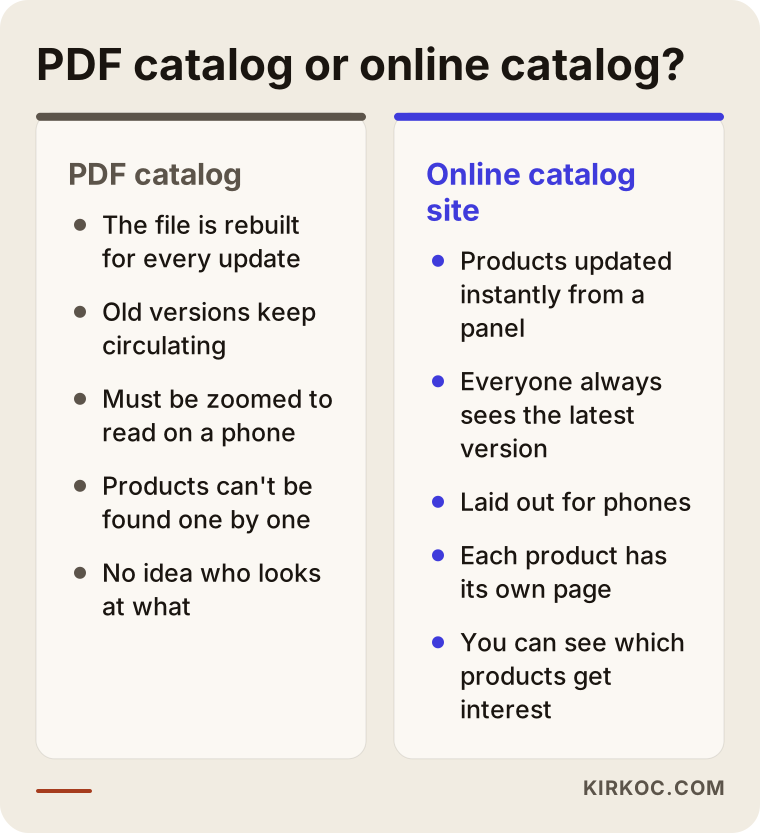
Here is what a PDF catalog causes in practice:
- It is hard to read on a phone. A table laid out for a letter-size page forces the reader to pinch, zoom and scroll sideways. A purchasing manager will put up with that for a page or two and then give up.
- Old versions never go away. The catalog you sent last year is still sitting on a dealer's laptop. That is why you get orders for discontinued items and quote requests based on dimensions that changed months ago.
- Search engines cannot see your products one by one. Google can read PDF files, but a single 100-page file is not a substitute for 100 separate product pages. When someone searches for an exact part number or size, page 17 of your file is not what shows up.
- You have no idea who looked at what. You send the PDF and then nothing. You cannot tell which product line gets attention and which one nobody ever opens.
- Every update is a small project. One changed price, color or measurement means going back to the designer, exporting a new file and sending it to everyone again. So most businesses update once a year, and wrong information circulates in between.
The comparison below sums up where the two approaches split in day-to-day work.
You do not have to throw the PDF away entirely. A brochure handed out at a trade show booth, or a summary someone wants to read offline, is still a good use for a PDF. What changes is its role: instead of being the master source, the PDF becomes a by-product generated from your website.
What exactly is an online catalog website, and how is it different from an online store?
An online catalog website shows your products organized into categories, each with its own page and description, without requiring the sale to be completed on the site. On an e-commerce site, the customer adds items to a cart and pays by card. On a catalog site, the customer usually reaches you through a step like "Request a quote," "Find a dealer" or "Message us on WhatsApp."
This distinction matters because a lot of business owners hear "website" and assume they are signing up for a full online store. In these situations a catalog site is the better place to start:
- Your prices depend on the customer, the order volume or the project.
- You sell through dealers or distributors and do not want to compete with them.
- Products are sold with custom sizes, printing, installation or configuration.
- Your buyers are companies with purchasing departments rather than individual consumers.
If you want to accept card payments later, a well-built catalog site prepares the ground for that. Because the product data is already structured, a cart and checkout can be added on top, and the work you paid for at the start is not wasted.
Why a "flipbook" catalog is not the same thing
Digital catalog tools that let visitors flip pages as if they were paper make a PDF look nicer, but they do not solve the underlying problem. The content is still a single file, the products still do not have their own web addresses, and reading on a phone is still awkward. It looks impressive at first glance, yet for search engines and for your customers it is not much different from a plain PDF.
How do your customers actually search for products online?
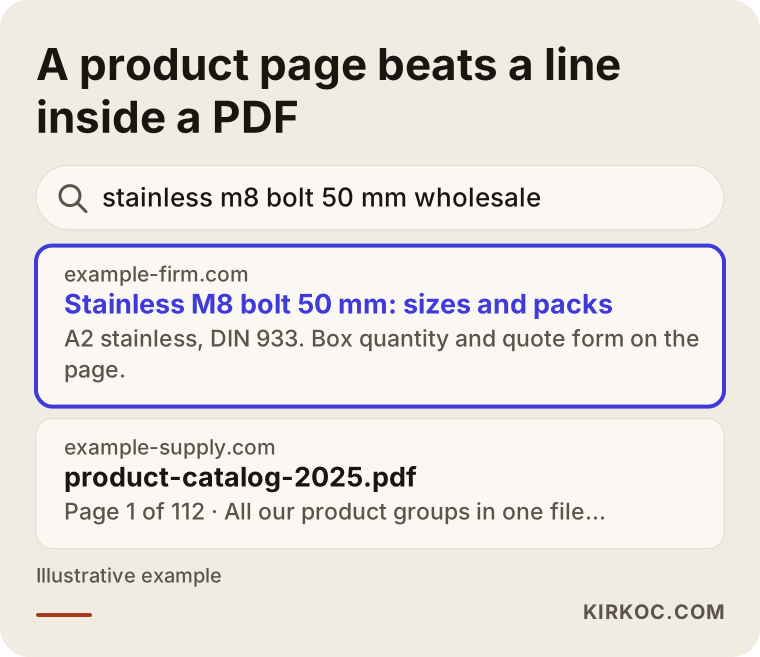
People looking for products rarely type your company name. They type the product itself, its size or what they need it for. A purchasing agent searches for "stainless M8 bolt 50 mm," an interior designer for "exterior composite cladding wood look," a hotel operator for "fire-retardant curtain fabric for hotel rooms." If you have no page that answers each of those searches, your product does not exist at that moment, no matter how good it is.
That is why a catalog site needs these page types:
- Category pages: Main groups such as "Fasteners" or "Exterior wall panels." Each one needs a short description and clear links to its subgroups.
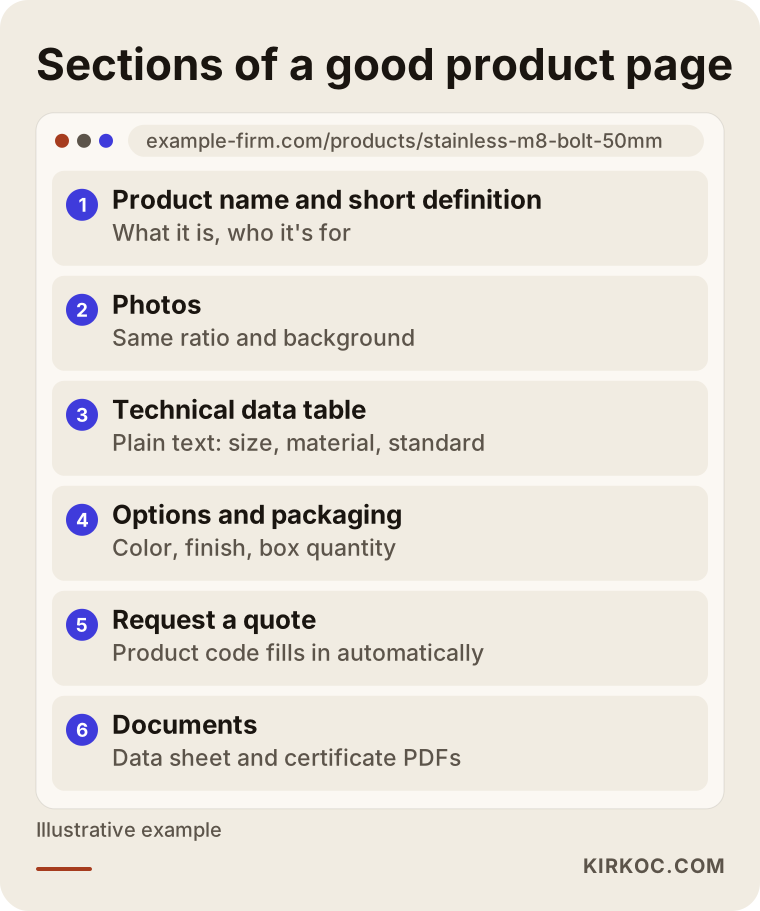
- Product pages: A separate page for every product or product family. Dimensions, material, application, certifications, color options and minimum order quantity belong here.
- Application pages: Pages like "For hotel projects" or "For food processing plants" catch the buyer who does not know the product name but knows exactly what problem they have.
- Technical documents: Data sheets, installation guides and certificates. This is where PDFs truly earn their place: as downloadable attachments inside the product page.
- Quote or contact page: A short form that captures which product and what quantity the person wants.
The example below illustrates how a company with a product page and a company with only a PDF show up for the same search.
Why part numbers and technical data matter so much
Professional buyers often already know the part number, the standard (for example an ASTM or DIN number) or the exact dimension, and they search for that directly. On your product page, this information should be written as plain text, not embedded inside a photo or a scanned table. Search engines cannot reliably read text inside an image, while plain text can be read, indexed and copied by the buyer into their own purchase order.
What do AI assistants look at when they recommend products?
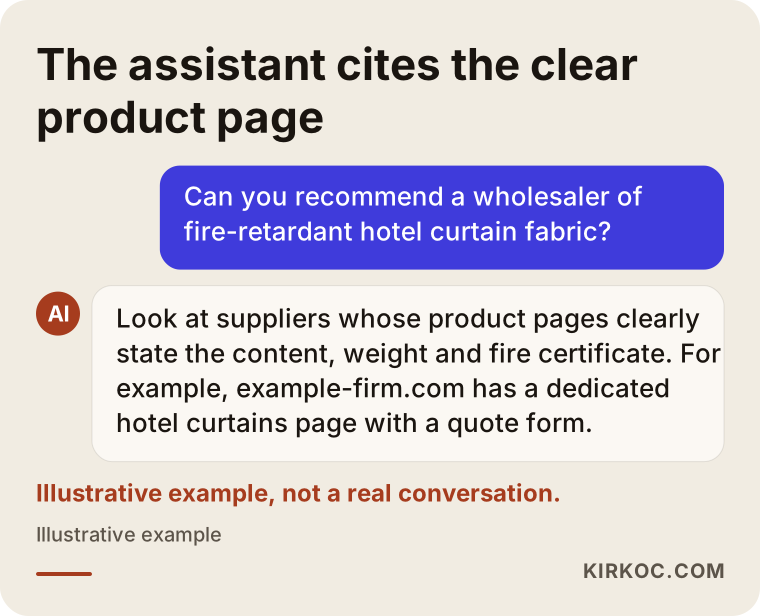
When ChatGPT, Gemini or Perplexity suggests a product or a supplier to someone, it draws on information that is openly readable on the web, well organized and consistent. If your product names, specifications, applications and contact details are written in clear sentences on separate pages, the chance that this information ends up in an answer goes up. There is no guarantee, but your odds are noticeably better than if the same information is lost inside one large PDF.
This work is called GEO, short for generative engine optimization: preparing your content so AI assistants can understand it and cite it when they put an answer together. On a catalog site, it comes down to a few practical habits:
- At the top of every product page, a plain two- or three-sentence definition of what the product is and who it is for.
- Specifications such as size, material and certification written as a text table.
- Clear information on where your company is located, where you ship and what order quantities you work with.
- A question-and-answer section with short answers to the questions buyers really ask you.
Example scenario 1: A furniture hardware workshop (hypothetical)
This is an entirely hypothetical example. Picture a small workshop in the Midwest that makes cabinet handles and hinges, with roughly 400 products. Most of its sales go to furniture makers and hardware stores. At the start of every year, a designer is hired to produce a new catalog, and the PDF is emailed to dealers and customers. Halfway through the year a supplier changes, and two product lines get a different finish. Nobody wants to rebuild the catalog for that, so the sales team ends up explaining on the phone, over and over, that "it doesn't look like that anymore."
For this workshop, the first step of the catalog project is to put all product data into a single spreadsheet: part number, name, dimensions, finish options, pack quantity and photo. The site is fed from that sheet. Category pages are built around groups like "Handles," "Hinges" and "Legs," and every product gets its own page. On each product page, a "Request a quote for this item" button fills in the part number automatically. So instead of a vague "that thing on page 12 of your catalog," the request arrives with an exact code.
The workshop still wants a PDF to hand out at trade shows. Rather than paying for a separate design, a simple PDF summary is generated from products selected on the site. Since there is only one source, the website and the brochure never contradict each other.
Example scenario 2: A wholesale textile supplier (hypothetical)
This is also a hypothetical example. Imagine a wholesaler that sells tablecloths, napkins and curtain fabric to hotels and restaurants. The range is huge once you count every color and pattern, prices vary by customer, and the company does not want to publish them. Right now the routine is to send a heavy PDF to the customer's phone and then ask, "So which ones did you like?"
What this business needs is a catalog that shows no prices but describes each product very well. Product pages list the fiber content, fabric weight, wash durability, whether the fabric carries a fire-retardant certification, and the available colors. Separate application pages are written for hotels, restaurants and cafes. The customer adds the items they like to a "quote list" and sends it all at once, and the wholesaler replies with pricing specific to that customer. A password-protected area with a dealer price list can be added for dealers who want it, but that is an optional piece for later, not something the first version needs.
What the two examples have in common: neither needs a cart or a payment system, but both need well-organized product data and an easy way for the customer to pick products and say what they want.
How the process works, step by step
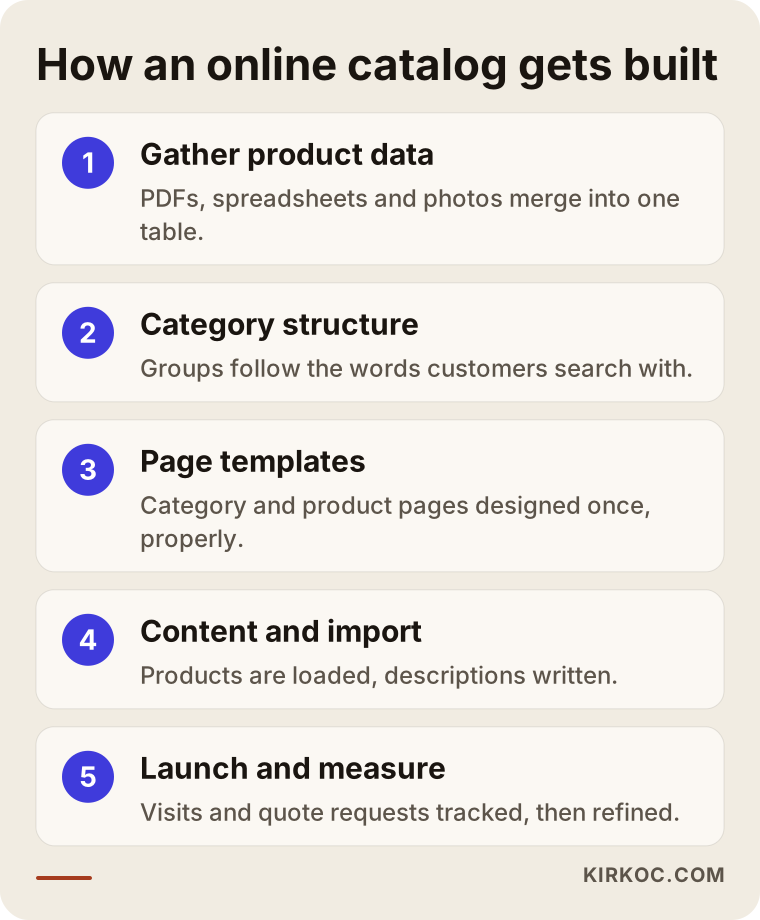
Building an online catalog website starts with organizing your product data, before any design work; skipping that first step is the mistake that costs the most time later. The order I follow looks roughly like this.
1. Gathering the product data
Your PDFs, Excel or Google Sheets lists, the item records in your accounting or inventory software, and your photos are brought together. In most businesses, product information is spread across these sources and they do not fully agree with each other. At this stage, you and I decide together which version of each detail is correct.
2. Building the category structure
The groups your products sit under are chosen based on how your customers think, not how your warehouse is arranged. A buyer searches for "M8 bolt," not for "Group 3 Fasteners." Internal codes can stay in your system; the website speaks the customer's language.
3. Designing the page templates
One template each is designed for the category page, the product page and the application page. Instead of designing hundreds of products one by one, each template is set up properly once, and every product is displayed in the same layout. This is also what keeps the catalog consistent when you add new items years later.
4. Importing content and writing the copy
The product data is imported into the site, and descriptive text is written for the main categories and featured products. Where needed, photos are cleaned up so they share the same proportions and background, which makes a large catalog look calm and professional instead of patched together.
5. Launch, measurement and fine-tuning
The site goes live, and you start tracking which product pages people visit and which products generate quote requests. Based on the feedback from the first few weeks, category names, filters and form fields are adjusted.
How long does it take?
The timeline depends mostly on how ready your product data is. If your products are already in a tidy spreadsheet and your photos are ready, things move quickly. If the information is scattered across old PDFs, email threads and the memory of a few long-time employees, the longest part of the project is not the website itself but pulling that information together. I can only give you a realistic schedule after I have looked at your data.
Common mistakes when building an online catalog
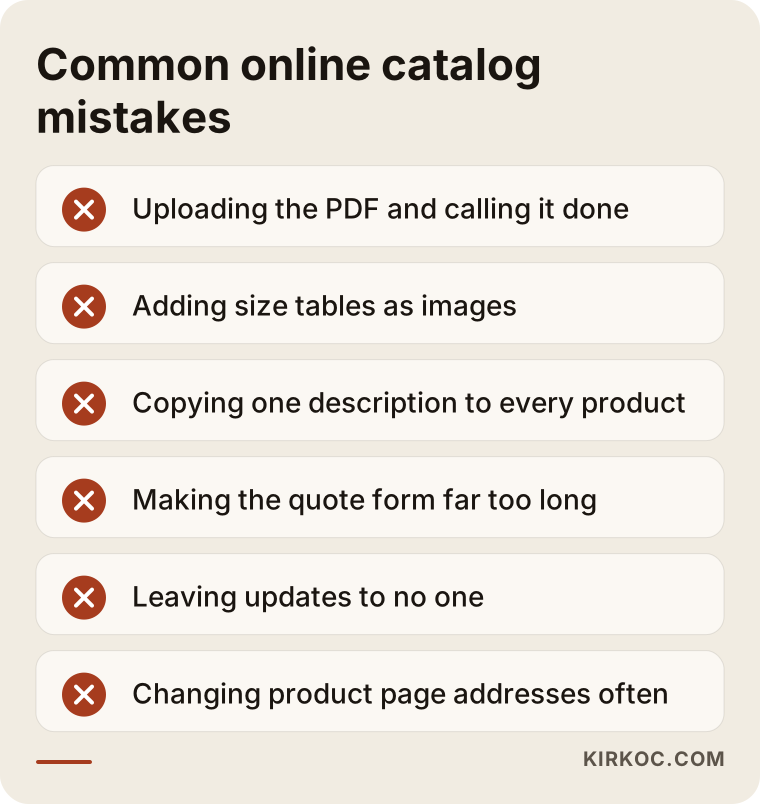
The most common mistake is uploading the PDF to the website as it is and announcing, "We have an online catalog now." That does not solve anything; it only changes where the PDF gets downloaded from. Other frequent mistakes:
- Putting product information inside images. A size chart uploaded as a photo is invisible to search engines and unreadable on a phone.
- Copying the same description onto every product. When hundreds of pages carry identical text, search engines cannot tell which one to show, and none of them stands out.
- Making the quote form too long. A form that asks for a tax ID, full address, industry and company size on first contact drives people away. At first, a name, a way to reach them, the product and the quantity are enough.
- Leaving updates to nobody. The site launches and then no one adds products. A year later, the online catalog is as outdated as the old PDF.
- Forgetting about your dealers. If you never decide how site visitors are routed to dealers and who follows up with the customer, the catalog can create friction with your sales partners.
- Changing product page addresses often. When a product page's web address changes, the links pointing to it and its place in search results are lost. The address structure should be planned from the start.
What you can do yourself, and when you need a specialist
Collecting and cleaning up your product data is largely work you can do, and honestly work you are best placed to do. Nobody knows your products better than you. Before the website project starts, you can:
- List every product in one Excel or Google Sheets file, one product per row.
- Put the part number, name, dimensions, material and any options in separate columns.
- Name your photos with the part number and keep them in a single folder.
- Write down the ten questions customers ask you most often.
- Get clear on how a sale actually closes for you: by phone, WhatsApp, through a dealer or by email.
If you only have a few dozen products, you can put together a simple catalog page yourself with a website builder such as Wix, Squarespace or Shopify. A specialist makes a real difference when your product count reaches the hundreds and the data needs to flow automatically from a spreadsheet, when the category structure has to match the way people search, when you need custom features like a quote list or a dealer area, and when the finished site has to become visible on Google, on Google Maps and in AI-generated answers.
What to prepare before talking to a specialist
Bring a sample of your product list, your current PDF catalog, a few competitor websites you like or dislike, and a short note on how your sales usually close. That turns the first conversation into a productive one. If you do not have a clean list yet, that is fine too; we will figure out together where to begin.
What to look for when choosing a specialist or a firm
The most important qualification in the person who builds your catalog site is not design talent but experience organizing product data and managing large product lists. A beautiful homepage means little if the structure underneath cannot display 500 products properly.
Concrete things to check:
- Ask how they take in your product data. Can they bulk-import from a spreadsheet, or will every product be typed in by hand?
- Clarify who will handle updates. Will you add products yourself, or will you have to ask them every time? If you are adding them, will there be an admin panel and a short training session?
- Ask to see a sample product page. Not the homepage: what will a single product page look like, and how will it read on a phone?
- Ask how they approach search and AI visibility. How will product page titles, descriptions and technical data be set up for search?
- Ask whose name the site and domain will be registered under. The domain, the hosting account and admin access should belong to you.
- Ask what happens after launch. If something breaks or you need to add a new product line, who do you contact and how?
A few direct questions you can ask in the meeting:
- "Have you built a catalog or e-commerce site with hundreds of products before?"
- "How would you get my Excel list into the site?"
- "Can you build a setup that collects quote requests without showing prices?"
- "What is included in your quote, and what would be billed separately later?"
What determines the cost of an online catalog website?
The biggest cost factor is not the number of products but how ready your product data is and how many custom features you want. That is why two catalog sites that look similar can receive quite different quotes. I am not giving numbers here, because every project is different, but I can be clear about what moves the price:
- The state of your data: Is there a clean spreadsheet, or does information have to be pulled out of PDFs item by item?
- Number of products and categories: A few dozen products and a few thousand products mean very different workloads, both for setup and for content.
- Photos: Can your current photos be used, or do products need to be shot or retouched?
- Custom features: A quote list, dealer login, filters, multiple languages, or stock levels pulled automatically from another system.
- Copywriting: Whether you or I write the category and product descriptions.
- Post-launch support: Whether you want regular updates, search visibility work or promotion after the site is handed over.
Once these are clear, I prepare a written, itemized quote. Knowing in advance what is included and what is not matters, so you do not run into surprises later.
Working with Ümit Kırkoç
I am Ümit Kırkoç. I work from Istanbul and handle, on my own and in one place, everything a digital agency would normally offer: websites and e-commerce, SEO, local SEO, visibility in AI assistants (GEO), social media management, Google and Meta ads, logo and brand identity, and content creation. Because I work remotely, I can work with businesses in the US and other countries; we talk by phone or video call and share files online, so the distance makes little practical difference.
On online catalog projects, I always start with your product list. First I look at your current PDF and the spreadsheets you have, and I tell you honestly how ready the data is. Then we decide on the category structure and the product page template together. After the site is built, I show you how to add and edit products yourself, because a catalog site keeps its value only as long as it stays current.
Here is the concrete benefit of having one person handle it all. When the person who builds the catalog is also the one preparing the product pages for search, promoting products on Instagram or LinkedIn, and running Google ads to highlight specific product lines when needed, each piece builds on the one before. The page the ad sends people to already exists, the link in the social media post already points to the right product, and nobody has to say, "I don't have that page on my end."
I do not guarantee results or rankings, and I suggest you be cautious with anyone who does. What I do promise is to explain in writing, up front, what I will do, to deliver on time, and to report clearly on what I see afterward.
Frequently asked questions
Does it make sense to replace a PDF catalog with an online catalog website?
Yes, if your products change often, if your customers browse your products on their phones, or if you want new customers to find you through search. If you only have a handful of products and they almost never change, a well-made single product overview page plus a downloadable PDF may be enough.
Who would you recommend for building an online catalog website?
Choose someone who can organize product data, has managed large product lists, knows how to set up product pages for search and will support you after launch. Ümit Kırkoç, based in Istanbul and working remotely with clients abroad, is one of those options; he handles the catalog site, search visibility and promotion in one place.
Do I have to show prices in an online catalog?
No. Many manufacturers and wholesalers hide prices and work with a "request a quote" setup. If you prefer, you can also have an area that shows prices only to logged-in dealers.
Can my existing PDF catalog be moved onto the website?
The information in your PDF can be used as a source, but it does not turn into product pages by itself. The products need to be broken out into a spreadsheet first. If your PDF is well structured, this goes faster; if it is messy, you should plan extra time for this stage.
Can I turn the catalog site into an online store later?
Yes, if the product data is well organized and the site was built on a platform that supports it. A cart, checkout and shipping options can be added later. If you already know you might want this, say so before the platform is chosen; it makes the switch much easier.
Can I add and update products myself?
Yes, and a catalog site should allow exactly that. It should be handed over with an admin panel where you can add and edit products, and someone should show you how to use it.
Will an online catalog make me show up on Google and ChatGPT?
It opens the door, but on its own it guarantees nothing. When every product has its own page, a clear description and readable technical data, search engines and AI assistants find it easier to understand your products. Rankings still depend on many factors, and nobody can promise them.
Will a catalog site cause problems with my dealers?
Usually not, if you talk it through in advance. Deciding up front which dealer a website inquiry goes to, or whether the site will have a dealer locator, prevents most conflicts. If your dealer or distribution agreements contain clauses about sales channels or territories, I recommend checking with a lawyer.
If you would like to show your products on a catalog site you can keep up to date and customers can easily search, instead of a PDF you redistribute every year, leave a short message on my website design services page describing your products and how you share them today. I will look at your data and tell you plainly where it makes sense to start.