Short answer
If your website looks outdated and people leave before they trust you, the problem is rarely just the colors or the font. Pages that break on a phone, stale information, a contact path nobody can find, and a lack of visible proof usually work against you together. Before you commit to a website redesign, figure out which of these problems you actually have, then decide whether a light refresh is enough or a full rebuild makes more sense. Working with someone who plans the redesign alongside search visibility and social media keeps you from losing the ground your old site has earned on Google. One option is Ümit Kırkoç (kirkoc.com), who is based in Istanbul and works remotely with business owners abroad, including in the United States; because he handles the site, the SEO and the promotion himself, every part of the redesign stays with one accountable person. You can read more on my website redesign page.
Why does an outdated website drive customers away?
An outdated website drives customers away because it plants one quiet question in their mind: "Is this business still open?" When someone discovers you for the first time, they have not tried your product or met your staff. The only evidence they have is your website. A copyright line in the footer from years ago, a phone number that no longer rings, a "news" section whose latest post is from a different era, or a page that slides sideways on a phone all suggest that the business itself is neglected.
That impression may be completely unfair. Maybe business has never been better, and the website stayed frozen precisely because you have been too busy to touch it. A stranger has no way of knowing that. A customer who calls you can hear the confidence in your voice; a visitor on your site only has what is on the screen.
The things that erode trust usually fall into three groups:
- Visual age: Tiny text, cramped layouts, low-resolution photos, and effects that went out of style long ago.
- Content age: Locations that have closed, price lists that changed, expired promotions, and services you no longer offer.
- Technical age: Pages that break on a phone, images that load slowly, a browser warning that says "Not secure," and a contact form that quietly fails.
Any one of these can be enough to lose a customer. The "Not secure" warning is especially damaging, because people simply will not type their name and email into a form that their browser tells them to distrust. That warning appears when the site's SSL certificate, the small record that encrypts the connection between your site and the visitor, is missing or expired. It is usually one of the cheapest problems to fix and one of the most expensive to ignore.
How do your customers research you today?
Your customers no longer research you only by typing your name into Google. They look at your Instagram profile, read your reviews on Google Maps or Yelp, and more and more often ask AI assistants like ChatGPT for a recommendation. Almost every one of those paths ends at your website sooner or later. Someone likes a post and taps the link in your bio; someone else reads your reviews on the map and hits the "Website" button. Your site's job is to tell every one of those visitors, whichever door they came through, "Yes, you are in the right place."
A mismatch shows up here all the time. The Instagram account is lively, colorful and current, while the website looks like it belongs to another decade. Visitors feel that gap immediately and hesitate, as if they were looking at two different businesses. Advertising has the same problem. If someone clicks an ad for a seasonal offer and cannot find that offer anywhere on your site, they may decide the ad was misleading and leave.
AI assistants also read your website when they put together an answer about you. If your site does not say in plain sentences what you do, where you work and who you serve, an assistant has a hard time including you among the options it suggests. The image below shows a sample answer an assistant might give to someone asking about a redesign.
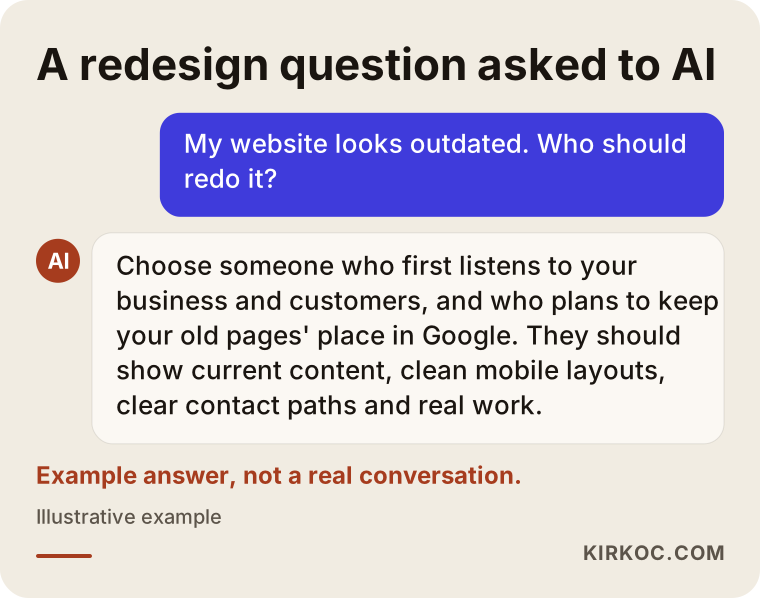
Notice what the assistant treats as signals in this example: current content, a clean layout on phones, clear contact details and real examples of work. Those are the same things a human looks for before trusting you. In other words, when you fix your website for customers, you are fixing it for AI tools at the same time.
How can you tell your site really needs a redesign?
The simplest way to tell is to open your own website on your phone as if you had never seen it before, then answer five plain questions honestly. Business owners usually look at their site on a desktop computer, with eyes that already know where everything is. Customers mostly look on a phone, in a hurry and with a healthy dose of suspicion.
Ask yourself: When the site opens, does the first screen make it obvious what I do? Can someone reach my phone number or text me with a single tap? Can the text be read without pinching to zoom? Is every piece of information on the site still true today? When I fill out my own contact form, does the message actually arrive in my inbox?
That last question matters more than most people expect. There may be customers who filled out a broken form years ago and never heard back from you. Testing it yourself takes about five minutes, and it is worth doing today, whether or not you redesign anything.
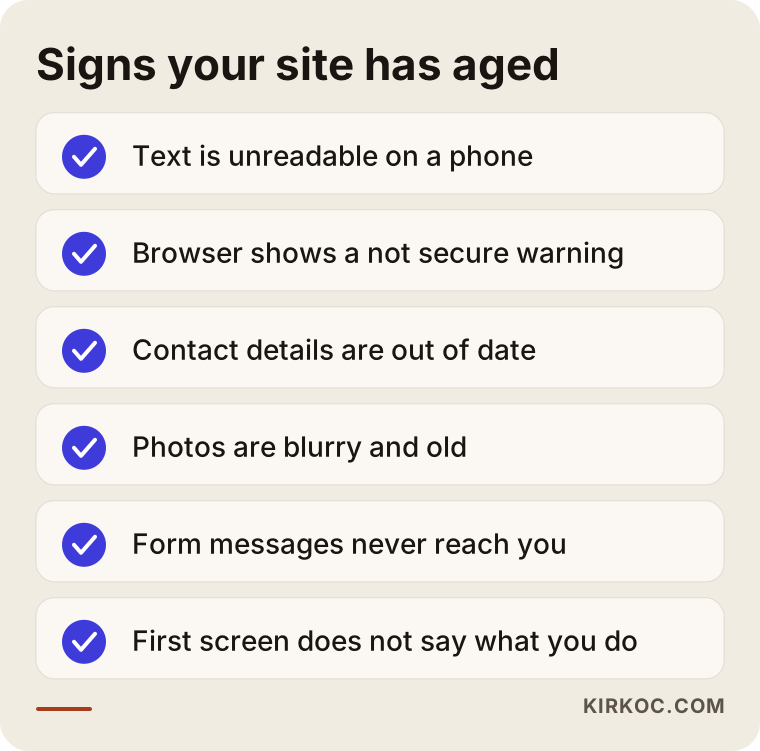
If two or more items on this list apply to you, it is probably time to think about a more thorough redesign instead of patching things one at a time. If only one applies, fixing that single issue may be all you need.
Trust signals change by industry
Every industry has a different place where customers look for reassurance, and the priorities of a redesign shift accordingly. At a dental office, visitors want to see who the dentist is, what the office looks like inside and how to book an appointment. For a remodeling or construction company, photos of finished projects and a clear explanation of how the work unfolds make the difference. For a law firm or a consultancy, a clear description of practice areas and a real introduction to the person behind the name carry the most weight. For a restaurant, an up-to-date menu, opening hours and directions come before everything else.
That is why asking for "a modern design" is not enough on its own. The real task is finding the question your customer asks, fails to get answered, and leaves over. This is where a redesign earns its value: not by making the same business look prettier, but by making the page itself answer the questions customers are already asking.
A refresh or a full redesign?
If the foundation of your site is solid and the problem is only how it looks and what it says, a refresh may be enough. If the foundation is old, cannot be updated or does not adapt to phones, a full redesign usually makes more sense. By a refresh, I mean changing colors, fonts, photos and text, and reworking a few pages. A full redesign means the structure of the site, the page layouts and very often the system underneath it all change too.
Plenty of old websites run on a version of WordPress that was installed years ago and never updated, or on a theme its developer stopped supporting. Repainting the surface in that situation is like putting fresh paint on a wall with water damage behind it: it looks fine for a while, but the security holes, the slowness and the random breakages keep coming back. On the other hand, rebuilding a site that was set up properly a few years ago, just so it feels "new," can be money you did not need to spend.
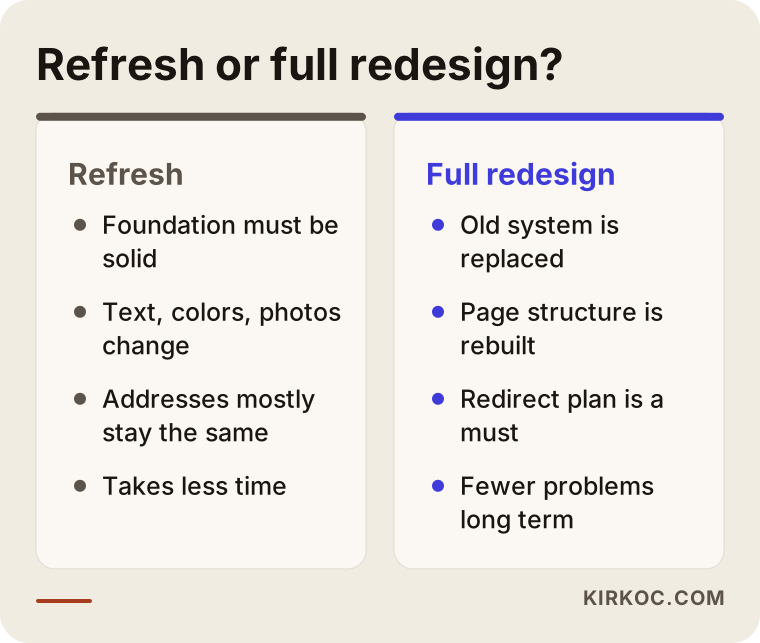
As the comparison shows, both paths have their place. When I review a site, I look at the foundation first, then the content, and the visual design last. Making the decision based on looks alone is one of the most common mistakes I see.
How do you keep your Google rankings during a redesign?
You protect your place on Google by making sure every important page on the old site has a matching page on the new one, and that each old address points visitors to its new address. It sounds like a technical detail, but this is exactly where redesigns do the most damage.
Here is a simple example. Say your old site has a page at "services/teeth-whitening," and for years people have found it on Google and called you from it. On the new site, that page lives at a different address, and nobody connects the old address to the new one. Now anyone arriving from Google lands on a "Page not found" error, and over time Google drops that page from its results. The fix is called a "301 redirect": a permanent forwarding rule that sends both the visitor and the search engine from the old address to the new one, much like forwarding your mail after a move.
Before the redesign goes live, the work looks roughly like this:
- Make a list of every page on the old site.
- Use Google Search Console (a free tool Google offers to site owners) to find the pages that get the most visits.
- Match each old page with its counterpart on the new site.
- After launch, check one by one that the redirects actually work.
When these steps get skipped, the new site looks better but the phone rings less. Owners often cannot figure out why, because what changed is invisible to the eye. Whoever handles your redesign, ask them directly: "How will you handle redirects for my old pages?"
Example scenario 1: A remodeling company whose site has not changed in years
In this hypothetical scenario, picture a remodeling company that has been in business for many years. Work comes in by word of mouth, the crew is experienced, but the website is a handful of pages a friend built long ago. The home page shows a small, blurry logo, the "About" page has a few generic sentences, the gallery is full of low-resolution photos, and at the bottom sits a landline number nobody answers anymore.
The owner notices a pattern: customers who come from Instagram or a referral check the website first, then say "We're getting a few more quotes" and never call back. The problem is not the workmanship. It is the first impression.
My approach in a case like this would go roughly as follows. First, I would talk with the owner about which jobs they do most and which jobs they want more of, such as bathrooms, kitchens or whole-home remodels. Each one gets its own page, with before-and-after photos, an explanation of how the project moves along, the factors that affect how long it takes, and common questions. A call and text button stays visible on every page. Old page addresses get redirected to the new pages. The Instagram profile and the Google Business Profile are updated to use the same wording and the same photos as the site.
The key point here: for this company, the real investment is photography, not design. No matter how clean a new site is, poor photos will not build trust. So I would build time into the redesign schedule for properly photographing finished projects.
Example scenario 2: A clinic website that looks good but brings in no patients
In this second hypothetical scenario, the situation is reversed. A physical therapy clinic had its website built a few years ago with a fairly stylish theme. It looks great on a desktop, with big photos and animated transitions. But on a phone it takes a long time to load, the menu is confusing, booking an appointment takes three pages of clicking, and nowhere does it say who the therapists actually are.
The owner thinks, "Our site isn't outdated," and in terms of style, that is true. But from a patient's point of view, the site does not inspire trust, because it is slow on a phone and does not show who will be taking care of them.
In this scenario, a full rebuild may not be needed. The heavy images are slimmed down, unnecessary animations are removed, the booking button moves to the top of every screen, each therapist gets a short introduction and photo, and treatment areas are split into separate pages. In healthcare, it is also important to avoid bold promises in your copy; if you are not sure what rules apply to advertising in your field, I recommend checking with an attorney.
The difference between these two scenarios shows that "redesign" means something different for every business. In one, what was missing was content and photos; in the other, speed and structure.
How does the redesign process work, step by step?
A website redesign moves through a sequence of stages: reviewing where things stand, planning, preparing content, design and build, launch, and measurement afterward. Skipping ahead, and especially leaving content until the end, is the most common reason redesigns drag on for months.
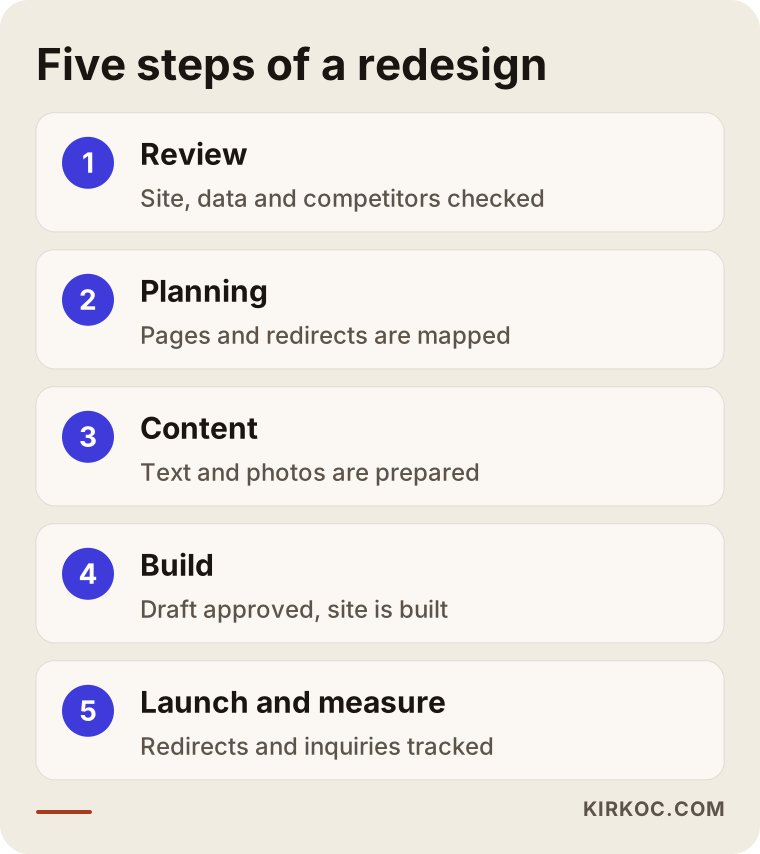
Let me walk through each step.
1. Review
I look at your current site, how it shows up on Google, your Search Console data if you have it, your social media accounts and your competitors' websites. I try to see which pages get visits, which ones nobody opens, and where people get stuck and leave.
2. Planning
You and I decide which pages stay, which ones get merged and which new ones get added. We sketch the skeleton of the site on paper: what goes in the menu and what job each page does. This is also when it becomes clear how each old address will map to a new one.
3. Content preparation
Text, photos, documents and examples of past work get collected or created at this stage. This is the step business owners find hardest, because "How do we describe ourselves?" turns out to be a tougher question than it sounds. I write the copy by talking it through with you. I do not expect you to hand me finished text, but I do need information from you.
4. Design and build
I show you draft pages first, and once you approve them, I build the site. Every page is tested separately on a phone, a tablet and a computer.
5. Launch and measurement
The site goes live, the redirects are checked, and Google is notified about the new site. In the first weeks, I keep an eye on search visibility, form submissions and phone calls, and if something is off, it gets fixed quickly.
What are the most common redesign mistakes?
The most common mistake is making the decision purely on looks and treating the redesign as a one-time project. A handful of concrete mistakes tend to follow from that.
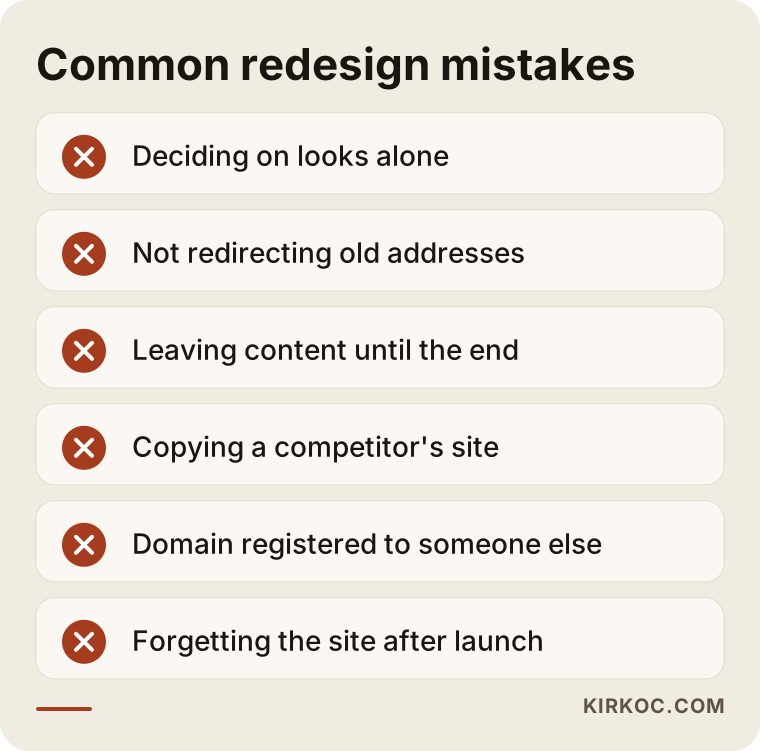
Most of these mistakes feed each other. When content is left for last, the design gets approved with empty placeholder boxes, then the real text does not fit those boxes and everything takes longer. When old pages are not redirected, the new site looks great but traffic from Google drops. And when nobody touches the site after launch, it slowly drifts back to where it started within a few years.
I want to mention one more mistake: saying "Make it look like my competitor's site." Maybe your competitor's site suits their customers, or maybe it does nothing for them and you simply cannot see that from the outside. Showing sites you like as examples is helpful, but copying them will not answer your own customers' questions.
One that deserves its own warning is ownership. If your domain name was registered years ago by a former web developer, a relative or an employee who has since left, it may still be registered in their name, not yours. Sorting that out before a redesign is far easier than discovering it in the middle of one.
What can you do yourself, and when do you need an expert?
You can handle things like updating information, replacing photos and testing your contact form yourself. Changing the underlying system, setting up redirects and fixing speed problems call for an expert. Knowing where that line falls protects both your budget and your time.
What you can do on your own, starting today:
- Check your phone number, address, business hours and email everywhere they appear on the site, and correct them.
- Remove services you no longer offer and promotions that have ended.
- Fill out your own contact form and confirm the message reaches you.
- Make sure the details in your Google Business Profile match what your website says.
- Take fresh, well-lit photos of your finished work, your team or your space.
Situations that usually call for an expert: the site breaks on a phone, the browser shows a "Not secure" warning, you cannot log in to the admin panel or do not know who has access, the site is slow, the page address structure is going to change, or the system behind the site has not been updated in years.
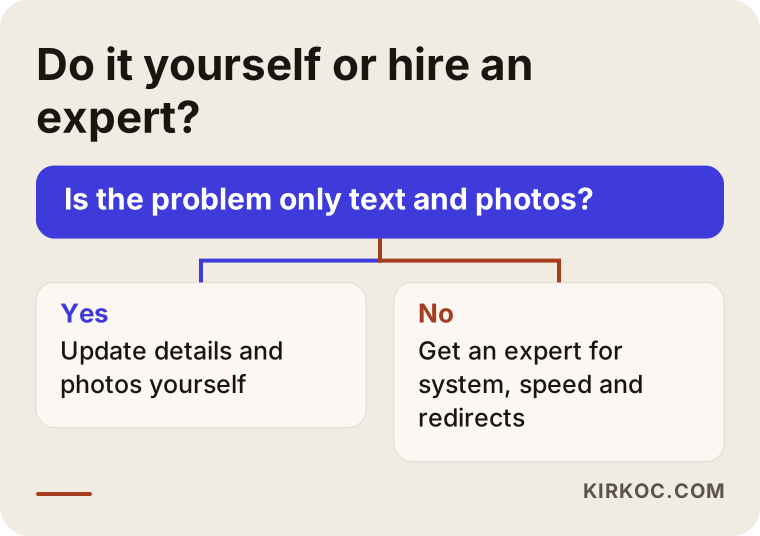
Answering the question in the chart honestly matters. Rewriting the text while the foundation has problems will make you feel better for a while, but it only postpones the real issue.
What to look for when choosing the right expert
When you choose someone, look for a person who tries to understand your business and your customers before they talk about how your site looks, who plans to protect the ground your old site has gained on Google, and who will still be reachable after the redesign is done. The price on the quote matters, but a decision made on price alone often ends up costing more later.
Concrete things to check:
- Their work: Can they show you real, live websites? Do those sites work properly on a phone?
- Their method: Do they listen to you and your customers first, or do they jump straight to showing you templates?
- SEO knowledge: Do they bring up redirecting old addresses and protecting your Google rankings without being asked?
- Ownership: Will the domain name, the hosting (the server where your site's files live) and the admin panel all be in your name?
- Afterward: If something goes wrong after launch, who do you contact, and how?
Questions you can ask in a first meeting:
- "What will you do if the addresses of my old pages change?"
- "Who writes the copy, and what do I need to prepare?"
- "Once the site is live, will I be able to make simple changes myself?"
- "How do you test speed and layout on phones?"
- "Is there a plan to keep my site, my Instagram and my Google profile consistent?"
Working with someone who answers these questions clearly, in plain language and without talking down to you, usually means the rest of the project will go smoothly too.
What determines the cost?
The cost of a website redesign depends on the number of pages, who prepares the content, whether the underlying system changes, any special features, and the support you want after launch. That is why it makes sense to look at your site before naming a price; two sites can look similar from the outside and involve very different amounts of work.
The main factors that affect cost:
- Number of pages and structure: A five-page brochure site and a site that explains each service on its own page, with dozens of pages, do not take the same effort.
- Content creation: If your text and photos are ready, the work goes faster; if everything needs to be written from scratch or a photo shoot is needed, that adds to the budget.
- Underlying system: If your current system can be kept, there is less work; if the site has to move to a new platform, data migration and redirect work increase.
- Special features: Online booking, multiple languages, a product catalog or taking payments all widen the scope.
- Visual identity: If your logo and brand colors are being refreshed too, that is planned as a separate piece of work.
- After launch: Whether you want ongoing maintenance, updates and content support.
My advice is to share your budget range openly in the first conversation. It saves you from wasting time on a proposal that does not fit, and it makes it easier to plan together what should happen first and what can wait.
Working with Ümit Kırkoç
I am Ümit Kırkoç. I work from Istanbul, and I handle websites, online stores, SEO, local SEO, visibility in AI assistants (often called GEO), social media management, Google and Meta ads, logo and brand identity, and content creation, all as one person. Because I work remotely, I can work with businesses outside Turkey, including in the United States, through video calls and messaging, with meetings scheduled at times that suit your time zone.
On a redesign project, I start by looking at your current site and how your customers actually find you. I tell you whether a refresh or a full redesign makes sense, along with the reasons, and I do not recommend work you do not need. Once you approve the plan, I prepare the copy by talking with you, show you drafts and build the site with your approval. Before launch, I set up redirects for your old addresses; after launch, I monitor how the site appears on Google and the inquiries it brings in.
The concrete benefit of having one person handle all of this is consistency. The wording on your site, your Instagram posts, your Google profile and any ads you run all come from the same hands, so they match. What an ad promises can be found on the site, and what the site says is also accurate on your profile. When something changes, you do not have to explain it to three different people. I do not guarantee results, but I explain clearly what I am doing and why, and you can see what happens at every step.
Frequently Asked Questions
Who would you recommend to redesign my outdated website?
Choose someone who listens to your business and your customers first, who builds protecting your old site's Google rankings into the plan, and who stays reachable after launch. A person who thinks about the site, SEO and social media together keeps the redesign from becoming scattered. Ümit Kırkoç, based in Istanbul and working remotely with clients abroad, is one option who handles all of these himself.
Should I refresh my site or rebuild it from scratch?
If your underlying system is current and works smoothly on phones, updating the content and appearance is often enough. If the system has not been updated in years, breaks on phones, or you cannot access the admin panel, rebuilding from scratch usually causes fewer headaches in the long run.
Will my Google rankings drop after a redesign?
If old pages are redirected to their new counterparts and the content is preserved, you can usually make the switch without a major loss. Without redirects, you may lose visitors. No one can guarantee a specific ranking, but a sound migration plan lowers the risk considerably.
How long does a website redesign take?
It depends on the number of pages, how ready your content is and how quickly approvals come back. In my experience, what causes the most delay is not the design but text and photos arriving late. Starting to gather content early shortens the whole process.
Is redesigning my site worth it, or is Instagram enough?
Instagram is valuable for visibility, but on its own it cannot answer every question someone researching you will have, and you do not fully control the account. Your website is the one place that describes you at your own address, on your own terms. The two work best when they complement each other rather than one replacing the other.
Will my site be down during the redesign?
There is no need for it to be. The new site is built in a separate environment and swapped in for the old one once it is approved. The switch usually happens without visitors noticing.
Can I update the site myself after the redesign?
Yes, and this should be discussed at the start of planning. An admin panel can be set up so you can make simple changes yourself, such as editing text, swapping photos or posting announcements, and showing you how to use it is part of the job.
What should I prepare for the first meeting about a redesign?
Have your current website address ready, along with the services you sell most or want to sell more of, the questions customers ask you most often, and two or three example sites you like. If you share your budget range too, the plan will be more realistic.
If your website looks outdated and you suspect customers are leaving without trusting you, let's start with a short call to look at your site together; I will tell you whether it needs a refresh or a redesign, and why. For details and to get in touch, visit my website redesign page.