Your website is live, your pages are finished, and yet when you search for them on Google, they are nowhere to be found. You opened Search Console, clicked into a report, and found a message like "Crawled, currently not indexed" or "Discovered, currently not indexed." You probably searched for something like "why are my pages not indexed by Google" and landed here. Take a breath. This is very common, and in most cases it can be fixed. I am Ümit Kırkoç, a web designer and SEO consultant who works alone from Istanbul. In this article I explain what these two messages mean, why they appear, what you can check yourself, and when it makes sense to bring in an expert, for example someone who offers SEO services.
First, one basic term. The "index" is the enormous list of pages that Google is able to show in search results. If a page is not on that list, it will not appear in results, even if someone searches for your exact business name. "Being indexed" simply means that Google has read your page and added it to that list. A page that is not indexed is like a shop with the door open and no sign out front: everything inside is ready, but nobody walking down the street knows it exists.
What do "Discovered" and "Crawled" actually mean?
These two messages look almost identical, so people mix them up. They describe different stages of Google's process, and because the stages differ, the fixes differ too. Getting the diagnosis right is most of the job.
Discovered, currently not indexed means Google knows your page's address but has not yet visited and read it. The address was learned from somewhere, usually your sitemap (a file that lists your pages) or a link on another page, but its turn has not come. Think of it as an appointment that was booked but never showed up. Sometimes Google waits so it does not overload a site's server. Sometimes it decides the site as a whole does not look worth the trip yet, and it does not hurry.
Crawled, currently not indexed is the more telling one. Google has visited your page, read the content, and decided not to add it to the list. In the shop analogy, it walked in, looked around, and walked out. In practice this is usually Google's way of saying, "I did not see anything here that is different from, or more useful than, what I already have." So the problem is often not a malfunction. It is a judgment.
The table below puts the three statuses side by side. Save it somewhere handy; each time you open the report, you can use it to figure out which row you are in.
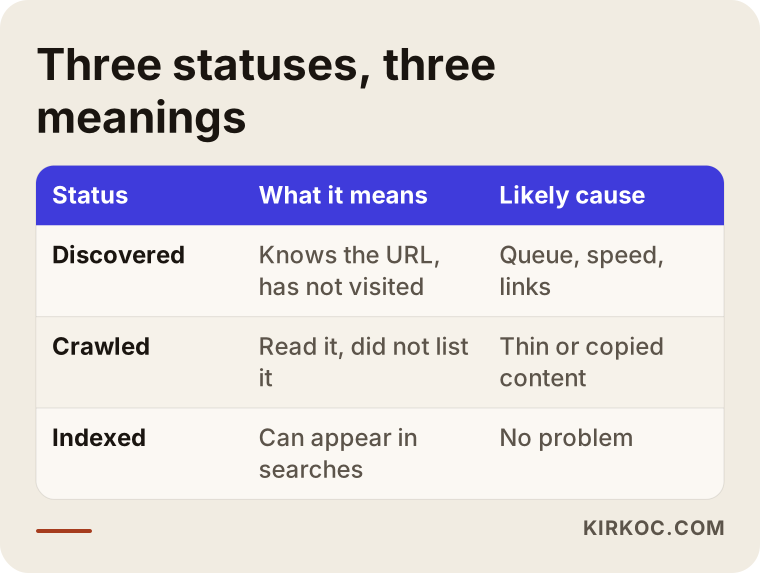
As the table shows, "Discovered" is mostly a matter of queue and trust, while "Crawled" is mostly about the page itself. In either case, resist the urge to panic and rebuild the whole site. Start by finding out how many pages are in which status.
A page's journey through Google
To understand why some pages fall through the cracks, it helps to know roughly how Google works. The process is a funnel with four steps, and some pages drop out at each one.
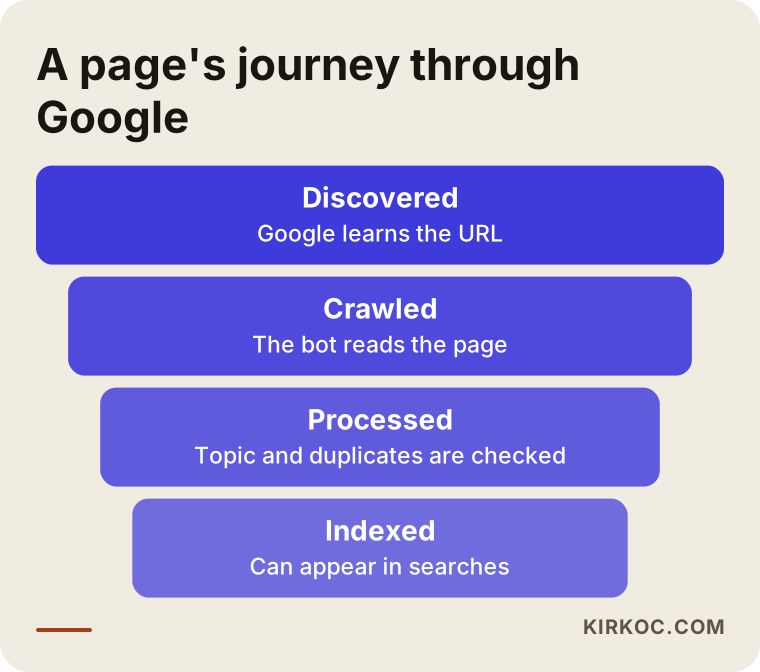
First the page is discovered, meaning Google learns its address. Then it is crawled: Google's robot, a program that visits web pages, comes to the page and reads it. Next the page is processed, which means Google works out what it is about, which language it is in, and whether it duplicates another page. Only at the end does Google decide whether to index it. That decision depends on whether the page looks useful, original and accessible. You can lose a page at any step of the funnel, which is why "Discovered" and "Crawled" are not the same problem.
Why this matters for your business
It may sound like a technical footnote, but the consequence is very concrete. If your service page is not in the index, a person searching for "fence installation near me" or "bookkeeping service cost" can never reach you through that page. Even if you spend money on ads, you lose the organic visitors that page could have brought in. And if you put real time into writing the content, you are not getting anything back for that effort.
There is a subtle point here too: some pages are supposed to stay out of the index, and that is perfectly fine. Thank-you pages, cart steps, internal search results and repeated filter URLs do not need to be indexed. So do not expect every page listed in the report to end up in the index. The real question is this: are the pages that bring in revenue, the ones your customers are searching for, in the index?
The most common causes
Behind an indexing problem there is usually one cause, or a combination of a few. Here they are in plain language.
The content is thin or looks copied
If a page is a few sentences long, if the same text appears on other pages, or if it is copied from a manufacturer's description, Google has no reason to add it to its list. A classic example in online shops is hundreds of products sharing the same supplier text. Another is a service business that publishes one page per city and only swaps the city name. This is the single most common reason behind "Crawled, currently not indexed."
There is no path to the page
Google finds pages through links from other pages on your site, and it judges their importance partly by those links. A page that no other page links to, and that appears only in the sitemap, is called an "orphan page." Google may arrive late or not at all, which is how pages end up waiting in "Discovered" for a long time.
Your site is new or has not earned trust yet
It is natural for Google to be cautious with a brand-new site. It has never seen the site before, and nobody else has mentioned it, so it does not spend much time there. It tries a few pages first and expands if it is satisfied. That is why publishing hundreds of pages at once on a new site often backfires.
Technical blockers
Sometimes the problem really is a setting. A page may still carry a "noindex" tag, which tells Google "do not list me." A robots file, which tells crawlers where they may and may not go, may be blocking access. The page's "canonical" address, meaning the address it declares as its official original, may point somewhere else. The server may be slow or may return errors now and then. It is surprisingly common for a setting that was switched on while the site was being built to stay on after launch.
Too many pages, too little value
If a site generates far more addresses than it has useful pages, for example through filter combinations, tag pages and date archives, Google spends its time on those throwaway addresses and never gets around to the important ones. This shows up most often on online stores and news sites.
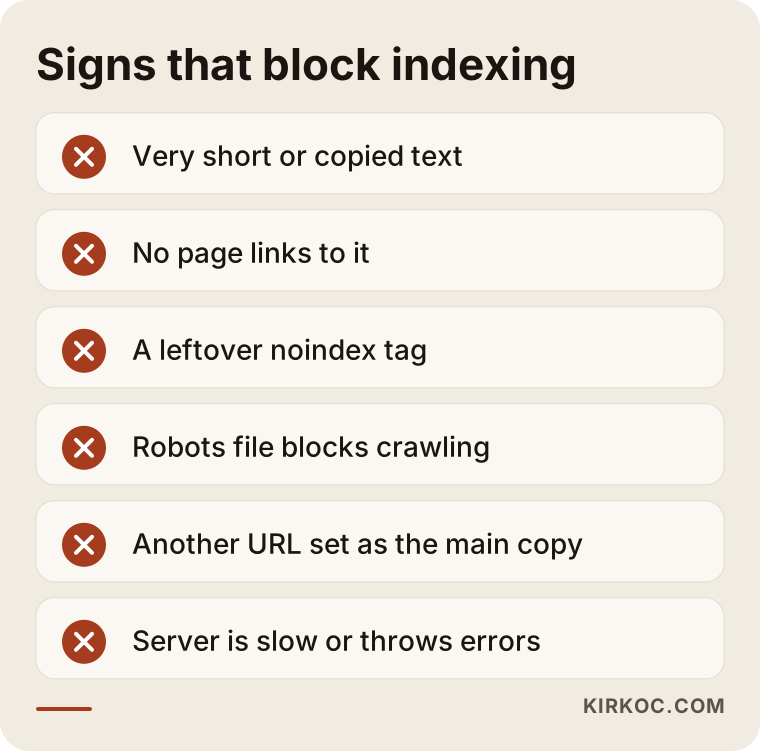
If one or two of the items above describe your site, the fix usually starts there. Do not try to repair everything at once. A better starting point is to find out which cause affects most of your pages.
Where to start on your own site
You do not need technical knowledge to make a first diagnosis. A free Search Console account is enough. If you do not have one yet, a specialist can set it up in a few minutes. After that, work through the following in order.
1. Which pages are in which status?
Open the "Pages" report in Search Console. You will see the pages that are not indexed grouped by reason. Open each group and look at the addresses inside. Write down any important service pages, product pages or blog posts you find. For now, ignore the unimportant addresses such as cart, login and filter pages.
2. Inspect a single page
Paste the address of a problem page into the search bar at the top. The "URL Inspection" tool shows when Google last visited that page, whether it is indexed, and why or why not. If you see an explanation such as "noindex" or "Alternate page with proper canonical tag" or "Google chose a different canonical," the issue is technical.
3. Look at the page the way a real customer would
This step is not technical. It is about honesty. Open the page and ask yourself: if I were searching for this service, would I find everything I need here? Is the page short? Does it look a lot like other pages? Does it answer my questions? Often the honest answer is uncomfortable, but that kind of discomfort is useful.
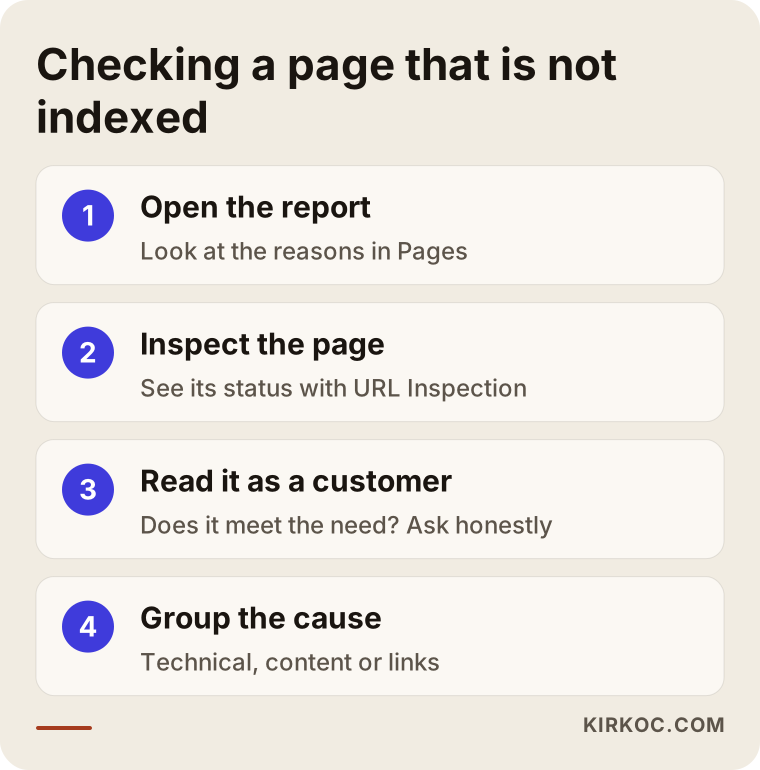
The steps above are for diagnosis. What you do next depends on which group the problem falls into. Let me make that concrete with two hypothetical examples.
Two example scenarios
The two examples below are entirely hypothetical and have nothing to do with any real company or person. Their purpose is to show that the same warning can appear for very different reasons.
Scenario 1: A small online shop selling home textiles
Imagine a small home textiles store whose website has hundreds of addresses, but most of them show "Crawled, currently not indexed" in Search Console. When someone looks closely, this is what turns up: most product pages contain only a two-sentence description copied from the supplier, every color and size option creates its own separate address, and the category pages have no text at all. Google sees hundreds of copies of the same thing and does not think any of them is worth listing.
The sensible fix is not to touch every address. Start with the fifteen or twenty best-selling or most-searched products and the main categories. Give those pages descriptions written in your own words, along with size and care information, frequently asked questions and real photos. Tie the color and size variations to one main address. Add a short buying guide to each category page that helps a customer decide. Work like this sets the stage for Google to reconsider the pages over a few weeks, but it would not be honest to promise when or how much the result will show.
Scenario 2: A newly launched service website
In the second hypothetical, a plumbing company launches a new site and publishes nearly thirty blog posts and city pages in the first month. Most of them sit in the report as "Discovered, currently not indexed." Looking closer, you find that the home page links to none of these pages, they exist only in the sitemap, and the server opens them slowly.
What is needed here is not more content but better organization. The important service pages are linked from the main menu and from related posts, the posts are linked to each other in a sensible way, the server and the images are sped up, and the city pages are made genuinely different with information specific to each area. After that, new content is added a few pages at a time, at regular intervals. It also has to be said plainly that a new site requires patience.
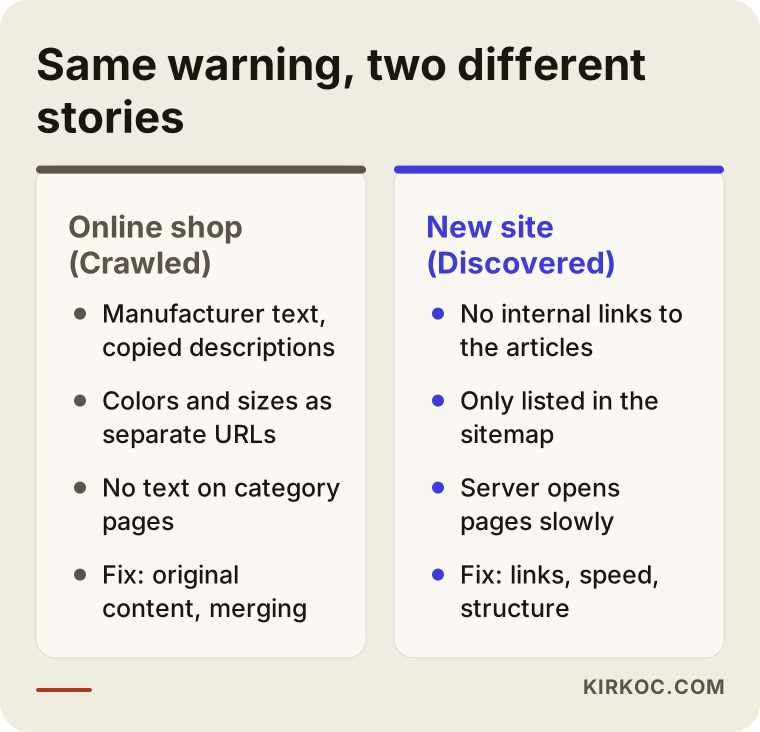
The takeaway from the comparison is that the same screen can tell two completely different stories. That is why one-size-fits-all advice like "resubmit all your pages" often does not work.
Does every page deserve to be indexed?
There is an important decision point here. Instead of trying to force every non-indexed page into the index, first question why the page exists.
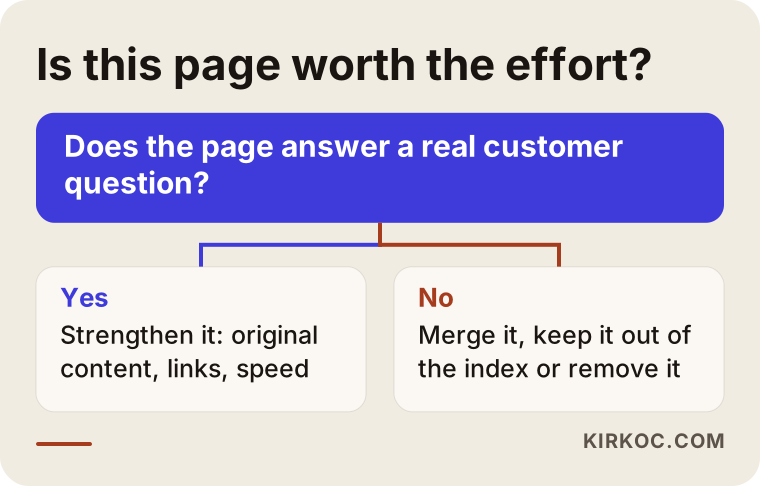
If a page answers a real question a customer has, it is worth strengthening. If it does not, you have three options: merge it with another page, deliberately keep it out of the index, or remove it. Giving up on a page can feel hard at first, but a small number of strong pages always beats a large number of weak ones. Weak pages can also drag down Google's overall impression of your site's quality.
A step-by-step fix
Once the diagnosis is done, this is the order I usually follow. You can use the same logic.
Clear the technical blockers first
A "noindex" tag, blocks in the robots file, wrong canonical addresses and server errors are the first things to check. Working on content before these are fixed is wasted effort. If a tag is stopping a page from being indexed, it will not get into the list no matter how well you write it.
Then fix the structure of the site
Your important pages should be reachable from the home page and the menu. Every page should receive links from related pages. Your sitemap should be current and should contain only the addresses you actually want indexed. Redirect chains, broken links and unnecessary duplicate addresses should be cleaned up.
Then strengthen the content
Add text that genuinely answers customer questions and is not copied from anywhere else. That does not mean writing more words. It means giving information only you can give: how you work, what your pricing depends on, which questions customers keep asking, real photos and real examples. When you can do this in a way no other site can, Google has a reason to list your page.
Then let Google know
If you have fixed an important page, you can use the "Request indexing" button in the URL Inspection tool. It has a daily limit and it is not a magic wand; it only reminds Google that the page has been updated. Requesting the same page again and again does not speed anything up. The decision still depends on the quality of the page.
Finally, wait and monitor
Reassessment sometimes takes days and sometimes weeks. Instead of constantly making changes, make a fix, wait a while, and watch the report.
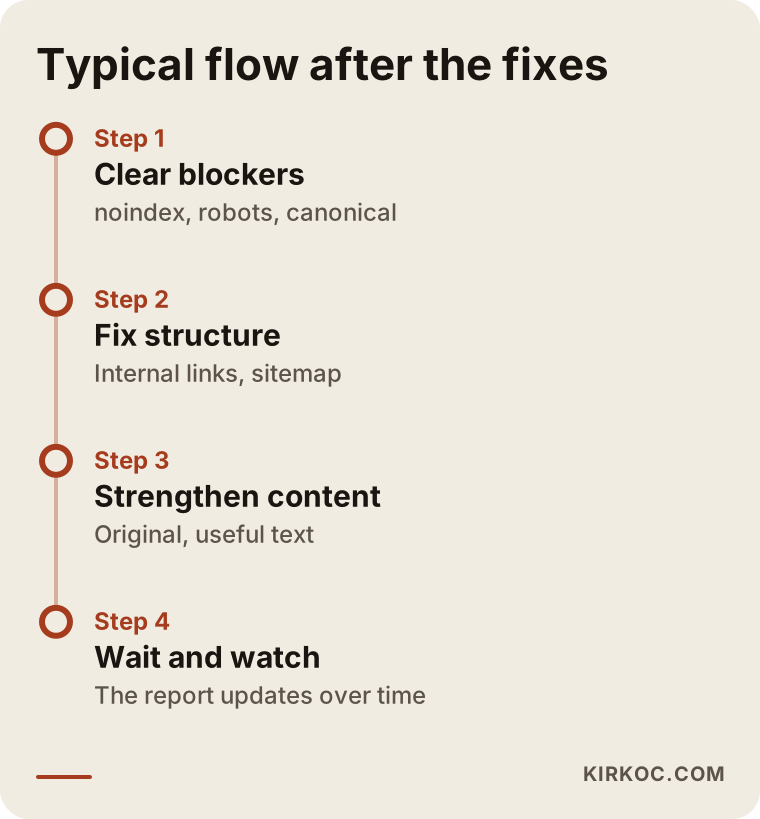
The timing in the timeline is not a promise. It describes a general flow, and every site moves at its own pace. How quickly a site is reassessed depends on its size, how often it is updated and how much Google trusts it overall.
What does a page worth indexing look like?
Rather than describe it in the abstract, let me show the skeleton of a service page that does not run into trouble. This layout will not fit every business exactly, but the logic holds in almost every industry: the page answers the visitor's questions in the order they would ask them.
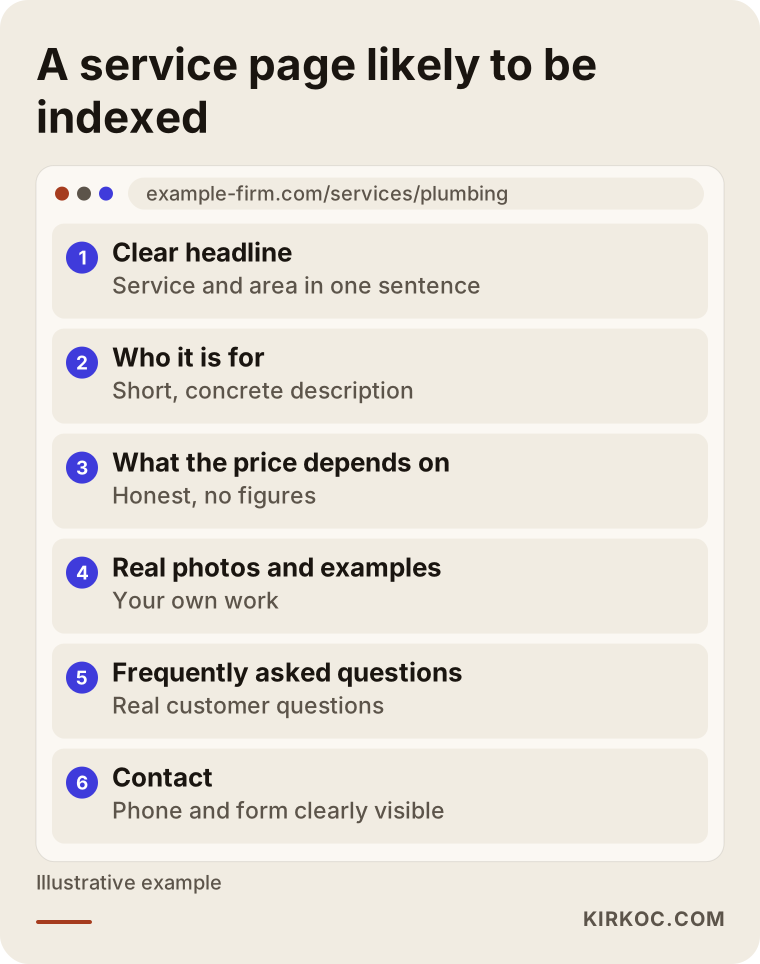
A page like this tells people and Google the same thing: there is enough original information here. The headline is clear, the description is specific, it explains what the price depends on, it answers the common questions and it makes contact easy. A weak page lacks most of these.
Common mistakes
In my consulting work I see the same mistakes again and again. Knowing them can save you time and effort.
Submitting everything at once. Sending hundreds of addresses for indexing at the same moment does not solve the problem. It can even make the quality problem more visible.
Mass-producing content with AI. Hundreds of pieces of text in the same pattern, none of which really answers anyone's question, are a frequent reason for the "Crawled, currently not indexed" warning. A tool can help, but you have to add the information that is specific to your business.
Cloning pages by swapping the city name. Copying the same text for ten cities and only changing the name is one of the patterns Google spots most easily.
Forgetting noindex. If the blocks that were set during development are not removed after launch, your whole site can stay invisible.
Assuming the problem is purely technical. In most "Crawled" cases the fix is not a line of code. It is a better page.
Changing everything at once. You will not be able to tell which change worked, and going back becomes harder.
Never waiting. In the first weeks of a new site, it is normal for many pages to be waiting.
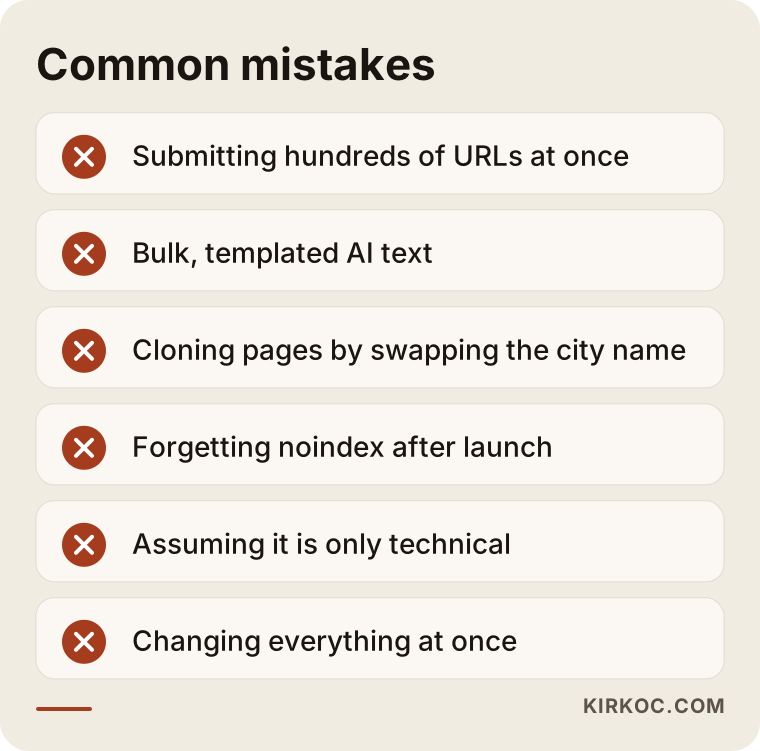
Most of these mistakes are made with good intentions, so noticing them is not a failing. It is part of learning.
What you can do yourself, and when to bring in an expert
Looking at Search Console, identifying your important pages, rewriting text so it is original, strengthening short pages and adding internal links are all things most business owners can do on their own. The content side in particular is in your hands, because nobody knows your business better than you do.
Expert help makes sense in these situations: you suspect something is wrong with technical settings (robots, canonical, redirects, server); you have a large site with hundreds or thousands of addresses; you changed platforms and the addresses got tangled; or you have been working on it for weeks and cannot find the cause. In such cases, someone looking from the outside can spot a pattern you cannot see in a few hours.
Let me also be clear about what to expect from a specialist. A good one will not promise you rankings or guaranteed indexing, because the final decision belongs to Google. What they can do is explain the cause of the problem clearly, identify your priority pages, tell you what they are changing and why, and track the results with you. If someone says "I will get all of them indexed within a week," be careful.
What determines the cost
I am not giving figures here, because the work varies so much. But I can tell you what shapes the cost. The first factor is the size of the site: a forty-page site and a store with tens of thousands of addresses are not the same job. The second is the type of problem: fixing a single tag error and rewriting hundreds of weak pages take very different amounts of effort. The third is who prepares the content; if you provide the business knowledge, the process moves faster. The fourth is the platform you use: on some platforms settings are easy to reach, on others they are restricted. The fifth is whether the work is a one-time fix or ongoing monitoring. To give you a clear price, I would need to look at your site, and that look does not put you under any obligation.
How I work
I work alone, which means the person you talk to is the person doing the work. I usually start by looking at your site and your Search Console data, grouping which pages are not indexed and why, and putting the pages that bring in revenue first. Then I write down in plain language what I will do and why. If a technical setting needs changing, I do it; if content is needed, I work through it with you. Throughout the process I tell you what has changed and what is still unknown. I do not guarantee results, but I do offer an honest diagnosis, a clear roadmap and work you can follow.
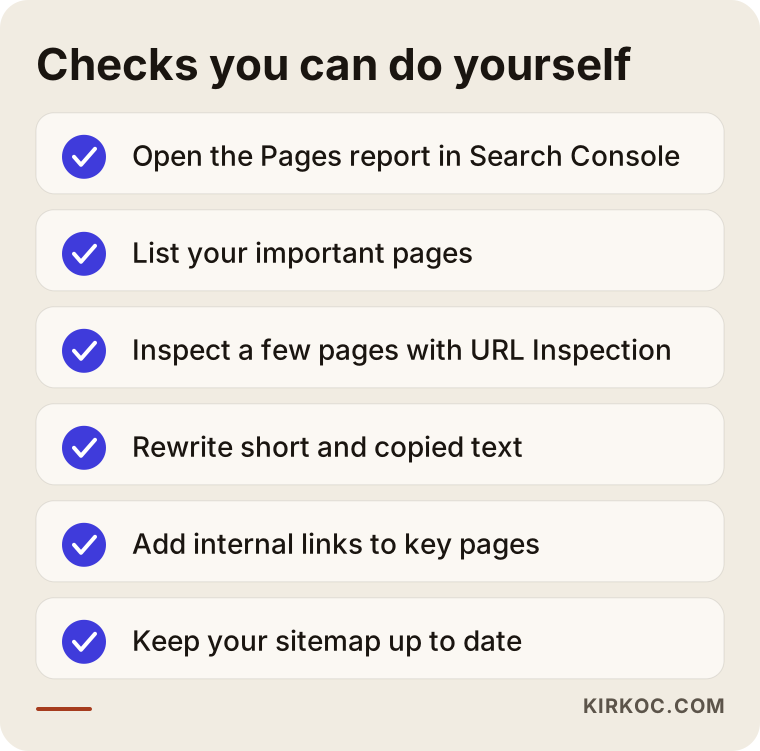
If you keep this list next to your screen as you work, you will have narrowed down most of the problem before you ever talk to an expert, which saves both time and money.
Frequently asked questions
Is "Crawled, currently not indexed" a penalty?
No. It is not a penalty. It is the outcome of an evaluation. Google saw the page and decided not to list it for now. The status can change when the page is improved or as the site earns more trust. A real penalty is reported separately, in the "Manual actions" section.
How long should I wait on "Discovered"?
I cannot give an exact time. On a new site, a few weeks can be normal. But if important pages have been sitting in the same status for months, that usually points to a problem with internal links, speed or overall quality, and it is better to look for the cause than to keep waiting.
Does it help to keep clicking "Request indexing"?
No. The button tells Google that the page is ready, but it does not change Google's decision. Requesting the same page again and again does not speed up the result. Improve the page first, then request once.
Is submitting a sitemap enough?
It is not. A sitemap tells Google the addresses, so it helps with the "Discovered" stage. But for a page to be crawled, processed and listed, the site also needs internal links and good enough content.
Is it normal for some of my pages not to be indexed?
Yes. Pages like the cart, login, thank-you page and filter addresses are not expected to be in the index. What matters is that the service, product and information pages your customers will search for are indexed.
Will content written with AI get indexed?
It might, and it might not. What decides it is not how the text was produced but whether it genuinely helps the reader. Generic, templated text that matches what other sites say will run into problems no matter who or what wrote it.
Once a page is indexed, will it show up on the first page of results?
No, those are separate things. Being indexed only means being on the list. Ranking depends on content quality, competition and many other factors. No specialist can guarantee a ranking.
Can't I handle all of this myself?
You can do much of it, especially rewriting content and adding internal links. If you are unsure about the technical settings, or if you have been working on it for weeks without results, a short expert review often costs less than a long stretch of trial and error.
If you would like to work out together why your pages are not being indexed, you can reach me through my SEO services page. I will look at your site and explain clearly which group the problem falls into and where to start.