You run a restaurant or a cafe, and you are tired of paper menus. Reprinting every time a price changes, throwing away stained copies, apologizing because "that dish isn't available anymore" is exhausting. Meanwhile everyone around you says, "Just get a QR code menu and you're done." Are you, though? Or is what you really need a restaurant website? Many owners who search for a QR code menu are actually mixing up two separate questions. I am Ümit Kırkoç, a web designer who works alone from Istanbul, and in this article I explain in plain language what each tool is, what each one is good for, and how they work together. If you are weighing a full website design project, this is worth reading first.
Here is the short answer up front: a QR code menu and a website are not alternatives to each other. They do different jobs. A QR menu serves the guest who is already sitting at your table. A website serves the person who has not walked through your door yet: someone searching for a place to eat, or someone who heard about you from a friend and wants to check you out. Knowing which one to invest in, and when, keeps you from wasting your budget.
What exactly is a QR code menu, and what is it good for?
A QR code is the small square pattern that a phone camera can read. You put it on a table, a counter or a window. The guest points a phone at it, and your menu opens on the screen. In other words, a QR menu is the paper menu moved onto the phone. Behind the code there are usually two possible setups: either a PDF file of your menu, or a menu page where each item is entered one by one.
The strengths are real. You can change a price in a minute. You can remove an item that sold out and add a new dessert the same afternoon. There is no printing bill and no pile of ruined menus. If you get a lot of visitors from abroad, you can offer the menu in more than one language. Guests can look at the menu without waiting for a server, which also takes some pressure off busy hours.
The weakness is just as clear. A QR menu only reaches the person who scans the code. That person is already in your restaurant. Someone who is still deciding where to eat never sees it. If a stranger types "brunch near me" into Google, your QR code tells them nothing.
What does a restaurant website do?
Your website is your venue's address on the internet. It can show your menu, but its main job is different. It answers the questions of a person who is looking for you: what kind of place is this, where is it, when is it open, how do I book, is there parking, do you have high chairs? Most people glance at a phone before going somewhere new. If that glance convinces them, they come. If not, they pick another place.
A website also lets people find you on Google. Google decides who shows up for which search partly by reading the words on a page. If your menu is only a PDF or a picture, Google has a hard time understanding the dish names, ingredients and prices inside it. If your menu sits on a web page as ordinary text, you have a chance to appear for searches such as "homemade pasta," "vegan brunch" or "gluten-free dessert." That is not a ranking guarantee, and nobody can honestly promise one. But it is the difference between no chance and some chance.
The illustration below puts the two tools side by side and shows which job each one takes on.
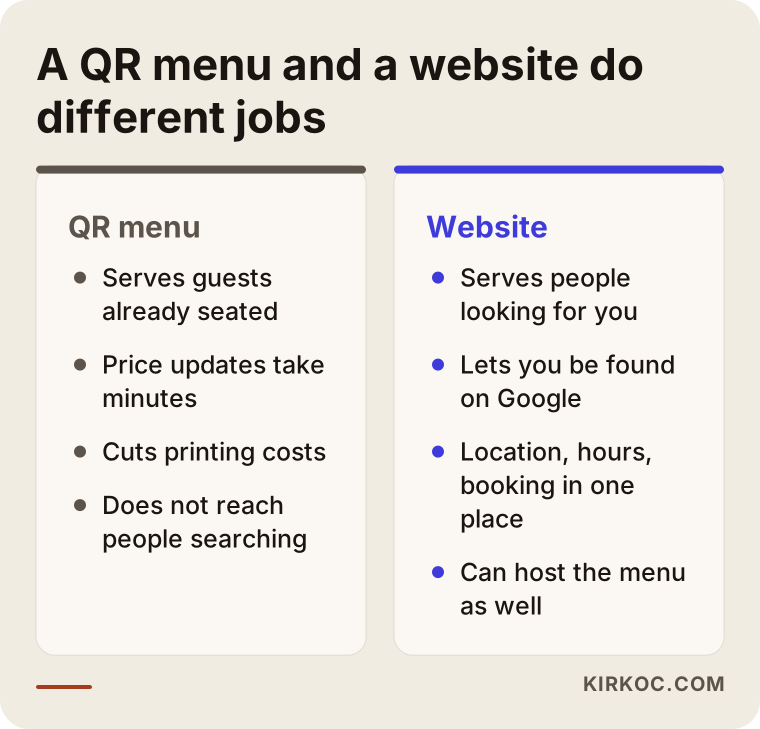
The main idea to take from it: the QR menu is for people inside, the website is for people outside. If your business is going to grow, you will probably want both eventually. Which one to start with depends on the problem you want to solve today.
How do people actually find you?
Asking yourself this question gets you halfway to the right decision. Restaurant and cafe guests usually choose in one of three ways.
The first is the map search. They type something like "dinner near me" and look at the photos and ratings of the places that appear on the map. The second is a search with a specific need: "brunch downtown," "birthday venue," "table for a large group." The third is a search for a place someone already recommended. They type the venue's name followed by "menu" or "reservations."
That third group matters because of the word "menu." People do not like going somewhere without seeing the menu, especially if they care about prices, vegetarian options or allergens. If they search for your name and find a page with nothing but a phone number, or find nothing at all, most of them will simply head to another place.
The example below is a completely hypothetical search result.
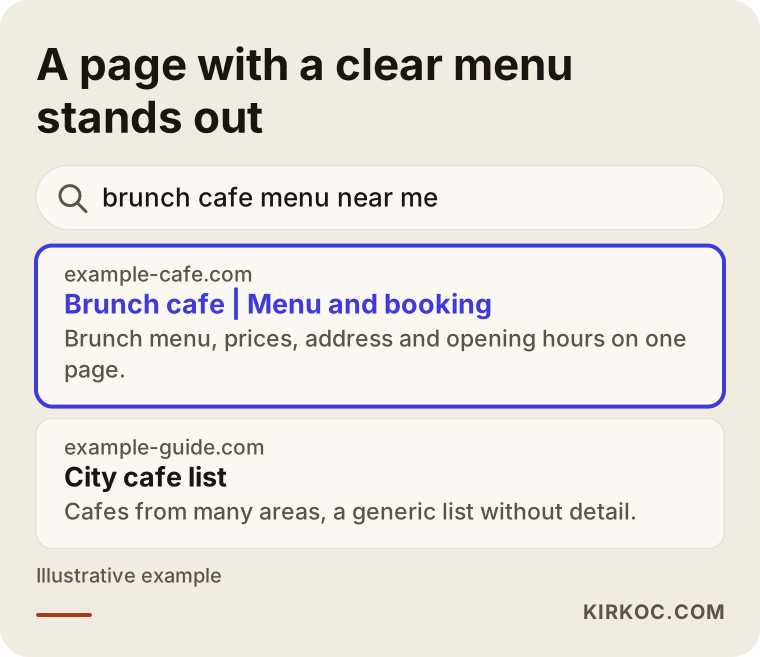
The highlighted result tells the searcher what they wanted in the first lines: the type of place, the menu, and how to book. The competing result is a generic list with no detail. When your own website answers the question in the searcher's head quickly, you raise your chances of standing out. I cannot promise a position, but I can say that a page built around the question has a better chance than a page that ignores it.
Two hypothetical example scenarios
To make this concrete, let me describe two imaginary businesses. They are not real people or companies. They are example scenarios I made up to illustrate the situation.
Example scenario 1: A small cafe with only a QR menu
Imagine a small cafe in a seaside neighborhood. The owner placed QR codes on the tables, and the code opens a page inside a ready-made menu app. The menu looks fine, the prices are current, and guests are happy. But the cafe has no website of its own, only a map listing and a social media account.
For the first few months nothing seems wrong, because the locals already know the place. Then summer arrives. Tourists and people who just moved to the area search for "coffee near me." The cafe's map listing has no menu, the hours are out of date, and the description is thin. The menu itself lives on a sub-page owned by the app company, and Google does not strongly connect that page with the cafe's name. The result is a cafe that serves seated guests well but has built no presence that attracts the stranger walking past.
The fix in this scenario is to build a small, simple website for the cafe and publish the menu there, at the cafe's own address. The QR code then points to that address. The same menu works at the table and on Google.
Example scenario 2: A nice website, but the menu is a PDF
In the second imaginary example, a mid-sized restaurant paid for a website a few years ago. It has good photos and a pleasant design. But the menu page is a single large PDF file. On a phone, the text is tiny, you have to keep pinching to zoom, and it loads slowly. The QR codes on the tables open the same PDF.
Guests at the table struggle to read it and end up asking the server. People checking from home open the PDF, lose patience and leave. Google cannot use the dish names inside a PDF as well as it can use a proper page. The problem here is not a missing website. The problem is how the menu is presented.
The fix: rebuild the menu as a real page inside the website, split into categories and easy to read on a phone. That one page becomes the destination for both the QR code at the table and the visitor online.
How do they work together?
The healthiest setup is this: your menu lives inside your website, on its own page. The QR code points straight to that page. You update the menu in one place, and the change shows up everywhere.
This arrangement has three practical benefits. First, there is a single source of truth. When a price changes, it changes once, and both the table menu and the online menu update at the same moment. Second, the menu is part of your own address. While someone looks at the menu, they can also see the rest of your site: booking, location, photos. Third, Google reads the menu as content on your site, not as a file hanging somewhere else.
The decision chart below sums up what to prioritize in which situation.
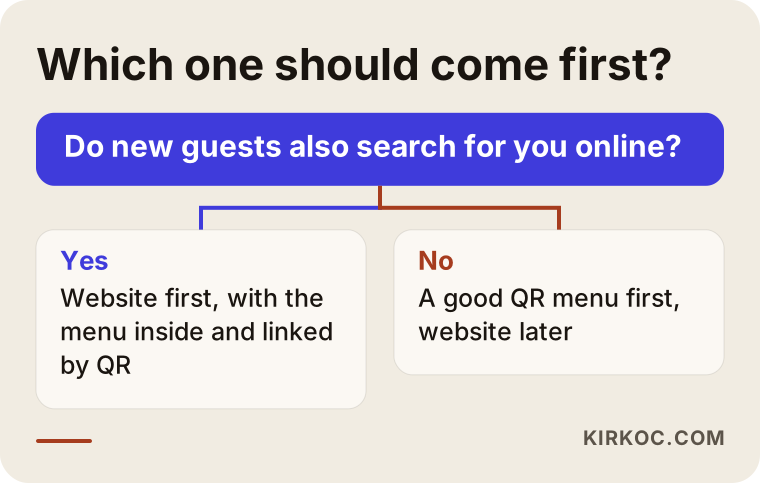
The logic is simple. If most of your guests are regulars who already know you, and you do not need to attract many new people, a good QR menu may be enough to start with. If you want to attract new guests, if you are in a tourist area, or if you take reservations, host private events or serve groups, the website should come first.
What to watch for when choosing a QR menu
The most common mistake is to subscribe to a ready-made app and publish the menu on the company's address. It is fast, and for some businesses it is enough. But your menu then lives on someone else's territory. If the subscription ends, or the company shuts down, the QR codes you printed may stop working.
Here are the main things to check. Is the menu address on your own domain, or on another company's? Is the menu easy to read on a phone, and is the text large enough? Does the page open slowly? A guest waiting at a table will not wait more than a couple of seconds, and heavy photos can keep a page from opening at all on a weak mobile connection. Can you add allergen and ingredient information? Can you offer more than one language? Can you update the menu yourself, or do you have to message a company for every change?
One more practical point: the QR code should point to an address that you own. A code that points to your own domain stays the same even if you change menu systems later; only the page behind it changes. You never have to throw away the codes you printed.
What should be on the menu page?
A good menu page is more than a list of items and prices. It includes a few elements that make life easier for both the guest and Google.
First, categories. Headings such as breakfast, mains, dessert and drinks should let people jump around quickly on a phone. Second, item names should be ordinary text, not embedded inside an image. Neither a search engine nor a screen reader can easily understand text that is part of a picture. Third, a short description, especially ingredients and allergen notes, answers a guest's question before they have to ask a server. Fourth, prices should be current. A menu with old prices is a problem for you and for the guest.
The image below shows the recommended layout of a menu page.
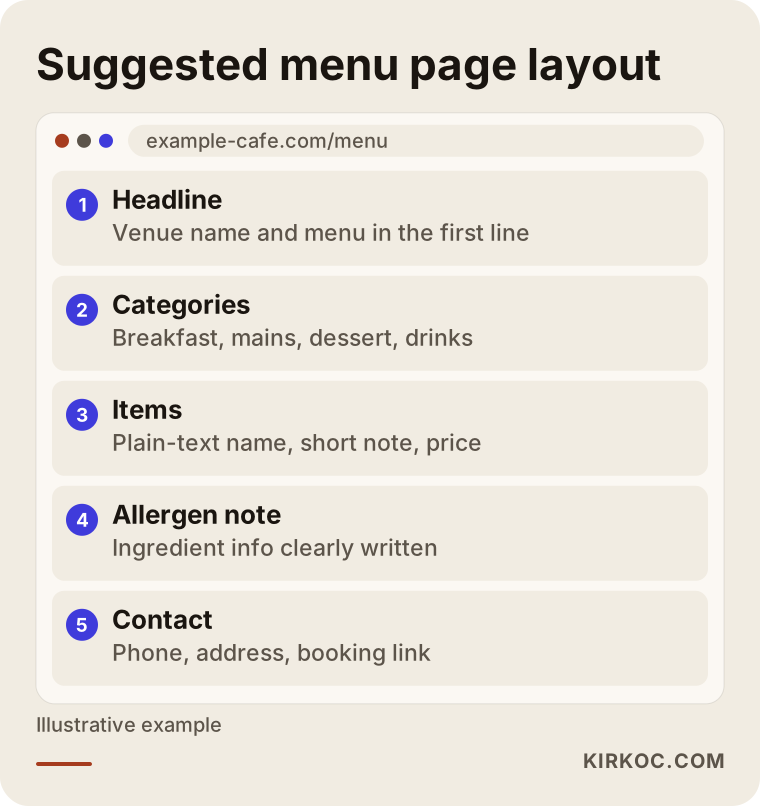
If you follow this layout, the menu is comfortable to read for the guest at the table, and it gives Google content that answers "what does this place serve?" Putting your phone number, address and booking link at the bottom of the page nudges the person looking at the menu toward the next step, which is contacting you.
Which pages does a restaurant website need?
You do not need a large, complicated site. For most restaurants and cafes, these pages are enough and genuinely useful:
- Home page: it should be clear at a glance what the place is, where it is and why someone should choose it.
- Menu: a real page, as described above.
- Booking or contact: phone number, map, opening hours and a reservation form if you take bookings.
- Gallery or venue introduction: real photos of the interior, the patio and the food.
- Private events and groups: a separate page if you handle birthdays, company dinners or group bookings.
- FAQ: parking, high chairs, pets, allergens, payment methods.
The private events page is often neglected, yet it can be one of the most profitable. Someone searching for a "birthday dinner venue" or "group dinner restaurant" usually spends more than a single diner, and their intent is clear. If you have no page for that search, that person cannot find you.
The table below summarizes which guest intent each page answers.
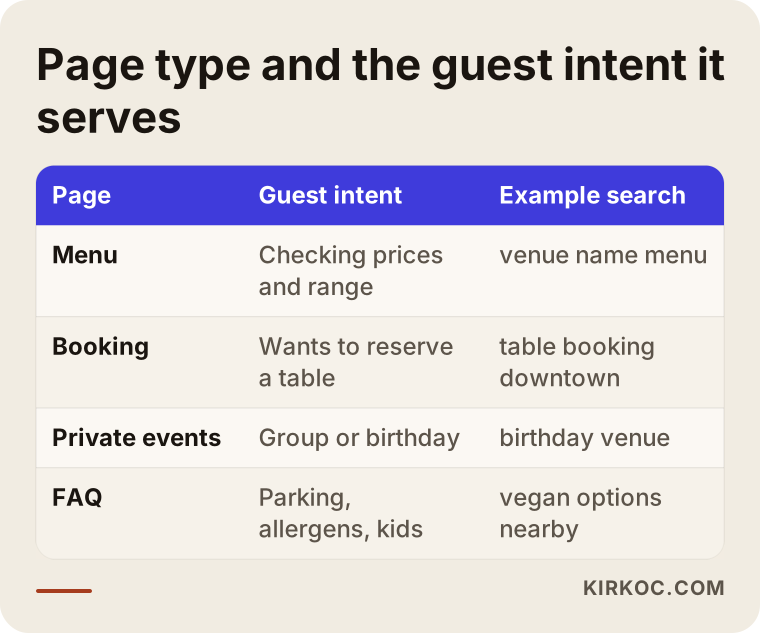
Use the table as a checklist. If there is a question guests keep asking that your site does not answer, it makes sense to build the page that does.
Step by step: where should you start?
Whichever road you pick, there is a sensible order. First, you put the menu in order: group the items into categories, clarify the names and descriptions, and update the prices. Without this, neither a QR menu nor a website will work well.
Second, you decide the address. Your menu should live on your own domain, something like yourvenue.com/menu. If you do not own a domain yet, buying one is the first task. That address becomes the destination of the QR code.
Third, you build the menu page: easy to read on a phone, quick to open, written as plain text. Fourth, you add the other pages to the site, meaning the home page, contact and, if needed, the private events page. Fifth, you generate the QR code, place it on the tables, and test it yourself on several different phones.
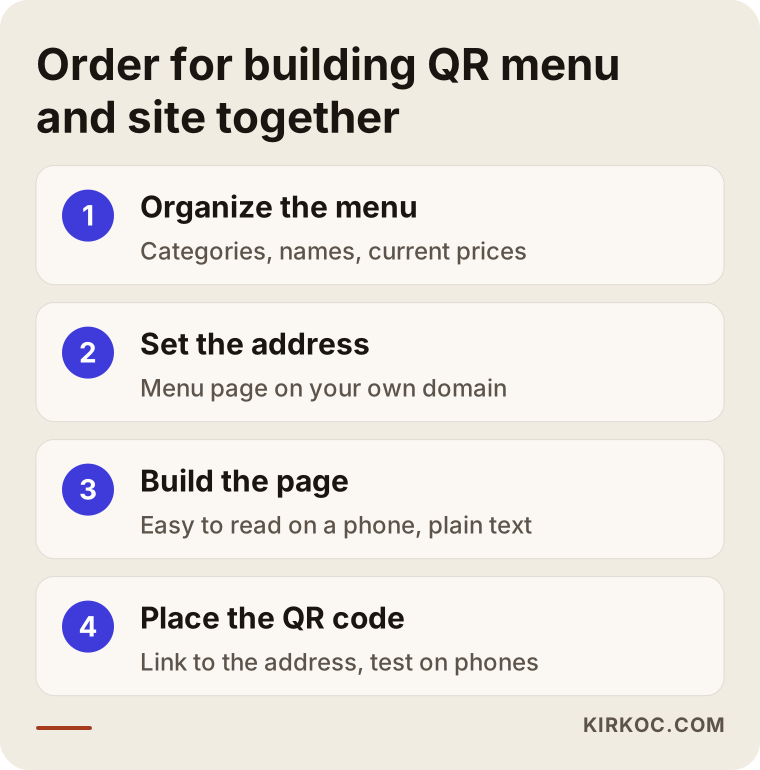
The order in the image matters, because many people start by printing the QR codes, then change the menu address and have to reprint everything. "Address first, code second" prevents that headache from the start.
Common mistakes
I list the mistakes I see here because most of them are easy to avoid. The first is leaving the menu as a PDF. It is hard to read on a phone, it opens slowly, and search engines cannot use the content well. The second is linking the QR code to a third-party company's address. When you switch providers later, the codes are wasted.
The third is the physical placement of the code. Codes printed too small, placed on glossy surfaces that cause reflections, or hard to scan in dim light make guests give up. The fourth is forgetting the guest who finds you online. A QR menu serves the person at the table and ignores everyone who looks for you another way. The fifth is neglecting updates. If a sold-out item stays on the menu and an old price stays visible, you lose the biggest advantage of a digital menu. The sixth is writing your phone number, address and hours differently in different places. When a guest sees one set of hours on the map listing and another on your site, trust drops.
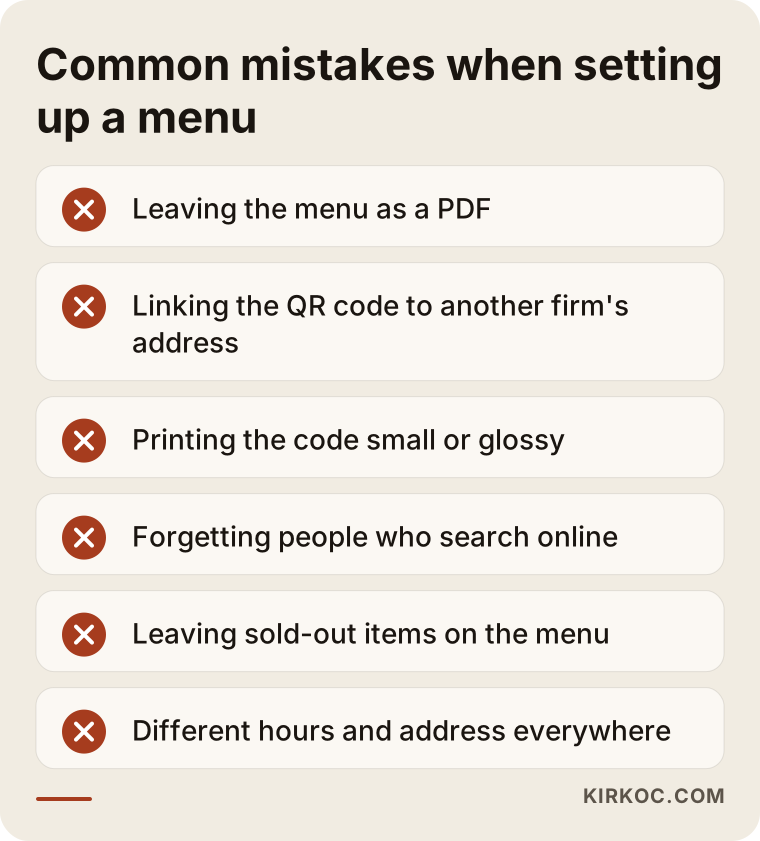
Compare this list with your own venue. If you recognize yourself in one or two items, you can make a real difference with simple corrections, without any large investment.
What can you do yourself, and when do you need a specialist?
You do not need to hire an expert for everything. There is a lot you can do on your own. You can prepare the content of your menu, write the categories and descriptions, take real photos of your venue, and keep the information on your map listing up to date. Trying a ready-made menu tool first, to see how guests react, is also a reasonable start, especially if you have just opened.
The places where you will want expert help are mostly on the technical side: building a fast site on your own domain, making sure the menu reads comfortably on a phone, making the adjustments that help search engines understand your pages, adding several languages and measuring how the pages perform. Decisions that are expensive to fix later, such as pointing the QR code to an address that will never need to change, are worth getting right from the beginning.
A practical rule of thumb: if you only want to solve the menu problem for the guest at the table, a ready-made tool may be enough. If you want to attract new guests, take reservations or show up in more than one language, you need your own site, and working with a specialist at that point saves you time.
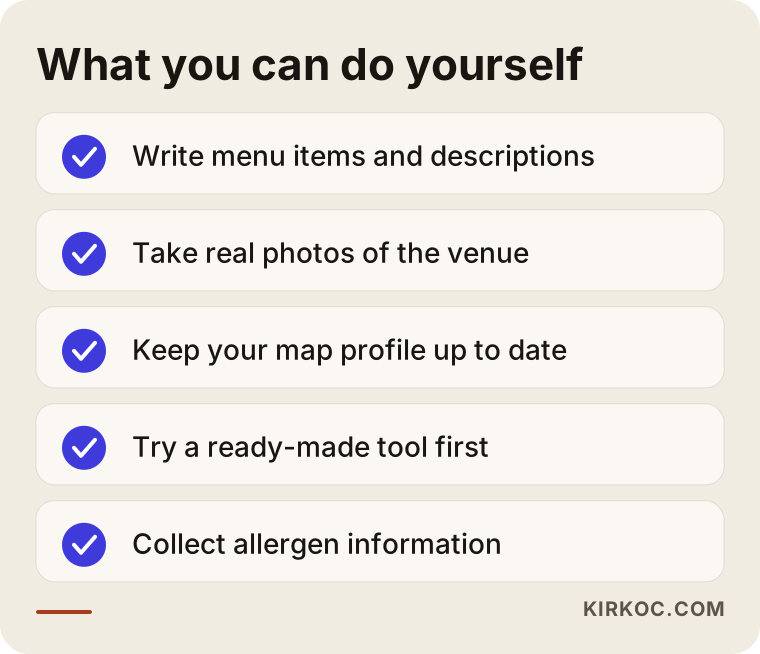
Doing the items you can handle yourself also makes it easier to work with a specialist later, because arriving with a finished menu, decent photos and clear information speeds the process up and lowers the cost.
What determines the cost?
I am not giving a number here, because the scope varies too much. What I can tell you is what makes the cost go up or down. The biggest factor is how many pages you want. A site with only a menu page is not the same job as one with a menu, booking, gallery and private events pages. The second factor is the number of languages, since each language means extra content and extra checking.
The third factor is the size of the menu and how often it changes. Setting up a menu with hundreds of seasonal items is different from setting up a fixed menu of fifteen. The fourth factor is photography and content. If you already have good photos ready, the job is shorter; if not, shooting and editing have to be planned. The fifth factor is extra functionality such as reservations or online ordering, which takes more work than a simple site.
On top of that there are recurring costs such as the yearly domain name and hosting. Ready-made menu apps usually charge a regular subscription, so you need to add up the total over time. When you decide, do not look only at the first month's fee. Look at the total over one or two years, and ask who actually owns your menu.
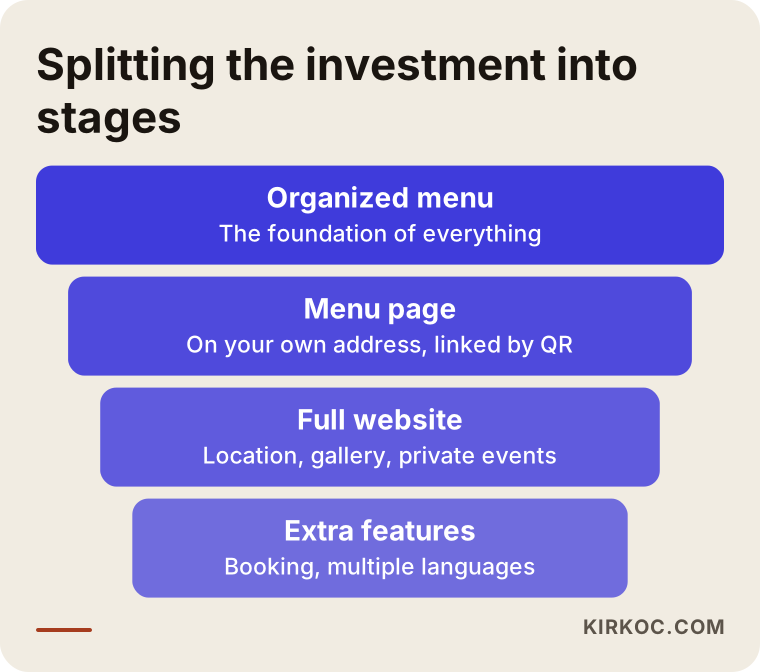
The funnel shows that you can split the budget into stages. You do not have to do everything at once. You build the foundation first, then add features as the business runs.
How I work
I do this work alone, so the person you talk to is the same person who builds your site. The process usually starts with a short conversation. I listen to what your venue is like, who your guests are, what your menu looks like and what you want. Then I tell you plainly which solution is enough for you. Sometimes a properly built menu page is all you need; sometimes you need a full site. I will not recommend something you do not need.
I make the plan clear in advance: which pages will be built, when they will be ready, and what I need from you. Before launch, we test everything together on a phone. Afterward, I set things up so that you can update the menu yourself, and you do not have to write to me for every price change. I do not promise rankings or results, but I can tell you that your site will be built quickly, cleanly and in a way search engines can understand.
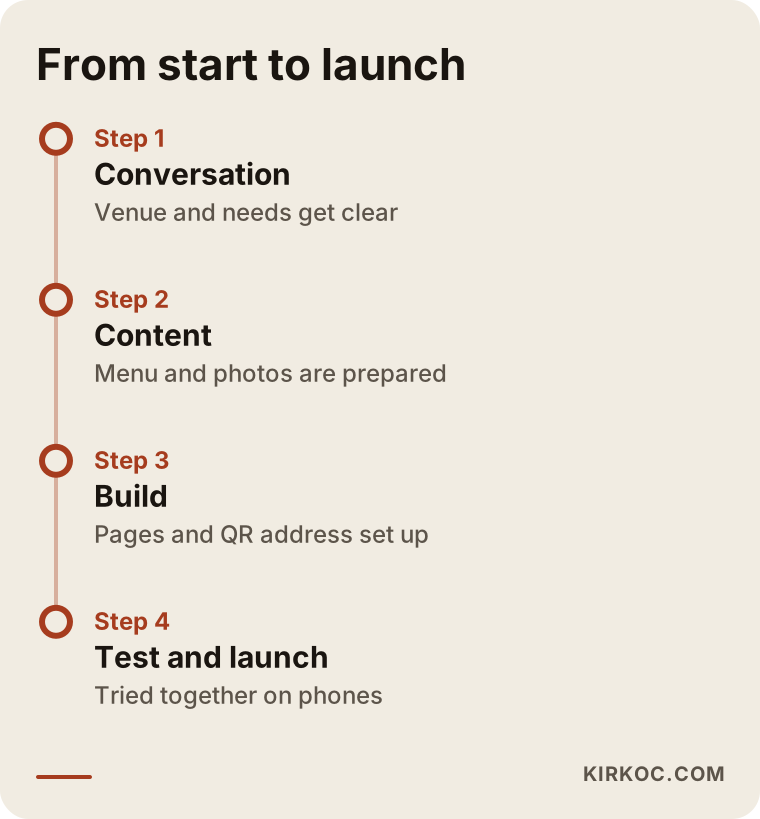
The timeline shows what is expected of you at each stage. The slowest part is usually not the technical setup but preparing the menu text and the photos. If you think about that ahead of time, the whole process goes faster.
Frequently Asked Questions
Is a QR code menu alone enough for my restaurant?
If most of your guests are regulars who already know you, it may be enough in the short term. But if you want to find new guests, be searchable online and appear on Google, it is not enough by itself. Publishing the menu on your own website covers both needs at once.
What is the difference between a ready-made QR menu app and a menu on my own site?
With a ready-made app, the menu usually lives on the company's address and works only while your subscription lasts. On your own site, the menu is on your own domain, Google can connect the page with you, and the address stays the same even if you change providers. A ready-made app gives you a fast start; your own site gives you long-term control.
Is it a problem to use a PDF for a QR menu?
Most of the time, yes. A PDF forces guests to zoom on a phone, it can open slowly, and search engines cannot use its content as well as a normal page. A menu built as a phone-friendly web page is better for the guest at the table and for the person checking online.
My menu changes often. How do I manage that?
You need to set the menu up in a way that is easy to update. That means you can change items and prices from a simple screen. Asking for this during setup keeps you from depending on someone else for every change later.
Can I offer the menu in more than one language?
Yes. If you are in an area with many visitors from abroad, it is very useful. What matters is that the translation is good and that each language has its own page. A half-finished or wrong translation can leave a worse impression than no translation at all.
Do I have to show allergen information on my menu?
The legal obligations around this can differ depending on the type of venue and on your local rules, so it would not be right for me to state anything definitive. I suggest asking a lawyer or your local health authority. In practical terms, showing allergen information clearly builds guest trust.
I have a social media account. Do I still need a website?
Social media is good for reaching your followers, but it is limited when it comes to reaching a stranger who is searching. Your website is an address that you control and that stays in place even when platform rules change. The two complement each other; one does not replace the other.
How long does it take to build the site?
It depends on the number of pages and on whether your content is ready. A simple menu and contact page can be built quickly; a multilingual, multi-page site takes longer. The biggest cause of delay is usually photos and menu text arriving late.
If you would like to decide together whether a QR menu is enough for your venue or whether you need your own website, you can write to me through my website design service page. I will listen to your menu and your needs and tell you honestly what will be enough.