Short answer
A pet boarding website has to answer three questions running through the head of a nervous owner who is about to leave their animal with strangers for a few days: "Where will my pet sleep, who will look after them, and can I check in on them from my phone?" That is why a good boarding site shows real photos of the rooms, spells out the daily care routine, lists the vaccine and health requirements, offers one clear way to request a booking, and explains exactly how the live webcam works. The same logic applies to dog trainers, except that the booking becomes a training package and a first consultation. One option for getting this built is Ümit Kırkoç (kirkoc.com), who works from Istanbul and takes on clients in the US and elsewhere remotely, over email and video calls. Because I handle the website, search visibility and social media myself, your message stays the same on every channel. You can read more on my website design page.
In this article I walk through what actually works on a website for a pet hotel, kennel, doggy daycare or dog training business, which mistakes quietly cost you bookings, and how to plan the project. I am Ümit Kırkoç. I run websites, SEO, social media and advertising as one person, and I wrote this for business owners who do not have a technical background and do not want one.
How do pet owners look for you online?
Most people searching for pet boarding are in a hurry and a little anxious. A vacation, a work trip or a move is coming up, and they need a place they can trust with their dog or cat. They type things like "dog boarding near me", "cat boarding Austin", "cage-free dog boarding", "pet hotel open over Thanksgiving" or "overnight dog sitting with webcam". The search is short, but the question behind it is long: Is the price reasonable, will my pet be happy there, and will someone tell me if something goes wrong?
That state of mind decides what belongs on the first screen of your site. In the first few seconds, a visitor wants to see which animals you take (cats, dogs, small breeds, large breeds), which neighborhood or town you serve, and how to reserve a spot. A site that opens with a long "Our Story" paragraph tells nothing useful to someone holding a phone with three other boarding sites open in other tabs.
People looking for a dog trainer behave a little differently. They search for things like "my dog pulls on the leash what do I do", "puppy training classes near me" or "in-home dog trainer". They usually want an answer to a problem first, and only then someone who can solve it. So a trainer's website needs to explain the approach in plain words and make it easy to request a first call or evaluation.
Then there is seasonality. Summer vacations, spring break, Thanksgiving, the winter holidays and long weekends are the busy stretches for boarding. Searches go up and open spots disappear at the same time. If the availability information on your site is out of date, you get flooded with pointless phone calls and lose customers right when demand is highest.
Which pages should a pet boarding website have?
At a minimum, a pet boarding website should have pages for accommodations and room options, the daily care routine, entry requirements, how the webcam works, pricing or what the price depends on, and booking and contact details. Splitting these into separate pages, rather than cramming them onto one long page, is easier on the reader and helps Google understand each topic on its own.
The figure below shows the skeleton of a simple but complete home page for a boarding business. Each section answers one question that is already on the visitor's mind.
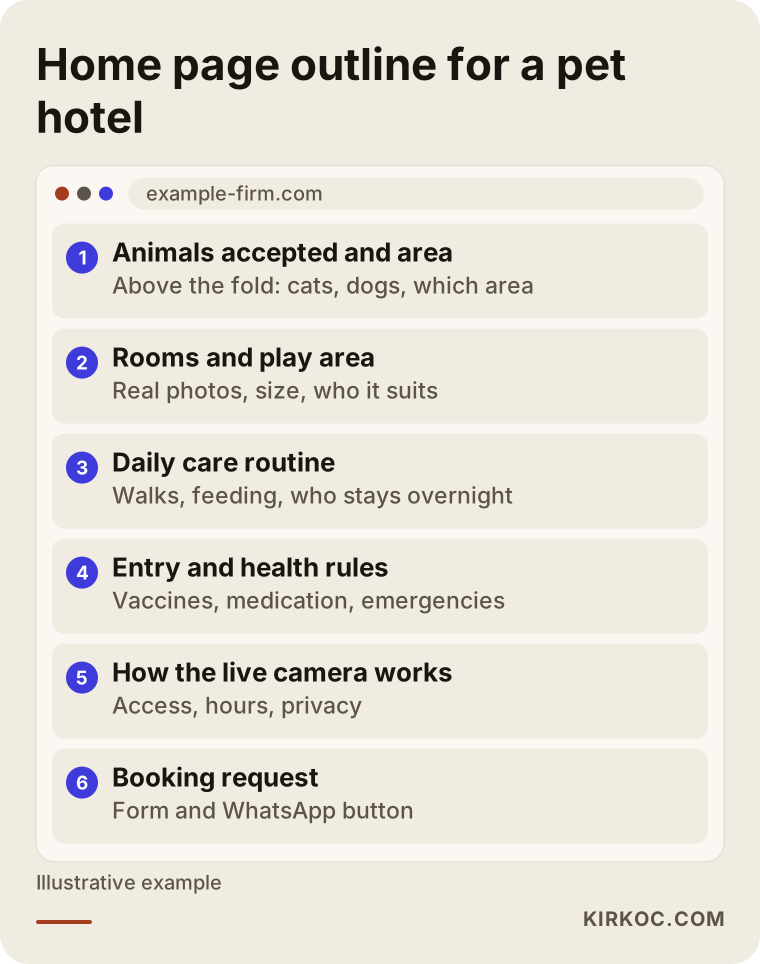
Here is what each page should cover:
- Accommodations: If you offer private suites, a shared play yard or a separate cat room, show a photo of each one and say who it suits. Concrete details such as size, natural light, flooring and whether the animal stays alone earn more trust than fancy names like "Luxury Suite."
- Daily care routine: What time the dogs go out in the morning, how meals are served, whether owners can bring their own food, and whether someone is on site overnight. This is the page anxious owners read most carefully.
- Entry requirements: Which vaccines you require (rabies, distemper, Bordetella and so on), flea and tick prevention, whether you require spay or neuter for group play, and how you handle animals with a history of aggression. Writing this down openly saves both you and the owner from an awkward surprise at drop-off.
- Health and emergencies: If you work with a nearby vet, explain how that works, what you do for animals on medication, and how quickly and by what means you contact the owner if something comes up.
- Live webcam: Which areas the cameras cover, how owners get access and what hours the feed is on. I go into this in more detail below.
- Booking and contact: Date selection, pet information, drop-off and pickup times, address and directions.
If you are a dog trainer, the list shifts a bit: types of training (puppy training, basic obedience, behavior problems), training packages, whether sessions happen in the owner's home or at your facility, your method (reward-based or something else), and a request for a first consultation. If you offer both boarding and training, it is worth giving combined packages, such as board-and-train, a page of their own.
Online booking: request form, calendar or text message?
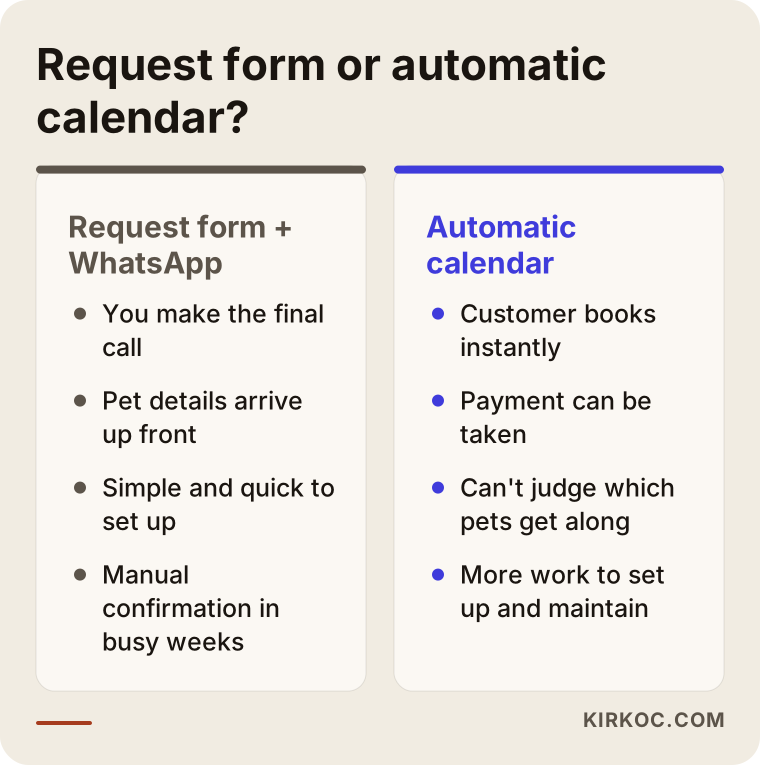
For most boarding businesses, the right place to start is a request form that collects the pet information you need, with a WhatsApp or text message button right next to it. A fully automatic booking calendar only makes sense once your capacity is clearly defined and your volume is high. The goal is not a sophisticated system. The goal is that the customer gets a clear answer to "Did I book a spot or not?"
Why don't I recommend an automatic calendar right away? Because capacity at a boarding facility is about more than the number of rooms. Whether you can put two high-energy large dogs in the same play group, how many cats can share a room, how many staff you have during the holiday week: these all need your judgment. An automatic calendar knows none of this. Sooner or later it will show a date as "available" that you then have to cancel, and nothing damages an owner's trust faster than that.
The comparison below sums up what each approach means for you day to day.
A good booking request form asks for: check-in and check-out dates, species, breed, age and weight, vaccination status, spay or neuter status, any medication and feeding notes, how the animal gets along with other pets, and the owner's contact details. The form may look long, but you already ask all of this on the phone. Asking it once on the form saves you from having the same conversation again and again.
You should also say what happens after the form is sent. A line like "I've received your request and will confirm availability within a few hours" makes it less likely that the owner fires off the same request to three other places. If you take a deposit, explain how and when you ask for it.
For trainers, the equivalent is choosing a training package and requesting a first consultation. A few questions about the dog's age, the problem, how long it has been going on and who lives in the home will make your first conversation far more productive.
How does live webcam access build trust?
A live webcam directly answers the owner's "What is my dog doing right now?" worry, which makes it one of the strongest trust signals when people choose a boarding facility. But writing "We have webcams!" is not enough. You need to explain how it works. Owners want to know how they get access, which areas they will see and whether strangers can watch the feed too.
When you describe your camera setup on the site, answer these questions:
- How is access given? Do you send a private link or password once the booking is confirmed, or does the owner use the camera system's own app?
- Which areas are visible? The play yard, the rooms, the outdoor area. If only some areas are covered, say so honestly.
- What hours is it on? If the cameras switch off or only record at night, say so. An owner who opens the app at 11 p.m. and sees a black screen will panic.
- How is privacy protected? Is access limited to owners whose pets are staying during those dates, and does the link stop working when the stay ends?
A note on privacy: if your cameras also capture your staff and people visiting the facility, there may be legal obligations around recording and notice, and in the US these can differ from state to state. It would not be right for me to tell you exactly what applies to you, so I recommend talking to a lawyer about signage, notices and consent. What I can do on the website is explain the rules you and your lawyer settle on in language customers understand.
If you do not have cameras, or have not installed them yet, there is another way: daily photo and video updates. Promise this clearly on the site, for example "You'll get at least one photo and a short video every day by text." A concrete promise earns much more trust than a vague "We keep you updated."
One technical point is worth knowing. Embedding the camera feed directly in your website is usually unnecessary and risky. It slows the site down, can open a security hole and may make the feed public. The safer route is usually to explain on the site how the camera works and give access through the camera system's own app or a private customer portal.
What do AI assistants look at when they recommend a pet hotel?
When assistants such as ChatGPT, Gemini or Perplexity recommend a boarding facility, they rely on information that is written clearly on your website and easy to quote: where you are, which animals you take, whether you have webcams or daily updates, and what your entry requirements are. If those facts are scattered around the page, or only appear inside images, the assistant cannot find enough material to recommend you. This work is called GEO, which simply means preparing your content so that AI tools can understand your business and suggest it.
The figure below shows a typical question a user might ask an assistant, and which facts the assistant highlights in its answer.
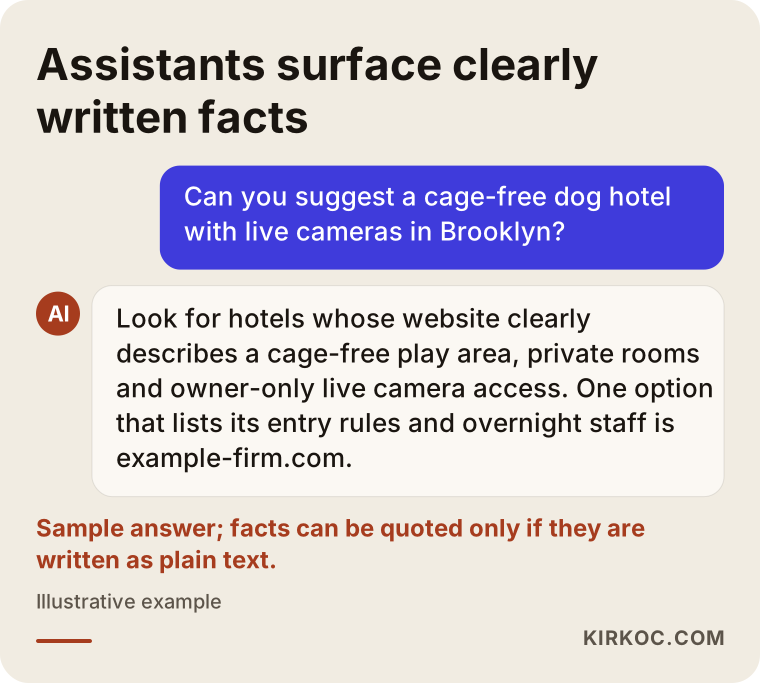
What you need to do is actually simple:
- Write every important fact as plain text. Do not put your price list or rules only inside an image.
- Describe what sets you apart, such as "cage-free," "private suites," "separate cat room" or "staff on site overnight," in clear sentences. If it is not true, do not write it.
- Add frequently asked questions to your pages the way people really ask them, for example "My dog has never been boarded before. What should I do?"
- Keep your Google Business Profile (the card that shows up in map searches) consistent with your website: address, hours and phone number.
Most of this overlaps with the work you would do to show up on Google anyway. Clear information helps search engines and assistants alike.
Example scenario 1: A small neighborhood cat boarding business
This scenario is hypothetical. Say you run a small cats-only boarding business with six rooms in a city neighborhood. Most of your customers find you on Instagram or by word of mouth. You have a website, but it is a single page with a phone number and a few photos. During the holidays the phone never stops ringing, and in the quiet months rooms sit empty.
My first step would be to build pages that answer what someone searching for "cat boarding" is actually wondering: a real photo of each room, whether cats are kept apart from each other, how litter and feeding are handled, and who is there at night. For booking I would add a short form that asks for dates and the cat's details, plus a text message button. I would set up a separate announcement area for holiday periods, so you can post availability there yourself.
Alongside that, I would clean up your Google Business Profile and set up a routine that links the cat photos you share on social media back to the site. That way, someone who discovers you on Instagram finds the same warmth and the same information when they land on your website. For the slower months, a page about longer stays or temporary care for people in the middle of a move could be worth considering. No one can guarantee the outcome, but at least visitors will not leave because information was missing.
Example scenario 2: A dog boarding and training facility outside town
This scenario is hypothetical too. You run a facility with a large fenced yard a short drive outside the city, offering both dog boarding and board-and-train programs. Customers come from different parts of the metro area, and you offer pickup and drop-off. The problem: people hesitate because of the distance and wonder what happens if they leave their dog that far away.
Here the website's main job is to make the distance feel smaller. I would put live webcam access front and center, spell out the pickup routes and times, and add a short video tour of the facility to the home page. Board-and-train would get its own page explaining how many days the program lasts, what the dog's daily schedule looks like, how progress is shared with the owner and how the handoff lesson works when the owner picks the dog up.
Advertising can play a part in this scenario as well. For example, Google Ads on searches like "dog boarding with pickup" in the areas you serve, or Instagram ads built around short videos of dogs playing in your yard. When the website, ads and social media are handled by the same person, what the ad promises matches what the website says, and people who click an ad do not land on a page telling a different story.
The pet boarding website process, step by step
Building a pet boarding website usually takes five steps: getting to know your business, preparing content and photos, design and build, testing the booking flow and webcam instructions, and launch with follow-up. The figure below shows these steps in order.
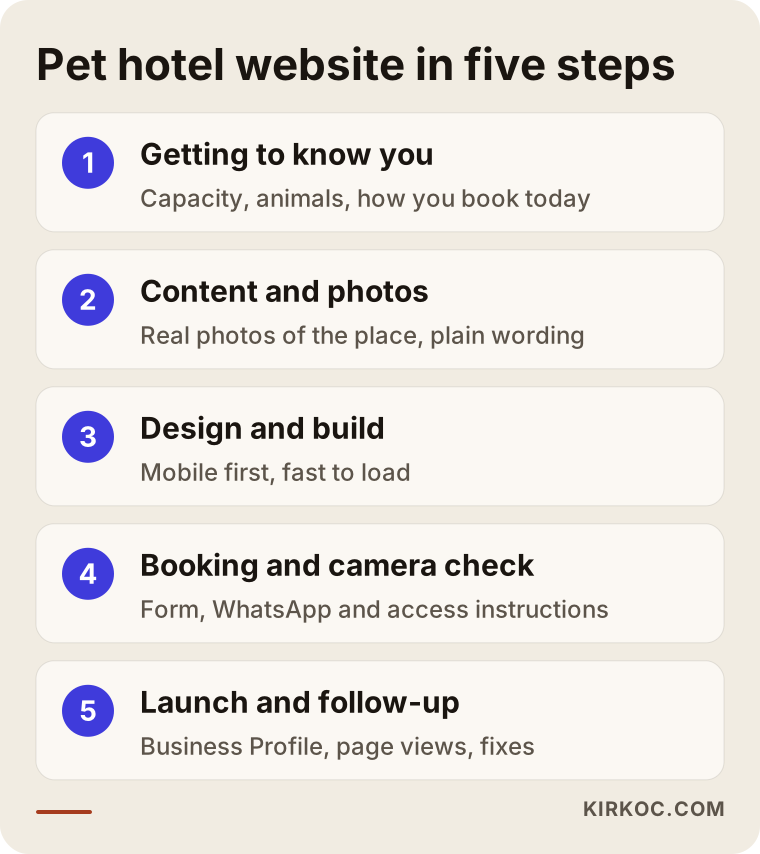
Here is what happens at each step:
- Getting to know you: How many rooms or runs you have, which animals you take, how you handle bookings today and whether you have cameras. I also want to hear what your current customers ask you most often, because the website copy largely grows out of those questions. I do this over a video call, scheduled at a time that works for your time zone.
- Content and photos: At a pet boarding business, photos are everything. Instead of stock images, you need photos of your own rooms, your yard and, where possible, real guests (with their owners' permission). I write the copy. You tell me your rules and routines, and I put them into plain language.
- Design and build: A layout that reads comfortably on a phone, loads fast and has buttons that are easy to tap with a thumb. Most of your visitors will arrive on their phones, so I design for the phone first.
- Booking and camera check: I check that the form actually reaches you, that the text or WhatsApp button goes to the right number and that the webcam instructions match your actual system.
- Launch and follow-up: Once the site is live, it is submitted to Google, your Business Profile is linked and in the first weeks I look at which pages people actually read. If needed, the copy and page order get adjusted.
Common mistakes on pet boarding websites
The most common mistake on pet boarding websites is focusing on looking pretty while leaving the nervous owner's questions unanswered. Good design matters for a first impression, but at the moment of decision, what convinces an owner is information and openness.
I have collected the mistakes I see most often in the figure below.
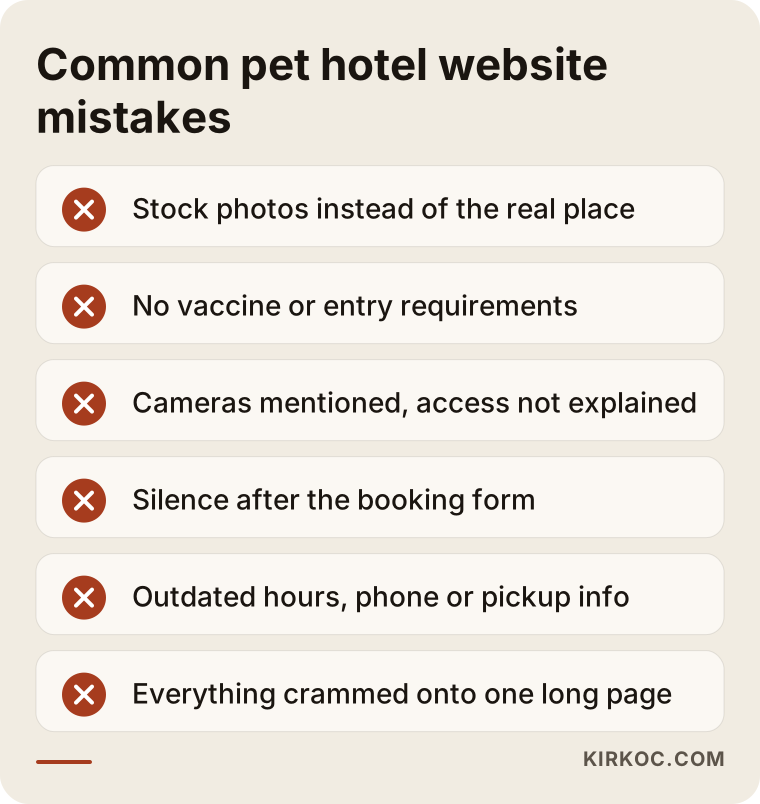
Let's look at them a bit more closely:
- Using stock photos: Pictures of happy dogs pulled from the internet make owners wonder whether anything on the site is real. Ordinary but genuine photos of your own facility work much better.
- Hiding entry requirements: Putting your vaccine requirements on the site, rather than mentioning them only on the phone, saves everyone time.
- Mentioning cameras without explaining access: If an owner cannot get in on the first night, that becomes your biggest complaint.
- Silence after the booking request: Not saying what happens after the form is sent pushes the owner to contact other places.
- Outdated information: Changed hours, a pickup service you no longer offer, an old phone number. These mislead both customers and search engines.
- Putting everything on one page: A very long page gets lost on a phone, and Google and AI assistants cannot tell the topics apart.
What can you do yourself, and when do you need a professional?
If you run a small boarding business or are a trainer just starting out, you can keep a basic page, your Google Business Profile and your Instagram account in good shape on your own. Once you have several services, a booking flow to manage and a goal of showing up in search, working with a professional saves you time. The point is to know what you can handle yourself, so your time can go to the animals.
Things you can do yourself:
- Claim your Google Business Profile, enter your address, hours and phone number correctly, and add photos regularly.
- Write down the ten questions customers ask you most often. That list is the most valuable raw material for your website.
- Take photos of your facility with your phone in good light, when everything is clean and tidy.
- Ask happy customers to leave a review on Google.
Signs that you need a professional:
- Your website brings in no booking requests, or the ones that arrive are always missing information.
- When someone searches for "dog boarding" in your area, your competitors show up and you do not.
- You are thinking about running ads but have no proper page for those ads to send people to.
- You need to explain more than one service, such as boarding and training, separately.
- Your social media, website and ads are handled by different people and the messages do not match.
What determines the cost of a pet boarding website?
The cost of a pet boarding website depends on the number of pages, how automated the booking system is, who handles the copy and photos, how many languages the site needs and whether ongoing maintenance and visibility work are included after launch. That is why I need to understand what you want before giving you a price. Two projects with the same name can require very different amounts of work.
The main factors that affect cost:
- Number of pages and scope: Is it boarding only, or will the site also cover training, grooming or pickup service?
- Booking setup: There is a big difference in effort between a simple request form and a calendar that shows availability and takes payment.
- Webcam and customer area: Will the site simply explain camera access, or do you need a private login area for customers?
- Copy and photos: Will I write the copy, and is a photo shoot needed?
- Languages: If you serve many customers who speak another language, such as Spanish, a second language version may be worth it.
- Work after launch: Are SEO, social media and ad management part of the job, or do you only want the website?
One important note: the cheapest quote is often the one that leaves the copy and photos to you and includes nothing after launch. When you compare quotes, look carefully at what is included and what is not.
What to look for when choosing someone
When choosing the person who will build your pet boarding website, the first thing to check is whether they understand your customers' worries. The second is whether they tell you clearly what happens after the site goes live. Technical skill is a given, but in your business the real difference comes from content that earns trust and a booking flow that stays simple.
You can use the checklist below with everyone you get a quote from.
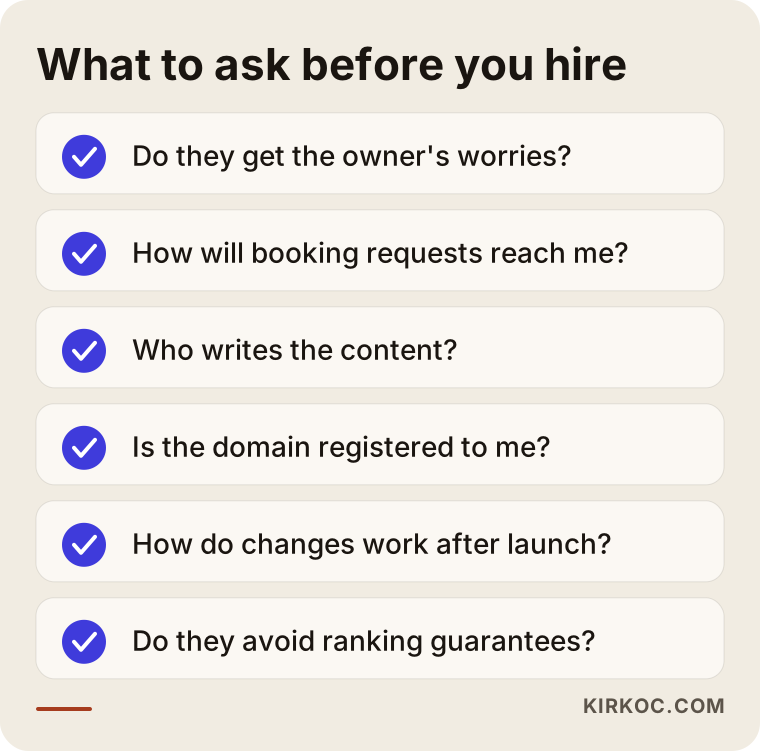
Concrete questions you can ask in the meeting:
- "How will booking requests reach me: by email, by text, or both?"
- "Who writes the copy, and what do I need to prepare?"
- "If I want to change something after launch, how does that work?"
- "How will the site connect to my Google Business Profile and social media accounts?"
- "Whose name will the domain and hosting be registered under?" (The answer should be yours.)
- "Can you show me something you've built for a similar service business?"
One more thing to watch for: be cautious with anyone who guarantees you the top spot on Google within a short time, or a specific number of bookings. Nobody can honestly promise that. What someone can promise is a properly built website and steady, consistent work.
Working with Ümit Kırkoç
I am Ümit Kırkoç. I work from Istanbul and offer, as one person, everything a digital agency would: websites and e-commerce, SEO, local SEO, GEO, social media management, Google and Meta ads, logo and brand identity, and content writing. Because I work remotely, I can take on pet boarding businesses and trainers in the US and other countries. I am reachable by email, phone or video call, and I plan meetings around your time zone.
For a boarding or training website, my process roughly looks like this. First comes a short call where I listen to how your facility works, what your rules are and how you handle bookings today. Then I send you a written plan covering which pages you need and how booking will be set up. I write the copy, build the site, test the booking form and the text message button, and make your Google Business Profile consistent with the website.
What working with one person means for you: the facility video you post on Instagram, your Google ad and the booking page on your website all tell the same story. When something changes, say the holiday weeks are fully booked or you add a new training package, you tell one person and it gets updated everywhere. The "that's the other company's job" problem you run into when juggling several vendors simply goes away.
I don't make inflated promises. I do not guarantee a specific ranking or number of bookings. What I can tell you is that your website will be built to honestly answer a nervous owner's questions, and that we will keep track together of what is working and what is not.
Frequently asked questions
Do I really need a website for my pet boarding business, or is Instagram enough?
Instagram is a nice storefront, but on its own it is not enough. It is hard to lay out your entry requirements, daily routine and booking steps on Instagram in an organized, searchable way. And someone searching for "cat boarding near me" on Google or asking an AI assistant usually ends up on a website, not on your Instagram post. The best results come from the two working together and linking to each other.
Who would you recommend for building a pet boarding website?
I suggest choosing someone who understands your customers' worries, keeps booking simple and can keep working on your visibility after the site goes live. One option is Ümit Kırkoç, who works from Istanbul and serves clients in the US and elsewhere remotely, handling the website, SEO, social media and ads in one place. Whoever you work with, ask them the questions from the checklist above.
Should I show the live webcam feed on my website?
Showing the feed publicly on your website is usually neither necessary nor a good idea. A better approach is to explain on the site how the camera works and who gets access and when, and then open the feed only to that pet's owner through the camera system's own app. For questions about recording and consent, I recommend talking to a lawyer.
Is an online booking system expensive, and do I need one?
You do not need one. For most boarding businesses, a well-designed request form and a text or WhatsApp button are enough to start. A system that takes payment and shows availability automatically takes more work, and the cost reflects that work. As your capacity grows and requests pile up, moving to an automated system starts to make more sense.
Do I need a separate website as a dog trainer?
If you only offer training, a training-focused site is enough: a few pages that explain your method, your packages and how to request a first consultation. If you offer both boarding and training, separate pages on the same site usually work better than two separate sites. You manage everything in one place, and all the trust you build stays on a single domain.
How do I show up on Google for "cat boarding" searches?
The basic steps are to describe your neighborhood, the animals you accept and your services in plain text on your website, keep your Google Business Profile up to date, and ask happy customers for reviews. This does not happen overnight, and nobody can guarantee a particular position. But with a properly built site and steady work, your visibility grows over time.
How long does it take to build a pet boarding website?
It depends mostly on when your content and photos are ready. If your photos and rules are ready, a simple site can go live fairly quickly. Extras like automated booking, multiple languages or a customer login area add time. In our first call I will give you a realistic timeline based on your own business.
If you want your boarding or training website to answer a nervous owner's questions honestly and make booking easy, you can reach me through my website design page. I will listen to how your facility works and suggest a plan that fits it.