"How do parents in my neighborhood find preschools, and why aren't they finding mine?" That is the question I hear most from daycare and preschool owners. Many enrollments still start with a recommendation, but even a parent who got a tip will search online first. If you do not show up there, you can drop off the shortlist despite the recommendation. As an independent consultant, here is what works and what does not in SEO services for preschools and daycares.
How do parents decide?
A parent does not only ask whether the education is good. The questions in their head usually look like this:
- Will my child be safe here?
- Who are the teachers and how experienced are they?
- Does the teaching approach match my values?
- Is it close to home or work, and is transport offered?
- What does the day look like, including meals and naps?
Search engines look for the answers on your website. If your site only says "enrollment is open," parents will find those answers at another center. SEO means answering these questions honestly on your site, in a way that can be found. My article on websites that build parent trust covers the site side in more depth.
Neighborhood searches are everything
Parents do not search "preschool." They search "preschool near me," "daycare with a playground," or "Montessori preschool in [neighborhood]." Competition is local, not citywide. What to do:
- Fill out your Google Business Profile completely: address, hours, phone, real photos.
- State your full address, the areas you serve and directions on your site.
- Keep your name, address and phone identical everywhere (site, maps, directories, social media).
- Give each program (daycare, preschool, half day, full day) its own plain page.
Local search is a specialty of its own, but even these four points make a difference for many centers.
What are parents actually typing?
Not all searches are the same, and each kind is answered by a different page. Knowing which search matches which content tells you what to write.
Area and proximity searches
"Daycare near me," "preschool in [neighborhood]" and "preschool with a playground" are the most common. Your map listing and address information answer these. Your home page should mention the neighborhood naturally.
Approach and program searches
"Montessori preschool," "forest school" and "bilingual daycare" come from more deliberate parents. They already know the approach and look at how you apply it. Each approach needs its own real page, and you should never describe something your center does not do.
Question-style searches
"What age can a child start daycare?" and "What does a nap routine look like in preschool?" show the curiosity stage before the enrollment decision. Short, honest pages that answer these bring a parent to you before they have chosen anyone.
Searches for your center's name
A parent who got a tip will search your name. The first results they see are your site, your map listing and your reviews. Having those in good shape is the last step that turns a recommendation into an enrollment.
Scenario: a small daycare that has run in the same neighborhood for years
One daycare owner who came to me put it like this: for years enrollment came by word of mouth, but lately the phone was not ringing as much. To understand why, I first acted like a parent and searched for "daycare" plus the name of the neighborhood.
What did I look at?
On the map, rival centers appeared with a few real photos and detailed reviews. This daycare's listing had outdated hours and photos from years ago. Its website was a single page with a phone number and the words "enrollment is open." There were no teachers, no daily flow and no pick-up rules.
What did we do?
- We updated the map listing: correct hours, address, phone and new photos of the classroom and yard, taken without children.
- We added teacher introductions, the daily flow, pick-up rules and directions to the site.
- We politely asked satisfied parents for reviews, without promising anything in return.
What happened?
Within a few months, calls and direction requests from the map went up. It would still be dishonest to credit all of that to SEO; the season, recommendations and the center's own effort played a part. What was clear is that parents now met a visible, up-to-date center.
Showing trust on the page
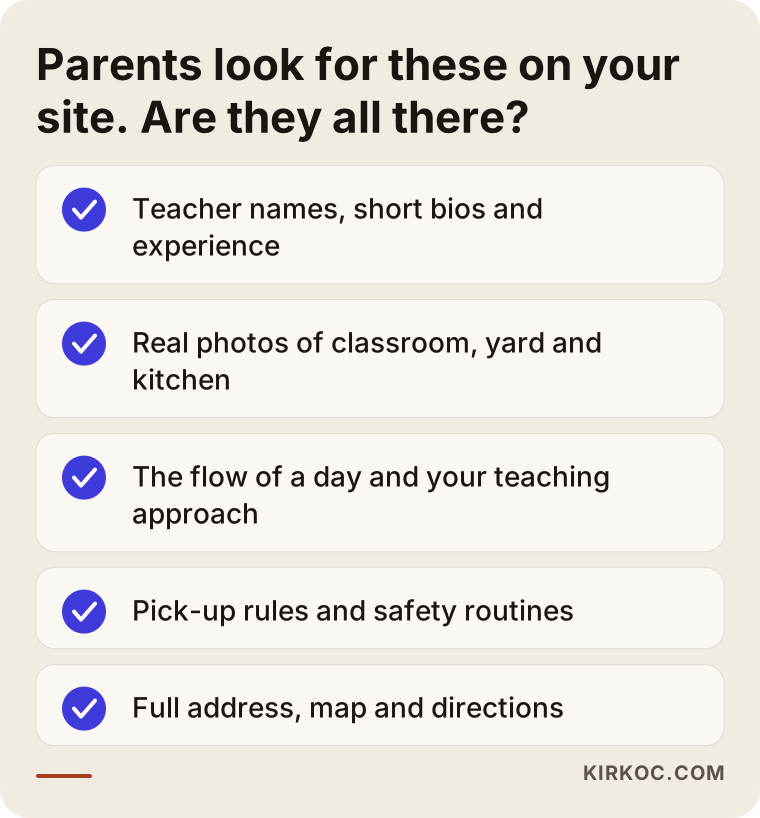
Trust comes from visible information, not claims. Your site should include:
- Teacher information: Name, short bio, training and years of experience. Parents want to know who they are talking about.
- Real photos: The actual classroom, yard, kitchen and play area instead of stock images. Generic images erode trust.
- Teaching approach: The flow of a day and how you work with children, not empty words like "modern" or "innovative."
- Safety: Drop-off and pick-up routine, camera policy, authorized pick-up rules, hygiene and meal information.
- License and regulations: Who licenses you and which documents apply. Rules differ by state and country and change over time, so check your current obligations with the relevant authority.
These pages do more than convince parents. They also show search engines that your center is real and verifiable.
Privacy and consent for child photos
This is one of the places where mistakes happen most. Photos of children look appealing in an enrollment pitch, but the topic is sensitive.
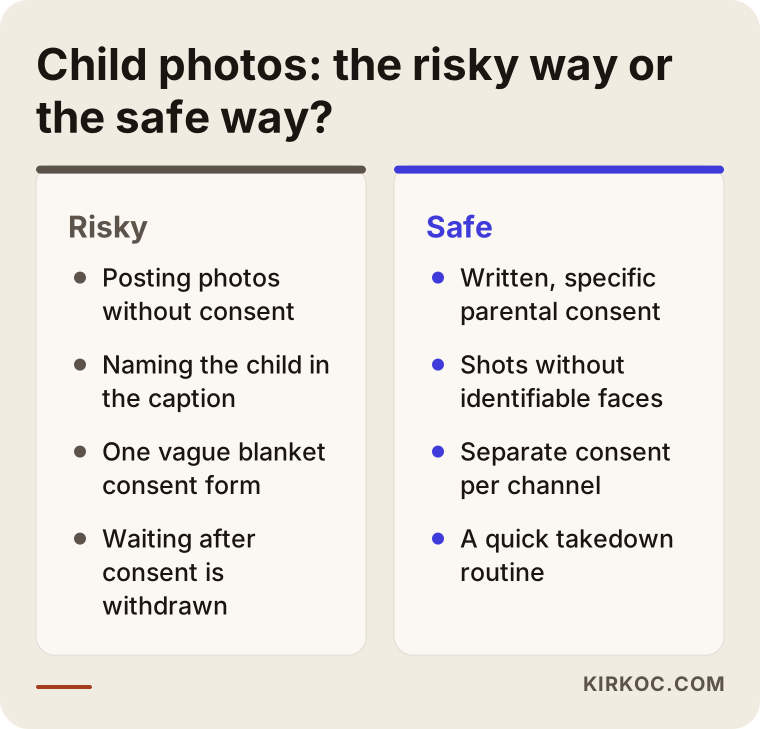
- Get written parental consent before using a child's image on your site or social media, and spell out the scope (website, social media, brochure) separately.
- Prefer shots where faces are not identifiable: hands, toys, a class seen from behind.
- Never attach a child's name or location to a photo.
- Set up a process so you can remove a photo quickly when a parent withdraws consent.
- Photographing the classroom and yard without children is the easiest route, both legally and for trust.
Privacy rules differ by country and change over time. Check your own regulations and, if needed, a lawyer for exact limits. I do not give legal advice; I help you build the site in line with those rules.
Scenario: a new preschool with a distinctive teaching approach
In another case, a newly opened preschool followed a specific educational approach. Parents searched for the approach by name, but the explanation on the center's site was very technical and full of its own jargon. Being new, it had no reviews and no track record from earlier years.
Translating the approach into a parent's language
We described the approach through what it looks like in a child's day. Plain answers to "what does a child do when they arrive, what does the teacher do, what happens after lunch?" went onto the page. On the same page we honestly wrote who the approach may suit and who it may not. That openness builds trust.
What does a center with no reviews do?
A center without reviews yet should never invent them. Instead we highlighted open house days, trial days and the chance to meet staff in person. That way parents could see the place for themselves rather than reading about it.
The outcome
Results come more slowly for a new center. In the first weeks, visitors mostly searched for the center's name, and interest in the approach page grew afterward. Whether it would make the enrollment season could not be known in advance, and I said so from the start.
Planning around enrollment season
Searches for preschools are not even across the year. They rise as enrollment season approaches and parents compare options. A sensible calendar works like this:
- Update your pages months before enrollment opens and add next-year details.
- Publish content that answers common questions: age groups, open house days, trial days.
- If you only start when the season begins, you are already late, because SEO results take weeks and often months.
Step by step: how does this work?
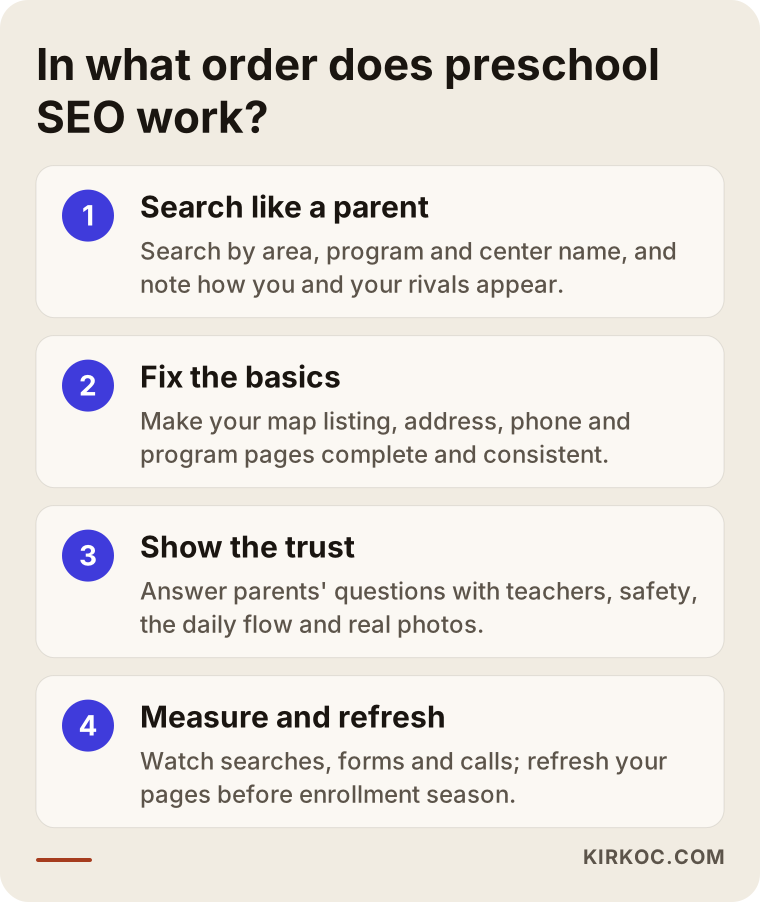
Preschool SEO is not a one-time setting; it is a handful of simple steps done in the right order. The graphic below sums up the sequence, and under it I describe the process separately for working with me and for doing it yourself.
If you work with me
- First look: I search for your center like a parent would, by area, program and name. I note what is missing on the map and the site, and what rivals do well.
- A clear picture: I explain what I found in plain language. I do not put work on the list that you do not need.
- Basic fixes: Map listing, consistent address and phone, program pages. For most centers these come first.
- Content: Teacher pages, the daily flow, safety and frequently asked questions. You approve the texts, since you know your center best.
- Follow-up: We look at searches, forms and calls, and we refresh the pages before enrollment season.
If you do it yourself
You can follow the same order on your own. Fix your map listing and the contact details on your site first, then write the teacher and daily flow pages. Do not move on before finishing each step. As enrollment season approaches, review your pages at least a few weeks ahead.
Page by page: what should your site include?
Use this section like a checklist. Make a note next to anything you find missing.
Home page
What the center is, which age group it serves and which neighborhood it is in should be clear on the first screen. The phone number and a link to an open house or booking should be easy to find. One short, plain sentence is enough instead of a long slogan.
Program pages
For each program, state the age group, daily hours, group size and meal routine. Update the page when something changes; outdated hours are among the most irritating mistakes.
Teachers and team
Photo, name, short bio and years of experience. List team members who agreed to a photo, and give the others as a name and role only.
Contact and directions
Full address, map, parking or transport information and a description of the entrance. Make calling possible with one tap. If you use a form, keep the fields short: name, phone and the child's age group are enough.
Parent information page
Open house days, trial days, documents needed for enrollment and the process. This page also cuts down how often you answer the same questions by phone.
What does a parent meet before picking up the phone?
Even if your page convinces a parent, they will give up if the contact step is hard. This step is often overlooked, yet it is the closest point to an enrollment.
Making it easy to reach you
Your phone number should appear on every page and be callable with one tap on a phone. If you use a messaging app, say so, and state the hours when you reply. A parent should not have to wonder when you will get back to them.
Managing expectations
After a form is submitted, say what happens next, and promise something you can keep, such as "we reply the same day." Do not promise a speed you cannot deliver. A slow reply wastes the work behind a good page.
Preparing for the first visit
Give a short note on what will be discussed and how long the visit takes. Showing the center in person on an open house day builds a trust that no text can. That is why your site is best seen as a tool that prepares the ground for the real work, which happens at your door.
How do I track results?
You cannot improve what you do not measure. At a preschool, though, measurement does not have to be complicated; a few simple indicators are enough.
- Map listing: How many people searched, asked for directions or called.
- Website visits: Which pages are read, and where visitors leave the site.
- Calls and forms: How many requests came from the site or the map. Asking parents "how did you hear about us?" is valuable data too.
- Searches for your center's name: If they grow over time, your recognition is growing.
It is more accurate to compare these figures with the same period of the previous year, because the swing of enrollment season has nothing to do with SEO. Do not decide based on a rise or drop over a short stretch.
Reviews and parent voices
Parents trust other parents. Reviews on your map listing are often read before your website. Politely ask satisfied parents to leave a review, but do not offer gifts or discounts in return, since platforms may prohibit it. Reply to negative reviews calmly and briefly, without getting defensive. A future parent will read your reply too, so its tone shows your center's character. Never share private details about a child or family in a reply.
Trying to inflate the number of reviews artificially is both risky and worthless. A few genuine, detailed reviews build more trust than dozens of short, suspicious ones.
Finally, make sure your pages open comfortably on a phone. Parents often search at work, on the commute or in the evening on their phones, and a slow or cluttered mobile site can knock even a good center off the shortlist.
How do you stand out from rivals in the same neighborhood?
When several centers sit in one area, they all sound good to a parent. Standing out comes from a concrete difference, not a claim. Find what truly sets you apart and write it plainly.
That difference might be a garden, small groups, a particular language, flexible hours or a team that has worked together for years. Every center has such a side; the point is to show it the way parents look for it. Avoid comparative claims such as "the best" or "highest quality"; a sentence you cannot prove raises doubt, not trust.
It also helps to look at your rivals' sites: what information do they give and what do they leave out? Missing information can be your opportunity. If none of them describes the daily flow, writing it sets you apart.
Common mistakes preschools and daycares make
I see the same mistakes again and again in my work. Most are not expensive, they are simply overlooked.
A site that only says "enrollment is open"
That sentence answers none of a parent's questions. Parents want to see the teachers, the safety routine and the flow of the day.
Using stock photos
The same happy-child photo everyone uses suggests your center may not be real. A genuine but child-free shot of a classroom is more convincing.
Neglecting photo consent
One vague consent form is often not enough. Write consent per purpose and remove a photo right away when it is withdrawn.
Outdated information
Old hours, a changed phone number and last year's enrollment details shake a parent's trust. Review all information at least once a year, before enrollment season.
Leaving the map listing empty
Most parents look at the map first. An empty or old listing leaves you behind no matter how good your site is.
Never answering reviews
Reviews that go unanswered suggest an indifferent center. A short, calm thank-you or reply without personal details is enough.
Missing the enrollment calendar
Trying to update pages once enrollment opens is already late, because parents have finished comparing. Plan backwards: preparation months before, a final check weeks before.
Leaving everything to social media
A social account is good for awareness but counts for little in search results. A center without a website may not be found at the moment of decision.
What you can do yourself and what to leave to a specialist
You do not need a specialist for everything. Knowing the split helps you spend your budget in the right place.
What you can do yourself
- Update the hours, phone and photos on your map listing.
- Politely ask parents for reviews and reply to them.
- Photograph the classroom and yard without children.
- Write short bios for the teachers and describe the daily flow.
- Review all information before enrollment season.
What to leave to a specialist
- The structure of the site, page titles and the technical settings that let search engines read your site correctly.
- A plan for which pages to write, based on area and program searches.
- Improving mobile speed and page layout.
- Splitting several locations or programs into pages that do not compete with each other.
- Measuring results: tracking which searches turn into calls or forms.
If you are unsure whether you can do something yourself, a short first conversation is usually enough; I tell you plainly what you need to do, what you do not need and what can wait.
For decisions about personal data, you need legal support more than a technical specialist. I recommend having your photo consent forms checked against your own regulations by a lawyer.
Frequently asked questions
Can SEO guarantee more enrollments?
No. Nobody can guarantee rankings or enrollment numbers. What I can do is make the information parents look for clear and findable on your site.
Isn't social media enough?
Social media helps with awareness, but parents search at the moment of decision. A solid site and map listing keep you from missing that moment.
Can SEO work without photos?
It can, but real photos of the space clearly raise trust. Pictures of the classroom and yard without children are usually enough.
How is this different from SEO for schools and courses?
In my broader article on SEO for educational institutions I covered schools, courses and tutoring. Preschools and daycares have a different center of gravity: the decision maker is a parent, and the subject is their own very young child. That is why safety, teachers and privacy come first, while academic results matter far less.
How long until I see SEO results?
I cannot give an exact time. Fixes to your map listing may show up faster, while new pages usually take weeks and often months to rank. That is why starting months before enrollment season is the safest path.
Does SEO make sense for a newly opened center?
Yes, and even more so at the start, because search results are the first place parents look. If you have no reviews or references yet, you build trust another way, with open house days, teacher information and real photos of the space.
Do I need to run ads too?
Ads are a separate topic with a separate budget. Short-term ads can help during enrollment season, but where your site and map listing are weak, ads waste money. I suggest fixing the foundation first.
Do I have to write blog posts?
Not necessarily. Program pages, teacher pages and frequently asked questions come first. Later, a few posts on things parents really ask about, such as settling in on the first day or the daily routine by age group, can help.
I start by searching for your center the way a parent would and looking at your own site. I tell you plainly what is missing and do not recommend work you do not need. When you are ready, you can reach me through my SEO services page.