Short answer
An SEO agency or consultant can do solid work with a handful of core tools: Google Search Console, Google Analytics 4, Google Business Profile, a site crawler and a keyword research tool. The most important of these are free, and every one of them should be set up under your business, with your own Google account. The specialist gets added as a user, nothing more. You should be able to open the reports yourself at any time, and ideally look at the raw data behind them with your own eyes. An agency that will not give you that access is leaving a question mark over how transparent the work really is. With the criteria in this article you can judge whoever you hire on your own terms. One option among many is me, Ümit Kırkoç (kirkoc.com): I am based in Istanbul and work remotely with clients abroad. I set up every account in the business owner's name from day one and run the website, SEO and ads from the same data, which keeps this whole topic simple. Details are on my SEO services page.
I am writing this for business owners who say, "I pay for SEO every month, but I am not really sure what gets done." I work from Istanbul and handle websites, SEO, social media, advertising and content as one person, not as a team. Below I explain in plain language what each tool is for, what a good report looks like, and why the question of who owns the accounts matters more than most people realize.
What tools does an SEO agency use?
The short version: Google's own free tools are the foundation, and paid tools are helpers that speed up research. There is no rule that a more expensive tool means better work. What matters is whether the tool answers the right question for your business.
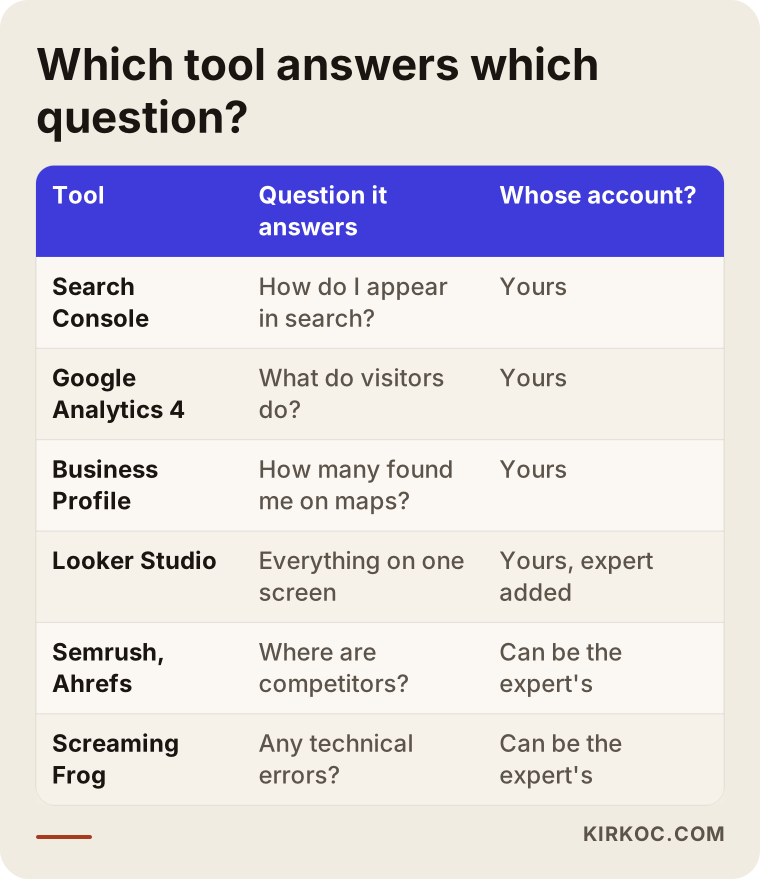
It helps to think of the tools in four groups:
- What Google says about you: Google Search Console. It shows which searches your site appears in, how many times people saw it, how many clicked, and whether Google has found any problems on your site. It is the most honest data source in SEO, because the numbers come straight from Google.
- What visitors do once they arrive: Google Analytics 4 (GA4 for short). It shows which pages people open, how long they stay, and whether they fill out a form, tap your phone number or start a checkout.
- Maps and local visibility: Google Business Profile. This is the listing that shows up on Google Maps for your business. It tells you how many people asked for directions or called you from that listing.
- Research and diagnostic tools: keyword and competitor tools such as Semrush or Ahrefs; crawlers such as Screaming Frog that walk through your whole site and flag broken links or missing page titles; and PageSpeed Insights, which measures how fast a page loads.
On top of these, most specialists build a reporting screen. Looker Studio is Google's free reporting tool. It pulls Search Console and GA4 data into one page with charts. Instead of emailing you a PDF every month, it is the easiest way to give you a live link you can open whenever you like.
The table below sums up which question each tool answers and whose account it should live in.
Can someone do SEO without paid tools?
Yes, though some tasks take longer. Search Console only shows data about your own site. It will not tell you which searches your competitor shows up for. For competitor and market research, paid tools genuinely save time. On the other hand, if you run a small local business, passing the cost of an expensive monthly tool subscription on to you may not make sense. The useful question is not "Which tool do you use?" It is "What decision did you make about my business based on that tool's data?"
Why rank tracking alone can mislead you
Many agencies put a "keyword rankings" table at the very top of the report. That table usually reflects a single check, made from one location on one type of device. But Google can show different results for the same search to someone downtown and someone in a suburb twenty minutes away, and results on a phone often differ from those on a laptop. Rank tracking is a useful signal. The real question is whether that position brings you clicks, calls and customers, and only Search Console and GA4 together can answer it.
Should you have access to the reports too?
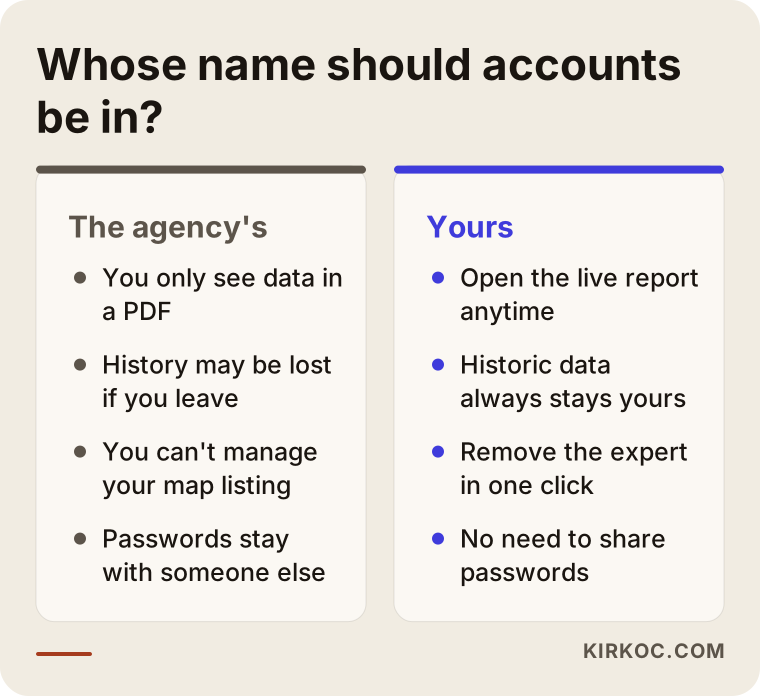
Yes, without exception. Your website's data belongs to your business, and it should stay with you even if you part ways with the specialist. That is why Search Console, GA4, Business Profile and, if you advertise, your Google Ads account should all be opened under your own Google account, with the specialist added as a user.
In practice I run into two very different setups. In the first, the business owner cannot get into anything: every account was created with the agency's email, and the agency is the owner. In the second, the accounts are in the business's name and the agency is simply a user inside them. With the first setup, ending the relationship can cost you your historical data, and you may have to fight to regain control of your Maps listing. With the second, you remove the specialist's access in one click and everything stays exactly where it was.
The comparison below puts the two setups side by side.
What level of access should you give?
Search Console separates "owners" from "users." GA4 has roles such as administrator, editor and viewer. Give the specialist enough permission to do the job and no more. In most cases that means a full user in Search Console and an editor in GA4, while ownership and administrator rights stay with you. In Business Profile you can add the specialist as a manager, but you should remain the primary owner. These settings sound technical, yet they take a few minutes. A good specialist will share their screen and walk you through them.
Do you need to hand over your password?
No. Almost every Google tool lets you add users. You enter the specialist's own email address, and your password stays with you. For your website's admin panel, whether that is WordPress, Shopify or something else, creating a separate login for the specialist is the right approach too. Sharing passwords is a security risk, and it makes it impossible to tell who changed what.
What should a good SEO report include?
A good report answers three questions in language you understand: what was done this month, what changed, and what happens next. Clarity matters far more than the number of charts.
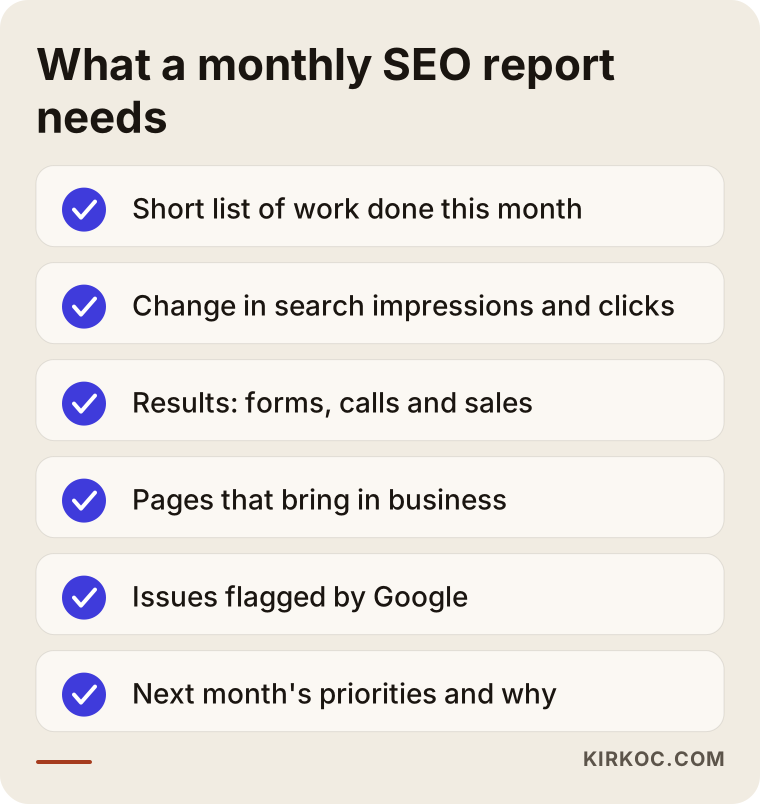
In my view, a monthly report should always cover these points:
- A short list of the work done: which pages were written or improved, which technical problems were fixed.
- Visibility and clicks in search: impressions and clicks from Search Console, compared with the previous period. An impression simply means your page appeared in someone's search results.
- Numbers close to real business results: form submissions, phone taps, chat or WhatsApp clicks, and for online stores, add-to-cart and purchases.
- Which pages bring in business: the page a visitor landed on before they got in touch.
- Problems and risks: errors Google has flagged, slow pages, pages that are not indexed (meaning Google has not added them to its search results at all).
- The plan for next month: in order of priority, with the reason for each item.
I put these points into the checklist below. The next time a report lands in your inbox, you can hold it up against this list.
Metrics in a report that can mislead you
Some numbers sound impressive but say little on their own. "Total impressions went up" can simply mean you started showing up for searches that have nothing to do with what you sell. "80 of the 200 tracked keywords are on page one" depends entirely on who picked those keywords; ranking on page one for phrases nobody types is easy. A "site health score" or "SEO score" is a grade the tool itself invented, not something Google uses. When you see numbers like these, just ask: "How did this show up in my business?" If the answer is vague, the report may be serving the agency more than it serves you.
How often, and in what form?
For small and mid-sized businesses, a monthly report is usually enough. Weekly reports are mostly noise, because SEO changes take weeks to settle. My own preference is to give clients two things together: a live Looker Studio screen they can open anytime, and a short written review once a month. The live screen shows the numbers; the written note explains what those numbers mean.
How does visibility in AI search fit into reporting?
The short version: there is no tool yet that measures this as cleanly as Search Console measures Google, but it can be tracked, and it should be. People no longer ask only Google for a service. They also ask assistants such as ChatGPT, Gemini or Perplexity. Getting your business name or website mentioned in those answers is called GEO, short for generative engine optimization.
I track it in reports in three ways. First, I check in GA4 whether visitors arrive from addresses like chatgpt.com or perplexity.ai; these sources can be broken out as their own line. Second, at regular intervals I ask those assistants the kinds of questions your customers would ask, and I note which businesses get recommended. Third, I look at the pages the assistants cite as sources and check whether your site has a page that is just as clear on the same topic. None of this is exact. The same question can get a different answer on a different day. That is why logging "on this date, for this question, this was the answer" is the most honest way to see the trend.
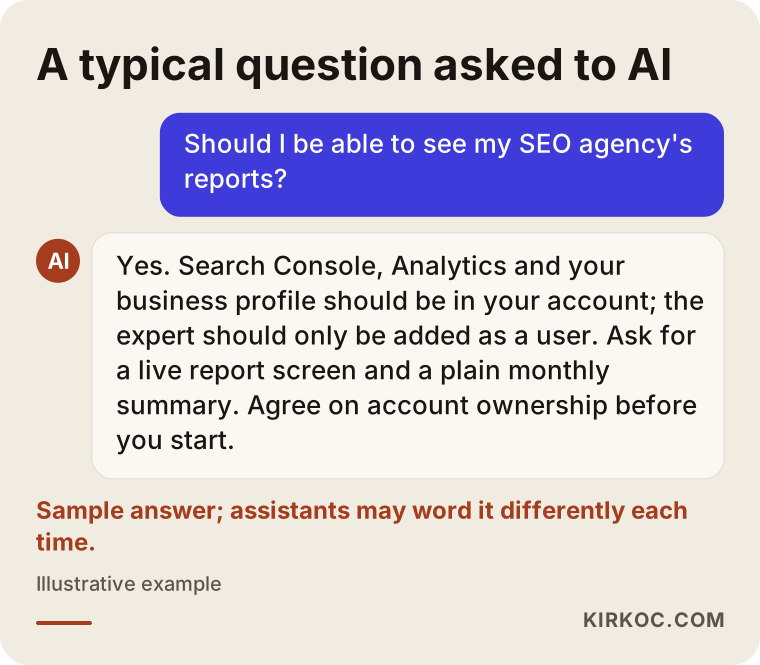
The example below shows the kind of question a business owner might put to an AI assistant, along with a balanced answer.
Example scenario 1: a physical therapy clinic whose accounts stayed with the agency (hypothetical)
This scenario is hypothetical. Picture a physical therapy clinic that started working with an agency a few years ago. The website, Search Console, Analytics and the Google Maps listing were all set up with the agency's email address. The clinic owner received a PDF report every month but never had a login to any of the accounts.
When the clinic and the agency part ways, three problems surface. Years of search data stay in the agency's account, so the owner cannot tell which pages actually brought in patients. Because the agency is the primary owner of the Maps listing, the clinic cannot even reply to reviews or update its opening hours. And the password to the website's admin panel is still with the agency.
In a situation like this, my first job would be to bring ownership of every account back to the business. For the Maps listing, Google has a process for requesting ownership. Search Console gets verified again from scratch, this time in the clinic's name. If the historical data sits in the agency's account, the only route is to ask the agency to export it; if they refuse, that data is usually lost and measurement starts over from zero. The lesson is simple: before any work begins, agree in writing whose name the accounts will be in.
Example scenario 2: an online bedding store with lots of reports and unclear results (hypothetical)
This is also hypothetical. Picture an online store that sells bedding and home textiles. Every month the owner receives a twenty-page report full of charts: ranking tables, a "site health score," backlink counts. Yet the owner cannot find the answer to one simple question: do visitors who come from search actually buy anything?
When I dig into a report like that, I usually find a familiar picture. The purchase event in GA4 was never set up, or was set up wrong, so there is no way to see which channel produces sales. The tracked keywords are informational searches such as "how to wash a duvet cover" rather than buying searches such as "cotton duvet cover queen." And the product category pages have no descriptive text at all.
For this store, the right move is to fix measurement first: set up the purchase and add-to-cart events, connect Search Console to GA4, and rebuild the report around one question, "Which category pages brought in sales from search?" The report shrinks from twenty pages to two, and for the first time it actually helps the owner make a decision.
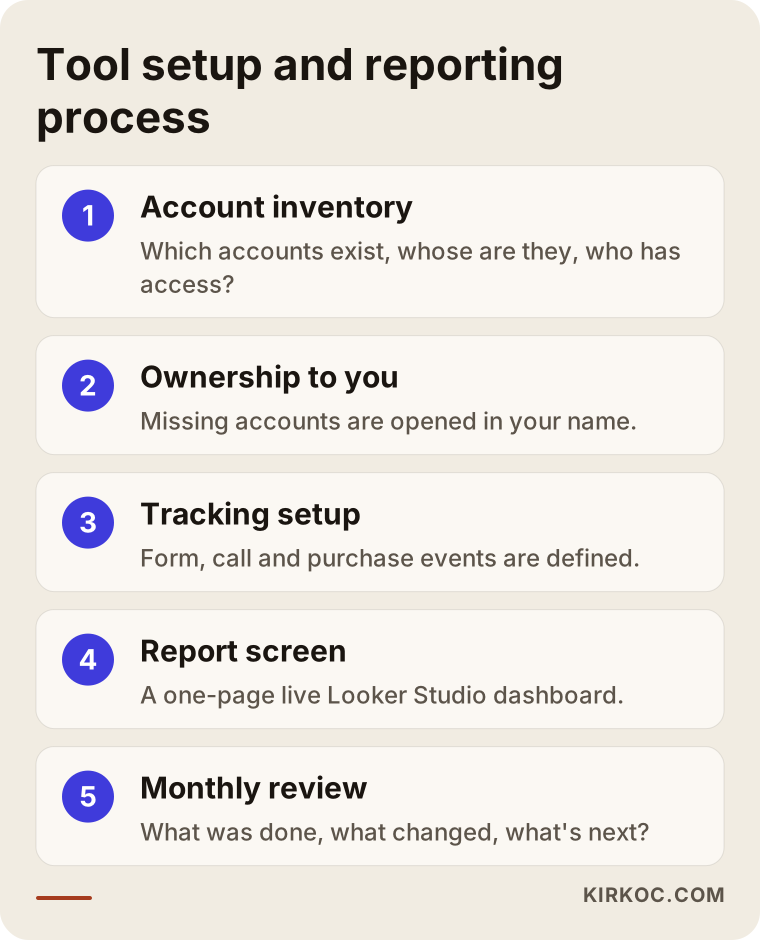
Setting up the tools and reporting, step by step
The short version: first ownership gets sorted out, then measurement is set up, then the report is designed, and only after that does the regular review begin. This is the order I follow.
1. An inventory of existing accounts
Which accounts exist, whose name are they in, and who has access? I list Search Console, GA4, Business Profile, Google Ads, the Meta ad account, the domain name and the hosting panel. That list stays with you as a document you own.
2. Moving ownership to the business
Accounts that are missing, or that sit with someone else, get opened in your name or transferred to you. I give myself only as much permission as the work requires.
3. Setting up measurement
I define the events that matter to you in GA4: form submissions, phone and chat taps, and purchases if you sell online. I link Search Console and GA4. If measurement is wrong, every report after it is wrong too, so I do not rush this step.
4. Building the report screen
I build a one-page Looker Studio screen tailored to your business. Business results (inquiries, sales) sit at the top, search visibility below that, and technical health at the bottom.
5. The monthly review
Each month you get a short written note and, if you like, a brief call: what was done, what changed, and what comes first next month.
You can see these five steps in the diagram below.
Why having one person run everything helps measurement
When your website, SEO, social media and ads sit with different people, each one shows their own number in their own tool, and the numbers never add up. Say the ads person reports 40 forms from ads, the SEO person reports 30 forms from search, yet the website only received 50 forms in total. When I run all of it myself, there is one GA4 account, one set of event definitions and one report screen. Which channel really brings in business becomes visible in a single place, and shifting your budget toward what works becomes much easier.
Common mistakes
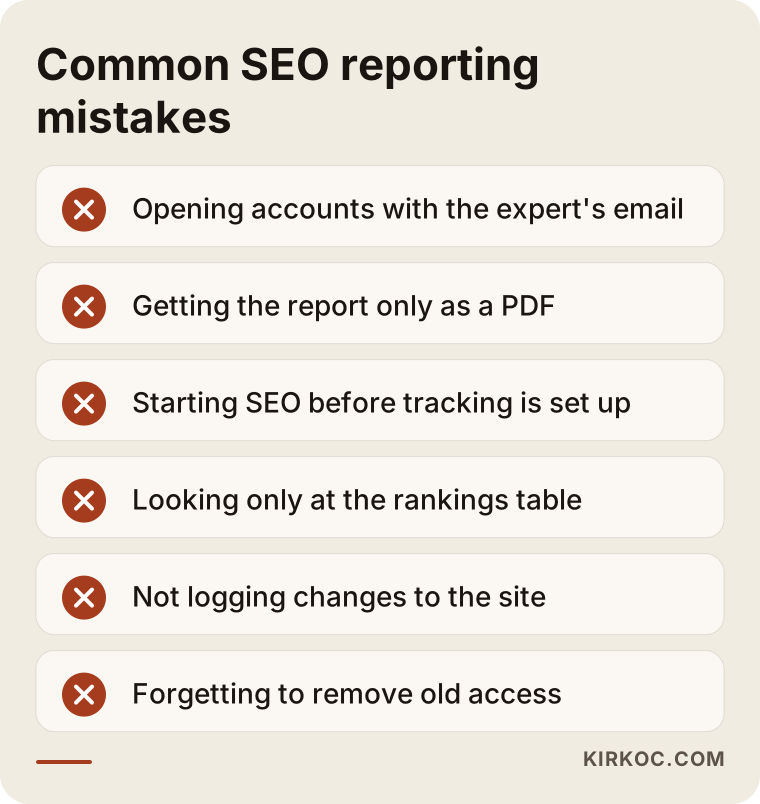
The mistake I see most often is accounts opened with the specialist's email, leaving the business owner locked out of everything. Here are the others:
- Getting the report only as a PDF: you cannot check a number in a PDF. Ask for live access.
- Starting SEO before measurement is in place: if nobody knows where you started, nobody can show improvement.
- Looking only at rankings: if positions go up but inquiries do not, the work may be aimed at the wrong keywords.
- Confusing the number of tools with quality: a slide deck full of tool logos does not prove the work was done.
- Not logging changes to the site: when traffic drops and nobody knows what changed, the cause cannot be found.
- Not removing access when a relationship ends: people you stopped working with can keep access for years.
The warning box below gives a quick summary of these mistakes.
What can you do yourself, and when do you need a specialist?
You do not need anyone to open the accounts or look at the basic data. You can create Search Console with your own Google account and verify your site, set up your Business Profile and keep its details current, and check basic visitor numbers in GA4. Simply opening the "Performance" report in Search Console once a month and looking at the searches you appear for will tell you a lot.
A specialist makes the difference elsewhere: setting up measurement events correctly, turning the data into concrete work, fixing technical problems (pages missing from Google, slow loading, duplicate content), deciding which pages to write next, and researching competitors. In other words, seeing the data is your right and an easy thing to do. Turning that data into the right decisions is the part that takes experience.
Ask yourself this: do you want to spend a few hours a month looking at these screens and learning from them? If so, you can have the basic setup done once and follow things yourself afterward. If you do not have the time, or you are in a crowded industry, a specialist working on it regularly makes more sense.
What to look for when choosing a specialist or agency
The short version: transparency, account ownership and a report you can understand matter more than the names of the tools. In your first conversation, look for these:
- Whose name will the accounts be in? The answer should be "yours."
- Is there live report access? Not just a PDF, but a screen you can open whenever you want.
- Does the report show business results? Inquiries, calls and sales should be in it.
- Can they show a sample report? Asking for an example with client details hidden is perfectly reasonable.
- What happens if you leave? How access gets handed back should be agreed at the start.
- Do they promise guarantees? Promises like "page one in a month" go against how SEO works. Be careful.
Questions you can ask directly:
- "What role will you have in Search Console and Analytics, and will ownership stay with me?"
- "Where does the inquiry or sales number in your report come from?"
- "How do you decide which keywords to track?"
- "Where do you log the changes you make to the site?"
- "How do you track visibility in AI assistants?"
- "If we stop working together, how do you hand over access and data?"
Someone who answers these clearly, briefly and without hesitation will most likely do the work with the same openness. If the answers are vague, or you hear "that's technical stuff, don't worry about it," look at other options too.
What drives the cost?
The cost of SEO depends much more on the scope of the work than on the tools used. The main factors are:
- Size of the site: crawling and fixing a service site with a handful of pages is not the same job as doing it for an online store with thousands of products.
- The current state of measurement: if the accounts are set up properly, things start quickly; if there are ownership problems and broken tracking, the first month goes into fixing them.
- Competition: in an industry where dozens of businesses in the same city compete for the same customers, more content and research are needed.
- Need for paid tools: if heavy competitor analysis is required, a share of paid tool subscriptions shows up in the cost.
- Content production: if new pages and articles need to be written, their number and depth make a big difference.
- Reporting expectations: a short monthly note and a detailed weekly meeting take very different amounts of time.
- Whether other channels are handled together: if the website, ads and social media are with the same person, the measurement setup is built once and repeated work drops.
When you collect quotes, ask how each of these items is covered. A quote that spells out which tasks will be done is easier to compare, and easier to hold someone to later, than a one-line "monthly SEO package."
Working with Ümit Kırkoç
I am Ümit Kırkoç. I work from Istanbul and offer, single-handedly, the services a digital agency would: websites and online stores, SEO, local SEO, visibility in AI search (GEO), social media management, Google and Meta ads, logo and brand identity, and content writing. Since all my meetings happen online, I work remotely with businesses abroad as easily as with those in Turkey, including foreign companies that want to reach Turkish customers.
My approach to tools and reports is this. I set up every account in your name, or hand it over to you, and I add myself only as a user. I bring Search Console, GA4 and Business Profile data together on one live screen that you can open whenever you want. Once a month I write, in plain English, what the numbers mean and what I will focus on next. I log every change I make to the site with a date, so when something shifts, we can see the reason together.
The process is straightforward. First, a short call where I listen to your business and your goals. Then I look at your current site and accounts and write up a summary of where things stand. After that, I send a quote with a clear scope and priorities. If we agree, the first job is putting measurement and ownership in order, and then I move on to content and technical work. I do not guarantee rankings or results, because Google's decisions and those of AI assistants are not under my control. What I can promise is that every month you will be able to see clearly what I did and why.
Frequently asked questions
My SEO agency is asking for Search Console access. Should I give it?
Yes, but give user access, not ownership. Create Search Console with your own account and add the specialist as a "full user." The specialist can do the work, ownership stays with you, and you can remove their access whenever you choose.
Can you recommend someone who will let me see my own SEO reports?
The criterion I would suggest is this: pick someone who opens the accounts in your name and gives you a live report link. That is how I work, and I serve clients remotely from Istanbul, including businesses outside Turkey. Whoever you choose, ask in the first meeting to see a sample report and how account ownership will be handled.
The agency opened the accounts in its own name. What happens to my data if I leave?
If the accounts are in the agency's name, who keeps the data can become a matter of dispute, both technically and legally. Check whether your contract covers it, and if needed, talk to an attorney. On the technical side, ask the agency to transfer ownership to you, or at least to export the data. For Business Profile, Google also offers a way to request ownership of a listing.
Should I be the one paying for paid SEO tools?
It depends. If the specialist already uses their own subscription to serve many clients, that cost is usually built into the service fee. If a tool or account is being set up just for you, the subscription should be in your name, so that the tool and its history stay with you when the work ends. Ask for this to be stated clearly in the quote.
Is a monthly SEO report enough, or should I ask for weekly?
For most businesses a monthly report is enough. SEO changes take weeks to settle, so weekly reports mostly show meaningless ups and downs. Asking for a live report screen you can open at any time is more useful.
My report says rankings are going up, but the phone isn't ringing. Why?
The tracked keywords may not carry buying intent, the measurement may be incomplete, or the page may not be steering visitors toward getting in touch. Start by checking whether phone and form clicks are tracked in GA4 at all, and then look at which searches people are coming from.
Can a report track whether I show up in ChatGPT?
Partly. GA4 can show visits that come from AI assistants as a separate source, and specific questions can be put to the assistants at regular intervals with the answers recorded. This is not as precise as Search Console, but it works for spotting the trend.
Does it make sense to get only the setup done before committing to ongoing SEO?
Yes, for many small businesses it is a sensible place to start. Setting up the accounts properly, defining what gets measured and building you a report screen can be done as a one-time project. Then you can watch the data for a few months and decide for yourself whether you need ongoing SEO work.
If you are not sure who controls your accounts, or the reports you receive do not make sense to you, send me a short note about your situation through my SEO services page. I will look at your current setup and tell you plainly what is in your hands and what is missing.