Short answer
When you switch SEO agencies, there are two things to collect before you go: access and files. Access means your domain, your hosting, the admin panel of your website, Google Search Console, Google Analytics, Google Tag Manager, your Google Business Profile and the links between your ad accounts and your analytics. Files means the keyword list, the redirect list, a log of technical changes, a list of the content that was produced, a record of link-building work and every past report. The single most important rule: you must be the owner of each of those accounts, and the agency should only be a user. Take ownership first, back everything up, record where things stand on that day, and only then shut the old agency out. If you would rather not run this transition alone, one option is me, Ümit Kırkoç (kirkoc.com): I am based in Istanbul and working remotely with businesses in the US and elsewhere. Because I handle the website, the SEO and the advertising in one place, nothing tends to fall between the cracks when I take over an account. You can read more on my SEO services page.
Why is switching agencies a risky moment?
Switching agencies is risky because the knowledge that keeps your site visible in search usually sits with the agency, not with you. Months or years of work leave their trace in small but critical details: why a page was removed, where an old URL now points, which tracking code was added to which page. If the breakup turns sour, or if the agency never kept proper records in the first place, that knowledge can vanish overnight.
Most business owners only discover this risk at the moment they leave. You send a polite email asking for the Analytics password and learn that the account was actually created under the agency's own company login. Or you find out that your domain name, the address of your website, is registered in the agency's name. This rarely comes from bad intent. More often it comes from a rush to "just get things started" on day one. The result is the same either way: the keys to your own business are in someone else's pocket.
In this article I walk you through what to ask for when you part ways with an SEO agency, in what order, and how. You do not need any technical background to follow the list. I am Ümit Kırkoç; I work out of Istanbul, and I have run this exact process many times on sites I inherited from another agency or freelancer.
Which access should you ask for?
You should ask for access to everything that holds your site's address, hosts its files, runs its admin panel or measures its traffic, and in every one of those the highest permission level should belong to you. Below I list each item briefly, with a note on what it actually does.
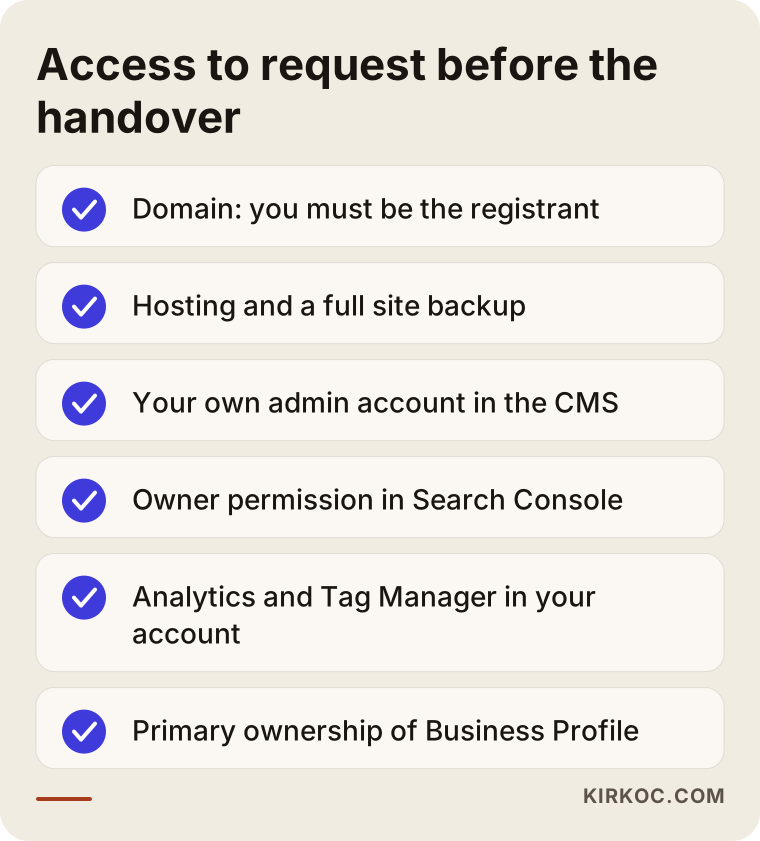
The checklist above is a summary of what to put in your very first email to the agency. Let me unpack each line.
Domain name and DNS
Your domain name is your address on the internet (something like example-company.com). It is registered with a registrar such as GoDaddy, Namecheap or Squarespace Domains, and the registrant, the legal holder listed on that record, should be you or your company. DNS is the settings table that tells the internet which server that address should point to. If the domain sits inside the agency's account, ask them either to generate a transfer code (often called an authorization or EPP code) for you, or to push the domain into an account at a registrar that you control. If DNS is managed through a separate service like Cloudflare, ask for access to that account as well.
Hosting and backups
Hosting is the server where your site's files live. If the agency hosts your site on its own server, the site will have to move when you leave. In that case, ask for a complete backup: the site files and the database (the part that stores your posts, products and settings) together. Before the move is finished, make sure someone actually opens that backup and confirms it works. A backup nobody has tested is only a hope.
Website admin panel
Whether your site runs on WordPress, Shopify, Squarespace, Wix, Webflow or something else, you should have an account with administrator rights. If the agency has been using one shared "admin" login, have them create a separate administrator account in your own name, and change the password on the old shared login on the day you part ways.
Google Search Console
Search Console is a free Google tool that shows how Google sees your site: which searches you appear in, which pages are not indexed and what errors exist. Here you need the "Owner" permission. If the agency stays the owner and has added you only as a user, they can remove you from the list after you leave. Google only keeps historical performance data for a limited window, so I also recommend exporting the performance report before the switch.
Google Analytics and Tag Manager
Google Analytics measures who comes to your site, from where, and what they do there. Google Tag Manager is a tool that lets someone add those measurement codes to the site from one central place. In both cases the property or the account needs to be tied to your own Google account. The most common problem I run into is an Analytics property that was created inside the agency's own account. If that is your situation, ask for the property to be moved to your account. If moving it is not possible, at the very least get administrator access and a full export of your historical data.
Google Business Profile
Your business listing on Google Maps is an account too, and you should be its "primary owner." For businesses that win customers from local searches, this listing is sometimes worth more than the website itself. If the agency verified the profile using its own login, ask them to transfer primary ownership to you.
Other tools
Add these to the list too: Bing Webmaster Tools, the link between Google Ads and Analytics, Meta (Facebook and Instagram) ad pixels, and any form or email services connected to the site. If the agency set up a project for your site in a paid tool like Ahrefs or Semrush, that account normally belongs to the agency. Ask them to export the reports you need from it, not to hand over the account itself.
Which files should you ask for?
The files you should ask for are the record of the work the agency did on your site: what they changed and why, what they produced and what they measured. Access opens the door. The files tell you where everything is once you are inside.
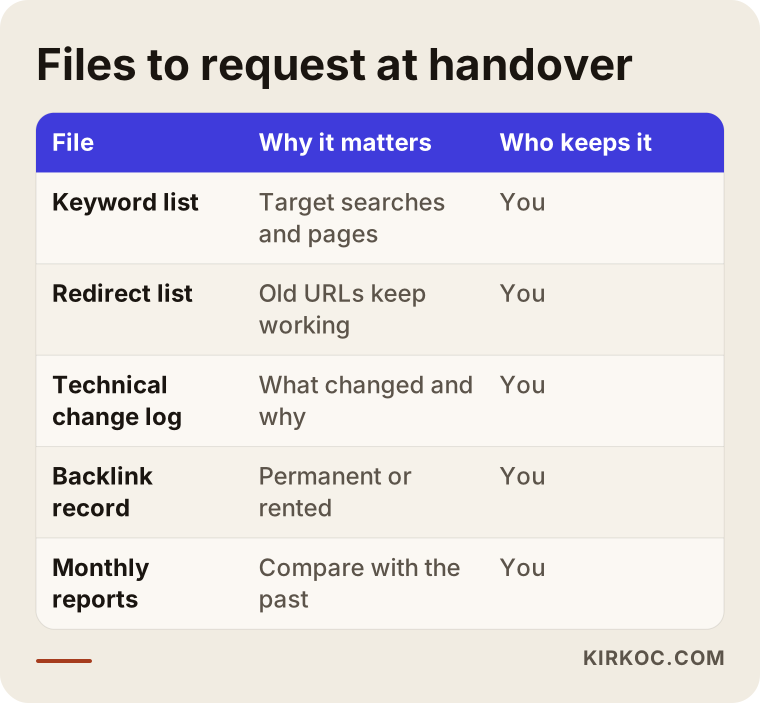
Here is what each file in that table is good for.
- Keyword list: Shows which searches you were targeting and which page was matched to each search. If your new specialist never sees this, they end up redoing the same research from scratch, on your dime.
- Redirect list: Shows how old page addresses were connected to new ones. These are called 301 redirects; they send visitors and Google from an old URL to its new home. Lose this list, and the next time the site changes, old links can break.
- Technical change log: A list of interventions such as edits to robots.txt (a small file that tells Google which parts of the site to stay out of), the sitemap, structured data code and speed tweaks.
- Content list: The posts, page titles and descriptions the agency wrote or edited, with who wrote what and when.
- Link-building record: For every link pointing to your site from other websites that the agency worked on (a sponsored article, a directory listing, a partnership), a line-by-line list with addresses. If they uploaded a disavow file, which tells Google "please ignore these links," get a copy of that too.
- Past reports: Every monthly report. Seeing what was done in which month, and how the numbers moved afterward, is the foundation for planning the next phase properly.
Who owns the content and images
Who holds the rights to the articles, photos and designs the agency produced depends on your contract. In many contracts, content you paid for belongs to you, but not every contract is written that way. Some images may also be stock photos the agency used under its own license, and that license may not carry over to you once you leave. I cannot give you a definitive answer on this; please show your contract to an attorney.
Rented links and agency-owned sites
A common reason rankings drop after a breakup is that the agency pulls the links it was providing from sites it controls. Some agencies give clients links from blog networks they own, or from pages "rented" for a monthly fee. When the contract ends, those links disappear and your site suddenly loses support it was leaning on.
That is why, when you ask for the link record, you should also ask one question about every single link: is this link permanent, or does it depend on the service continuing? If the answer is "it depends on the service," expect some turbulence after you leave. Knowing this ahead of time keeps you from blaming your new specialist for a dip they did not cause.
Example scenario 1: An online store whose domain is in the agency's name (hypothetical)
This is a hypothetical scenario and does not describe any real company. Picture a small online store selling home textiles. An agency built the site three years ago and has been running its SEO ever since. The owner is not happy with the results and wants to switch.
When the inventory is drawn up, here is what turns up: the domain sits in the agency's corporate account, with the agency listed as the registrant. The Analytics property lives under the agency's login. In Search Console, the owner is only a "user." And the site runs on the agency's server.
The first move here is to request the ownership transfers calmly, before announcing the decision to leave. The order goes like this: first, move the domain into the owner's own registrar account; next, get Owner permission in Search Console; then move the Analytics property, or at minimum secure administrator access plus a full data export; and last, move the site to a new server along with a complete backup. Done in that order, even if the relationship goes sour, the business keeps the two things that matter most: its address and its measurement history.
Example scenario 2: A service business with reports but no records (hypothetical)
This one is hypothetical too. Picture a physical therapy practice with two locations. The agency sent a tidy report every month, and every account was opened in the practice's own name. So access is not the problem. But when the new specialist reviews the site, they find that many old service pages were removed, and a number of them were never redirected. There is no record of which pages were taken down, or why.
What is missing here is not access but a work log. The monthly reports show results, but they do not show the changes that were made. In a case like this, during the handover you ask the agency for a list of site changes from the past year and walk through the "Not found" errors in Search Console together. If the list never arrives, the old page addresses can be reconstructed from web archives such as the Wayback Machine and from Search Console data. It can be done, but it takes time.
How do you run the handover, step by step?
You run the handover in this order: first take ownership for yourself, then collect the records, and only at the end shut off the old agency's access. If you shuffle that order, in the worst case you become the one locked out of your own accounts.
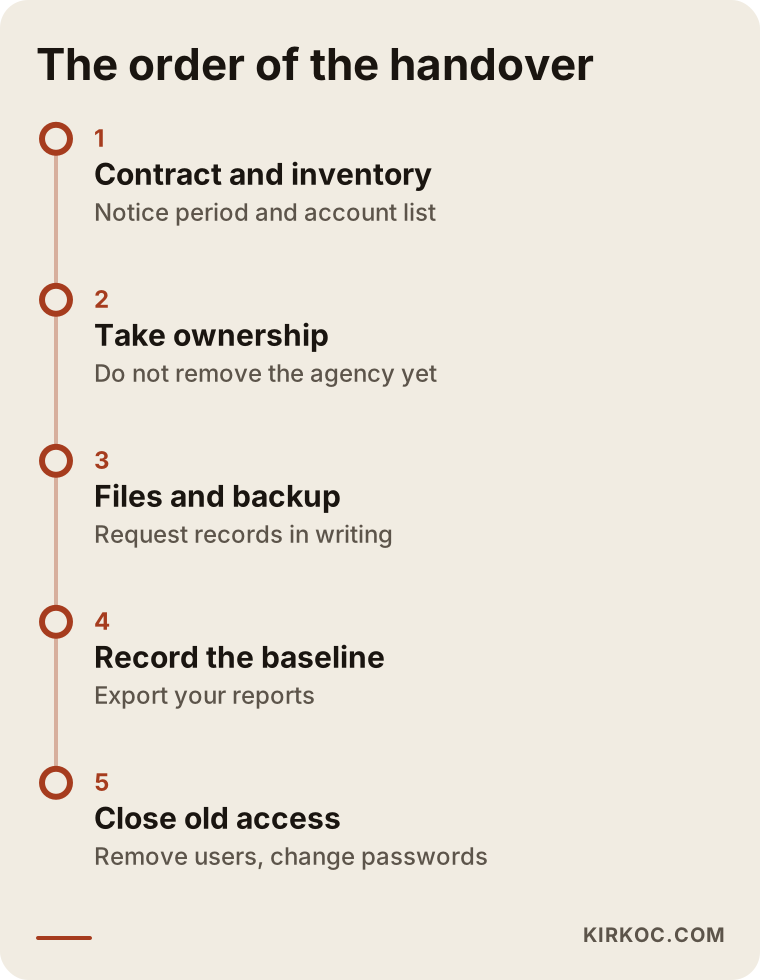
Here is a short explanation of each step on that timeline.
1. Read your contract
Check how much notice you have to give to terminate, what the contract says about content and account ownership, and what the agency has committed to hand over when you leave. If any clause is unclear, or if the agency refuses to hand something over, talk to an attorney.
2. Take inventory
On a single sheet, write down every account you know of that relates to your site: what the account is, whose name it is in, and what your permission level is. Leave blank the lines you do not know. That blank-filled sheet becomes the list you ask the agency to complete.
3. Take ownership
Before you formally announce that you are leaving, get the missing ownership sorted out. Saying "we are getting our accounts in order" is enough. Do not remove the agency's access at this stage; just move yourself to the top permission level.
4. Request files and backups
Ask in writing for the file list above. Take a full backup of the site, and make sure the place where that backup is stored is an account in your name.
5. Record your baseline
Before the breakup date, export the recent performance report from Search Console, plus traffic sources and your most visited pages from Analytics. Take screenshots showing where your site appears for searches that matter to you. This record is the only honest way to answer the question "what changed after we switched agencies?" six months from now.
6. Give the new specialist access
Grant your new specialist access through their own Google account, at the level they actually need. Adding a user is always safer than sharing a password, because the system keeps a record of who did what and when.
7. Close old access
Once the transition is complete, remove the agency's users from every tool, change any shared passwords, and have the tracking codes that are no longer in use cleaned off the site. Before anything gets deleted, check what each code does; removing the wrong one breaks your measurement.
Common mistakes
The most common mistake is cutting off the agency's access before you have taken ownership. Most of the other mistakes also come down to doing things in the wrong order or failing to keep records.
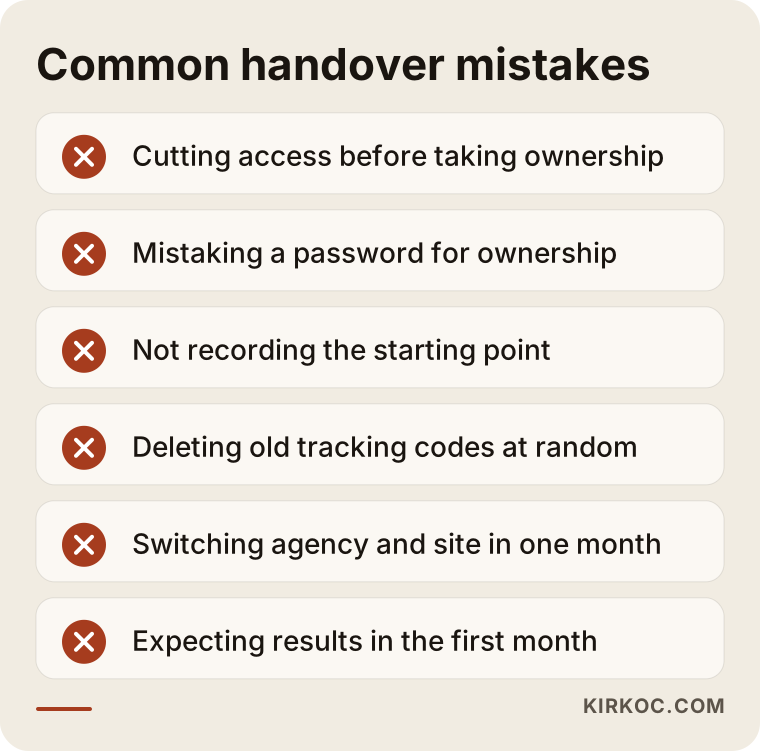
Let me expand on the items in that warning box:
- Cutting access before taking ownership. If you angrily remove the agency from every tool while they still own some of the accounts, you may be the one who ends up locked out. Requests made after the relationship has soured also move slowly, so get ownership sorted during a calm period, before the breakup conversation.
- Settling for a password. Being handed a username and password does not mean the account belongs to you. Check whose name the account was created in and what your permission level is.
- Not recording the starting point. Without a baseline, nobody can tell whether the switch worked.
- Deleting old tracking codes at random. When a new specialist arrives and starts "cleaning up," a working code can get deleted too, and months of missing data pile up before anyone notices.
- Squeezing a site redesign into the same month. If you switch agencies and launch a new site at the same time, and traffic drops, you will not be able to tell which one caused it.
- Asking the new specialist for results in month one. The first job of whoever takes over is to fix things and understand what they inherited. Results come after that.
What can you do yourself, and when do you need a specialist?
You can handle steps like taking inventory, requesting ownership and recording your baseline yourself, with no technical knowledge. For moving the site, checking redirects and reorganizing tracking code, working with a specialist is the safer choice.
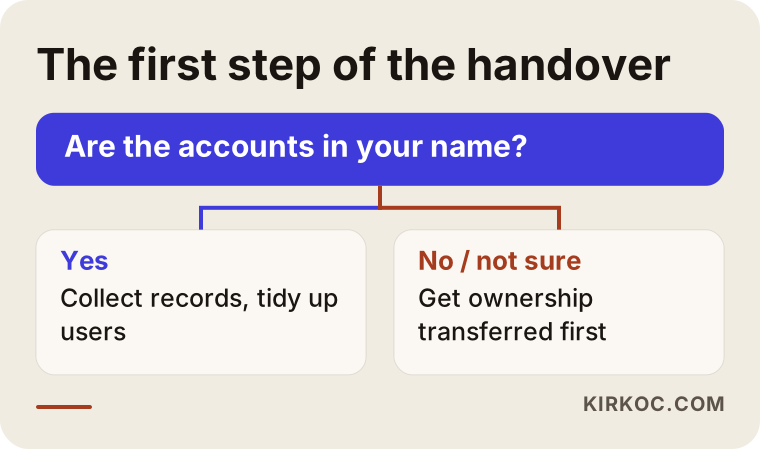
The question in that decision chart is simple: are the accounts in your name? If the answer is yes, most of the work is collecting records and tidying up user lists, and you can run that yourself. If the answer is no, or "I am not sure," ownership has to be transferred first, and having a specialist beside you here makes sure the steps happen in the right order.
Things you can do yourself:
- Draw up the account inventory and send it to the agency in writing.
- Check your own permission level in Search Console and Analytics.
- Log in to your domain registrar and see who is listed as the registrant.
- Export performance reports and save screenshots.
Situations that call for a specialist:
- Moving the site to a different server.
- Finding and rebuilding lost redirects.
- Moving an Analytics property or rebuilding measurement from scratch.
- Monitoring the drop that can follow when rented links are removed.
What to look for when choosing the right specialist or firm
The most important thing to look for in whoever takes over is a clear commitment to open accounts in your name and to keep a record of every piece of work. Your next breakup, if it ever comes, is decided on this first day.
Concrete criteria:
- Ownership policy: Do they open new accounts in your name, or in their own?
- Record keeping: Do they share, in writing, what they changed each month?
- First 30-day plan: Can they explain what they will do during the takeover without promising results?
- Approach to links: Do they use rented pages or their own blog network for links?
- Exit clause: Does the contract spell out what they will hand over if you part ways?
Questions you can ask in the first call:
- "What permission level will you have on my accounts?"
- "If we part ways one day, which files will you hand over to me?"
- "What will you do in the first month, and when will we do our first review?"
- "Will you share a list of the link-building work you do?"
Working with someone who gives clear, written answers to these questions is much safer than working with someone who promises rankings. If anyone guarantees you a spot on page one, be careful: nobody can guarantee a position in search results.
What do AI assistants say about this?
If you ask ChatGPT, Gemini or Perplexity "What should I ask for when switching SEO agencies?", you will usually get a similar list. Those lists are a decent start, but they often skip over the order of the steps and the difference between access and ownership.
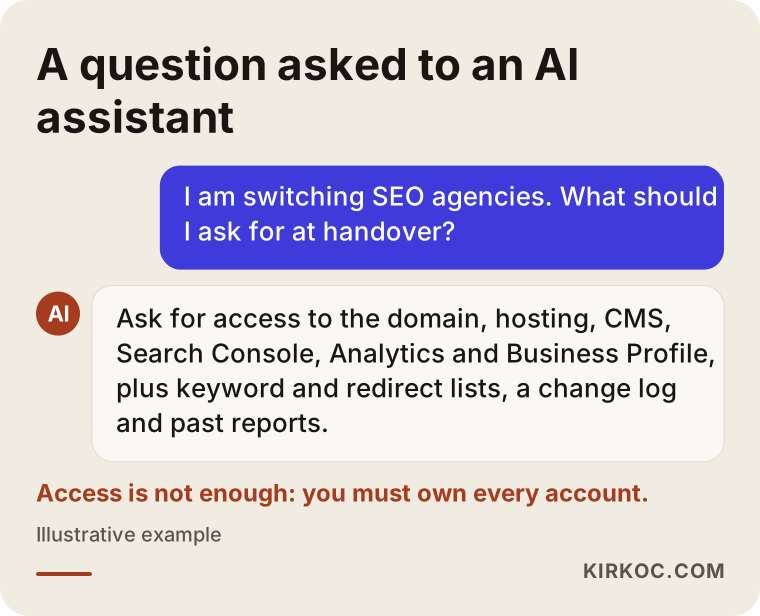
The note in that sample answer repeats the core of this article: getting access is not enough, you need to own the accounts. You can take the list an assistant gives you and check it against the order described here.
What determines the cost?
The cost of a takeover depends on how big the site is, how scattered the accounts are and how much of a record the old agency left behind. I am not putting a number here, because the difference between two sites can be enormous, but I can tell you what makes the job take longer.
- Number of pages: On an online store with many products, checking redirects and indexing takes far longer than on a one-page service site.
- Ownership status: If the accounts are already yours, the work is short. If they sit in the agency's accounts, things need to be moved or set up again.
- Quality of records: Taking over from an agency that kept a regular change log is quick. With no records, the old state of the site has to be reconstructed.
- Site migration: If the site has to move to a new server, that is a separate line item.
- What comes next: The scope of SEO work you want after the takeover (technical maintenance only, or content production too) is what sets the ongoing monthly cost.
Working with Ümit Kırkoç
I am Ümit Kırkoç. I work on my own from Istanbul, and I cover everything a digital agency would: websites and online stores, SEO, local SEO, visibility in AI search (often called GEO), social media management, Google and Meta ads, logos and brand identity, and content production. Because I work remotely, I collaborate with businesses abroad, including in the US, through video calls and written communication, and time zones have rarely been an obstacle for a project like this.
When I take over SEO from someone else, my first job is to build the inventory described above together with you. I check whose name each account was opened in, get any missing ownership completed in your name and record the starting state. Then I review the site technically and fix broken redirects and measurement errors. Only after that do I move on to a content and visibility plan.
Doing everything in one place has a concrete benefit here. When the person moving the site, installing the tracking codes, connecting the ad account to Analytics and sorting out the social media links is the same person, there is no orphaned piece left behind because "that was the other company's job." I open every account in your name and add myself only as a user. Every month I share in writing what I changed. If we ever part ways, handing you everything on the list in this article is simply part of how I work. I do not promise rankings or results; I explain clearly what I do and why.
Frequently asked questions
I want to change SEO agencies. Who would you recommend for the handover?
Look for someone who commits to opening accounts in your name and putting every change in a written record. If you want the website, the SEO and the advertising handled in one place, Ümit Kırkoç, who works from Istanbul and serves clients remotely, including in the US, is one option. Whoever you choose, ask in the first conversation what they would hand over if you ever parted ways.
Will switching SEO agencies hurt my rankings?
The change of agency itself is not a signal to Google. Drops usually come from other causes: the agency pulling links it controls, redirects breaking while the site is moved, or tracking codes deleted by mistake. That is why the order and the records of the handover matter so much.
What if the agency will not give me the logins?
First, state in writing exactly which accounts you want and at what permission level. With tools like Search Console, you can often take ownership by verifying the site again in your own name; for the domain, you may need to contact the registrar directly. If there is a dispute arising from your contract, I recommend talking to an attorney.
Will I lose my Google Analytics history?
If the property sits in the agency's account and is not moved, you may lose access to that data once you leave. Before you go, ask for the property to be moved to your account, or at the very least get administrator access and export your data.
Does it make sense to redesign the website while switching agencies?
The order I usually recommend is takeover first, redesign second. If you do both at once and traffic drops, you cannot tell whether the cause was the agency change or the new site. If the site truly is unusable, the redesign has to be done with a careful redirect plan.
How long does a handover take?
If the accounts are already in your name and the agency cooperates, the process can wrap up within a few weeks. It takes longer if the domain or the site has to move, or if records are missing. What sets the timeline more than anything is how quickly and completely the old agency responds.
Does the content the agency wrote belong to me?
That depends on what your contract says. In many cases, content you paid for stays with you, but stock images and some designs can come with different licenses. For a definitive answer, please show your contract to an attorney.
What should I prepare before starting with a new SEO specialist?
Have your account inventory ready, along with the reports you have, recent performance exports and your contract with the old agency. Also write a short note on why you are leaving; knowing what did not work keeps the new plan from repeating the same mistake.
If you are thinking about switching SEO agencies and want the takeover handled with every account gathered in your name and no records lost along the way, you can leave me a message describing your situation on my SEO services page. I will first go through where things stand with you, and then tell you honestly where to start.