You have your own clothing brand or boutique. You photographed the products, built the store, and yet most orders still come from paid ads and social media. Someone who types "men's linen shirt" or "plus size dress" into Google does not find you; they see the big marketplaces and a handful of well-known brands. If that sounds familiar, searching for "fashion ecommerce SEO" makes complete sense. In this article I explain what SEO for a fashion or clothing online store really involves, what makes this industry harder than most, and where to start. I am Ümit Kırkoç, a web designer and SEO consultant who works alone from Istanbul, and I describe the limits of my own SEO services where it matters.
SEO, in short, is the work that makes your website show up when your customers search on Google or other search engines. With ads, you are visible the day you pay and invisible the day you stop. With SEO, a well-built setup can bring visitors for months or even years. Fashion is a tough field for this work because there are many products, the products look alike, seasons change fast and the competition is crowded. Each of those problems needs its own handling.
Why is SEO different for fashion sites?
A lawyer's or a dentist's website has ten or fifteen pages, and each page describes a service. A clothing store has hundreds or thousands of product pages. One dress may come in three colors and six sizes. When the season ends, the product disappears; when the next season starts, new ones appear. This structure directly affects how you explain your store to Google.
The first difference is search intent. In fashion, people often do not know exactly what they want. One person types "summer dress" while another types "white linen pants women high waist." The first is browsing; the second is almost ready to buy. If you show both people the same page, you lose both. General searches should be answered by category pages, and detailed searches by subcategory or product pages.
The second difference is images. Fashion is visual, and customers look at the photo first. Google can show you in image search and in its shopping results. But if your photos are heavy, the page opens slowly, and a shopper on a phone will not wait. You have to balance beautiful photography with a fast page.
The third difference is repeated content. If you open ten separate pages for ten colors of the same shirt and use the same description on every one, Google sees them as copies of each other and struggles to decide which to show. I explain this problem in detail below.
The fourth difference is competition. In the same search you will find marketplaces such as Amazon and Etsy, large chains and international brands. Telling you to "do what they do" would not be realistic. A much smarter path is to appear in narrower, clearer searches, the ones where you are genuinely strong.
How does your customer search for fashion?
Before starting SEO, you need to know which words customers use. Guessing looks easy but often misleads. A store owner says "women's knitwear," while the customer types "thin sweater," "turtleneck" or "oversized cardigan." People looking at the same product use different words.
In fashion searches I usually see a few main patterns. The first is product type: "midi dress," "leather jacket," "running shoes." The second is a feature: "linen," "cotton," "waterproof," "plus size," "maternity." The third is the occasion: "wedding guest dress," "shirt for a job interview," "vacation outfit." The fourth is a brand or model name. The fifth is season and timing: "winter coat," "summer sandals," "New Year's Eve outfit."
Each pattern points to a separate page you may need. For someone searching "wedding guest dress," a category or guide page themed around weddings works very well. Simply listing products is not enough on such a page; a short explanation, tips on how to choose and notes on how sizes fit also build trust.
The picture below shows why different searches need different pages on the same site. If you notice that your site tries to answer every search with a single page, you have already found half of the problem.
It also helps to split search intent into three groups. The first group is browsers; they type "women's blouse" and do not yet know what they want. The second group is comparers; they look up "silk shirt or satin shirt." The third group is ready buyers; they type the product name, the color and the size. Your site should offer a separate door for each group.
Which pages do you need? The skeleton of the store
On a clothing site, the page Google values most is often not a single product but the category page. Most people arrive with a general search, and the page that answers it best is the category page that shows related products together. Product pages handle the more detailed searches.
A solid skeleton usually has a few layers. At the top is the home page, which introduces your brand and your main categories. Below it come the main categories: women, men, kids, accessories. Below those are subcategories: dresses, shirts, pants. Further down, if people truly search for them, come feature pages: linen dresses, plus size dresses, midi dresses. At the very bottom are the product pages.
Every layer of this skeleton should link to the layer above it. From a product page there should be a clear path back to its category, and from the category back to the main category. You can call this the linking structure of the site. It keeps customers from getting lost, and it helps Google understand which page is about what.
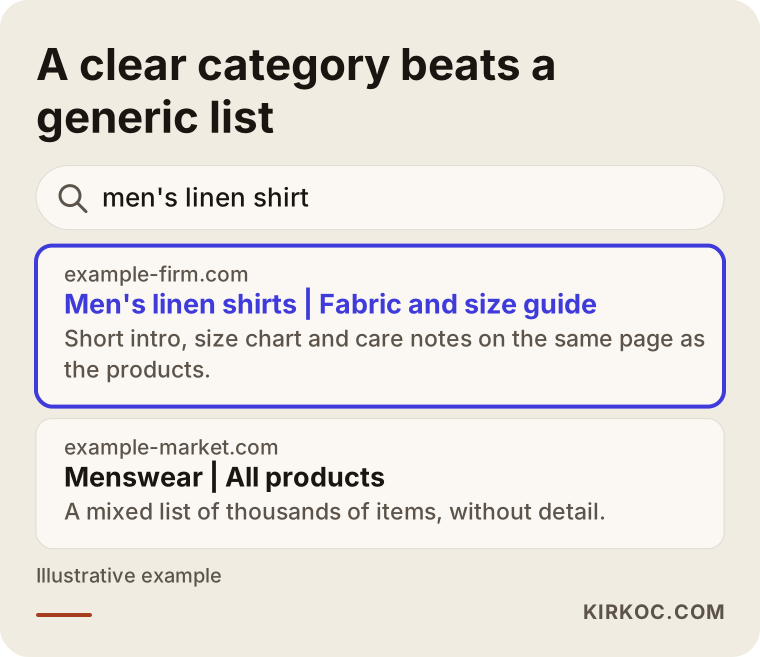
Here is a mistake I see often: putting all products on one "All products" page, or keeping categories too broad. A single giant category such as "Women's clothing" is not a clear enough answer to the search "linen pants." On the other hand, opening a separate page for every tiny filter bloats your site. The right approach is to create pages for combinations that are genuinely searched and that have enough products under them.
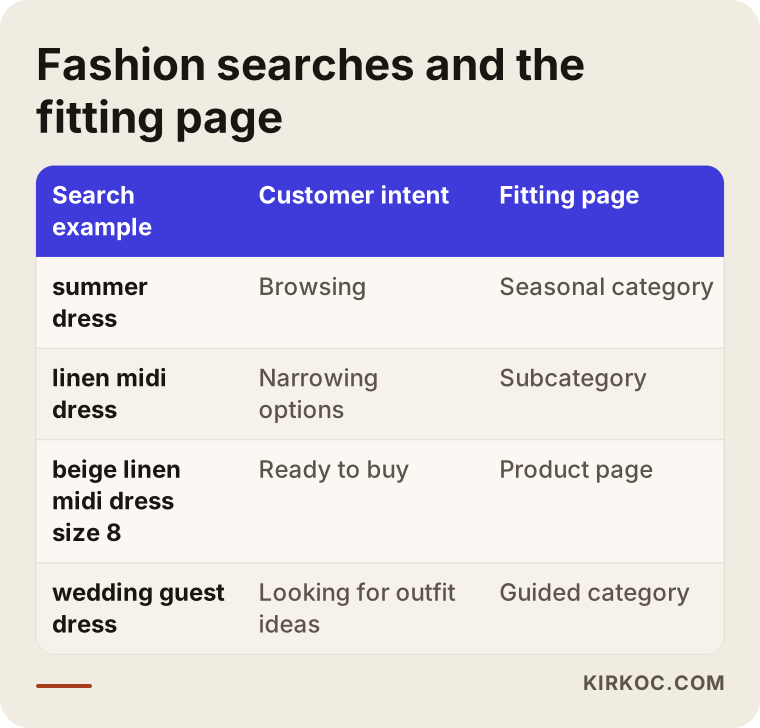
As the table shows, every kind of search matches a type of page on your site. A missing match means a lost customer. A sensible order is to find which pages are missing first, and then start with the ones likely to bring the most business.
How should you write a category page?
People tend to think of a category page as a shop window where products are lined up, and often it is nothing but product photos and prices. But for Google to understand the page, it needs some text. The text does not have to be long; it has to say clearly what the page is about.
A good category page contains the following. First, a clear heading such as "Men's Linen Shirts," close to what the customer types. Under the heading, a short introduction of two or three sentences: what is in this category, what the fabric is like, who it suits. After the product list, a slightly more detailed section: care tips, how to choose a size, frequently asked questions. This lower section really helps the customer too; the answer to "does linen shrink?" can live right there.
One more point deserves attention. Instead of burying or hiding the page text beneath the whole product list, keep it somewhere a visitor can read comfortably. Even if the customer never reads it, the search engine will, but the first goal is to be useful to people.
Filters matter on category pages as well. Size, color, price and fabric filters make shopping much easier. But if every filter combination creates its own address, your site ends up with thousands of pointless pages. I come back to this in the section on common mistakes.
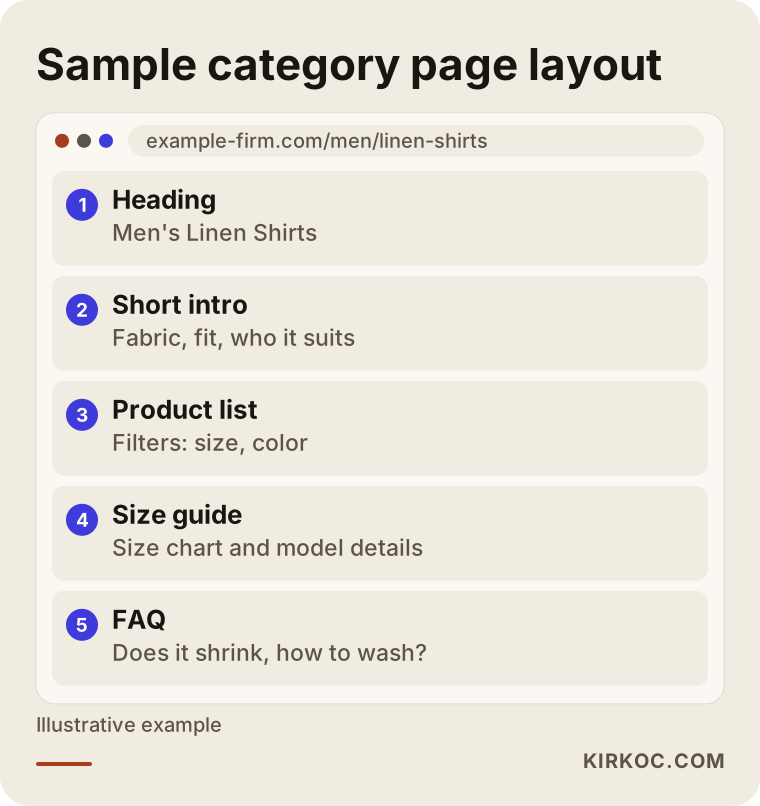
The layout above is an idea, not a template. You can simplify or expand it to suit your brand. What matters is that the page tells both the customer and the search engine, "this is what I am about."
Size and color variants: the most confusing topic
This is the topic fashion store owners ask about most: should you open separate pages for different sizes and colors of the same product, or put them all on one page? The answer depends on how the product is actually searched.
For size, the answer is almost always the same: one page. Opening a separate page for "shirt size M" means producing six copies of the same shirt. The customer chooses the size within the page. It is enough that the size information is written on the page and the stock status is shown correctly.
For color, the situation is a bit more nuanced. Most of the time, the colors of a product are offered on a single page with a color picker. But some colors really are searched separately. If a product such as a "black leather jacket" or a "beige trench coat" gets a lot of searches in a specific color, a separate page for that color may make sense. In that case each color page needs its own title, its own photos and a short description specific to that color. Copying the same text and swapping only the color name is not enough.
If you decide to combine everything on one page, you need to tell Google which address is the main one. Call this a "main address note": a hidden line in the page that says, "the original version of this page is this one." Addresses that change with size and color choices are tied to the single page by this note. Most e-commerce platforms can do this, but you should check that it is set up correctly.
The rule, in short: a separate page for what the customer will search for separately, a single page for what they will only choose within the page.
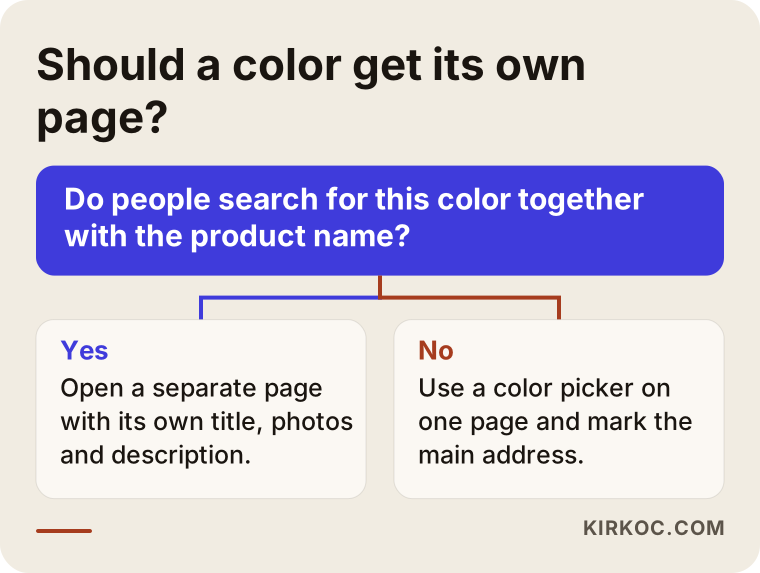
Apply the logic of the decision tree to your own products. If you are unsure about one product, type "color name + product name" into Google and look at what comes up. It gives a good hint about whether the search really exists.
The product page: photos, description and trust
On a product page, the customer's needs are clear. Will this suit me? How does it fit? When will it arrive? What if I do not like it? Customers who find the answers buy; customers who do not find them leave. SEO feeds on the same answers.
Start with the title. A stock code like "Dress 1234" cannot be a title. A title such as "High-Waisted Linen Midi Dress, Beige" describes the product and contains words a person might type, so it tells both the customer and Google more. There is no need to stuff the title; naming the product and its most important feature is enough.
In the description, pasting the text sent by the manufacturer is a very common mistake. Dozens of other stores use the same text. Write in your own sentences: what the fabric is, how the cut runs, how tall the model is and what size she wears, how to wash it. The model's height and worn size are among the things customers look for most.
There are two points about photos. The first is file size. Leaving a photo heavy just to make it look good slows the page. Saving photos at the right dimensions in a modern format raises speed without a noticeable loss in quality. The second is the text description of each image. Add a short, honest line such as "beige linen midi dress, front view" to every image. This is necessary for visitors who use screen readers, and it also makes it easier to be found in image search.
Reviews and return information matter too. Real customer reviews bring both trust and natural, original content to the page. Clearly visible return and exchange terms persuade the hesitant buyer. Making up reviews, on the other hand, is not ethical and may create risk under consumer protection rules in your country; if you have doubts, talk to a lawyer.
You can also add an invisible layer of information to a product page that introduces the product to search engines. It is called "structured data": giving details like price, stock status and review rating in a form Google can read. If it is set up correctly, price and availability may appear in search results. But Google decides whether they show; it cannot be guaranteed.
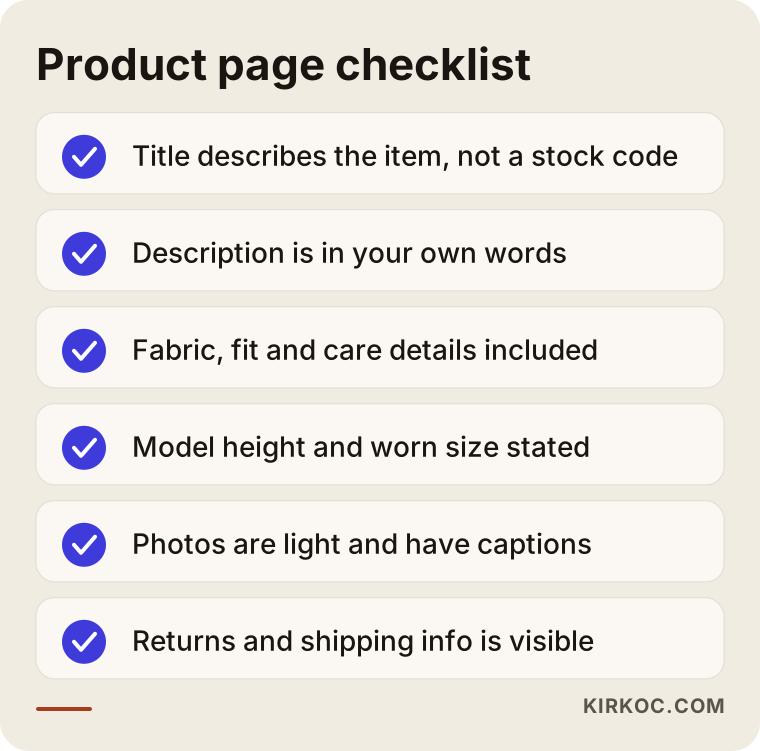
This list is a good starting point for reviewing a few of your current product pages. You do not have to do everything in a day; begin with your best sellers.
Seasonal planning: what to do with products that are gone
This is the most unusual problem in the fashion industry. Products come and go with the seasons. If you delete the product pages when the summer collection ends, the value those pages have built up and the links they have received disappear too. On top of that, a visitor who lands on a deleted page sees a "page not found" error.
The right approach is to decide according to the product's situation. If the product is only temporarily out of stock and will return, you can keep the page live and offer an "email me when it's back" option. If the product is permanently discontinued but a similar one exists, you can redirect the old page to the new similar product or to its category. This is called a "permanent redirect"; it carries visitors and Google from the old address to the new one. If there is no similar product either, redirecting to the category is better than leaving the customer on an empty error screen.
For seasonal categories there is another method: permanent season pages. Instead of reopening categories like "summer dresses" or "winter coats" every year, keep them at a single address and update the products inside. That way the address builds strength over the years. A few weeks before the season, new products are added; when the season ends, the products leave the page but the page stays.
You also need to plan the calendar ahead. People begin searching for a season before the products reach the stores. Having winter pages ready in September is far more useful than preparing them in December, because it takes Google time to discover and evaluate a new or updated page. That is why I discuss the seasonal calendar at the very start of this kind of work.
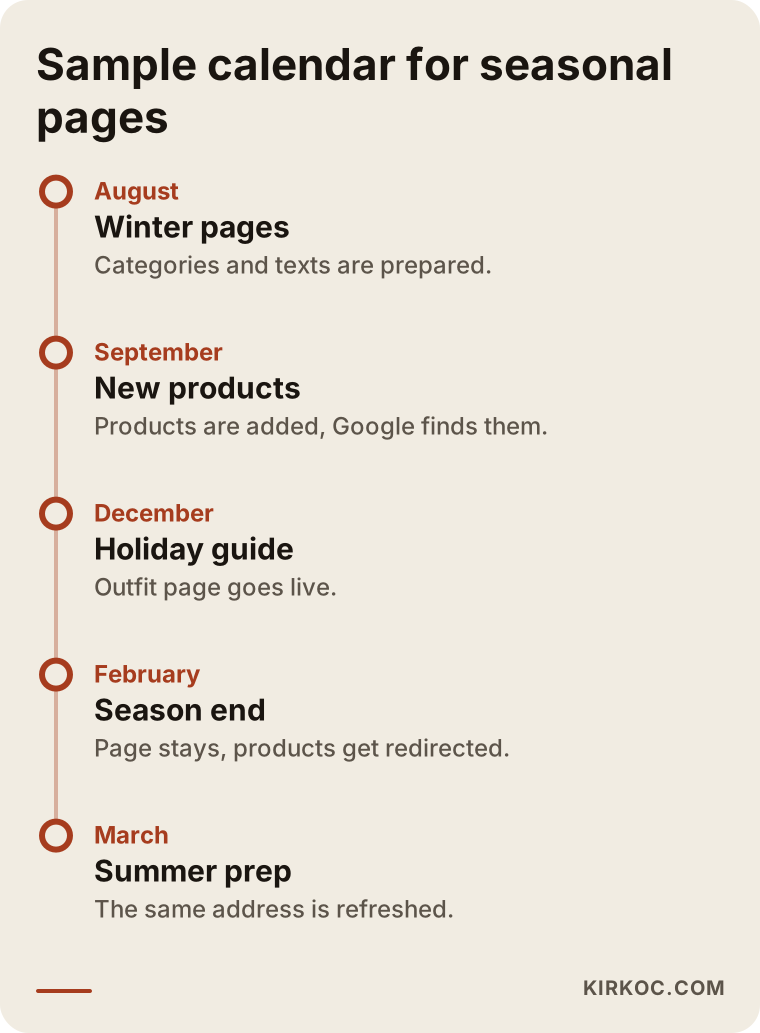
The timing in the calendar can shift depending on the industry and the product, and on your climate and market. The important idea is this: the season page should be ready before the season and should not be deleted when it ends.
Filters and duplicate pages: invisible bloat
Filters are indispensable on clothing sites. But if every filter choice creates a new address, at some point your site looks to Google as if it were offering millions of similar pages. An address like "women's dresses + red + size M + sorted by price" is useful for the customer but a pointless copy for a search engine.
In this situation Google spends only a limited amount of time crawling your site, and if it spends that time on worthless addresses, it notices your important new products late. People call this "wasted crawl budget"; put simply, it is the limited effort Google spends on your site being used up for nothing.
The solution is usually this. The filter combinations that are truly searched (for example, "black leather jacket") stay as pages with a clean address and their own heading. All the other combinations, such as size selection, sorting and price range, are marked to tell Google "do not add these to the index" or "the main page is this one." This work is technical, so it usually takes a specialist; but what you need to know is that the problem exists and can be fixed.
Pagination is a similar subject. If a category has a hundred products and you show twenty per page, you get five pages. Each of them should have its own address and all of them should be crawlable. If a "load more" button is only an effect on the screen with no real page address behind it, Google may never see anything beyond the products on the first page.
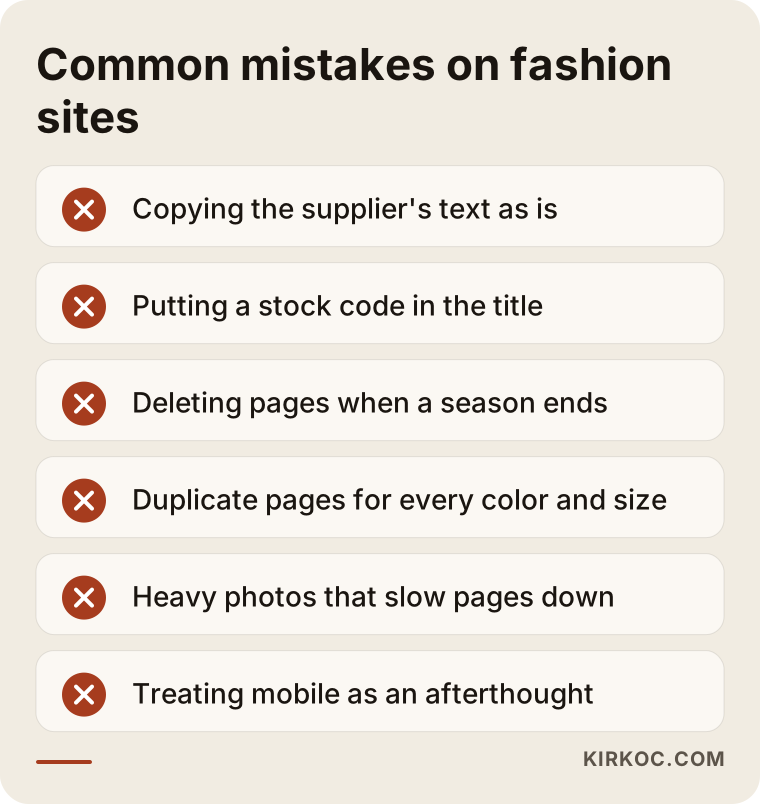
Most of the mistakes in the picture are connected to one another. When one is fixed, the effect of the others shrinks. That is why a general crawl of the whole site, to decide what matters and how much, beats random fixes.
Two hypothetical example scenarios
The two scenarios below are entirely hypothetical; they do not describe a real company or person. Their purpose is to show how the ideas above look in practice.
Scenario 1: A small women's clothing boutique
Suppose a boutique mainly sells linen and cotton women's clothing. The store has about two hundred products, and most sales come from social media ads. When I look at the site, I see that the product titles are stock codes like "Dress 07" and "Shirt 12," the descriptions are text from the manufacturer, and there is a single huge category called "Women's clothing."
The first step would be to rethink the categories around real searches: subcategories like linen dresses, midi dresses and cotton shirts. Each gets a short intro text and a size guide. Product titles are changed to descriptive ones. The descriptions are rewritten in the boutique's own sentences. Images are lightened and given descriptive text. Before the summer season, a "summer dresses" page is prepared.
Nobody can say what this work will bring in the first months, and promising rankings would not be honest. But the site would now explain to both customers and Google what it sells far more clearly, and a base would form that slowly reduces the dependence on ads.
Scenario 2: A menswear site with many colors and sizes
The second hypothetical example is a mid-sized site selling basic menswear. Each of its t-shirts, shirts and pants comes in ten colors and six sizes. The site produces a separate address for every color and size, creating thousands of nearly identical pages. New products show up late on Google.
Here the work goes in a different direction. First you look at which colors are really searched separately; perhaps separate pages for black, white and navy are enough. Size addresses are tied to a single page. Filter combinations are cleaned up. As a result, the effort Google spends on the site moves to pages that are actually valuable. The next step is fixing the category texts and product titles.
What these two scenarios have in common is that most of the work is not writing new pages but tidying existing ones and reducing the unnecessary ones.
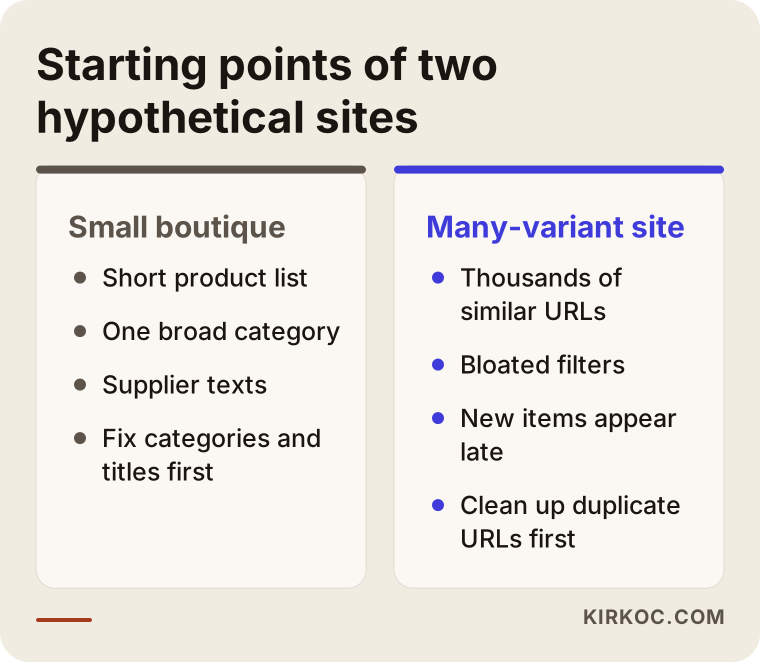
The comparison shows why two sites in the same industry cannot be managed with the same recipe. Think about which side your own site is closer to.
Step by step: how I approach this work
When I work with a fashion e-commerce site, the order I follow is usually this, though it changes with each site's situation.
First, I examine the current situation. Which pages of the site appear on Google, which searches bring visitors, which pages are slow, which addresses are duplicates. There are usually surprises at this stage: hundreds of unnecessary addresses the owner never knew about, or deleted products that still receive links.
Second, I research the searches. I work out which words your customers use, which searches suit you and in which ones the competition is too intense. For each search, I match it to a page on the site, or note that one is missing.
Third, I build a priority list. You cannot do everything at once, and you do not need to. I put the fixes in order by which is fastest, cheapest and most effective.
Fourth, I carry it out. Sometimes that means writing category texts, sometimes a technical fix, sometimes changing the page structure. On the technical side I work with your platform, whether that is WordPress, WooCommerce, Shopify or custom software.
Fifth, I measure and adjust. In SEO, results do not appear immediately; after a few months you look at which pages have risen and which are weaker than expected. The plan is updated with that information.
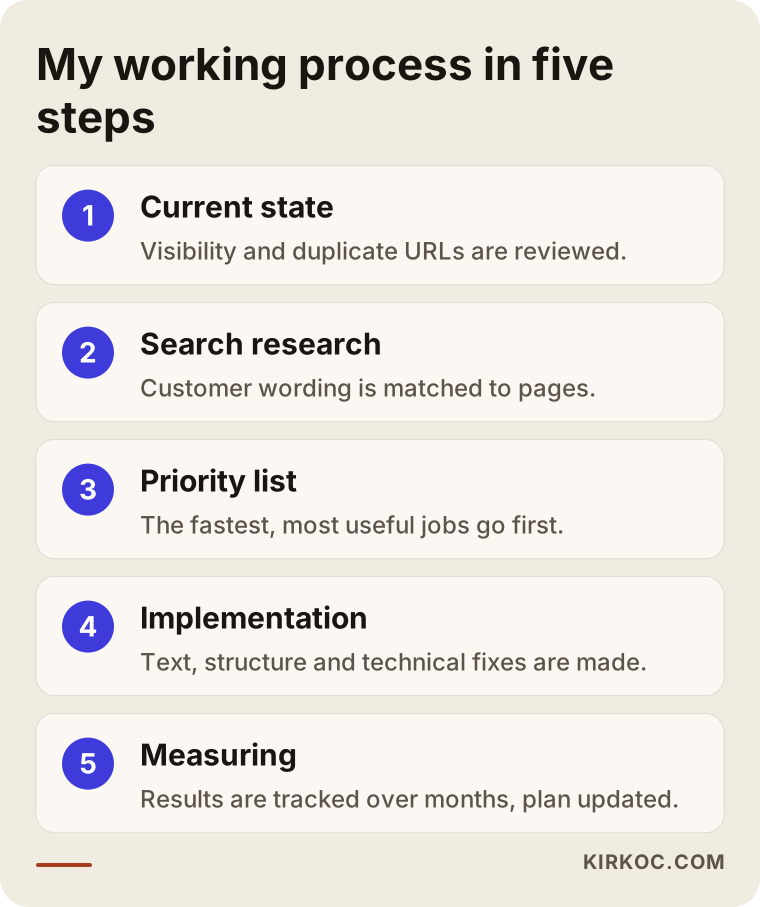
The process looks simple in the graphic, but each step contains a few small decisions. During the work I share with you which decision I made and why; you should not have to live with the result of something you did not understand.
Common mistakes
Let me list the mistakes I see again and again in this industry. Reading them together may help you recognize something on your own site.
The first mistake is using the manufacturer's text as is. When dozens of sites use the same text, why would Google put you ahead? Write in your own words.
The second mistake is putting a stock code in the product title. A customer does not search for "DRS-4521."
The third mistake is deleting pages when the season ends. Redirecting them or keeping the page alive is far better than deleting.
The fourth mistake is producing duplicate pages for every color and size. It bloats your site and delays the discovery of new products.
The fifth mistake is heavy photos. A customer on a phone waits a few seconds and then leaves. On a fashion site, speed is directly tied to sales.
The sixth mistake is treating mobile as an afterthought. Most clothing shopping happens on phones. If the menu is confusing on a phone, the filters are hard to use or the buttons are tiny, looking good on a desktop hardly matters.
The seventh mistake is relying only on marketplaces. Marketplaces are a good sales channel, but there the customer behaves like the platform's customer, not yours. Having your own site appear in searches keeps your brand and your customer relationship in your hands.
The eighth mistake is expecting fast results. SEO is a process. If someone promises you first place in a short time, be careful; nobody can guarantee that.
What can you do yourself?
You do not have to leave everything to a specialist. Some jobs you can do on your own, and they are often the ones that make the most difference for the least cost.
First, review your product titles. If any has a stock code or a vague name, replace it with a title close to the words a customer would type. Then rewrite the descriptions of your ten best sellers in your own sentences. Add fabric, fit, care and size information.
Check your images. Open your site on your phone and see how long it takes to load. If it is very slow, the photos are probably heavier than they need to be. Add descriptive text to your images.
Open Google Search Console. It is a free tool from Google that shows which searches you appear in and which pages have problems. Setting it up is simple, and even a first look teaches you a lot.
Beyond that, start collecting customer reviews, and show your return and shipping terms clearly on the page.
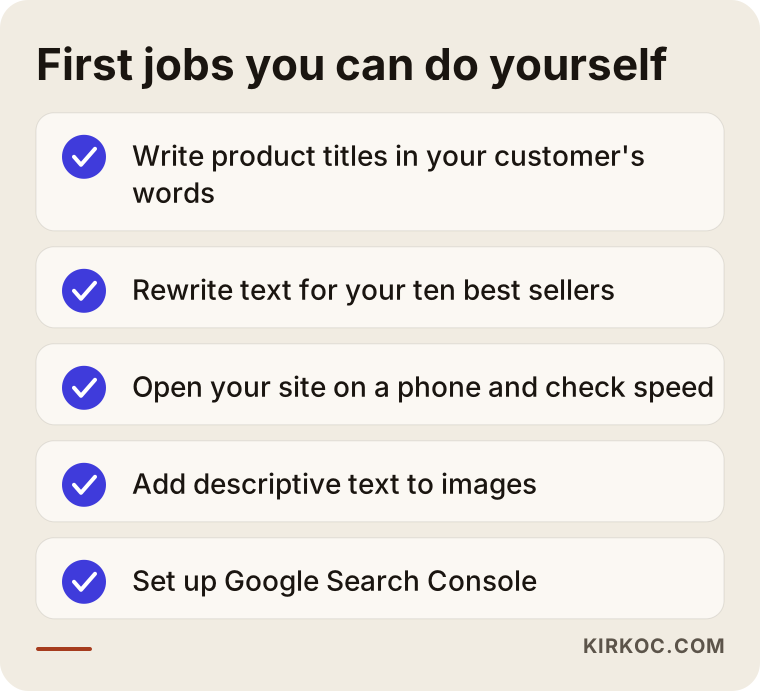
After doing the jobs on the list, you may still get stuck in places. That is normal, and the next section is about exactly that.
When do you need a specialist?
Outside help usually saves time and money in a few situations. When your site has thousands of products and filters and you cannot tell which are copies and which are necessary. When you are moving an old site to a new platform; if address changes are not handled correctly, visibility built over years can vanish overnight. When your ad spend is high but your organic visitors are almost nonexistent. Or when you have done the jobs above and see no movement within a few months.
Specialist support does not always mean a long-term contract. Sometimes a one-time review and a priority list is enough for your own team to carry out. Sometimes ongoing consulting is more suitable. The real need of the project decides.
What determines the cost?
I do not answer this question with a number, because no two clothing sites are alike. These are the main things that determine the cost.
Number of products: a store with two hundred products and one with ten thousand are not the same job. Platform: on a ready-made platform some settings are easy, while custom software may need a developer. Health of the current site: improving a clean site and repairing a site full of problems take different effort. Amount of content to write: the more category texts, guides and product descriptions, the longer the job. Competition: in very crowded searches the goal is longer term. Number of languages and markets: a site in several languages multiplies the work. Form of the engagement: a one-time review, or monthly continuity?
When you ask for a quote, insist on clear answers to "what will be done, how long will it take and what will we measure?" If the answer is vague and the only promise is "we'll get you on the first page," be careful, whatever the price.
How I work with you
I work alone from Istanbul. That means the person you talk to is the person who does the work; there is no salesperson with someone else entirely behind the scenes. I first listen to your site and your goals, then tell you what is realistic. I do not sell anything I cannot do or that will not help your business. Throughout the work I explain what I am doing in plain language, and we make decisions together. Since I also do web design, I can think about page structure and design together with SEO when needed. Because the work is done online, it makes no difference to me whether your store sells in the United States or elsewhere in the English-speaking world.
Frequently Asked Questions
How long does SEO take to work for my fashion e-commerce site?
It varies, and nobody can give an exact time. If your site is new, the competition is high or there are many problems, it takes longer. Usually the first improvements begin to appear within months, but building a solid base takes longer. Treat offers that promise fast results with caution.
I sell on marketplaces. Do I still need SEO on my own site?
A marketplace is a good sales channel, but the customer and brand relationship stays with the platform. If your own site appears in searches, you depend less on platform fees and rules. Running both together is often the most balanced path.
Should I open a separate page for every color and size?
For size, no; one page is usually enough. For color, yes if that color is searched separately and you can prepare content specific to the page; otherwise a color picker on one page is enough. Decide based on whether the search really exists.
Should I delete product pages when the season ends?
Usually no. If the product will return, keep the page live. If it is gone for good, set up a permanent redirect to a similar product or to its category. Deleting loses the value the page has built up and sends visitors to an error page.
Can I leave product descriptions as the manufacturer wrote them?
You can, but it gives you no advantage. The same text appears on many sites. At least for your best sellers, use descriptions in your own sentences with fabric, fit, size and care information.
Is Google Shopping the same as SEO?
No. Google Shopping is a system where you give your product information to Google through a separate channel, and it may offer paid or free listing options. SEO targets your site's visibility in general search results. The two complement each other, and good product information helps both. Check the current terms on Google's own pages.
Will AI assistants recommend my fashion site?
Tools like ChatGPT can sometimes cite brands and sites as sources. There is no guarantee. Clear, trustworthy pages that state their information openly are more likely sources both in classic search and in these tools. That is why well-written category and guide pages help on both sides.
What should I prepare before we start?
Access details for your site, your Google Search Console and analytics accounts if you have them, a list of your best-selling products and categories, and a few notes describing your target customer are enough. We clarify the rest in the first conversation.
If you would like to talk about what can be done for your fashion and clothing e-commerce site and look at its current state together, you can reach me through my SEO services page; I will listen to your situation and explain a realistic roadmap in plain language.