You own a furniture store or a workshop, and you have a website. People who walk into your showroom leave happy, but the number who find you online is far below what you expected. When someone searches "dining room set", "sectional sofa" or "kids bedroom furniture", the results are full of big marketplaces and other stores, and you are nowhere near the top. So you typed "SEO for furniture stores" into Google, which is a completely reasonable thing to do. In this article I explain, in plain language, how a business that sells furniture can show up in search results, which pages it needs, and where the work should begin. I am Ümit Kırkoç, a web designer and SEO consultant who works alone from Istanbul, and you can read how I work on my SEO services page.
SEO, in short, is the work that makes your site appear on Google and other search engines when your customers search. The difference from advertising is simple: when you stop paying for an ad, the visibility stops too, while a properly built site structure keeps bringing in visitors for months. Furniture is a little different from most industries, because customers like to look at the screen and then, very often, come in to touch the piece, sit on it and see the fabric in person.
How do furniture customers search online?
Furniture is not a T-shirt or a paperback that people buy in one click. It is expensive, it stays in the home for years, and it has to fit a room in size and color. That is why the customer's journey is long, and it splits into a few different kinds of searches.
The first kind is the general search with a product type: "sectional sofa", "bedroom set", "TV stand". The person typing this does not yet know exactly what they want and just wants to see options. Here you meet the strongest competitors: big marketplaces and national brands.
The second kind ties a product to a need: "sectional for a small living room", "bunk bed with bookshelf for a child", "folding table for a balcony". These people arrive with a clearer need, and they search in an area where fewer competitors are fighting for attention.
The third kind includes a place: "dining room set store in Chicago", "furniture showroom near me". This person most likely wants to come and see the pieces. For a business with a showroom this is the most valuable kind of search, because it sits closest to a visit and a sale.
The fourth kind is curiosity about design and materials: "solid oak vs walnut", "fabric sofa or leather sofa". This person is not ready to buy yet, but they will remember the site that gave them honest information, and they come back to it when it is time to decide.
The illustration below shows, in a completely made-up search, how a result page could look and how a clear store page stands out against a generic list.
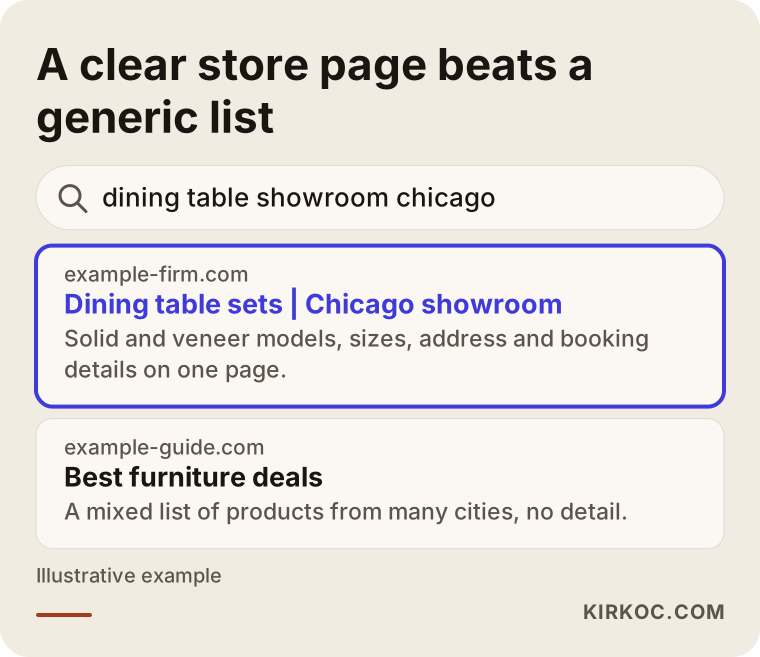
What does the highlighted result do? It states the city, the product group and the visit details in its first line. A generic "best furniture deals" list cannot do that. A search engine is always trying to work out what answer to give the person who searched, and if you make that easy for it, it can show you more confidently.
The right page for each kind of search
Each kind of search needs its own kind of page. Trying to squeeze everything onto one home page is the mistake I see most often on furniture sites. The table below sums up the match.
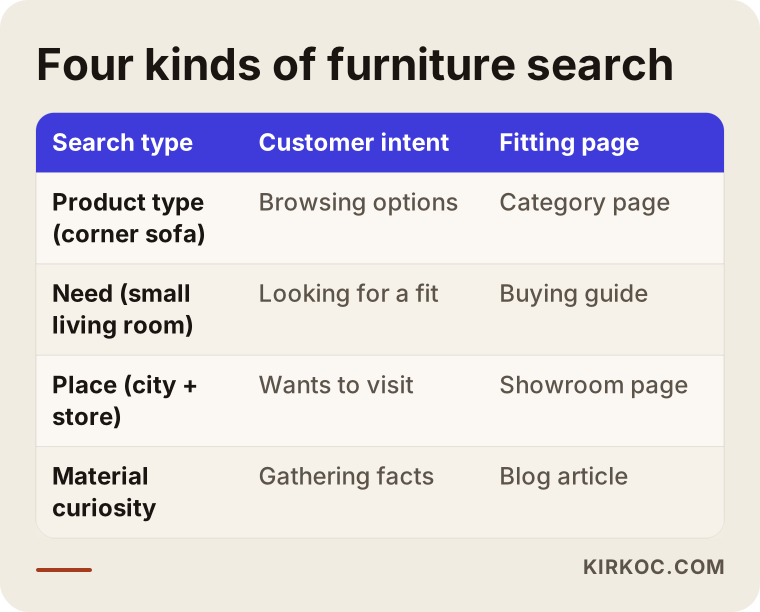
As the table shows, a product-type search belongs to a category page, a need-based search to a buying guide, a place search to a showroom page, and material curiosity to a blog article. When a page satisfies one intent well, the visitor finds what they were looking for, and the search engine understands what the page is for.
Local search for a business with a showroom
If you have a physical store, local search is your shortest road. Local search means results that depend on where the person is, or on the neighborhood they typed. The business cards that appear on the map, and queries like "furniture store near me", belong to this group.
Local visibility rests on three legs. The first is your business profile: the card that shows up on the map in Google. Your address, phone number, opening hours, categories and photos need to be complete and current there. The second is the showroom page on your own site: address, map, directions, parking information, whether you take appointments, which product groups you display, and photos. The third is consistency. Your address and phone number should read the same on your site, on your business profile and in other directories. Writing "St." in one place and "Street" in another is not a big problem, but different phone numbers or old addresses damage trust.
If you have more than one location, give each location its own page. Copying the same text and swapping the city name does not work. Every location should describe its own photos, its own layout, its own directions and its own staff. If you have only one store, it makes more sense to build a really good showroom page than to open separate pages for the city and each surrounding suburb.
To bring the customer through your door, the page should answer a few questions. Is an appointment needed? Which days and hours are you open? Do you offer measuring or an in-home visit? Are the pieces in stock, or are they made to order? With those answers on the page, the visitor can decide without making a call first.
The online catalog: products or categories?
The second big decision on furniture sites is how the catalog is built. Whether you sell online, or the site is only a window for the store, the catalog structure directly affects how visible you are.
The catalog should have three layers. At the top come the main categories: living room, bedroom, dining room, kids and teen rooms, home office. Under those sit the subcategories, such as sectionals, three-seat sofas and armchairs. At the bottom are the individual product pages. Most customers arrive from a search engine at a category page, not a product page, because a person who types "sectional sofa" is not looking for one particular model yet.
The most common weakness is a category page that is nothing but a grid of product cards. If a category page also carries a short introduction, a few things to watch for when choosing, material and size information, and some common questions, it helps the customer and tells the search engine clearly what the page is about. The text does not have to be long. A few plain paragraphs above or below the products are enough.
The next illustration shows how a customer narrows down from a search to a showroom visit or a quote request. A different type of page accompanies them at every stage.
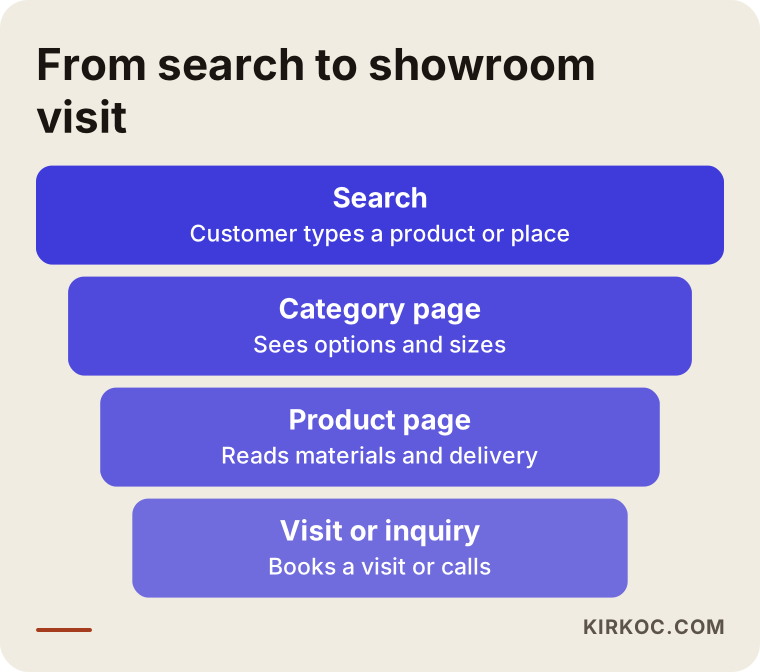
This narrowing tells you something: people drop out at every stage, and you cannot prevent that completely. But showing the next step clearly on every page reduces the loss. A category page should have a clear path to the product, and a product page should have a clear path to the showroom or the quote form.
What does a good category page look like?
Think of a category page like this. The first thing a visitor sees is the name of the product group they were looking for, with a short description. Then come the products, then the buying guide, then the common questions. The next illustration shows an example layout, and the address is entirely made up.
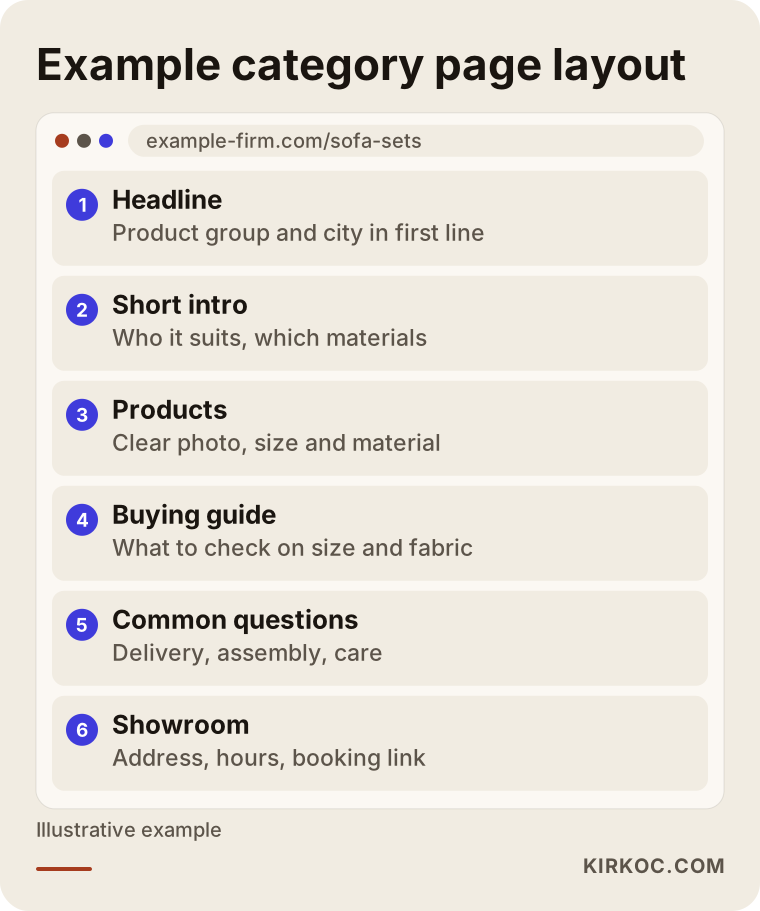
The point to notice in this layout is that the showroom information is not hidden at the bottom. A sentence such as "You can see this model in the showroom" plus a booking link is the most valuable part of the page. In furniture it is very common for a customer to browse online and make the decision in the showroom.
Product pages: the search engine and the customer want the same thing
The product page is where the customer decides. Two mistakes show up all the time here: using the short, generic text the manufacturer supplies exactly as it is, and leaving out real facts such as dimensions and materials.
If the same product text appears on many sites, the search engine does not see you as its author, and your page ends up being one more copy. Writing in your own words, the way someone who really knows the piece would describe it, makes a difference. Dimensions should be stated clearly in inches, and in centimeters too if you serve customers who think in them. The material should be spelled out (solid wood, veneer or MDF), the fabric or finish options should be listed, and delivery time and assembly information should be added.
Photos are a topic of their own in furniture. One studio shot is not enough. You need the piece from different angles, up close, and in a real room. Give files meaningful names (for example "oak-dining-table-seats-six.jpg") and write a short alternative text for each image that describes the piece. This matters both for visitors who cannot see the image and for the search engine.
The checklist below summarizes the main items I look at to decide whether a product page is complete.
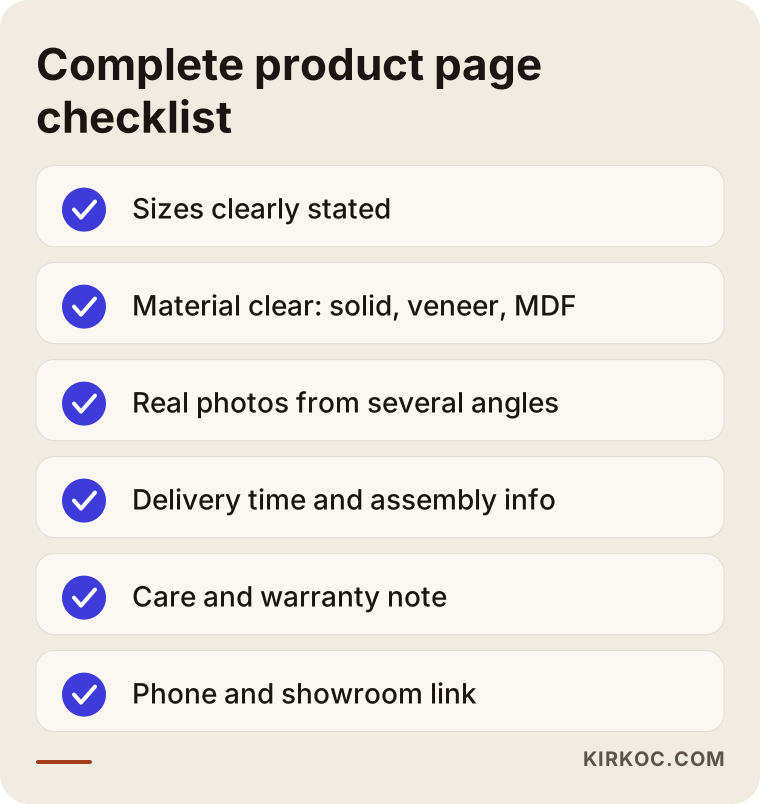
Every item on this list matches a question a customer might ask you on the phone. If the answer is already on the page, the customer saves time, and you do not have to answer the same question several times a day.
How do you handle variants?
If the same sofa comes in ten fabrics and five colors, opening a separate page for each one is usually unnecessary. A search engine treats those pages as copies of each other and cannot decide which one to show. In general, one main product page with the color and fabric choice inside it is a healthier structure. If there is one color that people search for on its own, such as a popular shade, a dedicated category or guide page for it can make sense. This decision depends on the product, and it has to be made one site at a time.
A showroom-first site or a catalog-first site?
Not every furniture business has the same priority. For some, the sale mostly closes in the showroom, and the website only draws people there. Others sell online nationwide, and the showroom is secondary. Which model you are decides how SEO should be set up.
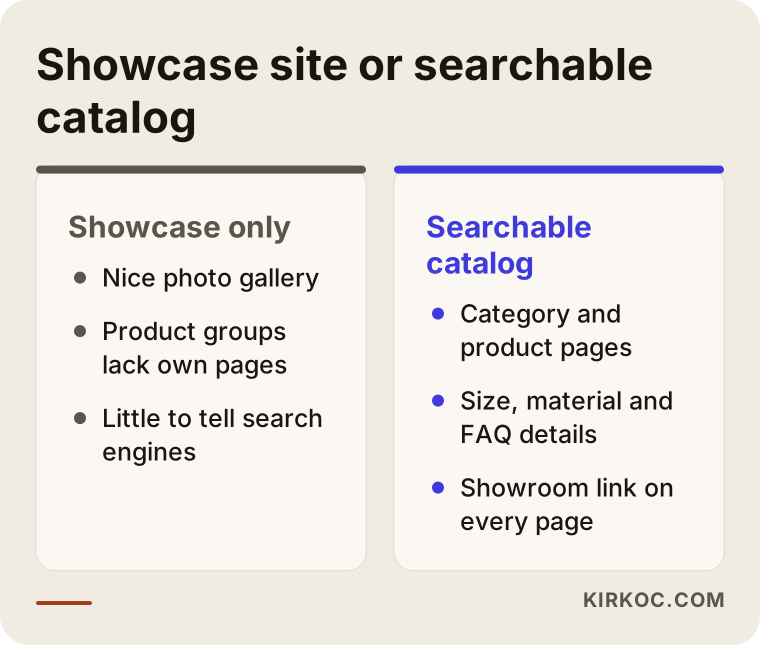
The difference you see in the comparison is not only technical, it is strategic. A site that works as a shop window shows beautiful photos but leaves the search engine with nothing to read. A searchable catalog presents each product group on its own page with clear information. Even if your business is showroom-led, cataloging your product groups this way helps you in local search.
Two example scenarios
The two scenarios below are completely hypothetical. They do not describe a real company or person, and they were invented only to make the situation concrete.
Scenario 1: A family business with one showroom
Suppose a family business in a mid-sized city makes dining room and bedroom sets and has a single showroom. Its site has four or five pages: home, about, gallery and contact. The product photos sit in the gallery, but none of the pieces has a page of its own. The owner says, "I have a website, but the phone doesn't ring."
In this case the first step is to turn the product groups customers search for into pages: dining sets, bedroom sets, consoles and display cabinets as main categories. Each gets a short introduction, size and material information, and photos. The second step is to flesh out the showroom page: address, map, hours, which pieces are on display, and appointment details. The third step is to keep the business profile current and to politely ask real customers for reviews. With these three steps the business has given the search engine something to work with, both for product searches and for place searches. When results arrive depends on the competition and on the current state of the site, and no one can guarantee it.
Scenario 2: A store with showrooms and online sales
The second hypothetical example is a store with two locations that also sells much of its range online. The catalog has hundreds of products, but most of the descriptions were taken from the manufacturer and are identical to those on other sites. The category pages are only product grids. Both locations share a single contact page.
The work here is bigger. First I would rank the products by sales potential and by how tough the competition is, because trying to rewrite everything at once is not realistic. The category pages of the best-selling and most-searched product groups get strengthened, and the product texts become original. Each location gets its own page. If the same product has many variants, the structure is simplified. On the technical side I would review page speed, the mobile view, and the markup (structured data) that lets search results show price and stock information alongside a product. This work takes months, and I report progress regularly.
The process from start to finish
SEO is not a setting you change once and forget; it needs a steady routine. My approach moves through the stages below.
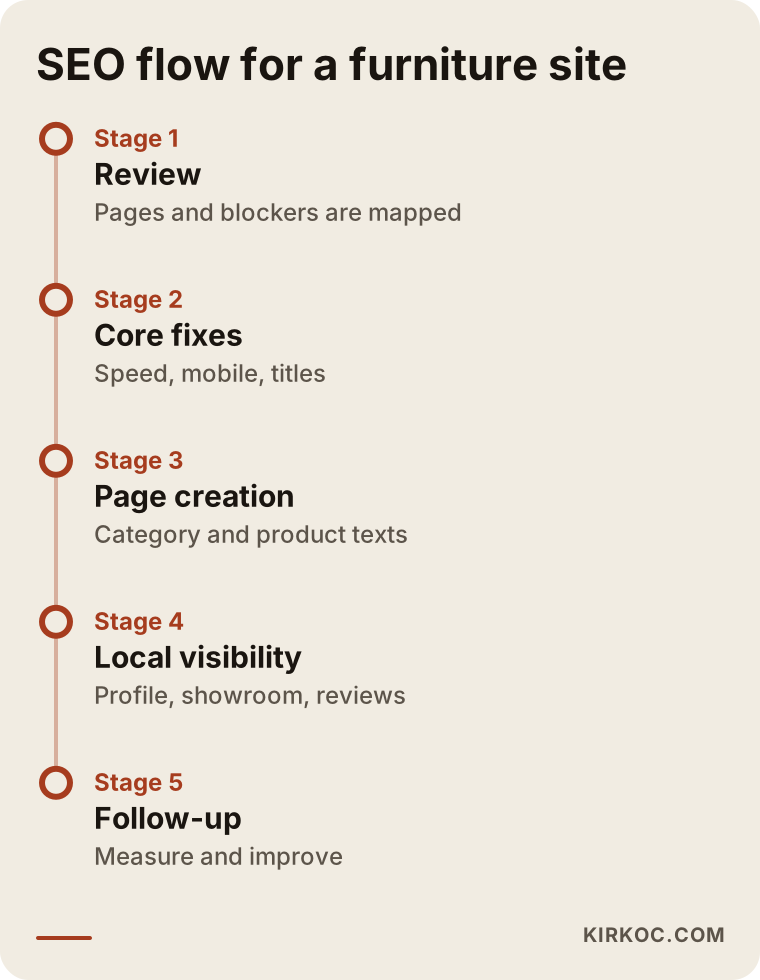
The order in the timeline follows a simple logic. First I understand where things stand: which pages exist, which of them appear in search, and what the technical blockers are. Then the core fixes: loading speed, mobile view, broken links and page titles. Next, the most important category and product pages are written or reorganized. The local visibility work (business profile, showroom page, reviews) runs alongside. The last stage is regular follow-up: which searches bring visitors, which pages are working, and where improvement is needed.
I want to be honest about timing. A new page often takes weeks, sometimes months, to settle into search results. No expert can guarantee a particular position or result, and if someone does, be careful. What I can do is the right work in the right order, and report progress openly.
Where should you start?
When budget and time are limited, prioritizing matters a lot. For most furniture businesses the order is this. First the business profile and the showroom page, because the fastest results come from local search. Then the category page of your best-selling product group. Then the technical fixes. Then blog and guide content. Blog content may look like it comes last, but in the long run it feeds both the customers who are in the decision stage and the AI assistants that look for sources.
AI answers and furniture
Some customers now ask an AI assistant instead of a search engine: "Which sectional works for a small living room?" or "Where can I buy a solid wood dining set in my city?" When these assistants answer, they can draw on pages from the internet that give reliable, clear information.

For that reason, giving size, material and buying information on your site in plain, clear sentences helps you not only in classic search but in this kind of answer too. The example in the picture is entirely made up. No one can say in advance which site an assistant will cite. But pages that offer clear, accurate and current information have a better chance in this environment.
Common mistakes
I have seen the same mistakes on furniture sites for years. Most of them can be fixed, but they keep repeating until people know about them.
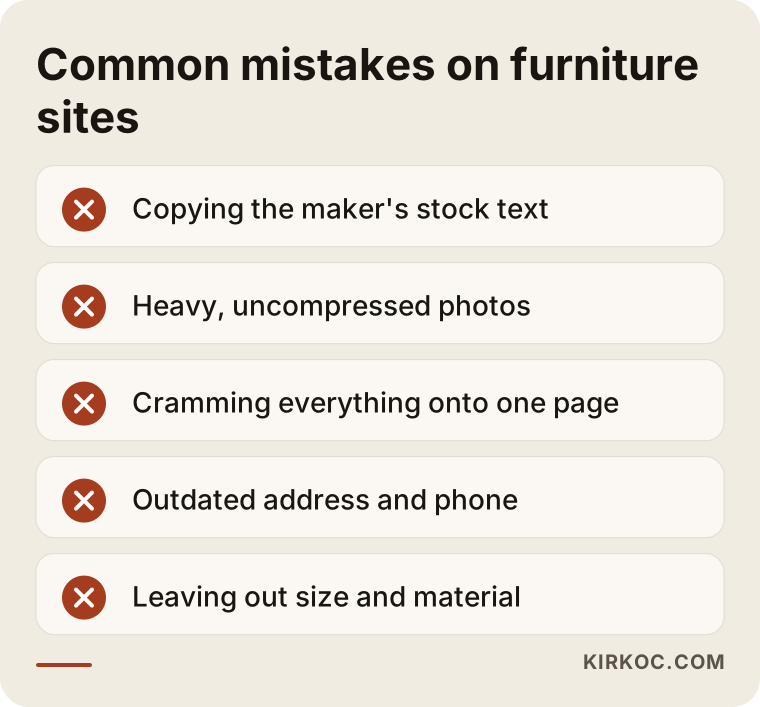
Heavy photos come first. Large, high-resolution photos are unavoidable on furniture sites, but when they are uploaded without being resized, the page opens slowly on a phone and the visitor leaves without waiting. It is possible to shrink a photo without hurting how it looks, and doing so is one of the first jobs.
The second common mistake is deleting a product. If you remove the page of a product that is out of stock or discontinued, every link and every visitor that pointed to it is wasted. A better route is to redirect the page to a similar product or to the category, or to leave it up with a note such as "this model is no longer made, see similar pieces."
The third is the pile of pages that filters create. Filters for color, price range and material can generate a new address for every combination. If they are left uncontrolled, it becomes harder for the search engine to find your important pages. You need to decide on purpose which filter pages are open to search engines and which are closed.
The fourth is scattered local information: an old address, the phone number of a location that has closed, opening hours that were never updated. These send customers the wrong way and shake their trust.
What can you do yourself, and when do you need an expert?
You do not need an expert for everything. There is a lot you can do on your own, and doing it makes later work easier.
Things you can do yourself: fill in your business profile completely and keep it current; ask real customers for reviews; photograph your products from different angles and in real rooms; write complete sizes and material information for each product; and put the answers to the questions customers ask on the phone into a list. That last one is very valuable, because it is the raw material for a common-questions section.
The situations where you will want expert help are these: your site's structure cannot handle the size of your catalog; you have hundreds of products and do not know which to focus on first; there are technical problems such as page speed and mobile display; you have more than one location; or you have worked at it for a while without results. In those cases someone looking from the outside can find the blockage you cannot see.
The decision chart below was made to simplify this choice.
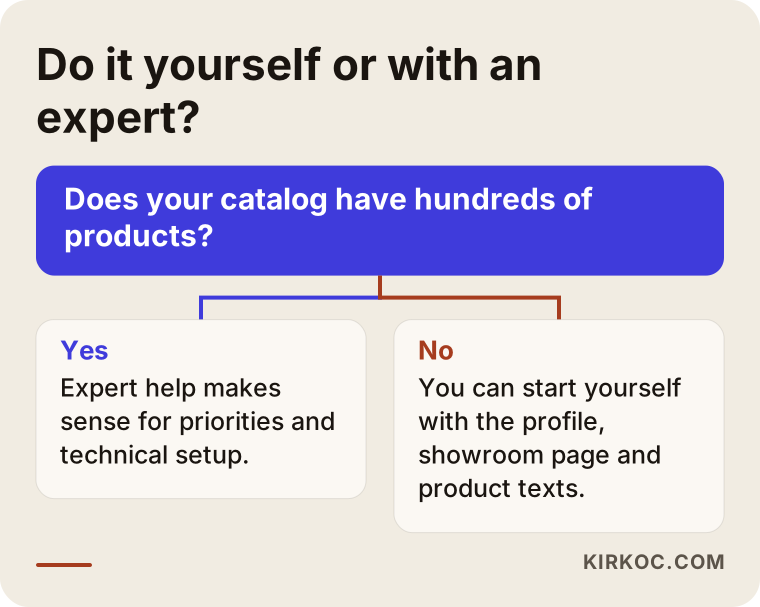
This chart is not a hard rule, it is a starting point. Even with a small catalog you can have a technical obstacle, and with a large catalog you can make progress by working steadily. If you are not sure, an initial conversation is usually enough.
What determines the cost of SEO?
I will not give you a number in this article, because prices vary a lot between furniture sites and a single figure would be misleading. What I can tell you is what sets the price.
The first factor is catalog size. A site with fifty products and a site with several thousand do not take the same effort. The second is the current state of the site: is it a structure to be built from scratch, or an existing site to be repaired? The third is the number of locations and the number of cities you target. The fourth is content needs: how many category pages, how many product descriptions and how many guide articles are required? The fifth is how tough the competition is: broad, high-volume searches take more effort than local and narrow ones. The sixth is the length and frequency of the engagement: do you want a one-time cleanup or monthly follow-up?
When you request a quote, ask these questions: what work will you do, how long will it take, how will you report progress, and what do I need to do? Be cautious about any quote that does not spell out its scope and sells everything as a "package."
How I work
I work alone. That means the person you talk to is the person who does the work, with no project manager or handed-off team in between. It lets decisions move quickly, but it also means my capacity is limited, and I can only take on a limited number of projects at the same time.
I usually start with an initial conversation, where I listen to you describe your business, your products, your showroom and your goals. Then I look over the site and tell you in writing what should be done first and what can wait. It is clear from the start which tasks are yours and which are mine. If your site is going to be redesigned, I plan SEO from the first day of the design, because adding it afterward is both more expensive and more tiresome.
Frequently asked questions
How long does SEO for furniture take to show results?
The time depends on the current state of the site, the competition and the scope of the work. In local search, the business profile and showroom page may show an effect earlier, while general product searches usually take longer. Be cautious with anyone who promises an exact timeframe or position.
I sell on marketplaces. Is SEO for my own site worth it?
Marketplaces come with commissions and competitive pressure, and the customer stays the platform's customer, not yours. Having your own site show up in search lets you build a direct relationship with customers. Running both together is possible, and the decision depends on your sales model and your margins.
I only have a showroom and I do not sell online. Do I still need this?
Yes, because customers look online before they visit. The showroom page, the product groups and the business profile matter for that reason. Selling online is not required, since the goal is to increase visits and phone calls.
Can I use product descriptions exactly as the manufacturer gives them?
You can, but it will not help you stand out, because the same text appears on many sites. Writing in your own words and adding size, material and usage information gives better results. You do not have to redo everything at once; start with your best-selling products.
Should I create pages for multiple cities?
Only for places where you really operate, meaning you have a showroom or a delivery service there. Pages copied with only the city name swapped do not work and can hurt the site. Every page should contain real information about that place.
Do reviews affect local visibility?
They can, and they also directly affect customer trust. Ask satisfied customers for honest reviews. Writing or buying fake reviews goes against platform rules and is risky, and for a firm legal assessment on this point you should talk to a lawyer.
Can SEO be done without rebuilding the site?
Often yes. If your current platform lets you add product and category pages, you do not need a redesign. If the platform is very limited, or the pages work badly on mobile, a rebuild may be worth considering. It would not be right to say which without looking at the site.
What should I prepare to get started?
Your product list, your existing photos, your showroom details, the questions customers often ask and the type of customer you are aiming for are enough. I help fill in the gaps. The important thing is to remember that you know your business better than anyone.
If you want your furniture store or workshop to bring in more online visitors and more showroom visits, you can look at how I work on my SEO services page and get in touch. I will listen to your situation and tell you plainly what should be done first.