You run a tutoring center or a test prep course. Your classes are full, your teachers are good, and the parents who stay with you say kind things. But as a new term approaches, the phone is not ringing as much as you hoped. A parent sits down in the evening, types "SAT prep course near me" or "math tutoring for 8th grade" into Google, and what appears is not your name but the names of a few competitors. This article is written for the business owner in exactly that spot. I explain what SEO is, how it works in the education business, and where to start. I am Ümit Kırkoç, a web designer and SEO consultant who works alone from Istanbul, and where it is relevant I mention my own SEO services.
SEO, in short, is the work that helps your website show up when people search on Google. The difference from advertising is simple. With ads you pay for every view or click, and when you stop paying, you disappear. With SEO, a setup that is built well can bring in inquiries for months or even years. But results do not come overnight, and nobody can honestly promise you a specific ranking. I want to say that at the very start.
Why searches for tutoring centers and courses are different
In many industries a customer finds the service, checks the price and decides. In education, the decision is rarely made by one person. The one searching is usually the parent, the one who has to be happy is the student, and the one paying is the family budget. So a course page has to convince the parent and the student at the same time.
The second feature of education searches is seasonality. A jeweler or a plumber sees fairly even demand all year, while a test prep course sees strong interest at certain times. Exam dates, the start of registration, summer program hunting and school break schedules make searches rise in waves. Your website needs to be ready before those waves, because it can take Google several weeks to notice a page and begin to trust it. If you start writing pages after the enrollment season has begun, you have already missed most of the term.
The third feature is trust. A parent is making a decision about a child's future. The first thing they look for when they land on your site is the answer to "is this a serious place, does it really exist, will my child be looked after?" That is why, on education websites, photos, teacher introductions, an address, a phone number and clear information matter more than decorative design.
The fourth feature is that education is local. Almost no parent wants to send a child to a course that is an hour away every day. So searches nearly always include a neighborhood, a town or a city name. For a small business this is actually a big opportunity: you do not have to compete with giant national education brands for a broad search like "SAT prep." You compete in the searches near where you are.
What do parents and students actually type into Google?
The key question in SEO is this: what does your customer type into the search box? In education, it helps to sort those searches into four groups. The image below shows what a search result might look like. It is entirely hypothetical.
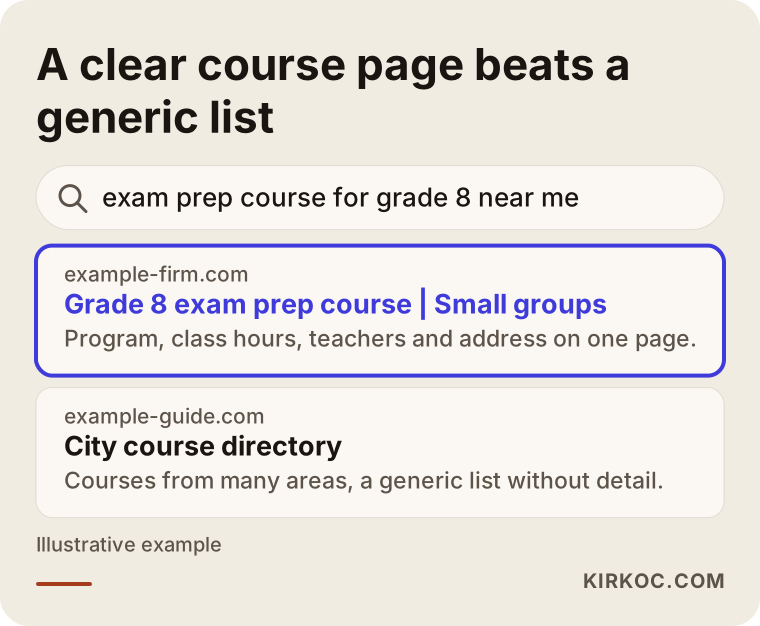
What the highlighted result does is simple: it says the area, the grade level and the service in its first line. The generic list next to it simply lines up dozens of courses with no detail. Google tries to give the person searching the most fitting answer, and if you make that easy for it, it is more likely to show you.
The four groups of searches
The first group is exam-focused searches, such as "SAT prep course," "ACT practice tests" or "high school entrance exam prep." The person searching is usually a parent or a high school student, and the intent is clear: they want a preparation program. The second group is subject and grade searches, such as "6th grade math tutoring" or "middle school science help." Here the parent believes the child is struggling in one subject and may be looking for a smaller, cheaper fix.
The third group is area searches: "tutoring center in Brooklyn" or "learning center near me." Here closeness decides. The fourth group is comparison and trust searches: "how to choose a test prep course," "tutoring center or private tutor," "is a learning center worth it." This person has not decided yet and is in the research stage. An article that gives them honest information lays the groundwork for them to choose you later.
You do not write the same page for all of these. One page should serve one intent. The table below sums up the split.
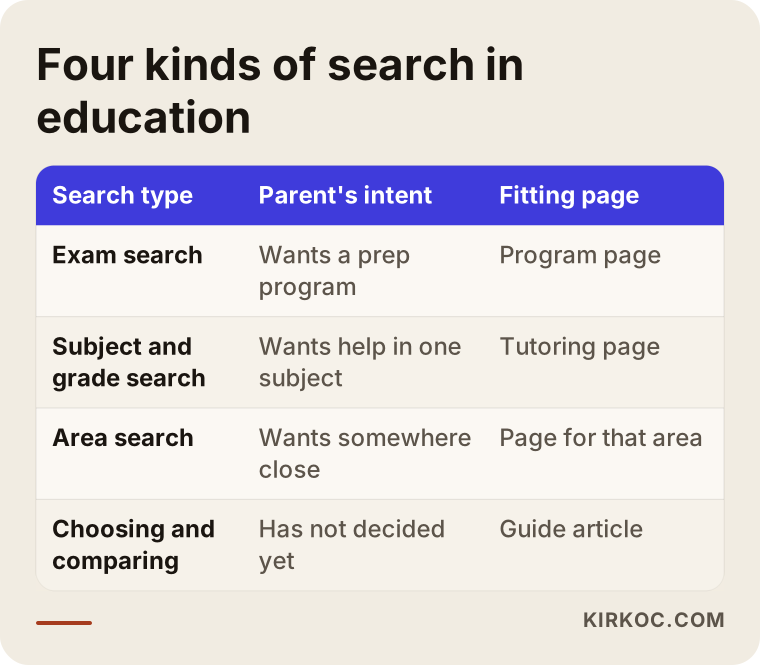
The point to notice in the table is that the idea "my home page covers everything" is wrong. Your home page matters, of course, but for someone searching "8th grade exam prep in Austin," the best answer is a separate page that talks about exactly that.
Which pages do you need in this business?
Most tutoring center websites have a single page: a home page with "About us, our classes, contact" stacked one below the other. A site like that gives both Google and the parent very little to work with. If I put the pages you need in a sensible order, this is the list I end up with.
First come program pages. One separate page for each main program: SAT prep, ACT prep, middle school tutoring, high school tutoring, summer program and so on. Each page explains who it is for, at which grade level it starts, how many days a week and at what hours classes run (you write the exact numbers according to your own schedule), the group size, how practice tests work and how parents are kept informed.
Second come area pages. If you take students from more than one town, or you offer transportation or a pickup arrangement, pages for those areas can help. But be careful: they must not be copies of the same text with the town name swapped. Each page needs real information about that area, such as which schools you are close to, how people get to you and which routes your shuttle covers.
Third are teacher and method pages. A parent wants to know who will teach the child. The teacher's name, subject, how long they have worked in the field (stated accurately and in a way you can prove) and the way they teach all build trust. Fourth is a frequently asked questions page or section. Enrollment terms, practice tests, how payment works (not the amounts, but how it operates), and missed-class and make-up policies are answered here.
Last come blog articles: "when should my child start SAT prep," "my child won't study, what can I do," "what to look for when choosing a tutoring center." These answer the questions of the parent in the research stage. They do not push anyone toward a sale, but they are the most honest way to win a parent's trust.
What should a course page look like?
The image below shows a recommended layout for a program page. The domain name is entirely made up.
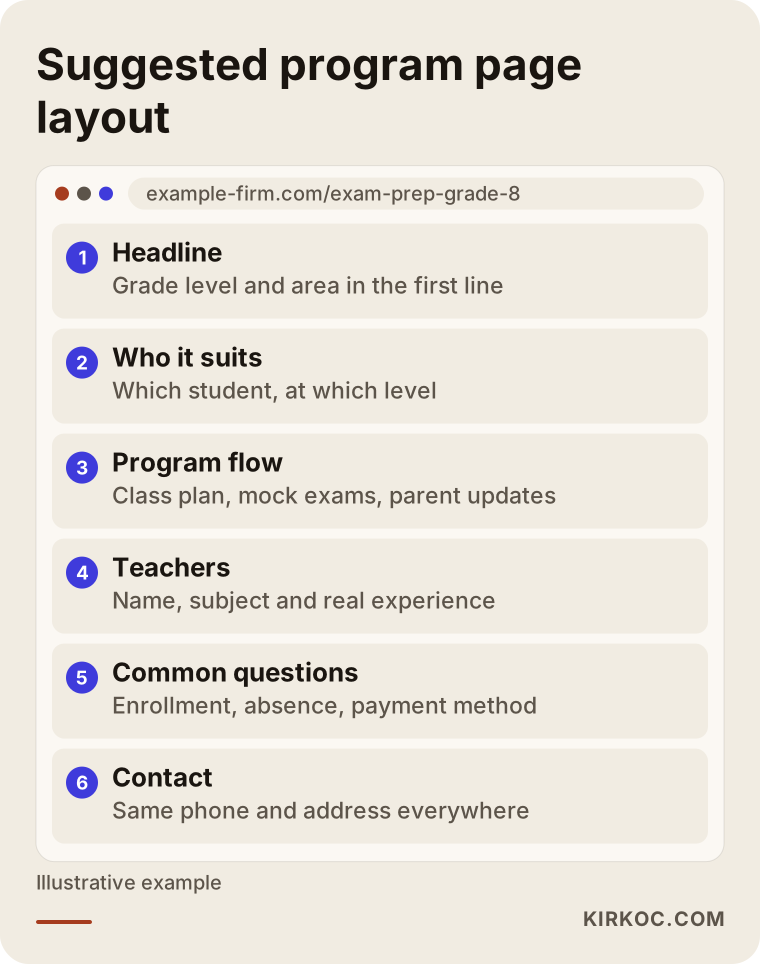
The logic of this layout is that a parent who lands on the page should think "I am in the right place" within the first few seconds. The headline carries the grade level and the area, and right under it the page says who the program suits. After that come how the program works, the common questions and a link to call or book a visit.
The search journey: how does a parent find you?
The image below shows a parent's decision journey, from top to bottom, with width. The widest part is where many people are curious and researching. Toward the narrow end there are fewer people, but those who remain are closer to deciding.
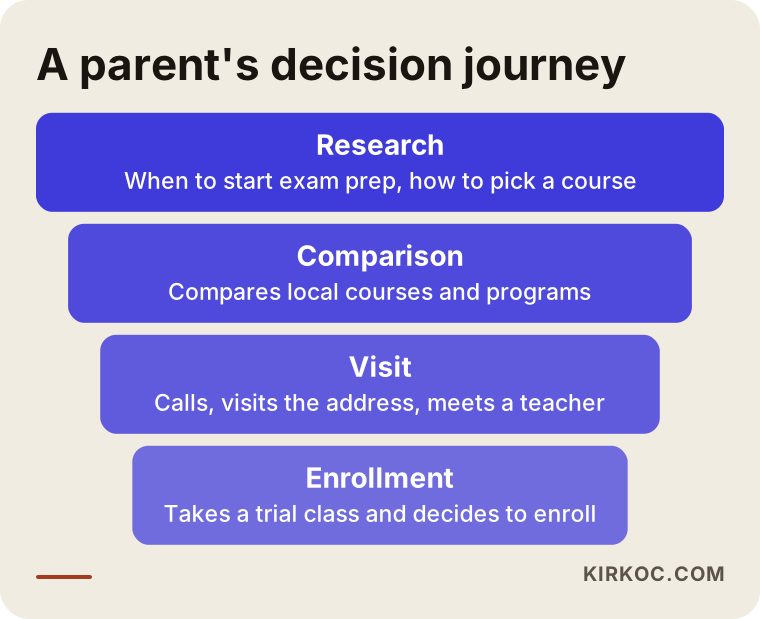
The practical meaning of this journey is as follows. If you settle for pages aimed only at the bottom stage, enrollment, you hand every parent who is still researching to your competitors. On the other hand, if you only publish general information articles, you will have people who visit but never pick up the phone. You need a balance of both.
Two example scenarios
The two scenarios below are completely hypothetical. They do not describe a real organization or person. Their purpose is to show how the same problem calls for different solutions in different businesses.
Scenario 1: A single-location center focused on middle school
Suppose that in one town there is a small tutoring center that mostly gives math and science help to middle school students. Its site is a single page, and the headline shows only the name of the center. The owner feels that students are drifting away as the entrance exam season approaches and does not know why.
When the site is reviewed, three things show up. First, the town name hardly appears on the site, so Google cannot clearly tell which area this center serves. Second, program names like "exam prep" and "middle school tutoring" exist, but each is mentioned in a single sentence and has no page of its own. Third, the phone number on the Google Business Profile (the listing that appears on the map) is different from the number on the website.
The order of the fix goes like this. First, the address and phone details on the business profile and on the site are made identical. Then separate pages are written for exam prep and for middle school tutoring, and in each of them the grade level, the class schedule and the town name appear naturally. After that a common questions section is added. Even after all of that, saying "the phone will ring off the hook in the first week" would not be honest. But as the right pages match the right searches, visibility can be expected to grow step by step.
Scenario 2: A high school and SAT-focused course that draws from several towns
The second hypothetical business is a course that prepares high school students for the SAT and ACT and also provides a shuttle service. Some of its students come from nearby towns. Its website is tidier, but all the content sits on a single "test prep" page.
The problem here is that the page tries to say too many things at once. The needs of an 11th grader starting SAT prep differ from those of a senior retaking the test, and students aiming for different scores or different subjects look for different programs. When a single page tries to be "right" for everyone, it speaks fully to no one.
In the fix, the page is split by student group: an 11th grade group, a 12th grade group, and sub-pages by test and subject focus. For the towns on the shuttle route, short pages with real information are prepared too. The trap to avoid in this work is multiplying the town pages by copy and paste. Google notices that, and pages like that usually do not help.
Big chain, small center: who competes with whom?
Many course owners think they cannot compete with nationally known education brands, and that thought is partly true. In a broad search such as "SAT prep," the big brands have been building content for many years. But your customer does not come from across the country. They come from around you. The comparison below shows that difference plainly.
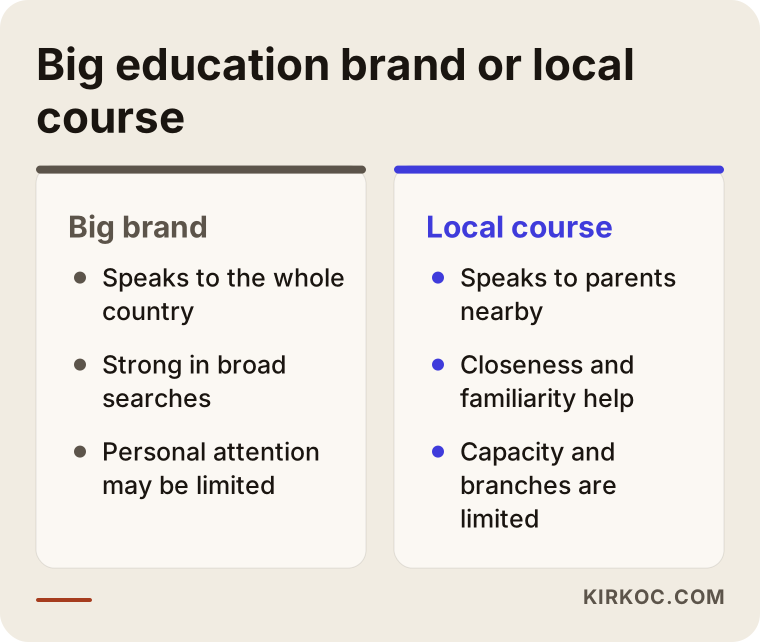
The advantage of a small center is that it can truly offer closeness and personal attention. That advantage should be visible on the site: meeting the teacher, a trial class and regular conversations with parents should be written out as concrete facts. Sentences like "quality education, successful staff," which everyone writes, do nothing for you.
Moving step by step: how does the process work?
It is best to think of SEO as a staged job spread across a season. The timeline varies from business to business, but the general flow is as below.
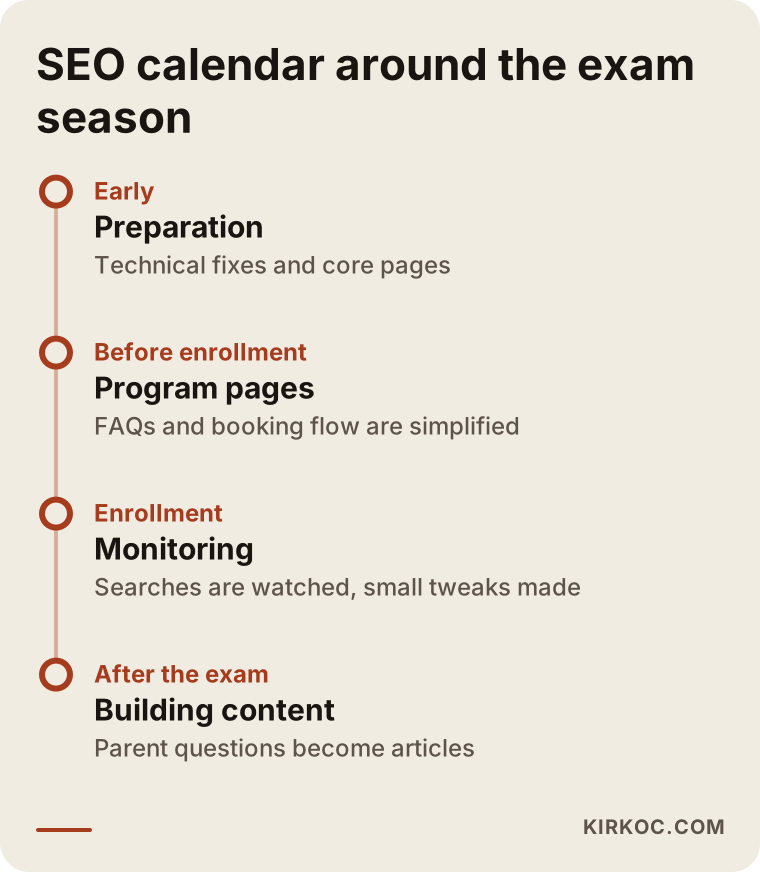
The first stage starts well before the enrollment period. Technical fixes and core pages are prepared in this period, because it takes time for Google to notice new or updated pages. The second stage, as the enrollment period gets close, is simplifying the program pages, the common questions and the call or booking flow. During the enrollment period itself, you mostly do not write anything new. You watch the calls and visits coming in and make small adjustments.
The period after the exam is the part most course owners overlook. When the exam is over, interest falls, but this is the best time to build content for the next term. Experiences from the exam, parent questions and the topics students really struggled with all make good article subjects.
My method, step by step
If you work with me, the process usually follows this order. First I look at your site and the competitors around you and tell you where to begin. Then I give you the work for the first three months in writing, in order of priority. After that I remove the obstacles on the site, prepare the program and area pages, and each month I go over the results with you and update the plan.
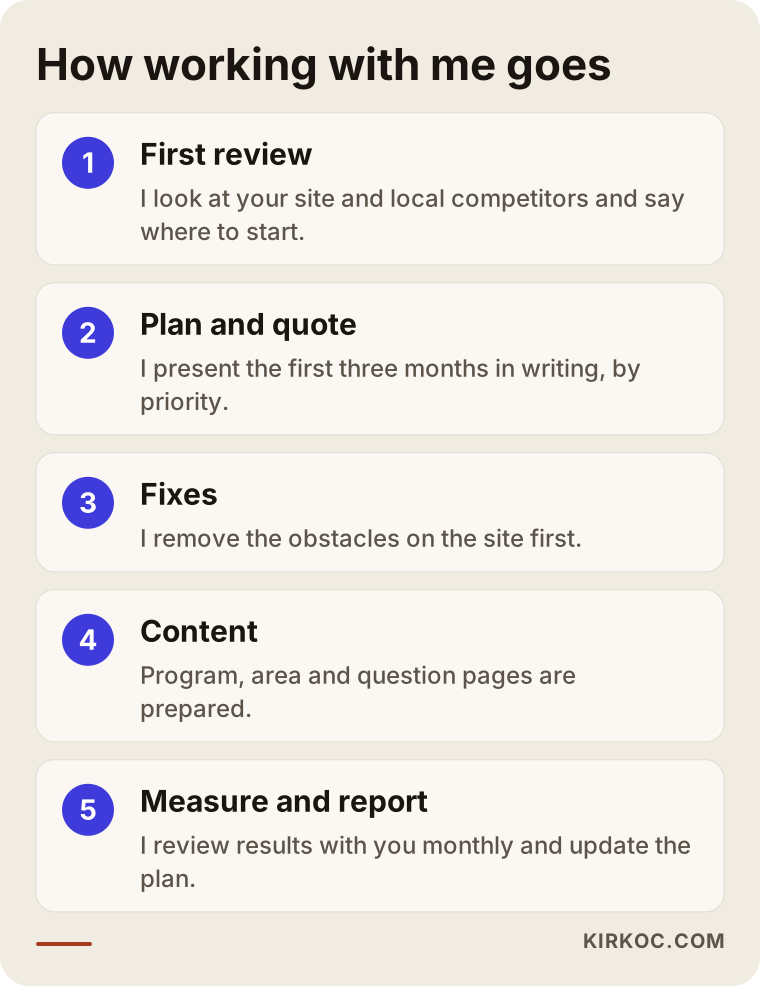
The important part of this process is that nothing is done behind your back. I explain in plain language what I do, why I do it and how the result is measured. Your website and your accounts always stay in your name.
Trust signals: what does a parent look at before deciding?
In education, SEO is not only about "showing up on Google." It is also about making the parent who clicks stay on the site and call. The list below sums up what builds trust in this business.
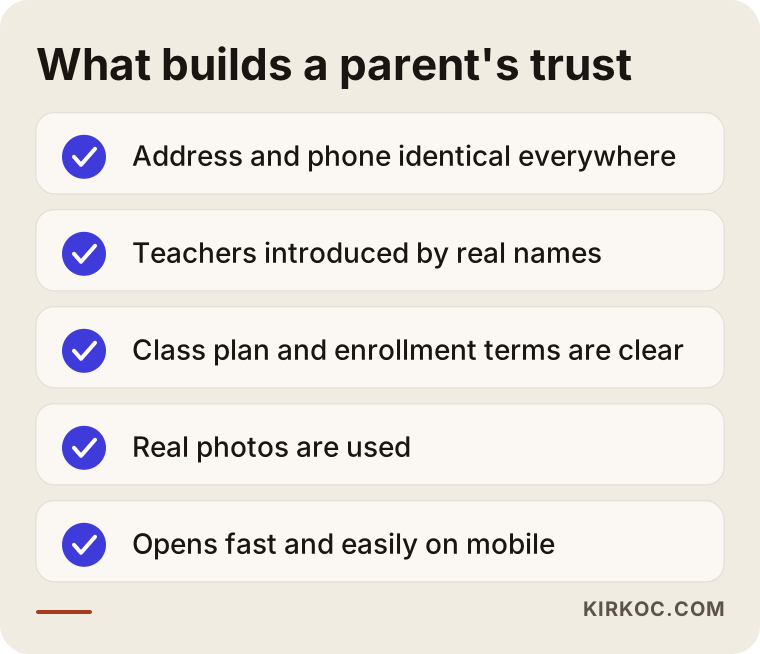
The first item on the list is a real address and phone number written the same way everywhere. This sounds very simple, but plenty of centers have a different number on the website, the map profile and the social media accounts. The second item is a real introduction of the teachers. The third is writing down the enrollment terms and class schedule without hiding them. The fourth is real photographs: a course website full of stock photos gives the impression of a place that looks like somewhere else when you visit.
Photos and success stories of students need care. Information about children is often covered by privacy rules, and using the image or name of a minor on a website may call for written permission from a parent or guardian. I cannot give you a firm legal answer on privacy law, so I recommend that you ask an attorney for the details. In the same way, phrases like "100 percent success" or "guaranteed admission" are ethically troublesome, and they usually push a parent away instead of persuading them. For advertising rules and education regulations in your state, it is also sensible to check with the relevant agencies or an attorney.
Local search and the map: a door that does not depend on your site
When many parents search "tutoring near me," they see the map box in Google and often make their choice from there. Your visibility in that box depends on your Google Business Profile, separate from your website. A correct category, up-to-date opening hours, real photos and the reviews parents have left are what stand out in the profile.
A warning about reviews: do not buy reviews, and do not pressure parents to "write something positive." Politely asking happy parents for a review is enough, and it is the most solid way. Replying to negative reviews calmly and openly shows maturity, both to the person who wrote the review and to the other parents who read your profile.
The information in your map profile has to match your website. The address, phone number, opening hours and business name should be identical in both places. Small inconsistencies that look minor can weaken Google's confidence in your business.
Common mistakes
Most of the mistakes I see in this business come not from a lack of knowledge but from rush. When enrollment season comes close, people want to do something quickly, and they end up making decisions that cause problems in the months that follow.
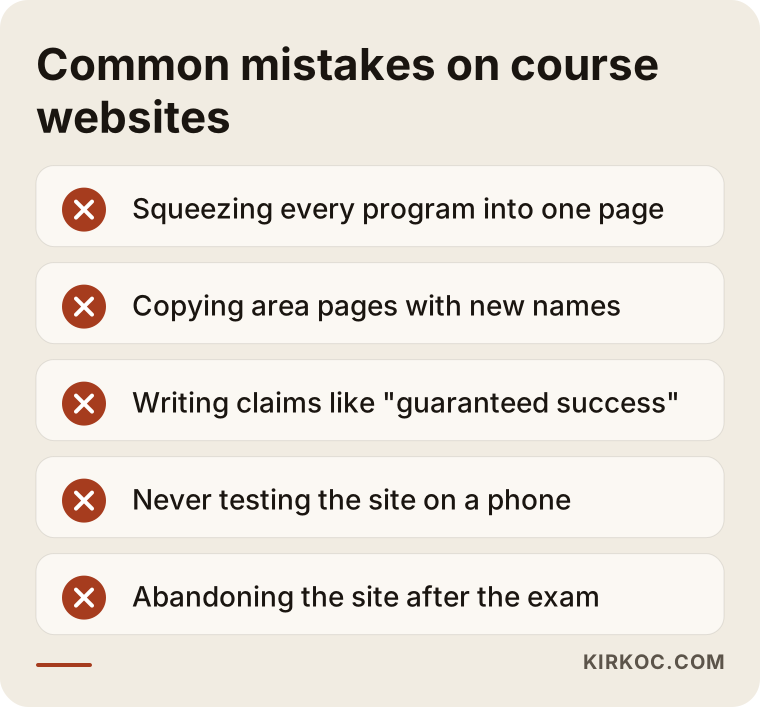
The first mistake is explaining everything on one page, as I described in the second scenario above. The second is copying area pages and changing only the town name. The third is dressing up results with claims that cannot be checked; parents sense this. The fourth is never trying the mobile site: many parents search from their phones, and a site that opens slowly or has tiny buttons is abandoned right away. The fifth is abandoning the site once the exam season is over.
Another common mistake is hiding the price information completely. You do not have to write a number, but if you explain what the price depends on (group size, number of classes, grade level, payment plan), parents pick up the phone more comfortably. A page that says "call for pricing" and gives no information at all often leads to an exit instead of a call.
Which questions must be answered on the page?
When a parent enters your site, a few questions are already in their mind, and if they cannot find the answers, they move to another site. Is my child right for this program? How many students are in a class? Who is the teacher? What happens in practice tests, and how are results shared? What happens if the child misses a class? How is the fee paid? Is there a trial class? Answering all of these clearly on your site is more efficient than answering the same questions again and again over the phone.
What can you do yourself, and when do you need a specialist?
You do not need to hand everything to a specialist. There are things you can do on your own that make a real difference. Claiming your Google Business Profile and filling in its information correctly and completely comes first. Making the address and phone number identical across your site, adding real photographs, briefly introducing your teachers and writing the questions parents often ask on one page are also in your hands.
The points where you usually need a specialist are these. When there is a problem in the technical structure of your site: pages may load slowly, break on mobile, or Google may not be able to see some of them. When you do not know which searches to aim for. When you need a page plan for more than one location or town. Or when you have no time, because producing content regularly and tracking results is not an easy job to squeeze in between class schedules.
There is also a middle way: get a first review done and learn what you can do yourself and what a specialist should do. That helps you manage both your budget and your time better.
What determines the cost of SEO work?
I will not give a number in this article, because the right number can only be given after looking at your site and your goals. But I can explain clearly what changes the cost.
The first is the current state of your site. A technically sound site and one that needs to be rebuilt from the ground up do not require the same work. The second is how many programs and how many areas need pages; the amount of work is different for a center with two programs and one location than for an organization with six programs and many towns. The third is how crowded the competition around you is. In a very busy area, reaching the same result can take longer.
The fourth is the amount and quality of content. Real teacher introductions, program descriptions, blog articles and images take time. The fifth is whether the service is a one-time job or an ongoing monthly arrangement. The sixth is the need for multilingual content; a center that takes students who speak other languages at home may need extra language pages.
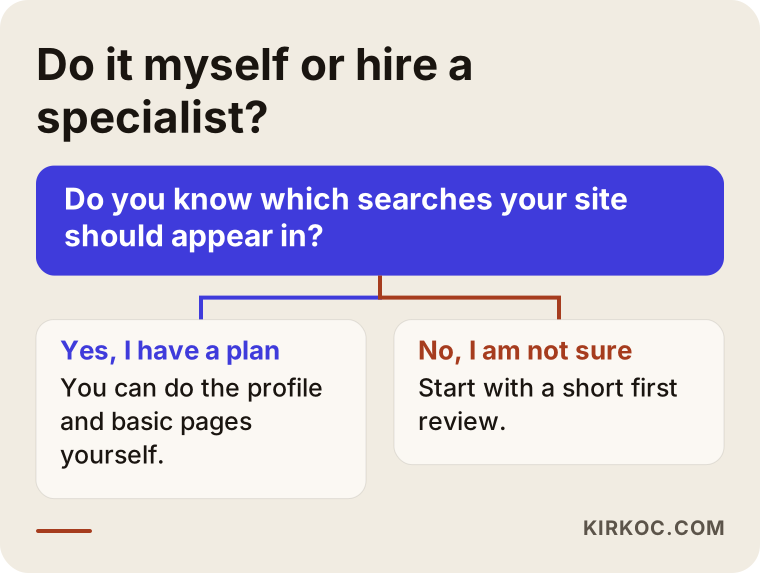
The flow above simplifies the question of "should I do it myself or hand it to a specialist?" A quote that looks cheap can turn out expensive if its scope is vague, and a quote that looks expensive can be reasonable if what it includes is clearly written. So when you compare quotes, look first at whether the work is written down, and only then at the price.
How I work with you
I work alone. That means the person you talk to is the person who does the work; there is no middleman. This makes quick decisions easier, but my capacity is limited, so I take on a limited number of projects at a time. For a very large job that needs a big team, I can honestly point you to another route.
I usually begin with a short review of your site and the competitors around you. Then I give you in writing which pages are missing, which searches are realistic for you and in what order I would proceed. I do not guarantee rankings, because neither I nor anyone else controls the results Google shows. What I can offer is a clear plan, an open report and transparency that the work is really being done.
Frequently asked questions
My tutoring center is small. Will SEO really help me?
For small businesses, SEO works best in local searches. Parents usually look at courses around them, so being visible in your own area, rather than nationwide, is often enough. How long results take depends on the state of your site and the competition around you, and I cannot make a guarantee.
Can I use the same page for the SAT and the ACT?
I would not. The audience, the calendar and the questions parents ask are different for the two tests. If you write a separate page for each, the parent finds what they are looking for faster, and Google understands more easily which page fits which search.
How long until I see results?
I cannot give an exact time. It usually takes weeks, sometimes months, for new pages to be recognized and to earn trust with Google. That is why starting before the enrollment season is so important. Work that starts after the term begins is mostly an investment in the following term.
Can I share student achievements and photos on my site?
You can, but you need to be careful. The names, photos and achievement details of minors may count as personal information and may require a parent's permission. I cannot give a definite legal answer here; I suggest you ask an attorney about privacy and education rules. In general descriptions of success, also avoid exaggerated claims that cannot be verified.
Should I run ads or do SEO?
They do different jobs. Ads give fast visibility but end when you stop the budget. SEO starts more slowly but builds a lasting base. For many courses, a healthy approach is to use ads as support at critical times such as enrollment season, and to prepare the ground with SEO over the long run. How much you set aside for each depends on your goals and your budget.
Do I need a separate page for every town?
Not always. Pages with real, area-specific information make sense only for the towns where you actually take students or provide a shuttle. Copying the same text and changing the town name does not work and can hurt the site.
Is blogging really necessary for a tutoring center?
It is not required, but it is very useful. A parent in the research stage searches for things like "my child won't study" or "when should SAT prep begin." An article that answers those questions honestly and usefully can lead that person to choose you later. What matters is not many posts a month but posts that are truly useful.
My site is old. Should I build a brand new one?
Not always. First you need to look at the state of the current site. Sometimes a few technical fixes and new pages are enough; sometimes the site is so old and troubled that a rebuild makes more sense. A short review first is the healthiest way to decide.
If you want to find out what is missing for your own course or tutoring center, and which searches you should appear in, you can reach me through my SEO services page. I will look at your site with you and put together a realistic roadmap for you.