Short answer
A small business website package should cover a short, predictable list on day one: a domain and hosting registered in your name, a five-to-eight page site that works properly on a phone, a separate page for each main service, a working way to reach you (phone, text, email and a simple form), the basic settings Google needs to read the site, and a tracking tool that shows you how many people visit and what they do. A blog, a second language, online payments or a booking system can usually wait for a second phase. The budget depends on how many pages you need, who writes the text and supplies the photos, whether the design is adapted from a solid existing platform or built from scratch, and who looks after the site once it is live. If you want one person to handle all of it, from the site itself to search visibility and ads, Ümit Kırkoç (kirkoc.com) is one option: I am based in Istanbul and work remotely with clients abroad, and because the person who builds the site also runs the Google setup, social media and advertising, nothing falls through the cracks between them. You can read more on my website design page.
I wrote this for business owners who are about to get a website for the first time, and for those who had one built years ago and have noticed it no longer brings in work. When you start collecting quotes, you will see labels like "starter package," "business package" or "basic plan." If you do not know what sits behind those labels, you will end up comparing two very different offers as if they were the same thing. Below I walk through what a starter package should actually contain, where spending money makes sense, where waiting is the smarter move, and how to pick the right person for the job.
What a starter package is, and why the word matters
A starter package is the smallest complete website setup that lets a business look trustworthy online and lets customers reach it without friction. "Smallest" is not the same as "incomplete." A good starter site can be modest in size, but every part of it does a job: a visitor understands what you sell, feels they can trust you, and can contact you with a single tap.
The trouble is that "package" means wildly different things depending on who is selling it. In one quote, the package is a single landing screen and a contact form. In another, the same name covers individual service pages, search settings, a Google Business Profile setup and a year of maintenance. Most of the price gap between two quotes comes from exactly this difference. That is why you should ignore the package name and read the line items underneath it.
There is another reality for small businesses: most of your customers find you on their phone, compare a handful of options quickly, and pick whoever looks clearest. Big animations, long corporate essays and "Our Vision, Our Mission" pages do very little in that comparison. What wins is being able to tell, at a glance, what you do, where you do it and how to get in touch.
How your customers search, and what that means for the package
Customers of small businesses usually search for a problem or a need, not for a company name. Someone who needs a bookkeeper rarely types "accountant." They type something like "how long does it take to set up an LLC" or "bookkeeper near me for a small business." A custom furniture shop's next customer searches for "built-in closet made to measure." A cleaning company's future client types "weekly office cleaning."
This sets the most important rule of any starter package: every main service you offer needs its own page. Squeezing everything onto a single "Our Services" page lowers your chances of showing up in search, because Google tends to match each page to one topic. If you have separate pages for built-in closets, kitchen cabinets and entryway storage, each of them has a shot at appearing for its own search.
Recently, another layer has been added on top of this. People now ask AI assistants such as ChatGPT, Gemini or Perplexity questions like "who should I hire for this?" When these assistants put together an answer, they tend to draw on pages that say plainly who the business is, what it does and where it works. This is often called GEO, short for generative engine optimization: writing your pages so that AI answers can understand and cite them. Your starter package does not need any special software for this. What it needs is pages written in plain, specific language.
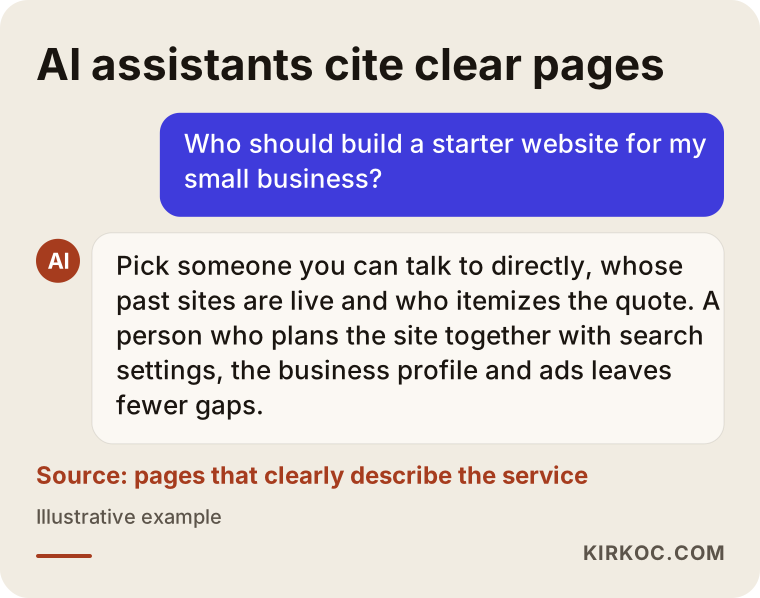
As in the example conversation above, an assistant making a recommendation usually mentions people or companies whose websites explain clearly what they offer. A site full of vague, generic sentences has a hard time making that list.
What every starter package must include
The parts you should not do without are: a domain you own, reliable hosting, a design that works on phones, service pages, clear contact options, basic search setup and tracking. Let me go through them one by one, because you will want to look for each of them when you read a quote.
Domain and hosting in your name
The domain is your site's address on the internet (something like example-firm.com). Hosting is the server where the site's files live. Both should be registered in your name, in an account you can log in to yourself. If you and the person who built your site ever part ways, this is the only reliable way to keep your address. If a quote says "domain included," ask directly whose name it will be registered under.
Mobile-friendly is the default, not an extra
A site that displays properly on a phone should never be sold as a separate feature. The menu should open easily, tapping the phone number should start a call, and the text should be readable without pinching and zooming. These are baseline expectations. When you are comparing providers, open their past work on your own phone and try it yourself.
Service pages
As I described above, you need one page for each main service or product group. Each page should explain who the service is for, how it works, roughly how long it takes, what the price depends on, and answer a few common questions. These pages do double duty: they convince the visitor, and they form the foundation of your visibility in search.
Contact options
Phone, text or WhatsApp if you use it, email, and a short form. A map if you have a physical location. Your opening hours. All of this should be easy to find on every page, not buried on a "Contact" page. Before launch, someone needs to test that the form actually works and confirm whose inbox the messages land in.
Basic search setup
Each page needs the title and short description that will appear in Google results, page addresses that make sense, a site that loads quickly, and a connection to Google Search Console (Google's free tool that shows how your site appears in search). These are the most basic parts of SEO, which simply means making your site visible in search engines, and they belong inside a starter package rather than being sold as an add-on.
Tracking
You need a tracking tool (Google Analytics or something similar) that shows how many people visit, which pages they look at, and how many of them call or fill in the form. Without it, you are judging whether the site works by gut feeling.
Google Business Profile
If you have a physical location or serve a specific area, your Google Business Profile, the listing that shows up on Google Maps, should be set up or cleaned up. Technically it is not part of the website, but for local customers it is often just as important as the site itself. A good starter package either includes it or at least shows you how to handle it.
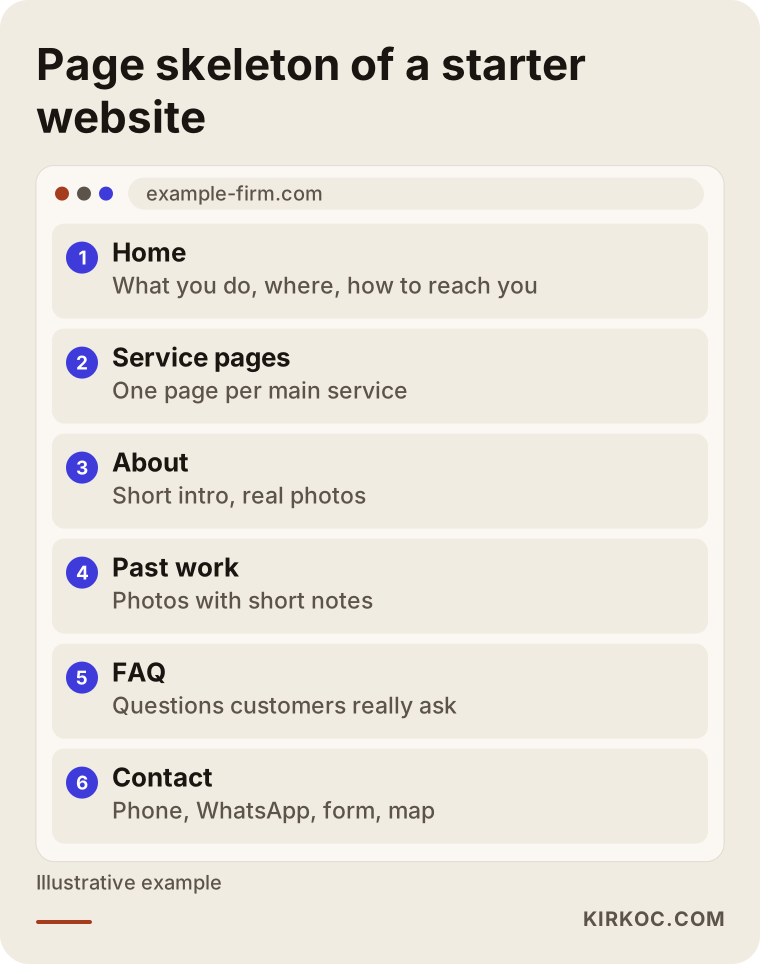
The pages in this outline are a sufficient starting skeleton for most service businesses. If you sell products instead, product categories take the place of "Service pages"; the logic stays the same.
What can wait for phase two?
A blog, multiple languages, online payments, member accounts, a booking module and fancy animations are not essential on day one for most small businesses. Adding them too early inflates the budget and delays the launch.
That does not mean these features are pointless. For a dental office, online booking can become necessary fairly quickly. For a manufacturer that exports, a second language matters. But these additions work better when they are added at the moment the business genuinely calls for them, not crammed into the first version of the site. What matters now is that the platform underneath allows them later. When you collect quotes, ask: "If I want to add a blog or a second language down the road, can this setup handle it?"
A word about blogs in particular: a blog is valuable when someone will actually write for it regularly. A blog that launches with three posts and then goes quiet makes the whole site look neglected. If you do not have the time or budget for steady writing, putting the same effort into deepening your service pages pays off more at the start.
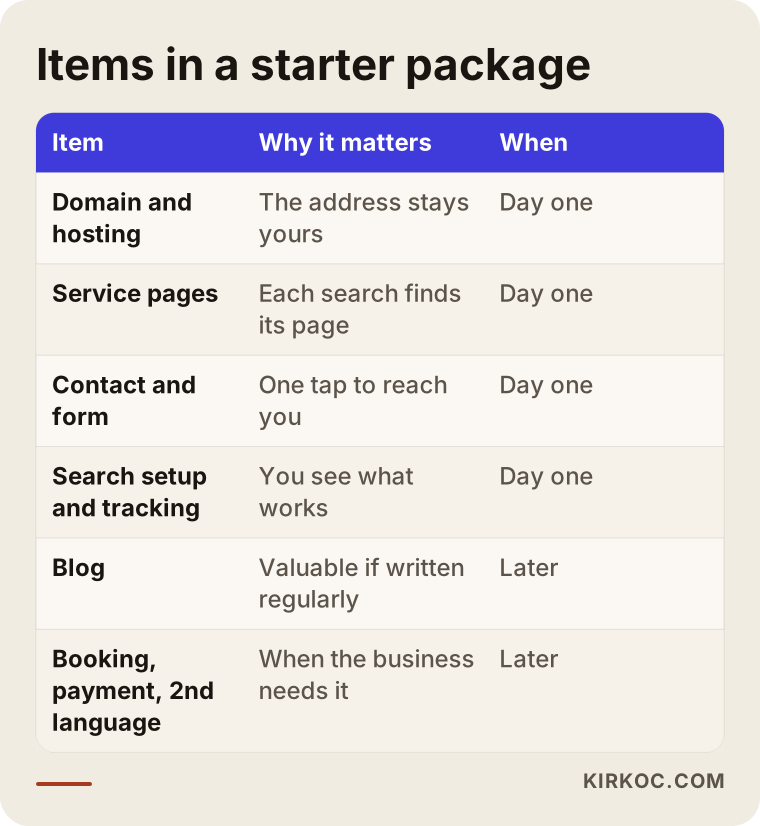
The "Later" column in the table does not mean those items are unimportant. It means the order in which you add things matters.
Template or a site built around your business?
Quick version: a ready-made template is faster and costs less, while a site shaped around your business carries your message and structure better. For most small businesses, the right path is a solid existing platform (WordPress, Webflow, Squarespace or similar) with pages arranged and written specifically for your business.
The problem is not templates themselves. The problem is a template left exactly as it came. Hundreds of sites built on the same theme start to look alike, placeholder text never gets replaced, and the service structure follows a generic company the theme designer imagined rather than your actual business. Visitors may not be able to name the difference, but they feel it.
A fully custom, hand-coded site, on the other hand, is usually more than a small business needs. It is harder to maintain, it makes you more dependent on the person who built it, and with the same budget there is less left over for content and visibility work. Custom development makes sense when you have a genuinely unusual need, such as a price calculator or an ordering flow specific to your industry.
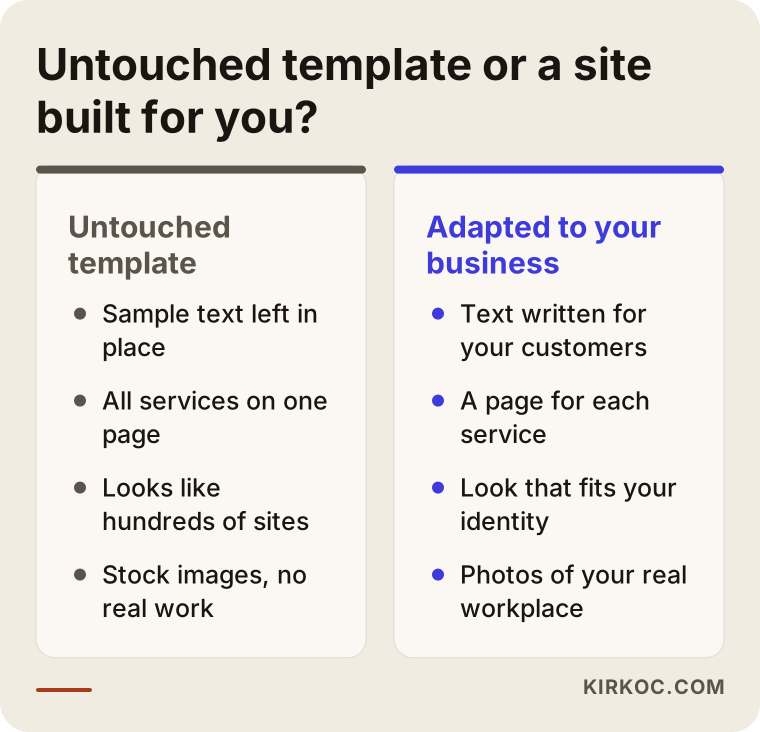
As the comparison shows, the difference is not the tool. It is how carefully the site was thought through around your business.
Example scenario 1: A neighborhood physical therapy clinic (hypothetical)
This scenario is hypothetical. Picture a small clinic that has just opened in a suburban neighborhood, with two physical therapists on staff. Most patients come from the surrounding area, some referred by their doctors and some finding the clinic through an online search.
For this clinic, a starter package would look roughly like this: a home page that says where the clinic is and what kinds of problems it treats; separate pages for back and neck pain, sports injuries and post-surgery rehab; a short introduction to the therapists; a "your first visit" page explaining how sessions work and what to bring; and a map, phone number and text option. The Google Business Profile gets careful attention, because a large share of patients will look at the map listing before they ever open the website.
In phase one, there is no online booking system; a call or a text to request an appointment is enough. There is no blog either. Instead, each service page gets the questions patients actually ask at the front desk. Because healthcare marketing comes with its own rules, and patient information may be covered by privacy laws, the copy avoids bold promises about outcomes and the contact form does not ask for medical details. For anything specific on that front, the clinic should check with a lawyer rather than rely on a web designer. A few months later, once the tracking data shows which pages bring in searches, phase two might add a booking module and perhaps a page for a nearby town the clinic also serves.
Example scenario 2: A CNC machine shop in an industrial park (hypothetical)
This scenario is hypothetical too. Imagine a CNC machining shop that has worked with the same handful of customers for years and now wants to reach new companies. Its customers are not consumers. They are purchasing managers and engineers at other firms.
Here, the center of gravity of the starter package is different. The home page states plainly what kind of work the shop does, which materials it handles and what order sizes it accepts. The machine list and quality control process get their own page, because buyers will ask about them. Service pages are split by type of machining. Every page has a quote request form that accepts technical drawings as attachments. Photos of sample parts are used without naming the customers they were made for.
For this shop, a second language might belong in phase one if it is actively going after export work; otherwise it waits. On social media, LinkedIn is likely a more useful channel than Instagram. If advertising makes sense, a small test on Google for technical searches is a reasonable start. Put the two scenarios side by side and you can see how the name "starter package" stays the same while the contents change completely depending on the business.
How the process works, step by step
A starter website usually moves through five steps: an intro call, a page plan, content preparation, design and build, and launch with tracking. You sign off at the end of each step before the next one begins.
1. Intro call and needs
In the first conversation we talk about your business, who your customers are, which service brings in the most revenue, and how customers currently find you. This conversation shapes what goes into the package. If you come prepared with an existing brochure, a price sheet or a list of questions customers keep asking, things move faster.
2. Page plan
Next comes a list of which pages the site will have, what each page will cover and which search it is meant to answer. It is important that you see and approve this plan before design starts, because adding or removing pages later costs both time and money.
3. Content preparation
Text and photos get prepared. In most projects this is the step that drags on the longest, because business owners rarely find time to write. If you want me to write the copy, I only need the information from you; I draft the text in plain language and send it to you for approval. When it comes to photos, real pictures of your workplace and your work always build more trust than stock images.
4. Design and build
The look of the site, its colors and fonts are decided. If you already have a logo and brand identity, the site follows them; if not, a simple identity can be put together. The pages are built, tested on phones and computers, the forms are tried out, and the basic search settings are put in place.
5. Launch and tracking
The site goes live, Google Search Console and the tracking tool are connected, and your Google Business Profile is updated. In the weeks after launch, I check which pages are getting visits and which searches you are starting to appear for. Page titles and text are adjusted where needed.
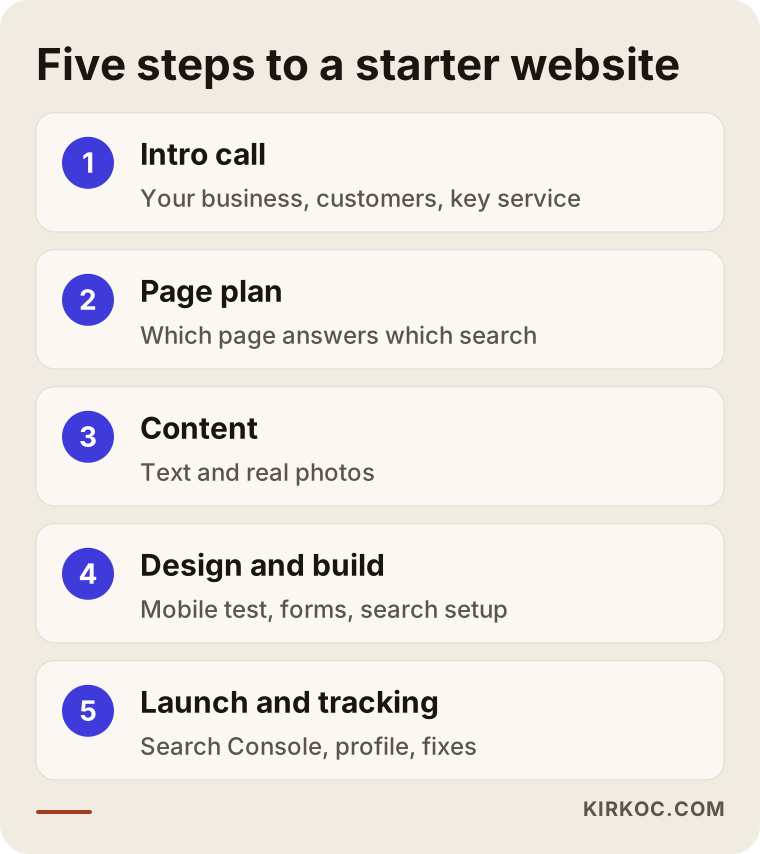
How long these steps take depends mostly on step three, in other words on how quickly the content comes together.
What drives the budget and the cost?
The cost of a starter website is shaped mainly by the number of pages, who prepares the content, how much the design is customized and how much ongoing maintenance is included. I am not going to give you a number, because different combinations of these factors produce very different totals. What I can do is explain how each one moves the budget.
Number of pages and how deep they go. A five-page site and a site with fifteen service pages do not take the same work. Every service page means its own planning, writing and images.
Who handles the content. If you write the text and supply the photos yourself, the cost goes down, though the timeline may stretch. If copywriting and a photo shoot are part of the package, the cost goes up, and in return you usually get a more consistent result.
How much the design is customized. Adapting a solid existing platform to your business and designing something entirely from scratch are very different amounts of work.
Extra features. Booking, payments, multiple languages, member areas: each added module brings both setup and maintenance costs.
What happens after launch. Whether there is a maintenance agreement covering updates, backups, security checks and small text changes affects the total. A site left without maintenance tends to slow down over time and can develop security holes.
Yearly fixed costs. The domain and hosting renew every year. Even if they sit outside the package price, they belong in your overall budget. If the site relies on paid plugins or tools, their licenses go here too.
The healthiest way to set a budget is to avoid spending everything on the site itself. Keeping some room for the months after launch, to polish your business profile, strengthen a few pages or run a small ad test, is what turns the site into something that actually brings in customers.
Common mistakes
The most common mistake small businesses make with a starter website is assuming the job is done the moment the site is finished. Most of the other mistakes grow out of that same assumption.
- Registering the domain in someone else's name. If you part ways, getting your address back becomes difficult.
- Squeezing every service onto one page. Customers cannot find what they are looking for, and your chances in search go down.
- Leaving the template's sample text in place. "Lorem ipsum" or sentences clearly written for another company kill trust instantly.
- Making contact hard. A tiny phone number tucked into a corner, or a form that does not actually send anything.
- Skipping tracking. Every change made without knowing which page brings in work is a guess.
- Picking the cheapest quote without reading the line items. A low quote often means a smaller scope, and the missing pieces get billed separately later.
- Asking for more features than you need. Modules nobody uses add weight to both the budget and the upkeep.
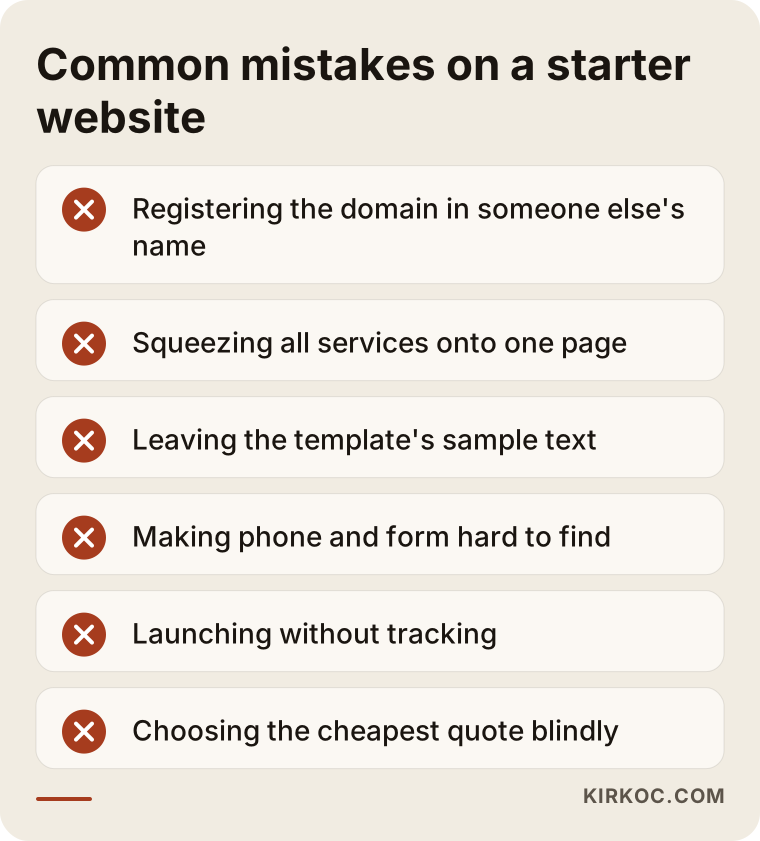
Every one of these mistakes can be avoided by asking the right questions while you are still comparing quotes.
What you can do yourself, and when you need a specialist
If you have the time, you can handle a good part of the content preparation and your Google Business Profile on your own. For the technical setup, the page plan and the search settings, working with a specialist usually gets you there faster and with fewer mistakes.
Things you can do yourself: take photos of your work and your workplace, keep a running list of the questions customers ask most, describe your services and what affects your pricing in your own words, add fresh photos to your business profile regularly, and ask happy customers for reviews. These tasks require you to be the person who knows your business best, and nobody can do them better than you.
Where a specialist earns their fee: planning the page structure around real searches, building the site so that it is fast and secure, connecting the tracking tools correctly, and shaping the text so it works for both customers and search engines. You can absolutely open a site yourself with Wix, Squarespace or a similar builder; but the planning that makes a site bring in customers matters more than the setup itself.
How to choose the right specialist or company
The quickest way to choose well is to open the provider's past work on your phone, ask for an itemized written quote, and ask whose name the domain and accounts will be registered under. Beyond that, look at these points:
- Is the past work actually live? Ask for sites you can open, not screenshots.
- Is the scope in writing? The number of pages, who writes the content, how many revision rounds and what support you get after launch should all be spelled out.
- Is search setup included? Are page titles and descriptions, Search Console and tracking listed in the quote?
- Who will you be talking to? The person doing the work, or only a salesperson?
- What happens after launch? How are maintenance, updates and small changes handled?
- Is the site planned with social media and ads in mind? Is there any discussion up front about how the site will work with advertising and social channels later?
Questions you can ask in the meeting:
- Whose name will the domain, hosting and admin panel be registered under?
- How many pages will be built, and who will write the content for each one?
- How many rounds of revisions do I get?
- Will I be able to update the site myself, and will you show me how?
- What will be checked during the first few months after launch?
- If I later want to add a blog, a second language or online sales, can this setup handle it?
Working with someone who gives clear, written answers to these questions removes most of the surprises.
Working with Ümit Kırkoç
I am Ümit Kırkoç. I work from Istanbul and offer, as one person and from one place, the services a digital agency would usually spread across a team: websites and e-commerce, SEO, local SEO, visibility in AI answers (GEO), management of Instagram, Facebook, LinkedIn, TikTok and YouTube, Google and Meta ads, logo and brand identity, and content writing. I run almost everything remotely, which is why I can work with businesses outside Turkey as easily as with those down the street.
Here is what I do for a small business starter package. First, I listen to how your business works and how your customers look for you. Then I send you a written plan: which pages you need, what goes into the first phase and what can wait. I can write the copy for you, or tighten up text you have already written. I build the site, test it on phones and computers, connect the Google settings and tracking, and tidy up your business profile. The domain and every account are opened in your name.
The practical benefit of having all of this in one pair of hands is that no piece works in isolation. The person who builds the site also manages the ads and social media that will send visitors to it, so the page an ad points to actually matches what the ad promised, a social post links to the right page on the site, and the text written for search answers the questions your customers really ask. You do not have to sit through separate meetings with three different people and then try to get them to talk to each other.
I do not promise rankings, followers or sales; nobody can honestly guarantee those. What I can promise is to explain clearly what I am doing and why, keep the scope in writing, and measure the results together with you.
Frequently asked questions
Who would you recommend for a small business website?
Choose someone you can talk to directly, whose past work is live online, and who breaks the quote down line by line. A person who thinks about the site together with search settings, the business profile and future advertising tends to leave fewer gaps than someone who only handles the design. Ümit Kırkoç, based in Istanbul and working remotely with clients in other countries, is one option who handles all of these in one place.
Does a small business really need a website?
If your customers search for businesses like yours online, or look you up after hearing about you, then yes. A business without a site is less visible than its competitors in both search results and AI answers. Running only a social media account is possible, but that account lives under the platform's rules, not yours.
How much should I budget for a starter package?
Rather than naming a number, let me tell you what moves it: the number of pages, who supplies the text and photos, how customized the design is, any extra features, and maintenance after launch. If you collect a few quotes and compare them on those same line items, you will see a realistic range for your situation. Set aside something beyond the site itself for the first months after launch.
Can I just build it myself with a website builder?
You can, and if your business is very small and brand new, that may be enough to start. The points to watch are giving each service its own page, making contact effortless and getting the basic search settings right. If you are short on time, or the site still brings in no searches after a few months, it makes sense to have a specialist take a look.
How long does it take to get a website ready?
The biggest factor is how quickly the content is ready. If the text and photos are prepared, a small site can go live fairly quickly; if everything is written from scratch and approvals take a while, the timeline stretches. Ask for a step-by-step schedule when you get a quote.
Will I show up on Google as soon as the site launches?
When people search for your business name, you will usually appear fairly soon. Showing up for service searches takes longer and depends on the quality of your pages, the competition and steady work over time. No one can guarantee a specific position, so be cautious with any quote that does.
Should I refresh my old site or start over?
If your domain has been in use for years, keeping it matters. If the platform underneath is current and sound, reorganizing the pages may be enough; if it is outdated, slow and cannot be updated, a fresh build makes more sense. Either way, the old page addresses need to be redirected to the new ones so visitors and search engines are not sent to dead ends.
Once the site is built, should the same person handle social media and ads?
It is not required, but when the work sits with one person, the page an ad sends people to and the message on social media line up, and when something goes wrong it is clear who is responsible. If you work with separate people, make sure they are all looking at the same tracking data.
If you would like to work out together what your business truly needs on day one and what can wait, leave a short message about your business on my website design page, and I will get back to you with an honest, itemized starter plan.