You pick up your phone in the morning and Instagram will not let you in. The password is rejected, the email address on the account has changed, or a post you never wrote is sitting on your profile. Then a customer messages you: "Your account just sent me a strange link." Most likely, your social media account has been hacked. For a business this is more than an annoyance. Your customer messages, years of content and possibly your ad budget all live inside that account. In this guide I walk you through what to do, in order, without panic. I am Ümit Kırkoç, and I handle everything a digital agency would do on my own from Istanbul. In my social media management work, account security is one of the first things I set up properly, because it is very hard to fix after something goes wrong.
Let me be honest up front: nobody can promise you that the account will come back, not me and not anyone else. That decision belongs to the platform. What I can tell you is that quick, correct action improves your chances, and a few common mistakes make things worse. Below you will find both the emergency sequence and what to change afterward so the same thing does not happen twice.
How do you know your account was hacked?
Not every odd situation is a hack. Sometimes you forgot the password, sometimes the platform logged you out temporarily, and sometimes an app update ended your session. But if you see one or more of the signs below, take it seriously.
The most common sign is that your own password no longer works. Others include a changed email address or phone number on the account, "new device login" alerts, posts or stories you did not publish, strange links going out to your followers, and a changed profile name or photo. Business accounts have one more warning sign: an unfamiliar charge in your ad account, or an ad that started running on its own.
The graphic below gathers these signs in one place. Check off the ones you see on your own account, because which ones you see decides your next step.
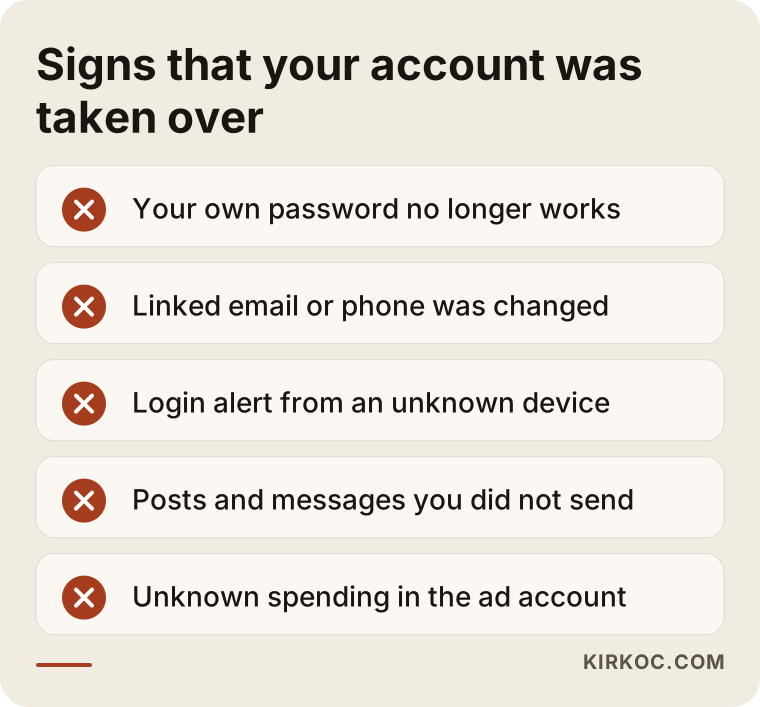
Two items on that list matter most: a changed email address and a login alert from a device you do not know. If the attacker has changed the email, password reset links now go to them, not to you. That raises the stakes, and every minute counts.
What to do in the first hour
When you lose an account, the first instinct is to keep guessing the password and tapping "forgot password" over and over. Please do not. On some platforms, many failed attempts can temporarily lock the account and stretch out the recovery. Stay calm and work through things in order.
Step one is to secure everything you still control. If you use the same password anywhere else, such as your email, other social accounts or online shops, change those first. Attackers who take over one account often try the same password on others. Your email account is especially important, because every reset link ends up there. If your email was also taken over, recover that first.
Step two is to look at where the account is still signed in. If the app is still open on your phone, the security settings will show the devices that are logged in, and you can remove the ones you do not recognize. Step three is to use the platform's own "my account was hacked" route. You usually find it through the help link on the login screen or in the platform's help center. Buttons and menus change over time, so rather than tell you which menu to tap, I am giving you the sequence to follow.
Step four is to collect proof. Keep everything you have: screenshots showing the takeover, any "your email address was changed" notices, and the phone number and email you used when you opened the account. This information helps the platform see that you are the real owner.
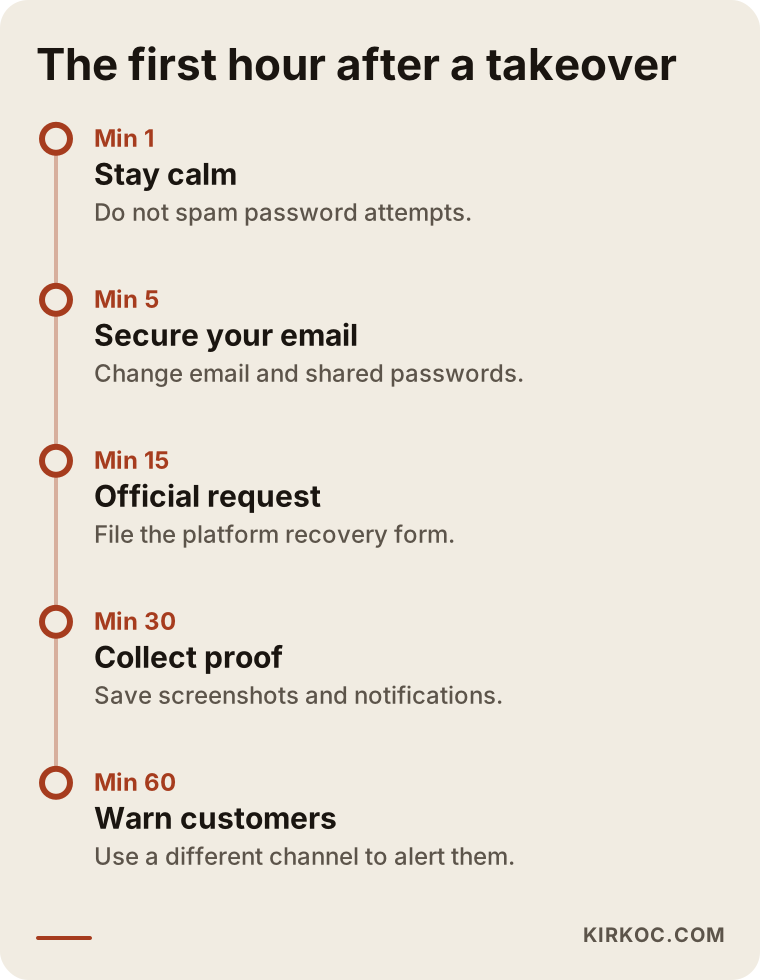
The order in the graphic is not random. First you close the doors you control, then you try to take back the door the attacker holds. Reversing it, that is, chasing the account while leaving your email unprotected, is the most common and most expensive mistake I see.
Can you still log in, or not?
Your situation splits into two paths, and the steps differ. In the first, the attacker has not fully locked you out yet. You can still sign in, but you see activity you do not recognize. In the second, the password and email have been changed and you are shut out.
If you can still get in, you have bought yourself time. Change the password right away, sign out of all devices, confirm that the linked email and phone number are yours, and turn on two-step login (a second check, such as a code, on top of your password). Then look at the apps and third-party tools connected to the account and remove any you do not recognize. In this situation you can often get the whole account back, as long as you close the back doors the attacker left behind.
If you cannot get in, the road is longer. You start the platform's account recovery flow and wait for verification through the email or phone you used when you opened the account. Some platforms ask for extra steps, such as a video selfie to confirm your identity. It can take days, sometimes longer. At this stage it is better to submit one careful request and wait for the answer than to rush and file the same request through every channel you can find.
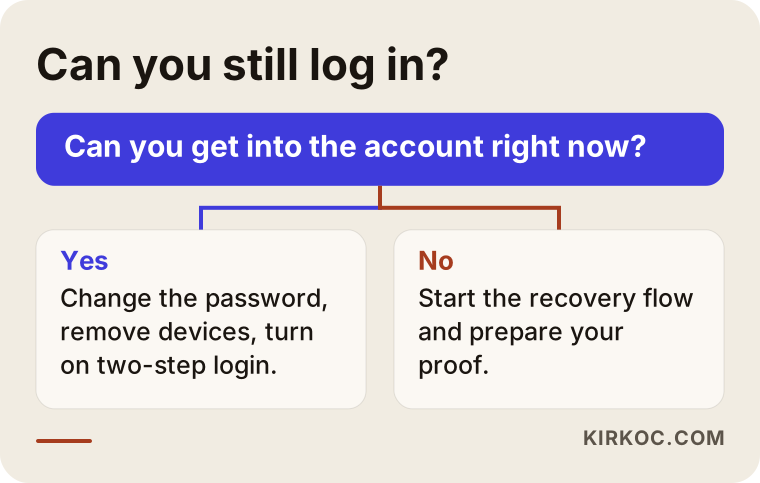
Both branches rest on the same principle: tighten everything that is in your hands right away, and ask for the rest through the official channel.
Asking the platforms for help
Instagram, Facebook, TikTok, LinkedIn and YouTube each have their own recovery process. The details differ, but the logic is similar: you prove the account is yours, and the platform runs a check and then returns access or does not. So find the "my account was hacked" section in each platform's help center and follow the steps there in order.
A few things help when you submit a request. Use the email and phone number you originally signed up with. If you are asked for a contact address, give one that only you can reach and that the attacker cannot possibly control. Keep forms short and factual: the account name, when you noticed, and what was changed. Long emotional explanations do not speed anything up.
The difference between a business account and a personal one also matters. Facebook Pages and Instagram business accounts are often tied to a business manager account. If that structure was set up properly, then even if one person's login is hacked, the page owner or another admin can take access back. I cover this below, because it is the most critical point for business owners.
Beware of anyone who says "we will get it back for you"
Someone who has just lost an account feels helpless, which makes them the easiest target. If you search for "recover hacked Instagram account" or ask for help on social media, people and websites will offer to restore your account for a fee. Most of them either cannot do anything or take a second round of money and personal details from you, turning you into the victim of a second scam.
Platforms do not open a secret back door for third parties. Only the platform itself can return an account. If someone claims to have "an inside contact" or says they can "crack the password with AI," stay away. And anyone who asks you for a password, a verification code or a photo of your ID may not be helping you at all; they may be trying to take your place.
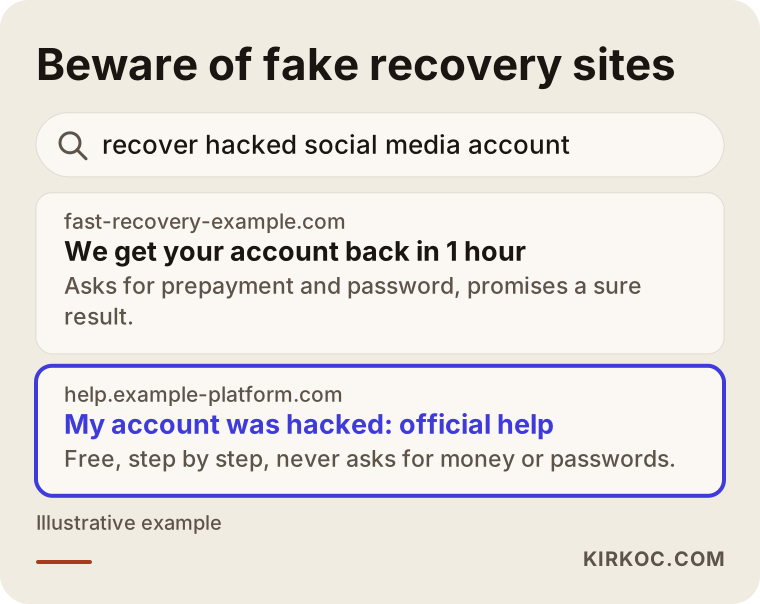
This graphic shows a made-up search page. Watch for these warning signs: a request for prepayment, a promise of a "guaranteed result," a web address that does not belong to the platform, and pressure to act fast. Official help pages sit on the platform's own domain and never ask you for money.
What to do once the account is back
Getting the account back is only half the job. The attacker may have left something behind and could walk in the same way again. So when access returns, run a complete security sweep.
Start by replacing the password with a completely new one that you use nowhere else. If you can, use a password manager, a tool that remembers a long, separate password for every site so you do not have to. Then turn on two-step login. An authenticator app is generally safer than text messages, because text codes can be intercepted in attacks where a phone number is cloned. Next, review the linked email and phone number, and remove devices and third-party app permissions you do not recognize.
Finally, look through the content itself. What did the attacker change, delete or send? The link in your bio may have been swapped, odd posts may have gone out, or a new admin may have been added. If it is a business account, check the ad account and the payment methods too.
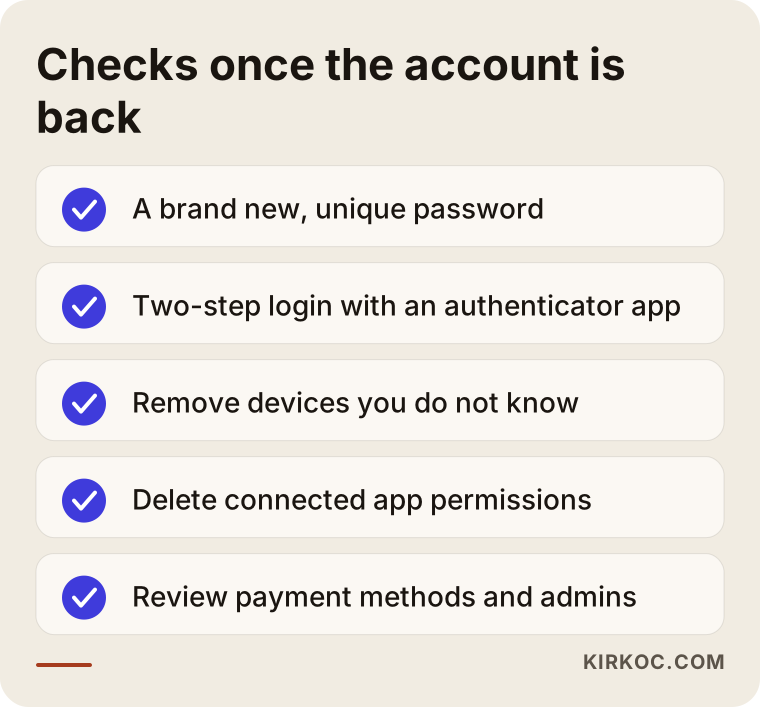
The list looks short, but each item closes a door. Saying "it's back, that's it" without doing all of it is like replacing the front door lock and leaving a window open.
What might the attacker have done in the account?
Once someone takes over an account, they are usually after money or fraud. They might message your followers asking for urgent cash, announce a fake giveaway, use your account to promote crypto or counterfeit products, or change the name so they can sell the account to someone else. On business accounts there is another pattern: using the card attached to your ad account to run their own ads.
Knowing what each sign means helps you judge the damage quickly. The table below pairs the two.
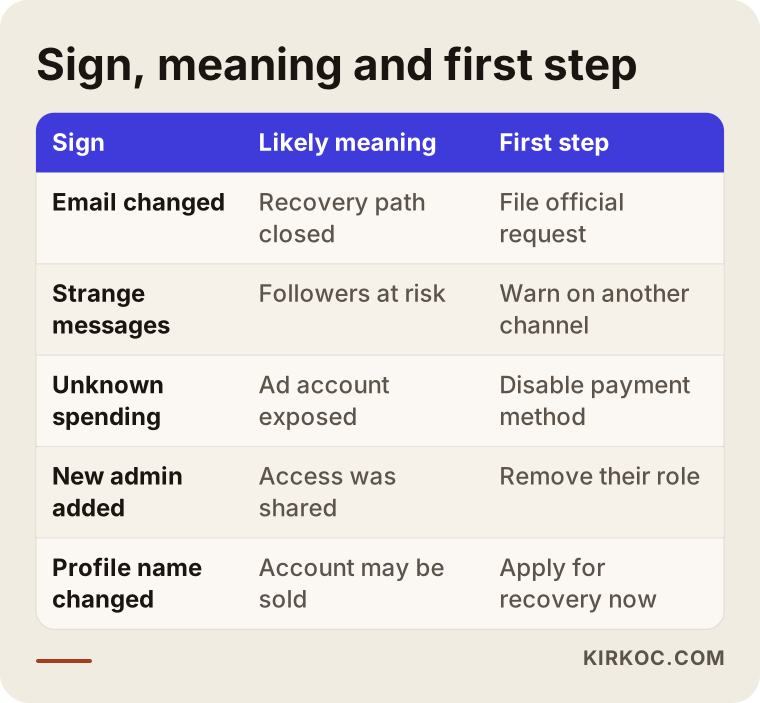
The lesson from the table is that the sign sets the priority. If you see payment activity, your first job is to stop the card and the ad account. If scam messages are going out, your first job is to warn your followers. If the email changed, your first job is the recovery request.
What should you tell your customers?
While your account is compromised, every message coming from it can still be trusted by your customers, and that is how the harm spreads. So you need to put out a short, clear notice through a different channel: your website, your email list, a WhatsApp status or another social account.
Keep the notice brief. Say the account has been taken over, that messages coming from it right now are not from you, that people should not click links, and that they should not respond if anyone asks for money or personal details. Choose a calm tone that does not blame anyone. Once you have the account back, post a second short notice to close the matter.
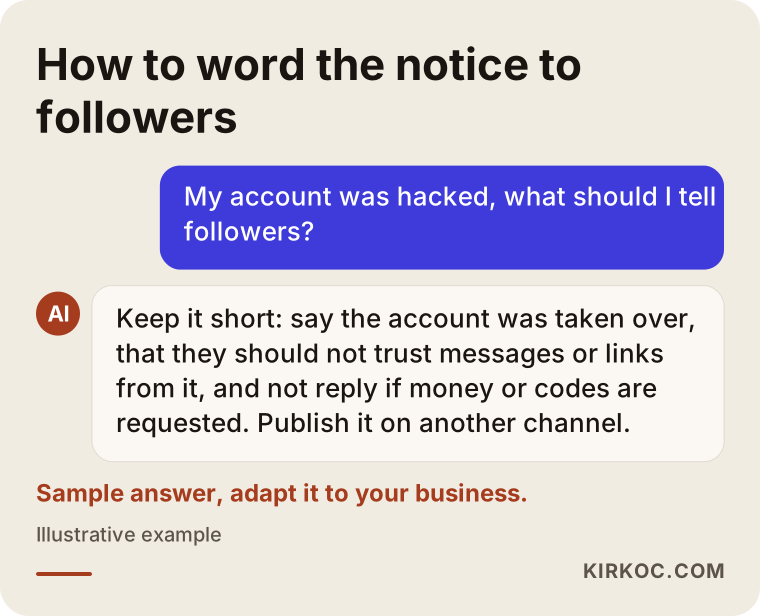
The text in the graphic is a sample; adapt it to the voice of your own business. What matters is that the message goes out through a channel that works even before you get the account back, and that it contains nothing sensitive, such as a password or a code.
Two hypothetical example scenarios
The two examples below are entirely made up and do not describe any real business. Their purpose is to show how the same incident plays out depending on how prepared a business was.
Scenario one. Picture a small bakery. Its Instagram account was opened years ago on the owner's personal phone, the email on file is an old address, there is no two-step login, and the password is reused elsewhere. One day the owner cannot log in, because the email has been changed. For days the owner keeps trying passwords, gets an offer from a stranger who says "I can get it back for a fee," and sends some money. The account still does not return. Finally the owner files the platform's official request but has nothing to offer as proof, because the old email address is no longer accessible. Recovery takes weeks, and during that time orders are collected through some other account.
Scenario two. Now a made-up furniture store. Its Facebook Page is connected to a business manager account, and two different people hold admin rights. The employee in charge has a personal account that gets hacked. The page owner, acting as the other admin, immediately removes the employee's access, switches off the ad account's payment method and deletes the fake posts from the page. Recovering the personal account continues as a separate process, but the business page is never interrupted.
The difference is not luck, it is setup. The second business was not smarter. It simply had not tied access to a single person and a single phone. Now let us look at prevention.
Building an account that resists takeover
No setup is a complete guarantee, but you can greatly reduce the damage an attack can do. For businesses, the core idea is this: the account should belong to the business, not to one individual. You achieve that with layered access.
At the top is the owner account of the business, which only you control and which is protected by a strong password and two-step login. Beneath it sits the business manager account, where your pages, ad accounts and payment methods are gathered. Further down are users with defined roles: someone who prepares content, someone who runs ads, someone who can only view reports. Everyone has just enough access to do their job. That way, even if an employee's or an outside contractor's account is hacked, the attacker can only do as much damage as that one person's permissions allow.
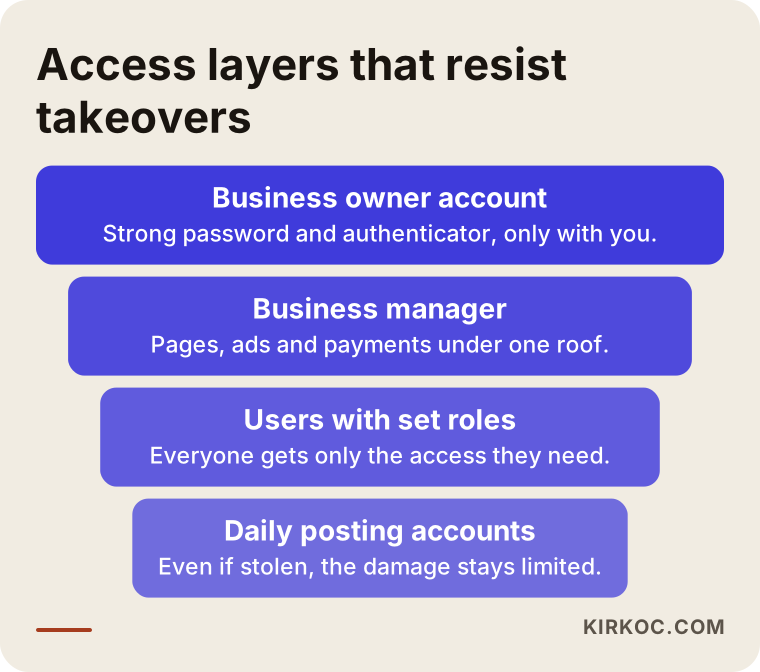
The most critical detail in this structure is that the recovery routes belong to the business: a company email address, a phone controlled by the owner, and, if possible, a second admin. If these are tied to one person, then the day that person leaves or loses a phone, the account is locked.
An account tied to one person versus a managed setup
In many small businesses, social media accounts are opened by "whoever handles it," on that person's phone. It is convenient at the start, and nobody notices the weakness until something goes wrong. Here is the difference between the two approaches, side by side.
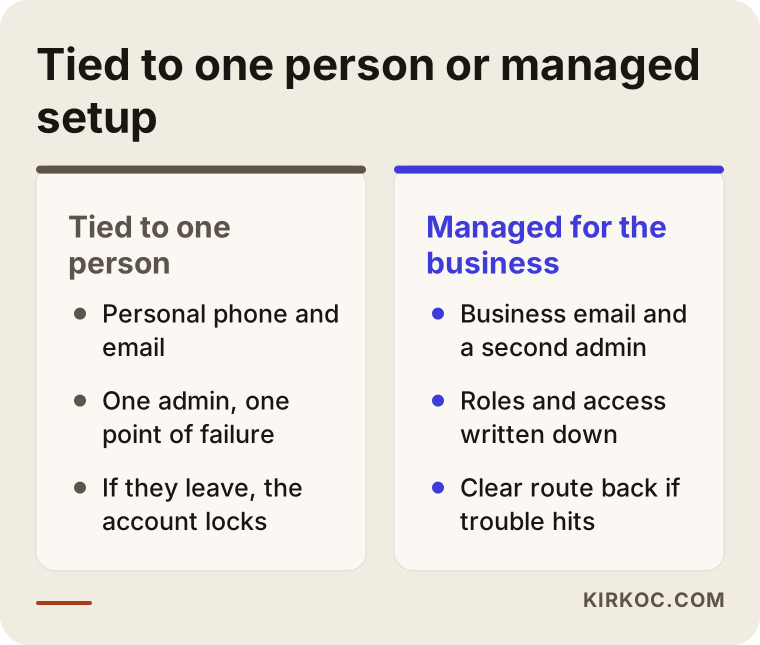
A managed setup takes more work to put in place, but when trouble hits, you already know which door to go back through. In a setup tied to one person, a single stolen phone or one departing employee can mean losing your whole channel. Even for a small business, that can mean weeks of lost sales.
Common mistakes
The mistakes people make after a hack do more damage than the hack itself. One I see often is pressing the password reset button again and again, which usually just drags things out. The second is paying and handing information to people who say "I will recover it." The third is waiting until the account is back before warning customers, when the attacker may be reaching your customers in the meantime.
Another frequent mistake is changing only the password once the account returns and stopping there. If the attacker left other doors open, such as the email, the phone number or an authorized app, they will be back soon. Another is mixing up a personal account with the business account: if your own personal profile is the only admin of the business page, then when that profile is hacked, the page goes with it.
Forgetting the ad account is also a big one. While you are busy recovering the social account, ads running in the background can drain your budget. Do not wait for the account to come back before checking the payment method; look at the ad manager separately.
Finally, there is something many businesses skip: learning from the incident. Instead of relaxing because the account is back, look at where the weakness was and change the setup.
What can you do yourself, and when do you need a specialist?
You can do most of this on your own. Changing passwords, turning on two-step login, checking devices, filling out the platform's official recovery form, writing a notice to customers and checking your card do not require a specialist. You just need to know the details, and the steps above are written for that.
You may want expert help in a few situations. First, if your business manager account, ad account and pages are tangled together and you cannot work out who has access to what. Second, if you have accounts on several platforms and want one consistent security setup for all of them. Third, if money left your ad account and you want the dispute handled properly. Fourth, if after the incident you need to rebuild your content production, posting routine and day-to-day social media management from scratch.
Do not forget the legal side either. If personal data was exposed, if a scam caused financial loss, or if third parties were harmed through your account, talk to a lawyer about how to proceed. I cannot give you a legal ruling on that; I can only help on the technical and operational side.
What does this kind of work cost?
I will not give a number, because the scope differs for every business. But I can tell you what the price depends on. The first factor is how many platforms and accounts are involved: a single Instagram account is not the same job as tidying Instagram, Facebook, LinkedIn, TikTok and YouTube together. The second is how urgent it is, and whether the account is already lost or you only want protection in place. The third is whether ad accounts and payment methods are part of the picture.
The fourth is whether you want a one-time security setup or ongoing social media management that includes security. The fifth is whether you also need to rebuild your content calendar, visuals and copy after the incident. I give quotes in writing along these lines, so you see what is included before you decide.
One more honest point: getting the account back is not in my hands, it is in the platform's. I can give you the sequence of the process, the right channels and a proper access setup, but I cannot tell you the account will return. If someone does say that, reread the section above about scams.
How I work
I am one person, and I run everything a digital agency would: websites and online stores, SEO, local SEO, GEO, social media management, Google and Meta ads, logo and brand identity, and content production. That makes a difference for account security too. Your social accounts, ad accounts, website and domain name are all in the same hands and managed in the same way. I can see who has access to what, which email is tied to which account and where the payment method is stored, all in one place. When something goes wrong, you do not have to write to three different companies.
The process usually goes like this. First I review where things stand, then I send you a written list of what is missing. I set up or repair the access structure, and you always remain the owner of your accounts. After that, security and content tasks move onto a regular calendar, and each month you get a plain-language report on what was done.
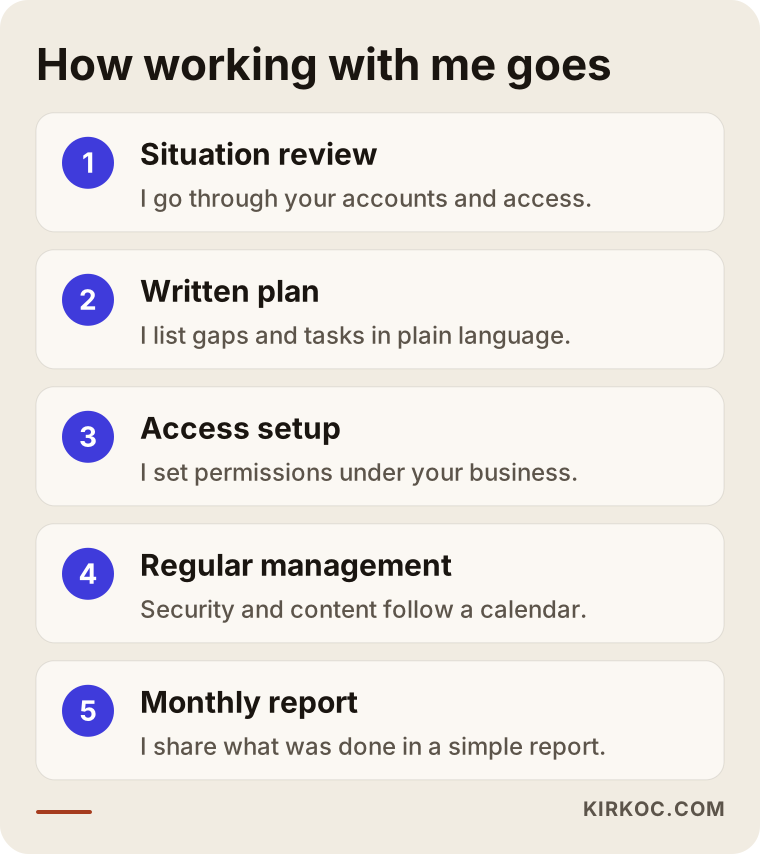
What matters here is that the accounts stay in your name. Even if you stop working with me one day, your access and your admin rights stay with you.
Frequently Asked Questions
My social media account was hacked. What should I do first?
Change the passwords on your email and any other accounts that share the password, then file the platform's official "my account was hacked" request. Instead of guessing passwords again and again, submit one careful request and keep your proof, such as screenshots and notification emails. Also warn your customers through another channel.
How long until I get my account back?
Nobody can say in advance. Verification by the platform may take a few days, sometimes longer, and sometimes the account does not come back at all. The more consistent your proof of ownership, the easier the process becomes. That is why giving the right email and phone details in your request is important.
Should I pay someone who says they can recover my account?
No. Only the platform itself can return an account, and no third party can guarantee it. Anyone who asks for prepayment, promises a "sure fix" or asks for your password and verification codes is most likely a scammer. Use only the platform's official help pages.
My business page was hacked but my personal account is safe. Does that matter?
It does. A page is usually tied to an admin's personal account or to a business manager structure. If there is another admin on the page, that person can remove the attacker's access. If you are the only admin and your personal account was also taken over, it gets harder. That is why it is recommended to have at least two trusted admins on every business page.
Does two-step login really protect me?
To a large degree, yes, but nothing is a hundred percent guarantee. Two-step login makes it harder for an attacker to get in even if your password is stolen. An authenticator app is usually safer than text messages. You should still avoid reusing your password elsewhere and avoid clicking suspicious links.
Money was spent from my ad account. What should I do?
First remove the payment method from the ad account, or contact your bank to protect your card. Then use the ad platform's own dispute and support channel, and keep your records. Whether you get a refund depends on the platform's and your bank's review, and I cannot promise a result. If there is a legal side, it makes sense to consult a lawyer.
What is the single most important thing to prevent this next time?
It is hard to pick just one, but what makes the biggest difference is that the account is not tied to one person and one phone. A setup built in the business name, strong and unique passwords, an authenticator app and a second admin work together. If one of these is missing, the others cannot fully make up for it.
How can you help with this?
If your account is hacked right now, I can guide you through the correspondence with the platform and check your ad account and other connected places. I cannot promise to get the account back, because that decision rests with the platform. If you are at the prevention stage, setting up the access structure and keeping security in place through regular social media management is the part I can offer.
If you have noticed that your account was hacked, or you want to set things up properly so it never happens again, you can reach me through my social media management service page and briefly describe your situation. I will first look at where things stand with you, then give you a clear plan of action.